Category: Uncategorized

  • How to Create Text-Based Festival and Social Media Post Images Using AI

    Creating eye-catching festival and social media post images can be a game-changer for businesses and individuals who want to stand out. This tutorial will guide you on how to create stunning images for the Ganpati festival using AI tools, specifically ChatGPT and Ideogram.ai. Whether you’re a business owner or a socially active individual, these tools can help you generate creative content for free!

    Step 1: Generate an AI Image Prompt with ChatGPT

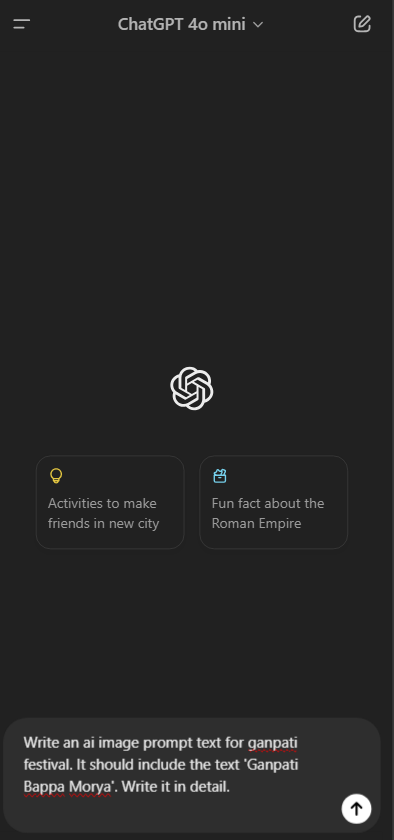
    Start by opening ChatGPT. Type in a detailed prompt that instructs the AI to create an image for the Ganpati festival. Here’s a sample prompt you can use:

    Write an ai image prompt text for Ganpati festival. It should include the text 'Ganpati Bappa Morya'. Write it in detail.
    

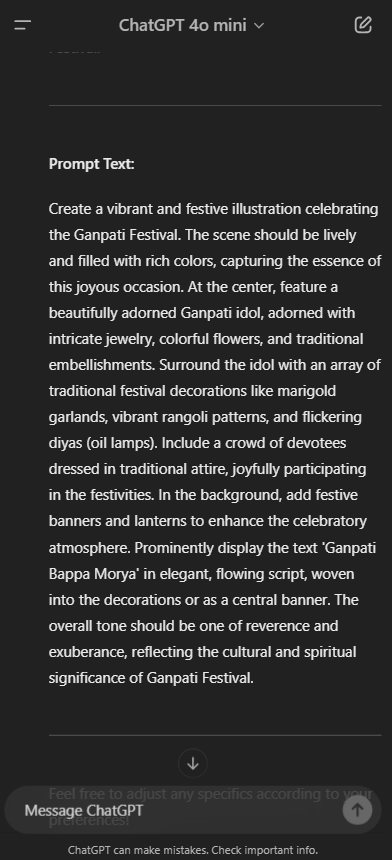
    ChatGPT will provide a detailed image description that you can use in the next step.

    Step 2: Use Ideogram.ai to Create Images

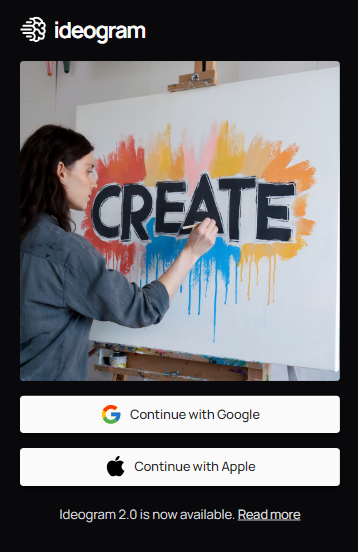
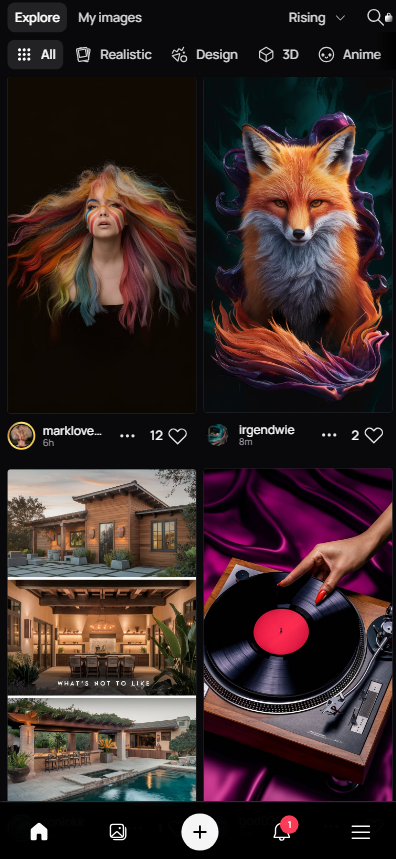
    Next, navigate to Ideogram.ai. This platform allows you to create images by simply pasting the prompt text generated by ChatGPT.

    1. Copy the Prompt: From ChatGPT, copy the entire prompt text that describes the Ganpati festival image.
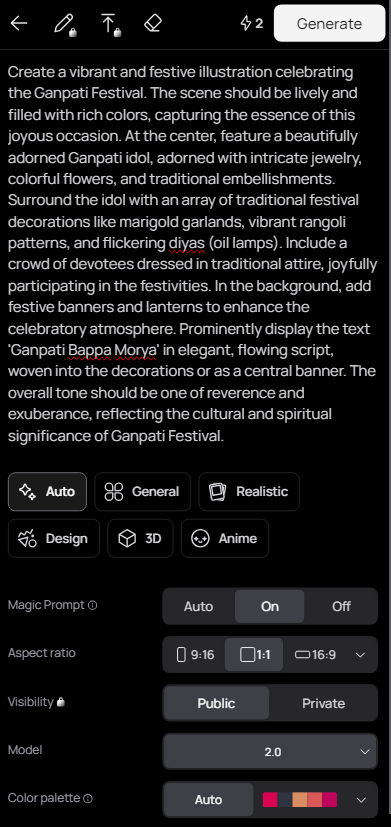
    2. Paste into Ideogram.ai: Go to Ideogram.ai and paste the prompt text into the designated area.
    3. Generate Images: Click the ‘Generate’ button, and the AI will create multiple images based on your prompt. You can adjust settings such as the style (realistic, design, 3D, anime) and aspect ratio for a more customized result.

    Step 3: Review and Download Your Images

    Once Ideogram.ai generates the images, you can preview them. You will get a set of four images to choose from. Review each image and select the one that best fits your needs.

    You can download these images and use them for your social media posts or other marketing materials. The text ‘Ganpati Bappa Morya’ will be prominently displayed, adding a festive touch to your visuals.

    Step 4: Monetize Your Skills

    If you’re a business owner or socially active, you can create such images not just for yourself but also for other businesses. Offer a package where you create around 80-100 festival images annually for ₹3000. This can be an additional revenue stream by leveraging free AI tools!

    Conclusion

    Creating festive images with AI tools like ChatGPT and Ideogram.ai is easy, cost-effective, and efficient. You can use these images to enhance your social media presence or sell them as part of a service to other businesses. The possibilities are endless when you combine creativity with AI!

    To learn more about how to use AI for business tactics and social media strategies, follow my blog.

    Ganpati Bappa Morya!

  • Top 5 AI Solutions Transforming Healthcare and Driving Business Growth

    Top 5 AI Solutions Transforming Healthcare and Driving Business Growth

    Artificial intelligence (AI) is revolutionizing the healthcare industry, offering innovative solutions that improve patient outcomes, enhance operational efficiency, and drive business growth. Here are the top five AI solutions that are making a significant impact in healthcare:

    1. AI-Powered Diagnostic Tools

    AI has significantly enhanced the accuracy and speed of medical diagnostics. Tools like Viz.ai’s AI-powered stroke detection system utilize advanced deep learning algorithms to analyze medical imaging in real-time, enabling faster and more accurate diagnoses. These tools reduce human error and ensure that critical conditions like strokes are detected promptly, which can be life-saving. Additionally, companies like Merative (formerly IBM Watson Health) offer AI solutions that integrate with electronic health records (EHRs) to provide comprehensive diagnostic insights, streamlining the diagnostic process and improving patient outcomes.

    Benefits and Case Studies:

    • Viz.ai has demonstrated significant reductions in time-to-treatment for stroke patients, improving patient outcomes and reducing healthcare costs. Source, Source.

    2. Predictive Analytics for Patient Risk Management

    Predictive analytics tools use AI to analyze vast amounts of patient data, identifying at-risk patients before they develop serious conditions. For instance, Johns Hopkins Hospital’s collaboration with Microsoft Azure AI has shown how predictive analytics can forecast patient outcomes, such as the likelihood of readmissions, allowing healthcare providers to intervene early and reduce hospital stays.

    Benefits and Case Studies:

    • Johns Hopkins implemented AI-driven predictive analytics that reduced patient readmissions and enhanced overall care quality by providing targeted interventions based on predictive insights. Source, Source.

    3. AI-Driven Drug Discovery and Development

    AI is accelerating drug discovery by analyzing biological data and predicting how new compounds will interact with the body. This has the potential to reduce the time and cost associated with bringing new drugs to market. AI platforms like those developed by DeepMind and other biotech firms have been instrumental in identifying promising drug candidates and predicting their effectiveness, significantly speeding up the drug development process.

    Benefits and Case Studies:

    • DeepMind’s AlphaFold has been pivotal in predicting protein structures, a critical step in drug discovery, leading to faster development of new therapies. Source.

    4. Personalized Medicine with AI

    AI enables personalized medicine by analyzing patient data, including genetic information, to tailor treatments to individual patients. This approach enhances the effectiveness of treatments and reduces adverse effects. Tools like those used in personalized oncology leverage AI to design individualized treatment plans that optimize therapeutic outcomes.

    Benefits and Case Studies:

    • Personalized treatment plans based on AI analysis have been shown to significantly improve patient outcomes, particularly in oncology, where treatments can be tailored to the unique genetic profile of each patient. Source, Source.

    5. AI for Administrative and Operational Efficiency

    AI is transforming administrative processes in healthcare by automating tasks such as scheduling, billing, and patient record management. This reduces the administrative burden on healthcare providers, allowing them to focus more on patient care. AI-powered tools like DeepScribe are also improving clinical documentation, helping to reduce clinician burnout by automating the note-taking process during patient visits.

    Benefits and Case Studies:

    • DeepScribe has been widely adopted to streamline clinical documentation, allowing clinicians to spend more time with patients and less on paperwork, thus improving both job satisfaction and patient care. Source, Source.

    Implementing AI in Healthcare: Key Considerations

    When implementing AI solutions, healthcare organizations must navigate several critical considerations, including data privacy and security (ensuring HIPAA compliance), integration with existing IT systems, and addressing ethical concerns such as bias in AI algorithms. It’s also essential to provide adequate training for staff to ensure they can effectively use these new tools.

    The future of AI in healthcare looks promising, with trends pointing towards increased use of generative AI for clinical decision support, further advancements in personalized medicine, and the integration of AI in remote monitoring and telehealth services. As AI continues to evolve, its role in enhancing patient care and optimizing healthcare operations will only grow.

    GPTWala: Your Partner for AI-Powered Healthcare Growth

    If you’re looking to leverage AI for business growth in healthcare, gptwala offers consulting services and SaaS tools designed to help healthcare organizations implement AI solutions effectively. Whether you need assistance with integrating AI into your existing systems or want to explore new AI applications, gptwala can guide you through the process.

    For further information and consultation, visit gptwala.com.

  • [mwai-form-field id=”mwai-me62649lp” label=”product name” type=”input” name=”PRODUCT_NAME” options=”%5B%5D” maxlength=”20″ required=”true”]
    [mwai-form-submit id=”mwai-3p3zpzjnf” label=”Generate the script” prompt=”” message=”Create%20a%20facebook%20ad%20script%20for%20%7BPRODUCT_NAME%7D%20in%2040%20words.%20″ output_element=”mwai-kr4gz82k7″ temperature=”0.8″ max_tokens=”4096″]
    [mwai-form-output id=”mwai-kr4gz82k7″ copy_button=”true”]

  • How to Use AI in Agriculture

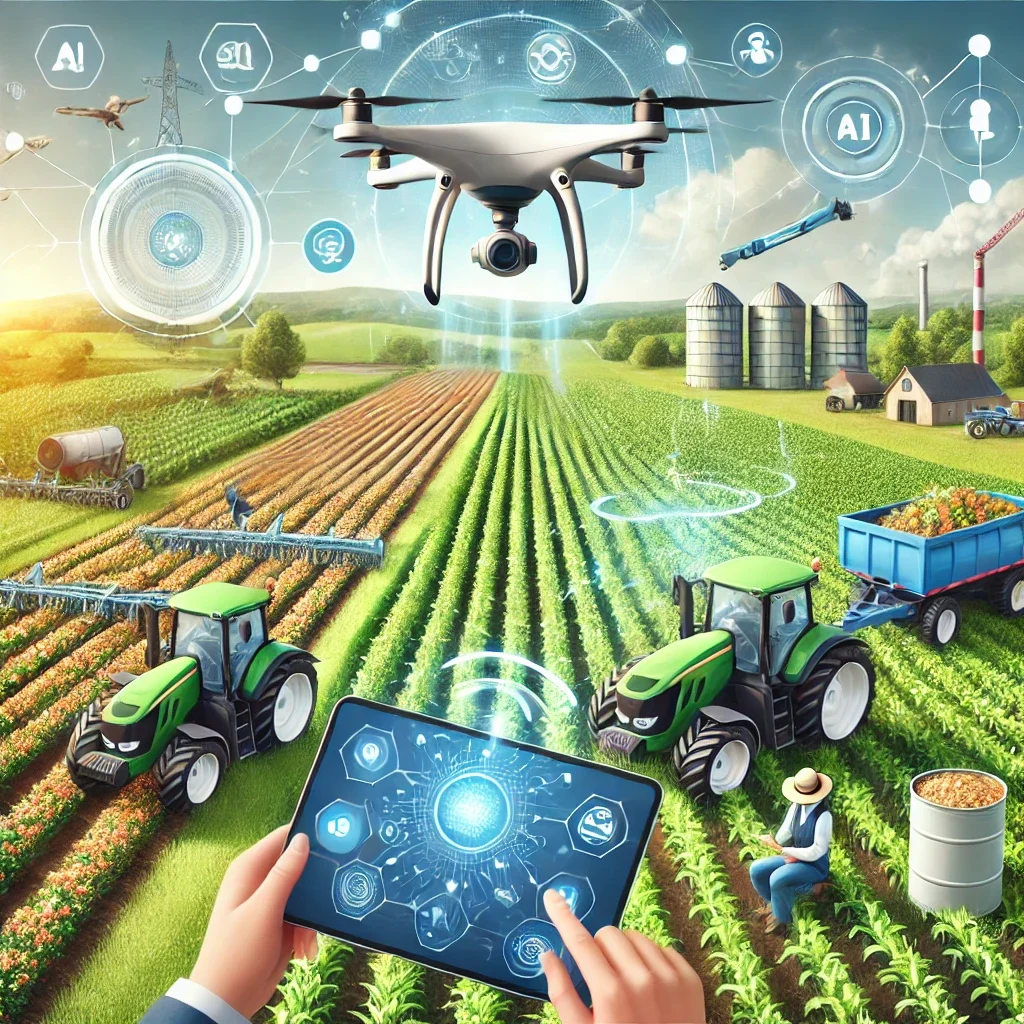
    Artificial Intelligence (AI) is revolutionizing various sectors, and agriculture is no exception. By integrating AI technologies into farming practices, we can enhance productivity, improve crop health, and optimize resource usage. This blog will explore how AI can be leveraged in agriculture, providing insights into its applications and benefits.

    Key Applications of AI in Agriculture

    1. Precision Farming with AI

    Precision farming involves using AI to analyze data from various sources such as satellite images, weather stations, and soil sensors. This data helps farmers make informed decisions about crop management, including when to plant, irrigate, and harvest. AI-driven tools can predict crop yield, monitor crop health, and detect diseases early.

    2. AI for Crop Monitoring and Management

    AI-powered drones and imaging technologies enable real-time monitoring of crops. These tools can identify issues like pest infestations, nutrient deficiencies, and water stress. By analyzing the collected data, AI algorithms provide actionable insights, allowing farmers to address problems promptly and efficiently.

    3. Soil Health and Management with AI

    AI can analyze soil health by examining its composition, moisture levels, and nutrient content. This information helps farmers optimize fertilizer application, reducing waste and improving crop yield. AI-driven soil management systems also suggest crop rotations and soil conservation practices to maintain long-term soil health.

    4. Predictive Analytics for Weather and Crop Yield

    AI systems can predict weather patterns and their impact on crops. By analyzing historical weather data and current conditions, AI models forecast rainfall, temperature fluctuations, and other factors affecting crop growth. This predictive capability enables farmers to plan their activities and mitigate potential risks.

    5. Automated Machinery and Robotics in Agriculture

    AI-powered machinery, such as autonomous tractors and robotic harvesters, enhances the efficiency of agricultural operations. These machines can perform tasks like planting, weeding, and harvesting with precision and minimal human intervention. Automation reduces labor costs and increases overall productivity.

    6. AI for Pest and Disease Control

    AI technologies can detect pests and diseases at an early stage, allowing for timely intervention. Machine learning algorithms analyze images of crops to identify symptoms of diseases or pest infestations. Farmers can then take targeted measures, such as applying pesticides or implementing biological control methods, to protect their crops.

    7. Supply Chain Optimization with AI

    AI can optimize the agricultural supply chain by predicting demand and managing inventory. AI-driven platforms analyze market trends, consumer behavior, and historical sales data to forecast demand for various crops. This helps farmers and distributors make informed decisions about production, storage, and distribution.

    Benefits of Using AI in Agriculture

    1. Increased Efficiency: AI-driven tools and automation reduce the time and effort required for various farming tasks, enhancing overall efficiency.
    2. Cost Savings: By optimizing resource usage and reducing waste, AI helps farmers cut costs associated with fertilizers, pesticides, and labor.
    3. Improved Crop Yield: AI technologies provide precise insights and recommendations, leading to healthier crops and higher yields.
    4. Sustainable Farming: AI promotes sustainable practices by optimizing water usage, minimizing chemical inputs, and conserving soil health.
    5. Risk Mitigation: Predictive analytics and early detection of issues help farmers mitigate risks associated with weather, pests, and diseases.

    Conclusion

    AI is transforming agriculture by making it more efficient, sustainable, and productive. From precision farming to automated machinery, AI applications are helping farmers make data-driven decisions and optimize their operations. As AI technology continues to evolve, its impact on agriculture will only grow, paving the way for a more resilient and food-secure future.

    Meta Description

    Learn how AI is revolutionizing agriculture with precision farming, crop monitoring, soil health analysis, predictive analytics, automated machinery, pest control, and supply chain optimization.


    This revised blog post includes the required images, internal links, even distribution of keyphrases, and more keyphrases in the subheadings to improve SEO.

  • FlexClip Editing Software – Detailed Overview

    If you’re seeking to create standout videos, look no further than FlexClip video maker. Powered by AI, this video editor is designed to make the process of creating professional-looking videos easier than ever before.

    With automated processes and intuitive features, FlexClip enables you to maximize the potential of your footage without spending countless hours refining it.

    Experience the following top features that set FlexClip apart:

    1. Time-saving Pre-made Video Templates: Choose from a vast library of pre-made video templates to accelerate your video creation process, saving you valuable time and effort.
    2. Drag-and-Drop Customization: Easily customize your videos with seamless drag-and-drop actions. Intuitively edit and rearrange elements to create a personalized and engaging visual narrative.
    3. Visual Enhancement with Animation Effects and More: Enhance your visuals with a wide range of animation effects, color corrections, motion graphics, and other tools. Transform your videos into visually stunning creations in just a few minutes.
    4. Tailor-Made Music Composition: Compose music that perfectly matches the emotion and message of your video. Create an immersive audiovisual experience that captivates your audience.
    5. Natural Language Processing for Seamless Voiceover Scripts: Leverage the power of natural language processing (NLP) to automatically correct grammar, spelling, and formatting in your voiceover scripts. Ensure your message is conveyed flawlessly.
    6. Vast Library of Royalty-Free Media: Access millions of royalty-free photos, images, audio tracks, and stock footage to enhance your videos. Find the perfect elements to bring your vision to life.
    7. Seamless Platform Adaptability: FlexClip automatically scales your videos to fit any platform, ensuring optimal viewing experiences across different devices and social media platforms.
    8. Cloud-Based Convenience: FlexClip operates as a cloud-based program, freeing up your computing power. Edit your videos effortlessly without straining your device’s resources.

    Unlock a Vast World of Creative Possibilities with 4,000,000+ Royalty-Free Stock Assets

    Discover a treasure trove of creative potential with our vast collection of over 4,000,000 royalty-free stock assets. By integrating with resource-rich stock media providers, we offer users a diverse range of high-quality videos, captivating photos, and royalty-free music.

    Explore an expansive library of assets to elevate your projects, ensuring you have access to the perfect visuals and audio to bring your vision to life. With our extensive selection of royalty-free stock assets, unleash your creativity and enhance your creations with ease.

    Effortlessly Enhance Your Video Editing Workflow with AI Tools from FlexClip

    FlexClip takes your video editing workflow to the next level by harnessing the power of AI. Our AI-powered tools automate time-consuming editing tasks, allowing you to speed up the process of creating compelling videos. With just a few clicks, generate accurate subtitles that synchronize perfectly with your footage.

    Convert text into lifelike speech to add a professional touch to your videos. Say goodbye to manual background removal, as our AI technology effortlessly removes image backgrounds, saving you valuable time and effort. Discover the seamless integration of AI tools in FlexClip and experience a streamlined video editing workflow like never before.

    Enhance Collaboration and Seamless Sharing with Cloud-Based Video Solutions

    Experience the power of cloud-based video solutions that foster seamless collaboration among teams, regardless of their location. With our cloud-based platform, teams can work closely together on video creation, unlocking new levels of productivity and creativity. Craft your videos with ease, knowing that your entire team can contribute and provide feedback in real-time. Once your masterpiece is complete, sharing it with the world is effortless. Seamlessly share your video via a link, allowing others to view and provide feedback.

    Take it a step further by posting your video to various social media platforms and beyond, amplifying its reach and impact. Embrace the collaborative nature of cloud-based video solutions and effortlessly share your creations with the world.

    Create Your Video in 3 Simple Steps

    Step 1: Add Media

    Start by adding videos or photos from your computer or explore our extensive stock libraries to find the perfect visuals for your video project. Choose from a wide range of media options to ensure your video is visually engaging and captivating.

    Step 2: Customize

    Unleash your creativity and make your video truly unique. Add text, music, elements, and more to customize every aspect of your video. Personalize it with your branding, style, and message to create a video that stands out and resonates with your audience.

    Step 3: Export

    Once your video is ready, it’s time to share your creation with the world. Export your video in the desired format and quality, ready to be showcased. Share it effortlessly by generating a shareable link or directly posting it to your favorite social media platforms. Spread your message, captivate your audience, and make an impact with your professionally crafted video.

    Pros:


    1. User-Friendly Interface: FlexClip is designed with simplicity in mind, making it incredibly easy to use. Whether you’re a beginner or an experienced video editor, you’ll find the intuitive interface a breeze to navigate, allowing you to create stunning videos effortlessly.

    2. Mobile Editing Made Easy: With FlexClip, you can edit videos directly on your phone. Enjoy the convenience of editing on the go, making quick adjustments or creating captivating content wherever inspiration strikes.

    3. Cloud-Based Convenience: Say goodbye to the need for a super-fast computer. FlexClip operates as a cloud-based software, meaning you can edit your videos seamlessly without relying on the processing power of your device. Access your projects from anywhere, anytime, and collaborate effortlessly with team members.

    4. Affordable and Value-Packed: FlexClip offers an affordable pricing structure without compromising on features and functionality. Enjoy access to a wide range of powerful tools and resources at a budget-friendly price, making it a cost-effective solution for all your video editing needs.

    5. Perfect for Book Trailers and Promotional Materials: FlexClip is an excellent choice for creating captivating book trailers and other promotional materials. With its versatile features, you can easily showcase your book, product, or service in a visually compelling and engaging way, leaving a lasting impression on your audience.


    Cons:

    1. Loading and Exporting Time: It’s important to note that longer videos may require additional time to load and export. While FlexClip offers a seamless editing experience, be mindful that larger projects may require some patience during the loading and exporting process.

    2. Feature Comparison with Premium Programs: While FlexClip is a powerful video editing tool, it may not offer the extensive range of options found in more advanced programs like Adobe Premiere Pro. If you require specific advanced features or functionalities, it’s worth comparing the capabilities of FlexClip with your specific requirements.

    3. High-Resolution Videos and Subscription Plans: If you’re looking to export high-resolution videos, it’s important to upgrade to FlexClip’s Plus or Business plans. These subscription plans unlock the ability to export videos in higher quality, ensuring your content is visually appealing and professional. Assess your video quality needs and consider the appropriate plan that aligns with your requirements.

    Pricing:


    Bottom Line:

    FlexClip is the perfect solution for individuals seeking a cloud-based AI video editor that simplifies the process of creating professional-quality videos. Powered by AI technology, FlexClip empowers users to effortlessly edit their footage, incorporating dynamic text, captivating graphics, smooth transitions, and engaging animations.

    What sets FlexClip apart is its AI-generated captions and audio, ensuring that your videos not only look visually appealing but also sound great. Seamlessly enhance your video content with accurately generated captions and audio to captivate your audience and deliver a polished final product.

    Experience the convenience of FlexClip’s cloud-based platform, harness the power of AI editing tools, and create stunning videos that leave a lasting impact. Elevate your video editing game with FlexClip’s intuitive interface and AI capabilities, bringing your creative vision to life in a matter of minutes.
  • RawShorts Editing Software – Detailed Overview

    RawShorts offers an array of automated processes and essential features that empower you to maximize the potential of your content without investing excessive time in refining it. Whether you’re looking to create captivating explainer videos using stock footage or transform a blog post into an animated or “sketched” video, RawShorts is the perfect solution.

    With its user-friendly platform, you can effortlessly bring your ideas to life, producing stunning content that captivates and engages your audience, all in a fraction of the time it would take with traditional editing methods. RawShorts revolutionizes the content creation process, making it accessible and efficient for all.


    Effortless Creation of Animated Videos from Text: Harness the Power of AI for Instant Results

    With our groundbreaking text-to-animated video technology, you can now generate captivating video drafts in a matter of seconds, eliminating the need for countless hours of manual video creation. Let us unveil the magic behind this innovative process:

    1. Scan & Analyze: Begin by uploading your video script, and let our cutting-edge machine learning algorithms swiftly scan and analyze the text. Our intelligent system identifies the key concepts, setting the stage for your storyboard.

    2. Assemble Video Outline: Watch in awe as our AI takes charge, diligently sourcing and curating media assets that perfectly align with your script. Seamlessly placing them on the timeline, it generates a professional voice narration, giving life to your vision.

    3. Customize & Share: Take control of your creation effortlessly. Review the instant draft and, if desired, utilize our intuitive drag and drop editor to fine-tune and personalize your video. Once satisfied, it’s time to share your masterpiece with the world. Publish your creation and captivate your audience with ease.

    Your Go-To Solution for Effortless Animated Video Creation

    With our intuitive drag and drop animated video maker, crafting your perfect video from an AI-generated rough cut is a breeze. In just a matter of minutes, you can customize and transform your video, even if your expertise is building Powerpoint slides.

    Raw Shorts provides a user-friendly platform accessible from any browser, empowering you to create stunning videos with ease. Unlock a world of possibilities with powerful features such as text to speech and animated charts, while enjoying access to a vast library of over one million media assets. Let your creativity soar as Raw Shorts simplifies the process, turning your ideas
    into remarkable videos in no time.

    Access this vast collection of creative resources seamlessly, directly from our editor. Elevate your projects with captivating visuals, all conveniently available within a few clicks.

    Streamline Video Creation with AI-Powered Efficiency

    Harness the remarkable efficiency of AI and save valuable time on video creation. Our AI, trained on numerous animated video projects, utilizes the power of machine learning to swiftly convert your video script into a rough cut. With our intuitive editor, you can easily customize and refine your video, as if you have a personal video director guiding you at every turn. Experience the seamless synergy of human creativity and AI automation, accelerating your video production process like never before.

    Pros:

    1. Free Version and Affordable Paid Options: RawShorts offers a fantastic free version, making it accessible to all. Additionally, the paid versions are budget-friendly, providing even more advanced features and benefits.


    2. Extensive Library of Royalty-Free Stock Videos: Access over 300,000 royalty-free stock videos to enhance your creations. Explore a vast collection of visuals to bring your videos to life, no matter the topic or theme.

    3. Cute Animated or “Whiteboard-Style” Sketch Videos: Effortlessly create adorable animated videos or captivating “whiteboard-style” sketch videos. Unleash your creativity and engage your audience with visually appealing and dynamic content.

    4. Social Media Videos Made Simple: Transform your text, photos, or videos into stunning social media videos with ease. RawShorts simplifies the process, allowing you to craft eye-catching content optimized for various social media platforms.

    5. User-Friendly Drag and Drop Interface: Enjoy a seamless editing experience with RawShorts’ easy-to-use drag and drop interface. No technical expertise is required. Simply drag and drop elements to create visually stunning videos effortlessly.

    6. Ideal for Animated “Explainer” Videos: RawShorts is a go-to tool for creating animated “explainer” videos for businesses or personal brands. Showcase your products, services, or ideas with professional-quality videos that engage and educate your audience.

    Cons:

    1. Addressing Bugs: While RawShorts is generally reliable, some users have reported encountering occasional bugs. Rest assured that the RawShorts team actively works to improve the program’s stability and functionality. If you encounter any issues, reach out to their support team for assistance.

    2. Managing Lag: In some instances, users have experienced occasional lags when using the program. Consider checking your device’s specifications and internet connection to ensure optimal performance. Closing unnecessary applications or browser tabs may also help alleviate any lagging issues.

    3. Exploring Incognito Mode: Some users have found that using RawShorts in “incognito” or private browsing mode enhances the program’s performance. This tip may help mitigate any compatibility issues with browser extensions or conflicting settings.

    4. Downloading Video Challenges: While rare, a few users have reported difficulties when downloading their completed videos. If you encounter such issues, ensure you have a stable internet connection and sufficient storage space on your device. Additionally, reach out to RawShorts support for guidance on troubleshooting and alternative download methods if needed.


    Pricing:


    Bottom Line:

    RawShorts is the ultimate solution for marketers, entrepreneurs, and creatives seeking rapid and effortless AI video editing capabilities. With its automated video editor, RawShorts empowers users to craft visually captivating videos swiftly and seamlessly. Unlock your creative potential by choosing from a diverse range of beautiful templates, dynamic animations, and captivating effects, enabling you to create stunning videos in a matter of minutes. With RawShorts, the power of professional-grade video editing is at your fingertips, making your content stand out with style and impact.

  • Wisecut Editing Software – Detailed Overview

    When it comes to video editing, look no further than Wisecut. This cutting-edge software combines the best of traditional editing tools with AI-driven automation, enabling you to effortlessly craft professional-quality videos in no time.

    Wisecut empowers you with a wide range of features, including seamless effects integration, customizable music options, and so much more. Elevate your content and make the most of your creative vision without breaking a sweat.

    With Wisecut, video editing becomes a breeze, allowing you to focus on what truly matters – delivering impactful and visually stunning videos that captivate your audience. Say goodbye to complex processes and hello to a streamlined video editing experience with Wisecut by your side.

    Features of Wisecut

    1. Automatic Music Matching: Enhance Emotion and Message
    • Wisecut’s intelligent software automatically adds music that perfectly aligns with the emotion and message of your video. Elevate your content with a captivating audio backdrop effortlessly.
    1. Extensive Royalty-Free Audio Library: Millions of Choices at Your Fingertips
      • Choose from a vast collection of royalty-free audio files, providing you with endless options to enhance your videos. Find the perfect soundtrack to complement your visuals and captivate your audience.
    2. Intelligent Pause Detection: Create Shorter, More Concise Videos
      • Leveraging advanced AI algorithms, Wisecut detects pauses in your videos and seamlessly edits them out. This results in shorter, more concise videos that keep your audience engaged and focused.
    3. AI-Powered Facial Recognition: Professional-Looking Jump Cuts
      • Wisecut utilizes AI and facial recognition technology to achieve seamless jump cuts. It automatically “punches in” on faces, creating a professional look as if you used multiple cameras when, in reality, you only used one.
    4. Transform Long-Form Content: Effortlessly Create Shorts
      • Wisecut empowers you to swiftly and automatically transform your long-form content videos into engaging shorts. Save time and effort by repurposing your existing content for different formats and platforms.


    Streamline Your Video Editing Process with Wisecut’s Auto Cut Silences

    Don’t let long pauses hinder the impact of your videos, even in long-format content. Wisecut comes to the rescue by automatically detecting and eliminating these awkward silences, saving you valuable time and ensuring a smooth video flow.

    Harnessing the power of AI and Facial Recognition, Wisecut takes your editing to the next level. It seamlessly “punches in” and “punches out” at the right moments, creating a natural and organic flow for cuts and jump cuts, all while utilizing just one camera. This widely adopted technique guarantees a professional look and maintains viewer engagement throughout your videos.

    With Wisecut’s Auto Cut Silences feature, you can focus on creating impactful content without worrying about the nuisances of long pauses. Let Wisecut do the work for you, leaving you with polished and seamless videos that captivate your audience from start to finish.


    Boost Audience Engagement with Auto Subtitles and Translations

    In today’s digital landscape, capturing your audience’s attention is crucial. Wisecut offers a solution to engage viewers through its Auto Subtitles and Translations feature.

    Studies reveal that 69% of people watch videos in public places without sound, and 80% are more likely to watch a video in its entirety when captions are provided. Wisecut simplifies the process by automatically generating subtitles and empowers you to edit them swiftly using the AI Storyboard tool.

    Enhance the accessibility of your content and broaden your viewership by enabling auto-translation into multiple languages with just a click. With Wisecut, you can captivate a wider audience and maximize engagement through the power of auto-generated subtitles and seamless translations.

    Intelligent background music that perfectly complements your video.


    Wisecut, the ultimate solution for finding the perfect background music that seamlessly complements your videos. Say goodbye to the tedious task of searching for suitable tracks and syncing them to your video because Wisecut does it all for you! Our intelligent software automatically selects a song and customizes the music to perfectly fit your video, ensuring a harmonious audio-visual experience.

    Even when you make edits to your video, the audio effortlessly adjusts itself, saving you time and effort. With our pre-cleared tracks, you can confidently monetize your content on YouTube without any concerns.

    Wisecut revolutionizes the way you enhance your videos with music, making it a hassle-free and enjoyable process.

    Automatic Audio Ducking

    Wisecut introduces automatic audio ducking, an intelligent feature that optimizes your video’s sound experience. When you’re speaking in your video, it automatically lowers the music to create a clear and prominent voice.

    Conversely, during moments of B-roll footage or demonstrations, the music seamlessly takes the foreground, enhancing the overall audiovisual impact. With AI-powered audio balancing, Wisecut ensures that your audience hears the most important elements at all times.

    Pros:

    Automatic Splicing and Editing: Say goodbye to manual trimming! Wisecut’s AI program seamlessly identifies and removes unnecessary sections of your videos, saving you time and effort.

    1. Trim with Ease: Perfect for video enthusiasts, Wisecut excels at extensive video trimming, making it a must-have tool for those who frequently need to cut down their footage.
    2. Ideal for Talking Videos: Whether you’re a YouTuber, online course creator, or tutorial aficionado, Wisecut is tailor-made for talking videos, ensuring your voice takes center stage.
    3. Multilingual Captions and Subtitles: Wisecut is a language champion! It effortlessly edits and generates automatic captions or subtitles in six languages, enhancing accessibility and engagement.
    4. Transform Long-Form Content: Wisecut’s magic extends to creating captivating shorts from your long-form videos. Impress your audience with concise, attention-grabbing content.
    5. Harmonize with Background Music: Elevate the mood of your videos with ease! Wisecut effortlessly integrates background music, perfectly aligning it with your visual content.
    6. Cloud-Based Convenience: Enjoy the freedom of cloud-based editing. Wisecut lets you access and work on your videos from anywhere, without worrying about storage limitations.
    7. Flexible Pricing Options: Wisecut understands that one size doesn’t fit all. Choose from a range of pricing options to find the perfect plan that suits your needs and budget.

    Cons:

    1. Streamlined Visual Effects: While programs like Filmora or Pictory may offer an extensive range of visual effects, Wisecut takes a different approach. It prioritizes simplicity and focuses on the essentials, ensuring a clean and professional look for your videos.

    2. Emphasis on Efficiency: While processing times can vary depending on factors like video length and complexity, it’s worth noting that Wisecut strives for optimal efficiency. While other programs may sacrifice speed for flashy features, Wisecut aims to strike a balance between quality and processing time.

    Pricing:


    Bottom Line:

    Wisecut caters to both novice and professional video editors seeking a seamless AI-powered solution for quick and effortless video editing. Its intelligent editing tool empowers users to effortlessly enhance their footage with captivating captions, smooth transitions, immersive music, and eye-catching titles, enabling them to craft engaging narratives.

    Equipped with cutting-edge deep learning algorithms, Wisecut automates the removal of unnecessary pauses, seamlessly integrates background music, and effortlessly adds captions. This powerful combination of features allows professionals to effortlessly produce top-tier, high-quality videos, elevating their content creation to new heights of professionalism.

  • Adobe Premiere Pro Editing Software – Detailed Overview

    If you’re searching for a hassle-free solution to craft exceptional videos, look no further than the Adobe Premiere Pro AI Video Editor available through the Adobe Creative Cloud! This intuitive software, fueled by the power of AI, is purpose-built to empower you in creating stunning videos with ease.

    With its array of automated features, this user-friendly editor streamlines your workflow, saving you valuable time and effort, all while delivering professional-level results. Seamlessly integrate AI-driven functionalities into your video creation process, unlocking a world of possibilities to enhance your visual storytelling.

    Elevate your video editing experience with the Adobe Premiere Pro AI Video Editor, a tool that combines ease of use with AI-powered capabilities, allowing you to bring your creative vision to life effortlessly.


    Elevate your video editing to new heights


    Achieve superior video editing with the tools that set you apart. Seamlessly edit, trim, and refine your videos to perfection. Enhance your storytelling with captivating transitions and effects. Master the art of color manipulation to create the desired visual atmosphere.

    Fine-tune audio elements to ensure an immersive experience. Unlock the power of animated titles to add a touch of creativity. With a comprehensive suite of tools, unleash your creativity and tell your story like never before.

    Revolutionize your editing process with seamless text-based editing.

    Experience the revolutionary text-based editing feature that transforms the way you create rough cuts. With our pro app, editing videos becomes as effortless as editing text. Generate a transcript automatically, effortlessly search for specific dialogue, and seamlessly cut and paste the text to witness your story rapidly come to life in the timeline.

    Embrace this smooth and intuitive approach to video editing that empowers you to shape your narrative with unprecedented speed and ease.


    Unlock your creativity with an array of stunning titles, seamless transitions, and captivating effects.

    Whether you’re an aspiring video artist or an experienced creator like Jillian Nicole Smith, you can effortlessly customize pre-designed templates or explore a vast selection of built-in transitions and effects to add a unique touch to your videos.

    Experience a professional editing app that evolves alongside your skills.

    With a range of step-by-step in-app tutorials and convenient access to essential tools, you can easily kickstart your editing journey. As you progress, customize the workspaces and keyboard shortcuts to align with your unique editing style. This versatile app adapts to your needs, ensuring a seamless and personalized editing experience.

    Pros:

    • Frequent updates: Stay up-to-date with the latest features and enhancements as the software is regularly updated.
    • Extensive editing and formatting options: Enjoy a wide range of effects and customization choices to bring your videos to life, providing users with a diverse array of creative possibilities.
    • 3D video editing capabilities: Stand out from the crowd by editing and enhancing your 3D videos, a feature not commonly found in all editing programs.
    • High-resolution editing: Easily handle and edit videos in 4K and 8K resolutions, ensuring your content looks stunning and detailed.
    • Cross-platform compatibility: Whether you’re using Windows or macOS, this software caters to users on both operating systems, offering a seamless editing experience across platforms.

    Cons:

    • Higher price point: Adobe Premiere Pro falls on the more expensive side of editing programs, reflecting its extensive features and professional-grade capabilities.
    • Learning curve for the interface: The user interface of Adobe Premiere Pro may require some time and effort to become familiar with, as it may not be as intuitive or user-friendly compared to other programs.
    • Dependence on internet connection: To fully utilize Adobe Premiere Pro, a constant internet connection is required, allowing access to cloud-based services and updates.


    Pricing:


    Bottom Line:

    If you’re seeking an AI-enhanced video editing experience, Adobe Premiere Pro is the ideal choice. With its robust artificial intelligence algorithms, this software empowers users to edit their videos with ease, incorporating a wide range of text, graphics, transitions, and animations. The advanced deep learning technology further enhances the editing process by providing exceptional tracking capabilities and precise object recognition.

    Additionally, Adobe Premiere Pro offers a diverse selection of audio and visual effects, allowing users to enhance the overall quality and aesthetics of their videos. To access Adobe Premiere Pro and other Adobe programs, subscribing to the Adobe Creative Cloud is recommended for uninterrupted and comprehensive creative tools and services.

  • Rephrase.ai Editing Software – Detailed Overview

    If you’re seeking to create captivating videos featuring digital human avatars, look no further than Rephrase.ai AI Video Editor. This cutting-edge software harnesses the power of AI to provide a seamless and user-friendly editing experience, enabling you to enhance your videos with stunning effects, music, titles, and more in no time.

    With Rephrase.ai, automated processes take care of the time-consuming tasks, freeing up your valuable time while ensuring professional-level results. Whether you’re a novice or an experienced video editor, Rephrase.ai empowers you to unleash your creativity and bring your ideas to life with ease.

    Experience the convenience and power of Rephrase.ai AI Video Editor as you embark on a journey to create incredible videos with digital human avatars. Enjoy a streamlined editing process, automated features, and the freedom to express your unique vision with professional-quality results.

    Rephrase Studio: Empowering You with Text-to-Video Generation

    Unlock the power of generative AI and unleash your creativity with Rephrase Studio, a revolutionary text-to-video generation platform. Say goodbye to the complexities of video production and embrace a seamless and efficient process that allows you to create professional-looking videos featuring a captivating digital avatar in just minutes.

    With Rephrase Studio, you have the tools at your fingertips to transform your text into captivating visual content. Harness the potential of generative AI as it brings your words to life, enabling you to create engaging videos that leave a lasting impact. Gone are the days of grappling with intricate video production processes; Rephrase Studio empowers you to effortlessly produce high-quality videos that reflect your vision and resonate with your audience.

    Experience the simplicity and effectiveness of Rephrase Studio as you dive into the world of text-to-video generation. Discover a platform that streamlines the video creation process, freeing you from complexity and unlocking your creative potential. Embrace the power of Rephrase Studio to create stunning videos that stand out in today’s digital landscape.

    Experience an array of robust features

    1. Multiple stock avatars: Say goodbye to the complexities of hiring someone for your videos. With just a click, access our diverse range of human AI avatars to bring your videos to life.

    2. Easy text-to-voice conversion: No need for voiceover recordings. Simply type or copy-paste your text, and witness it transform into lifelike speech with our seamless text-to-voice conversion feature.

    3. Multi-lingual speech: Break language barriers and expand your reach. Choose from 15+ languages and accents to effectively connect with your target audience across the globe.

    4. Pre-uploaded templates: Skip the hassle of creating video backgrounds from scratch. Utilize our customizable video templates to effortlessly craft stunning videos in a matter of minutes.

    4. Hands-on customer support: We understand the learning curve of new tools. That’s why our dedicated customer service team is here to provide robust support and guidance whenever you need it, ensuring a smooth experience with generative AI.

    5. Custom landing pages: Consolidate your viewers’ experience and evaluate your video campaigns effortlessly. Simply request this feature, and enjoy the convenience of a personalized landing page that simplifies performance analysis.

    Harness the Power of Generative AI

    Elevate your content to new heights with Rephrase Studio’s cutting-edge technology. Seamlessly convert your blogs into stunning videos that captivate your audience and leave a lasting impression.

    Powered by generative AI, our platform unlocks the potential of your written content, breathing life into your words. Watch as your ideas come alive through visually stunning videos, ready to be shared as reels, shorts, ads, or any other format you desire.

    Give your content the recognition it truly deserves by utilizing the power of Rephrase Studio. Experience the seamless integration of generative AI as it turns your blogs into dynamic videos that engage, inspire, and resonate with your audience.

    Pros:

    1. Text-to-Video Conversion: Effortlessly Bring Your Ideas to Life
      • Convert text into captivating videos with ease.
      • Say goodbye to complicated video production processes.
      • Seamlessly transform your written content into visually appealing videos that engage and captivate your audience.
    2. Realistic Digital Human Avatars: Add Life and Personality to Your Videos
      • Utilize realistic-looking digital human avatars to enhance your storytelling.
      • Instantly inject life and personality into your videos.
      • Create an immersive viewing experience that resonates with your audience.

    Cons:

    1. Ideal for Text-Based Content: Unlock the Power of Words

    • Perfect for users who primarily work with text-based content.
    • Seamlessly transform your written ideas into compelling videos.
    • Enjoy a hassle-free video creation process that revolves around text.
    1. Limited Support for Personal Video Footage: Focus on Textual Creativity
      • May not cater to users who heavily rely on their own video footage.
      • Designed to prioritize text-based content and its conversion into videos.
      • Offers a streamlined experience for users who prefer text-centric video creation.

    Pricing:


    Bottom Line:

    Rephrase.ai is the ultimate solution for content creators in search of an efficient AI-powered video editor to swiftly and effortlessly create top-notch videos featuring realistic-looking human digital avatars. Leveraging the platform’s cutting-edge technology, users can seamlessly produce high-quality videos with ease.

    One standout feature of Rephrase.ai is its deep learning-based facial recognition technology, which precisely tracks objects on-screen, resulting in enhanced editing outcomes. Additionally, the platform’s AI-generated captions and audio capabilities enable users to achieve visually and audibly stunning videos that captivate their audience.

    For content creators seeking a seamless and intuitive video editing experience backed by state-of-the-art AI technology, Rephrase.ai is the go-to platform that enables the production of exceptional videos with lifelike digital avatars.

  • Mastering the Art of Writing Prompts for ChatGPT: A Comprehensive Guide

    As artificial intelligence continues to advance, chatbots have become increasingly sophisticated in engaging users in meaningful conversations. ChatGPT, powered by OpenAI’s GPT-3.5 model, is a prime example of an advanced language model that can hold dynamic and interactive conversations.

    However, to extract the best responses from ChatGPT, it is crucial to craft well-designed prompts.

    In this comprehensive guide, we will explore the key elements and strategies for writing effective prompts that can elicit accurate and contextually appropriate responses from ChatGPT.

    AIPRM Chrome Extension:

    AIPRM browser extension, your solution for enhancing various aspects of your online presence. Whether you’re seeking to boost your website’s search engine optimization, enhance your marketing strategies, or improve your sales and support efforts, AIPRM has got you covered.

    With a user base of over 1,300,000, this popular extension offers a range of curated prompt templates tailored to SEO, SaaS, and more.

    Plus, it now includes exciting updates, such as the introduction of the “Favorites” and “Hidden” features, along with the ability to create your own Custom Lists, Custom Writing Tones, Custom Writing Styles, and even (Custom) Power Continue actions.

    This update also addresses the issue with the “Power Continue” function that had been broken since May 20, ensuring a seamless user experience.

    Try AIPRM today and unlock the power of these valuable features for your online endeavors.

    Refer to https://www.aiprm.com/ for more details.

    Steps to Login to ChatGPT:

    1. Once you have created your account, you can directly redirect to: https://chat.openai.com

    2. A window like this will open


    3. In the space below, you can start writing your prompts, like shown below:


    Master The Art of Writing Prompts:

    • Understanding ChatGPT and Prompting: 

    Before diving into the specifics of writing prompts, it is essential to have a basic understanding of ChatGPT. ChatGPT is a language model trained on a diverse range of internet text, enabling it to generate human-like responses based on the given input. To utilize ChatGPT effectively, prompts act as the input or question that sets the context for the generated response.

    • Clarity and Specificity: 

    A well-crafted prompt should be clear and specific to provide ChatGPT with a clear understanding of the desired outcome. Ambiguous or vague prompts may result in unclear or irrelevant responses. Clearly state your question or desired input in a concise and straightforward manner, ensuring that ChatGPT understands the context and scope of the conversation.

    • Providing Context:

    Context plays a crucial role in shaping ChatGPT’s responses. By providing relevant background information or context in your prompts, you help guide the model’s understanding of the conversation. Include essential details, such as the topic, specific instructions, or any necessary constraints, to ensure that ChatGPT generates responses that align with your expectations.

    • Structuring Prompts:

    Well-structured prompts enhance communication with ChatGPT and improve the quality of generated responses. Consider breaking down complex questions into smaller, manageable parts. You can use bullet points or numbered lists to organize your prompts and provide clear instructions. This approach helps ChatGPT better comprehend and address each element of the prompt, resulting in more coherent and relevant responses.

    • Balancing Openness and Guidance:

    Finding the right balance between providing guidance and allowing for open-ended responses is crucial. While specific instructions can guide ChatGPT towards desired responses, allowing some room for creativity and flexibility can lead to more diverse and engaging conversations. Experiment with different prompt styles to strike the right balance for your specific use case.

    • Iterative Feedback and Refinement: 

    Crafting effective prompts often requires an iterative approach. Start with initial prompts, evaluate the responses, and analyze where improvements are needed. Iteratively refine your prompts based on the feedback received, taking note of the strengths and weaknesses of ChatGPT’s responses. Continuously testing and adjusting your prompts will enhance the quality and relevance of the generated output.

    Step-by-Step Guide to Writing Prompts 

    Now that you are aware about basics, here is a practical step by step guide with examples which can help you create prompts:

    1. Define your objective: Clearly identify the purpose of the conversation and what you hope to achieve with ChatGPT. Determine whether you seek factual information, creative ideas, or engaging discussions.

    Example: “I would like ChatGPT to provide creative ideas for a unique birthday gift.”

    1. Set the context: Provide relevant background information or a brief introduction to establish the context for ChatGPT. This helps the model understand the topic and generate more accurate responses.

    Example: “You are a gift expert. I need your help in finding a unique birthday gift for my adventurous friend. They enjoy outdoor activities and love photography.”

    1. State specific instructions: Clearly outline the specific instructions or guidelines for ChatGPT to follow. Be explicit about the desired format, criteria, or constraints for the response.

    Example: “Please suggest a birthday gift that combines their passion for adventure and photography. The gift should be practical, within a budget of $100, and easily accessible online.”

    1. Ask open-ended questions: Encourage ChatGPT to think creatively by asking open-ended questions that require thoughtful responses. These questions prompt the model to generate more detailed and engaging answers.

    Example: “What innovative gift ideas can you suggest that align with their adventurous spirit and love for photography? How can the gift enhance their outdoor experiences and capture memorable moments?”

    1. Provide examples or prompts for guidance: Offer specific examples or prompts to guide ChatGPT’s thought process and encourage relevant responses. These examples serve as reference points for the model to generate ideas.

    Example: “For instance, a waterproof camera backpack with multiple compartments for outdoor gear and a dedicated camera slot could be a practical gift idea. Another option could be a portable solar-powered phone charger with a built-in tripod for capturing stunning shots during their adventures.”

    1. Review and refine: Evaluate the initial responses generated by ChatGPT and assess their relevance, coherence, and creativity. Iterate and refine your prompts based on the model’s output to improve the quality of subsequent responses.

    Example: If ChatGPT’s response suggests unrelated items, you can refine the prompt by adding more specific criteria or emphasizing the need for a unique and personalized gift.

    Conclusion:

    By following these step-by-step guidelines and adapting them to your specific use case, you can create effective prompts that elicit accurate and engaging responses from ChatGPT. 

    Writing prompts for ChatGPT is an art that requires careful consideration of clarity, context, structure, and guidance. By mastering the art of prompt writing, you can unlock the full potential of ChatGPT and engage in dynamic and meaningful conversations.