Category: AI in Instagram

  • How to Create Viral AI Videos for Free Using Blinkshot and GPTWala’s Viral Video Strategist

    How to Create Viral AI Videos for Free Using Blinkshot and GPTWala’s Viral Video Strategist

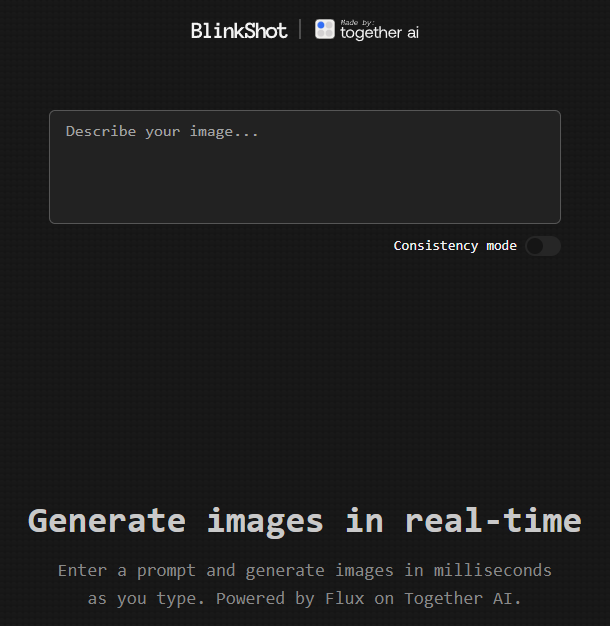
    Image credit: Blinkshot

    Are you eager to create viral AI videos without spending a dime? You’re in the right place! In this comprehensive guide, we’ll explore how you can leverage TogetherAI’s Blinkshot tool and GPTWala’s Viral Video Strategist Chatbot to generate captivating content that can skyrocket your business’s online presence.

    Table of Contents

    1. Introduction
    2. What is Blinkshot by TogetherAI?
    3. Generating Realistic Images in Real-Time
    4. Implementing AI Videos in Your Business
    5. Leveraging GPTWala’s Viral Video Strategist Chatbot
    6. Step-by-Step Guide to Creating Viral Videos
    7. Case Study: An Ecommerce Business
    8. Next Steps
    9. Conclusion

    Introduction

    The digital landscape is evolving rapidly, and video content remains at the forefront of engaging audiences. With advancements in artificial intelligence, creating high-quality, viral videos has become more accessible than ever. This blog will walk you through utilizing cutting-edge AI tools to enhance your content strategy and grow your business.

    What is Blinkshot by TogetherAI?

    Blinkshot is a revolutionary tool recently released by TogetherAI. It integrates the FLUX image model, allowing users to generate realistic images in real-time—for free!

    Features of Blinkshot:

    • Real-Time Image Generation: No more waiting hours for renders.
    • High-Quality Outputs: Produce stunning visuals that captivate your audience.
    • User-Friendly Interface: Easy for beginners and pros alike.

    Generating Realistic Images in Real-Time

    Imagine being able to create images like “A Hindu temple in Varanasi during Diwali night with firecrackers” instantly. With Blinkshot, this is entirely possible.

    Generated using Blinkshot

    How to Generate Images:

    1. Visit Blinkshot: Go to the Blinkshot website.
    2. Input Your Prompt: Describe the image you want.
    3. Generate: Click the generate button and watch the magic happen.

    Implementing AI Videos in Your Business

    You might be thinking, “This is great, but how do I use it for my business?” The answer lies in integrating these AI-generated images and videos into your marketing strategy to create engaging content that resonates with your audience.

    Leveraging GPTWala’s Viral Video Strategist Chatbot

    To bridge the gap between AI-generated content and practical business application, turn to GPTWala’s Viral Video Strategist Chatbot.

    How the Chatbot Helps:

    • Idea Generation: Get tailored video ideas for your industry.
    • Strategy Development: Learn how to implement these ideas effectively.
    • Immediate Implementation: Receive actionable advice you can apply right away.

    Step-by-Step Guide to Creating Viral Videos

    1. Generate Images with Blinkshot: Create captivating visuals relevant to your business.
    2. Consult the Chatbot: Ask, “How to use this viral video idea in my [Your Industry] business?”
    3. Receive Tailored Ideas: The chatbot provides specific strategies for your industry.
    4. Create Your Video: Combine the images and strategies to produce your video.
    5. Publish and Promote: Share your video across your marketing channels.

    Case Study: An Ecommerce Business

    Let’s say you run an ecommerce store. Here’s how you could apply these tools:

    • Generate Product Images: Use Blinkshot to create lifestyle images of your products.
    • Strategy from Chatbot: Ask for ideas on making these images into a viral video.
    • Implement Ideas: Create a video showcasing your products in a trending context.
    • Result: Increased engagement and sales from a viral marketing campaign.

    Next Steps

    Ready to dive in? Here’s what you can do:

    • Try Blinkshot: Visit Blinkshot.io and start generating images.
    • Get Detailed Guidance: If you want a more in-depth guide and additional resources, just send us a message with the word “Instant”.
    • Personalized Coaching: Looking to grow your business with AI? Send us “Coaching” to get personalized assistance.

    Conclusion

    Harnessing the power of AI doesn’t have to be complicated or expensive. With tools like Blinkshot and GPTWala’s Viral Video Strategist Chatbot, you can create viral content that propels your business forward. So why wait? Start exploring these tools today and watch your business reach new heights.


    For more insights and tips on leveraging AI in your business, stay tuned to our blog. If you have any questions or need assistance, feel free to reach out!
    [aiomatic-chat-form temperature=”1″ top_p=”1″ assistant_id=”” model=”gpt-4o-mini” enable_vision=”off” presence_penalty=”0″ frequency_penalty=”0″ instant_response=”stream” ai_role=”AI-based Strategist” ai_avatar=”10832″ user_avatar=”” chat_preppend_text=”You are a viral video strategist AI designed to help users create engaging, high-retention video content. Your main focus is to provide creative and actionable ideas for videos, tips on structuring content to keep viewers hooked, and advice on optimizing for social media platforms. You guide users in selecting topics, writing scripts, and using visual elements to create compelling review videos and social media content.” chatbot_text_speech=”off” upload_pdf=”disabled” enable_god_mode=”disabled” user_message_preppend=”User” show_header=”show” show_clear=”show” show_dltxt=”show” show_mute=”show” show_internet=”show” overwrite_voice=”” overwrite_avatar_image=”” internet_access=”enabled” embeddings=”enabled” ai_message_preppend=”Sahil Sangani – Viral Video Strategist” ai_first_message=”Hey there! I’m your AI Video Strategist, here to help you create viral content.” chat_mode=”text” persistent=”off” prompt_templates=”” prompt_editable=”on” placeholder=”Enter your chat message here” select_prompt=”Please select a prompt” file_uploads=”off” bubble_user_alignment=”right” show_ai_avatar=”show” show_user_avatar=”show” bubble_alignment=”left” bubble_width=”100%” custom_header=”” custom_footer=”” custom_css=”” send_message_sound=”” receive_message_sound=”” response_delay=”” submit=”Submit” compliance=”” show_in_window=”off” window_location=”bottom-right” font_size=”1em” height=”auto” background=”#f7f7f9″ general_background=”#ffffff” minheight=”250px” user_font_color=”#ffffff” user_background_color=”#0084ff” ai_font_color=”#000000″ ai_background_color=”#f0f0f0″ input_placeholder_color=”#333333″ persona_name_color=”#3c434a” persona_role_color=”#728096″ input_text_color=”#000000″ input_border_color=”#e1e3e6″ submit_color=”#55a7e2″ submit_text_color=”#ffffff” voice_color=”#55a7e2″ voice_color_activated=”#55a7e2″ width=”100%”]
  • Unlock the Power of AI for Effortless Video Editing and Instagram Growth

    Are you tired of spending hours editing videos for your Instagram? Say goodbye to tedious editing and hello to the ultimate tool for creating auto-edited videos with ease. In this blog, we’ll walk you through how to elevate your Instagram content and introduce you to an exclusive opportunity to grow your Instagram with my AI consultation services.

    Step-by-Step Guide to Effortless Video Editing

    1. Sign Up and Get Started:

    • Visit the tool’s website and sign up for a free account.
    • Once logged in, click on the ‘Create New Video’ button.

    2. Upload Your Video:

    • Select the video you want to edit from your device and upload it.
    • The tool will automatically generate captions for your video using advanced AI technology.

    3. Use AI Edit for Easy Editing:

    • Click on the ‘AI Edit’ feature to easily edit your videos with the help of AI.
    • This feature allows you to make quick and efficient edits, saving you time and effort.

    4. Customize Your Captions:

    • Review the autogenerated captions and make any necessary edits to ensure accuracy.
    • Customize the font, color, and style of your captions to match your brand’s aesthetic.

    5. Enhance Your Video:

    • Add music, filters, and other effects to make your video more engaging.
    • Use the trimming tool to cut any unwanted sections and keep your video concise.

    6. Download and Share:

    • Once you’re satisfied with your edits, download the video in your preferred format.
    • Share your newly edited video on Instagram and watch your engagement soar.

    Boost Your Instagram Growth with My AI Consultation Services

    While this tool takes care of your video editing needs, there’s more you can do to optimize your Instagram strategy. With over 8 years of experience in digital marketing and AI, I offer personalized AI consultation services to help you grow your Instagram presence effectively. Here’s what you can expect from my consultation:

    1. Tailored Content Strategies:

    • Get customized content strategies that resonate with your audience.
    • Learn how to leverage AI tools to create high-performing posts and stories.

    2. Advanced Analytics:

    • Utilize AI-driven analytics to understand your audience better.
    • Identify the best times to post and the type of content that drives the most engagement.

    3. Growth Hacking Techniques:

    • Implement proven growth hacking techniques to increase your followers organically.
    • Learn how to run successful ad campaigns and optimize your budget.

    4. Exclusive AI Tools:

    • Gain access to exclusive AI tools that automate repetitive tasks, saving you time and effort.
    • Stay ahead of the competition with cutting-edge AI technologies.

    Book Your Consultation Today

    Ready to take your Instagram to the next level? Book an AI consultation with me today and discover the full potential of your Instagram account. Together, we’ll create a strategy that not only boosts your engagement but also drives real results.

    The Secret Tool

    The secret tool that will transform your video editing process and save you hours of work is Captions.AI. Try it today and see the difference it makes.