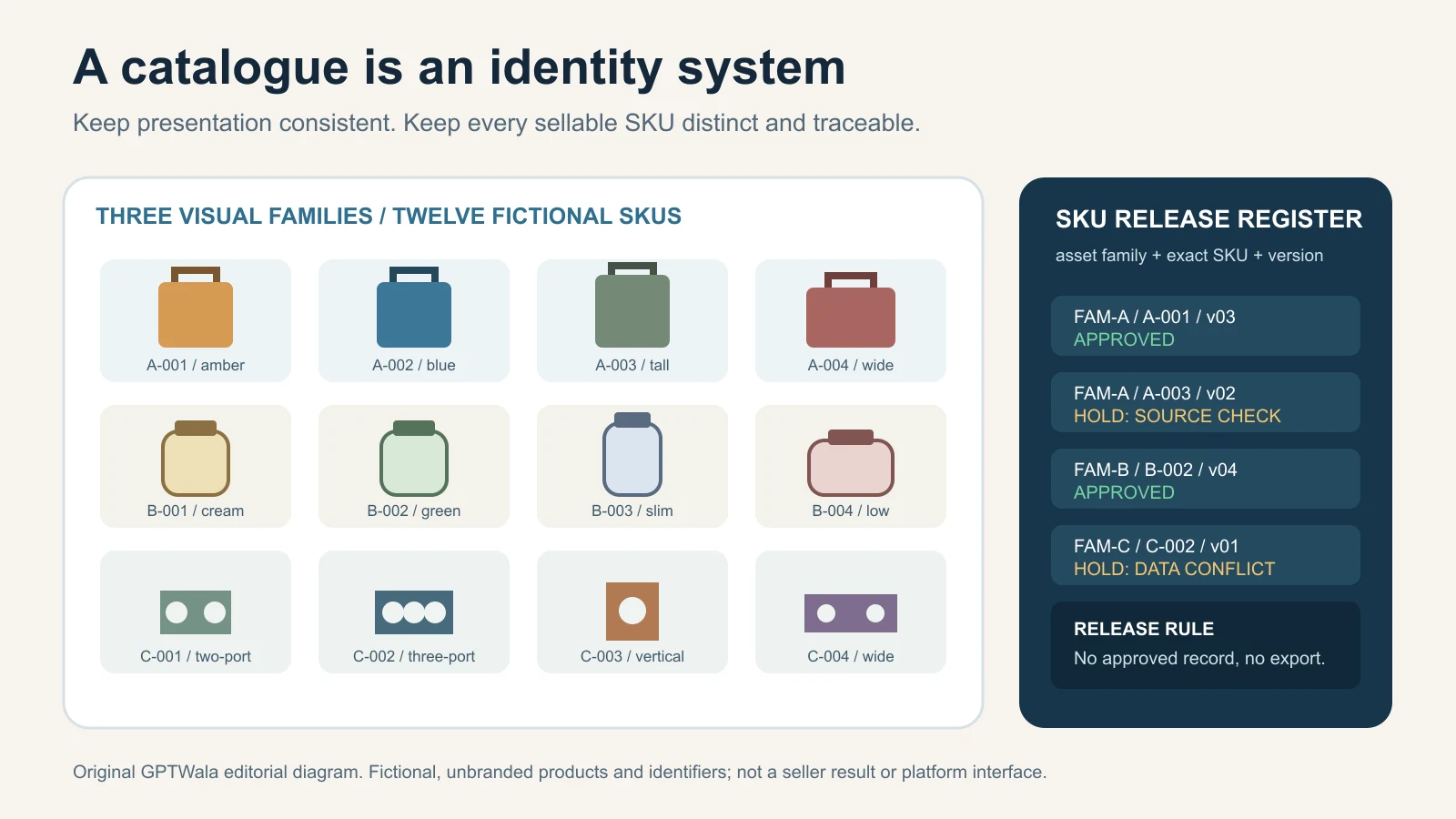
Reviewed and updated: 12 August 2026
AI catalogue photography works at scale only when every image is tied to an exact sellable SKU, a verified source pack and an approval record. Keep the canvas, crop logic, lighting family and output roles consistent across the catalogue, but never standardise away real differences in colour, finish, dimensions, components, labels, pack quantity or included accessories. Generate in controlled batches, route exceptions to a separate queue and release only approved, versioned assets.
For a manufacturer or wholesaler, the unit of work is not “one attractive picture”. It is an approved image set for one exact product record. That distinction prevents a 200-SKU catalogue from becoming 200 plausible-looking files that nobody can safely match to stock, dealer price lists, a website or marketplace listings.
This guide owns the high-SKU operating system: catalogue scope, product-to-asset mapping, visual families, batch production, naming, version control, approvals, exception handling and measurement. The complete AI product photography guide for Indian businesses covers the broader strategy. For a single product set, use the phone-to-AI product photography workflow. For tool selection, see the AI product photography tools comparison. For a full image-level truth audit, use the AI product image accuracy checklist.
Table of contents
- Why a large catalogue is an identity system
- Define the catalogue unit before making images
- Build one production register
- Separate image roles
- Create visual families without cloning products
- Approve a golden-SKU pilot
- Run the batch catalogue workflow
- Use a naming and version-control SOP
- Make approvals and status changes unambiguous
- Check consistency and SKU differences together
- Link assets to channel data safely
- Apply the system to Indian product businesses
- Measure the catalogue without invented savings
- Use real-photography stop rules
- Frequently asked questions
Why a large catalogue is an identity system
A high-SKU catalogue is any range large or changeable enough that memory, WhatsApp messages and filenames such as final2-new.jpg no longer keep products straight. The threshold differs by business. Twenty complex industrial assemblies can be harder to control than 500 visually simple size variants.
Three identities must remain connected:
- Product family or parent: the related style, model or series.
- Sellable record: the exact SKU or variant a buyer can order.
- Asset: the exact main, detail, scale or contextual image approved for that sellable record.
Do not collapse these layers. A “sand beige” tile and a “warm ivory” tile may belong to one series, but they are separate orderable finishes. A 750 ml bottle and a 1 litre bottle may share a formula and design language, but they differ in capacity, proportion and label information. A machine component with four mounting holes is not an interchangeable visual for the six-hole part.
This is consistent with established product-data practice. GS1 says a Global Trade Item Number can uniquely identify a trade item that is priced, ordered or invoiced, and its GTIN Management Standard asks whether a buyer or trading partner needs to distinguish a new or changed product. Google Merchant Center likewise asks merchants to submit a unique ID for each different product and to group genuine variants with a shared item-group ID. See GS1’s GTIN overview, the GTIN Management Standard and Google’s item group ID guidance.
Your internal SKU is still the operational anchor if you do not use GTINs. Never invent, alter or infer a GTIN inside the photography process. Product identifiers belong to the authorised product-data owner.
Consistency is not sameness
Catalogue consistency means a buyer can compare products without the presentation changing arbitrarily. It does not mean forcing every item into identical pixels.
Keep these elements consistent within a visual family:
- canvas ratio and export profile;
- camera/view family;
- product footprint range and crop logic;
- neutral balance and lighting direction;
- background or shadow policy;
- image-role order; and
- naming and review method.
Keep these elements truthful for each sellable record:
- silhouette, construction and proportions;
- exact colour, pattern, grain, texture and finish;
- holes, ports, fasteners, settings, seams and hardware;
- brand, label, certification marks and printed text;
- dimensions, capacity and pack quantity;
- included components and accessories; and
- packaging generation or revision.
If a template makes a tall product look short, crops a handle, hides a connector or changes the apparent number of units, the template has failed. Create another visual family instead of “fixing” the product to fit the grid.
Define the catalogue unit before making images
Start with the commercial object being built. “Catalogue” can mean several different deliverables:
| Deliverable | Primary job | Photography system must supply | This guide does not own |
|---|---|---|---|
| B2B line sheet or dealer catalogue | Help a buyer identify and shortlist products | Comparable main views, selected proof details, exact identifiers | Page layout, pricing strategy or dealer distribution |
| Ecommerce or marketplace image pack | Support one sellable listing at a time | Exact-variant main and additional images mapped to listing data | Current platform/category limits; verify them separately |
| Website product library | Support browsable product families and variants | Stable approved masters plus web derivatives | Product-page development and complete structured-data implementation |
| WhatsApp or sales-team asset pack | Make the correct visual easy to retrieve | Lightweight derivatives with visible internal mapping | WhatsApp catalogue setup or enquiry scripts |
| Campaign asset source | Supply verified product layers for ads | Approved product masters and provenance | Ad concepts, claims and campaign optimisation |
The current product-image rules guide owns destination requirements. The future digital product catalogue guide owns assembly and distribution. This guide stops at the approved, traceable image library and its hand-off.
Write the definition of done
A useful definition is:
One catalogue item is complete when every required image role for the exact sellable record is approved, named, linked in the production register and released in the requested destination profiles.
The words required image role matter. If an industrial fitting needs a front, connection detail and dimension drawing, one hero image is not a completed set. If two garment sizes look identical in product-only photography, they may deliberately point to the same approved visual master while remaining separate sellable records. That is controlled reuse, not accidental duplication.
Before production, record:
- in-scope product families and sellable records;
- launch, season, dealer-meeting or upload deadline;
- destinations and current specifications owner;
- image roles required per family;
- source samples physically available;
- products awaiting packaging or design changes;
- regulated or high-risk categories requiring specialist review; and
- explicit exclusions for this release.
Never count an unavailable sample as “AI-ready”. Put it in an exception state such as SOURCE_MISSING.
Build one production register
The register is the catalogue’s control surface. It can begin as a spreadsheet, product information system or digital asset manager export. The tool matters less than one authoritative row per sellable record and a clear owner for each field.
Minimum register fields
| Field | What it controls | Owner or evidence |
|---|---|---|
| Product family ID | Groups real variants without merging unrelated products | Product-data owner |
| Sellable SKU / item ID | Connects image to the exact orderable record | ERP, inventory or approved price list |
| GTIN, if assigned | External trade-item identifier | Authorised master data; never photography staff |
| Product name | Human-readable identity | Approved product master |
| Variant values | Colour, size, finish, material, capacity, configuration | Physical sample plus product master |
| Pack or offer composition | Unit, pair, set, multipack and included accessories | Packing list / bill of materials |
| Packaging revision | Prevents old-pack images returning | Packaging owner and effective date |
| Critical truth fields | Features that cannot change visually | Product/category reviewer |
| Source asset IDs | Front, back, side, detail, label and scale references | Capture team |
| Source status | Complete, incomplete, damaged sample, superseded | Intake reviewer |
| Visual family | Selects the approved template and view rules | Catalogue lead |
| Required image roles | Main, alternate, proof, scale, contextual | Merchandising/channel brief |
| Production method | Real, protected composite, AI-assisted or synthetic concept | Catalogue lead |
| Rights/provenance | Source owner, permissions, model/property record, AI metadata route | Rights owner |
| Current working version | Makes review comments reproducible | Operator/system |
| Approval status | Prevents work-in-progress release | Authorised reviewer |
| Approved asset IDs | Immutable link to released masters | Release controller |
| Destination derivatives | Website, dealer PDF, marketplace or sales pack | Channel owner |
| Exception code and note | Explains why a record stopped | Reviewer |
| Review date and reviewer | Creates accountability and freshness | Approval log |
Add category-specific fields instead of hiding them in comments. A tile business may need size, thickness, finish, edge and face/design number. A pump manufacturer may need inlet/outlet configuration, mounting pattern and nameplate revision. An apparel wholesaler may need colour, size set, fabric, included pieces and embroidery map.
Separate facts from instructions
The register should distinguish:
- source facts: “handle is black phenolic; pack contains two pans”;
- presentation rules: “front three-quarter view; handle fully visible; 8% minimum edge margin”;
- destination rules: “create current marketplace main-image derivative”; and
- workflow status: “awaiting label verification”.
Mixing these categories invites errors. A background instruction must never overwrite a product fact. A deadline must never convert an unverified accessory into an included item.
Never create a visual-only variant
Do not ask an image model to create blue, green and red variants from a single black reference merely because the colour names exist in a price list. Each visually different variant needs adequate evidence: the physical sample, approved colour/finish reference, verified artwork and a product owner who can compare the output.
For visually indistinguishable records—such as size variants whose appearance truly does not change—map every sellable record to the approved shared master deliberately. Google’s current image guidance says variants that differ only in size and essentially look the same may use the same image, while still directing users to the correct variant landing page. That is a Google example, not a universal marketplace permission. See Google’s image link guidance.
Separate image roles
One visual cannot perform every catalogue job. Define roles before selecting AI, photography or a hybrid method.
1. Identity image
Shows the exact item clearly enough to recognise and compare. It usually needs the least staging. It may become a main website or listing image after the current destination rules are checked.
Truth burden: highest. The sellable product, variant and quantity must be unmistakable.
2. Proof or detail image
Shows construction, texture, connectors, closure, back, underside, label or included pieces that affect a buying decision.
Truth burden: highest. A generated close-up is not evidence of detail the model never saw.
3. Scale or configuration image
Helps a buyer understand size, arrangement or compatibility. Use verified dimensions, a real scale reference or a clearly labelled diagram.
Truth burden: high. Perspective and props can create false scale. Do not depict compatibility that has not been confirmed.
4. Context or lifestyle image
Shows a plausible environment, use moment or merchandising context. This is usually the safest role for AI-generated backgrounds after the exact product layer is protected and reviewed.
Truth burden: still real. The scene must not imply unverified load, heat resistance, waterproofing, food safety, performance, included accessories or a particular installation.
5. Concept-only image
Explores a campaign or setting before a sale asset exists. Keep it outside the approved product library and label it internally as concept-only.
Do not promote a contextual or concept image to “main” by changing its filename. The role controls the evidence standard.
Create visual families without cloning products
A catalogue with hundreds of SKUs should not have hundreds of unrelated briefs. It also should not have one universal template. Create a small set of visual families based on product geometry and buying needs.
Possible families include:
- flat or surface-led products, such as tiles and laminates;
- tall packs, bottles or canisters;
- wide products with handles or protrusions;
- reflective metal products;
- soft goods that fold or drape;
- small precision components;
- kits, bundles and multi-part offers; and
- large products needing a scale or installed-context image.
Use three layers of control
| Control layer | Examples | Rule |
|---|---|---|
| Batch-constant | canvas ratio, colour profile, naming grammar, approval status vocabulary | Keep stable across the release |
| Family-constant | view angle, product footprint range, light direction, shadow treatment, role order | Keep stable within the family; create a new family when geometry needs it |
| SKU-locked | colour, print, finish, shape, openings, hardware, label, quantity, accessories | Must match the exact sellable record |
Some presentation elements can vary within guardrails. A small bowl and a long serving tray should not have identical pixel width if that destroys their apparent scale relationship. Use footprint ranges and comparison references rather than blind auto-cropping.
Create a family specification card
For each visual family, record:
- approved example and asset ID;
- eligible and excluded product types;
- required source views;
- main and alternate view definitions;
- canvas, crop and product-footprint range;
- background and shadow rule;
- protected product regions;
- critical per-SKU fields;
- acceptable editing operations;
- automatic rejection conditions; and
- destination profiles created after approval.
This card is not a prompt library. The AI product photography prompt guide owns reusable generation language, and the AI background generation guide owns protected-background methods. The family card tells the operation which validated method to use.
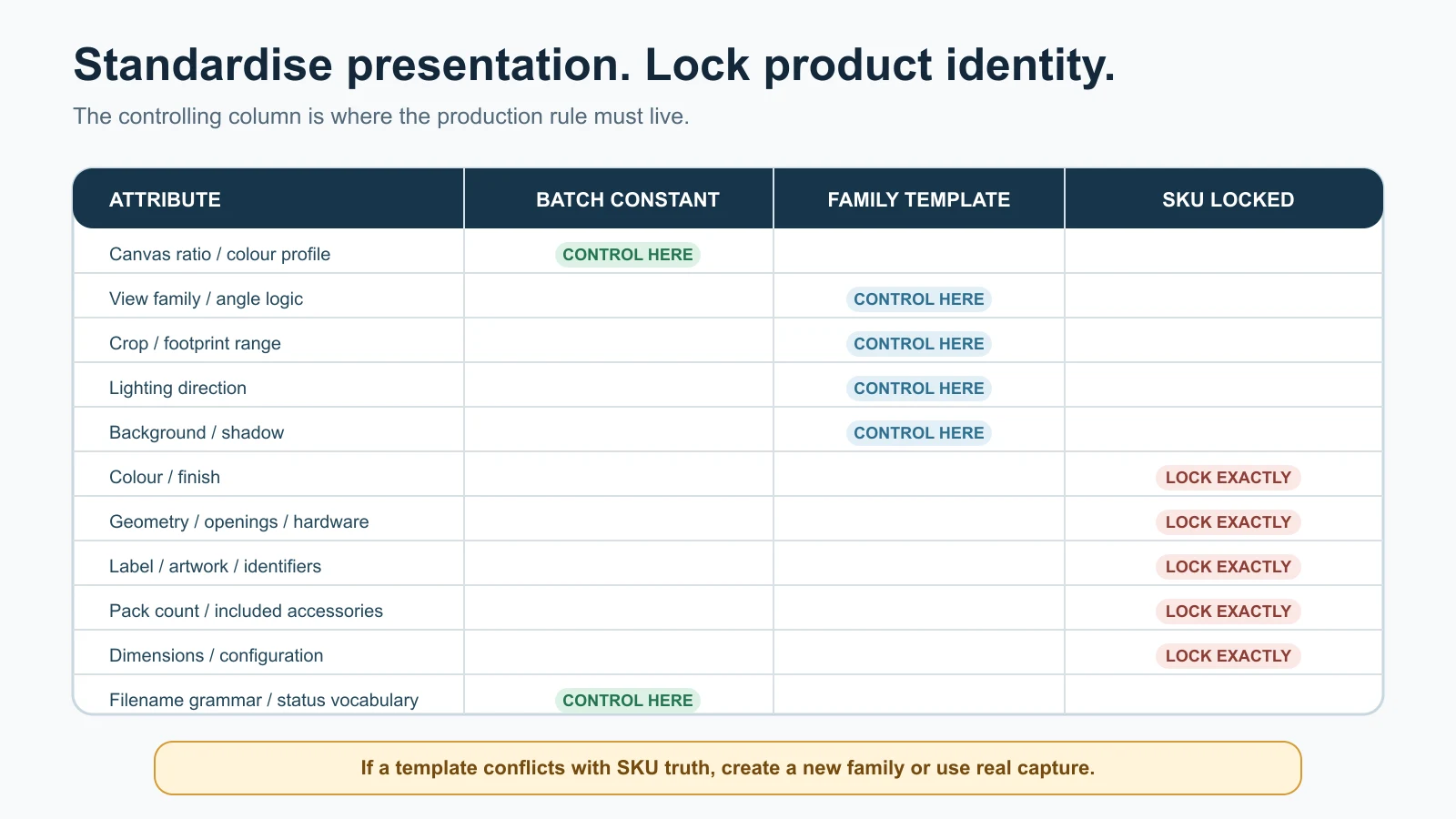
Standardise presentation controls; lock product identity separately for every sellable record. If a template conflicts with SKU truth, create a new family or use real capture.
Approve a golden-SKU pilot
Before processing the catalogue, prove the system on products that expose its weaknesses.
Select:
- one typical SKU from each visual family;
- at least one dark and one light finish where colour or edge separation matters;
- the smallest and largest geometry;
- a reflective, transparent or texture-critical exception if present;
- a multipack or accessory-heavy offer if present; and
- a current packaging revision with readable artwork.
There is no universal “correct” pilot count. Choose enough records to cover the visual families and risk conditions. Five nearly identical easy products prove less than three deliberately different edge cases.
For every pilot record:
- verify source completeness;
- produce all required roles;
- run the product-truth review;
- create destination derivatives;
- confirm naming, metadata and register links survive the hand-off;
- record time, rework and causes; and
- revise the family card before scaling.
The pilot is approved only when the system works. One beautiful hero image is not enough if the label derivative is wrong, the reviewer cannot locate the source or the approved file is later overwritten.
Create exception classes early
Examples:
SOURCE_MISSING— required view or exact sample unavailable;DATA_CONFLICT— sample, ERP, label and price list disagree;COLOUR_UNVERIFIED— colour-critical output cannot be compared reliably;GEOMETRY_DRIFT— AI changed shape, ports, holes or proportions;LABEL_UNREADABLE— required text or marks cannot be verified;BUNDLE_UNCLEAR— included quantity or accessories are ambiguous;RIGHTS_UNCONFIRMED— source, model, artwork or AI-use permission incomplete;DESTINATION_REVIEW— current channel rule needs a specialist check; andREAL_CAPTURE_REQUIRED— evidence burden exceeds the AI or composite method.
An exception queue protects production momentum. It lets clear records continue without quietly approving uncertain ones.
Run the batch catalogue workflow
Stage 1: freeze the release scope
Give the release a name and cut-off date, such as 2026-Q3-DEALER-CATALOGUE-R1. Lock the in-scope sellable records. New SKUs enter the next release or a formally approved change request.
This is not a freeze on the business. It is a freeze on what reviewers are expected to approve in this batch.
Stage 2: reconcile product identity
Compare the source product, inventory/ERP record, authorised price list, packaging file and bill of materials where relevant. Resolve conflicts before image work.
If the source sample says 500 g and the product master says 450 g, stop. Photography cannot decide which offer is correct.
Stage 3: complete source intake
Capture or receive the exact SKU references required by its family card. Keep originals read-only. Record physical sample ID, capture date and source filenames.
Batch capture by visual family when practical, but place an unmistakable SKU card at intake and remove it from the sale image. Do not rely on shooting order alone.
Stage 4: assign method and risk
Choose per image role:
- real capture;
- conventional edit;
- real product cut-out with controlled composite;
- reference-led AI-assisted edit; or
- synthetic concept kept outside the sale library.
The AI versus traditional product photography guide helps choose the method. Do not force AI across the whole catalogue to make a spreadsheet column look uniform.
Stage 5: generate or edit in small, named batches
Work by visual family and review capacity, not by the maximum number a tool can output. Each job receives the exact SKU source pack and family specification. Never mix references from similar variants in one generation context.
Small batches make drift visible. If crop, shadow or product shape begins changing after 12 outputs, the team can stop 12—not discover the problem after 300.
Stage 6: perform an operator check
Before specialist review, the operator verifies:
- correct SKU and source pack;
- required role and view;
- file opens at intended dimensions;
- no obvious truncation, duplicate, artefact or unrelated object;
- correct working version and provenance record; and
- no known template violation.
Operator review is not product approval.
Stage 7: perform product-truth approval
The authorised product reviewer compares the output against the exact source and locked fields. Use the full AI product image accuracy checklist for image-level severity and repair decisions.
At batch scale, review 100% of the critical identity fields for 100% of released sellable records. Sampling can help monitor non-critical presentation consistency; it must not replace verification of colour, quantity, label, configuration or other buying-critical facts.
Stage 8: approve the channel-neutral master
Approve a high-quality master only after product truth passes. This master is not automatically a marketplace main image. It becomes the source for controlled derivatives.
Preserve:
- asset ID and version;
- linked SKU and role;
- source and method;
- approval date and reviewers;
- rights/provenance information; and
- AI-origin metadata where applicable.
Stage 9: create and verify destination derivatives
Apply the currently verified crop, size, background, format and metadata rules for each destination. Never replace the master with a cropped derivative.
Name the destination in the derivative record. MAIN is an image role; GOOGLE-MC, WEBSITE, DEALER-PDF or another code identifies a destination profile.
Stage 10: release a manifest
The release controller exports a manifest containing:
- release ID;
- sellable record;
- approved master asset IDs;
- destination derivative IDs and URLs/paths;
- superseded asset IDs;
- outstanding exceptions; and
- release date and owner.
The website, marketplace, dealer-catalogue or sales team should ingest from the manifest, not browse folders and choose what looks newest.
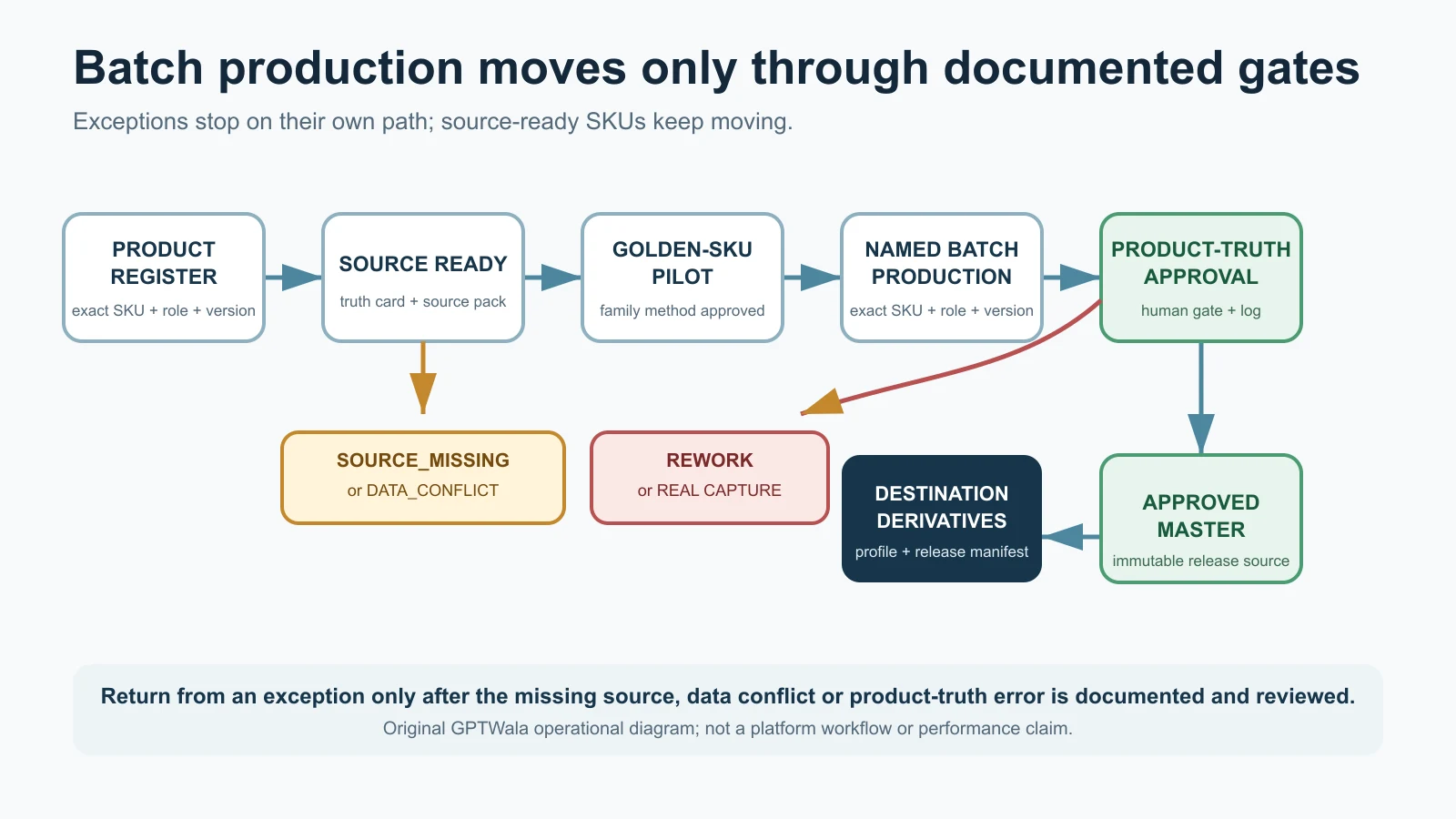
Exceptions stop at their own gate while source-ready SKUs continue through the approved production path. Original GPTWala operational diagram; not a platform workflow or performance claim.
Use a naming and version-control SOP
Filenames are not the database, but useful names reduce human error.
A practical filename grammar
Use:
[family]_[sku]_[variant]_[role]_[view]_[method]_[vNN]_[status].[ext]
Fictional example:
terra450_TR450-SAND-MAT_sand-matte_MAIN_front-hybrid_v03_APPROVED.tif
Website derivative:
terra450_TR450-SAND-MAT_sand-matte_MAIN_front-hybrid_v03_WEBSITE.webp
Rules:
- use the authoritative SKU exactly once;
- use controlled, documented codes;
- avoid spaces,
final,latest, staff initials as the only reviewer record, and dates without versions; - never put unverified marketing claims in filenames;
- increment the working version when pixels or buying-relevant content changes; and
- keep the asset ID stable only according to your asset system’s rules.
Do not overwrite approved masters
An approved master is immutable. A change creates a new version and a review event. Mark the old version SUPERSEDED, retain its link in the change log and prevent it from being selected for new releases.
If only a web compression setting changes, create a new derivative version. If the product label, colour, pack quantity or geometry changes, treat it as a product/asset change and re-enter the required approval path. Ask the authorised product-data owner whether the sellable identifier or GTIN also changes; the image team does not decide.
Suggested folder or collection structure
/catalogue-release-id/
  /00-register-and-manifest/
  /01-source-read-only/
    /product-family/
      /sellable-sku/
  /02-working/
    /visual-family/
  /03-review/
    /operator-passed/
    /product-review/
    /exceptions/
  /04-approved-masters/
  /05-destination-derivatives/
    /website/
    /dealer-catalogue/
    /marketplace-profile-name/
  /06-superseded/
Permissions matter more than folder beauty. Operators can write to working areas; only authorised roles can move or mark assets as approved or released.
Make approvals and status changes unambiguous
A small business may have one person performing several roles. Keep the role decisions separate even then.
| Role | Decision | Must not assume |
|---|---|---|
| Product-data owner | Which sellable record, attributes and pack are authoritative | That the newest-looking file is correct |
| Capture/operator | Whether sources and output meet the production brief | That plausibility equals product truth |
| Product/category reviewer | Whether the exact item and buying-critical details match | That platform acceptance is automatic |
| Channel reviewer | Whether the derivative meets the current destination rules | That the channel has verified the underlying product |
| Release controller | Whether only approved assets enter the manifest | That an approval in chat applies to every version |
Use a controlled status vocabulary:
PLANNED → SOURCE_READY → IN_PRODUCTION → OPERATOR_PASSED → PRODUCT_APPROVED → CHANNEL_READY → RELEASED
Exception paths:
SOURCE_MISSING, DATA_CONFLICT, REWORK, REAL_CAPTURE_REQUIRED, REJECTED, SUPERSEDED.
Do not use “done” as a status. It does not say what was reviewed.
Record approvals as decisions
Every approval should include:
- asset/version ID;
- SKU and image role;
- decision and date;
- reviewer name/role;
- checklist or fields reviewed;
- conditions, if any; and
- link to the exact reviewed file.
“Looks good” in a group chat is not a release record if the attachment can later be replaced.
For a high-risk product, use separate product and release approval. Two signatures do not guarantee truth, but they reduce the chance that one person both creates and waves through their own undetected error.
Check consistency and SKU differences together
Run two QA passes. A catalogue can fail either because the presentation drifts or because the products become falsely similar.
Pass A: presentation consistency
Check within each visual family:
- canvas ratio and pixel dimensions;
- product footprint within the approved range;
- view direction and horizon;
- background, shadow and colour profile;
- crop safety and edge margins;
- required role sequence; and
- naming, metadata and derivative profile.
Contact sheets are useful here. Review 12–30 images together to see drift that is hard to notice one by one. The contact sheet is a QA tool, not a substitute for opening the full-resolution file.
Pass B: difference preservation
Compare neighbouring variants and ask:
- Can the buyer see the real colour or finish difference?
- Did two SKUs accidentally receive the same image?
- Did AI copy a label, handle, stone, port or accessory from an adjacent product?
- Did normalisation make different proportions look equal?
- Did the wrong pack quantity enter one record?
- Is a superseded package mixed with the current release?
- Does every derivative still point to the same approved master and exact sellable record?
Use the right denominator
Do not report “99% accurate” because 99 of 100 files opened. File integrity, presentation consistency and product truth are different checks.
Useful control totals include:
- sellable records in scope;
- required image sets;
- approved sets;
- exceptions by reason;
- released destination derivatives; and
- records with changed or superseded assets.
Reconcile totals at each release. If 160 records were planned, 145 approved and 10 are exceptions, five records are unexplained. Do not let them disappear inside a folder count.
Link assets to channel data safely
The approved asset register should map cleanly into the website or commerce feed without letting one channel redefine product identity.
Google product variants
Google’s current Merchant Center guidance says to give each different product a unique ID and use the same item_group_id for genuine variants of one product. It also says the landing-page details should match variant-identifying values including title, colour, price, availability and image link. Google’s main-image guidance says the submitted image should show the correct colour, pattern and material, and colour variants should show one variant rather than a group image. See item group ID and image link.
Operationally, export one feed mapping per sellable record:
internal SKU → channel item ID → item group/parent → approved image URL → landing-page variant URL → release ID
Do not paste one “family hero” URL into every colour variant merely for visual consistency.
Website variant pages and structured data
Google Search Central’s current product-variant documentation uses ProductGroup with variesBy, hasVariant and productGroupID, alongside Product data. Its technical guidance says each variant needs a unique identifier and must be directly selectable at a distinct URL that shows the right image, price and availability. See Google’s product variant structured-data documentation.
That implementation belongs to the website team, but the photography register should supply the correct variant-level image and stable parent/child mapping.
AI provenance in the asset chain
Google Merchant Center currently requires images created using generative AI to carry the appropriate IPTC DigitalSourceType metadata and says not to remove embedded source-type tags. It recognises relevant values for generated and composite synthetic content. See Google’s AI-generated content guidance.
The IPTC Photo Metadata User Guide also describes fields for AI system, system version, prompt information and prompt-writer name, while warning that CMS or processing configurations may strip embedded metadata. See IPTC’s Photo Metadata User Guide.
For every AI-assisted master:
- classify how the image was made;
- preserve required embedded metadata;
- retain a separate internal provenance record;
- test whether export, compression, DAM and website pipelines preserve metadata; and
- recheck the destination rule on the release date.
Metadata is not a substitute for a truthful image. It records origin; it does not prove that the pictured SKU is correct.
Amazon, Flipkart and other destinations
Do not copy a universal size, background or image-count rule from this article. Category, programme, account and seller-guide requirements can differ or sit behind sign-in. Use the current public and account-level guides, save the verification date in the destination profile and route uncertainty to DESTINATION_REVIEW.
The product-image rules guide maintains that dated channel check.
Apply the system to Indian product businesses
The following are fictional operating examples, not seller results or claims about regional businesses.
Morbi tile manufacturer: surface consistency without finish confusion
A tile manufacturer has one design family in multiple sizes, face patterns and finishes. The batch system should not simply put every sample into the same room scene.
Use:
- one sellable record per orderable size/design/finish combination;
- controlled top/front and edge-detail families;
- verified scale and thickness references;
- a locked finish field such as polished, matte or textured;
- face/design identifiers where cartons can contain controlled variation;
- real capture for gloss, texture and shade when synthetic rendering cannot be verified; and
- contextual room images only after the exact product surface and installation implications are reviewed.
Stop if AI changes grout, edge, surface veining, reflectivity or the number of distinct faces in a way that implies a different product.
Rajkot component or cookware manufacturer: geometry before polish
For machine parts, pumps, fittings or cookware, attractive reflections are secondary to geometry and configuration.
The register may lock:
- model and material grade as approved by the product team;
- diameter, capacity or configuration;
- holes, ports, threads, fasteners and handles;
- included lid, gasket, cable or accessory;
- nameplate and safety marks; and
- packaging/set quantity.
Use real detail photographs or verified technical drawings for interfaces, tolerances and dimensions. An AI-generated cutaway, flame scene, load scene or performance illustration must not imply a tested capability without evidence.
Surat apparel wholesaler: colour and set composition at scale
A wholesale kurta line may have multiple colours and size records. If sizes look the same in product-only images, one approved visual can be mapped intentionally to the size records. Every colour, print, embroidery map and included-piece combination still needs exact evidence.
Keep flat-lay or product-only proof images beside any AI model image. Model visuals introduce separate fit, drape, consent and cultural-styling risks covered in the AI model photos for apparel guide.
Multi-brand wholesaler: protect brand and packaging revisions
A wholesaler may not own the product artwork. Record supplier permission, supplied asset version, brand and package generation. Do not use AI to remove a manufacturer’s mark, create a cleaner label or modernise an old pack unless authorised and truthful for current stock.
When two packaging generations remain in inventory, the business needs an explicit stock and listing decision. A visually nicer new-pack image cannot represent old-pack fulfilment without clear, lawful handling and appropriate customer communication.
Measure the catalogue without invented savings
Do not claim AI saved 80% or doubled sales unless your records and a suitable commercial test support it. Measure the production system first.
Core operational metrics
| Metric | Formula | What it reveals |
|---|---|---|
| Source-ready rate | source-ready sellable records ÷ in-scope records | Whether missing inputs, not image tools, are the bottleneck |
| First-pass product approval | sets approved without rework ÷ sets submitted for product review | Brief/source quality and method reliability |
| Rework rate | sets returned for rework ÷ sets reviewed | Production waste; segment by cause |
| Exception rate | records in exception status ÷ in-scope records | Catalogue complexity and unresolved risk |
| Variant mismatch rate | records with wrong colour/configuration/quantity/label ÷ records checked | Identity-control performance |
| Median time to approved set | median elapsed time from source-ready to product-approved | Typical throughput without one extreme job distorting the figure |
| Cost per approved set | attributable production and review cost ÷ approved sets | True unit cost after rejects and human review |
| Release completeness | released sets ÷ required sets | Whether a destination received the intended catalogue |
| Post-release defect rate | released records requiring correction ÷ released records | Escaped-error control |
| Change latency | time from authorised product change to corrected released asset | Freshness of the catalogue |
Track cost by method and visual family. Include capture, generation/tool usage, operator time, reviewer time, recapture, rework and derivative creation. A cheap generation that needs three reviews may cost more per approved set than a real capture that passes once.
Do not confuse association with sales impact
If enquiries rise after a new catalogue, other factors may have changed: prices, stock, dealer outreach, seasonality, product mix, advertising or website speed. Use controlled tests where practical and label observations honestly.
The AI-versus-traditional photography cost worksheet explains cost-per-approved-asset calculation. Before spending on distribution, use the future unit economics guide to connect contribution margin, enquiry handling and advertising decisions.
Review by cause, not only by total
A rework total of 18 is not actionable. Split it:
- missing source view;
- incorrect product data;
- tool altered geometry;
- colour/finish uncertainty;
- template/crop failure;
- label or quantity mismatch;
- destination rule failure; and
- approval or hand-off error.
Then fix the upstream system responsible. Do not solve a source-data problem by buying another generation tool.
Use real-photography stop rules
Move an image role to real photography, verified technical illustration or a tightly protected composite when any of the following is true:
- the exact SKU or visually distinct variant is not available as adequate reference;
- colour, grain, gloss, transparency, texture or reflectivity cannot be compared reliably;
- AI changes geometry, proportion, holes, ports, seams, stones, settings, fasteners or components;
- the image must prove dimensions, fit, drape, capacity, compatibility, performance or safety;
- required label, certification, ingredient, warning, net quantity or technical text is unreadable or regenerated;
- pack count, bundle composition or included accessories are uncertain;
- an old and new packaging generation could be confused;
- a regulated or high-consequence product requires evidence the current method cannot preserve;
- source, artwork, brand, model or property rights are unconfirmed; or
- the authorised reviewer cannot confidently approve what a buyer will receive.
Do not repair a missing fact with a prompt. Obtain the fact or change the image role.
India product-truth safeguard
Treat a product catalogue as commercial communication, not harmless decoration. The Central Consumer Protection Authority’s 2022 guidelines address misleading advertisements, and the ASCI Code says advertisements should not mislead through statements or visual presentation, including by implication, omission, ambiguity or exaggeration. See the Department of Consumer Affairs’ misleading-advertisement guidelines page and the ASCI Code.
Operationally:
- show the product and offer that can actually be supplied;
- substantiate objective visual or written claims;
- do not hide a material mismatch behind a small disclaimer;
- keep approval evidence for high-risk claims and depictions; and
- obtain category-specific legal advice when the product, claim or market requires it.
This is operational guidance, not legal advice. It does not claim that all AI-assisted product imagery is prohibited or that one disclosure cures a misleading visual.
A practical four-cycle rollout
Cycle 1: inventory and identity
- freeze one release scope;
- reconcile families, sellable records and product data;
- define image roles and exception codes; and
- identify source gaps before production.
Cycle 2: visual families and pilot
- create family cards;
- select typical and edge-case SKUs;
- test real, hybrid and AI-assisted methods; and
- approve the process, not only the outputs.
Cycle 3: controlled batches
- produce to review capacity;
- run operator and product approvals;
- isolate exceptions; and
- calculate first-pass approval, rework and cost per approved set.
Cycle 4: derivatives, release and change control
- verify current destination profiles;
- preserve provenance and AI metadata;
- issue a release manifest; and
- monitor escaped defects and product changes.
Repeat by product family. A visible sequence of approved sets is more useful than months spent designing a perfect catalogue system without releasing a pilot.
Turn the catalogue into an online growth asset
A clean asset library removes friction, but it does not create demand by itself. Manufacturers and wholesalers still need a discoverable online presence, useful content, a way to reach relevant buyers and a controlled enquiry path.
If the business still depends mainly on walk-ins, exhibitions, dealer calls or forwarded PDFs, the GPTWala workshop explains the DAA path: Digital Presence → AI Content Creation → ₹100/day WhatsApp ads. It connects approved product assets to a broader enquiry system without promising leads, sales or return on ad spend.
See the GPTWala workshop and decide whether it fits your product business.
Frequently asked questions
Can AI create an entire manufacturer catalogue from one product photo?
Not safely when the catalogue contains distinct SKUs or unseen product details. One photo cannot verify another colour, finish, back, label, accessory, pack quantity or configuration. Use an exact source pack for each visually distinct sellable record and move unverifiable roles to real capture.
How do I keep hundreds of product images consistent?
Create visual families with fixed canvas, view, crop range, lighting and shadow rules. Keep a separate set of SKU-locked truth fields. Generate in small batches, review contact sheets for presentation drift and verify critical product fields on every released record.
Should every variant have a separate image?
Every visually distinct variant needs a correctly mapped image. Records that differ only in a non-visible attribute may deliberately share an approved master if that is truthful and the destination permits it. Keep separate sellable records and explicit mappings rather than duplicating files informally.
What is the difference between a parent SKU and a sellable SKU?
A parent or family identifier groups genuine variants of one product. A sellable SKU identifies the exact orderable variant. The catalogue asset should map to the sellable record; the family ID helps control shared presentation and product grouping.
Can I generate colour variants instead of photographing them?
Only when the exact colour/finish is authorised, adequately evidenced and can be reviewed against a reliable reference. Do not invent variants from colour names or recolour texture-, gloss- or shade-critical products when the result cannot be verified.
What is a good AI catalogue batch size?
There is no universal number. Use the number your team can review before errors accumulate. Begin with enough SKUs to cover the visual family and its edge cases, measure review time and drift, then adjust batch size from your own first-pass approval and rework data.
Does every image need human approval?
Every released sellable record needs human verification of its buying-critical identity fields. Automated checks can find dimensions, naming or duplicate files, and sampling can monitor low-risk presentation consistency. Neither replaces product approval for colour, quantity, configuration, label or offer truth.
How should catalogue image files be named?
Use a controlled pattern containing product family, exact SKU, variant, image role, view, method, version and status. Keep the authoritative mapping in a register. Never overwrite an approved master or rely on final-final.jpg to communicate release status.
When should a manufacturer use real photography instead of AI?
Use real photography or verified technical illustration when the image must prove geometry, finish, dimensions, configuration, label, pack contents, performance, safety or another detail that AI cannot preserve and a reviewer cannot verify confidently.
How should I calculate whether AI catalogue production is cheaper?
Compare cost per approved image set, not generation price. Include source capture, tools, operator time, review, rework, recapture, derivatives and rejected outputs. Compare like-for-like product families and image roles.
Sources checked for this guide
- Google Merchant Center: Item group ID
- Google Merchant Center: Image link
- Google Merchant Center: AI-generated content
- Google Search Central: Product variant structured data
- GS1: Global Trade Item Number
- GS1: GTIN Management Standard
- IPTC: Photo Metadata User Guide
- Department of Consumer Affairs: Guidelines for Prevention of Misleading Advertisements and Endorsements for Misleading Advertisements, 2022
- Advertising Standards Council of India: The ASCI Code
Leave a Reply