Category: AI in Ecommerce

  • AI Adoption Roadmap for Manufacturers and Retailers

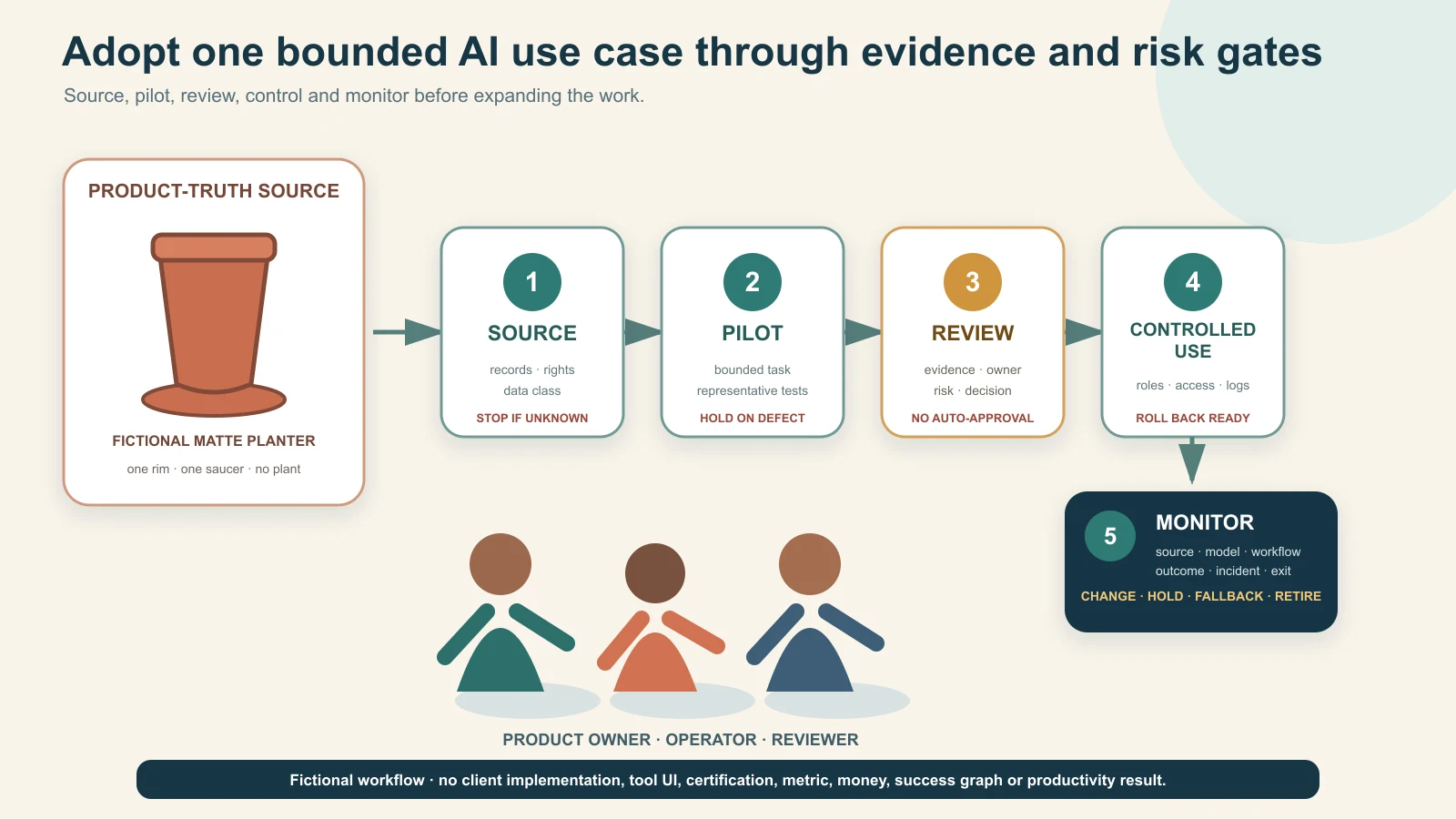
    Indian manufacturer and retailer moving one bounded AI use case through source, pilot, approval, rollout and monitoring gates
    Original GPTWala editorial illustration using fictional people, one unbranded terracotta planter and native workflow cards. It shows no client implementation, software interface, external approval, certification, metric or productivity result.

    Reviewed and updated: 12 August 2026

    To adopt AI responsibly, map the work before selecting tools, classify use cases by decision and data risk, choose one bounded task with a trustworthy source and human reviewer, measure it against the current process, and release it only through a written approval gate. Turn a successful pilot into a controlled workflow with named owners, access, records, monitoring, incident response and an exit plan. Scale only after the same controls work across a wider product range, team or channel.

    Do not begin with “give everyone an AI account” or “automate the whole business.” A polished demo can hide wrong products, leaked data, invented claims, unsafe decisions, unclear rights, unpredictable costs and dependency on a tool the team cannot audit or leave. The useful unit is an approved AI-assisted use case: one defined job, permitted inputs, bounded outputs, responsible owners, pass/fail evidence and a decision to keep, fix, stop or scale.

    This root guide owns staged AI implementation, roles and risk control across a product business. The DAA framework guide owns the customer-growth path; the AI product-photography guide and AI product-video guide own specialist asset production; the B2B lead-generation guide owns buyer acquisition; and the unit-economics guide owns profitability decisions.

    Table of contents

    1. Define AI adoption as an operating change
    2. Set the non-negotiable sources of truth
    3. Inventory work, tools and data before adding more
    4. Choose the first AI use case
    5. Classify use cases by risk
    6. Stage 0: establish the mandate and guardrails
    7. Stage 1: run a bounded assisted pilot
    8. Stage 2: turn a passing pilot into a controlled workflow
    9. Stage 3: roll out to a trained team
    10. Stage 4: connect systems and bounded automation
    11. Stage 5: monitor, change and retire
    12. Assign roles and decision rights
    13. Select tools and vendors with an exit route
    14. Protect data, confidentiality, rights and access
    15. Protect product truth and customer claims
    16. Measure adoption without vanity metrics
    17. Apply the roadmap to manufacturers and retailers
    18. Use a 90-day starting roadmap
    19. Respond to incidents and stop unsafe use
    20. Frequently asked questions

    Define AI adoption as an operating change

    AI adoption is not a tool purchase or a training session. It changes how work is sourced, produced, reviewed, approved, released, measured and corrected. The business remains responsible for the product, customer promise, transaction, employee action and regulatory obligation even when a model assists.

    The US National Institute of Standards and Technology’s AI Risk Management Framework organises voluntary risk work around Govern, Map, Measure and Manage across the AI lifecycle. This article is not a NIST implementation or certification. It adapts the lifecycle idea into a practical product-business sequence: mandate → map → pilot → control → scale → monitor/retire.

    The OECD AI Principles are another high-level reference, including robustness, safety and accountability. They do not approve a particular tool, workflow or business decision.

    Separate four adoption questions

    Question What the business must decide Weak shortcut
    Why Which business job or risk is worth changing? “Competitors use AI”
    What Which exact task, input and output are in scope? “Use AI for marketing/operations”
    Who Who owns source truth, operation, review, release and incident response? “The AI team”
    How controlled What permissions, gates, records, measures and stop rules apply? “A human will check it”

    If these questions do not have named answers, the organisation has experimentation—not adoption.

    Do not confuse capability with readiness

    A model may generate an image, classify a file, draft a reply or summarise a specification. That does not prove the task is suitable for release. Readiness also requires:

    • permitted and current inputs;
    • enough source evidence;
    • defined output use and affected people;
    • product/domain review;
    • data, rights, security and policy review;
    • versioned instructions and records;
    • measurable pass/fail conditions;
    • a fallback when the tool fails; and
    • authority to stop or correct downstream use.

    Set the non-negotiable sources of truth

    AI should sit beside authoritative records, not replace them. Before selecting a use case, name what proves the product, offer, customer, employee, stock, order, payment and business rule.

    Use a source-of-truth map

    Domain Authoritative source AI may assist with AI must not decide or invent
    Product identity Approved product/SKU master and physical item Classification, formatting, descriptions from supplied facts SKU, variant, included parts or unseen feature
    Specifications/claims Current technical, test, compliance and claim records Find/summarise cited fields for review Material, performance, safety, certification or compatibility
    Images/video Approved exact-product captures and rights records Background/context, layout, captions, variants within controls Product shape, colour, pattern, text, parts, scale or proof
    Price/terms Authorised commercial system/version Draft a quote explanation from current values Price, discount, credit, tax, freight or expiry
    Stock/capacity Inventory, production and allocation records Flag/reformat a current snapshot Availability, capacity or delivery commitment
    Customer/enquiry Approved CRM/order/support record Draft summary or next-question checklist Intent, identity, consent, payment or order status
    Payment/accounting Authorised bank/gateway/accounting record Reconciliation assistance under approved controls Settlement, refund, credit or dispatch approval
    People/roles HR/access/permission records Training support or authorised scheduling Likeness/voice use, employment decision or sensitive inference

    The source can be imperfect. Adoption should expose missing ownership and version control rather than letting AI fill gaps with plausible text.

    Create a claim register

    For every public or buyer-facing claim, record:

    • exact claim text or allowed meaning;
    • product/SKU/facility/process scope;
    • supporting document or authorised source;
    • owner and reviewer;
    • channels/use contexts;
    • approval/expiry or event-triggered review; and
    • words/visual implications that are not allowed.

    AI can retrieve approved claims from this register. It should not draft stronger claims from a certificate name, test summary, customer conversation or competitor page.

    Inventory work, tools and data before adding more

    Most businesses already have unofficial AI use: personal accounts, browser extensions, phone apps, agency tools, automated features inside existing software and employee experiments. A new roadmap should first make that use visible without punishing good-faith disclosure.

    Build the AI use-case inventory

    Field What to record
    Use-case ID and name One exact job, not a department slogan
    Business owner Accountable person who can approve/stop
    Operator and reviewer Who creates and who independently checks
    Tool/model/feature Provider, product/plan and version or date observed
    Input data Source, classification, rights and permitted fields
    Output Asset, draft, decision support, customer reply or system action
    Audience/impact Internal only, public, customer, employee, supplier or automated downstream use
    Source of truth Record used to verify output
    Risk tier Low, controlled or restricted/high risk under the business rule
    Access/integration Named users, permissions, API/connector and destination
    Vendor controls Retention, model improvement, region, security and admin settings checked
    Approval evidence Test set, reviewer, decision and date
    Monitoring/change trigger Quality, cost, incident, model/policy/source change
    Status Discovered, proposed, pilot, controlled, scaled, held or retired

    Inventory embedded AI features too. “It came with the software” does not remove data, accuracy, rights or change risk.

    Classify data before tools

    Use a simple business-specific classification such as:

    • public and approved: material intentionally published and current;
    • internal operational: non-public but routine business data;
    • confidential/restricted: designs, price lists, margins, contracts, supplier terms, unreleased products;
    • personal: customer, employee, creator or contact information; and
    • regulated/high-impact: information or decisions whose misuse can create legal, safety, financial or rights harm.

    The classification does not itself create legal permission. It tells the operator when a tool/account/configuration is not authorised for an input.

    Discover shadow use safely

    Ask teams:

    • which tools/features they use;
    • what they upload;
    • what outputs reach customers or systems;
    • which logins/payment owners exist;
    • what work would stop if the tool disappeared; and
    • what errors they have already seen.

    Do not respond to disclosure only with a blanket ban. Quarantine high-risk use immediately, then give teams a safe route for suitable work. Otherwise shadow use becomes harder to see.

    Choose the first AI use case

    The best first task is useful, bounded, reversible and easy to review—not necessarily the most impressive.

    Pass the first-use-case gate

    Start when:

    • the current workflow and problem are documented;
    • inputs have known sources and permissions;
    • output scope is narrow;
    • a knowledgeable human can detect material errors;
    • harm is limited and a fallback exists;
    • a representative test set can be created;
    • the baseline cost/time/quality can be measured; and
    • the team can stop before public or operational release.

    Avoid an AI-first pilot when:

    • the business expects the model to discover missing truth;
    • the task makes safety, eligibility, employment, credit, payment, pricing or legal decisions;
    • sensitive/confidential data cannot be protected;
    • no qualified reviewer exists;
    • errors are hard to detect before harm;
    • the vendor/integration cannot be controlled or exited; or
    • success is defined only as “people used it.”

    Use value, feasibility and risk as gates

    Dimension Evidence question Decision
    Value What avoidable effort, delay, inconsistency or buyer problem exists? No defined problem → do not pilot
    Feasibility Are sources, permissions, tool capability, reviewer and fallback available? Critical missing input → hold
    Risk Can material error, data/rights harm and downstream impact be prevented/detected? Uncontrolled high impact → prohibit or specialist route
    Measurability Is there a baseline and pass/fail test? No comparison → documentation-only exploration
    Ownership Can one person approve, stop and fund the use case? No accountable owner → do not launch

    Do not average a critical red risk into a high overall score. A useful task with no permitted data remains a no-go.

    Classify use cases by risk

    Risk depends on the task, data, audience, autonomy, reversibility and impact—not the brand name of the tool.

    Green lane: internal, bounded and reversible

    Examples:

    • reformatting approved product records;
    • grouping supplied SKUs for human review;
    • drafting meeting notes from authorised content;
    • creating internal checklists from a current SOP;
    • brainstorming options that are not released; and
    • translating internal draft text for fluent review.

    Controls still include permitted data, source links, named accounts and human review, but AI has no release authority.

    Amber lane: buyer-facing or operational assistance

    Examples:

    • product-description or catalogue drafts;
    • background/context edits around a real product;
    • buyer-facing FAQ and reply drafts;
    • ad variants;
    • enquiry classification;
    • specification extraction into a review checklist; and
    • workflow summaries that influence an operator.

    Require versioned sources, product/domain review, release owner, sampling/monitoring and a fallback. One wrong material or price can be more important than fifty correct sentences.

    Red lane: restricted, high-impact or specialist-controlled

    Examples:

    • inventing or approving technical/safety compatibility;
    • autonomous price, discount, credit, refund, stock, payment or dispatch decisions;
    • medical/health, regulated or safety claims;
    • employment or worker-performance decisions;
    • sensitive personal-data profiling;
    • unauthorised likeness or voice cloning;
    • realistic deceptive synthetic people/events;
    • unsupervised customer outreach or contract commitment; and
    • quality inspection where a missed defect can create material harm.

    Red does not always mean “AI can never assist.” It means the business cannot use an ordinary content-tool workflow. It may require prohibition, validated specialist systems, professional review, stronger technical controls and clear human authority.

    NIST’s Generative AI Profile is an official cross-sector risk reference for generative AI. It does not certify this three-lane model, and the three lanes are GPTWala editorial guidance.

    Stage 0: establish the mandate and guardrails

    Before a pilot, the owner approves a short AI mandate.

    The minimum mandate

    1. Purpose: which business outcomes AI may support.
    2. Prohibited uses: data, decisions and outputs not allowed.
    3. Source rule: AI never overrides named authoritative records.
    4. Data rule: which classifications may enter which approved tools/accounts.
    5. Human rule: who reviews and who has release/decision authority.
    6. Access rule: named users, least privilege, recovery and offboarding.
    7. Vendor rule: minimum terms, security, retention, rights and exit checks.
    8. Record rule: what prompts/inputs/outputs/versions/decisions must be retained.
    9. Incident rule: how to stop, quarantine, escalate, correct and notify.
    10. Change rule: which tool/model/source/policy changes force revalidation.

    Keep it readable enough for operators. A policy nobody can apply will not control a live workflow.

    Establish a safe experimentation space

    Provide:

    • approved tools/accounts for low-risk exploration;
    • synthetic or de-identified training examples where appropriate;
    • prohibited-data reminders at the point of use;
    • example tasks and red flags;
    • a help/escalation route; and
    • a fast way to report errors without hiding them.

    Do not use real customer, employee, confidential design or unreleased product data for training exercises unless that exact use has been approved.

    Stage 1: run a bounded assisted pilot

    A pilot tests a workflow, not whether the tool can produce one attractive example.

    Write the pilot card

    Field Required decision
    Job Exact task and boundary
    Business problem Current delay, cost, inconsistency or capacity issue
    Baseline Current method, quality, time, cost and defect evidence
    Inputs Source IDs, data classes, rights and exclusions
    Output/audience Draft/recommendation/asset and where it may go
    Tool/configuration Approved account, feature/model/version and settings
    Test set Representative products/cases, including difficult and stop cases
    Review Operator, domain reviewer, rights/data reviewer and release owner
    Pass conditions Accuracy, truth, usability, cost/time and zero-tolerance defects
    Stop conditions Data/rights breach, product drift, unsafe claim, inaccessible reviewer, uncontrolled cost/change
    Fallback Existing manual or specialist route
    Decision date Keep, fix, stop or advance

    Use a representative test set

    Include:

    • normal cases;
    • adjacent variants that are easy to confuse;
    • poor or incomplete inputs that should trigger a stop;
    • long/complex records;
    • multilingual or unit-format cases where relevant;
    • buyer-critical labels, patterns, dimensions or claims;
    • prohibited/sensitive examples the system must reject; and
    • known historical errors.

    Do not train the team only on the cleanest product photograph or simplest spreadsheet.

    Keep the pilot human-in-the-loop

    The operator uses AI to draft or transform. The reviewer compares the output with sources. The release owner decides whether it may leave the pilot. If the same person holds multiple roles in a small team, require a second review for amber/red-adjacent work.

    No pilot output should silently enter a product page, catalogue, customer reply, production instruction, order system or ad account.

    Stage 2: turn a passing pilot into a controlled workflow

    A passing pilot becomes an SOP only when the team can reproduce the result safely.

    Build the controlled workflow pack

    • purpose and scope;
    • eligible/ineligible inputs;
    • source and version requirements;
    • approved tool/account/configuration;
    • prompt/template or procedure with protected fields;
    • output naming and storage;
    • product/domain/rights/data review checklist;
    • release authority;
    • sampling and monitoring frequency;
    • cost/usage boundary;
    • incident and rollback route;
    • model/tool/source change triggers; and
    • owner, backup and review date.

    Prompts are one component, not the control system. A long prompt cannot guarantee that a generative model preserves a product, follows policy or uses the right record.

    Separate draft, approved and released states

    Use visible states and permissions:

    • draft: generated/edited; not reviewed;
    • revise: material issue identified;
    • approved for defined use: reviewer and scope recorded;
    • released: exact channel/version/date recorded;
    • withdrawn: removed from further use; and
    • retired: workflow/tool no longer authorised.

    An approved image for an internal mood board is not approved for a marketplace listing. Approval scope travels with the asset.

    Run a shadow period

    Before replacing the old workflow, run the controlled AI-assisted process beside the established method for enough representative work to detect differences. “Enough” depends on product variety and risk; no universal number applies.

    If the old method provides the only reliable fallback, do not dismantle it before the new workflow proves recoverable.

    Stage 3: roll out to a trained team

    Rollout is a change in behaviour, access and responsibility—not a link to a recorded webinar.

    Train by role

    Operators need:

    • eligible tasks and data;
    • source requirements;
    • tool procedure;
    • common failure examples;
    • when to stop/escalate; and
    • how to preserve records.

    Reviewers need:

    • product/domain truth fields;
    • claim and rights rules;
    • sampling/inspection method;
    • approval scope; and
    • how to reject without “fixing from memory.”

    Managers need:

    • capacity and quality measures;
    • cost and access ownership;
    • incident/status review;
    • vendor/change risks; and
    • keep/fix/stop/scale authority.

    Qualify people for the task and revalidate on change

    Use a practical observed exercise on the current workflow and representative test cases. Record which use case/tool/version the person is internally authorised to operate or review. This is task qualification, not an external certification. A general “AI trained” badge does not prove readiness for a new model, product category or high-risk decision.

    Expand one dimension at a time

    Increase either:

    • product range;
    • output type;
    • audience/channel;
    • user/team;
    • volume;
    • language/geography; or
    • autonomy/integration.

    Changing all dimensions at once makes defects hard to diagnose. Recheck risk and evidence whenever the affected dimension changes.

    Stage 4: connect systems and bounded automation

    Automation increases the speed and reach of both correct and wrong outputs. Connect systems only after a manual controlled workflow passes.

    Approve the integration map

    For each connector/API/agent, record:

    • system and owner;
    • data read and write permissions;
    • trigger and frequency;
    • model/tool/service involved;
    • transformations and prompts;
    • human checkpoint;
    • error/retry behaviour;
    • logs and alerts;
    • rate/cost limits;
    • downstream systems/actions;
    • credentials and recovery; and
    • kill switch/rollback.

    Grant the minimum permission needed. A catalogue-drafting assistant should not be able to modify prices, issue refunds, message every customer or approve dispatch.

    Keep material decisions deterministic or human-authorised

    Use validated rules or authorised people for:

    • price/discount/credit limits;
    • product/variant and stock commitment;
    • quality acceptance;
    • safety/compatibility decision;
    • legal/compliance approval;
    • customer opt-out/suppression;
    • payment/refund status;
    • hiring/discipline; and
    • final public claims.

    AI may prepare evidence for the decision. It should not silently become the decision owner.

    Test failure modes before launch

    Simulate:

    • missing/late/wrong source data;
    • duplicate trigger;
    • tool timeout or partial result;
    • hallucinated/invalid output;
    • denied permission;
    • rate/cost spike;
    • human reviewer unavailable;
    • downstream system unavailable;
    • opt-out or deleted record; and
    • vendor/model change.

    The safe outcome may be “do nothing and alert a person.” Automatic retry is not always safe.

    Stage 5: monitor, change and retire

    An approved AI workflow can drift because products, sources, prices, policies, model behaviour, vendor terms, team members and attack patterns change.

    Monitor four layers

    Layer Monitor Example trigger
    Source Completeness, currency, owner and version New pack, price, claim or policy
    Model/tool Version, features, output behaviour, terms, cost and availability Model update or removed control
    Workflow Operator/reviewer adherence, defects, overrides and incidents Review bypass or repeated repair
    Outcome Accepted quality, downstream errors, buyer/staff harm and business value Product complaint or rework spike

    Do not monitor only usage or token counts.

    Revalidate on change

    Reopen the use case when:

    • model/tool/plan/region changes;
    • source schema or product family changes;
    • new personal/confidential data enters;
    • output reaches a new audience/channel;
    • autonomy or integration increases;
    • applicable law/platform policy changes;
    • a material defect or complaint occurs; or
    • the reviewer/owner leaves.

    Retire deliberately

    When a workflow no longer passes:

    1. stop new use and downstream release;
    2. preserve required records and open issues;
    3. revoke tokens, connectors and user access;
    4. export business-owned data/templates where permitted;
    5. follow approved retention/deletion and contract steps;
    6. identify live assets/actions that depend on the workflow;
    7. move work to the fallback or replacement;
    8. notify affected teams; and
    9. monitor for residual automated actions.

    Do not let an abandoned API key or browser extension remain a hidden production dependency.

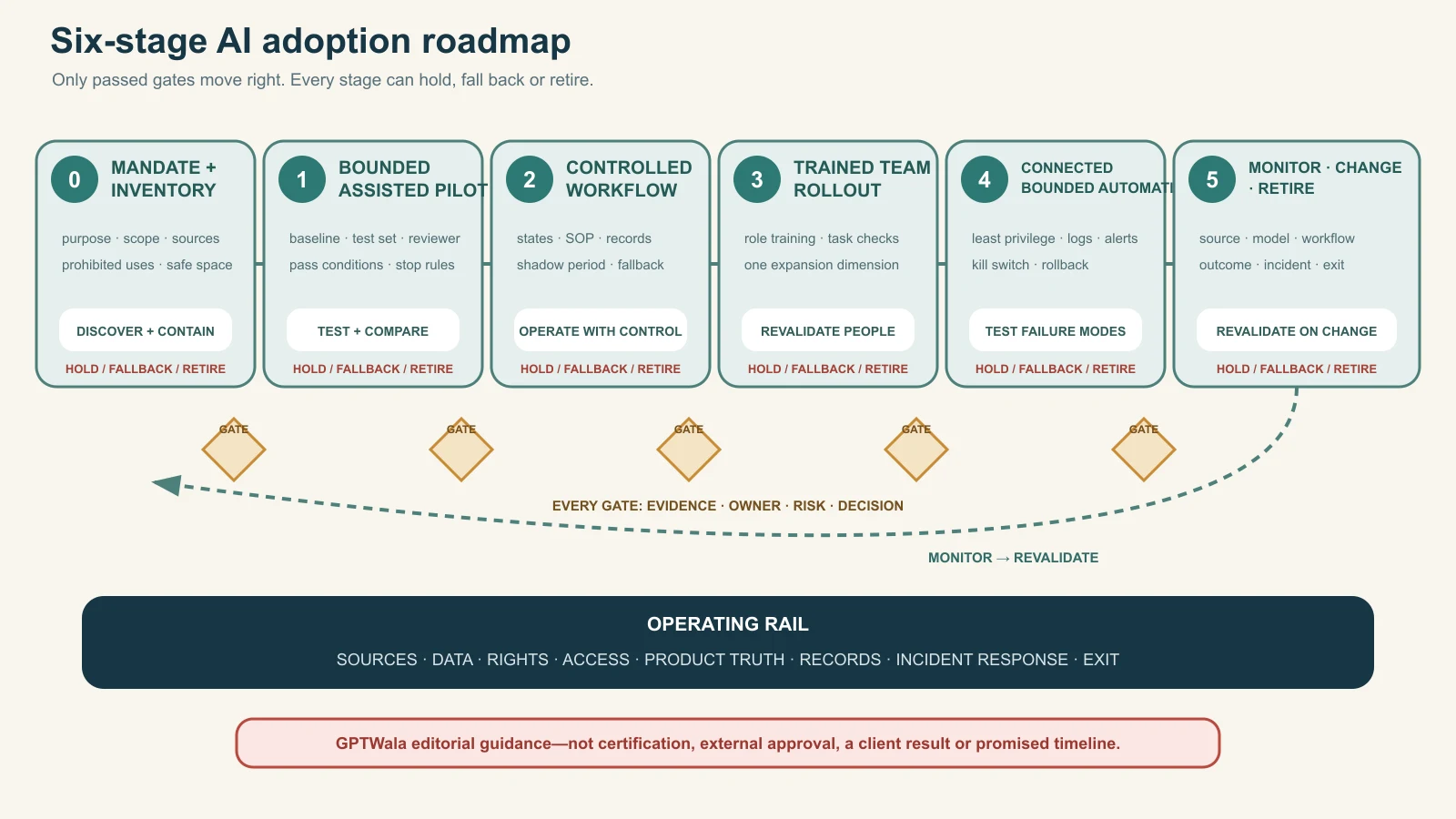
    Six-stage AI adoption roadmap from mandate and inventory through pilot, controlled workflow, team rollout, bounded automation and monitoring or retirement

    Original GPTWala deterministic roadmap. Every stage has evidence, owner, risk and decision gates plus a hold, fallback or retirement route; it is guidance, not certification or a promised implementation timeline.

    Assign roles and decision rights

    One person can hold several roles in a small business, but each decision still needs an explicit owner. Separate operation from approval when the output can materially affect a product, customer, employee, supplier, payment or public claim.

    Minimum role map

    Role Owns Cannot delegate silently to AI
    Accountable business owner Purpose, budget, risk appetite, stage decision Final accountability
    Use-case owner Workflow, baseline, value, SOP and ongoing performance Scope/change decision
    Product/domain owner Product/specification/process truth Technical/product approval
    Data/source owner Source quality, access, classification and retention Permission/currency decision
    Operator Executes approved procedure and records exceptions Release authority unless assigned
    Reviewer Compares output against product/source/rules Evidence-based sign-off
    Privacy/security/rights reviewer Data flow, access, vendor, content/people rights Specialist judgement
    Release/decision owner Authorises defined channel/action Claim, price, stock, payment or safety commitment
    Technical/integration owner Connectors, credentials, logs, rollback and changes Business approval
    Incident owner Stops, coordinates, corrects, documents and closes Material incident decision

    Use decision rights, not “human oversight” as a slogan

    For each use case, state:

    • who may start a job;
    • who may access which data;
    • who reviews which truth fields;
    • who can approve internal use;
    • who can release externally;
    • who can change the tool/prompt/integration;
    • who can override the output;
    • who can stop the workflow; and
    • who owns downstream correction.

    A reviewer without time, source access, expertise or authority is not a control.

    Small-team pattern

    An owner may be accountable and release authority; a product manager may be source owner and reviewer; an operator may create drafts. For amber work, use a second person or delayed second pass. For red/high-impact work, obtain appropriate specialist independence rather than self-approving because the team is small.

    Select tools and vendors with an exit route

    Choose against the use-case card, not a viral demo or a generic “best AI tools” list.

    Use the vendor decision sheet

    Dimension Evidence to inspect Stop/hold condition
    Job fit Test-set performance on exact task Works only on showcase examples
    Control References, masks, constraints, structured output, audit/export Cannot protect buyer-critical fields
    Data Inputs, retention, model improvement, region, subprocessors/settings Confidential/personal use is unclear or unapproved
    Security/admin Named users, roles, MFA/SSO where needed, logs, offboarding Shared login or no recovery/control
    Rights/terms Input rights, output terms, restricted uses, indemnity/limits Intended commercial/channel use unresolved
    Reliability/change Versioning, status, support, change notice, fallback Workflow cannot detect material change
    Cost Unit, limits, overage, human review/rework, integration Cost cannot be bounded or measured
    Integration Permissions, logs, error handling, sandbox and kill switch Excess access or irreversible write path
    Exit Export, formats, deletion/retention, credential removal, replacement Business records/workflow are locked in

    Provider terms are provider-specific. For example, OpenAI’s current ROW Terms of Use say users are responsible for input rights and output evaluation, and warn outputs may be inaccurate or non-unique. That is not a universal summary of every provider or a warranty for any use case. Read the actual current terms, privacy/data controls and enterprise agreement for the chosen account.

    Include the full operating cost

    Count:

    • subscription/usage/API;
    • setup/integration;
    • source preparation;
    • operator and reviewer time;
    • correction and rejected output;
    • storage, security and admin;
    • training/change management;
    • downtime/fallback; and
    • incident/exit cost.

    A cheaper generation is not cheaper adoption when review and rework rise.

    Protect data, confidentiality, rights and access

    AI adoption often moves business data to new providers, accounts, extensions and integrations. Review the data flow before the first upload.

    Use an AI input gate

    Before submitting data, answer:

    1. What exact fields/files are entering?
    2. Who owns or has rights to use them?
    3. Are personal, confidential, regulated or third-party elements present?
    4. Is this provider/account/feature approved for that classification and purpose?
    5. What retention, model-improvement and human-review settings/terms apply?
    6. Where does the output/log go and who can access it?
    7. Can the input be minimised, masked, aggregated or replaced with synthetic training data?
    8. What notice, contract, consent or other authority is required?
    9. How will correction, deletion, access revocation and incident handling work?
    10. Does a safer manual/local/enterprise route exist?

    India’s DPDP framework has phased commencement. The current India Code commencement record is a publication-day legal-refresh route, not a checklist proving that a data use is lawful. Obtain current privacy, employment, sector, contract and cross-border advice for the real workflow.

    Control likeness, voice and synthetic media

    Do not upload an employee, customer, creator or owner’s face/voice merely because the business has a photograph or recording. Record purpose, source, person, consent/contract, languages, products, channels, duration, withdrawal, provider and final approval.

    India’s 2026 synthetic-media framework is time-sensitive. MeitY’s official FAQ on synthetically generated information discusses realistic synthetic audio/visual media and current intermediary/platform declaration/labelling context. It does not create a universal merchant label or make impersonation acceptable. Reopen the notified rules, corrigendum, platform controls and real facts before use. The AI spokesperson video guide owns the detailed workflow.

    Protect accounts and integrations

    • use business-owned named accounts;
    • enable appropriate authentication/recovery;
    • avoid shared personal logins;
    • grant least privilege;
    • separate production and testing;
    • store credentials in approved systems;
    • review extensions/connectors;
    • remove access promptly when roles change; and
    • inventory renewal/payment owners.

    Do not let an agency or one employee become the only person who can access, recover, export or stop a critical AI workflow.

    Protect product truth and customer claims

    AI can make missing truth look complete. Product businesses need a release gate that compares every material output with the exact item and authorised records.

    The current ASCI Code says objectively ascertainable advertising claims should be capable of substantiation and that statements or visual presentation should not mislead through implication, omission, ambiguity or exaggeration. India’s official 2022 misleading-advertisement guidelines are another publication-day check. General guidance cannot replace category-specific legal review.

    Product-truth release gate

    Reject an asset or answer that changes/invents:

    • SKU, model, variant or current pack;
    • shape, proportions, openings, handles, closures or components;
    • colour, finish, material, transparency, pattern, text or logo;
    • dimensions, weight, capacity or scale;
    • number of items or included accessories;
    • fit, drape, setting, tolerance or compatibility;
    • stock, production capability, lead time or geographic service;
    • price, tax, discount, credit, freight, warranty or return terms;
    • certification, hallmark, test, safety, health, environmental or performance claim; or
    • customer result, testimonial, rating or endorsement.

    Disclosure is separate. “AI-generated” does not repair a wrong product or unsupported claim.

    Use risk-specific evidence

    Business/product AI can assist Human/real-source proof remains essential
    Surat apparel Layout, background/context draft, catalogue copy from records Exact print/colour/size, seam, transparency, fit and drape
    Jaipur jewellery Classification, captions from approved fields, scene concepts Stone count/setting, metal/purity/hallmark, weight, clasp, scale
    Rajkot components RFQ extraction, checklist, document search Drawing, tolerance, material, process, compatibility and quality release
    Morbi tiles Taxonomy, room-context draft, sample-request routing Shade/batch, dimensions, finish, slip/performance and installation claims
    Packaged consumer goods Asset resizing, approved-description variants Current label, declarations, quantity, ingredients/claims, seals and pack version
    Local retailer FAQ/reply drafts from live records Exact model, stock, price, delivery, installation, warranty and payment

    Route imagery through the product-accuracy audit and scale workflows through the AI catalogue system.

    Control AI-generated web content

    Google’s official guidance on generative AI content focuses on accuracy, quality, relevance and context; scaled low-value pages can conflict with spam policies. Do not use adoption targets such as “publish 1,000 pages.” Set a buyer decision, unique evidence, review owner and maintenance trigger for each public page.

    Measure adoption without vanity metrics

    Logins, prompts and generated files show activity. They do not prove business value, safety or adoption quality.

    Establish the baseline first

    For the existing workflow, record a representative period or set:

    • inputs and volume;
    • cycle/wait time;
    • operator/reviewer hours;
    • cost;
    • accepted output definition;
    • first-pass acceptance;
    • rework and defect types;
    • downstream errors/complaints;
    • data/rights/security incidents; and
    • capacity/quality limits.

    If the baseline is not recorded, a faster-looking demo can receive credit for work it did not replace.

    Use adoption-quality measures

    Measure Definition Guardrail
    Accepted output Output passing the defined source/truth/use review Generated does not equal accepted
    First-pass acceptance rate Accepted without material revision ÷ outputs reviewed Define material revision and cohort
    Material defect rate Outputs with defined truth/claim/data/rights defect ÷ outputs reviewed One severe defect may stop regardless of average
    Escaped-defect rate Released outputs later found with material defect ÷ released outputs reviewed Requires downstream correction log
    Total cost per accepted output Tool + setup allocation + operator + reviewer + rework + incident cost ÷ accepted outputs No zero-denominator value
    Cycle time Start-to-approved/released time under defined boundaries Separate active work and waiting if useful
    Review burden Reviewer time and queue by use case Falling review time is unsafe if defects escape
    Override/stop rate Jobs stopped or routed to fallback ÷ jobs attempted A healthy stop can be a control success
    Adoption coverage Trained/authorised operators actually using the controlled workflow Do not reward shadow use
    Outcome measure Verified downstream business/quality measure linked under a stated method Avoid automatic revenue attribution

    Use zero-tolerance gates

    For some defects, average performance is irrelevant. Define automatic hold conditions such as:

    • personal/confidential data exposure;
    • wrong product/variant released;
    • unsafe or regulated claim;
    • unauthorised person/voice/asset use;
    • price/payment/credit/stock action without authority;
    • unlogged autonomous customer action; or
    • inability to stop/trace the integration.

    Make the scale decision

    • Keep: bounded value is demonstrated and controls work.
    • Fix: issue has a plausible bounded correction and retest.
    • Stop: value is weak or risk/control cannot be resolved.
    • Scale: expand one dimension with a new gate and monitoring plan.

    “Team likes the tool” can support usability evidence. It cannot replace quality, risk, cost and outcome evidence.

    Apply the roadmap to manufacturers and retailers

    These scenarios are illustrative workflows, not GPTWala clients or measured results.

    Manufacturer: RFQ intake assistant

    Start: extract supplied RFQ fields into a review checklist and flag missing drawings, materials, quantity, tolerance and delivery information.

    Keep human: engineering compatibility, manufacturability, capacity, quality plan, price, contract and commitment.

    Pilot gate: representative RFQs, known missing/contradictory cases, exact source citations, no auto-reply and no ERP write. Stop if the model invents a specification or maps to the wrong part.

    Manufacturer: catalogue-image workflow

    Start: controlled background variants around exact approved product captures.

    Keep human: SKU mapping, geometry, colour/material, text, parts, scale, claims, channel rules and release.

    Pilot gate: adjacent variants, reflective/transparent items and incomplete inputs must trigger rejection. Use the phone-to-approved workflow before team rollout.

    Retailer: product-enquiry reply assistant

    Start: draft replies from current catalogue, service area and approved policy fields; ask a human to select/send.

    Keep human/authoritative system: exact stock, price, discount, delivery, installation, warranty, payment/refund and exceptions.

    Pilot gate: no autonomous outreach, no unlimited marketing inference and no request for sensitive payment credentials. Route the sales process to the WhatsApp selling system.

    Apparel wholesaler: collection-content system

    Start: group verified styles and draft buyer-specific collection text.

    Keep human: style/size/colour mapping, assortment, case/MOQ, price basis and model-image fit/drape truth.

    Pilot gate: no adjacent-print contamination, invented size availability or generated garment feature.

    Jewellery retailer: content and search assistant

    Start: retrieve approved design fields, draft captions and help staff locate matching items.

    Keep human: exact item, stone settings, metal/purity/hallmark, weight, price, availability and customer advice.

    Pilot gate: macro references and physical item required; no invented stone/material claim and no generated image used as composition proof.

    Multi-store retailer: demand summary

    Start: summarise authorised aggregate sales/stock reports for managers and surface questions.

    Keep deterministic/human: replenishment order, promotion, price, shrinkage accusation, employee evaluation and supplier commitment.

    Pilot gate: reconcile aggregates to the source, restrict store/customer/employee data, and label inference/uncertainty. Do not let a natural-language summary write inventory changes.

    Use a 90-day starting roadmap

    Ninety days is an editorial planning frame, not a promise that every business will reach production. High-risk, regulated, integrated or data-heavy work may need much longer; a low-risk task may stop earlier.

    Days 1–15: discover and contain

    • name accountable owner and working group;
    • inventory current/shadow tools, use cases, data and integrations;
    • stop obvious restricted/uncontrolled use;
    • map product/claim/data sources;
    • publish a short mandate and experiment route; and
    • shortlist one low/controlled-risk use case.

    Days 16–30: design the pilot

    • define current workflow and baseline;
    • classify data and rights;
    • evaluate tool/vendor/account and exit route;
    • build representative test and stop cases;
    • assign operator, reviewer, release and incident owners; and
    • approve pilot card, budget and fallback.

    Days 31–60: run and measure

    • execute in a non-production or draft-only boundary;
    • record tool/model/configuration and sources;
    • compare outputs with evidence;
    • log reviewer effort, defects, stops, cost and cycle time;
    • test failure/rollback; and
    • decide keep, fix or stop.

    Days 61–75: operationalise a passing use case

    • write SOP/workflow pack;
    • define states, permissions, storage and logs;
    • train operators/reviewers on current cases;
    • run shadow/parallel work;
    • complete security/privacy/rights/vendor checks; and
    • approve limited release.

    Days 76–90: decide bounded scale

    • inspect released quality and escaped defects;
    • confirm value and total cost against baseline;
    • recheck vendor/source/model changes;
    • approve only one expansion dimension;
    • schedule monitoring and revalidation; and
    • document fallback/retirement route.

    Do not create a second pilot merely to avoid deciding the first. Close each cycle with an evidence-backed stage decision.

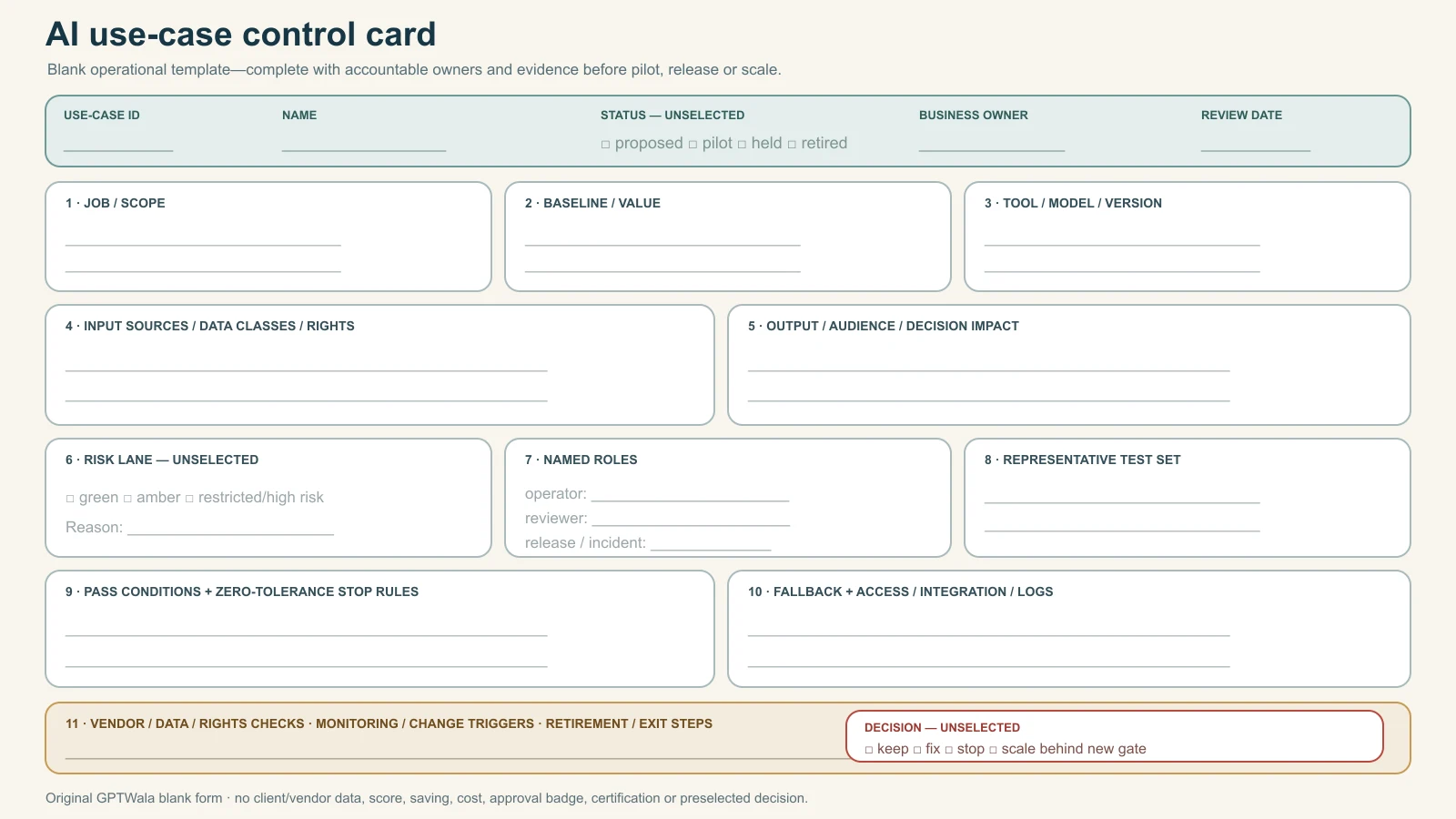
    Blank AI use-case control card with purpose, sources, data class, risk, owners, test, pass conditions, stop rules, monitoring and retirement fields

    Original GPTWala blank operating template. Status and decisions remain unselected, and the card contains no client or vendor data, approval badge, certification, score, saving or productivity result.

    Respond to incidents and stop unsafe use

    An incident can be a data exposure, wrong product, misleading claim, unauthorised content, security event, harmful decision, uncontrolled automation, material cost spike or inability to trace/correct an output.

    Use the stop-and-correct route

    1. Stop: pause generation, release and automated downstream action.
    2. Quarantine: identify affected outputs, records, accounts, connectors and live destinations.
    3. Preserve: retain relevant input/output/prompt/version/log/decision evidence under approved policy.
    4. Escalate: notify incident, business, product, data/security, rights/compliance and vendor owners as applicable.
    5. Protect: revoke access/keys, block the workflow and prevent further exposure or commitment.
    6. Correct: remove/replace public assets, correct records and contact affected people/partners where required and appropriate.
    7. Assess: determine scope, harm, obligations, source/model/workflow cause and control failure.
    8. Retest: update the system and run the representative/stop test set.
    9. Decide: resume within scope, reduce scope, return to manual, replace vendor or retire.
    10. Learn: update training, inventory, controls and monitoring without hiding the incident.

    Do not let the operator silently regenerate until the error disappears. That destroys evidence and leaves the underlying control failure alive.

    Define authority before the incident

    Every production use case needs a named person who can:

    • disable access or integration;
    • stop publication/messages/actions;
    • inform downstream owners;
    • approve corrections;
    • contact vendor/support;
    • obtain specialist advice; and
    • decide whether the workflow remains authorised.

    If nobody can stop it quickly, it is not ready for automation.

    Connect AI adoption to the DAA system

    AI adoption should strengthen a product business’s source truth and operating discipline, not create content faster than the business can verify, distribute, answer or fulfil.

    GPTWala’s DAA sequence is Digital Presence → AI Content Creation → ₹100/day WhatsApp ads. Article 25’s offline-to-online DAA roadmap explains the customer-growth sequence. This AI adoption roadmap supplies the wider organisational controls underneath it: approved tools, inputs, owners, product-truth gates, release records, measurement and stop rules.

    The GPTWala workshop is educational. It does not guarantee productivity, savings, content volume, leads, orders, revenue, profit or return on ad spend.

    Frequently asked questions

    Where should a manufacturer or retailer start with AI?

    Start with one useful, bounded and reversible task whose inputs are permitted and current, whose errors a knowledgeable person can detect and whose baseline can be measured. Examples include formatting approved product data or drafting from a controlled source. Do not start with autonomous pricing, credit, safety, quality release, customer outreach or product claims.

    Do we need an AI policy before a pilot?

    You need at least a short mandate covering purpose, prohibited uses, sources, data, human review, access, vendors, records, incidents and change. It can begin concise and grow with risk. Do not wait for a perfect policy while employees use unapproved tools invisibly; inventory and contain current use first.

    How many AI tools should we test?

    There is no universal number. Compare only enough options to answer the use-case requirements and exit risks. One deeply tested workflow is more informative than many shallow demos. Tool count is not an adoption metric.

    How do we choose the first AI use case?

    Require defined value, known/permitted inputs, bounded output, human reviewer, manageable harm, representative test set, baseline, fallback and accountable owner. Hold the task if a critical condition is missing. Do not average a data, rights or safety failure into a high score.

    Can AI approve product specifications or quality?

    Not through an ordinary generative-content workflow. AI may extract fields or flag questions, but technical compatibility, tolerance, material, safety and quality release need authoritative sources, validated methods and qualified human/system authority. High-impact machine-vision or engineering systems need specialist validation and governance.

    Can employees upload customer or product data to AI tools?

    Only when the exact data, purpose, tool/account, settings, retention, rights, security and legal/contract conditions are approved. Public availability does not remove rights or privacy questions. Minimise the input and use synthetic/de-identified training cases where appropriate.

    How should we measure AI adoption?

    Compare accepted output, material and escaped defects, total cost per accepted output, cycle time, review burden, stop/override rate, authorised-user coverage and a verified downstream outcome where appropriate. Pair measures with cohorts and definitions. Logins, prompts and generated files measure activity only.

    When can we automate an AI workflow?

    After the manual AI-assisted workflow passes, sources and decision rights are stable, permissions and data controls are approved, failure modes/rollback are tested, logs/alerts exist and a person can stop it. Increase one dimension of autonomy or scope at a time.

    What if the AI model or vendor changes?

    Treat a material model, feature, plan, term, data-control, region, integration or output change as a revalidation trigger. Pause affected high-risk use if the team cannot show that prior controls still work. Preserve a fallback and exit route before dependency grows.

    Is AI adoption successful if it saves time?

    Time can be one benefit, but only after accepted quality, product truth, data/rights safety, total cost and downstream outcomes are considered. A faster workflow that increases review, defects, customer harm or lock-in is not a demonstrated improvement.

    How is this different from the DAA framework?

    DAA is the customer-growth sequence linking Digital Presence, AI Content Creation and a controlled ₹100/day WhatsApp ads system. This article covers AI adoption across teams, tools, data, permissions, use cases, roles, integrations, monitoring and retirement. The two connect, but they solve different operating decisions.
    Sources checked for this guide

  • AI Model Photos for Apparel: Fit, Drape and Garment-Truth Checklist

    Exact kurta reference, synthetic adult model image and garment-truth checklist for reviewing fit and drape
    Original GPTWala editorial diagram using a fictional garment and clearly synthetic adult. It is not fit proof, a seller result or a real customer.

    Reviewed and updated: 12 August 2026

    AI model photos can be useful as secondary apparel images when they show the exact garment, the model or likeness is properly authorised, and a garment expert checks every buying-critical detail. They should not be presented as proof of exact fit, size, fall or drape. If the sale depends on how a real garment behaves on a body, if a complex drape or layered outfit cannot be verified, or if AI changes the garment’s cut, construction, print, colour or included pieces, use real model photography.

    This guide covers fixed marketing images created by placing or generating apparel on a model. It does not promise customer-specific virtual fitting, recommend a particular AI tool, or replace the current image rules for a marketplace. Tool features, model releases, platform policies and India’s privacy framework can change, so verify the final production setup on the date of use.

    Table of contents

    1. What an AI apparel model image can and cannot prove
    2. Choose the correct risk lane before generation
    3. Build the exact-garment reference pack
    4. Create a garment-truth card
    5. Control model consent, likeness and data
    6. Review fit and drape without turning a visual into a promise
    7. Brief cultural and regional styling without stereotypes
    8. Use the eight-gate AI model-photo workflow
    9. Find garment changes with a structured review
    10. Apply the real-photography stop rules
    11. Run a five-SKU apparel pilot
    12. Frequently asked questions

    What an AI apparel model image can and cannot prove

    The safest mental model is visualisation, not fitting evidence. An AI system can produce a plausible person wearing something that resembles the reference garment. It has not physically put that garment on that person, felt the fabric, checked the size label or measured the ease.

    Google makes the same distinction in its current customer-facing try-on documentation. It says generated images may contain errors in body shape, personal features or clothing details, and that the result does not indicate fit, suggest a size or show size availability. That is guidance for Google’s own try-on feature, not a performance assessment of every commercial tool, but it is a useful truth boundary for any seller-created AI model visual. See How Google’s try on tool works.

    Image type What it may safely communicate after review What it cannot establish by itself
    Real model wearing the exact sample Observed appearance of that sample on that model, in that pose and size Fit for every customer or size; unseen motion or long-term wear
    Reference-led AI model image Styling direction, approximate wearing context and an additional visual angle Exact fit, ease, drape, transparency, stretch, weight, size recommendation or body-specific outcome
    Fully generated fashion concept Campaign mood, pose or scene direction Evidence of a purchasable SKU, actual garment details or what the buyer receives
    Customer virtual try-on preview A personalised visualisation within that feature’s stated limits Measurement, tailoring advice, stock availability or guaranteed fit
    Flat lay, ghost mannequin or product-only photo Garment identity, construction and details visible in the source Appearance on a moving body or exact drape in use

    Research supports the need for this caution. Recent virtual try-on work continues to focus on preserving complex text, patterns, uncommon garment details, pose, layering and resolution. An AAAI 2025 paper describes difficulty retaining intricate text and patterns in prior methods. A March 2026 research preprint reports that complete outfits and layering remain challenging for current try-on and general image-editing systems. These are research findings on specific datasets and methods, not a claim that every output fails. They show why an attractive image still needs garment-led human review. See Cascaded Diffusion Models for Virtual Try-On and the preprint Garments2Look.

    The complete AI product photography guide explains the broader visual system. This page owns apparel-model truth: body interaction, garment fit and drape implications, model rights and culturally plausible styling.

    Choose the correct risk lane before generation

    Do not begin with “make this kurta look premium.” Begin with one image role and one risk lane.

    Lane 1: low-risk styling concept

    The model, outfit or scene is concept-only and is not attached to a product listing. Use it to plan a campaign, casting, backdrop or pose. Label it internally as concept-only and rebuild the sale asset with the exact garment.

    Suitable for: moodboards, pre-shoot planning, colour-direction exploration.
    Not suitable for: product proof, a marketplace main image, fit claims or a catalogue order page.

    Lane 2: reviewed secondary model image

    The exact garment is supplied as reference and appears on an adult synthetic or authorised real model. The image is an additional website, catalogue or social visual. Product-only and real-detail images remain available beside it.

    Suitable for: a simple T-shirt, kurta or dress after exact-SKU review when the generated view does not claim size or fit.
    Required controls: complete source pack, locked garment fields, model-rights record, garment expert approval and destination-rule check.

    Lane 3: real photography or tightly controlled hybrid

    Use the real garment on a real model when the image’s job is to prove fit, drape, transparency, movement, layered construction, scale or tailoring. AI may still extend a background or create a crop around protected real pixels if the final image remains truthful.

    Suitable for: complex sari or dupatta drape, bridal or embellished garments, sheer layers, fit-sensitive products, size-range representation and high-value catalogue proof.

    The lane can only move toward more evidence. A concept image does not become a verified product asset because it receives a logo and SKU number.

    Decision flow for choosing AI apparel model imagery, a protected hybrid or real model photography

    Original GPTWala decision flow. Any missing reference, missing right or repeated garment drift routes the job to a safer method.

    Build the exact-garment reference pack

    AI model imagery is constrained by what the team can verify. One front photo rarely reveals the back, side seam, border continuation, lining or material behaviour. Build the pack before opening a tool.

    Capture the garment itself

    For one exact SKU and variant, collect:

    • full front and full back, squared to camera;
    • left and right side where construction differs;
    • inside view showing lining, facing, seam finish and labels where relevant;
    • neckline, sleeve, hem, border, placket, zipper, buttons, hooks, pockets and embellishment close-ups;
    • a colour reference captured under controlled light;
    • a scale frame and verified garment measurements;
    • every included piece, such as kurta, trousers and dupatta, photographed separately and together;
    • the current packaging and size label; and
    • a short real video showing movement when fall, stiffness, sheen or transparency is buying-critical.

    The video is evidence for the reviewer, not an instruction to invent motion. If the real fabric forms broad structured folds, the generated image should not turn it into liquid satin. If the cloth is translucent under backlight, do not let the image silently make it opaque.

    Record the exact size and physical measurements

    Store the sample size, bust/chest, waist, hip where relevant, shoulder, garment length, sleeve length, hem opening and other category-specific measurements. Record whether measurements are garment measurements or body recommendations; do not mix them.

    The model image should name the sample size in the internal record. Public text such as “Model is wearing M” is only valid if the visual and production method support that statement. A synthetic model did not physically wear the sample. Safer copy may be “AI-assisted styling visual; see size chart for garment measurements” when disclosure is appropriate and channel rules allow it.

    Capture one verified real wearing reference when drape matters

    A flat lay shows shape; it does not fully show behaviour on a body. For a garment where the selling idea depends on fall, pleats, volume, length or layering, capture at least one real wearing reference of the exact sample, even if it is not the final campaign image.

    This is especially useful for:

    • sari borders and pallu behaviour;
    • dupatta transparency, fall and edge weight;
    • anarkali flare and panel distribution;
    • lehenga volume, cancan or lining;
    • wide-leg trousers and palazzo movement;
    • asymmetric hems;
    • oversized versus regular-fit silhouettes; and
    • knit stretch, rib recovery or body cling.

    If no one has ever seen the exact garment worn, the team cannot honestly certify AI-generated drape from a flat reference alone.

    Create a garment-truth card

    The truth card turns “same dress” into fields a reviewer can approve or reject.

    Truth field Record from the physical SKU Automatic reject example
    Identity SKU, colour, size, collection and current version Neighbouring colourway or previous season’s construction appears
    Silhouette Straight, A-line, fitted, oversized, flared or other verified cut Straight kurta becomes cinched or flared
    Proportions Garment and sleeve length, neckline depth, waist/hem relationships Crop length, slit height or sleeve length changes materially
    Construction Seams, panels, darts, pleats, gathers, closures, pockets and lining Pocket, dart, zipper or panel is added or removed
    Print and motif Motif artwork, repeat direction, scale and placement Print is regenerated, mirrored, stretched or repeated incorrectly
    Border and embellishment Width, sequence, count, placement and continuity Border widens at hem; embroidery changes design or density
    Colour and finish Catalogue colour name plus controlled references Rust becomes red; matte cotton becomes shiny silk
    Fabric behaviour Verified stiffness, fall, stretch, transparency and texture Structured handloom cloth becomes flowing chiffon
    Included pieces Exact components and colours Dupatta, belt, trousers or jewellery appears included when it is not
    Branding and labels Logo, label and visible text Garbled label, invented monogram or altered logo
    Size/fit implication Sample size, real reference and allowed language Image or caption implies a guaranteed body fit
    Cultural styling Intended drape, layer order, occasion and reviewer Pallu, dupatta or head covering is placed in an unintended or implausible way

    Mark every field locked, context may change, or unknown—recapture. Never turn unknown into “let AI decide.” The product-truth prompt pack can express the locked fields, but prompts do not replace source evidence or review.

    Garment approval and model permission are separate records. A perfect kurta reproduction can still be unusable if the team did not have the right to upload, transform or publish the person’s image.

    Choose the model source deliberately

    Model source Minimum control before use Stop condition
    Fully synthetic adult with no intended real-person resemblance Tool terms permit commercial output; generation record; no celebrity, public figure or identifiable reference Output resembles a real person, appears underage or carries an unapproved identity claim
    Paid real model photographed by the business Written release covers commercial channels, AI-assisted alteration, permitted derivatives, territory, duration and storage Release is silent on AI transformation or planned use exceeds its scope
    Employee, founder or friend Same written, freely given and specific release as a paid model; no assumption that employment or friendship equals permission Pressure, vague verbal permission or inability to withdraw from future optional use
    Licensed stock or agency model Licence explicitly permits the intended commercial use and AI/synthetic modification; keep invoice and terms version “Commercial use” exists but synthetic alteration, derivative use or sensitive context is excluded
    Customer or social-media photo Separate explicit permission and a qualified rights/privacy process Screenshot, tag, DM approval or public post is treated as a model release
    Child or person who may appear under 18 Specialist legal/guardian process and platform/tool review Age is uncertain, consent is informal, or synthetic output makes an adult look like a child

    For a small apparel business, the cleanest low-risk starting point is often either a contracted adult model with a clear AI-use release or a fully synthetic adult who is not based on an identifiable person. Do not prompt for a celebrity lookalike, clone a competitor’s campaign model or use an influencer’s face without a specific agreement.

    Put these fields in the model release and rights log

    Ask qualified counsel or a rights professional to adapt the release to the business. Operationally, record:

    • model’s verified adult status and identity record owner;
    • the original shoot or source files;
    • commercial purpose and named brand or entity;
    • whether AI editing, virtual try-on, face/body alteration and synthetic derivatives are permitted;
    • which product categories and contexts are allowed or excluded;
    • channels, territories, languages and campaign duration;
    • paid-media, marketplace, catalogue, website and social permissions;
    • whether vendors or processors may receive the file;
    • storage, access, deletion and breach-contact process;
    • compensation and credit terms;
    • withdrawal, expiry and takedown procedure; and
    • approving person, agreement date and version.

    The ASCI Code is a self-regulatory advertising standard, not a model-release statute, but its truth principles are relevant. It says advertisements should be truthful, should not mislead through visual presentation, implication or omission, and should have permission for references to a person that confer an unjustified advantage or cause ridicule or disrepute. See the current ASCI Code.

    Do not oversimplify India’s DPDP commencement status

    An identifiable person’s digital image may involve personal-data processing, but the exact legal analysis depends on the facts. India’s Digital Personal Data Protection Act, 2023 and the 2025 Rules have a phased commencement. The official 13 November 2025 notification brings some provisions into force immediately, some after one year, and many substantive processing and consent provisions 18 months after publication. On 12 August 2026, that 18-month point had not arrived.

    Do not write “DPDP requires this release today” as a blanket claim. Maintain a specific written permission and secure data process now because it is sound rights management, and obtain current legal advice for the business, use case and effective dates. The sources of record are MeitY’s commencement notification, the DPDP Act, 2023 and the DPDP Rules, 2025. This article is operating guidance, not legal advice.

    Review fit and drape without turning a visual into a promise

    Fit is a relationship, not a look

    Fit depends on the physical garment, pattern, labelled size, ease, stretch, construction and the wearer’s measurements and posture. A generated picture can create a convincing waist, shoulder or sleeve line without calculating any of those relationships.

    Reject or qualify an image when it visually implies:

    • a fitted waist for a straight-cut garment;
    • a drop shoulder when the pattern has a set-in sleeve;
    • extra ease or body cling unsupported by the sample;
    • a shorter or longer hem than the measured garment;
    • a deeper neckline or higher slit;
    • a size-inclusive result that was never checked on that body range; or
    • “perfect fit,” “tailored fit” or a size recommendation without evidence.

    Keep the actual size chart next to the image. The image can inspire; measurements must do the size-information work. Google’s apparel guidance similarly treats size, size type and size system as explicit product data rather than something a buyer should infer only from a photograph. See Google’s apparel and accessories best practices.

    Drape is physical behaviour, not just folds

    Drape is affected by fabric weight, structure, weave or knit, finish, lining, cut, grain, pleating, gravity, pose and motion. AI often produces aesthetically pleasing folds that belong to a different material.

    Review:

    • where folds begin and end;
    • whether pleats are constructed or invented;
    • how the fabric hangs from shoulder, waist and hip;
    • whether a border follows the real grain and edge;
    • whether transparency and lining remain visible where they should;
    • whether sheen is plausible for the verified material;
    • whether flare and volume match the panel construction; and
    • whether hands, bags or hair hide a failure.

    If a reviewer cannot compare with a real wearing or movement reference, the output cannot be approved as drape proof.

    Body editing is also a product-truth risk

    Some systems change the body while placing the garment: narrowing a waist, lengthening legs, changing shoulder width, smoothing skin or moving hands. Apart from model-rights and representation concerns, body changes can make the garment look differently fitted.

    Keep a model/body reference where a real model is used. Reject unexplained changes to body outline, pose or proportions that alter the garment’s apparent fit. For a fully synthetic model, select the body brief before generation and do not silently generate only the body type that flatters the garment most. A responsible catalogue can show range without claiming that one synthetic outcome predicts every customer.

    Brief cultural and regional styling without stereotypes

    “Indian model wearing ethnic outfit” is not a usable production brief. India’s garments, draping systems, occasions and customer preferences are too varied for a single default. Cultural fit means the styling is accurate for the seller’s intended product story and respectful to the audience, not that the model looks generically “traditional.”

    Specify the product story, not an identity caricature

    Record:

    • garment and component names used by the business;
    • region or tradition only when genuinely relevant to the product;
    • intended occasion and customer setting;
    • exact layer order and drape method;
    • blouse, inner layer, trousers, petticoat or lining requirements;
    • whether head, shoulders, midriff, arms or legs should be covered for the intended styling;
    • footwear, jewellery and props, with a clear note that styling items are not included;
    • hair, makeup and pose direction without skin-tone or body stereotypes; and
    • a local merchandiser or cultural reviewer who can approve the result.

    Do not add a bindi, turban, religious symbol, wedding marker, temple background or community-specific styling merely because the model is Indian. Do not “improve” authenticity by inventing accessories the buyer will not receive.

    Stress-test Indian garment structures

    Standard research datasets have expanded from upper-body garments to broad categories such as tops, bottoms and dresses, but that does not prove accuracy for every Indian garment or drape. The Dress Code research dataset, for example, groups front-view catalogue imagery into upper-body, lower-body and dresses. A 2026 research preprint, Virtual Try-On for Cultural Clothing, introduced saree, panjabi and salwar kameez examples specifically to study a wider clothing domain. These sources show active research expansion; they are not a commercial accuracy certificate.

    For sari, lehenga, salwar-kameez, kurta sets, dupattas and layered occasion wear, test the exact tool with the exact SKU and review:

    • pallu direction, length and border continuity;
    • pleat count and where pleats originate;
    • dupatta placement, transparency and edge weight;
    • kurta side slits, trousers and layer order;
    • lehenga panel distribution, flare, waistband and blouse construction;
    • motif scale across folds and seams; and
    • whether styling pieces appear included in the offer.

    Use real photography when the drape method itself is part of the product value.

    Four illustrative Indian business cases

    Surat kurta-set wholesaler: The tool preserves the print at the front but invents a matching motif on the trouser and makes the dupatta opaque. Reject. Use the real flat-lay set and detail images; regenerate only when all three components and transparency remain verified.

    Tiruppur T-shirt manufacturer: A simple crew-neck T-shirt can be a reasonable secondary-image pilot. Lock neck rib width, sleeve length, shoulder seam, fit category, colour and print placement. Reject if the model image narrows the torso and turns regular fit into slim fit.

    Jaipur occasion-wear retailer: Dense embroidery, tassels, lining and layered flare are high risk. Use real model photography for the product page. AI may help plan the scene or extend a protected background, but not redraw the garment.

    Varanasi sari seller: Border, pallu, weave appearance and drape are central buying information. A generated wearing image without a verified real drape reference is inspiration only. Retain real full-length and macro images; stop if the system repeats or widens the border.

    These are illustrative operating examples, not reported case studies or claims about every business in those cities.

    Use the eight-gate AI model-photo workflow

    Gate 1: define one image job

    Write the SKU, exact variant, channel, slot, audience and one-sentence purpose. Example:

    Create one reviewed secondary website image showing fictional adult model M-07 wearing exact SKU KRT-IND-114-RUST in a neutral standing pose. Preserve the kurta’s straight cut, round neck, three-quarter sleeves, rust colour, white motif scale, side slits and measured length. Do not imply a size recommendation or include trousers, dupatta, jewellery or belt.

    Gate 2: approve the reference and rights packs

    Confirm the garment source pack, truth card, sample size and model-rights record. If the garment or model record is incomplete, stop before generation.

    Gate 3: select a tool by control, not demo beauty

    Test whether the tool accepts the required garment views, a model reference where authorised, pose controls, masks and output resolution. Read current terms for commercial use, input retention, training and prohibited content. The same-SKU AI product-photo tool comparison owns vendor selection; this article owns the apparel acceptance test.

    Gate 4: generate a small candidate set

    Create four to eight candidates for one SKU and one pose family. Do not generate hundreds and approve the least-wrong image. Keep the prompt, tool/version, inputs, settings, output IDs and date.

    Gate 5: run garment identity review

    Compare the candidate with front, back and detail references. Check every locked truth-card field. Any changed SKU, construction, motif, border, colour or included piece is an automatic reject.

    Gate 6: run fit, drape and cultural review

    An apparel merchandiser or pattern/garment expert checks silhouette, length, ease implication, folds, layering and styling. A cultural reviewer checks any region- or occasion-specific drape. “Looks good” is not a pass condition.

    Gate 7: run model-rights and representation review

    Confirm release scope, adult status, likeness, body/face changes, sensitive context, disclosure plan and file handling. Reject a celebrity resemblance, an uncertain-age appearance or a context outside permission.

    Gate 8: export for one destination and record it

    Check the current marketplace, Shopping feed, website or ad rules; keep required AI provenance metadata; export the exact approved file; and record where it was used. The current product-image rules guide owns Google, Amazon India, Flipkart and website requirements.

    Google’s Merchant Center guidance currently recommends showing clothing on models, keeping the product central and using additional images for other angles or context. It also says Shopping images created with generative AI need the relevant IPTC source metadata. That platform guidance does not turn an inaccurate generated garment into an acceptable one.

    Find garment changes with a structured review

    Review at three scales

    1. Full frame: identity, silhouette, model pose, body proportions, length and cultural styling.
    2. 100% view: seams, neckline, sleeve, slit, folds, borders, closure and transparency.
    3. 200% detail: motif, embroidery, text, weave appearance, edge artifacts, fingers over fabric and small construction changes.

    Use side-by-side comparison and an overlay where camera alignment permits. An overlay is useful for product-only or matched-pose references, but it is not a fit measurement when the model or pose changes.

    AI apparel model-image failure atlas showing changed fit, drape, motif, layering and body proportions

    Original teaching atlas using a fictional garment. The deliberate errors are review examples, not observed tool-test results.

    Use a severity-based decision

    Severity Example Decision
    Critical Wrong SKU, colour, included piece, print, silhouette, label, model rights or apparent minor Reject and stop the asset
    Major Changed sleeve/hem length, neckline, border, embroidery, pocket, transparency, body proportions or drape claim Reject; recapture or change method
    Moderate Recoverable background edge, contact shadow or crop issue outside the garment Repair only if garment pixels remain protected, then re-review
    Minor Non-material background speck that cannot affect product meaning Correct, document and run final review

    Do not repair a critical garment error with more prompting while keeping the corrupted output as the new reference. Return to the approved source. The product-accuracy guide covers the broader severity and audit system.

    Keep a simple apparel approval record

    Field Record
    SKU/variant/sample size Exact identifiers and measurements source
    Image role/destination Secondary website, catalogue, ad concept or other named use
    Tool/version/date Reproducible production record
    Garment references Source folder and verified views
    Model source/rights Synthetic or authorised real model, release/licence version
    Truth-card result Pass/reject by field
    Fit/drape statement “Visualisation only”; any permitted public qualifier
    Cultural reviewer Name/date when applicable
    AI provenance/disclosure Metadata and visible disclosure decision
    Final decision Approved, revise or reject; reviewer and rollback file

    Apply the real-photography stop rules

    Use real model photography, a real mannequin/flat lay, or a protected hybrid if any of these conditions applies:

    • the image must prove exact fit, size recommendation, ease or tailoring;
    • a sari, dupatta, lehenga, draped or layered garment cannot be checked against a real wearing reference;
    • fabric transparency, lining, stretch, stiffness, sheen or movement changes buying meaning;
    • embroidery, print, border, weave, lace, text or branding is too detailed for reliable preservation;
    • multiple pieces must layer in a specific order;
    • the product is made-to-measure, personalised or high value and the generated view could alter expectation;
    • the output changes body shape or pose enough to change apparent fit;
    • model permission, licence scope, adult status or vendor data use is uncertain;
    • the destination requires a real or differently structured image;
    • the team cannot identify a qualified garment reviewer;
    • repeated generations fail the same locked field; or
    • the seller would be uncomfortable showing the AI image beside the physical garment to a customer making a return complaint.

    Real photography is not a failure of AI adoption. It is the correct evidence method for a truth-sensitive job. The AI versus traditional photoshoot guide helps choose AI, studio or hybrid at the project level.

    A strong hybrid apparel set

    For many small Indian sellers, a trustworthy product page can use:

    • real front and back images of the exact garment;
    • real detail and construction close-ups;
    • real model image for the key fit/drape view;
    • one reviewed AI-assisted secondary context image where useful;
    • an accurate measurement chart; and
    • copy that explains fabric, fit category and included pieces without turning the image into a guarantee.

    This gives the buyer evidence and inspiration without asking a generated image to do both jobs.

    Run a five-SKU apparel pilot

    Do not begin with the full catalogue. Choose five SKUs that reveal different risks:

    1. simple solid T-shirt;
    2. printed kurta;
    3. kurta set with two or three components;
    4. sheer or reflective fabric; and
    5. embroidered, draped or layered occasion garment.

    For each SKU, produce one secondary image candidate and record:

    • candidates generated;
    • critical/major garment failures;
    • time to approved asset;
    • need for recapture or real wearing reference;
    • rights-review result;
    • reviewer confidence;
    • destination acceptance; and
    • whether the asset adds information not already supplied by real images.

    Approve the workflow only for the categories it handles reliably. A pass on a solid T-shirt does not approve the same tool for a Banarasi sari or embroidered lehenga. Retire the tool or narrow its lane when review time exceeds the value of the asset.

    Frequently asked questions

    Can AI put my exact kurta or dress on a model?

    It can create a plausible reference-led wearing image, but “exact” must be established by human comparison with the physical SKU. Lock silhouette, length, construction, print, colour, border, included pieces and fabric behaviour. Reject any changed field and keep real product images beside the AI visual.

    Are AI model photos accurate for fit and sizing?

    Do not treat them as exact fit or sizing evidence. Google’s own current try-on guidance says generated results do not indicate fit, suggest a size or show size availability. Use verified measurements, a size chart and real fitting evidence for fit-dependent claims.

    If an identifiable real person’s image is uploaded, transformed or published, obtain a specific written release and confirm that it covers AI-assisted alteration, commercial channels, duration, vendors and planned context. A verbal “yes,” public social post or ordinary stock licence may not cover synthetic modification. Get current legal advice.

    It reduces the need for a real model release only when no identifiable person supplied the likeness and the tool’s commercial terms permit the use. Still check for accidental resemblance, celebrity/public-figure likeness, uncertain age, prohibited content and vendor terms. Keep a generation record.

    Can I use AI model images as marketplace main images?

    That depends on the current destination, country, category and image role. Do not assume permission. Check the current channel image rules and the signed-in seller account. Even when a channel accepts an AI-assisted image, it must remain truthful.

    How do I stop AI from changing a print or embroidery?

    Provide full garment views and high-resolution detail references, lock motif scale and placement, protect the garment region where the tool allows it, and compare at 100% and 200%. If the system repeatedly redraws the detail, stop using it for that SKU and use real photography.

    Are AI model photos suitable for saris and lehengas?

    They are high risk because drape, border continuity, pleats, layering, volume and embellishment can change. Use a real wearing reference and a garment expert. When the drape or construction is central to the purchase, choose real model photography and use AI only for concepting or a protected background.

    Should I disclose that an apparel model image is AI-generated?

    Follow the current channel, advertising and legal requirements. Google Shopping currently requires source metadata for generative-AI product images. Beyond a mandatory rule, visible disclosure can prevent a secondary visualisation from being mistaken for a real fit test. Do not use a disclaimer to excuse a materially inaccurate garment.

    What should I do if the AI model looks like a real celebrity or influencer?

    Do not publish it. Regenerate without names or likeness references, document the rejection and review the tool’s terms. If resemblance remains plausible or the campaign has already circulated, seek qualified rights advice.

    When is a traditional apparel shoot the better choice?

    Use a traditional or hybrid shoot when fit, drape, movement, transparency, layering, detailed construction, size representation or high-value product truth is the image’s job. Use AI where it adds context without weakening evidence.

    Turn truthful apparel visuals into an online growth system

    Better model images are one part of taking an apparel business beyond showroom visits, exhibitions and reseller messages. GPTWala’s DAA workshop connects digital presence, AI-assisted content creation and a practical WhatsApp advertising path for product businesses.

    See the GPTWala workshop and decide whether it fits your apparel business.

    Sources checked for this guide


  • AI Background Generation for Product Photos

    A fictional indigo ceramic planter moving from approved cut-out to an empty scene plate and grounded composite
    Original GPTWala teaching diagram using one fictional, unbranded product. It is not a client result or evidence that an AI tool preserved an exact SKU.

    Reviewed and updated: 12 August 2026

    Editorial test status: this guide publishes a controlled background-generation method and blank approval scorecard. No named tool was hands-on tested for this article, and no speed, cost, conversion or product-preservation result is claimed. Business examples are illustrative.

    To generate an AI background safely, begin with an approved image of the exact SKU and protect the product layer. Brief the surface, setting, scale, camera, light and exclusions; then generate only the scene. Ground the product with coherent contact, perspective, shadow and reflections. Approve it twice: first for an unchanged product, then for truthful context. If the tool redraws the item or implies a false size, use or included accessory, reject the image.

    Table of contents

    1. What AI background generation is—and is not
    2. Choose one of three background-edit paths
    3. Prepare an approved product master
    4. Write a six-field scene card
    5. Use this eight-step background-generation workflow
    6. Make the product belong in the scene
    7. Choose a background by business job
    8. Run the two-gate approval
    9. Stop when the method cannot stay truthful
    10. Fix common background-generation failures
    11. Apply the method to Indian product businesses
    12. Check tools, destination rules, rights and provenance
    13. Run a three-scene pilot before batching
    14. Turn approved background assets into an online growth system
    15. Frequently asked questions

    What AI background generation is—and is not

    AI background generation uses an existing product image as the foreground and creates or replaces the scene around it. The new area may be a plain studio sweep, a coloured surface, a room, a seasonal setting or an application context.

    The safe objective is narrow:

    Change the environment while keeping the sale item and offer unchanged.

    That means a background edit is not permission to:

    • reconstruct the product from text;
    • invent another viewing angle;
    • repair unreadable label information;
    • change the colour, finish, shape, pattern or construction;
    • add an accessory that appears included;
    • demonstrate an unverified fit, installation or performance result; or
    • turn an unavailable concept into a listing image.

    Background replacement sits in the contextualise lane of the complete AI product photography guide. This article owns the scene plate, extraction, grounding and context review. The AI product photography prompt pack owns reusable prompt variations; the product-accuracy guide owns the full defect audit.

    The distinction matters because an image can show the correct product on an impossible surface, at a false scale or in an unsafe use. Product truth and scene truth are two different gates.

    Choose one of three background-edit paths

    Use the least reconstructive method that can do the job.

    Path What changes Best use Main risk Approval label
    A. Generate a background plate, then composite The scene is created without the product; an approved cut-out is placed on top High-fidelity product, readable pack, repeatable campaign scenes Edge, shadow and perspective mismatch Product asset after two-gate review
    B. Select or mask the background in an image editor The tool edits around the photographed product Simple rigid products and limited scene changes Selection leakage redraws edges or product details Product asset only after pixel-level comparison
    C. Regenerate the product and scene together Both foreground and background can be reconstructed Mood boards and exploratory concepts Identity, label, geometry, colour and quantity drift Concept-only unless rebuilt from verified product evidence

    Path A: a separate scene plate gives the strongest product lock

    Generate an empty background with the required surface, camera height, perspective and light. Place the approved product cut-out into it without asking the model to redraw the item. Add contact shadow and any necessary reflection as separate editable layers.

    This path demands competent extraction and compositing, but it gives the reviewer a simple product comparison: the foreground master should remain the same file. Use it for packaging, technical products, patterned goods or any label that must stay readable.

    Path B: selected edits are convenient, not perfectly contained

    Some editors let the operator select the background and describe the replacement. OpenAI’s current Images in ChatGPT documentation describes both selected-area editing and direct edit instructions. It also warns that highlights are not always precise and an edit can extend beyond the selected area.

    Therefore, a background selection is not a product lock. Compare the output with the source around the full silhouette, then inspect internal text, colour and construction. If the product has changed, reject the output rather than trusting the selection boundary.

    Path C: full generation is a concept route

    Text-to-image or loose reference generation can be useful when an owner needs to choose a mood, palette or set direction. It is not evidence of the exact sale item. Label the output CONCEPT—NOT PRODUCT PROOF and hand the selected direction to a photographer, compositor or locked-product workflow.

    Do not publish a concept as a listing merely because it looks plausible.

    Prepare an approved product master

    This guide begins after basic capture. If the only source is a difficult phone image, complete the phone-photo product-image tutorial first.

    Use the exact current SKU

    Record the child SKU or design code, variant, pack version, included components and verification date. The source should show the entire product at a useful resolution, with enough references to inspect its buying-relevant details.

    Do not silently substitute a neighbouring shade, old label or supplier image with uncertain rights.

    Start with one clear foreground

    For many automated tools, a centred image with one main product and an uncomplicated background is easier to separate. Google’s current Product Studio documentation, for example, recommends one main product, centred with open canvas, and advises against input images with people, hands or props for its workflow. Those are Product Studio-specific recommendations, not universal rules.

    Your master should ideally provide:

    • the complete silhouette without clipping;
    • crisp label, pattern, fastener and edge detail;
    • a colour and finish reference the reviewer can check;
    • a believable original shadow or enough form information to construct one;
    • correct orientation and camera angle; and
    • space or resolution for the intended final crop.

    Inspect the extraction before generating a scene

    Zoom into the mask edge. Look for:

    • pale or dark halos from the old background;
    • clipped handles, chains, fibres, lace, glass rims or translucent areas;
    • holes that were filled rather than cut out;
    • shadows mistaken for product—or product mistaken for shadow;
    • lost reflections that define metal, glass or gloss; and
    • fringe colours around packaging and labels.

    If an accurate cut-out would require the operator to guess the edge, recapture against a more useful contrast or send it to a specialist retoucher. A generated background cannot repair missing product evidence.

    Write a six-field scene card

    A long adjective list is not a production brief. Use six fields that control how the product meets the environment.

    Field Decision to record Example for a fictional ceramic planter
    1. Asset role Main, additional, lifestyle, ad, catalogue or concept Secondary website lifestyle image
    2. Environment Specific place and visual boundaries Covered urban balcony with neutral plaster wall
    3. Support surface Material, height, edge and cleanliness Waist-high matte sandstone ledge, dry and uncluttered
    4. Product placement and scale Position, crop and measured relationship Planter centred left; its known 24 cm height must remain believable
    5. Camera and light Viewpoint, lens feel, direction, softness and shadow Eye-level slight three-quarter view; soft morning light from upper left
    6. Exclusions and truth limits What cannot appear or be implied No extra planter, plant, water, hanging hardware, logo, text or size claim

    Then write one compact scene instruction:

    Create only an empty covered-balcony background with a matte sandstone ledge at eye level, soft morning light from upper left, restrained neutral colours and sufficient negative space on the right. Keep the scene dry and uncluttered. Do not add products, plants, people, labels, logos, text or mounting hardware.

    That is a scene plate brief, not a product-generation prompt. The product is composited later. For a selected edit, add: “Replace only the selected background; preserve the foreground product exactly,” then still inspect for leakage.

    Keep the full prompt library on A04. Here, the scene card exists to control geometry and implication.

    Use this eight-step background-generation workflow

    Step 1: assign one role and destination

    Decide whether the asset is a clean catalogue image, secondary lifestyle scene, ad creative, dealer visual or concept. Check the current destination before making the background.

    A plain main image and a festive ad need different rules. Do not ask one file to be both.

    Step 2: lock the product and offer fields

    List what cannot change: identity, silhouette, colour relationship, finish, pattern, text, quantity, included parts, scale and approved claims. Attach the real references. A wrong locked field is an automatic reject.

    Step 3: choose Path A, B or C

    Use a separate plate and composite when product fidelity dominates. Use a selected edit for a simple, well-separated product only if the output can be compared closely. Use full generation only as a concept until product evidence is restored.

    Step 4: prepare the product layer

    Work on a duplicate. Preserve the original. Extract or mask conservatively, repair only capture artefacts that are not product features, and keep an editable high-resolution master.

    Do not bake an invented shadow into the product file. Keep product, shadow, reflection and background separable when the editor allows it.

    Step 5: generate a small candidate set

    Use one scene card and create a limited set of alternatives. Change one variable at a time: surface, distance, light direction or colour palette. Do not generate dozens of unrelated scenes and choose by beauty alone.

    Record the tool, date, input, scene description and candidate number. A download is a candidate—not approval.

    Step 6: ground the unchanged product

    Place the product at a scale supported by its real dimensions or a verified reference. Align the camera and horizon. Add a contact shadow consistent with the scene light. Match reflections only where the real material would show them.

    Do not warp the product to fit the background. Change the scene plate or use a compatible source angle instead.

    Step 7: run the two-gate approval

    Gate 1 asks whether the exact item and offer remain unchanged. Gate 2 asks whether the scene is physically and commercially truthful. Both gates must pass. The scorecard appears below.

    Step 8: export, label and preserve provenance

    Create one approved master, then destination copies. Keep the source image, mask, scene card, background plate, editable composite, generation record, reviewer and final status.

    Preserve destination-required metadata through compression, WordPress and CDN delivery. Reopen the delivered file and compare it again; an export can clip edges, change colour or strip metadata.

    The phone-to-approved production workflow owns the wider folder, hand-off and approval system.

    Make the product belong in the scene

    Grounding is not decoration. It is the set of visual cues that tells the viewer where the object sits, how large it is and how the environment affects it.

    Research on product-background inpainting treats product consistency and background appropriateness as separate evaluation problems. Image-compositing research likewise identifies layout, scale, viewpoint, occlusion, lighting and shadows as foreground–background compatibility problems. See the primary papers on product-background evaluation and shadow generation for composites. The checklist below translates those concerns into an editorial review; it is not the papers’ scoring system.

    Contact and gravity

    The lowest visible part of a resting product should meet a plausible surface. Check for a bright gap, blurred base, contradictory feet or a shadow that starts too far away. A hanging, wall-mounted or handheld item needs real support evidence, not a floating interpretation.

    Safe fix: move the product to the correct plane, use its real base geometry and add a restrained contact shadow. If the scene requires another support state, recapture that state.

    Perspective and horizon

    The product’s camera angle must agree with the surface and room. A top-down pack cannot sit naturally on an eye-level shelf without transforming its geometry.

    Check the product’s verticals, visible top surface and base ellipse against the background’s horizon and converging lines. If they conflict, choose a new background plate generated from the source viewpoint. Do not skew a truth-critical item until it merely “looks about right.”

    Light direction and shadow

    Look for the brightest face and main highlight on the real product. Background objects, the generated contact shadow and visible light source should agree with that direction.

    Shadow shape depends on the object, surface, light direction, distance and softness. A generic oval shadow may be acceptable for a simple opaque pack on a neutral sweep; it is not a universal solution for handles, legs, transparent items or directional sunlight.

    Reflection and material

    Gloss, metal and glass connect strongly to their surroundings. A studio reflection can contradict a warm room; a generated mirror reflection can invent the product’s reverse side, label or internal content.

    Prefer real reflections where they define the item. If a new reflection is needed, keep it subtle, derived from the approved foreground and inspected for false detail. Jewellery, glass, chrome and liquids often deserve specialist compositing or real capture.

    Scale and surrounding objects

    Set scale from real dimensions, not intuition. A cup beside an enormous lemon or a floor tile beside a miniature chair can change perceived size even when the product pixels are untouched.

    Use known architecture or props only when their relationship is credible. Avoid props whose standard size varies widely. If the image needs to prove dimensions, show real measured evidence elsewhere; a generated room is context, not measurement.

    Depth, occlusion and focus

    Foreground objects can overlap the product only when the overlap is truthful and does not hide a buying-relevant field. Depth of field should follow the intended camera plane. A razor-sharp distant wall behind a softly focused product—or a blurred label beside a sharp generated flower—can expose the composite and obstruct proof.

    When a scene needs complex occlusion around chains, handles, fabric or transparent edges, use a layered composite and detailed mask rather than a one-click background change.

    Grounding checks for contact, perspective, light, shadow, scale and depth in a product composite

    Original GPTWala grounding diagram. Dimensions and scene relationships are illustrative, not measured specifications.

    Choose a background by business job

    Background role Appropriate use Keep real Avoid
    Plain neutral or white Catalogue consistency, clean proof, some channel mains Product, true edge, natural form and current label Invented border, false pure-white rule across every platform, clipped light products
    Simple brand-colour studio Website tiles, dealer deck, organic social Product and one restrained shadow Colour cast that changes the item; promotional text inside the product image
    Lifestyle context Secondary website or marketplace image, catalogue inspiration Exact product layer and scale Extra components, unsafe use, impossible installation, context presented as product proof
    Seasonal/festive context Campaign or ad variation Current pack, offer and quantity Gifts, ingredients or decorations that look included; invented discount or claim
    B2B application scene Dealer education and use-case orientation Exact part and verified interface False connector fit, capacity, environment or certification; unlabeled concept treated as installed evidence
    Concept/mood board Choose art direction before production Clear concept label Publishing as an available SKU, completed project or customer result

    For channel-specific main/additional/lifestyle requirements, use the product-image rules guide. This page does not maintain a duplicate specification table.

    Run the two-gate approval

    Gate 1: product lock

    Compare source and output side by side at full size.

    Product-lock question Pass condition Automatic reject
    Is it the exact SKU and variant? Identity and current version match Another colour, pack or design appears
    Is the silhouette unchanged? Edge, openings, handles and proportions match Shape, count, attachment or construction changes
    Are colour, pattern and finish preserved? Buying-relevant appearance matches verified references Material, gloss, motif or shade changes meaning
    Is all text and branding intact? Required text is exact and in the same position Garbled, missing, moved or invented text/logo
    Are quantity and components truthful? Only what the buyer receives appears as included Extra item or missing component
    Is scale supported? Placement matches known dimensions/reference Product appears materially larger or smaller

    Any automatic reject returns to the product layer, source capture or edit path. Do not repair unreadable product text by guessing.

    Gate 2: scene truth and grounding

    Score each item PASS, REVISE or REJECT:

    • contact and support;
    • camera angle and horizon;
    • light direction and shadow softness;
    • reflections and material response;
    • scale and prop relationship;
    • depth, focus and occlusion;
    • safe, plausible use;
    • no false inclusion, claim or installed result; and
    • current destination fit.

    A scene can be aesthetically weak but truthful; revise it. A scene that falsely implies size, components, compatibility, safety or outcome is a reject.

    The full severity model and four-pass audit belong to the product-accuracy guide. This page uses a smaller binary product lock so operators can approve a background job without duplicating that system.

    One fictional product in a grounded scene beside floating, false-scale and extra-accessory rejection examples

    Original editorial teaching board using one fictional product. It is not a seller test, platform result or approval claim.

    Stop when the method cannot stay truthful

    Stop generating and change the method when:

    • the editor repeatedly redraws the product or label;
    • the background cannot be separated from transparent, reflective, furry, fibrous or fine-chain edges;
    • the source lacks a view required by the requested scene;
    • scale cannot be supported by dimensions or a trustworthy reference;
    • the scene would imply a safety, fit, performance or compatibility claim the team cannot verify;
    • the only available source is the wrong pack or variant;
    • a supplier image has unclear editing or AI-upload rights;
    • the platform/category presentation is uncertain and the asset is destined for upload;
    • the product expert is unavailable for a high-risk review; or
    • repeated revisions cost more than recapture or specialist compositing.

    Choose one of four actions: simplify the scene, generate a background plate and composite, recapture from a compatible angle, or hire a photographer/retoucher. The AI versus studio versus hybrid guide helps make that routing decision.

    Fix common background-generation failures

    Symptom Likely cause Safe action Do not do
    Product floats Missing/weak contact or wrong surface plane Reposition to the surface and build a restrained contact shadow Add a random dark oval
    Bright or dirty halo Old background contamination or poor mask Refine edge from source; use better contrast or specialist extraction Blur the whole silhouette
    Background and product angles disagree Scene camera does not match source Regenerate the plate from the product viewpoint Warp the product into a new shape
    Shadow points the wrong way Light directions conflict Match shadow to the product’s real key light or choose another plate Relight through buyer-relevant detail without review
    Glass/metal looks pasted on Lost/transplanted reflections Preserve defining real reflections; composite with material-aware review Generate a false reverse side/reflection
    Product appears too large or small No dimension anchor; misleading props Use recorded dimensions and a credible surface/environment Use arbitrary everyday objects as proof
    Extra object looks included Scene props are too close or repeated Remove it or separate clearly; clarify offer in nearby copy Assume the buyer will understand
    Product text or geometry changes Selection leakage or full reconstruction Reject; restore protected product master or use Path A Patch label text from memory
    Scene implies unsupported use Brief lacks safety/application limits Replace with a verified use or label as concept Add a disclaimer to rescue a materially false image
    Batch loses consistency Too many uncontrolled variables Lock scene card, camera, palette and review fields; pilot first Apply one style blindly to every category

    The AI product photography mistakes guide should own deeper symptom-by-symptom troubleshooting when live.

    Apply the method to Indian product businesses

    The following examples demonstrate decisions, not observed client outcomes.

    Morbi ceramics manufacturer: scale-checked room context

    A manufacturer wants room scenes for dealer catalogues. The exact tile pattern, finish and format are buyer-relevant.

    Method: photograph and approve every commercially distinct tile variant. Generate an empty room plate from a camera view compatible with the real source, then composite a verified texture or product layer using measured scale and pattern repeat. Keep real close-up proof beside the context image.

    Stop rule: reject a scene with the wrong tile size, repeat, grout, finish or installed claim. Label a purely illustrative interior as concept rather than a completed customer project.

    Surat apparel wholesaler: change the set, not the garment

    A wholesaler wants the same flat-lay sari image on simple seasonal surfaces.

    Method: protect the exact fabric, border, print, fall and colour relationship. Generate background plates without garments, jewellery or accessories; then place the approved flat-lay on a compatible plane with a restrained shadow.

    Stop rule: background generation must not become model generation, drape reconstruction or pattern extension. Use the future AI model photos for apparel guide for fit/drape decisions.

    Jaipur jewellery retailer: real macro proof, minimal secondary scene

    A jeweller wants a gift-context image for a necklace.

    Method: keep real macro, clasp, setting and worn-scale photos as proof. For a secondary campaign asset, use a protected jewellery composite on a simple fabric or box scene, with material-aware masking and no generated reflection that invents stones or hallmarks.

    Stop rule: a changed stone count, prong, clasp, chain proportion, metal colour or implied box inclusion rejects the image. Follow the future AI jewellery photography guide for category detail.

    Rajkot machine-part manufacturer: labelled application illustration

    A component maker wants to help distributors understand where a fitting may be used.

    Method: retain real technical views and a dimensioned sheet. Composite the exact part into a generic application background only when the interface and scale are verified. Mark a non-literal scene “illustrative application” near the image.

    Stop rule: no invented port, thread, connector, load, certification or installed result.

    Local packaged-goods retailer: festive context without false inclusion

    A shop wants Diwali or wedding-season variants around a current sweet or spice pack.

    Method: preserve the current label, net quantity, flavour and pack count. Generate restrained lights, colour and surface outside the pack. Keep diyas, flowers or serving elements visually separate unless included.

    Stop rule: no generated ingredients, gift box, free item, quantity, discount or quality claim that changes the offer.

    Home décor seller: one verified product, three channel roles

    A retailer has an approved planter cut-out and needs a website tile, WhatsApp image and ad.

    Method: create one plain brand-colour background, one scale-checked balcony context and one campaign crop from the same protected product master. Keep the product’s known dimensions and use the same approval card.

    Stop rule: the plant, stand or mounting hardware must not appear included. Do not let the crop remove a buyer-relevant feature.

    Check tools, destination rules, rights and provenance

    Treat tool controls as capabilities, not guarantees

    Current official documentation gives useful examples:

    • OpenAI documents uploading an existing image, describing an edit and optionally selecting an area; it also warns that edits may extend outside a selection.
    • Google Product Studio documents background changing from a product image and scene description, and recommends inputs with one main, centred product. Google describes the feature as experimental, notes that unexpected outputs can occur and lists unsupported product/input cases on the current page.

    These facts help screen a workflow. They do not prove product preservation, commercial suitability or availability in every account. Check the live interface, terms, input handling, rights, retention and export before using real client or confidential product files. No named tool was hands-on tested for this article.

    Match the current image role

    Google Merchant Center’s main-image guidance currently requires the actual product and correct variant, restricts generic imagery and promotional overlays, and separates other views through additional/lifestyle attributes. A rich generated room may belong as a secondary image rather than the main image.

    Amazon, Flipkart, Meesho and other platforms have their own account, country and category controls. Use the current seller surface on upload day. Do not infer acceptance from what another listing shows or from a tool’s “marketplace-ready” label.

    Preserve required AI-source metadata

    Google’s current AI-generated content guidance requires generative-AI images in its specified product-image attributes to contain and retain relevant IPTC DigitalSourceType metadata. Test the actual path: source export → optimiser → WordPress/CDN or feed system → downloaded delivered file.

    Metadata records provenance; it does not prove that the product, scale, offer or rights are correct.

    Keep visual claims truthful

    The ASCI Code says advertising visual presentation should not mislead by implication, omission, ambiguity or exaggeration. A generated background can create those implications without changing a line of copy—for example, by showing an extra accessory, impossible use or unsupported installed result.

    Keep the source rights, supplier permissions, model/location permissions where relevant, selected service terms and approval record. This is practical editorial guidance, not legal advice; obtain category-specific advice for regulated or high-risk claims.

    Run a three-scene pilot before batching

    Use one approved, representative SKU and create only:

    1. a plain neutral or brand-colour scene;
    2. a simple lifestyle scene; and
    3. one seasonal or B2B application scene relevant to the business.

    Keep the product master, reviewer and destination fixed. For each candidate, record:

    • edit path (A, B or C);
    • scene-card version;
    • attempts submitted;
    • Gate 1 product-lock result;
    • Gate 2 scene-truth result;
    • rejection reason;
    • operator and reviewer time;
    • tool/retouching cost allocated to the job; and
    • approved destination.

    Use:

    Background approval rate = approved scenes ÷ scenes submitted for review

    Cost per approved background = all attributable generation, compositing and review cost ÷ approved backgrounds

    Do not publish a result until the pilot is actually run, dated and reviewable. The purpose is to discover whether extraction, viewpoint, grounding, review or destination causes repeated failure.

    Batch only the background roles and product categories that pass. A style that works for opaque cartons may fail for chains, glass or apparel edges.

    Turn approved background assets into an online growth system

    A new background can make an approved product asset more usable, but it does not create demand or follow up enquiries by itself.

    If your business still relies mainly on walk-ins, dealers or referrals, the GPTWala workshop explains the DAA path: Digital Presence → AI Content Creation → ₹100/day WhatsApp ads. Background generation belongs inside AI Content Creation. The workshop shows how content connects to a visible digital destination and a controlled enquiry process; it does not promise leads, sales or ROI.

    See the GPTWala workshop
    Create backgrounds for a defined business job—not an unused folder of variations.

    Frequently asked questions

    What is the safest way to generate an AI background for a product photo?

    Create the scene as a separate background plate, then composite an approved cut-out of the exact SKU. This gives the strongest product lock. Match surface, camera, scale, light and shadow, then pass both product and scene review. A selected background edit can also work, but selections can leak and require full comparison.

    How do I stop AI from changing my product while replacing the background?

    Use an exact-SKU source, protect or reuse the original product layer, and generate only the environment. Inspect the entire silhouette plus internal label, colour, pattern and construction. If the product changes, reject it and use a separate plate/composite or recapture. A preservation instruction alone is not proof.

    What should I write in an AI product-background prompt?

    Specify the asset role, environment, support surface, product placement and scale, camera, light, and exclusions. For maximum control, ask for an empty scene plate and composite the real product later. Use the dedicated prompt pack for variations; do not rely on adjectives such as “premium” without physical scene instructions.

    Why does my product look like it is floating?

    The base may not meet the surface plane, or the contact shadow may be absent, detached or inconsistent with the light. Align the product with the scene perspective and create a restrained shadow that begins at real contact points. Do not add the same oval shadow under every product.

    Can I generate a lifestyle background for a marketplace main image?

    Only if the current platform, country, account and category rules allow that presentation. Many platforms distinguish main images from additional or lifestyle images. Google’s current rules require the actual product/correct variant and restrict generic imagery and overlays for the main image. Check the live destination on upload day.

    Are AI backgrounds safe for jewellery, glass or reflective products?

    They are higher risk because the edge, transparency and reflection connect the product to its environment. Keep real macro proof and consider specialist masking/compositing. Use simple secondary backgrounds, preserve defining reflections and reject any invented stone, clasp, hallmark, reverse side or material cue.

    Can I add props around the product?

    Yes, in an appropriate secondary or ad asset, but props must not appear included, change scale perception or imply unsupported ingredients, uses or outcomes. Keep them visually separated and verify the offer. Remove any prop whose meaning is ambiguous.

    Do AI-generated product backgrounds need metadata or a visible label?

    Requirements depend on destination. Google Merchant Center currently requires specified IPTC digital-source metadata for generative-AI images in its product-image attributes. Do not claim that every context requires a visible “AI-generated” badge. Preserve required provenance and follow the current platform and advertising rules that apply.

    When should I stop using an AI background generator?

    Stop when it repeatedly redraws the product, cannot preserve difficult edges, lacks a compatible source angle, creates false scale or use, or cannot pass current destination review. Simplify the scene, use a separate plate and composite, recapture, or hire a photographer/retoucher.

    Sources and review method

    Reviewed 12 August 2026. Platform and tool interfaces can change. Recheck current documentation and the actual seller account within 24 hours of publication and on upload day. The three edit paths, scene card, eight-step workflow, grounding checklist, two-gate approval and three-scene pilot are GPTWala editorial tools, not claimed industry standards.

  • How to Create Product Images From a Phone Photo

    Phone capture, controlled background edit and product-truth review of the same fictional ceramic planter
    Original GPTWala concept diagram of a one-image phone-to-approved workflow. The planter is fictional and unbranded; the visual is not a merchant result or proof that an AI tool preserved a real SKU.

    Reviewed and updated: 12 August 2026

    Editorial disclosure: this guide gives a beginner workflow and a documentation-checked ChatGPT Images example. GPTWala did not run or benchmark the named interface for this article. Tool labels and behaviour can change; product accuracy must be checked on every output.

    To create a product image from a phone photo, photograph the exact SKU in soft, even light, keep the original file, and edit only the background around the product. Then compare the result with the physical item at useful zoom. Approve it only if shape, colour, material, text, quantity and included parts remain true. If a detail is blurred, hidden or reflective, recapture it instead of asking AI to guess.

    Table of contents

    1. What this tutorial creates
    2. Choose a safe first product
    3. Write a one-image truth card
    4. Set up a simple phone shoot
    5. Capture the source photo
    6. Protect the original
    7. Change only the background
    8. Choose a candidate
    9. Run the product-truth check
    10. Export for one destination
    11. Indian product examples
    12. Failures and safe fixes
    13. When to recapture or hire a specialist
    14. Frequently asked questions

    What this tutorial creates

    This walkthrough creates one clean product image from one primary phone photo. The intended result is a truthful image for a product page, a B2B catalogue draft, a WhatsApp catalogue draft or another destination whose current rules you have checked.

    It does not create a batch, a lifestyle campaign or a complete marketplace image set. It also does not certify that an output is “marketplace-ready.” The phone-to-approved product-image workflow owns team roles, folders, batches, review logs and hand-off. This page owns the smaller beginner job: one product, one background edit, one final decision.

    If you first need to decide what AI product photography should and should not do, start with the complete AI product photography guide for Indian businesses.

    The safest first output has four qualities:

    • the entire sale item is visible;
    • the product itself does not need to be regenerated;
    • the new background is simple and neutral; and
    • a person who knows the SKU can compare the output with the real item.

    Beginner rule: remove or replace the background around a real product. Do not generate the product from its name.

    Choose a safe first product

    Start with a rigid, opaque, matte product that has a clear outline. A plain ceramic planter, closed cardboard box, wooden tray or non-reflective household item is easier to verify than a chain, transparent bottle, glossy steel vessel or draped garment.

    Product condition Good beginner job? Why Safer action
    Rigid, opaque, matte, fully visible Yes Outline and surface are easier to compare Use the tutorial and keep the edit outside the product
    Fine printed label or small logo Caution Generative edits can corrupt text Keep the real product pixels; recapture if text is not readable
    Shiny steel, chrome, glass or transparent edge Usually no Reflection and edge cues are easy to erase or invent Use controlled photography or specialist masking
    Jewellery with small stones, prongs or chain links No for a first attempt One changed setting or link can misrepresent the item Use macro references and an experienced jewellery workflow
    Apparel where fit, fall or drape matters No for this tutorial A single flat or front view cannot prove worn behaviour Capture the garment properly and use a fit-aware workflow
    Regulated, safety-critical or high-value product No without expert review A visual change may imply a false feature or performance claim Use verified real photography and relevant compliance review

    AI can produce a plausible image from a weak source. Plausibility is not proof. If the phone photo does not show a feature, no prompt can turn that missing information into evidence.

    Write a one-image truth card

    Before touching the camera, put the exact sale item on the table. Write down what the image must preserve. This takes two minutes and prevents a pretty but wrong result from being approved from memory.

    Truth field What to record Reject the output if…
    SKU and variant Exact code, colour and current pack/design version It resembles another variant or an old package
    Shape Silhouette, openings, handle, lid, clasp or other defining geometry A curve, edge, opening or component changes
    Colour and finish Catalogue colour name; matte, gloss, brushed, woven or other finish The buying-relevant colour or finish changes
    Pattern and construction Motifs, seams, joints, borders, stone settings or grain A mark, motif, seam or part is invented or removed
    Text and marks Exact visible label, logo, quantity and orientation Text becomes garbled, sharper than the source or moves
    Offer Number of pieces and every included accessory An extra prop appears to be included or a real part disappears
    Size evidence Physical dimensions and any truthful scale reference The scene makes the item materially larger or smaller

    Choose one image job as well. A useful example is:

    Create one square, clean-background secondary product image for fictional SKU KHP-PLANTER-18-TC. Keep the planter’s exact rim, tapered body, terracotta colour, matte finish and drainage-saucer count. Change only the area outside the product.

    “Make it premium” is not a job. It gives the editor freedom without saying what truth must remain locked.

    Step 1: Set up a simple phone shoot

    You do not need to claim that one phone model, camera mode or megapixel count works for every product. You need a file that clearly records this item.

    Clean the subject and lens

    Remove dust, fingerprints, loose threads and temporary stickers that are not part of the sale item. Wipe the phone lens. If you sell the product with a label, seal, tag or protective film, do not remove it merely to make the image prettier.

    Use soft, even light

    Place the product near a bright window out of direct sun, or use two diffused lights if you already have them. Avoid a mix of strongly different light colours. Move the product until you can see its surface without a hard shadow hiding one side.

    Soft light is not a guarantee of exact colour. If colour determines the variant, keep the real item available for review and include a trusted neutral or colour reference in a separate safety frame. A phone screen and a buyer’s screen can render the same file differently.

    Choose a simple, contrasting background

    Use plain paper, foam board, cloth pulled smooth or a clean wall-and-table sweep. The product must separate from the background. Do not place a white translucent item on white or a dark fine-edged product on black if the outline disappears.

    The source background does not need to be beautiful. It needs to make selection and edge review easy.

    Stabilise the phone and avoid destructive effects

    Use a small tripod, shelf, stack of books or both hands braced against a stable surface. Keep the camera reasonably level when straight product geometry matters. Move closer rather than relying on heavy digital zoom.

    Default camera modes are often easier to verify than portrait, beauty or artificial-blur modes, but that is not a universal device rule. Take a normal frame and inspect it. If a mode softens the outline, changes texture or blurs a handle, use another mode.

    Simple side-light, phone, neutral sweep and product arrangement for a beginner product photo

    A simple capture arrangement, not a fixed lighting specification. Adjust the distance and light to the real product.

    Step 2: Capture one primary photo and two safety references

    This tutorial edits one primary photo. Take two extra reference frames anyway. They are not extra final images; they are evidence for checking whether the edit changed the SKU.

    Take the primary frame

    For the first job, use a straight-on or gentle 45-degree angle that shows the product’s defining shape. Leave some space around the whole item. Do not clip the top, base, handle, hanging loop, package edge or included part.

    Tap or otherwise set focus on the product using the controls your phone provides. Take several frames without changing the setup. A small hand movement can make fine text or edges unusable even when the phone thumbnail looks sharp.

    Take two safety references

    Take:

    1. one alternate angle that reveals depth, back geometry or the opposite side; and
    2. one close-up of the most fragile truth field—such as a label, border, clasp, texture, handle joint or set of included parts.

    For a fictional Khurja terracotta planter, the primary frame could show the front and rim; the alternate frame could show the back and saucer; the close-up could show the rim profile and matte surface. The primary image alone might not prove that the saucer is included or that the rim stayed the same.

    Inspect before putting the product away

    Open the sharpest candidate at full resolution. Reject the capture and retake it if:

    • the exact variant cannot be identified;
    • required label text is unreadable;
    • a defining edge blends into the background;
    • highlights erase material detail;
    • the base, top or included item is clipped;
    • the file is visibly blurred or heavily compressed; or
    • the colour cast is strong enough to confuse the variant.

    AI “enhancement” cannot recover proof that the camera never recorded. If a generated result makes blurred label text readable, treat that text as invented until it is independently verified.

    Step 3: Protect the original and make a working copy

    Keep the untouched phone file. Duplicate it and edit the duplicate.

    Use a short filename that ties the image to the sale item:

    KHP-PLANTER-18-TC_phone-front_source.jpg
    KHP-PLANTER-18-TC_clean-bg_working-v01.png
    KHP-PLANTER-18-TC_clean-bg_approved-v01.png
    

    The code is illustrative. Use the product identifier your business already controls. Do not mix two colours or package versions in one folder just because they look similar.

    If your product is confidential or unreleased, check the tool’s current privacy, retention, model-improvement and account settings before uploading it. Do not infer data protection from a feature page.

    Background selected around a fictional planter while the product remains outside the edit area

    Original GPTWala mask diagram. A selection is a control aid, not a guarantee that the product pixels stayed unchanged.

    Step 4: Change only the background

    The exact interface depends on the editor. The safe logic is the same:

    1. upload the working copy of the real product photo;
    2. select or mask the background, not the product;
    3. request a simple background and believable contact shadow;
    4. keep the product’s identity fields locked in the instruction;
    5. generate a small number of candidates; and
    6. assume every candidate is unapproved until compared with the SKU.

    A documentation-checked example in ChatGPT Images

    As of 11 August 2026, OpenAI’s official Images in ChatGPT guide says a user can upload an existing image and describe an edit. The documented editor includes Select for highlighting an area, Undo, Redo, Cancel, Aspect ratio and Save. It also warns that highlights are not always precise and that edits can extend beyond the selected area.

    That warning matters more than the button names. A background selection is a request, not a product lock.

    Use this documented route as an example, adapting it to the interface currently visible in your account:

    1. Upload the working copy of the phone photo.
    2. Open the image editor.
    3. Choose Select and highlight the background around the product. Keep the selection away from thin edges until you can inspect the result.
    4. Use Undo or Redo if the selection crosses the product.
    5. Describe the edit. If the editor allows a direct instruction without selection, state the exact area that may change.
    6. Review the result. Use Save only to download a candidate—not to mark it approved.

    This article does not claim the route was hands-on tested. Recheck the official help page and your account before publication or training staff, because availability and labels may change.

    Use a product-truth background prompt

    Copy and adapt this narrow prompt:

    Using the uploaded photo of the exact SKU, replace only the area outside the product with a plain warm-white studio background. Preserve the product pixels and its exact silhouette, proportions, colour, material, finish, pattern, label/logo text, number of parts and included accessories. Do not add, remove, redraw, sharpen or reshape the product. Keep the same camera angle and crop. Add only a soft, physically plausible contact shadow directly beneath the product. No props, text, border, watermark, offer badge or extra sale item. Output one clean square candidate for review.

    The instruction reduces ambiguity; it does not prove compliance. If the product changes, reject the output even if the background looks excellent. The product-truth prompt pack contains prompts for other image roles; do not expand this beginner job into a lifestyle scene yet.

    Keep the first background boring

    A plain warm white, pale grey or another destination-appropriate neutral is easier to verify than a room scene. It also reduces false scale, floating products and accidental props.

    Do not add flowers beside a vase, ingredients beside food packaging or utensils beside a kitchen product unless the image role and offer make it unambiguous that the props are not included. For a first approved image, remove that risk entirely.

    Step 5: Choose the truest candidate, not the prettiest one

    If the tool returns several candidates, do not choose by mood. Eliminate any candidate with a product-truth error first.

    Use this order:

    1. exact SKU and variant;
    2. complete shape and correct part count;
    3. label, logo and pattern integrity;
    4. material, finish and colour plausibility against the real item;
    5. clean edges and contact with the surface;
    6. appropriate crop for the one destination; and
    7. visual polish.

    One wrong handle is more important than a perfect shadow. One invented stone is more important than a premium-looking surface.

    If the product changed, try one controlled repair only when you can isolate the error without redrawing more of the item. Otherwise return to the source, tighten the mask or use a non-generative background-removal/compositing method. Repeated product drift is a routing signal, not a reason to keep generating until one output happens to look right.

    Step 6: Run the five-minute product-truth check

    Put the physical item beside the screen when possible. If it is no longer available, use the primary phone photo plus the two safety references. Do not approve from memory.

    Inspect the full product and then zoom into fragile areas. Review the file once against a neutral background and once at the intended crop.

    Source phone photo and edited product image compared at rim, colour, surface and included saucer

    Original concept-only comparison using one fictional product. It is not a tested AI preservation result or an approval record.

    Check Compare Automatic reject Safe next action
    Identity SKU, variant and pack/design version Wrong or ambiguous item Find the right source; do not repair a wrong SKU
    Geometry Silhouette, rim, handle, neck, openings, base and proportions Any defining shape changes Remask, composite the real product layer or recapture
    Quantity Product units and included parts Extra or missing component Remove candidate; rebuild from a correct complete source
    Text and marks Label, logo, hallmark, care text and orientation Garbled, invented, moved or falsely sharpened text Keep real text pixels or use verified manual layout outside the product
    Pattern and construction Motifs, weave, seams, joints, settings and grain Invented, repeated, missing or shifted detail Reject; use a stronger reference or real photograph
    Colour and finish Real item under controlled viewing; verified references Variant confusion or material changes Correct capture cast conservatively; use specialist colour control if critical
    Edges Thin parts, transparent areas, hairlines and cut-outs Halo, erosion, clipping or new edge Refine a non-generative mask or hire a retoucher
    Scene physics Contact shadow, reflection, scale and orientation Floating item, impossible shadow or misleading size Simplify the background and rebuild the shadow

    Use the full product-accuracy audit for AI images when the SKU has more fragile fields than this compact check can cover.

    The CCPA’s Guidelines for Prevention of Misleading Advertisements, 2022 apply across advertising forms and media. Among their conditions for a valid, non-misleading advertisement are truthful and honest representation and no exaggeration of a product’s capability or performance. A visually invented feature is not cured by calling the image “AI-assisted.”

    The one-image approval card

    Complete this before changing the filename to APPROVED:

    Field Entry
    SKU and variant
    Image role and destination
    Source filename
    Editor/tool and date
    Edit instruction or prompt
    Truth fields checked
    Destination rule checked on
    Decision APPROVE / REVISE / REJECT
    Reviewer and date
    Final filename

    Keep the table blank until a real image is reviewed. A filled fictional approval is not an operating record.

    Step 7: Export and approve for one destination

    Do not export one universal “social-commerce-marketplace” file. Choose one destination, check its current rules, and create one channel copy from the reviewed candidate.

    Before a marketplace or shopping-feed upload, consult the current product-image rules by destination and recheck the seller account itself.

    Destination What to check before export Important limit
    Own product page Site aspect ratio, sharpness, responsive crop, file weight, accurate alt text Your theme may crop differently on mobile and desktop
    WhatsApp catalogue draft Current crop/preview in the actual app, complete product, readable identifying detail An attractive thumbnail does not prove product truth or platform acceptance
    B2B PDF/digital catalogue Consistent canvas, print/screen quality, SKU mapping and caption Keep dimensions and offer facts as native text, not AI-drawn text inside the image
    Google Merchant Center main image Current image and category rules, exact variant, complete product, minimal staging and no prohibited overlays A background tool’s preset is not Google approval
    Other marketplaces Current seller-account, category and image-role rules Do not copy Google’s requirements and assume they apply elsewhere

    Google’s current Merchant Center main-image guidance requires the image to accurately show the product and correct variant, rejects generic or placeholder images for most products, and restricts promotional overlays. It also gives destination-specific size, file and framing guidance. Treat those numbers as Google Merchant Center rules checked on the review date—not as universal requirements for WhatsApp, your website or every marketplace.

    Google also says product images created using generative AI must retain specified IPTC digital-source metadata. See its official AI-generated content guidance. Do not assume that downloading, compressing or uploading through WordPress preserves metadata; inspect the final delivered file when that destination requires it.

    Name, reopen and inspect the final file

    Use a filename such as:

    KHP-PLANTER-18-TC_clean-bg_website-approved-v01.webp
    

    Reopen that exact file. Confirm that:

    • it is not the wrong candidate;
    • the crop still includes the complete product;
    • the product has not become soft after compression;
    • transparency behaves as expected on the actual background;
    • required provenance metadata is present; and
    • the filename maps to the right SKU.

    Use literal alt text that describes what is visible, such as “Matte terracotta planter with matching saucer on a warm-white background.” Do not write an unseen feature, promotional claim or list of SEO keywords as alt text.

    Which Indian product examples fit this workflow?

    These are illustrative routing examples, not reported client results.

    Example Safe one-image job What must stay true Stop or escalate when…
    Khurja ceramic planter Replace a plain capture background with warm white Rim, taper, glaze/matte finish, colour and saucer count Glaze colour is buying-critical or the rim/handle changes
    Morbi cardboard tile-sample box Clean the background around the closed package Current label, size, colour code and box construction Text is blurred, package version is old or surface swatch colour drifts
    Rajkot stainless-steel tiffin Conservative non-generative cleanup only Number of tiers, latches, lid shape and steel finish Reflections merge with background or AI redraws a latch
    Surat printed kurti Clean flat-lay background only when the full garment is documented Print sequence, neckline, sleeve, border, colour and size variant The image is being used to prove fit, fall or worn drape
    Jaipur earrings Not a beginner background-generation job Stone count, settings, pair symmetry, metal colour and scale Any prong, stone, hallmark, chain or reflection cannot be verified
    Packaged food or personal-care item Preserve the photographed pack; change only outer background Current label, quantity, declarations, seal and pack shape Text is unreadable or the editor rebuilds the package face

    The narrow workflow is most valuable when it tells you not to generate. A product that exceeds the safe boundary belongs in a more controlled shoot, a layered retouching workflow or a specialist’s hands.

    Common failures and their safe fixes

    Failure What likely happened Safe fix
    White halo around the product Source and background had poor separation or mask was too wide Recapture with contrast or refine a non-generative mask
    Edge or handle disappears Selection crossed into the product Reject; restore from the real source instead of generating the missing part
    Label becomes “cleaner” but wrong AI reconstructed unreadable text Use a sharper real photo; never approve inferred label text
    Product colour becomes richer Lighting or generation changed the variant cue Compare with the physical SKU and verified reference; use real photography if unresolved
    Product floats Contact shadow does not match its base Use a simpler surface and restrained shadow under the real product layer
    Extra accessory appears Scene generation treated a prop as part of the offer Remove all props for the first image and rerun the truth check
    Surface becomes plastic or glossy Model simplified the material Reject; retain the original product pixels or use controlled retouching
    Product looks stretched Perspective, crop or aspect-ratio regeneration altered geometry Return to the original angle; resize the canvas, not the product
    File passes on phone but fails on desktop Small-screen review hid edge or text defects Review at useful zoom on a second display before approval

    For a deeper diagnosis, use the AI product-photography troubleshooting checklist when it is live. If one specific question is “How do I create a new setting without touching the SKU?”, use the AI background-generation guide.

    When to recapture or hire a specialist

    Recapture the phone photo when

    • focus missed the label, edge, pattern or material detail;
    • the product is clipped;
    • highlights erase a reflective surface;
    • the background swallows a thin or transparent edge;
    • mixed light makes the variant uncertain;
    • the wrong pack, colour or included part was photographed; or
    • only a compressed social-media copy remains.

    A new capture is usually more trustworthy than a longer prompt. Keep the physical product on the table until the candidate passes review.

    Hire a photographer or specialist retoucher when

    • exact colour is commercially critical and your capture/review chain cannot control it;
    • jewellery, glass, chrome, glossy black, transparent material or fine hairline edges dominate the image;
    • dimensions, fit, drape or safety features must be shown as evidence;
    • labels, hallmarks or micro-text must remain exact;
    • the item is high-value, regulated, one-of-a-kind or expensive to misrepresent;
    • repeated masking removes or invents real product detail; or
    • you need a consistent high-volume catalogue but cannot maintain the standard internally.

    AI and professional photography are not opposites. A hybrid workflow can use a real, carefully retouched product layer and AI only for controlled context. The AI product photography versus traditional photoshoots guide owns that broader decision.

    Turn one approved image into an online-growth asset

    One truthful product image can now enter a product page, a digital product catalogue or a WhatsApp Business catalogue after the relevant destination checks. It is still only one part of taking an offline product business online.

    The GPTWala workshop connects this AI Content Creation step with a broader DAA path: Digital Presence → AI Content Creation → ₹100/day WhatsApp ads. The workshop is educational; it does not guarantee enquiries, sales or return on ad spend.

    See the GPTWala workshop
    Learn how approved product content fits into a practical online-growth system.

    Frequently asked questions

    Can any phone photo be turned into a product image?

    No. A usable source must clearly show the exact product and the fields the final image needs to preserve. Blur, clipping, glare, heavy compression, missing views and unreadable text are reasons to recapture. AI may make a weak photo look plausible, but that does not restore missing evidence.

    Is one phone photo enough?

    One primary photo can be enough for one controlled background edit when the product is simple and every important visible feature is captured. Take at least an alternate angle and a fragile-detail close-up as safety references. If hidden geometry, reverse text, fit, scale or included components matter, one photo is not enough.

    Should I remove the background before uploading the photo?

    Not always. A clean, contrasting source background may be enough for the editor to isolate the product. If automated selection damages thin or reflective edges, use a controlled non-generative mask or specialist retouching. Do not continue erasing until the product changes.

    Can I use a ChatGPT Images output as a marketplace main image?

    Only after it accurately shows the exact product and passes the marketplace’s current account, category and image-role rules. OpenAI’s editor controls do not provide marketplace approval. Google Merchant Center, Amazon, Flipkart and other destinations have separate requirements that can change.

    How do I keep the product colour accurate?

    Use consistent neutral light, avoid mixed colour temperatures, keep a verified reference and compare the output with the physical product. Do not promise exact colour from an uncontrolled phone-screen chain. If colour defines the variant and you cannot verify it, use a controlled professional workflow.

    Can AI repair a blurry product label?

    It can create readable-looking text, but that text is not evidence of the real label. Recapture the package or place verified text in the page layout outside the product image where appropriate. Never publish invented ingredients, quantity, model code, hallmark or compliance text.

    What is the safest AI prompt for a first product image?

    Ask the editor to change only the area outside the product, preserve named truth fields, keep the same angle and crop, add no props or text, and produce a simple neutral background. Then verify the pixels. A strong prompt narrows the job; it does not lock the SKU.

    When should I stop trying AI and hire a specialist?

    Stop when repeated edits change product identity, edges, text, colour, finish or scale; when the material is highly reflective or transparent; or when fit, safety, dimensions or high value make error costly. A reliable real photograph is better than an unprovable “perfect” image.

    Sources and review method

    Reviewed 11 August 2026. Named interface controls and destination-sensitive rules were checked against current official documentation. No hands-on tool test, merchant submission, WordPress metadata test or client result is claimed. Recheck platform-sensitive statements within 24 hours of publication and whenever an interface, account or channel rule changes.

  • Product Image Rules for Google Shopping, Amazon, Flipkart and Your Website

    Product-image master file being checked against Google Shopping, Amazon India, Flipkart and website requirements
    Original GPTWala editorial diagram using one fictional product master. It is not a marketplace dashboard, approval badge or compliance result.

    Reviewed and updated: 12 August 2026

    The safest way to prepare product images for Google Shopping, Amazon India, Flipkart and your own website is to keep one verified source set for each exact SKU, then create and check a separate export for each channel. Do not rely on one “marketplace size” copied from a blog. Google publishes feed-specific main, additional and lifestyle-image rules; Amazon combines public technical guidance with signed-in category style guides; Flipkart’s image checks depend on its current Seller Hub workflow, category and vertical; and your website needs truthful images that also load quickly and remain understandable to search engines and people.

    This guide was checked against official public sources on 11 August 2026. Marketplace policies and account-level validations can change. The current rule shown in the relevant seller account, category guide, upload template or diagnostics screen wins over any static checklist, including this article.

    Table of contents

    1. The four-channel answer at a glance
    2. Main, additional and lifestyle images are different jobs
    3. Google Shopping product image rules
    4. Amazon India product image rules
    5. Flipkart product image rules
    6. Product image rules for your own website
    7. Build channel exports from one truthful master
    8. Use a pre-upload verification log
    9. Apply the product-truth gate before every upload
    10. What to do when an image is rejected or does not update
    11. Frequently asked questions

    The four-channel answer at a glance

    The most important distinction is not Amazon versus Flipkart. It is published universal rule versus live category or account rule. Google exposes unusually detailed public specifications. Amazon publishes a useful India-facing summary, but points sellers to signed-in style guides for category details. Flipkart exposes its image-guidelines route and quality-check workflow, while many exact production limits are presented dynamically inside the seller flow. Your own website has no marketplace upload gate, but it still has product-truth, accessibility, search and performance requirements.

    Destination What the public official source establishes What still needs a live check Safe production decision
    Google Shopping Separate image_link, additional_image_link and lifestyle_image_link roles; correct product and variant; no promotional overlays on the main image; generative-AI source metadata; technical and URL requirements Merchant Center Diagnostics, feed format, account warnings and the image-size transition described below Export a clean, exact-SKU main image plus separately classified additional and lifestyle images; preserve final-file AI metadata
    Amazon India Public Amazon staff guidance lists technical ranges and a clean main-image pattern; additional images may explain features or use Signed-in Product Image Requirements, Product Page Style Guide, category exceptions, Submission Status and the current ASIN state Treat the public post as orientation, then approve against the India account and exact category on upload day
    Flipkart Seller terms require listing pictures to describe the actual item and prohibit misleading descriptions; an official image-guidelines and image-uploading route exists Seller Hub category/vertical guide, listing template, live QC and rejection reason Do not publish a universal pixel, fill or image-count claim; record the live requirement for the exact category before export
    Your website You control the gallery, but Google Search documents discoverability, alt text, responsive delivery and structured-data practices Theme/CDN behaviour, real mobile rendering, product schema, caching and page-speed results Use truthful exact-variant images, responsive files, descriptive alt text and a tested product page

    This page owns dated channel-rule verification. For capture, editing, approval roles and version control, use the phone-to-approved AI product photography workflow. For the wider strategy, begin with the AI product photography guide for Indian product businesses.

    Main, additional and lifestyle images are different jobs

    Calling every file a “product photo” creates avoidable rejections. Give each image one job before editing it.

    Image role Buyer question it should answer Typical content Risk to control
    Main or primary image “What exactly am I buying?” The correct product or sale bundle, clearly visible, with minimal distraction Wrong variant, extra props, promotional text, clipped product, misleading quantity
    Additional proof image “What does the back, detail, texture, size or included set look like?” Other angles, close-ups, packaging, included components, a measured detail or permitted information graphic An annotation that becomes an unsupported claim; showing an item that is not included
    Lifestyle or use image “How does this product look or work in context?” Product worn, held, installed or staged in a plausible setting Altered fit, scale, colour, finish, construction or implied performance
    Website campaign image “Why should I keep exploring this range?” A wider composition with brand context and room for page copy Treating a campaign illustration as product evidence; poor mobile crop; text embedded in the file

    Google has explicit feed attributes for all three Shopping roles. Amazon calls the first detail-page image the main image and distinguishes it from additional images. Flipkart’s current slot names and validations must be taken from the listing flow. Your website can use its own naming, but the gallery should still start with product proof rather than atmosphere.

    Do not force one file into four roles. A wide website banner may fail as a marketplace main image. A square white-background main image may be truthful but weak as a lifestyle visual. The efficient method is one verified source pack, not one universal export.

    Comparison of main, additional and lifestyle product-image roles and their buyer questions

    Original GPTWala role diagram. Verify every destination’s current slot and category rules before upload.

    Google Shopping product image rules

    Google’s product-data documentation is the clearest public rule set in this comparison. It also contains an active size transition, so dates matter.

    What the Google main image must do

    The main image is submitted through image_link and is required for each product. Google’s current documentation says the URL must point to a supported image, be crawlable, use http or https, and remain stable unless the image genuinely changes. The file must accurately show the product and correct variant. Placeholders, a merchant logo instead of the product, borders and promotional overlays can cause disapproval, subject to the narrow category exceptions listed in Google’s own guide.

    Google differentiates requirements from best practices. That distinction should stay visible in a production checklist.

    Google main-image check Status in Google’s guide Production interpretation
    Required image for every product Requirement No placeholder or missing main image
    Actual product and correct variant Requirement or direct accuracy guidance Match colour, pattern, material and customization to the submitted item
    Entire product visible with minimal or no staging Requirement Do not crop away a deciding feature or hide it with props
    No price, “buy now”, free-shipping badge, watermark, retailer logo, border or other promotional overlay Requirement Keep promotion outside the image file and in the appropriate feed/page fields
    Bundle represented accurately Requirement If the feed marks a bundle, show what the bundle contains as directed by Google
    Product occupies about 75% to 90% of the frame Best practice Use it as a composition target, not as a false universal rejection threshold
    Solid white or transparent background Best practice, with cautions Prefer a clean background; check how light products render on transparency
    High-quality source, up to 64 megapixels and 16 MB Requirement/best-practice limits shown in the current page Export from a real high-resolution master; do not enlarge a thumbnail

    Source: Google Merchant Center’s official image link specification, verified 11 August 2026.

    Handle Google’s 2027 image-size transition conservatively

    At the time of this review, Google’s main-image page contains two statements that a seller should not silently flatten into one rule:

    • an important notice says a minimum of 500 × 500 pixels for all products begins 31 January 2027; and
    • the same page’s minimum-requirements section currently displays at least 500 × 500 pixels, while recommending images around 1500 × 1500 pixels or above.

    That page is evidently in a transition state. The practical response is not to debate which smaller legacy file might pass today. Prepare a sharp source large enough for a 1500 × 1500-pixel or larger square export when the product permits it, stay below Google’s current file and megapixel limits, and treat Merchant Center Diagnostics as the live decision for the account. Record the effective date beside the export so an old checklist cannot override the upcoming rule.

    Do not upscale a small WhatsApp image to reach the number. Google explicitly warns against scaled-up images and thumbnails. Recapture or return to the high-resolution original.

    Use additional images for proof, angles and permitted staging

    The optional additional_image_link attribute can carry up to 10 additional images under Google’s current specification. Those images can show another view, highlight part of the product, include product staging, show use, or clarify a bundle or multipack in ways the main slot cannot.

    Additional does not mean unregulated. Google says additional images must meet the main image requirements, with the documented allowances for staging, partial views, bundles and multipacks. They must still be clear, relevant and truthful. A lifestyle scene that changes a kurta print, gemstone setting, appliance control panel or pack quantity is not rescued by being in a secondary slot.

    See Google’s official additional image link specification.

    Use the lifestyle attribute when the feed needs a distinct context image

    The optional lifestyle_image_link is designed to show the product in a real-world context, such as apparel worn by a model or furniture in a room. Google’s current page states a minimum resolution of 600 × 600 pixels and adds its own aspect-ratio, overlay, border and quality rules. Because exact ratio text and feed validations can change, check the live lifestyle image link specification while preparing the feed rather than copying an old ratio table.

    A lifestyle file should answer a context question without becoming a false demonstration. If AI generates the room, model or hand, reviewers still need to compare the sale product with the exact SKU references for silhouette, colour, construction, markings, quantity and plausible scale.

    Preserve Google’s AI-image provenance metadata in the final file

    Google says all images created with generative AI must contain metadata identifying that origin. Its current guidance points to the IPTC DigitalSourceType property and names TrainedAlgorithmicMedia, CompositeSynthetic and AlgorithmicMedia source types. The rule applies to images used in the main, additional and lifestyle attributes.

    The important production detail is final file. Adding IPTC metadata to a working PNG is not enough if a later background remover, optimiser, CDN transform or format conversion strips it. Before upload:

    1. Export the exact channel file.
    2. Inspect the metadata in that exported file.
    3. Upload or pass that file through the actual delivery path.
    4. If the CDN or commerce platform creates another derivative, inspect the served derivative where practical.
    5. Keep the original generation and edit record with the SKU approval log.

    Use Google’s official AI-generated content guidance as the source of record. This Google requirement should not be presented as an identical Amazon or Flipkart rule without an official source for those channels. Regardless of channel policy, keep internal provenance so the team knows what was generated, composited, retouched and approved.

    Amazon India product image rules

    Amazon India provides public staff guidance, but the public page is not the final category-by-category authority. A safe article must state both parts.

    What Amazon’s public India guidance currently says

    An Amazon-moderated India Seller Forums guide, last shown as moderator-updated about 12 months before this review, states that product images should be 500 to 10,000 pixels on the longest side and use JPEG, TIFF, PNG or non-animated GIF. It recommends at least 1,000 pixels for zoom. The same Amazon staff post says the main image should use a pure white background, the product should fill at least 85% of the frame, and extra text or logos should not be added to that main image. It describes additional images as the place for feature, use, lifestyle and permitted infographic content.

    Use the official Amazon India post, Sell More! Your Guide to Perfect Amazon.in Product Photos, as a public orientation source. A second official Amazon staff summary says every product needs at least one image, prefers images above 1,000 pixels on the longest side and JPEG, lists the same 500-to-10,000-pixel technical range, and warns that non-compliant images may be rejected, removed, altered or associated with listing suppression. It also notes that Amazon may select images supplied by other selling partners for a shared detail page. See Listings Lounge: Product Image Requirements.

    What must be checked inside Seller Central

    Amazon’s own public posts direct sellers to the Product Image Requirements page, the Product Page Style Guide for the category, Image Manager, Submission Status and listing-fix tools. Some of those resources require sign-in, and category rules can differ. Therefore:

    • do not treat the public 500-to-10,000-pixel range as the only rule;
    • do not assume an apparel, jewellery, grocery, home, electronics or bundle listing has identical main-image exceptions;
    • do not infer that text permitted in one category’s additional image is allowed in every category;
    • do not copy an Amazon.com or another-country rule into Amazon.in without checking the India account; and
    • do not assume an uploaded image will necessarily be the displayed image on a shared ASIN.

    On upload day, open the India marketplace, confirm the exact product type and category style guide, then save the rule version or screenshot reference in the pre-upload log. If Seller Central rejects the asset or shows a different requirement, the account message supersedes the public summary.

    Keep the ASIN and image tied to the same product

    Amazon’s public guidance says one ASIN represents one product and should not be repurposed for a new version. The image workflow must follow the same discipline. A package redesign, component change, new jewellery setting, altered garment pattern or revised appliance panel may need a new source pack and a listing decision, not a quiet image replacement.

    For shared catalogue pages, check the live detail page after approval. Your submitted file may pass but not become the displayed image. Record what was submitted, what Amazon displayed and when the page was checked.

    Flipkart product image rules

    Flipkart is the section where many online articles become overconfident. Public search results often repeat exact dimensions, frame-fill percentages and image counts without an accessible current Flipkart source for every category. This guide does not convert those repetitions into “official” rules.

    What can be verified publicly

    Flipkart maintains an official Image Guidelines and Image Uploading route in its Seller Learning content, but the detailed page is dynamically presented and may not expose a stable universal specification to a signed-out reader. Flipkart’s public seller terms say listing graphics, pictures and videos must describe the item for sale; the listing description must not be misleading and must describe the actual condition of the product. The terms also say listed products and their features should be consistent with what is shown on the platform.

    Those are strong product-truth rules. They do not prove one universal 2026 pixel dimension, image count, aspect ratio, file-size ceiling or frame-fill percentage for every Flipkart category.

    Verify the exact category and vertical inside Seller Hub

    Before producing a Flipkart export, the seller or authorised operator should:

    1. Sign in to the correct Flipkart Seller Hub account.
    2. Choose the exact marketplace, category, sub-category and vertical used for the SKU.
    3. Open the current image guidelines or download the current single/bulk listing template.
    4. Record the accepted file formats, dimensions, aspect ratio, file-size limit, required views, image count, background rule and any category-specific model or packaging rule.
    5. Upload one representative SKU before processing the whole range.
    6. Read the real-time QC or catalogue QC result and save the stated failure reason.
    7. Update the channel profile only after the test passes.

    If an agency says “Flipkart always requires 2000 × 2000” or “every primary image must fill exactly 85%,” ask for the current official Seller Hub rule for your category and date. Use the official rule if it exists; otherwise label the number as an agency production target, not platform policy.

    Keep Flipkart truth and QC as separate gates

    A technically accepted image can still be misleading, and a truthful image can still fail a technical upload check. Review both:

    • Truth gate: exact SKU, colour, pattern, components, quantity, packaging, scale and supported claims match the item.
    • Channel gate: the file meets the live Flipkart category and QC requirements.

    The official Flipkart seller terms support the truth gate. The Seller Hub image guide, listing template and QC result provide the channel gate.

    Product image rules for your own website

    Your website gives you more creative freedom, not permission to weaken product evidence. It also adds technical responsibilities that a marketplace normally handles.

    The first product image should make the selected variant understandable. When a buyer changes from blue to maroon, from 500 ml to 1 litre, or from a single unit to a pack of four, the visible image should change where that difference matters. Do not show a premium set while the selected offer is one piece.

    A useful product-page sequence is:

    1. clean main view of the selected SKU;
    2. opposite side or back;
    3. deciding detail or texture;
    4. included components and packaging;
    5. scale or measured view;
    6. truthful use or lifestyle context; and
    7. category-specific proof such as clasp, sole, label, controls, care information or garment construction.

    This is an editorial sequence, not a universal image count. Add only the views needed to remove buying uncertainty.

    Make images discoverable and understandable

    Google Search’s official image guidance recommends standard HTML image elements, a usable src fallback for responsive images, descriptive filenames and useful alt text. It also says images should appear near relevant page content. Google does not index CSS background images in the same way it finds images in the src attribute of an <img> element.

    Use:

    <img
      src="handloom-cotton-kurta-maroon-front-800.webp"
      srcset="handloom-cotton-kurta-maroon-front-480.webp 480w,
              handloom-cotton-kurta-maroon-front-800.webp 800w,
              handloom-cotton-kurta-maroon-front-1500.webp 1500w"
      sizes="(max-width: 600px) 92vw, 50vw"
      width="1500"
      height="1500"
      alt="Maroon handloom cotton kurta, front view, with round neck and three-quarter sleeves">
    

    The alt text describes the image in context; it is not a list of keywords. For a decorative texture that communicates no product information, empty alt text may be appropriate. For a product-proof image, describe what a buyer who cannot see it needs to know. Follow Google’s image SEO best practices and your accessibility review.

    Serve responsive files without shifting the page

    Do not force every phone to download the largest studio master. Create responsive sizes with the same truthful product content and let the browser choose through srcset and sizes. Keep a valid fallback src. Set width and height, or reserve the correct aspect ratio, so the page does not jump when an image loads. Google’s web.dev guidance explains that responsive images reduce unnecessary mobile transfer and can improve image load time, while explicit dimensions help prevent layout shift.

    Use a modern delivery format such as WebP or AVIF when it produces an acceptable visual result, with a compatible fallback where the site needs one. Inspect fine jewellery edges, fabric texture, small label text and gradients after compression. A smaller file that destroys a product-defining detail fails the truth gate.

    References: serve responsive images, serve images with correct dimensions and choose the right image format.

    Connect the visible image to product data

    Use Product structured data appropriate to the page and ensure the image URL, name, SKU, price, availability and selected variant agree with the visible page. Google says product structured data can support richer Search, Google Images and Google Lens presentations, and that combining on-page structured data with a Merchant Center feed can help Google understand and verify product information.

    Validate the page with Google’s Rich Results Test and inspect the rendered mobile page. Structured data does not make an inaccurate image accurate, and it does not guarantee a rich result. Use the official Product structured data documentation for the current required and recommended properties.

    Build channel exports from one truthful master

    The efficient workflow separates evidence, master and channel derivative.

    Keep three asset layers

    1. Reference evidence: untouched phone or camera captures of the exact SKU, all deciding views, packaging and included items.
    2. Approved master: a high-resolution, colour-checked product image or protected product layer that has passed the product-accuracy review.
    3. Channel derivative: a file cropped, compressed, tagged and named for one destination and slot.

    Never overwrite reference evidence. A channel file can be remade when a platform changes a limit; the physical truth should not need to be rediscovered.

    Use a channel profile, not tribal memory

    Create one versioned profile for each destination and category. A profile is not “Amazon rules.” It is more specific:

    Channel: Amazon.in
    Product type/category: [exact current value]
    Image slot: MAIN
    Source checked: signed-in Product Page Style Guide
    Checked on: 11 August 2026
    Dimensions and file limits: [copied from current guide]
    Background/framing: [copied from current guide]
    Text/prop/model/packaging rules: [copied from current guide]
    Test ASIN/SKU and result: [record]
    Owner and next review date: [record]
    

    Make a separate profile for Google Merchant Center, Flipkart and the website theme/CDN. When the rule changes, update the profile version; do not edit history out of an old approval record.

    Export in this order

    1. Choose the exact approved master and variant.
    2. Choose one channel, category and image slot.
    3. Apply the current crop, canvas, colour space, format and compression target.
    4. Preserve or add required provenance metadata to the final derivative.
    5. Reopen the exported file and compare it with the master.
    6. Run truth, technical and file-integrity checks.
    7. Upload one pilot SKU.
    8. Record the channel response before batch export.

    This sequence prevents a common small-business loss: editing 200 SKUs to a remembered specification and discovering at upload that the current category template differs.

    Use a pre-upload verification log

    The log is the evidence that a real rule was checked for a real SKU. It also makes rejections easier to diagnose.

    Field What to record
    SKU and exact variant Internal SKU, marketplace ID/ASIN/FSN where available, colour, size, pack and current packaging version
    Destination Google Merchant Center, Amazon.in, Flipkart or website URL
    Category/vertical Exact live category, product type or vertical, not a broad label such as “fashion”
    Image role Main, additional, lifestyle, gallery, variant or banner
    Official rule source Direct URL plus signed-in page/template name where applicable
    Rule checked on Date and time, account/marketplace, operator
    Technical limits Pixel dimensions, ratio, file size, formats, colour/background and image-count rules shown live
    Content limits Cropping, fill, text, border, watermark, prop, model, packaging, bundle and category exceptions
    AI provenance None, retouched, composite or generated; IPTC value required/present; final-file inspection result
    Product-truth result Pass/reject for identity, colour, construction, markings, quantity, scale and claims
    Upload result Accepted, warning, rejected or displayed differently; exact diagnostic text
    Reviewer and decision Name, approval date, next action and rollback file

    Pre-upload product-image verification log for SKU truth, channel rules, AI metadata and upload result

    Original blank workflow asset. It contains no seller data, platform verdict or fabricated approval.

    Do not write “meets all platform rules” in the result. Write what was actually tested: “Amazon.in, Home Storage product type, MAIN, accepted 11 August 2026” or “Google Merchant Center Diagnostics: no image issue after recrawl.” Approval for one category and slot is not proof for every channel.

    Apply the product-truth gate before every upload

    Platform acceptance is not the same as a truthful offer. India’s Consumer Protection framework is relevant to online representations and misleading advertisements. Flipkart’s own seller terms also require listing media to describe the actual item. The operational rule is simple: an image must not falsely change or imply what the buyer receives.

    Product-truth field Reject the image when… Indian product-business example
    Identity and variant It shows another design, colour, size, batch, pack or version A maroon kurta listing uses the wine variant because it photographed better
    Shape and construction AI or retouching changes a silhouette, seam, clasp, stone setting, handle, control or component A jewellery image adds prongs or a garment image changes the neckline
    Quantity and inclusion Props or duplicates look included when they are not A single jar appears as a set of three; a necklace is shown with earrings not in the offer
    Colour, material and finish The edit changes buying meaning Oxidised silver looks mirror-polished; matte laminate appears glossy
    Label and packaging Text, marks, statutory label details or pack version are wrong A generated food pack invents or blurs the printed information
    Scale and fit Perspective, model or context makes size or fit materially misleading A small pendant appears oversized; an apparel model changes actual drape
    Performance or use The scene implies an unsupported capability An image shows water exposure without a verified waterproof claim

    If a feature cannot be verified from the source pack, recapture it or use the real photograph. Do not prompt an AI model to reconstruct a missing clasp, reverse label, garment border or component. The common AI product photography mistakes guide provides a separate troubleshooting checklist; the apparel model-photo checklist and AI jewellery photography guide cover category-specific risks.

    The official sources are the Department of Consumer Affairs’ Consumer Protection rules collection, including the Consumer Protection (E-Commerce) Rules, 2020 and amendment, and the CCPA’s Guidelines for Prevention of Misleading Advertisements and Endorsements, 2022. This section is practical editorial guidance, not legal advice. Regulated categories and specific claims may require professional compliance review.

    What to do when an image is rejected or does not update

    Do not immediately resize or regenerate the whole catalogue. First identify which gate failed.

    If the platform reports a technical failure

    • copy the exact error, field, SKU and time into the log;
    • confirm file extension matches the actual format;
    • check pixel dimensions, file size, colour profile and corrupt exports;
    • verify the image URL is publicly crawlable for Google;
    • compare against the current category guide, not a saved agency checklist; and
    • retry one corrected pilot before changing the batch.

    If the platform reports a content or policy failure

    • inspect borders, promotional text, watermarks, incorrect variant and product crop;
    • check bundle, multipack, packaging, model and category-specific exceptions;
    • compare the final upload file, not only the master;
    • use the account’s diagnostic, Submission Status or QC reason; and
    • escalate through the platform’s support path with the file and rule evidence if the result appears wrong.

    If the new image is accepted but the old one remains visible

    Google recommends a new, unique URL when the image genuinely changes; its current main-image page says a new URL typically prompts a faster recrawl, while replacing the content at the same URL can take much longer. On Amazon, another selling partner’s image may be selected for a shared detail page. On Flipkart, record the listing/QC status and live page separately. On your website, purge the relevant cache or CDN derivative and verify the selected variant on mobile and desktop.

    Never disguise a changed file behind an old approval record. Record the new hash or filename, URL, upload time and displayed result.

    Frequently asked questions

    Can I use the same product image on Google Shopping, Amazon, Flipkart and my website?

    You can use the same approved source master, but do not assume the same exported file is suitable for every slot. Make a channel derivative and verify the current destination, category, image role, format, dimensions, background, overlays, metadata and upload result.

    What size should I make one master file?

    There is no single official cross-platform size. Capture and retain a high-resolution master that preserves real detail, then export per channel. For Google Shopping, the current public page recommends around 1500 × 1500 pixels or above and announces a 500 × 500 minimum for all products beginning 31 January 2027. Amazon and Flipkart category/account checks still apply.

    Does Google Shopping allow lifestyle product images?

    Yes. Google has a dedicated optional lifestyle_image_link attribute and also allows documented staging in additional images. The main image still needs to identify the actual product accurately and follow its own rules. Use the correct feed attribute rather than treating every scene as a main image.

    Do AI-generated Google Shopping images need a label?

    Google says generative-AI images must retain IPTC DigitalSourceType metadata indicating their source. Check the final exported and delivered file, because optimisation or format conversion may strip metadata. This does not replace exact-SKU review.

    Is an Amazon India main image always white with 85% product fill?

    Amazon’s current public India staff guidance describes a pure-white main background and at least 85% frame fill. Amazon also tells sellers to check the signed-in Product Image Requirements and category Product Page Style Guide. Use the live India category rule and any displayed exception as the final authority.

    What is the official Flipkart product image size in 2026?

    This review did not find one stable public exact specification that can safely be applied to every Flipkart category and vertical. Flipkart exposes an official image-guidelines route, while the operative details and QC are dynamic. Check the current Seller Hub category/vertical guide or listing template and record the result. Do not present an agency target as a universal Flipkart rule.

    Can I put text and dimensions on additional images?

    It depends on the channel, category and slot. Google permits certain additional-image uses but still restricts irrelevant or promotional text. Amazon’s public guidance describes infographics in additional images, while category guides control the exact use. Flipkart requires a live check. Dimensions must be accurate and supported by the physical product record.

    Should alt text include my target keyword on every website image?

    No. Write useful alt text that describes that specific image in context. Google warns against keyword stuffing. A front view, material close-up and size diagram should not all have identical alt text.

    How often should marketplace image rules be rechecked?

    Check before a new category, new marketplace, new listing template or major batch; after a rejection; and on the review date in your channel profile. Google’s dated 2027 transition is a clear reason to recheck before and after 31 January 2027. Always let the live account message override a static checklist.

    Turn compliant images into a working online sales system

    Correct image exports prevent avoidable rejections, but images alone do not build demand or close enquiries. GPTWala’s DAA workshop connects digital presence, AI-assisted content creation and a practical WhatsApp advertising path for product businesses that want to grow beyond walk-ins.

    See the GPTWala workshop and decide whether it fits your product business.

    Official sources checked for this guide


  • AI Product Photography vs Traditional Photoshoots: When to Use AI, a Studio or a Hybrid

    The same fictional terracotta desk organiser shown across real studio, hybrid and AI-assisted workflow panels
    Original editorial decision diagram using one deterministic fictional product symbol. It is not a client result, same-SKU test or claim that AI preserved a physical product.

    Reviewed and updated: 12 August 2026

    Editorial method note: this guide provides a decision model and blank cost worksheet. It does not claim a measured price, time saving, conversion lift or approval rate. The business scenarios are illustrative, not client case studies.

    Choose the method asset by asset. Use real photography when the image must prove the exact product, fit, finish, construction, scale or included parts. Use AI for controlled cleanup, crops and secondary context when the product layer can remain truthful. Use a hybrid workflow when you need both: real product evidence plus adaptable backgrounds or campaign scenes. Compare methods by cost per approved asset, not by the price of a shoot or subscription alone.

    Table of contents

    1. The decision in one table
    2. What AI, a traditional shoot and a hybrid actually mean
    3. Ask five questions before choosing a method
    4. Risk-and-fit matrix by image job
    5. When real capture is mandatory
    6. When AI is a sensible fit
    7. Why hybrid is often the practical default
    8. Compare total cost per approved asset
    9. Six illustrative product-business decisions
    10. Check platform rules, rights and advertising truth
    11. Use this nine-step hybrid SOP
    12. Run a small decision pilot
    13. Put the approved method into an online growth system
    14. Frequently asked questions

    The decision in one table

    “AI versus photography” is the wrong business-level question. A manufacturer may need a controlled studio capture for a technical component, a hybrid installation scene for a brochure and AI-assisted crops for dealer messages. Those are three asset decisions for one SKU.

    Use this first-pass rule:

    If the image must… Start with Why Do not approve until…
    Prove the exact item, variant, finish, construction or pack Real capture The product itself supplies the evidence It matches the physical SKU and current offer
    Show exact fit, drape, scale or use that affects a buying decision Real capture, usually with a specialist A plausible reconstruction can still imply the wrong product behaviour The product expert verifies the visible result
    Put an already approved product into a new secondary context Hybrid A real product layer carries identity while AI changes the scene Edges, reflections, contact, scale and context remain truthful
    Remove a background, clean dust, resize or make channel crops AI-assisted or conventional editing The task can often preserve the product pixels The before/after comparison shows no product change
    Explore a campaign direction before production AI concept Fast visual exploration can help a brief It is labelled concept-only and never presented as product proof
    Produce a main listing image for an unfamiliar platform or category Real or hybrid after checking the current rule The destination controls what may appear and how The current seller-account/category rule and exact SKU both pass

    Decision path choosing real capture, hybrid or AI assistance according to whether the image must prove a buyer-relevant field and whether the product layer can remain exact

    Original GPTWala method-decision diagram. Start with real capture when an image must prove the product; use AI assistance only when the editable scope is narrow and reviewable.

    This is a routing table, not a verdict on a profession or tool. A strong photographer can solve lighting, composition and material problems that automation cannot. A disciplined AI-assisted workflow can remove repetitive production work. A hybrid team can use each method where it is strongest.

    For the broader terminology and three product-truth risk lanes, read the complete AI product photography guide. This page owns the method-selection and cost decision.

    What AI, a traditional shoot and a hybrid actually mean

    Fair comparison begins with fair definitions.

    AI-assisted product imagery

    This can range from low-risk editing to high-risk reconstruction:

    • background removal or replacement;
    • expansion for a different aspect ratio;
    • cleanup, relighting or shadow generation;
    • placement of a real cut-out into a generated scene;
    • generation of model or lifestyle context around a reference; or
    • complete text-to-image generation.

    These are not equivalent. Removing dust from a real pack is different from asking a model to reconstruct a necklace. The first may preserve the product; the second can invent it. Judge the actual operation, not the “AI” label.

    A traditional or studio photoshoot

    This means the sale item, or a verified representative item where that is legitimate, is physically captured. It may involve a product photographer, stylist, model, studio lighting, colour control, focus stacking, specialist rigging and conventional retouching.

    “Traditional” does not mean unedited. Real photography still needs a product-truth boundary. Retouching that removes a permanent seam, changes a gemstone setting or alters the pack quantity can mislead just as an AI reconstruction can.

    A hybrid workflow

    A hybrid starts with verified real captures and uses AI or conventional compositing for a controlled part of the final asset. Common examples include:

    • a real product cut-out on an AI-generated room background;
    • real apparel and fit reference with a carefully reviewed context extension;
    • a studio hero image plus AI-assisted crops for WhatsApp and ads; and
    • a real machine-part photograph combined with a clearly illustrative installation setting.

    Hybrid does not automatically mean safe. It is safe only when the protected product layer remains exact, the new context does not create false scale or performance implications, and the final file passes human review.

    Ask five questions before choosing a method

    1. What must this image prove?

    Write one sentence:

    This image must help the buyer verify the exact blue 750 ml bottle, its current label, cap, quantity and included pourer.

    If the sentence contains verify, exact, fits, includes, measured, current pack, finish, setting, connector or safety, begin with real evidence. AI can assist later, but it should not invent the field that the image is supposed to prove.

    If the job is “show how this approved bottle could look on a breakfast table,” a hybrid secondary image may be appropriate. The bottle still needs a real source; the table can be contextual.

    2. Can the exact product layer remain untouched?

    Ask whether the process can preserve the product silhouette, label, colour relationships, construction and reflections while changing only the permitted area.

    If the editor must regenerate through the product because the source angle is missing, the mask is poor or the scene demands a new view, risk increases sharply. Return to capture rather than treating the prompt as evidence.

    The product-accuracy control guide owns the detailed audit. For this decision, one rule is enough: if you cannot isolate what may change from what must not change, choose real capture or recapture.

    3. Is repeatability more important than novelty?

    A wholesaler may need the same crop and background treatment across 400 already photographed SKUs. A rule-based AI-assisted edit may be useful if the same acceptance test works across the batch.

    A new premium range may instead need one art-directed shoot that establishes lighting, angles and material language. Novelty is not automatically better, and volume does not automatically make full generation sensible. Count repeatable operations, not just SKU volume.

    4. Can a qualified reviewer detect a wrong result?

    An owner who handles the ceramic every day can often identify a false glaze or rim. A marketplace operator who has never seen the physical product may not. A jewellery image needs someone who can check the stone setting and clasp; an industrial part needs someone who knows the ports and dimensions.

    If nobody available can verify the high-risk fields, do not use a method that can reconstruct them. A realistic output is not self-verifying.

    5. What happens after approval?

    Name the destination before production: website, marketplace main image, additional image, WhatsApp catalogue, dealer PDF, ad or internal concept board.

    The same scene can be acceptable as a clearly contextual website image and unsuitable as a marketplace main image. Google Merchant Center, for example, distinguishes the main product image from additional images and currently requires the main image to accurately display the product and correct variant. Its rules also require specified AI-source metadata to remain in generative-AI product images. Check the current destination rather than assuming one “ecommerce-ready” file works everywhere. See Google’s main-image, additional-image and AI-generated content guidance.

    Risk-and-fit matrix by image job

    “Strong fit” means a sensible starting method, not automatic approval.

    Image job AI-assisted Real studio/on-location Hybrid Primary failure to control
    Clean background, dust cleanup or channel crop from a good source Strong fit Optional Useful for difficult edges Product pixels, thin edges or label are altered
    Marketplace main image Conditional Strong fit Strong fit when exact product remains real Wrong variant, crop, staging, overlay or current platform rule
    Secondary lifestyle image Useful Useful Strong fit False scale, extra components or invented use
    Apparel fit and drape proof Weak as reconstruction Strong fit Conditional secondary use Cut, length, transparency, print or drape changes
    Jewellery macro/detail proof Weak as reconstruction Strong fit Conditional context use Stone count, prong, clasp, metal colour or reflection changes
    Reflective, transparent or translucent product Risky Strong fit with specialist control Useful after a real hero exists Edges, transparency, highlights or material identity fail
    Technical part, dimensions or connector proof Weak as reconstruction Strong fit Useful for labelled context diagrams Hole, thread, port, scale or included part is invented
    B2B catalogue range with approved SKU cut-outs Useful for standardisation Useful for source capture Strong fit Variant mapping and batch QA break
    Seasonal ad background around an approved pack Useful Useful Strong fit Offer, pack, quantity or context becomes misleading
    New campaign mood-board Strong fit as concept Useful later Useful Concept is mistaken for an available product or result

    The matrix deliberately avoids a single winner. It also avoids a separate page for every industry. The product’s buyer-relevant fields and asset role determine the route.

    When real capture is mandatory

    For this editorial system, real capture is mandatory for the product layer whenever the final image must prove a field that the team cannot otherwise verify. That is an operating stop rule, not a claim that a particular law bans AI.

    Start or return to a real shoot when:

    • the exact SKU or current variant has not been photographed;
    • a reverse side, closure, underside, port or included component is missing;
    • fit, drape, transparency or size relationship affects the buying decision;
    • colour or surface finish is commercially decisive and the current capture chain cannot be checked;
    • stones, prongs, engraving, hallmarks, fine textures or reflective edges must be visible;
    • the image communicates dimensions, compatibility, safety, performance or a regulated claim;
    • a high-value or one-off item cannot tolerate invented detail;
    • a marketplace or category rule requires a presentation the team cannot create and verify from the existing source;
    • the AI-assisted result repeatedly changes the same essential field; or
    • no competent reviewer can compare the output with the physical item.

    “Real capture” can mean an owner’s controlled phone reference for a simple low-risk secondary asset, or a specialist studio for colour, reflections, macro detail, liquids, glass, jewellery, machinery or models. Choose the capture competence that the product demands.

    Do not confuse real capture with automatic accuracy. Use the correct sample, clean it, record the variant and approve the retouch. A studio image of the wrong packaging version is still wrong.

    When AI is a sensible fit

    AI is most useful when it removes repeatable work or creates non-evidentiary context around evidence that already exists.

    Good candidates include:

    • background removal from a clean source;
    • canvas expansion for a banner or vertical ad;
    • consistent shadows after the product layer is protected;
    • removal of temporary dust, support wires or capture artefacts that are not product features;
    • standard crops and exports across approved images;
    • multiple secondary room or seasonal contexts around one approved cut-out;
    • early campaign concepts that are clearly labelled and not offered for sale; and
    • internal visual briefs before a photographer, stylist or designer produces the final asset.

    Use a narrower guide for AI background generation or creating a product image from a phone photo when those pages are live. This article does not own their tool steps.

    AI is a poor fit when the operation must imagine unseen product surfaces, create another view from inadequate references, reconstruct exact lettering or demonstrate performance. More prompting does not turn missing evidence into evidence.

    Why hybrid is often the practical default

    A hybrid library separates proof assets from persuasion assets.

    Proof assets show what the buyer receives: clean front and back, important details, scale, current packaging, components, fit and construction. Capture these from the real item and preserve them.

    Persuasion assets help a buyer imagine context: a sari at an occasion, a planter in a balcony, a fitting in a production line, a gift box in a festive setting. These can use controlled AI assistance when the product remains accurate and the scene does not imply a false inclusion, dimension, use or result.

    That separation gives a small business reusable material without asking every image to do every job. It also gives reviewers a fallback: when a contextual image is uncertain, the real proof set remains available.

    A practical sequence is:

    1. capture and approve the exact product once;
    2. create a protected master cut-out where appropriate;
    3. build a small number of controlled contexts;
    4. compare every context with the real proof set;
    5. export by destination; and
    6. recapture whenever the requested angle or product state is absent.

    For the full phone-to-approved operating trail, use the seven-gate AI product photography workflow. The decision here is simpler: hybrid is valuable only when it keeps the proof layer real.

    Real-capture product proof library beside controlled secondary context assets built around the same protected fictional product

    Original GPTWala asset-role diagram. It explains why proof and contextual imagery need different approval jobs; it is not a product-preservation test.

    Compare total cost per approved asset

    The cheapest generation, subscription or shoot quote can become the most expensive route if it creates unusable files, repeated review or a reshoot. Compare the same job, quantity, destination and quality threshold.

    Use the same cost boundary for every method

    For each method, record:

    • planning and shot-list time;
    • sample sourcing, cleaning, transport and returns;
    • photographer, studio, model, stylist, operator or agency fees;
    • equipment or rental allocated to the job;
    • software, credits and storage allocated to the job;
    • capture, generation, retouching and compositing time;
    • product-expert and channel-review time;
    • rejected attempts and revision time;
    • export, naming, metadata and hand-off time;
    • licensing, releases or rights administration where applicable; and
    • reshoot or recapture cost caused by a failed method.

    Use the business’s actual loaded hourly cost or an agreed internal rate. Do not copy a universal Indian market rate into the worksheet.

    Calculate approved output, not generated output

    Use:

    Total cost per approved asset = all attributable production and review cost ÷ number of assets that passed product truth and destination review

    If an AI tool generates 80 files and only eight pass, the denominator is eight. If a shoot produces 30 captures but the brief required and approved 12 final assets, the denominator is 12. Drafts and rejected variations are work, not inventory.

    Add two separate measures:

    Lead time per approved set = elapsed time from approved brief to usable hand-off

    First-pass approval rate = assets approved without revision ÷ assets submitted for review

    These measures reveal different problems. A method can be inexpensive but slow because approval waits for a product owner. Another can have a high shoot fee but deliver a durable proof library for several campaigns.

    Use this blank comparison worksheet

    Cost or outcome AI-assisted route Real shoot route Hybrid route
    Planning and sample preparation ₹___ ₹___ ₹___
    Capture/studio/model/operator ₹___ ₹___ ₹___
    Software, equipment and allocated overhead ₹___ ₹___ ₹___
    Retouching/compositing ₹___ ₹___ ₹___
    Review and revisions ₹___ ₹___ ₹___
    Rights, releases and hand-off ₹___ ₹___ ₹___
    Recapture/reshoot caused by failure ₹___ ₹___ ₹___
    Total attributable cost ₹___ ₹___ ₹___
    Assets submitted for review ___ ___ ___
    Assets approved ___ ___ ___
    Cost per approved asset ₹___ ₹___ ₹___
    First-pass approval rate ___% ___% ___%
    Lead time for approved set ___ ___ ___

    Do not force depreciation, reusable set design or a source library into one job if they will serve future work. Allocate them consistently and state the rule. Also record the life of the asset: a verified studio master reused for two years is not fairly compared with a one-week campaign background without noting reuse.

    The worksheet supports a decision; it does not prove that one method always wins. Keep filled results private until they come from a dated, reviewable production run.

    Six illustrative product-business decisions

    These scenarios show how the matrix works. They are not claims about real GPTWala clients, costs or outcomes.

    Rajkot component manufacturer: real proof, hybrid application context

    The manufacturer sells a machined connector to distributors. Hole placement, threading, dimensions and finish affect compatibility.

    Decision: commission controlled real front, back, side, macro and measured views for the technical proof set. Use a hybrid image only for a clearly contextual “typical installation” scene, with the real component layer protected and any non-included machinery clearly contextual.

    Why not full generation: the image must prove geometry that a model could plausibly but incorrectly reconstruct. A dealer should receive dimensioned technical material, not an attractive approximation.

    Surat apparel wholesaler: real garment truth, selective secondary context

    The wholesaler needs line-sheet images for many sari designs plus a few campaign scenes. Border, print, weave, transparency and drape distinguish the SKUs.

    Decision: capture each exact design and its border/details. Use real model photography when fit or drape is evidence. Consider hybrid or AI-assisted secondary scenes only after the exact garment is preserved and checked.

    Stop rule: if the generated view invents pleats, changes the border width, repeats a motif or shows a different transparency, reject it. The dedicated AI model photos for apparel guide should control garment-specific review when live.

    Jaipur jewellery retailer: specialist real macro first

    The retailer sells a high-value necklace whose stone arrangement, prongs, clasp and scale drive trust.

    Decision: use specialist real macro and worn-scale photography for proof. AI may help create a non-product background for a secondary campaign image only if the necklace layer is unchanged and the contact, reflection and scale remain believable.

    Stop rule: one changed setting, missing prong, invented hallmark or misleading chain scale stops the asset. Use the AI jewellery photography checklist for category detail when live.

    Indore packaged-goods retailer: current pack capture plus seasonal variants

    The retailer has a modest catalogue and changes festive messaging through the year. Current label, net quantity, flavour and included count matter.

    Decision: photograph the current pack and included units. Keep a clean real main image. Build hybrid secondary festival contexts around the approved pack, but do not add gifts, ingredients, quantities or performance claims that are not part of the offer.

    Stop rule: an old pack, unreadable statutory information or an extra product that appears included returns the job to capture or brief.

    Morbi ceramics brand: controlled master library, then contextual scale

    The brand exports tiles or tableware and needs consistent dealer imagery plus room scenes.

    Decision: create real colour/finish and detail masters for every commercially distinct variant. Use hybrid room scenes for inspiration only after checking pattern repeat, scale, edge, grout or set quantity implications. Label a concept if it is not a literal installed result.

    Why hybrid: one controlled proof library can support several layouts, while the real master remains the buyer’s reference. Do not let a generated room become the only evidence of finish or size.

    Multi-brand wholesaler: rights check before any method

    The wholesaler receives mixed supplier images and wants a consistent catalogue quickly.

    Decision: first confirm which source files may be edited, uploaded to an AI service and reused in ads. Request missing high-resolution or current-variant files. Then standardise approved sources with controlled backgrounds and crops.

    Stop rule: no permission, unclear variant or unknown source means no AI upload and no public reuse until resolved. Speed does not cure an asset-rights gap. The AI catalogue photography guide for manufacturers and wholesalers should own the batch-governance layer when live.

    Check platform rules, rights and advertising truth

    Method choice is only one gate. A truthful product can still use the wrong crop for a platform; a technically accepted image can still depict the wrong SKU.

    Platform rules control the destination

    Google Merchant Center’s current main-image page says the image should accurately display the entire product, should not use a generic illustration instead of the actual product except in stated categories, and should show the correct variant, colour, pattern and material. It also requires AI-source metadata to remain in generative-AI images. Google permits AI-generated images in specified image attributes, but that permission is not a promise that any particular output is accurate or will be accepted.

    Amazon India’s controlling product-image requirements can require sign-in and category context. Its public seller-staff guidance also tells sellers to check the category Product Page Style Guide. Reopen the current seller account on production day. Do not turn a public forum post, an AI tool’s export label or this article into blanket platform approval.

    Use the forthcoming product image rules for Google Shopping, Amazon, Flipkart and websites for the channel-by-channel check. Until then, verify each live seller surface directly.

    Put rights and permissions in the brief

    In India, the Copyright Act identifies photographs as artistic works and contains specific rules on first ownership of commissioned photographs, subject to its provisions and any agreement to the contrary. It also sets requirements for written assignments, including the work and rights assigned. Those rules can be fact-specific; this article is not legal advice. See the official Copyright Act, 1957, especially Sections 2, 17 and 19, and obtain professional advice where needed.

    Operationally, record:

    • who created or commissioned each source photograph;
    • the agreed media, territory, duration, editing and sublicensing scope;
    • whether supplier files may be modified and used in advertising;
    • whether the selected AI service may receive the product, logo, model or location files under its current terms;
    • model, talent and location permissions where applicable;
    • restrictions on confidential prototypes or unreleased designs; and
    • who may deliver masters and working files after the job.

    Do not assume a subscription gives rights to source material you did not own, or that paying a photographer resolves every model, location, trademark or cross-border use. Put the required commercial uses in writing before production.

    Product truth applies to every method

    The ASCI Code says advertising claims should be truthful and that visual presentation should not mislead by implication, omission, ambiguity or exaggeration. The Government of India’s Consumer Protection rules and guidelines hub lists the E-Commerce Rules and the 2022 misleading-advertising guidelines.

    That is why an AI scene must not imply a component, scale, capability or result that the buyer does not receive—and why a heavily retouched studio image does not get a free pass. Keep claim evidence and product approval separate from aesthetics. Obtain category-specific legal or regulatory advice for medical, food, cosmetic, electrical, safety-related or other controlled claims.

    Use this nine-step hybrid SOP

    This is a narrow hand-off between real capture and controlled context. It is not a replacement for the complete production workflow.

    1. Assign one image role

    Name the exact SKU, destination and role: proof, detail, lifestyle, ad or concept. Do not combine “marketplace main image” and “festive ad” in one brief.

    2. Lock the product truth fields

    List the silhouette, variant, colour relationship, finish, pattern, label, construction, quantity, components, dimensions and approved claims that cannot change.

    3. Capture the real proof set

    Photograph enough views to verify the locked fields. Keep the untouched originals and the physical product available until the first contextual output passes.

    4. Confirm rights and destination

    Record source permissions, model/location permissions where applicable, tool upload permission and the current channel/category rule.

    5. Build a protected product master

    Create a clean cut-out or approved real base without reconstructing missing edges. Thin chains, glass, fibres, shadows and reflective edges may need specialist masking. If the extraction cannot preserve the item, change the source or method.

    6. Generate or compose only the permitted context

    Mask or otherwise protect the product layer. Specify what may change—background, surface, lighting environment or crop—and what must remain untouched. Avoid prompts that ask for another product angle unless that view has real evidence.

    7. Review proof and context separately

    First compare product identity, offer, material and geometry against the real item. Then check contact, shadow, reflections, scale, surrounding objects and implied use. Reject a context that makes an unsafe, unsupported or non-included claim.

    8. Export for one destination

    Apply the current size, crop, format, overlay and provenance rules. Preserve required metadata through compression, content management and delivery. Reopen the delivered file—not only the editor preview.

    9. Record the decision and true cost

    Mark APPROVED, REVISE or REJECTED with a reason. Record attempts, operator time, reviewer time, external fees and approved output. Feed the result into the cost-per-approved-asset worksheet.

    If product truth repeatedly fails at Steps 5–7, do not keep regenerating. Return to the real shoot, change the asset role or use the real image without generated context.

    Run a small decision pilot

    Before committing a range, choose one representative SKU and three materially different asset jobs:

    1. a proof or main-listing image;
    2. a secondary contextual image; and
    3. a channel crop or campaign variation.

    Produce each job with only the methods that are genuinely plausible. Do not force full AI generation into a proof job just to complete a comparison.

    Keep the same brief, product, destination check and approval owner. Record:

    • source quality and missing views;
    • first-pass product-truth result;
    • destination result;
    • attempts and rejection reasons;
    • hands-on and elapsed time;
    • all attributable cost;
    • approved asset count; and
    • whether the method creates a reusable master.

    At the end, make a per-job decision:

    • Real: proof risk or specialist capture need dominates;
    • AI-assisted: the task is repeatable and product preservation is demonstrable;
    • Hybrid: real evidence plus adaptable context gives the cleanest control; or
    • Stop/change brief: no method can support the requested implication truthfully.

    This pilot is a template, not a result. Do not publish a savings percentage or “faster than a studio” claim until a dated comparison with the same acceptance standard exists.

    Put the approved method into an online growth system

    Choosing the right image method does not create demand by itself. The asset still needs a useful destination, an offer, a way for buyers to ask questions and a follow-up process.

    If your product business still depends mostly on walk-ins, referrals or dealer visits, the GPTWala workshop explains the DAA path: Digital Presence → AI Content Creation → ₹100/day WhatsApp ads. Product photos belong in the AI Content Creation layer; the workshop shows how that layer connects to a visible presence and a controlled enquiry process. It does not promise leads, sales or ROI.

    See the GPTWala workshop
    Choose an image method that supports the business system—not a pile of unused files.

    Frequently asked questions

    Is AI product photography always cheaper than a traditional photoshoot?

    No. Compare total cost per approved asset for the same brief and acceptance standard. Include source capture, subscriptions or credits, operator time, retouching, product-expert review, rejected attempts, exports, rights administration and recapture. AI can be efficient for repeatable context or crops; repeated product errors can erase that advantage. A shoot can cost more upfront while creating a reusable proof library.

    Can AI replace a product photographer?

    Not as a universal rule. AI can reduce repetitive editing and create controlled secondary context. A photographer remains the stronger starting point when lighting, material, reflections, macro detail, colour, fit, scale or physical product proof must be captured. Many businesses will use both, with the method chosen per asset.

    Is a studio photo automatically more accurate than an AI image?

    No. A studio can capture the real item, but the wrong sample, poor colour control or excessive retouching can still create a false image. Real capture provides evidence that generation cannot invent; it still needs exact-SKU identification, an approved brief and product-truth review.

    What is hybrid product photography?

    Hybrid product photography combines verified real product captures with controlled editing, compositing or AI-generated context. A common example is an approved real cut-out placed into a generated lifestyle scene. The product layer, offer and scale still need side-by-side approval, and the final destination rules still apply.

    Which method is safest for jewellery?

    Begin with specialist real capture for stone settings, prongs, clasps, metal colour, engraving, scale and reflections. Use AI cautiously for secondary backgrounds or campaign context only when the real jewellery layer remains intact. Reject any changed construction or implied hallmark, weight, purity or inclusion.

    Which method is best for apparel model images?

    Use real garment and fit evidence when cut, length, drape, print, transparency or size presentation matters. AI-assisted model or context images can be secondary assets only after garment-specific review. A plausible garment on a model can still show a different construction.

    Can I use an AI image as a marketplace main image?

    Only if the current platform, account and category rules allow the final presentation and the image accurately represents the exact product. Google Merchant Center currently allows generative-AI images in specified attributes but also requires the actual product/correct variant standards and AI-source metadata. Other marketplaces control their own current rules. Check on upload day; “marketplace-ready” from a tool is not approval.

    How do I calculate cost per approved product image?

    Add every attributable production and review cost, then divide by the number of assets that pass both product-truth and destination review. Use approved assets—not generated variations—as the denominator. Record lead time and first-pass approval separately so a low price does not hide long waits or repeated rework.

    Who owns commissioned or AI-assisted product images?

    Ownership and permitted use depend on the source, contract, applicable law, tool terms and any third-party rights. Indian copyright law has specific rules for commissioned photographs and written assignments, but the facts and agreement matter. Record rights, media, territory, duration, editing, AI upload and model/location permissions in writing, and seek legal advice for uncertain or high-value use.

    Sources and review method

    Reviewed 11 August 2026. The method matrix, cost worksheet, hybrid SOP and illustrative scenarios are GPTWala editorial tools, not externally validated standards. No real comparative cost pilot was available for this draft. Platform rules and service terms can change; recheck them within 24 hours of publication and on each destination’s upload day.

  • AI Spokesperson Product Videos: Workflow, Trust and Disclosure

    A governed AI spokesperson video workflow separating authorised identity, verified script, exact product footage and disclosure
    Editorial illustration of a fictional synthetic presenter and a fictional, unbranded product. It is not a client result, a real person, a provider interface or proof of platform acceptance.

    Reviewed and updated: 12 August 2026

    Editorial disclosure: no avatar, voice, product, account, advertisement or upload was created or tested for this article. Named controls and policies come from current official sources. The workflow, consent-scope card, claim ledger and review gates are GPTWala editorial guidance; all business examples and planned visuals are fictional.

    An AI spokesperson product video can explain a verified product repeatedly and in more than one language, but the presenter must never become a shortcut around consent or truth. Choose an authorised identity, document the permitted uses of the face and voice, approve every claim, show the exact product through real product assets, and disclose synthetic media where the law, provider or destination requires it. If the message depends on personal experience, expertise or a real demonstration, record a real person instead.

    Table of contents

    1. What this guide owns
    2. Choose the presenter type
    3. Build real consent
    4. Check current provider limits
    5. Create the truth pack
    6. Write a truthful script
    7. Keep the product exact
    8. Use the production workflow
    9. Review Indian languages
    10. Disclose the right things
    11. Run the approval gate
    12. Indian product-business examples
    13. Know when to record a human
    14. Frequently asked questions

    What an AI spokesperson product video is

    An AI spokesperson product video uses a generated or digitally recreated presenter, voice, or both to deliver a product script. The presenter may be:

    • a provider-supplied stock or synthetic avatar;
    • a fictional character created for the brand;
    • an authorised digital version of a founder, employee or creator;
    • a licensed synthetic voice over product footage; or
    • a hybrid, with a short synthetic introduction followed by real product shots.

    The presenter is the delivery layer. It is not product evidence, a customer, an expert, or a person who has used the item merely because it looks and sounds confident.

    This article owns identity choice, face and voice permission, script authority, presenter disclosure, multilingual review and final trust approval. The complete AI product-video guide for Indian product businesses owns video strategy, channel roles and measurement. The still-photo product-demo workflow owns the safe assembly of verified product stills. The future AI ad-creative guide owns paid testing and campaign use.

    Four statements that must stay separate

    Before production, ask four different questions:

    1. Who is speaking? A fictional avatar, licensed stock presenter, founder, employee, customer, creator or expert?
    2. What may that identity say? Brand facts, personal experience, technical advice, a testimonial or an endorsement?
    3. What proves the product? Real footage, approved stills, current catalogue data, test records or nothing yet?
    4. What must viewers and platforms be told? Synthetic-media status, commercial relationship, product limitations and current upload declaration?

    One “AI-generated” label cannot answer all four. Likewise, a provider accepting an avatar does not verify the product, the script or the final advertising use.

    Choose the lowest-risk presenter that can do the job

    Use the least identity-dependent format that still communicates clearly.

    Presenter route Appropriate role Main risk Minimum approval condition
    Real owner/staff recording Founder story, expertise, craft, personal message or real demonstration Ordinary filming, claim and release risks Real speaker approves the script and final edit; claims are supported
    Clearly fictional or stock synthetic presenter Neutral explanation, FAQ, catalogue navigation or dealer-enquiry introduction Viewer assumes a real person or real experience; provider licence may restrict channels Current licence allows the intended use; synthetic status and script ownership are clear
    Authorised founder/employee avatar Repeatable brand explanation or approved language versions Likeness/voice scope expands beyond what the person expected Same person completes provider verification; separate scoped permission and script approval exist
    External creator or influencer avatar A contracted campaign where the person’s identity is genuinely relevant False endorsement, material-connection disclosure, reuse after campaign Detailed agreement, genuine endorsement, claim due diligence and destination disclosure
    Customer/testimonial avatar Rare; only reproducing a genuine, current account with explicit permission Fabricated experience or altered meaning Original testimony exists, is current and accurately represented; customer approves every final version
    Unauthorised real-person or celebrity clone None Impersonation, false endorsement and identity harm Do not create or publish

    A neutral stock avatar is not automatically safe. It can still imply that a real sales representative, technician, doctor, customer or designer is speaking. Wardrobe, background, name caption, script and product category all shape that impression.

    Do not manufacture authority through styling

    Reject a synthetic presenter designed to look like a professional whose authority the business cannot substantiate. Examples include:

    • a person in a doctor’s coat making health claims;
    • a hard-hat “engineer” certifying machinery performance;
    • a jeweller or assayer guaranteeing purity without verified evidence;
    • a chef claiming personal use of cookware never tested by that person;
    • a customer describing delivery, fit or durability that never occurred; or
    • a founder lookalike presented as the actual founder.

    If expertise is necessary, use an appropriately qualified, authorised real person and obtain category-specific review.

    Current avatar providers use identity and consent checks. For example, HeyGen says every video-based Digital Twin requires a short consent video and that a person creating an avatar for someone else must have that person submit their own consent recording. Synthesia currently requires a live consent video of the same person for a photo avatar and separate voice-speaker consent for voice cloning. These are useful safeguards, not a complete contract for your marketing programme. See HeyGen’s consent-video instructions, Synthesia’s personal-avatar guidance and Synthesia’s voice-cloning guidance.

    Build a scoped permission record before uploading a face or voice

    At minimum, record and review:

    Permission field Question the record must answer
    Identity Who is the real person, and who verified that the source face/voice belongs to them?
    Source assets Which photographs, footage and voice samples may be uploaded?
    Creation purpose Is permission for a test, internal training, product explainers, organic social, paid advertising or all approved uses?
    Presenter role May the avatar appear as founder, employee, creator, neutral narrator or another precisely defined role?
    Script authority Must the person approve every script, every final output, or a defined claim library plus every final output?
    Products and claims Which categories, SKUs, claims and sensitive topics are permitted or forbidden?
    Languages and voice Which languages, accents, translations, cloned voices and pronunciation variants are allowed?
    Channels and geography Website, YouTube, Instagram, marketplace, WhatsApp, paid ads, dealer screens, India or other territories?
    Term and archive When does permission start/end, and what happens to old public videos and internal files?
    Access Which employees, agencies and provider workspaces may generate or edit the avatar?
    Training and retention What may the provider retain or use, under the selected account terms and settings?
    Withdrawal and disputes How can the person raise an objection, and who pauses new use, access and distribution?
    Payment and credit What compensation, attribution or material-connection disclosure applies?
    Final approval Who signs off the face, voice, script, product, disclosure, destination and export?

    This is an operational checklist, not a legal release. Likeness, voice, employment, advertising, privacy and data rules vary with the people, category, territory and distribution. Obtain current legal advice where the use is material, sensitive or disputed.

    Consent scope for an AI spokesperson from identity verification through approved use and withdrawal handling

    GPTWala consent-scope card. A provider’s live consent check is one gate inside a wider business permission and approval record.

    Do not bury avatar permission inside a vague “all media forever” line and then assume the relationship will never change. A practical system should be able to:

    • stop new generation immediately;
    • remove staff or agency access;
    • identify every existing video using the identity;
    • distinguish editable project files from already distributed copies;
    • record whether withdrawal affects future use, existing use or both after advice; and
    • route a complaint to a named owner rather than an unmanaged inbox.

    India’s data-protection framework has a phased commencement. The official 13 November 2025 notification schedules many core processing and consent provisions of the Digital Personal Data Protection Act for a later commencement date. That timing is one reason not to copy an old consent template or treat this checklist as legal advice; verify the law and contract position on the actual production date. See the official DPDP commencement record on India Code.

    Provider controls differ by avatar type, voice type, plan and intended channel. Recheck the current source in the account before production; do not rely on a tutorial screenshot.

    Three current examples show why the exact route matters

    • HeyGen Digital Twin: the person shown must provide the required consent video. That proves a current provider gate exists; it does not approve your claim, contract, destination or product depiction.
    • Synthesia personal avatar and voice: current guidance requires same-person live consent for a photo avatar and the voice speaker’s own passcode consent for a clone. Its current licensing page also distinguishes stock/synthetic-avatar use from custom-avatar use and lists paid-promotion restrictions for stock/synthetic avatars. Check the exact licence before turning an organic product explainer into an ad. See Synthesia’s current video-licensing page.
    • ElevenLabs Professional Voice Clone: current help says a user can create a Professional Voice Clone only of their own voice. If another speaker wants to share one, that speaker creates and verifies it in their account and can share it privately. ElevenLabs also prohibits unauthorised, deceptive or harmful impersonation. See Professional Voice Clone ownership guidance and the ElevenLabs Prohibited Use Policy.

    These examples are not a tool ranking or a promise that a feature is available on your plan or in your location. They establish a working rule: verify the current identity route, licence, data terms and destination for the exact presenter type you intend to use.

    A provider approval does not mean platform or ad approval

    Keep four approvals separate:

    1. the avatar/voice provider accepts the source identity and content;
    2. the identity owner permits the specific business use;
    3. the destination accepts the media, disclosure and advertising format; and
    4. the product/category reviewer approves every visible and spoken claim.

    Passing one does not imply the others. Do not write “approved for ads” unless the current provider licence and actual advertising destination both say so for that asset and use.

    Build the product, identity and claim pack first

    Do not generate the presenter and then invent something for it to say. Assemble the evidence first.

    Product identity card

    For the exact item shown, record:

    • product and child SKU/design code;
    • current colour, finish, size and pack version;
    • quantity and included components;
    • dimensions and units from controlled data;
    • exact label, logo, model and variant text;
    • material and construction claims;
    • current price, tax, minimum order, stock and territory where mentioned;
    • product warnings, exclusions and compatibility limits;
    • source image/video IDs; and
    • product owner and approval date.

    If the physical item, source footage and product record disagree, stop and reconcile them. The avatar should never be used to smooth over a catalogue error.

    Identity card

    Record:

    • real, fictional, stock or authorised digital-double status;
    • provider avatar/voice ID and workspace owner;
    • approved public name and role, if any;
    • source-person permission record or stock licence;
    • permitted/forbidden scripts and destinations;
    • required identity and commercial disclosures; and
    • approval owner, expiry and withdrawal route.

    Do not label a fictional avatar with a plausible employee name, title or professional credential unless the communication makes its fictional status clear and the representation has been reviewed.

    Claim ledger

    Every factual sentence needs an owner and source.

    Proposed line What it implies Evidence needed Safe treatment
    “Model RB-24 is available in blue and grey.” Current variants and availability Current SKU/stock record Allow only for the named date/market; update or remove when stale
    “The carton contains 24 units.” Exact sale quantity Current pack/BOM and real set image Show the real count or sealed pack; reject if quantity changed
    “I use this every day.” Speaker’s personal experience Genuine, current experience of the identified speaker Never assign to stock/fictional avatar; use only with the real person’s truthful approval
    “Our founder designed this.” Identity, role and authorship Company record and founder approval Use founder’s real recording or authorised avatar with exact wording
    “Customers love the fit.” Broad testimonial/consumer evidence Representative, current evidence and compliant claim review Prefer specific verified feedback; do not put invented consensus in an avatar’s mouth
    “100% waterproof.” Measured performance Relevant controlled test and scope State the precise supported rating/conditions or remove; use real proof footage where needed
    “Only five left.” Real scarcity Timestamped stock record for that destination Publish only while true; avoid synthetic urgency

    The CCPA’s Guidelines for Prevention of Misleading Advertisements and Endorsements for Misleading Advertisements, 2022 require truthful, honest representation and address misleading exaggeration. An official March 2026 PIB explanation also states that an endorsement should reflect the genuine, reasonably current opinion of the endorser and be based on adequate information or experience. A synthetic presenter cannot create that experience after the fact.

    Write a script the presenter is actually allowed to say

    Use brand-language by default, not fake personal experience

    For a neutral or fictional avatar, prefer:

    • “This model includes…”
    • “The product record lists…”
    • “The real product footage shows…”
    • “For current price and availability, message the seller…”
    • “The manufacturer specifies…” followed by accurate qualification.

    Avoid:

    • “I bought this…”
    • “I tested this…”
    • “I recommend this…”
    • “My patients/customers use this…”
    • “We guarantee…” without the exact authorised guarantee; and
    • “As an engineer/doctor/jeweller…” when no real qualified speaker is making the statement.

    An authorised founder avatar may use first person only where the statement is true, within the permission scope and approved in the final context. “I founded this business in 2018” and “I personally use every product” are different claims; verify each.

    Write one language master before translations

    The language master should include:

    • exact product/SKU name;
    • pronunciation and forbidden substitutions;
    • approved units, numbers and currency format;
    • claim source beside each factual line;
    • words that must remain in English or a product-specific term;
    • warnings and qualifications that must not be shortened;
    • disclosure wording; and
    • one current call to action.

    Keep sentences short enough to review by ear. Do not let a fluent synthetic voice hide a changed number, model name or guarantee.

    Illustrative scene map for a B2B product introduction

    This example is a script structure, not a tested duration or performance formula.

    Scene Picture Speaker/copy role Proof rule
    1 Synthetic presenter beside brand colour panel Identify the product and buyer problem Presenter clearly synthetic/authorised; no personal experience
    2 Real approved front and side footage of SKU RB-24 Name visible construction and variant Product pixels come from verified source footage
    3 Real set/pack image State carton quantity and included parts Quantity must match current BOM and offer
    4 Native text card plus real detail State verified MOQ, territory or compatibility Time-sensitive fields have owner/date
    5 Presenter returns with enquiry CTA Invite catalogue request or WhatsApp enquiry No false urgency or guaranteed outcome
    6 Disclosure/end card Identify synthetic presenter and commercial source Disclosure survives every crop/export

    Do not make the avatar hold, wear, open, pour or operate the product unless the interaction was really captured and composited without changing it. A generated gesture is not a demonstration.

    Keep the synthetic presenter and product proof separate

    The safest composition uses a presenter to orient the viewer and real product assets to prove the item.

    Use a two-layer edit

    Presenter layer

    • carries explanation, navigation and CTA;
    • uses an authorised/stock/fictional identity;
    • contains no generated product interaction;
    • remains visually distinct from technical or product proof; and
    • carries the appropriate synthetic identity disclosure.

    Product-evidence layer

    • shows real video or approved stills of the exact SKU;
    • preserves label, geometry, colour, texture, quantity and included parts;
    • adds dimensions, price and claims as verified native text;
    • uses real footage for operation, fit, drape, scale, safety or performance; and
    • retains source IDs and product approval.

    If you only have stills, use the product demo from still photos workflow and keep motion inside the photographed evidence. Use the product-accuracy guide before placing any AI-edited product asset into the video.

    Reject “presenter holding product” generations when touch matters

    Generated contact can silently change:

    • the product’s size relative to a hand or body;
    • the number, shape or position of handles, clasps, stones, straps or buttons;
    • the way a garment fits or falls;
    • a jewellery piece’s length, stone count, setting or hallmark;
    • a machine’s controls, guards, cable or moving parts;
    • the quantity inside a pack; and
    • shadows and reflections that imply false material or scale.

    For sale-facing proof, film a real authorised person holding/using the exact item, or show the product separately. Use the synthetic avatar only as a presenter.

    A six-scene AI spokesperson storyboard where presenter scenes are separated from exact-product proof scenes

    Fictional storyboard. Presenter scenes explain; real-product scenes prove. No generated touch, testimonial or performance claim is shown.

    Use a twelve-step spokesperson workflow

    1. Define one job and one destination

    Choose a bounded job: introduce a dealer catalogue, answer one repeated product question, explain a verified feature or invite an enquiry. Record whether the file is for a website, organic social post, marketplace, WhatsApp, sales screen or paid ad. Rights and disclosures can change by destination.

    2. Choose the identity class

    Select real recording, stock/fictional avatar, authorised digital double or synthetic voice-only. Write down why that identity is necessary. If a neutral captioned product video can do the job, it may be the simpler option.

    3. Verify identity and permission

    Complete the provider’s current same-person/voice verification route. Separately complete the business permission record for source upload, role, script, languages, products, term and channels. Do not ask an agency to “make the founder avatar” from public clips.

    4. Verify the licence and data route

    Check the exact provider, avatar/voice type, account plan, commercial-use terms, paid-promotion restrictions, workspace access, retention and deletion controls. Save the dated source/terms version in the project record. Do not publish a legal conclusion based only on a pricing table.

    5. Lock the exact-product pack

    Confirm SKU, variation, source footage, claims, quantity, price/offer and product owner. Protect the original media; work on traceable copies.

    6. Build and approve the claim ledger

    Map every number, feature, comparison, superlative, testimonial, certification and CTA to current evidence. Remove any sentence without an owner and source.

    7. Approve the language master

    The identity owner, product owner and marketing owner review the exact script. A specialist reviews regulated or technical claims where necessary. Lock the approved version before synthesis.

    8. Generate the presenter without product proof

    Create a short presenter candidate on a clean background or brand panel. Keep the product out of the avatar’s hands and generated scene. Record provider, avatar/voice ID, settings, project version and output date. No candidate is approved merely because it renders successfully.

    9. Review face, voice and role

    Compare the output with the authorised identity and intended role. Reject:

    • face or voice mismatch;
    • strange expressions that change the message;
    • wrong name, accent or professional impression;
    • lip-sync that changes a number or term;
    • emotional delivery that implies a testimonial; or
    • an output the real person considers unacceptable.

    10. Add exact-product evidence

    Cut to real, approved product footage/stills for every product fact. Add copy as native text. Review every crop, composite edge, shadow, reflection, label, component and frame transition. Do not let a transition merge the avatar with the product.

    11. Add disclosures and destination data

    Assess synthetic-media, commercial-relationship and platform-upload disclosures separately. Preserve provider labels/provenance where required. Add captions and accessible disclosure in the relevant language. Recheck the destination’s current rules on upload day.

    12. Run final approval and archive the record

    The identity/consent owner approves the person and voice. The product owner approves the SKU and claims. The language reviewer approves every spoken/captioned version. The channel owner approves licence, disclosure and final export. Archive sources, script, permissions, output IDs, approvals and released destinations.

    Do not release an “almost approved” file while waiting for one of those gates.

    Review every Indian language as a new claim version

    Synthetic dubbing can make a script sound fluent while changing its commercial meaning. Review each language against the locked master, not only against the previous translation.

    Build a spoken truth sheet

    For Hindi, Gujarati, Marathi, Tamil, Telugu, Bengali or another target language, record:

    • exact product/brand pronunciation;
    • SKU and model-code reading;
    • units such as mm, ml, kg, watts, carats and pieces;
    • currency, tax, MOQ and offer wording;
    • material, purity, safety, warranty and certification terms;
    • whether English product terms should remain unchanged;
    • required disclosure in the same language or an approved understandable form; and
    • named human reviewer and approval date.

    Review five tracks, not only the voice

    1. Meaning: Does the translation preserve every limit and qualification?
    2. Identity: Does the voice still sound within the authorised role and scope?
    3. Timing: Does shortened or stretched speech detach a claim from its proof shot?
    4. Captions: Do captions match the final audio, model code, units and price?
    5. Disclosure: Is the synthetic/commercial disclosure understandable and visible/audible in the final destination crop?

    If no fluent reviewer can verify a language, do not publish it as an approved sales version. Use a simpler real narration, find a qualified reviewer or keep the video in the language you can govern.

    Use three different disclosures for three different questions

    1. Synthetic-identity disclosure: “Is this a real recorded person?”

    For a realistic synthetic presenter or cloned voice, a plain-language on-screen and/or audible statement can clarify the production method. A practical template is:

    AI-generated presenter and voice. Script approved by the brand. Product footage shows the exact SKU identified in this video.

    Use the last sentence only when it is true and verified. For an authorised real person’s digital double, name the person only with permission and state that an authorised digital avatar/voice is being used. Translate and human-review the disclosure for the audience.

    India’s 2026 IT Rules amendment created a current intermediary due-diligence framework for “synthetically generated information” (SGI). MeitY’s official FAQ says the threshold covers realistic synthetic audio/visual media that appears real and depicts a person/event in a way likely to be perceived as indistinguishable from the real. It describes prominent labels/provenance for qualifying permissible SGI and user declarations/labels on significant social-media intermediaries. These are intermediary rules with defined scope, not a substitute for case-specific advice to a merchant. Treat a realistic AI spokesperson or cloned natural-person voice as a high-priority disclosure review, answer platform declarations accurately and do not remove labels or provenance. See the MeitY FAQ on the 2026 SGI amendments.

    2. Commercial disclosure: “Is this advertising or an endorsement?”

    An AI label does not reveal a paid partnership, employee relationship or other material connection. If a real creator/influencer’s identity is used, handle the commercial disclosure separately.

    ASCI’s current influencer guidance says influencer ads with a material connection require an upfront, prominent advertising disclosure. It also says a virtual influencer must additionally tell consumers that they are not interacting with a real human being. Apply that guidance where the presenter/account actually operates as an influencer or virtual influencer; do not casually label every brand-owned support video an influencer post. See ASCI’s influencer advertising guidance.

    3. Platform declaration: “What must the uploader select or provide?”

    YouTube’s current policy requires creators to disclose AI-generated or meaningfully AI-altered photorealistic content and provides an “AI use” setting during upload. Examples include making a real person appear to say or do something they did not do. YouTube also lets people request review of realistic synthetic content that looks or sounds like them; disclosure and consent are among the factors it considers. See YouTube’s current GenAI disclosure guidance and YouTube’s identity-protection guidance.

    Other destinations have their own current rules. Do not assume a disclosure embedded in the video replaces the upload control, or that selecting an upload control replaces a clear viewer-facing disclosure.

    Disclosure does not cure deception

    “AI-generated” does not make any of these acceptable:

    • an unauthorised founder, customer, expert or celebrity clone;
    • a fictional testimonial;
    • a false price, shortage, certification or guarantee;
    • a generated product presented as the exact SKU;
    • a voice clone outside its permission or licence; or
    • a misleading demonstration or professional claim.

    Truth, permission, licence and disclosure are separate gates.

    Run the final spokesperson-truth gate

    Reject the file when any critical row fails.

    Gate Reviewer checks Reject when
    Presenter identity Stock/fictional/real-person status, public name and role Identity is ambiguous or falsely presented
    Likeness permission Same-person verification plus scoped business record Permission is missing, expired, disputed or outside use
    Voice permission Source, provider route, languages and licence Voice is unverified, misattributed or outside scope
    Provider/destination licence Avatar type, organic/paid use, channel, plan and date Intended destination is not clearly allowed
    Script authority Final approved version and speaker role Output says something the identity owner did not approve
    Endorsement truth Personal opinion/experience, material connection and role Fictional or altered experience is implied
    Product identity SKU, variant, label, geometry, colour and pack Any critical product field drifts
    Quantity and included parts Real pack/BOM/source image Count or bundle differs from the current offer
    Claims and offer Source, scope, date, conditions and qualifications Claim is unsupported, exaggerated or stale
    Language Meaning, pronunciation, units, captions and warnings Reviewer cannot verify or meaning changed
    Human-product interaction Scale, contact, fit, use and physical behaviour Generated interaction is presented as real proof
    Synthetic disclosure India/destination/provider assessment and final label Required disclosure/metadata is missing or removed
    Commercial disclosure Ad/employee/partnership/affiliate status where relevant Material connection is hidden
    Export Audio, captions, crop, safe area, label and metadata Released file differs from approved master
    Archive Sources, consent, script, tool/output IDs and approvals Team cannot reconstruct what was authorised and released

    Review the actual exported/uploaded derivative, not only the editor timeline. Compression, auto-captions, crop and platform processing can obscure a disclosure or change how the presenter/product appears.

    How Indian product businesses can apply the workflow

    These are fictional routing examples, not client case studies or performance claims.

    Ludhiana fastener manufacturer: neutral dealer explainer

    A manufacturer wants to introduce a new dealer catalogue. A licensed neutral synthetic presenter can explain how to request the catalogue, while real macro footage shows the exact fastener head, threading, finish and pack label. Verified native text carries dimensions, grade and MOQ. The avatar does not dress as an engineer, claim to have tested load performance or hold a generated fastener between unstable fingers.

    Route the approved product assets through the catalogue photography guide for manufacturers and wholesalers before the presenter edit.

    Surat apparel wholesaler: authorised founder language versions

    The founder may record a real master and permit an avatar for selected Hindi and Gujarati catalogue introductions. Each translation retains fabric composition, piece count, size range and dispatch terms. Real garment video shows colour, construction and drape. The synthetic founder never claims “I am wearing this” unless that event was actually recorded and the statement is true. Use the AI model-photo guide for apparel when product/model imagery is part of the source pack.

    Jaipur jewellery seller: presenter intro, real jewellery proof

    A clearly synthetic presenter can introduce a collection and invite a WhatsApp enquiry. Real approved macro footage must show the exact piece, stone count, setting, clasp, hallmark location where relevant, colour and scale reference. The avatar should not hold generated jewellery, state personal ownership or imply purity from appearance. Use the AI jewellery product-photography guide for stone, hallmark, reflection and scale safeguards.

    Rajkot kitchenware retailer: current-offer explainer

    A fictional presenter can introduce a storage-set offer, but the quantity, sizes, materials, current price and included lids must come from the actual offer record and real set image. “Only today” or “last five sets” requires live evidence and expiry handling. A native end card can invite a WhatsApp catalogue request without promising a response time or discount that operations cannot meet.

    Coimbatore machinery supplier: real engineer for technical authority

    Use a synthetic neutral narrator for navigation if needed, but record a real authorised technical person and real machine footage for operation, guard placement, safety, capacity and performance statements. Do not dress a fictional avatar as an engineer or animate an unrecorded machine movement. High-risk product claims need category-appropriate technical and legal review.

    When a real human or specialist is the better choice

    Choose a real recording when the value of the scene comes from the person actually being there.

    Use a real human for:

    • founder history, emotion, accountability or craft;
    • genuine customer experience or testimonial;
    • professional expertise, certification or regulated advice;
    • product use where hands, body, fit, drape or ergonomics matter;
    • live operation, assembly, safety or performance;
    • a sensitive apology, complaint response or trust repair;
    • employee culture or behind-the-scenes authenticity; and
    • any message the identity owner wants to deliver personally.

    Stop and obtain specialist advice when:

    • a celebrity, public figure, deceased person or minor is involved;
    • the source person, employee, creator or customer is unsure or withdraws permission;
    • paid media, sublicensing, cross-border use or long-term reuse is not covered clearly;
    • a health, financial, safety, legal or other regulated claim appears;
    • the avatar or voice provider’s current terms conflict with the intended channel;
    • the destination has a new synthetic-media or advertising rule you cannot interpret;
    • a complaint alleges impersonation, privacy harm or false endorsement; or
    • the team cannot separate product proof from generated presentation.

    A clear phone recording from the real founder can be more trustworthy and easier to approve than a highly polished digital double. Use AI when repeatability genuinely helps—not because the real person’s permission, product proof or accountability is inconvenient.

    Frequently asked questions

    What is an AI spokesperson product video?

    It is a product video in which a generated or digitally recreated presenter, synthetic voice, or both deliver a script. The presenter can explain verified facts, but it does not create personal experience, expertise, a testimonial or product proof.

    Can I make an AI avatar of my founder?

    Only with the founder’s informed, documented permission, the provider’s current same-person verification, a defined script/channel/language scope, final approval and required disclosure. Do not build one from public interviews or social clips without a valid authorised route.

    No. It is an important platform safeguard, but the business still needs a scoped record covering source upload, presenter role, scripts, products, languages, channels, duration, access, withdrawal, compensation and approvals. Obtain legal advice for the actual use.

    Can I clone an employee’s or voice actor’s voice?

    Only through a provider route and agreement that allow that specific person, voice and use. Some tools require the speaker to create and verify the voice in their own account. Do not upload recordings merely because the business possesses the file.

    Must an AI spokesperson video be disclosed?

    It depends on the finished realism, jurisdiction, provider and destination, but a realistic synthetic person or cloned voice requires a high-priority disclosure review. India’s current SGI intermediary framework and YouTube’s current AI-use policy make accurate declarations and prominent labels especially important. Disclosure does not legalise impersonation or false claims.

    Can a synthetic presenter give a customer testimonial?

    Not as an invented customer. If it reproduces a real customer’s genuine, current experience, the customer must authorise the exact use and approve every final version; the edit must not change meaning. In many cases, a real customer recording is safer and more credible.

    Can I use a stock AI avatar in paid advertising?

    Do not assume so. Licences can differ by provider, avatar type, plan and destination. Synthesia’s current page, for example, lists paid-promotion restrictions for its stock/synthetic avatars and a different route for custom avatars. Verify the exact current licence and advertising platform before production.

    How should I make Hindi or regional-language versions?

    Lock one verified language master, then have a fluent human review each version for meaning, product names, units, price, warnings, captions, voice identity and disclosure. If no reviewer can verify the language, do not release it as an approved sales video.

    Should the avatar hold the product?

    Usually not when scale, fit, components, jewellery details, fabric behaviour or use matters. Generated hands and contact can change the product. Show real approved product footage separately or film a real authorised person handling the exact item.

    When is a real spokesperson better than an AI avatar?

    Use a real person for personal stories, testimonials, expertise, trust repair and physical demonstrations. Use a synthetic presenter for repeatable, neutral explanation only when permission, licence, script, product evidence, language and disclosure can all be governed.

    Build the system beyond one spokesperson video

    One approved presenter video is useful; a governed digital growth system is more valuable. In the GPTWala DAA framework, product businesses connect Digital Presence → AI Content Creation → ₹100/day WhatsApp ads. An AI spokesperson belongs in the content layer only after the exact product, claim, identity and destination are controlled.

    Explore the GPTWala DAA workshop to learn how an offline manufacturer, wholesaler, retailer, shopkeeper or product brand can connect truthful digital assets to a practical online enquiry path. Verify the current workshop page and offer before publication; this article promises no views, leads, sales or return on ad spend.

    Sources and further reading

  • How to Preserve Product Accuracy in AI-Generated Images

    Human reviewer comparing a fictional terracotta reference product with an AI-assisted contextual image using a blank accuracy checklist
    AI-generated editorial illustration using a fictional, unbranded product reference. It is not a merchant result, physical-SKU test or product-accuracy benchmark.

    Reviewed and updated: 12 August 2026

    Editorial test status: this page publishes a blank, repeatable same-SKU audit protocol. GPTWala has not claimed observed defects or tool accuracy rates because a controlled exact-SKU test was not completed for this article. The category examples are clearly labelled illustrative.

    The safest way to preserve product accuracy in an AI image is to make the exact SKU the source of truth, protect rather than regenerate its pixels, and compare every output against several verified real views. Reject any change to identity, variant, quantity, included parts, label, material or other buyer-relevant detail. Photorealism, a strong prompt and even platform acceptance do not prove that the pictured product is correct.

    Table of contents

    1. Why a realistic AI product image can still be wrong
    2. Build the source-of-truth pack
    3. Classify the edit before choosing the method
    4. Prevent errors at input, edit and export
    5. Use a four-level defect severity system
    6. Run the four-pass product-accuracy audit
    7. Category-specific stop-ship fields
    8. Decide whether to fix, recapture, change method or stop
    9. Use the same-SKU truth-audit protocol
    10. Set tolerances, ownership and records
    11. Separate truth, disclosure, provenance and compliance
    12. Estimate time, cost and resources
    13. Run a five-SKU pilot
    14. Frequently asked questions

    Why a realistic AI product image can still be wrong

    Photorealism is appearance, not evidence

    An image can have convincing light, shadows and materials while depicting the wrong sale item. A generative system may reconstruct a clipped edge, unreadable label, reflection, weave, stone setting or hidden side with a plausible detail. Plausible is not the same as verified.

    This distinction matters commercially. A Jaipur jewellery seller does not deliver “a photorealistic necklace”; the seller delivers a particular necklace with a particular chain, clasp and stone setting. A Surat wholesaler does not deliver “a realistic printed kurti”; the buyer expects the sampled print, border, cut and colourway. Product truth belongs to the SKU and offer—not to the visual style of the output.

    Even a tool provider may warn that generative results can be unexpected. Google’s current Product Studio guidance describes the feature as experimental, says it may create unexpected images or videos, and notes that it works better for some product types than others. That is a reason to review outputs, not a claim that every result will be inaccurate.

    Prompts describe intent; controls and comparison enforce it

    “Keep the product exactly the same” is a useful instruction, but it is not an approval record. Stronger protection comes from a chain of controls:

    1. supply verified views of the exact variant;
    2. list the attributes that cannot change;
    3. make the editable region as narrow as the job allows;
    4. change one thing at a time;
    5. compare at product-relevant zoom; and
    6. record a human decision against clear stop rules.

    A prompt can reduce ambiguity. A mask or protected layer can reduce the edit area. Neither guarantees that an output is faithful. The comparison against the real item closes the loop.

    Platform acceptance and product truth are separate

    Platform rules give sellers a destination-specific floor; they do not replace product review. Google Merchant Center’s current main-image guidance tells merchants to show the actual product accurately and to use the correct variant, colour, pattern and material. An Amazon India moderator’s product-image guidance similarly says all images must accurately represent the product for sale.

    An upload can still be wrong for your SKU even if an automated check does not reject it. Conversely, an accurate image can fail a channel rule because of its crop, background or overlay. Run product-truth approval first, then the current platform and category check.

    The practical reason is also straightforward: the Consumer Protection (E-Commerce) Rules, 2020 apply to goods sold over digital or electronic networks and require relevant product information that helps the buyer make an informed pre-purchase decision. The ASCI Code says advertising descriptions, claims and visual presentations should be truthful and not mislead by implication, omission, ambiguity or exaggeration. This is practical content, not legal advice; obtain professional advice for your category and claims.

    Build the source-of-truth pack before editing

    The input image is not automatically the whole truth. A front photo cannot prove the clasp, underside, rear label, included accessories or exact depth. Build a small evidence pack that can answer the reviewer’s questions without asking the model—or a team member—to guess.

    Capture multiple verified views

    For each exact SKU and variant, keep the views needed to verify its buyer-relevant details:

    • front and back;
    • left and right sides;
    • top and bottom where construction matters;
    • close-ups of label, logo, fastening, texture, seams, ports, settings or joints;
    • current packaging and every included part;
    • a measured scale reference when size affects the scene; and
    • an untouched overview that shows quantity and the whole offer.

    You do not need a ritualistic number of photos. You need enough evidence to answer what the buyer will receive. If a critical surface or component is not visible, recapture it. Do not prompt around missing proof.

    Complete a locked-attribute sheet

    Use four truth classes so small teams do not review only the most obvious feature, such as colour.

    Truth class What must match the exact SKU and offer Typical stop-ship examples
    Identity truth SKU, model, variant, silhouette, distinctive design, current version Wrong colourway, altered shape, another model’s feature
    Offer truth Quantity, included parts, packaging, label, claims and what the buyer receives Extra unit, missing accessory, changed net quantity, invented label claim
    Material truth Colour, pattern, weave, texture, finish, transparency, stone or setting, construction Gloss becomes matte, motif shifts, metal tone changes, port or seam appears
    Context truth Scale, grounding, use, fit/drape, surrounding props and buyer implication Product looks larger, prop appears included, impossible use, misleading fit

    Four product-truth classes—identity, offer, material and context—connected to one verified source product

    Original GPTWala product-truth diagram. A candidate must match every buying-critical class that applies to the exact SKU and offer.

    Copy this record for each SKU:

    Field Verified value Evidence Owner Stop-ship if changed?
    SKU and exact variant [enter] [stock/ERP record + item] [name/role] Yes
    Shape and proportions [enter] [front/side filenames] [name/role] Yes
    Colour and colourway [enter] [physical check + controlled photo] [name/role] Yes
    Material, texture and finish [enter] [detail filename/spec] [name/role] Yes
    Label/logo/visible text [enter] [current artwork/label close-up] [name/role] Yes
    Quantity and included parts [enter] [offer record + complete pack photo] [name/role] Yes
    Dimensions or scale cue [enter] [measured record] [name/role] Yes
    Permitted edit [enter] [approved image brief] [name/role]
    Destination and image role [enter] [approved image brief] [name/role]

    Physically verify high-risk fields

    The product owner or someone who knows the stock should inspect the real item when possible. Measure dimensions; count components or stones; operate the clasp, cap or fastener; read the actual label; and confirm the current packaging version. Do not copy a value from memory or assume the reference photo shows the latest variant.

    For products whose exact colour drives purchase, compare the output with the physical sample under a consistent review setup. A photograph, phone display and buyer’s screen introduce their own capture and display variables, so avoid claims such as “perfect colour match” unless you have a defined colour-managed method. The safer approval language is specific: “no material colour drift detected under the documented review conditions.”

    Classify the edit before choosing the method

    Risk depends less on whether a tool is marketed as “product photography” and more on how much of the sale item it is allowed to reconstruct.

    Preserve lane: lowest reconstruction risk

    Use the photographed product as a protected layer and change only what sits outside it: canvas, background, supporting surface or surrounding light. This is the preferred lane for a catalogue master, proof image or high-risk SKU.

    Inspect masks around fine chains, glass, chrome, fabric fibres, handles, shadows and transparent packaging. If the tool cannot separate the boundary reliably, use a manual cutout, conservative retouching or a new photograph.

    Contextualise lane: controlled creative risk

    Place the verified product into a new setting while keeping the product layer, view and scale stable. This can be useful for an additional or lifestyle image, but it adds questions about contact shadow, reflections, props, intended use and scale.

    Context is not harmless decoration. A spoon beside a jar can look included. A model can change the perceived size of a handbag. A reflection can imply a finish that is not present. Review the whole buyer implication, not only the product outline.

    Concept-only lane: not product proof

    Use text-to-image or strongly generative exploration for moodboards and campaign ideas. Do not use it as evidence of an exact sale SKU unless the final commercial asset is rebuilt with verified product content and passes the truth audit.

    Stay out of a generative sale-image workflow when:

    • the product’s reverse side or construction is unknown;
    • precise apparel fit or drape is the claim;
    • a reflective, transparent or very fine object cannot be isolated reliably;
    • a label carries regulated, safety, health, capacity or performance information;
    • a technical cutaway would reveal unseen internal parts; or
    • the generated image itself would be the buyer’s only proof of an expensive or highly variable item.

    Prevent errors at input, edit and export

    Input controls

    • Clean the product and photograph the exact current variant.
    • Keep unclipped edges and enough resolution for the reviewer to inspect critical detail.
    • Separate variants into different folders and briefs; never mix “similar” colourways as references.
    • Correct obvious exposure or white-balance problems conservatively without beautifying the product.
    • Record real dimensions and included parts outside the image.
    • Keep the untouched originals read-only or in a protected source folder.

    Edit controls

    • Prefer a mask or layer that excludes the product from generation.
    • Make the editable region smaller than the product whenever the job permits.
    • Ask for one controlled change per iteration.
    • Use the same crop and product scale across candidates so comparison is easier.
    • Keep scene complexity low until a simple result passes.
    • Record tool, model or feature, date, prompt, reference files and important settings.
    • Save every reviewed candidate, not only the final attractive one.

    If a product detail changes repeatedly, do not keep adding adjectives to the prompt. Narrow the edit, restore the real layer, change the method or stop.

    Export controls

    • Export from the approved master, not from a messaging-app preview or screenshot.
    • Do not overwrite the untouched source or the approved master.
    • Check that resizing, sharpening, background removal, auto-enhancement or compression has not altered a critical edge, label or texture.
    • Inspect the exact crop shown in the live destination; a safe full image can become misleading after an automated crop.
    • Preserve required origin metadata and inspect the delivered file after optimisation.
    • Record filename, version, destination, status and reviewer so an old variant cannot return later.

    Use a four-level defect severity system

    A beautiful image should not win an argument against a critical defect. Classify the most serious buyer-relevant problem first.

    Severity Definition Required action
    Stop-ship Wrong identity or variant; changed quantity, essential component, label/claim, material, safety/use implication; or materially altered geometry Reject. Do not publish. Return to source or a product-preserving method.
    Major Likely to change buyer understanding of colour, scale, texture, fit, finish, context or included items Reject or rework. Require a second review before approval.
    Minor Edge, shadow or crop defect that does not change product understanding under a written product-specific tolerance Correct if practical; approve only with the recorded tolerance and reviewer.
    Creative preference Scene or style choice with no product-truth effect Optional revision. Do not report it as an accuracy defect.

    “Close enough” is never acceptable for identity or offer truth. A necklace with the wrong stone count is not a minor defect because the stones are small. A carton showing an invented net quantity is not rescued by a good background. A machine part with one generated port is a different product depiction.

    There is no responsible universal pixel, percentage or colour-difference tolerance for all products. A harmless one-pixel fringe on a large opaque carton is not equivalent to a clipped prong on jewellery. The owner sets tolerances for the category and exact SKU; the reviewer applies them consistently.

    Run the four-pass product-accuracy audit

    Review the source and candidate side by side at the same scale. Include an overall view and identical crops of critical regions. Use the real item when a photograph cannot resolve the question.

    Each pass ends with one decision: APPROVE, REVISE or REJECT. Record the precise field and defect; do not write only “looks off.”

    Four-pass product-accuracy audit from identity and offer through geometry, material, and context, with approve, revise or reject at every pass

    Original GPTWala audit-flow diagram. Any stop-ship defect exits to “do not publish”; there is no averaged fidelity score.

    Pass 1: identity and offer

    Check:

    • exact SKU, model and variant;
    • sale quantity and pack count;
    • every included component and accessory;
    • current packaging version;
    • label, logo, visible text and claim;
    • customisation, size or colourway shown; and
    • whether any nearby prop could be mistaken as included.

    Any wrong identity or offer element is stop-ship. Do not repair an invented label by trying another full-frame generation. Restore the real label or product layer from approved artwork or recapture it.

    Pass 2: geometry and construction

    Compare the silhouette, proportions and product-specific construction:

    • edge profile and openings;
    • symmetry where the real item is symmetric—and real asymmetry where it is not;
    • handles, caps, pumps, clasps and fasteners;
    • seams, stitching, borders and joins;
    • holes, ports, threads, prongs and settings;
    • outsole, underside or reverse details when visible; and
    • orientation of repeated features.

    Use several source views. A front-only candidate can hide an error revealed by the side reference. If the required view was never captured, the action is RECAPTURE, not INFER.

    Pass 3: material and colour

    Check:

    • colour cast and variant colour;
    • motif, print or weave placement;
    • texture and surface grain;
    • gloss, matte, brushed or polished finish;
    • transparency and edge transmission;
    • metal and stone tone;
    • reflections that imply a false material; and
    • artificial smoothing that erases real construction detail.

    Review under documented conditions and state the limit. A normal buyer screen cannot be treated as a calibrated physical sample. For high-return-risk colours, keep a real, controlled reference image and consider a clear website note about normal screen variation without using that note to excuse a materially wrong asset.

    Pass 4: context, scale and destination

    Check:

    • believable contact and shadow;
    • consistent reflection and light direction;
    • product size against a verified scale cue;
    • credible installation, handling or use;
    • apparel fit, drape and transparency without unsupported promises;
    • props that do not imply inclusion or performance;
    • crop, occlusion and overlays in the actual destination; and
    • current channel-specific image and origin-metadata requirements.

    Google’s current main-image rules, for example, distinguish actual product imagery from generic illustrations and require the correct variant. They also say generative-AI images must retain specified IPTC DigitalSourceType metadata. That metadata is a destination and provenance check; it is not evidence that the SKU itself passed Passes 1–3.

    Category-specific stop-ship fields

    Use one shared control system, then add the details that carry risk in your category.

    Category Stop-ship fields to verify Safer proof assets
    Jewellery Stone count and setting, prongs, clasp, chain proportions, metal colour; any visible hallmark, weight or purity claim; reflection and scale Real front/back/detail images; measured scale; controlled secondary context only
    Apparel Exact print and border, embroidery, weave, colour, cut, length, stitching, transparency; fit or drape that implies another construction Real flat, front/back and detail proof; model image only after garment-specific review
    Packaging/cosmetics Container, cap/pump, net quantity, pack count, ingredients or claim text, colour/finish, current artwork version Preserve real pack and label layers; approved artwork comparison
    Footwear Last and silhouette, upper material, stitching, eyelets/laces/fasteners, outsole, pair/quantity, colour, grounding Real pair and outsole views; contextual image as secondary proof
    Manufactured/multi-part goods Ports, holes, threads, fasteners, dimensions, components, capacity/performance label, included accessories Real dimension/detail views, dealer sheet and measured record

    These are not separate thin workflows. The same source pack, severity model and audit applies. A specialist apparel or jewellery guide should add category expertise without weakening the stop rule.

    Decide whether to fix, recapture, change method or stop

    Use this decision path instead of generating endless variants:

    1. Is identity or offer wrong? Reject immediately. Return to the exact source and a protected-product method.
    2. Is evidence missing or unreadable? Recapture the real item. Do not ask AI to invent the reverse, label or component.
    3. Did the tool edit too much of the frame? Narrow the mask or restore the product as a separate real layer.
    4. Is the same material or geometry defect recurring? Change workflow or tool. More adjectives are not a control.
    5. Can a conservative manual repair restore the verified source without invention? Repair, save a new version and rerun all four passes.
    6. Is exact product proof essential and still uncertain? Stop using the generated candidate. Use real or hybrid photography.

    The fastest safe fix is often to make the edit less generative. If only the background needs to change, there is no reason to ask a model to rebuild the cap, chain, print, pump or port.

    Decision tree routing product-image defects to verified repair, recapture, a narrower edit, a different method or a stop

    Original GPTWala decision tree. Missing evidence routes to recapture, never invention; unresolved truth routes to real or tightly controlled hybrid photography.

    Use this same-SKU truth-audit protocol

    No same-SKU test was run for this article, so the following is a blank protocol, not a results table. Do not replace its placeholders with imagined defect counts or an AI-created “before/after” graphic.

    Choose one owned or clearly fictional reference SKU. Use the same source pack for three jobs:

    • Candidate P: protected-background edit;
    • Candidate C: restrained lifestyle context around the protected product; and
    • Candidate G: deliberately more generative, high-risk version for internal diagnosis only—not a sale image.

    Fix the attempt budget in advance and save every attempt. Compare identical crops and record only defects that are visible in the saved files or verified against the physical product.

    Field Reference Candidate P Candidate C Candidate G
    Tool/feature, version and date [enter] [enter] [enter]
    Prompt and editable region [link/file] [link/file] [link/file]
    Identity/offer decision Authoritative [approve/revise/reject + evidence] [enter] [enter]
    Geometry decision Authoritative [enter] [enter] [enter]
    Material/colour decision Authoritative [enter] [enter] [enter]
    Context/destination decision N/A [enter] [enter] [enter]
    Highest severity [enter] [enter] [enter]
    Final action [approve/repair/recapture/change method/stop] [enter] Internal test only
    Reviewer and date [owner] [enter] [enter] [enter]

    When reporting the test, separate observation (“the saved output shows six stones; the verified source has five”) from cause hypothesis (“the broader edit may have reconstructed the setting”). A one-SKU test can expose failure modes in that run; it cannot establish a universal error rate for a tool or model.

    Set tolerances, approval ownership and recordkeeping

    The operator should know what they may approve without escalating.

    Role Responsibility Must not do
    Product/SKU owner Defines locked fields, current offer, evidence and product-specific tolerances Approve from memory when current stock can be checked
    Image operator Uses approved source and brief; logs versions and self-checks all four passes Quietly accept or “repair” a stop-ship field
    Reviewer Compares against the source pack and records approve/revise/reject Judge only the scene’s attractiveness
    Publisher/catalogue owner Checks final file, destination crop, metadata, current rules and approved version Publish an unreviewed candidate or old variant

    For high-risk products, use a second reviewer when feasible. The person who generated the image may miss the same product change twice because they are focused on scene quality. The second reviewer should know the SKU or have access to the item and verified specification.

    Use a simple approval log:

    Asset ID | SKU/variant | image role | source version | candidate version | highest defect | decision | required action | operator | reviewer | review date | destination | published version

    Keep the source pack, prompt, controls, reviewed candidates, difference crops and final file together. If packaging or the product changes, create a new source version and retire old approved assets. Do not silently overwrite the history; a rollback path prevents an old but attractive image from returning to the catalogue.

    Product truth, disclosure, provenance and compliance are different checks

    An asset can pass one check and fail another:

    • Product truth: does it accurately depict the exact SKU and offer?
    • Disclosure/provenance: does it record or communicate how the image was created or edited where required or useful?
    • Rights and privacy: are the product design, logo, model, location and uploaded materials authorised for this use?
    • Destination compliance: does the final file meet the current platform, country and category rules?

    The current IPTC Photo Metadata User Guide defines source-type values for AI-created and AI-edited media and fields that can record the system, version and prompt information. Google Merchant Center separately requires specified AI-origin metadata in generative-AI product images. Preserve the required metadata through editing, compression and upload.

    But provenance is not a product certificate. The C2PA explainer states that provenance can support understanding of an asset’s origin and history, but by itself cannot tell whether the content is true, accurate or factual. A valid creation record can describe the history of a necklace image without proving the necklace’s stone setting matches the sale item.

    Do not claim that Indian law requires a visible “AI-generated” badge on every product image. Follow the specific destination and advertising rules that apply, avoid misleading visual implications, preserve required metadata, and seek category-specific legal advice where needed.

    Estimate time, cost and resources per approved image

    Cheap generation is not the same as cheap approval. Track the work that creates an approved asset:

    Cost per approved image = (tool charges + capture labour + operator time + review time + repair/recapture time + allocated overhead) ÷ number of approved images

    Also track:

    • attempts generated per approved image;
    • first-pass approval rate;
    • stop-ship and major defects caught;
    • rework and recapture time;
    • approvals per operator hour;
    • review disagreements;
    • rejected tool credits; and
    • destination failures after product approval.

    Do not borrow a generic “five-minute image” claim. Make a time budget for your pilot, then replace it with observed numbers. A small team minimally needs the physical SKU, a phone or camera, simple repeatable lighting, a measurement tool, an organised source folder, the editing tool, a reviewer who knows the product and a spreadsheet or database for decisions. High-risk colour, reflective products, models or regulated claims may justify specialist photography or retouching.

    The comparison that matters is not AI fee versus photographer day rate. Compare the total cost and time of an approved usable image, including failed generations, supervision and return-risk from a misleading asset.

    Four illustrative Indian business scenarios

    These are control examples, not reported merchant case studies.

    Jaipur jewellery seller

    A lifestyle candidate adds an extra prong and changes the stone arrangement. The reflection is attractive, but the construction differs. Classification: identity/material truth, stop-ship. Action: reject; keep real jewellery pixels and create only the surroundings, or use controlled real photography.

    Surat apparel wholesaler

    A model image moves the printed border and creates a narrower cut. Classification: material and context truth, stop-ship or major depending the exact offer implication. Action: reject the candidate; retain real flat/front/back/detail proof and move any model image through a garment-specific review.

    Packaged-goods retailer

    Background generation redraws the front panel and substitutes readable-looking net-quantity text. Classification: offer truth, stop-ship. Action: restore the photographed pack and label as a protected layer; never manually guess missing regulatory or quantity text.

    Small industrial manufacturer

    A dealer creative shows an additional connector that is absent from the physical part. Classification: identity and construction truth, stop-ship. Action: return to the real part image and measured detail views. Do not publish the candidate as a technical or compatibility illustration.

    Run a five-SKU accuracy pilot before catalogue rollout

    Choose five SKUs with different risks, not five easy products:

    1. opaque product with a simple edge;
    2. transparent, reflective or fine-detail product;
    3. product with important label text;
    4. product with variants or a precise pattern; and
    5. multi-part, wearable or scale-sensitive product.

    For each one, define the image job, fix the attempt budget, run the source pack and four-pass audit, and record approval, severity, rework, operator time and reviewer time. Include failures in the review.

    Pause the rollout if an identity or offer defect escapes the review stage, if reviewers cannot resolve a material question from the source, or if cost per approved asset is worse than a real or hybrid alternative. The pilot tests the control system—not sales impact. Do not promise higher conversion, fewer returns or revenue without a separate, credible measurement design.

    Accurate product images are one part of taking an offline business online. They still need a useful digital presence, consistent content distribution and a clear path from interest to enquiry and follow-up. In GPTWala’s DAA framework, that connects Digital Presence, AI Content Creation and a ₹100/day WhatsApp ads system.

    Join the GPTWala workshop to see how product assets fit into that wider system. The ₹100/day figure is a taught starting-budget setup, not a guarantee of reach, leads, sales or profitability.

    Frequently asked questions

    Why does AI change my product’s colour, label or shape?

    Generative editing can reconstruct pixels instead of copying them exactly, particularly where a source is unclear, an edit selection is broad or the scene requires new reflections and geometry. Use verified multi-view references, protect the product layer, narrow the edit and reject material drift. Do not treat a more detailed prompt as a guarantee.

    What is the best way to keep a product unchanged in an AI image?

    Use a real photograph of the exact SKU as a protected product layer and generate only outside its boundary. Lock identity, offer, material and context fields in writing, then compare the candidate against multiple real views. For uncertain edges, text, reflections or fine detail, use manual masking or real/hybrid photography.

    Is one reference photo enough?

    Only when that one view contains every detail needed for the specific low-risk job—which is uncommon for commercial approval. A front image cannot verify a back label, clasp, underside, included part or depth. Capture the missing evidence instead of asking the tool to infer it.

    Does masking guarantee the product will not change?

    No. A mask or selected area reduces the permitted edit, but boundaries can be imperfect and downstream resizing or enhancement can still alter the result. Inspect difficult edges, compare the full candidate and audit the final exported file.

    Can an AI product image be perfectly colour accurate?

    Do not promise perfect physical colour from a normal phone-to-screen workflow. Capture, white balance, file profiles, display settings and ambient light can all affect appearance. Document the review conditions, compare with the physical item and reject material drift. Use a defined colour-managed workflow when exact colour is commercially critical.

    Are AI images safe for jewellery and apparel?

    They can be useful as controlled secondary assets, but both categories have high-risk fields. Jewellery requires checks for settings, prongs, stone count, clasp, metal tone, reflection and scale. Apparel requires checks for print, border, weave, stitching, cut, fit, drape and transparency. Keep strong real proof and use specialist review.

    Does AI metadata prove that the product is accurate?

    No. Metadata or Content Credentials can describe origin, edits and tools, and a platform may require particular tags. C2PA explicitly separates provenance from factual truth. Product accuracy still requires comparison with the exact SKU, verified specifications and current offer.

    If Amazon or Google accepts the image, is it safe to publish elsewhere?

    No. Platform acceptance is not a universal product-truth certificate, and each channel has different image roles and rules. First approve the SKU and offer; then check the current destination, country and category requirements. Recheck after any crop, compression or automated improvement.

    When should I stop using AI and hire a photographer or retoucher?

    Stop when critical evidence is missing, product pixels cannot be protected, the same material defect recurs, precise fit or technical proof is required, a high-value reflective/transparent item cannot be verified, or review costs exceed a real or hybrid alternative. The goal is an approved truthful asset—not maximum AI use.

    Sources and review method

    This article was researched and reviewed on 11 August 2026 using current official or first-party sources for platform, Indian advertising and provenance claims. Tool behaviour, marketplace rules and metadata guidance can change. Recheck named sources within 24 hours of publication, recheck destination rules on upload day and after major platform updates, and keep the non-legal-advice caveat.

  • How to Make a Product Demo Video From Still Photos

    Verified product stills arranged into a short demo timeline while the physical product remains unchanged
    Editorial illustration of a stills-to-demo workflow using a fictional, unbranded lunchbox. It is not a client result, tool test or proof that generated motion preserved a real product.

    Reviewed and updated: 12 August 2026

    Editorial disclosure: no video tool, product or publishing account was tested for this article. Named capabilities come from current official documentation. The workflow, storyboard and checks are GPTWala editorial guidance; all examples and planned visuals are fictional.

    To make a product demo video from still photos, start with verified images of the exact SKU, write one truthful message, and place the photos on a simple timeline. Use cuts, native text and slow camera movement over the stills before trying generated product motion. A single photo cannot prove an unseen side, opening action, fit or performance. If the video must show the product doing something, record that action with the real product.

    Table of contents

    1. What this workflow makes
    2. Choose a safe motion level
    3. Build the still-photo pack
    4. Write the one-message brief
    5. Create the storyboard
    6. Assemble the video
    7. Use image-to-video carefully
    8. Add text, voice and music
    9. Run motion-truth review
    10. Adapt for the destination
    11. Indian product examples
    12. Failures and fixes
    13. When real video is required
    14. Frequently asked questions

    What this workflow makes—and what it cannot prove

    This page creates a short product-explainer video from real, approved photographs. It is useful when the buyer needs a quick overview of the product, its visible details, included parts and next action.

    It does not create evidence of real movement from a still image. It also does not create an AI presenter. The complete AI product-video guide for Indian product businesses owns video strategy, formats, channel roles and measurement. The AI spokesperson product-video guide owns synthetic presenters, consent, voice and disclosure. This article owns the smaller production task: verified product stills → honest timeline → reviewed demo file.

    What a still-based demo can show safely

    • the exact product from photographed angles;
    • visible material, finish, pattern, label and construction captured in those images;
    • the quantity and included components shown in a real set photo;
    • verified dimensions presented as native text;
    • a sequence such as front → detail → back → contents → offer;
    • a controlled zoom, pan or crop inside a real photograph; and
    • a background or graphic transition that does not change the product.

    What it cannot establish on its own

    • how a hinge, lid, pump, zip, wheel, mechanism or machine moves;
    • how fabric falls, stretches or fits on a person;
    • how a liquid pours, foam forms or a product performs under use;
    • the unseen back, inside or underside of a product not photographed;
    • a genuine 360-degree rotation from one view;
    • real speed, strength, capacity, waterproofing, heat resistance or other performance;
    • human handling, scale or ergonomics from a generated hand; or
    • real results, customer response or return on ad spend.

    If your intended “demo” depends on one of those facts, the correct input is real video footage—not a longer prompt.

    Choose the safest motion level that can do the job

    Motion can come from the camera, the edit or the product. Those are not equivalent.

    Level What moves Suitable use Truth risk Approval rule
    1. Static timeline — safest Nothing inside the photo; the edit cuts between real images Catalogue overview, product features, set contents Low Every still already approved; transitions add no product pixels
    2. Camera move over a still Crop window slowly pans or zooms across a real photo Reveal detail, create pace, fit a vertical frame Low to moderate Product remains within source pixels; no edge is invented
    3. Layered/parallax scene Verified product layer and background move at different speeds Controlled depth, banner-style motion Moderate Masks must not expose hidden product areas or bend geometry
    4. Generated background motion Scene changes around a retained product Secondary lifestyle or ad context Moderate to high Product, scale, shadow and reflections remain true in every frame
    5. Generated product motion — highest Tool invents in-between product states Internal concept or shoot planning High Not commerce proof; record the real action before publishing a claim

    Start at Level 1 or 2. Move higher only when the buyer benefit is clear and a reviewer can still verify the exact product frame by frame.

    Safe camera motion over verified stills compared with unsafe invented product movement

    GPTWala motion-truth lanes. Moving the frame is not the same as proving that the physical product moved.

    Build a truthful still-photo pack

    The video is only as trustworthy as its source images. Keep the physical product, exact child SKU and approved product data together until review is complete.

    Start with one exact SKU and offer

    Record:

    • SKU/design code and child variant;
    • colour, finish, size and current pack version;
    • quantity and every included component;
    • dimensions and weight only from controlled product data;
    • visible label/logo text;
    • material and performance claims supported by current records;
    • intended video destination; and
    • one buyer question the video must answer.

    Do not mix a blue product front, a black product back and an old package detail into one smooth-looking video. Do not show a single unit while the caption claims a set unless the offer and visuals explain the quantity clearly.

    Capture the views the video will actually use

    For a simple rigid product, a useful source pack may include:

    1. clean front or 45-degree hero view;
    2. back and side views;
    3. top, inside or underside only when actually photographed;
    4. detail images of texture, label, joint, closure or control;
    5. all included parts in one truthful set image;
    6. measured scale reference for internal review; and
    7. packaging only if it is part of the offer.

    The list is not universal. A flat notebook may need fewer views. A jewellery set, reflective vessel, printed garment, machine component or transparent bottle may need more. The phone-to-approved product-image workflow covers the full capture and approval SOP.

    Protect the untouched files

    Keep source images separate from crops, background edits and video exports. Use filenames that preserve SKU, view, version and status:

    SKU_view_source.ext
    SKU_view_approved-v01.ext
    SKU_demo-timeline_review-v02.ext
    

    If an input image has already changed the label, colour, geometry or included parts, animation will multiply the error across many frames.

    Write a one-message demo brief

    A product demo from stills needs one clear job. “Make a viral video” is not a brief.

    Use this format:

    Create a short vertical product overview for exact SKU RJK-LBX-900-MB. Show the real exterior, latch, interior divider and included spoon using approved stills. Use slow camera moves and native captions only. Do not animate the lid, hand, food, insulation effect or leakproof performance. End with “Ask for current price and stock on WhatsApp.”

    The product code is fictional. The important parts are the locked SKU, visible proof, prohibited motion and honest next action.

    Choose one buyer question

    Buyer question Still-photo answer Do not imply
    What does it look like? Real front, back, side and detail cuts A hidden angle that was not captured
    What is included? Real set layout plus native item list An extra prop or alternative colour is included
    How big is it? Verified dimensions in text and measured reference graphic Scale from a generated hand or room
    What detail makes it useful? Close-up of a real latch, texture, pocket or connector That it operates successfully if no real action is shown
    How do variants differ? Separate approved stills and labels for each child SKU Morphing one colour/design into another as if it is the sale item
    How do I enquire? Native CTA to current WhatsApp/landing page Scarcity, discount or delivery claim not verified

    Keep benefit wording tied to visible fact. “Two removable dividers included” can be shown with a real components photo. “Keeps food hot for 8 hours” requires evidence beyond a still photo and should not appear because the video looks warm.

    Build a short scene-by-scene storyboard

    Plan before opening an animation tool. Each scene should have one approved visual, one factual caption and one transition.

    Illustrative 18-second storyboard

    This timing is a copyable example, not a universal platform rule or tested “best length.” Adjust it after checking the real destination and viewer job.

    Time Visual Native caption Motion Truth check
    0–2 s Approved hero still Exact product name/variant Gentle scale-in within source frame Whole product remains visible
    2–5 s Front and side stills One verified visible feature Straight cut or dissolve No morph between angles
    5–8 s Detail macro Verified material/construction label Slow pan across real detail Crop never leaves recorded pixels
    8–11 s Included-parts still Exact quantity and contents Static hold with native pointers Every listed part is visible and sold
    11–14 s Measured/product-data card Verified dimensions or variant Native graphic transition Numbers match current SKU data
    14–18 s Approved hero or pack shot Honest WhatsApp/website CTA Simple fade No fake urgency or outcome claim

    Use captions outside the product pixels

    Build titles, measurements, arrows and CTA as native video text or graphics. Do not ask a video generator to draw package labels, dimensions or price inside the product image. Generated lettering may look convincing while being wrong.

    Keep text readable against a high-contrast background, leave safe margins for the actual destination and provide captions when narration carries meaning.

    Use cuts when interpolation would invent

    A cut from a real front image to a real back image is truthful. A morph that “rotates” the product between them can invent the sides, thickness, handle and label transition. If the in-between states were not recorded, use the cut.

    Six still-photo scenes showing the same fictional lunchbox, details, included parts and an honest enquiry end card

    Original GPTWala fictional storyboard. It shows one lunchbox, one latch, one divider and one spoon; it is not a tool result or proof of product motion or performance.

    Assemble the first version without generating product motion

    A conventional timeline editor is the safest first tool because it can move the crop window without rebuilding the product.

    1. Set the destination canvas

    Choose the aspect ratio and resolution from the current destination requirements, not from a universal template. A vertical social video, landscape website embed and square catalogue preview have different crops. Keep one high-quality edit master and make reviewed channel copies rather than stretching one export everywhere.

    2. Place only approved stills

    Put the images in storyboard order. Match each file to the exact SKU record. Do not use an attractive draft, neighbouring variant or an AI scene that has not passed product truth.

    3. Add controlled camera movement

    For each still, set a start crop and end crop that remain inside the recorded image. Use a slow push toward a label or detail, a side-to-side pan across a wide set, or a small pull-back to reveal included parts.

    Avoid aggressive zoom that exposes blur, turns a thumbnail into a macro or crops away a component. Do not pan beyond the original edge and fill the gap with generated pixels unless that new area is background-only and reviewed.

    4. Use simple transitions

    Straight cuts, short fades and restrained slides are easier to understand and audit than liquid morphs or object transformations. A transition should connect scenes, not turn one product state into another.

    5. Add native information

    Insert product name, variant, dimensions, components and CTA from the current SKU record. Keep a source for every claim. Spell-check Hindi, English and regional-language copy with a human reviewer; do not trust text rendered inside generated frames.

    6. Export a review file

    Name it REVIEW, not FINAL. Reopen the exported file and watch it once at normal speed, once frame by frame around every transition, and once in the destination crop.

    Use generative image-to-video only inside a motion-truth lane

    Generative image-to-video creates new frames. That is exactly what makes it useful and risky.

    What current official tools document

    Google’s current Product Studio documentation describes an Animate images route from an uploaded image or Merchant Center product, with an editable generated prompt and multiple output candidates. It also states that the broader Generate Video feature is currently available to merchants in India and selected other countries, and warns that experimental features may produce unexpected results.

    Google’s separate Product Studio video guide documents choosing products and arranging product images, optional text and AI-asset labelling guidance. Availability, account access and label controls can change; verify them in the real account.

    Adobe’s current Firefly image-to-video documentation describes a first image, optional last image, text-guided transition and camera-motion choices. It also warns that availability can vary by geography, user type and regulatory requirements.

    This article did not test either tool. Documentation proves that the controls exist on the checked date; it does not prove product fidelity, cost, speed or suitability for a SKU.

    Old tutorials are especially risky. OpenAI currently says the Sora web and app experiences were discontinued on 26 April 2026, with the API scheduled for discontinuation on 24 September 2026. Do not build a production SOP around an old interface video without checking the current provider page.

    Safer generated motion

    Use generative video only for a narrow instruction such as:

    Use the supplied approved photo as the exact first frame. Keep the product completely static and unchanged. Apply only a slow virtual camera push toward the product while the plain background light shifts subtly. Preserve exact geometry, colour, finish, label text, logo, component count, included parts, scale, crop and contact shadow. Do not rotate, open, bend, deform, relight, touch or animate the product. Do not add hands, props, text, particles, liquid, food, steam or extra products. Return one candidate for frame-by-frame human review.

    A prompt is not a lock. If the tool cannot keep the product still, return to Level 1 or 2.

    Unsafe generated motion from stills

    Do not publish these as product demonstrations without real footage:

    • rotating the item to reveal an unseen side;
    • opening a lid, hinge, clasp, zip or package;
    • pouring from a bottle or operating a pump;
    • flexing fabric, footwear, cable or material;
    • spinning a wheel, fan, mixer, tool or machine part;
    • putting apparel or jewellery on a generated person;
    • showing food, cosmetics or a chemical taking effect;
    • adding steam, water, fire, impact or load to imply performance; or
    • generating a customer, worker or expert using the product.

    These actions can be useful as a storyboard for a real shoot. Label them concept-only and keep them out of commerce until recreated and verified.

    Add text, voice and music without adding false claims

    Keep copy tied to evidence

    Create a claim ledger before recording voiceover:

    Script line Evidence Safe status
    “Includes two dividers and one spoon” Real contents photo and current SKU record Use if the exact offer matches
    “Matte blue exterior” Approved colour/finish source plus physical review Use with normal colour-display caveat
    “Leakproof” A still of a closed lid Do not use; a still does not prove performance
    “Fits every lunch bag” No dimensional comparison Do not use; universal claim unsupported
    “Made in India” Current product/supplier records Use only when verified for this SKU
    “Best-selling” No current sales evidence and scope Do not use

    The CCPA’s Guidelines for Prevention of Misleading Advertisements, 2022 require truthful and honest representation and prohibit misleading exaggeration of product capability or performance. This is general compliance context, not legal advice for one video.

    Use a real or authorised voice

    A simple owner/staff narration can work if the speaker approves the recording and the script. If you use a synthetic or cloned voice, verify the speaker’s rights/consent, destination rules and disclosure requirements. A voice sounding confident does not make a product claim true.

    AI presenter and cloned-voice decisions belong in the AI spokesperson product-video guide. This still-photo workflow can work without any presenter: captions plus product images are enough.

    Treat music as licensed material

    Use music you created, licensed or are otherwise authorised to use for the destination. Record the source and licence. Do not assume a tool’s library, “royalty-free” label or subscription automatically permits every organic, paid, client or cross-platform use; check the current terms.

    Run the frame-by-frame motion-truth review

    Video review must inspect time, not only a thumbnail. Compare the source stills and exact SKU against the start, middle, end and every transition of each shot.

    Gate Inspect across frames Automatic reject
    Identity SKU, child variant, current package/design Product becomes a similar or generic item
    Geometry Shape, proportions, handles, lids, openings, edges Product bends, rotates into invented geometry or changes silhouette
    Colour/finish Buying-relevant colour, pattern, material cues Variant drifts or material changes with generated light
    Text/marks Label, logo, quantity, model code and orientation Text swims, sharpens falsely, changes or disappears
    Quantity Units, components, accessories and props Extra/missing item or prop appears included
    Scale Dimensions, hand/model/room relationship and crop Product grows, shrinks or floats
    Physical behaviour Hinges, liquid, fabric, mechanism, shadow and gravity Unrecorded function or impossible movement is shown
    Background/contact Surface, reflection, shadow, occlusion and edge Product detaches, intersects a prop or reveals a missing side
    Captions/voice Spelling, timing, language and evidence Unsupported claim, wrong variant or misleading urgency
    Disclosure/rights AI label, people/voice consent, music and source records Required disclosure/permission is missing
    Destination file Aspect, crop, resolution, captions, metadata and CTA Final export differs from approved review file

    Watch at normal speed after the frame review. A transition may pass frame-by-frame but still create a misleading impression when seen quickly.

    Use an approval record

    Field Entry
    SKU / child variant
    Video purpose and destination
    Source still IDs
    Storyboard/script version
    Tool/editor and model/version if relevant
    Generated segments and prompts
    Claims and evidence record
    Music/voice/people rights
    Disclosure decision
    Product reviewer
    Channel reviewer
    Decision APPROVE / REVISE / REJECT
    Final filename/checksum or version

    Keep the form blank until a real video is reviewed. Do not turn the illustrative storyboard into a fake approval record.

    Export and disclose for the real destination

    Verify format and crop at publication time

    Aspect ratios, duration limits, file-size limits, safe areas, caption behaviour and ad rules change. Check the actual destination account before export. Use the product-image and creative rules guide for the broader verification habit, then confirm the current video-specific page for the channel.

    Create a master with sufficient quality for planned versions, but review every crop. A vertical crop can remove a handle, included part or measurement card even when the landscape version passed.

    Disclose realistic synthetic content where required

    YouTube’s current altered or synthetic content guidance requires disclosure when content is meaningfully altered or synthetically generated and appears realistic; the upload flow includes an Altered content setting. Minor aesthetic edits may not require the same disclosure, but the examples and rules must be checked for the actual video.

    Do not use disclosure as permission to misrepresent the product. “AI-generated” does not cure a false lid movement or invented feature.

    Add video structured data only for a real embedded video

    If the finished demo is watchable on a product or article page, Google’s current VideoObject documentation describes properties such as name, description, thumbnail URL, upload date, duration and content/embed URL. Use markup that matches the visible, accessible video. Do not add VideoObject to this article until an actual video exists, and do not expect markup to guarantee a rich result.

    How Indian product businesses can use the workflow

    These are fictional operating examples, not client results or promises.

    Morbi tile manufacturer

    Use real stills of the tile face, edge/thickness, finish, back and verified dimensions. Cut between them with native specification text. Do not animate the tile bending, resisting water, preventing slips or supporting a load unless those claims and actions are captured and supported.

    Rajkot kitchenware seller

    Show the real vessel, lid, handle/joint, included parts and measured capacity from verified data. A slow pan across a real finish is safer than generated rotation. Film the actual opening, pouring, steam, heat or induction use if those behaviours matter.

    Surat apparel wholesaler

    Sequence real front, back, fabric, print/border, stitching and size-chart stills. Do not make a flat garment appear to drape, stretch or fit a generated model. Use real model footage when fall, fit and movement drive the purchase decision.

    Jaipur jewellery retailer

    Cut between real main, back, setting, clasp, measured-scale and applicable hallmark views. Do not generate sparkle, rotation or a wearing view from one photo. One changed stone, prong, chain link, hallmark or scale rejects the segment. The AI jewellery photography checklist is the category authority.

    B2B machine-part manufacturer

    Use verified front/side/back/port and dimension drawings as native graphics. Do not animate a shaft, valve, switch, load path or safety function from stills. Record the real mechanism under appropriate safety conditions and technical review.

    Local packaged-goods retailer

    Show the current pack front, back/label, seal, size and real included quantity. Keep ingredients, declarations, net quantity and expiry/batch information readable only from current real sources. Do not make particles, ingredients or outcomes swirl out of the pack as if they prove contents or performance.

    Common still-to-video failures and safe fixes

    Failure Why it happens Safe fix
    Product “breathes” or changes shape Generative interpolation redraws each frame Use a static still with camera crop movement
    Label letters swim Tool rebuilds fine text over time Keep label static; add verified native text outside product
    Fake 360 rotation One/two views cannot define hidden geometry Use cuts between real views or record a real turntable
    Extra part appears mid-shot Model invents context/occlusion Remove generated segment; simplify background
    Colour pulses Generated lighting changes material/variant Use approved stills and restrained global transitions
    Product floats Shadow/contact changes across frames Keep real contact; use static background or controlled composite
    Hand changes size or grip Generated human/product interaction is unstable Film a real authorised hand with measured product
    Transition morphs variants Tool blends child SKUs Separate variants with a cut and native label
    Zoom reveals blur Source lacks detail Recapture macro; do not upscale into false detail
    Caption claims more than still shows Script written for persuasion, not evidence Use claim ledger; delete or verify the line
    CTA covers product/quantity Destination crop/safe area ignored Reposition native CTA and preview in actual surface
    Export loses captions/audio/metadata Preset or platform processing changes file Reopen final upload/derivative and compare with approved master

    The common AI product-photography mistakes guide covers source-image defects. Fix those before video assembly; animation does not repair product truth.

    When to stop and record real video

    Record real footage when the buyer must see:

    • opening, closing, locking, folding or assembly;
    • pouring, dispensing, mixing, spraying or flow;
    • fit, drape, stretch, movement or worn scale;
    • texture changing under touch or pressure;
    • reflective/transparent material changing with angle;
    • machine, tool, wheel, valve, switch or safety operation;
    • setup time, speed, load, temperature, sound or performance;
    • a person using the product;
    • an unboxing, seal, pack contents or condition sequence; or
    • a one-off, high-value or regulated item where invented motion is unacceptable.

    Still-photo video is a presentation method. Real video is evidence of real motion. A hybrid can use real action clips plus still macros and native data cards, with every part tied to the exact SKU.

    Turn the demo into an online-growth asset

    An approved video can support a product landing page, digital product catalogue, WhatsApp follow-up or an AI ad-creative testing plan after the relevant channel review. Do not call it successful until you measure the real business outcome separately.

    The GPTWala workshop connects this AI Content Creation step to the DAA path: Digital Presence → AI Content Creation → ₹100/day WhatsApp ads. It teaches a practical system, not guaranteed views, enquiries, sales or return on ad spend.

    See the GPTWala workshop
    Learn how truthful product content can connect to a wider online-growth process.

    Frequently asked questions

    Can I make a product video using only photos?

    Yes. Use a timeline of real approved stills with cuts, native captions and slow pan/zoom movement. This can explain appearance, details, dimensions and included parts. It cannot prove an unrecorded action, hidden side, fit or performance.

    How many product photos do I need?

    There is no universal number. Capture enough approved views to support every scene without invention: hero, side/back, details, included parts and measured evidence as the product requires. If the storyboard asks for a view you do not have, recapture it or delete that scene.

    Can AI turn one product photo into a 360-degree video?

    It can generate a plausible rotation, but the unseen geometry is inferred. Do not present that as an exact-product demo. Use a real turntable video, a verified 3D model created from sufficient product data, or cuts between real views.

    What motion is safest for a still-photo product demo?

    A slow crop-window pan or zoom within a real photograph, plus simple cuts and fades. The product pixels do not need to be regenerated. Check that the crop stays inside the source and that no important component or text is lost.

    Can I animate a lid, pump, zip or machine part from a still?

    Not as evidence of real function. A generated action may invent hinges, seals, hands, intermediate positions or performance. Film the actual movement with the exact product and appropriate safety review.

    How do I stop text and logos changing in AI video?

    Keep the product/label static where possible and place captions as native video text. Frame-by-frame review is still required. If a generated segment makes label text swim, sharpen, vanish or change, reject it.

    Do I need to disclose that a product video used AI?

    It depends on the destination and the nature of the edit. YouTube currently requires disclosure for meaningfully altered or synthetic content that appears realistic. Other platforms and advertising systems have their own rules. Check the actual destination and local obligations; disclosure does not permit product misrepresentation.

    Should I use an AI spokesperson in a photo-based demo?

    It is optional and adds consent, voice, likeness, script and disclosure risks. A clear product-only video with native captions can be enough. Use the separate AI spokesperson guide before adding a synthetic presenter.

    What should make me reject a generated product-video segment?

    Reject it if identity, geometry, colour, label, quantity, scale, shadow, included parts or physical behaviour changes; if it shows an unverified claim; or if rights/disclosure evidence is missing. One serious error outweighs attractive motion.

    Sources and review method

    Reviewed 12 August 2026. Named tool capabilities, platform disclosure and schema facts were checked against current official documentation. The storyboards, motion levels, checks and examples are editorial recommendations. No tool output, merchant account, Indian checkout, upload, VideoObject implementation or performance result was tested.

  • AI Product Videos for Indian Product Businesses: Complete Guide

    Indian product team comparing real, hybrid and synthetic video methods for the same fictional product
    Choose the production method shot by shot: real footage for proof, AI where it can add context without changing the product or claim. Original GPTWala diagram using one fictional tiffin; not a tool test, seller result or platform approval screen.

    Reviewed and updated: 12 August 2026

    An AI product video should begin with an exact product, a verified claim and one job for the viewer—not with a tool or a “viral” template. Use real footage when movement, fit, function, texture, scale, safety or performance must be proved. Use AI-assisted editing for scripts, cutdowns, captions and controlled presentation; use synthetic motion or scenes only when every visible and spoken implication can be verified. The safest result is often hybrid: real product evidence plus AI-assisted production.

    For an Indian manufacturer, wholesaler, retailer, shopkeeper or product brand, the key unit is an approved video master, not a generated clip. Approval means the exact SKU, motion, offer, voice, text, claims, rights, disclosure and destination version have all passed review.

    This is the root guide for deciding what kind of AI product video to make and how to govern it. The complete AI product photography guide owns approved still-image foundations. The future still-photo product demo tutorial will own the click-by-click image-to-video build. The future AI spokesperson video guide will own avatar, voice, likeness, consent and talking-head workflow in depth.

    Table of contents

    1. What counts as an AI product video
    2. Choose the video job before the format
    3. Understand product truth and motion truth
    4. Choose real, hybrid or synthetic production
    5. Build a motion-truth card
    6. Prepare the evidence pack
    7. Write a claim-led script and storyboard
    8. Use the ten-gate production workflow
    9. Review every frame, transition and sound
    10. Handle Indian languages, voice and captions
    11. Disclose realistic synthetic content and preserve provenance
    12. Prepare website, social, sales and ad versions
    13. Apply the method to Indian product businesses
    14. Measure a pilot without invented results
    15. Know when AI should stop
    16. A four-cycle first pilot
    17. Frequently asked questions

    What counts as an AI product video

    “AI video” describes several different production methods. Treating them as one category creates bad decisions.

    Method What AI does Best first use Main risk
    AI-assisted real-footage edit Helps script, transcribe, caption, remove pauses, organise clips, create versions or clean audio Demo, FAQ, dealer explainer and product-page video built from real evidence Automated edits remove context, mistranscribe facts or imply a sequence that did not occur
    Motion-design video from approved assets Moves text, diagrams, crops and approved still product layers on a timeline Feature summary, catalogue reel, launch notice, dealer presentation Camera motion or effects are mistaken for product motion; still details morph
    Image-to-video generation Creates apparent camera or object movement from a still image Secondary mood shot or controlled visual transition The unseen side, label, geometry, hand interaction or mechanism is invented
    Text-to-video generation Creates a scene from a written description Concept development, non-product moodboard, abstract background Plausible scene becomes false product evidence
    Synthetic presenter or voice Delivers a script through an avatar, generated person or voice Multilingual explanation after rights and disclosure review False endorsement, likeness/voice misuse, lip-sync or translation changes the claim
    Hybrid product video Combines real footage/product layers with AI-assisted edit or synthetic context Most sale-facing physical-product videos Viewers cannot tell which moments are proof and which are illustrative

    The production label does not determine truth. A conventional edit can mislead through cropping or timing. A synthetic background can be safe when it is clearly contextual and the product layer remains exact. Review the finished communication, not only the tool used.

    Product video is broader than an advertisement

    A product video may:

    • identify a product or range;
    • show how to assemble, open, wear, install, clean or use it;
    • explain material, finish, configuration or included parts;
    • give a B2B buyer a quick model comparison;
    • answer a recurring sales or after-sales question;
    • show a possible lifestyle or merchandising context;
    • introduce an offer and invite an enquiry; or
    • become a source for later ad creatives.

    Each job needs different evidence. A lifestyle reel can use a clearly illustrative room; an installation video cannot invent the mounting sequence.

    Choose the video job before the format

    Write one sentence:

    After watching, [specific viewer] should understand [one verified thing] and take [one next action].

    Examples:

    • “A dealer should distinguish the 500 ml and 750 ml bottle and request the current price list.”
    • “A retail buyer should see the real zip, lining and pocket arrangement and open the product page.”
    • “A machine-parts buyer should understand which port is inlet and which is outlet and ask for the data sheet.”
    • “An existing customer should follow the verified cleaning steps and avoid a common misuse.”

    Avoid “make people excited”. It gives the editor no truth boundary.

    Match the video to the buyer question

    Buyer question Useful video role Evidence burden
    What is it? Product identity/reveal Exact SKU, variant, pack and scale
    What differs between these models? Comparison Same camera logic, verified differences and no hidden configuration change
    How does it work? Demonstration Real or verified action sequence, actual timing and safe operating conditions
    What will I receive? Unboxing/offer contents Exact current pack, quantity, accessories, labels and exclusions
    How might it look in context? Lifestyle/context Exact product plus plausible, non-deceptive scene; no implied included props
    Can this solve my use case? Explainer/case application Substantiated suitability, constraints and no unverified performance promise
    What should I do next? Enquiry/offer video Current availability, price/terms where stated and a working action path

    One master can contain several roles, but every shot still needs one job. Do not hide a proof claim inside decorative B-roll.

    Understand product truth and motion truth

    An approved still image is not automatically safe to animate. Motion adds information the source never contained.

    Product truth

    Product truth asks whether the product looks like the exact sellable SKU:

    • identity and variant;
    • shape, proportions and dimensions;
    • colour, material, texture and finish;
    • print, label, logo and required marks;
    • parts, openings, seams, stones, ports and fasteners;
    • pack quantity and included accessories; and
    • current packaging generation.

    Use the AI product image accuracy checklist before a still becomes a video source.

    Motion truth

    Motion truth asks whether the video accurately represents what happens over time:

    • Can that lid, clasp, hinge, wheel, fabric or mechanism move that way?
    • Does the hand hold the product at a truthful scale?
    • Does a component appear, disappear or pass through another object?
    • Is the quantity of liquid, food, product or pack content stable?
    • Is the action sequence complete and in the correct order?
    • Does speed-ramping make a slow result seem instant?
    • Does reverse playback make disassembly look like automatic assembly or repair?
    • Does a loop conceal an ending, spill, fit problem or manual reset?
    • Do particles, shine, vapour or sound imply power, freshness, cooling, weight or quality?
    • Does the scene show an accessory or environment as if it is included, compatible or approved?

    Motion can create a claim without words

    Edit or visual Possible viewer inference Required control
    Water rolls off a surface Waterproof or water-resistant Use verified test/evidence and accurate wording, or remove the action
    Heavy impact sound Solid, metal, premium or durable construction Use truthful recorded sound or neutral audio; do not let effects substitute for material proof
    Food sizzles immediately Heating performance or speed Demonstrate under recorded conditions or label illustrative sequence clearly
    Fabric flows in slow motion Weight, softness, transparency or drape Use real garment movement when those properties matter
    Jewellery emits added sparkle Stone quality, count or brilliance Keep decorative effect clearly separate from proof; retain real macro footage
    A room assembles around a product Installation ease or compatibility Do not present synthetic assembly as instruction
    A model praises the item Testimonial or endorsement Use a genuine authorised statement or identify scripted presentation; never fabricate customer experience

    The rule is simple: if the buyer could reasonably use the motion to judge the product, the motion needs evidence.

    Choose real, hybrid or synthetic production

    Choose at the shot level. A 25-second video can contain a real demonstration, an approved animated diagram, a synthetic contextual background and a conventional CTA card.

    Lane 1: real evidence

    Use real capture when the shot must prove:

    • movement, fit, drape, opening, assembly or use;
    • colour, gloss, texture, transparency or reflection in motion;
    • exact dimensions, quantity or relative scale;
    • actual sound, timing, output or physical result;
    • a safety-critical or regulated instruction; or
    • a real person’s experience or endorsement.

    AI can still assist with captions, transcript cleanup, shot logging, noise repair and derivative versions after the evidence is recorded.

    Lane 2: protected hybrid

    Use a hybrid shot when the exact product evidence can remain real while AI changes non-product context. Examples:

    • animate a camera crop around an approved still without inventing the unseen side;
    • place a protected real product cut-out over an illustrative background;
    • combine a real hand demonstration with labels and verified callouts;
    • use a real rotation with an AI-assisted clean backdrop; or
    • turn a real longer demo into short language or destination versions.

    The AI-versus-traditional photography decision guide applies the same evidence-first thinking to source assets.

    Lane 3: synthetic illustration

    Use fully generated scenes for:

    • concept boards;
    • abstract mood or category context;
    • non-literal transitions;
    • a clearly illustrative problem/solution setup; or
    • pre-production planning.

    Do not let a synthetic illustration become the only evidence beside a purchase or enquiry action. Pair it with exact product views and mark the internal role clearly.

    Decision matrix

    Shot job Default method AI may help with Stop condition
    Exact product reveal Real or protected product layer Background, crop, light cleanup, titles SKU/label/shape changes
    Physical demo Real capture Script, shot list, captions, edit, callouts Action, timing or result cannot be verified
    Feature list Approved stills/footage plus motion design Layout and versions Visual callout points to the wrong feature
    Lifestyle context Hybrid or synthetic secondary shot Scene, props, atmosphere Scene implies false scale, included item, compatibility or performance
    Technical explanation Real detail plus verified diagram Diagram animation, narration, captions AI invents cutaway, dimensions or internal components
    Model/apparel movement Real capture for fit/drape proof Secondary styling/context Garment construction, drape or body interaction changes
    Spokesperson Real authorised person or governed synthetic presenter Language versions and layout Likeness/voice/endorsement rights or disclosure unclear

    Build a motion-truth card

    Create one card before scripting. It should fit on one page and travel with the project.

    Identity and offer

    • exact SKU, variant and product family;
    • current pack, quantity and included pieces;
    • product name and approved pronunciation;
    • destination and intended viewer;
    • video job and next action; and
    • source/product owner.

    Locked visual facts

    • shape, proportions, construction and dimensions;
    • colour, finish, print and label;
    • parts, settings, seams, ports and accessories;
    • product-facing surfaces that must remain visible; and
    • old packaging or similar variants that must not appear.

    Allowed and prohibited motion

    • motion directly observed in real footage;
    • permitted camera movement around a still or cut-out;
    • operations that require real capture;
    • actions, results, durations or environments not verified;
    • props that are contextual but not included; and
    • unsafe or off-label uses that must not appear.

    Claim and audio controls

    • approved feature and benefit wording;
    • source for objective claims;
    • words such as “fast”, “strong”, “natural”, “premium”, “waterproof” or “safe” that require evidence or removal;
    • verified units, measurements and model numbers;
    • voice, music and sound-effect rights; and
    • pronunciation/translation owner.

    People, disclosure and release

    • model, actor, employee, customer, likeness and voice permissions;
    • whether a person is real, synthetic or an authorised digital double;
    • platform upload disclosure decision and owner;
    • C2PA or other provenance route, if supported;
    • product, legal-risk and channel reviewers; and
    • real-capture stop rules.

    Motion-truth card linking exact product identity, allowed movement, claims, evidence, rights and approval

    Lock the product, permitted motion and claim evidence before any clip is generated. Missing evidence is a stop, not a prompt.

    Prepare the evidence pack

    AI cannot recover facts that were never supplied. Build the pack according to the video job.

    Product sources

    • approved front, back, side, top and detail images;
    • real footage of any action being claimed;
    • scale reference and verified dimensions;
    • current label, packaging and artwork files;
    • bill of materials or included-parts list where relevant;
    • data sheet, usage instruction and safety information; and
    • exact colour/finish reference where buying-critical.

    For a high-SKU range, use the AI catalogue photography system to prevent adjacent variants from contaminating a video job.

    Communication sources

    • approved product description and offer;
    • substantiation for objective claims;
    • known buyer question and objection;
    • glossary of product terms and forbidden substitutions;
    • brand voice and visual guide;
    • approved CTA and destination; and
    • language master plus authorised translations.

    Rights and provenance sources

    • who owns each image, clip, design, voice, music and font;
    • release/permission for identifiable people, locations and property where required;
    • tool, plan/model, project date and settings;
    • source files and generation/edit history; and
    • export and disclosure record.

    Do not upload unreleased products, customer information, confidential drawings, faces or voices until the chosen provider’s current terms and the business’s data policy permit it.

    Write a claim-led script and storyboard

    Start with evidence, then write. An AI-written script can sound fluent while changing a model number, adding a benefit or turning “may help” into “will”.

    Use a claim ledger

    Script line or on-screen statement Claim type Evidence Allowed wording Reviewer
    Product name/model Identity Product master Exact approved name Product owner
    “Includes lid and two inserts” Offer composition Pack list and physical sample Exact count only Product owner
    “Matte surface” Attribute Approved specification/sample Do not upgrade to “scratch-proof” Category reviewer
    “Ask for dealer pricing” CTA Current sales process No unavailable price/stock promise Sales owner
    Warranty or performance statement Objective claim Current written policy/test Match scope, conditions and date Authorised business/legal reviewer

    Keep a line that has no evidence out of the script. A disclaimer is not a storage place for unsupported claims.

    Use a shot ledger

    Shot Viewer job Visible product/action Method Truth risk Approval evidence
    01 Identify exact item Static front/three-quarter product Real/protected Wrong variant or pack Approved master and SKU
    02 Prove feature Real opening/connection/detail Real footage Impossible motion or hidden reset Raw clip and instruction
    03 Explain benefit Callout over verified detail Motion design Callout exaggerates attribute Claim ledger
    04 Add context Product in illustrative setting Hybrid/synthetic False scale or included props Context reviewer/disclosure decision
    05 Invite action End card Conventional Old offer, phone or URL Sales owner

    This ledger is the project’s most useful hand-off. The generator, editor and reviewer can see why every shot exists and what would make it fail.

    Storyboard for silent understanding

    View the storyboard without narration. Can a buyer still identify the exact product and avoid a false inference? Then read the script without visuals. Does the audio make a promise the product footage never proves? Review both layers separately before combining them.

    Use the ten-gate production workflow

    Gate 1: define viewer, job and action

    Choose one primary viewer and one next step. A dealer video and a consumer reel can share footage but should not share an unfocused script.

    Gate 2: approve the method lane

    Assign real, hybrid or synthetic method per shot. Escalate proof, safety, fit, performance and endorsement scenes to real evidence.

    Gate 3: approve the motion-truth card

    The product owner signs off the exact SKU, locked facts, allowed motion and stop rules before generation.

    Gate 4: complete the evidence pack

    Mark missing sources. Do not let an editor fill a blank with a plausible clip.

    Gate 5: approve script, claim ledger and storyboard

    Check identity, units, offer, language and implied claims. Separate product facts from creative direction.

    Gate 6: capture and generate shot by shot

    Record proof footage first. Generate small, replaceable components rather than asking for an entire finished commercial in one step. Keep source, prompt/instruction, output and version together.

    Gate 7: assemble picture and sound

    Add titles, callouts, narration, music and sound effects only from approved sources. Keep product labels and mandatory information readable for long enough to review.

    Gate 8: run independent truth review

    The operator checks technical quality. A product/category owner checks the exact SKU, motion, claim and offer. A language reviewer checks voice, on-screen copy and captions where needed.

    Gate 9: make destination versions

    Create versions from the approved master according to current platform, website, sales and ad requirements. Recheck crops because a vertical cut can hide a disclaimer, product part or quantity.

    Gate 10: release, log and measure

    Release only named, approved versions. Record the publication URL, upload disclosure choice, source master, date and owner. Keep rejected versions out of shared sales folders.

    Review every frame, transition and sound

    Do not review an AI product video only at normal speed on a phone. Review the full-resolution master, then inspect keyframes and transitions.

    Five review passes

    1. Identity pass: exact SKU, colour, label, pack and included parts.
    2. Geometry pass: shape, proportions, openings, seams, stones, handles and product boundaries across frames.
    3. Motion pass: physical action, contact, sequence, timing, continuity and cause/effect.
    4. Claim pass: narration, text, symbols, props, sound and implied benefit.
    5. Release pass: rights, captions, disclosure, crop, CTA, destination profile and final filename.

    Common motion failures

    Symptom Likely risk Decision
    Label letters swim or change Wrong brand, model, quantity or legal text Replace with protected real label/footage; do not patch frame by frame blindly
    Handle, clasp, port or stone count changes Product identity/geometry drift Reject shot; use real capture or protected layer
    Hand merges with product False use, scale or safety Reject; recapture real interaction
    Product rotates to reveal invented back Unseen detail fabricated Limit camera motion or supply/record the real back
    Liquid or pack contents change between frames Quantity/offer misrepresentation Reject or use real footage
    Shadow/reflection moves independently Floating or physically impossible presentation Repair only if product truth remains exact; otherwise recapture
    Cut hides a manual step Ease-of-use or performance implication Restore the step or label the edit/summary accurately
    Speed change makes outcome look immediate Timing/performance claim Show actual time/conditions or remove implication
    Voice says a stronger claim than text Unsupported audio claim Return to approved script and rerecord/regenerate
    Caption changes a unit/model number Offer or safety error Correct caption and review all language tracks

    When one critical product feature changes, reject the shot rather than averaging the rest of the video into a passing score.

    Four-frame product video review showing label drift, an extra handle, changing pack quantity and an impossible hand interaction

    Inspect transitions and keyframes; critical product details often fail between attractive start and end frames. The defects are deliberate teaching illustrations, not observed model outputs.

    Handle Indian languages, voice and captions

    India-facing product videos often mix English product terms with Hindi, Gujarati, Marathi, Tamil, Telugu, Bengali or other languages. Translation must preserve the product, not merely sound fluent.

    Create one approved fact master

    Lock:

    • product and model names;
    • technical terms that remain untranslated;
    • units, quantities, prices and dates;
    • safety, warranty and limitation wording;
    • CTA destination; and
    • terms that must not be upgraded into stronger claims.

    Use a competent reviewer for every published language. Back-translation can expose drift, but it does not replace a reviewer who understands the product and intended audience.

    Treat captions as content

    W3C’s WCAG 2.2 guidance for prerecorded synchronized media says captions should provide synchronized text for audio content, including meaningful non-speech information. See Understanding WCAG 2.2 captions for prerecorded media.

    YouTube also warns that automatic captions may misrepresent speech because of pronunciation, accents, dialects or background noise and tells creators to review and correct them. See YouTube’s automatic captioning guidance.

    For product videos, always check:

    • brand and model pronunciation;
    • Indian names and regional terms;
    • decimal points, units and pack counts;
    • phone numbers, URLs and prices;
    • speaker labels and meaningful sound cues; and
    • caption placement over product details and disclosures.

    Do not rely only on burned-in subtitles if the publishing surface supports a proper caption track. Supply both where the audience and platform need them.

    Disclose realistic synthetic content and preserve provenance

    Disclosure rules differ by platform and can change. Make the decision for each destination on the upload date.

    YouTube’s current rule

    YouTube currently requires creators to disclose content that is meaningfully altered or synthetically generated when it seems realistic. Its examples include making a real person appear to do or say something they did not, altering a real event/place, or generating a realistic scene that did not occur. It says minor production assistance such as script help, caption creation, sharpening or audio repair generally does not require that disclosure, while the list is not exhaustive. See YouTube’s GenAI disclosure guidance.

    Use the upload setting YouTube provides when the finished product video meets that test. Do not assume a caption saying “AI video” replaces the platform setting.

    YouTube’s current impersonation policy also says disclosure is not a free pass to use someone’s AI likeness or voice to falsely imply authorisation or endorsement. See YouTube’s impersonation policy.

    The AI spokesperson product video guide will cover that risk in depth. Until then, do not create a customer, expert, celebrity, employee or founder endorsement without documented permission and truthful wording.

    Keep a provenance record

    The C2PA 2.3 explainer describes Content Credentials as a cryptographically bound structure that can record an image, video, audio file or document’s origin, modifications and AI use. It also says credentials do not judge whether the underlying content is true and can be incomplete or removed. See the C2PA Content Credentials explainer.

    Therefore:

    • preserve supported Content Credentials through editing/export where practical;
    • keep a separate internal record of source, tool/model, edits, claims and approvals;
    • test whether the editor, compressor, host and platform preserve credentials; and
    • never treat provenance metadata as proof that the product or claim is accurate.

    India product-truth safeguard

    The Central Consumer Protection Authority’s 2022 misleading-advertisement guidelines apply to commercial communication, and the ASCI Code says advertising should not mislead through statements or visual presentation by implication, omission, ambiguity or exaggeration. See the Department of Consumer Affairs’ official guidelines page and the ASCI Code.

    For an AI product video:

    • show the SKU, offer and current packaging that can actually be supplied;
    • substantiate objective claims and visual demonstrations;
    • do not fabricate a testimonial, test or product result;
    • disclose material synthetic presentation where the destination or context requires it; and
    • seek category-specific legal review for regulated, safety-critical or high-consequence claims.

    This is operational guidance, not legal advice. There is no blanket claim here that every AI-assisted edit requires the same public label in India.

    Prepare website, social, sales and ad versions

    An approved master is not automatically ready for every destination. Maintain a version register with:

    • source master ID;
    • destination and account;
    • frame/aspect and safe-area profile;
    • maximum duration/file requirements from the current guide;
    • caption/subtitle track;
    • AI disclosure decision;
    • thumbnail/poster frame;
    • CTA, link and offer date;
    • reviewer and approval date; and
    • published URL.

    Do not publish universal aspect ratios, file sizes or duration limits from memory. Verify the current platform/account instructions at export time.

    Google Search Central says video discovery depends on crawlable embeds, an indexable page and a valid thumbnail at a stable URL. For eligibility in video features, it recommends a dedicated watch page where watching the single video is the main purpose; it specifically notes that a product page with a complementary 360-degree video is not a watch page. A non-watch product page can still appear as a normal text result. See Google’s video SEO best practices.

    If one product video deserves search visibility:

    • create a useful page where that video is the main content;
    • give it a unique title and description;
    • place a truthful transcript or supporting copy nearby;
    • provide a stable, accessible thumbnail;
    • add accurate VideoObject structured data if implemented correctly; and
    • monitor indexing rather than promising a video rich result.

    Google says structured data information should match the actual video and does not guarantee a specific search feature. See Google’s VideoObject documentation.

    Sales and WhatsApp use

    Create a lightweight approved derivative only after the master passes. Keep the exact product name, sales contact and current offer in the message or adjacent copy. Do not compress until label text or product detail becomes misleadingly unreadable.

    An organic or sales video is not automatically ad-safe. Advertising destinations impose additional content, offer, rights and account rules. Google Ads, for example, prohibits ads or destinations that deceive by omitting relevant product information or providing misleading information, and YouTube/Discover feed ads receive a separate review. See Google Ads’ misrepresentation policy.

    The future AI ad creatives guide should own the creative/ad system. Recheck the actual ad platform policy and account before submission; never say a video is “platform approved” merely because a tool exported the right dimensions.

    Apply the method to Indian product businesses

    The following are fictional operating examples, not client results or claims about every business in those regions.

    Rajkot cookware manufacturer: prove the mechanism, generate the kitchen

    A pressure cooker or pan video may need to show the exact handle, lid fit, valve, finish and included pieces. Capture the opening/closing and safety-relevant actions for real, following the authorised instructions. AI can help storyboard, clean the background, add verified feature callouts and create a non-proof kitchen context.

    Stop if the video changes the valve, implies instant heating, shows unsafe steam handling or adds a lid/accessory not in the pack.

    Morbi tile manufacturer: separate finish evidence from room context

    Use real footage to show surface texture, gloss, edge, face variation and scale. A generated room can help a dealer imagine a style, but it should not become evidence of shade, slip resistance, installation ease or an exact layout. Do not animate grout or tiles assembling themselves as an installation tutorial.

    For a B2B range, link every video master to the same SKU/finish records used in the catalogue system.

    Surat apparel wholesaler: movement is a product claim

    When fabric moves on a body, the viewer may judge drape, weight, transparency, flare, fit and included pieces. Use real garment movement when those properties affect the sale. A synthetic model or generated walk can distort construction and body interaction even if one frame looks convincing.

    Keep product-only and real-detail evidence available and use the AI model photos for apparel guide for fit, drape, consent and cultural-styling safeguards.

    Jaipur jewellery retailer: real macro motion before sparkle effects

    A real turntable or hand-held macro clip can prove stone arrangement, prongs, clasp, back and scale. AI sparkle, lens flare or floating motion may be decorative, but it must not change stone count, metal colour or brilliance in a way that becomes product proof.

    Use the AI jewellery photography checklist to approve the still/detail sources before motion work.

    Multi-brand wholesaler: permission and version control

    Confirm that the supplier’s clips, pack shots, trademarks, music and product claims can be reused and edited. Record the packaging generation and source date. Do not modernise a label, remove the manufacturer’s identity or make a synthetic representative “recommend” the product without authorisation.

    Measure a pilot without invented results

    Do not claim AI made video “10x faster”, cut costs by a fixed percentage or increased sales unless a defined test supports it.

    Operational measures

    Metric Formula Why it matters
    Source-ready rate projects with complete evidence packs ÷ projects started Separates source problems from tool problems
    First-pass shot approval shots approved without rework ÷ shots submitted Measures method/brief reliability
    Critical motion-defect rate shots rejected for identity, geometry, motion, claim or offer defects ÷ shots reviewed Shows product/motion-truth risk
    Rework time per approved master total rework minutes ÷ approved masters Makes hidden labour visible
    Cost per approved master all attributable production and review cost ÷ approved masters Compares methods after rejection, not before
    Caption/translation defect rate caption or language lines corrected ÷ lines reviewed Finds multilingual risk
    Disclosure completeness released versions with documented disclosure decision ÷ released versions Checks platform/process control
    Destination completion approved destination versions ÷ required versions Measures release readiness
    Post-release correction rate released videos needing a truth/offer correction ÷ released videos Tracks escaped errors

    Include real capture, subscriptions/credits, operator time, product review, language review, music/voice/licensing, rework, storage and export in cost. A generated clip that fails product truth is not an approved master.

    Audience and business measures

    Choose only metrics tied to the video’s job:

    • viewers reaching the first meaningful product proof;
    • completion of a short instruction or comparison;
    • clicks to the exact product or data sheet;
    • qualified WhatsApp enquiries tagged to that video;
    • dealer requests for a catalogue or sample;
    • reduction in a specific repeated support question; or
    • attributed orders where the measurement setup is credible.

    Do not assume views equal demand or attribute a sales change to video when price, stock, distribution, seasonality, ads or follow-up also changed. The future unit economics guide should decide whether scaled distribution makes commercial sense.

    Pilot design

    Test a small but representative set:

    • one simple product identity video;
    • one feature or comparison video;
    • one product with motion/interaction risk; and
    • one destination/language version that challenges the workflow.

    Keep the job, evidence standard and review method fixed when comparing a real, hybrid or synthetic approach. Publish no “winner” unless the test is actually run and documented.

    Know when AI should stop

    Use real capture, a verified technical animation or no video when:

    • the exact SKU, variant or pack is not available as adequate evidence;
    • movement, fit, drape, texture, reflection, timing or scale is the reason people buy;
    • AI changes product geometry, labels, counts, components or interaction;
    • a demonstration implies safety, efficacy, compatibility, durability or measured performance;
    • a generated hand/body interaction cannot be verified;
    • the script contains a testimonial, certification, comparison or guarantee without substantiation;
    • model, voice, music, location, trademark or source rights are unclear;
    • a required disclosure cannot be made accurately;
    • translation or captions change a model, unit, warning, price or offer; or
    • rework makes the hybrid/AI route less controllable than a simple phone or studio capture.

    “Use AI only for planning, captions and versions” is a successful decision when product evidence needs to stay real.

    A four-cycle first pilot

    Cycle 1: one product, one viewer, one job

    Choose a representative SKU, define the next action and build the motion-truth card.

    Cycle 2: evidence, claims and storyboard

    Complete the source pack, approve every script claim and assign real/hybrid/synthetic method shot by shot.

    Cycle 3: small-component production and review

    Capture proof first, generate replaceable elements, assemble one master and run the five review passes.

    Cycle 4: one destination, measure and revise

    Verify the current destination settings, publish one approved version, record operational metrics and fix the system before scaling across SKUs or languages.

    The production system should grow only after one honest master survives the complete hand-off.

    Turn product video into an online growth system

    A product video is an asset, not a complete growth plan. It still needs a digital place to be found, a useful message, distribution to the right people and an enquiry/follow-up path.

    If your business still relies mainly on walk-ins, dealer calls, exhibitions or forwarded catalogues, GPTWala’s workshop explains the DAA path: Digital Presence → AI Content Creation → ₹100/day WhatsApp ads. It connects approved content to a broader online enquiry system without promising leads, sales or return on ad spend.

    See the GPTWala workshop and decide whether it fits your product business.

    Frequently asked questions

    What is an AI product video?

    It is a product video in which AI helps with one or more production tasks, such as scripting, editing, captions, motion design, image-to-video generation, synthetic scenes, voices or presenters. The label says nothing about accuracy; the final product, motion, claims, rights and disclosures still need approval.

    Can I make a product video from one photo?

    You can create limited camera or design motion, but one photo does not prove the unseen sides, mechanism, hand interaction, scale or movement. Keep the product static/protected or use the future still-photo tutorial for a controlled secondary video. Record real footage when the video must demonstrate function or physical behaviour.

    Should I use real footage or AI-generated video?

    Use real footage for proof and AI for tasks that do not weaken the evidence. A hybrid video is often appropriate: real product reveal and demonstration, AI-assisted captions/editing, and a clearly contextual synthetic scene. Choose per shot, not for the whole project.

    Can an AI product video show how my product works?

    Only if the working action is based on real or otherwise verified evidence. Do not let image-to-video invent opening, assembly, flow, timing, output or safety steps. Use real capture for buying-critical or high-consequence demonstrations.

    How do I stop the product changing between frames?

    Use complete exact-SKU references, protect real product layers where possible, restrict camera/object movement, generate short components and inspect keyframes. Reject the shot if labels, geometry, parts, colour, quantity or contact points drift; do not rely on a prompt alone.

    Do AI product videos need a disclosure?

    It depends on the destination and the finished content. YouTube currently requires its disclosure when content is meaningfully altered or synthetically generated and seems realistic under its guidance. Other platforms and contexts have their own rules. Check on upload day and keep an internal disclosure decision for every released version.

    Can I use an AI avatar or cloned voice to sell a product?

    Only after confirming likeness/voice rights, script truth, disclosure, data handling and the destination’s current rules. Never create a false customer, expert, celebrity or founder endorsement. Use the dedicated AI spokesperson guide when it is live.

    How long should an AI product video be?

    There is no universal best duration. Make it long enough to complete one viewer job without hiding required steps or conditions. Test destination-specific versions using your own retention and action data; do not cut proof merely to reach an arbitrary number.

    Can I use the same video on my website, YouTube, Instagram and WhatsApp?

    Use the same approved master as a source, but make reviewed destination versions. Crops, caption support, duration, safe areas, disclosure settings, link behaviour and compression differ. Recheck every version because a crop can hide a product part, condition or disclosure.

    How should I compare AI video production with a real shoot?

    Compare cost per approved master for the same video job and evidence standard. Include capture, tools, operator time, product/language review, rights, rework, captions and exports. Also compare critical defect rate and whether the method can prove what the buyer needs.

    Sources checked for this guide