Reviewed and updated: 12 August 2026
To build a useful digital product catalogue, start with one controlled product master—not a PDF design. Give every sellable SKU or variant a stable identifier, verified images, buyer-relevant specifications, pack and quantity rules, current commercial terms, an owner and a last-checked date. Then organise those records around how a buyer searches, compares and enquires. Publish only the fields appropriate to that buyer and channel, and route every enquiry with the exact product code and catalogue version attached.
A manufacturer may need technical families, case packs and enquiry routing. A wholesaler may need brand/category navigation, minimum order quantities and dealer terms. A retailer may need simple benefits, exact variants, price, availability language and service conditions. The interface can be a website, PDF, spreadsheet, portal or messaging catalogue; the operating system underneath should remain the same.
This guide owns catalogue structure and buyer information. The AI catalogue photography guide owns image-production consistency. The WhatsApp selling guide owns the enquiry-to-sale process. The future WhatsApp Business catalogue guide owns current in-app setup, and the product landing-page guide owns conversion-page construction.
The examples below are operating models, not reported GPTWala client results. Legal and sector requirements vary by product, buyer, transaction and current law; verify the fields that apply to your business before publication.
Table of contents
- Understand what a digital product catalogue is
- Choose the buyer and the catalogue job
- Build a product master before designing pages
- Create a catalogue structure buyers can navigate
- Design one complete product record
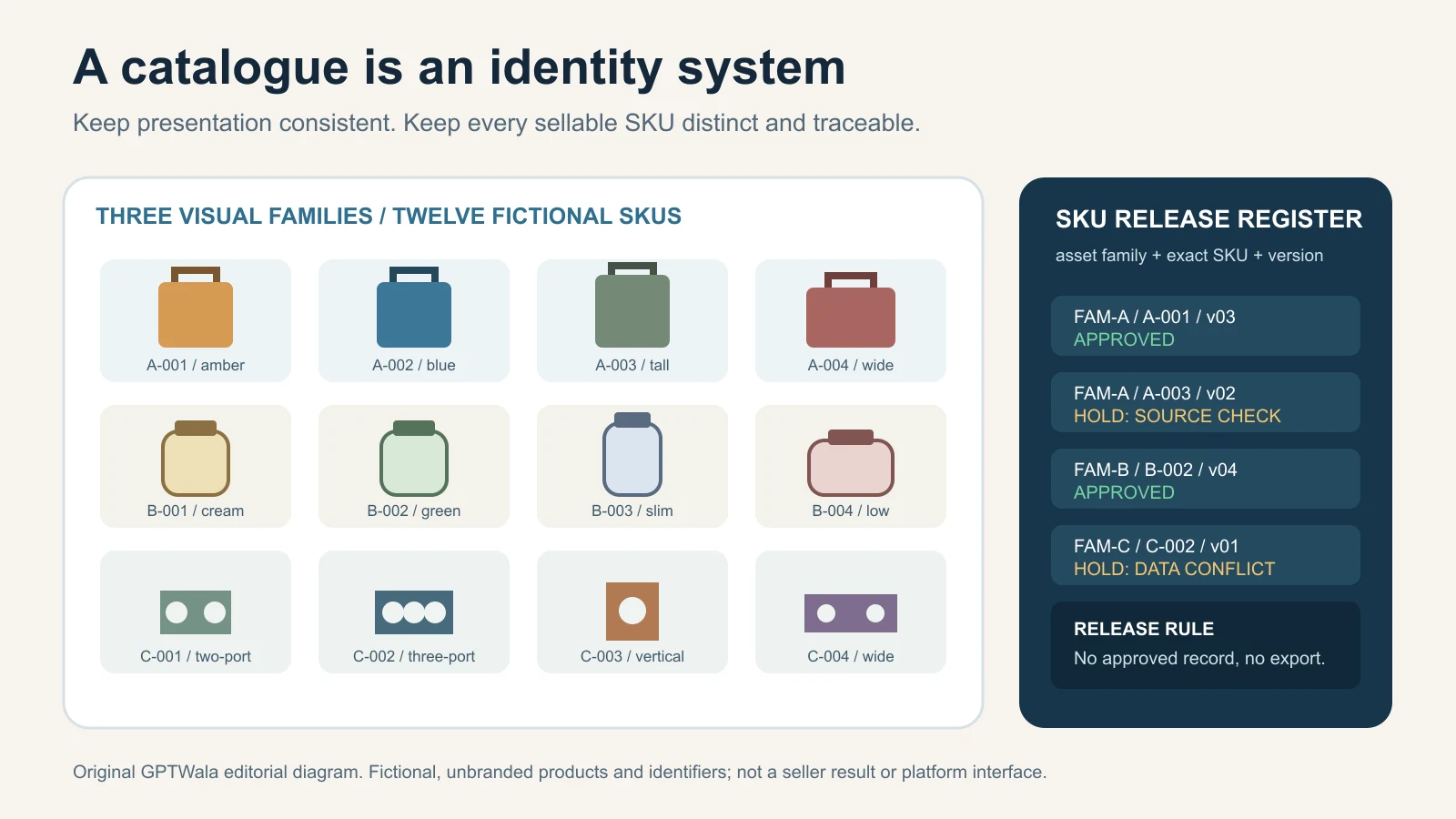
- Control variants, identifiers and product families
- Present prices, MOQs, packs, stock and terms honestly
- Use product images without changing the offer
- Choose the right catalogue format
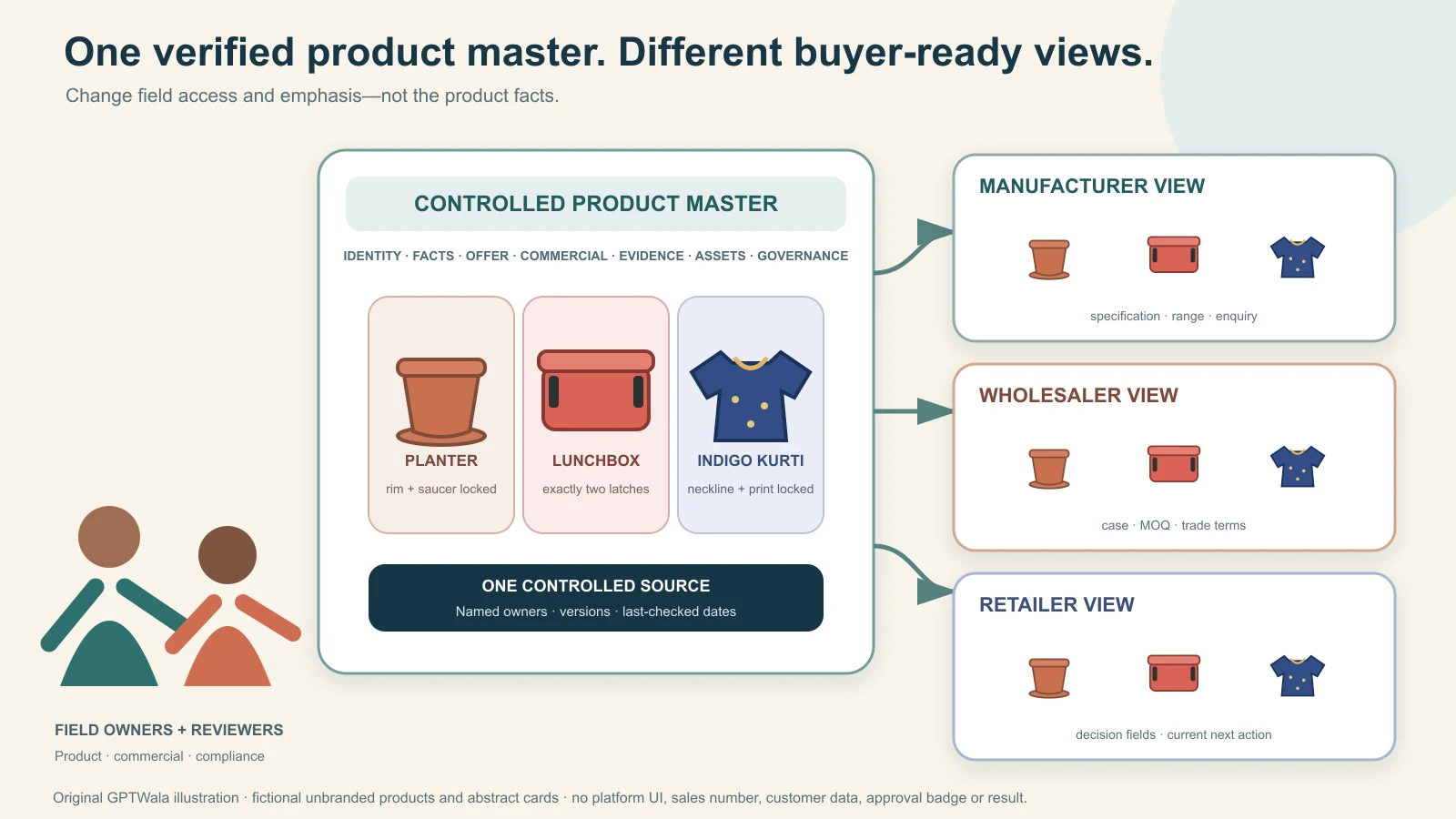
- Create different views from one source of truth
- Connect every product to a controlled next action
- Apply India consumer and catalogue safeguards
- Make a web catalogue searchable and accessible
- Set ownership, versioning and an update rhythm
- Measure catalogue usefulness without false attribution
- Launch a 20-SKU pilot
- See examples for Indian product businesses
- Avoid common digital catalogue mistakes
- Frequently asked questions
Understand what a digital product catalogue is
A digital product catalogue is a controlled collection of product records presented so a specific buyer can discover, compare and take the correct next action. The public screen or PDF is only one output. The catalogue system also includes the product master, image library, price and policy sources, approval rules, update log and enquiry handoff.
A catalogue is not just a designed PDF
A beautiful PDF can fail if:
- the buyer cannot find the relevant family;
- two colours share one ambiguous product code;
- the visible image shows a part that is not included;
- an old price circulates after a revision;
- specifications are copied differently across pages;
- the enquiry arrives without a SKU or quantity; or
- nobody owns corrections.
Conversely, a plain but well-structured catalogue can be useful when every product is identifiable, comparable and connected to a clear action.
A catalogue is not the stock ledger, quotation or contract
Unless the catalogue is reliably integrated with those systems, it should not pretend to be them.
- Stock: “Available” is time-sensitive. Say how availability will be confirmed.
- Price: a catalogue price may exclude freight, tax, installation, customisation or dealer-specific terms. State the basis.
- Quotation: a quote is buyer-, quantity-, destination- and time-specific.
- Order: an enquiry or cart submission is not necessarily an accepted order.
- Specification: a catalogue summary may not replace a controlled technical datasheet, drawing, test certificate or safety instruction.
The catalogue should move a buyer to the next decision without silently making commitments that belong to another record.
One source can support several catalogue outputs
A single approved product record can feed:
- a public web catalogue;
- a dealer or distributor portal;
- a buyer-specific PDF shortlist;
- a trade-show tablet view;
- a sales-team product finder;
- a marketplace or shopping-feed preparation file; and
- a WhatsApp Business catalogue entry.
Do not rebuild the facts from memory for every output. Filter and format the same controlled fields.
Choose the buyer and the catalogue job
“Show all our products online” is too vague to design well. Start with one buyer, one decision and one next action.
Define the primary buyer
Useful buyer definitions describe commercial context rather than broad demographics:
- a retailer looking for a repeatable wholesale assortment;
- an architect comparing surface finish, size and application;
- a procurement team shortlisting components against a drawing;
- a consumer choosing a colour and pack size;
- a reseller asking for a low-risk opening order;
- an existing dealer checking newly launched variants; or
- a sales representative building a buyer-specific shortlist.
The same item can need different information for each audience. A technical buyer may need tolerance and compatibility before a lifestyle image. A consumer may need use, size and included pieces before a factory detail.
Pick one primary catalogue job
| Catalogue job | Primary buyer question | Essential structure | Typical next action |
|---|---|---|---|
| Range discovery | “What do you sell?” | Category, family, use and visual overview | Open a family or request a shortlist |
| Product comparison | “Which option fits my need?” | Comparable attributes and differences | Select exact variant |
| Wholesale/dealer buying | “Can I stock this range?” | Pack, MOQ, assortment, price basis and service area | Request trade terms or quote |
| Technical shortlisting | “Does it meet the requirement?” | Dimensions, material, performance fields and documents | Send specification/drawing for review |
| Retail purchase | “What exactly will I receive?” | Exact offer, price, availability, delivery and returns | Buy or enquire |
| Sales enablement | “What should I show this buyer?” | Filters, approved claims and shareable shortlist | Send controlled selection |
A catalogue can support a secondary job, but one primary job should determine the hierarchy. Otherwise every card becomes crowded and no buyer gets a fast answer.
Write the catalogue promise
Use a sentence such as:
This catalogue helps independent kitchenware retailers compare our current wholesale tiffin range by capacity, tier count, case pack and finish, then request a dated quote using the exact SKU.
That sentence defines the buyer, assortment, comparison fields and next action. It also reveals what the catalogue must not imply: live inventory, universal pricing or automatic order acceptance unless those capabilities genuinely exist.
Build a product master before designing pages
Create one row or record per sellable variant. A folder of images and a price list are not a product master because neither reliably connects identity, offer, facts and ownership.
Minimum product-master fields
| Field group | Minimum controlled fields | Why it matters |
|---|---|---|
| Identity | Internal SKU, approved product name, status, family and variant | Prevents two different items from sharing one public identity |
| Buyer language | Short description, use, differentiator and approved claim wording | Gives sales and publishing teams consistent copy |
| Physical truth | Material, colour, finish, dimensions, weight or capacity as relevant | Supports comparison and reduces assumption |
| Offer | Included pieces, excluded props, unit/pack/case quantity and accessory relationship | Defines what the buyer receives |
| Commercial | Price source, MOQ, order multiple, tax/freight basis, validity and availability source | Stops a catalogue from becoming an uncontrolled quote |
| Operations | Lead time basis, service area, dispatch method and customisation route | Sets a responsible next expectation |
| Evidence | Datasheet, test/certification source, claim owner and expiry/review date where relevant | Keeps factual claims tied to proof |
| Assets | Approved main image, detail images, alt text, file version and rights/consent status | Connects the exact record to the exact visual |
| Governance | Record owner, approver, last checked, next review and change note | Makes maintenance possible |
Use only the fields that apply, but do not omit a buying-critical field merely to make the page cleaner. Move detailed information into a specification table, document or next step rather than hiding it.
Separate facts, commercial terms and marketing copy
These three layers change for different reasons:
- Product facts come from engineering, production, approved packaging or another authoritative source.
- Commercial terms come from finance, sales operations, stock and fulfilment.
- Marketing copy explains the product using approved facts and substantiated claims.
One person may maintain a small catalogue, but the source for each field must still be clear. A copywriter should not infer a load rating from a photograph. A designer should not turn “confirm on enquiry” into “in stock”. A salesperson should not overwrite a master dimension in a forwarded PDF.
Use an import template, not copy-and-paste production
For a 20-SKU pilot, a well-controlled spreadsheet can be enough. Give each column a definition, format, allowed values and owner. Examples:
SKU: unique internal identifier; never reused;public_name: buyer-readable approved name;status: draft / approved / paused / discontinued;colour_name: controlled catalogue value, not free-form synonyms;pack_qty: number of sale units in the named pack level;price_note: display basis, not a bare number without context;image_main: exact approved asset reference;last_checked: date the record was reviewed; andnext_action: route plus the product code passed into it.
Validation lists reduce spelling drift, but they do not verify the fact itself. A human owner must still compare the record with the current product and business source.
Create a catalogue structure buyers can navigate
Your factory organisation chart is rarely the best buyer navigation. Buyers may not know internal department names, legacy series codes or how stock is arranged in a godown.
Build a buyer-facing taxonomy
Start with the questions buyers naturally use:
- What is it used for?
- Which product family is it in?
- What material, size, capacity or style do I need?
- Is it retail, wholesale, custom or project supply?
- What is available for my location or buyer type?
A practical structure is:
Catalogue → category → product family → product group → exact variant
Example for a fictional Morbi surface manufacturer:
Surfaces → wall tiles → matte stone-look series → 300 × 600 mm group → charcoal variant, SKU MWS-3060-CH
The buyer can enter through use, family or filter, while the business still lands on an exact variant record.
Keep categories mutually understandable
Avoid mixing different classification logics at one level:
- “Kitchen”, “Premium”, “Steel” and “New” are use, position, material and lifecycle labels—not four peer categories.
- “Women”, “Cotton”, “Kurtis” and “Under ₹999” are audience, material, product type and price filter.
- “Fasteners”, “OEM”, “Automotive” and “Ready stock” are product family, business model, industry and availability state.
Choose a primary hierarchy, then expose other attributes as filters or badges. A product can have several attributes without living in several competing category trees.
Design the filter vocabulary before the interface
Choose only filters that:
- matter to the buyer’s decision;
- exist reliably across the relevant range;
- use controlled values; and
- lead to a useful set of results.
For apparel, size, colour, material, pattern and product type may help. For industrial components, thread, material, finish, standard, diameter and application may help. “Trending”, “premium quality” and “best” are not useful filters unless the business defines and maintains them objectively.
Give every collection a short orientation
A category or family page should explain:
- what belongs in the collection;
- the main differences between options;
- the two or three attributes to compare first;
- any important use boundary; and
- the next action when the buyer is unsure.
This prevents the catalogue from becoming a wall of nearly identical thumbnails.
Design one complete product record
The product record is the catalogue’s smallest trustworthy decision unit. It should answer “Is this the right item?” and “What do I do next?” without forcing the buyer to decode the image filename.
Use a buyer-first information order
For many product businesses, this sequence works:
- approved product name and exact SKU/variant;
- one-sentence use and differentiator;
- truthful main image;
- buying-critical attributes;
- included quantity and package level;
- applicable price/MOQ/availability language;
- relevant detail images or documents;
- delivery, service, return or enquiry conditions as applicable; and
- one primary action carrying the SKU.
The exact order changes by buyer. A technical procurement catalogue may bring the specification table and downloadable drawing above commercial copy. A retail catalogue may bring variant selection, price and delivery earlier.
Write names that distinguish variants
An approved name should be specific enough for a buyer and operator to recognise the item. Compare:
- weak: “Designer Kurti 7”;
- stronger: “Indigo Cotton Straight Kurti — Round Neck — Size M — SKU SK-IND-RN-M”; and
- weak: “Premium Bearing”;
- stronger: “Sealed Deep-Groove Ball Bearing — 6204-2RS — SKU BR-6204-2RS”.
Do not stuff every search phrase into the name. Put secondary attributes in structured fields.
Use descriptions to resolve decisions
A useful short description explains:
- what the product is;
- who or what use it fits;
- the most important verified differentiator; and
- the limit a buyer must know.
Avoid copy such as “best-in-class”, “100% safe”, “guaranteed results”, “export quality” or “eco-friendly” unless the term has a defined, supported basis appropriate to the product and context. The CCPA’s 2022 misleading-advertisement guidelines state that a valid, non-misleading advertisement should be truthful and honest and should not exaggerate a product’s capability or performance. A catalogue is not exempt because it feels informational.
Show exact inclusions and exclusions
Use explicit offer language:
- “Includes 1 jar and 1 matching lid.”
- “Sold as a pair.”
- “Case contains 24 retail units.”
- “Display stand shown for scale; not included.”
- “Mattress, cushions and installation are not included.”
If a photo contains multiple units, props or optional accessories, the written offer must remove ambiguity. Better still, choose a main image that does not create it.
Control variants, identifiers and product families
Variant confusion is one of the fastest ways to turn a catalogue into an order-error generator.
Use one record per sellable variant
Create a separate variant record when the buyer can order it separately and a field such as size, colour, material, pattern, pack, capacity, voltage or finish changes. Each record should map to the identifier used by sales, inventory and fulfilment.
Do not show six colours on one card and accept “blue one” if operations recognise three different blues. Do not combine 500 ml and 750 ml packs because the photograph is similar.
Keep parent and child identity separate
The product group explains what variants share. The child record states what differs.
| Level | Fictional example | Fields that belong here |
|---|---|---|
| Family | Stackable pantry jars | Shared use and navigation |
| Product group / parent | Airtight Jar Series AJ | Shared construction, material and compatible accessories |
| Variant / child | AJ-1000-AMBER | 1,000 ml, amber, exact dimensions, image, pack and price |
If the catalogue is implemented as an ecommerce website, Google’s current product-variant structured-data documentation uses ProductGroup plus variant Product records and requires unique identifiers for variants and groups. That is implementation guidance for eligible web markup—not a reason to invent GTINs, a ranking promise or a substitute for correct visible page content.
Do not invent identifiers
An internal SKU can be designed by the business under its own controls. A GTIN is different. GS1 describes the Global Trade Item Number as an identifier for trade items that may be priced, ordered or invoiced in the supply chain. Use a GTIN only when it has been legitimately assigned and maps to the exact trade item; never generate a plausible barcode number for visual completeness.
Treat bundles and pack levels as offers, not decoration
“One bottle”, “pack of six”, “retail display of 24” and “master case” may need separate orderable records. Record:
- product unit;
- inner pack;
- case quantity;
- order multiple;
- included assortment, if mixed;
- dimensions/weight at the relevant logistics level; and
- identifier used for that order level.
A photograph of six pieces does not itself establish that six are included.
Present prices, MOQs, packs, stock and terms honestly
Commercial fields are useful only when their basis and freshness are controlled.
Decide what price the catalogue is allowed to show
| Price approach | Appropriate when | Required context |
|---|---|---|
| Fixed retail price | The current sell price can be maintained reliably | Taxes, delivery and offer conditions as applicable |
| “Starting from” | A genuine purchasable configuration exists at that price | Which configuration; what changes the total |
| Price range | Variants or quantities legitimately span the range | Range basis and route to exact quote |
| Wholesale/dealer login | Terms differ by approved buyer | Eligibility, login/access and quote rules |
| Request a quote | Configuration, freight, volume or raw material materially changes price | Information needed for a useful quote |
| No public price | Commercial strategy requires controlled disclosure | Do not imply “best price”; give a clear enquiry route |
Never use a crossed-out price, discount, scarcity message or “only today” label without a current and supportable basis. Do not make an enquiry form look like a confirmed order if acceptance still requires a quote, credit check or stock verification.
State MOQ and order multiple separately
- MOQ answers the minimum acceptable order.
- Order multiple answers the increment in which quantity must be ordered.
- Case pack answers how units are packed.
- Assortment rule answers whether colours/sizes can be mixed.
Example: “MOQ 120 units; order in multiples of 24; one case contains 24 units; mixed colours require confirmation.” That is clearer than “MOQ: 5 boxes” when the buyer does not know the box quantity.
Use bounded availability language
If inventory is not live, use language such as:
- “Availability confirmed at quotation.”
- “Made to order; lead time confirmed after specification review.”
- “Current range; selected variants may be temporarily unavailable.”
- “Discontinued—replacement options available.”
Avoid a permanent green “in stock” badge fed by a manually updated sheet. Record the stock source and last refresh if the interface displays availability.
Separate catalogue terms from buyer-specific terms
The public catalogue can explain the general basis. A dated quote or trade agreement can then confirm:
- exact quantity and variant;
- applicable price and tax treatment;
- freight or delivery basis;
- lead time;
- payment or credit terms;
- quote validity;
- warranty/service scope; and
- cancellation or return conditions.
The WhatsApp selling guide owns the later qualification, quote, confirmation and fulfilment controls.
Use product images without changing the offer
Product images are evidence about appearance only to the extent that they truthfully show the exact offer. A polished image cannot prove a hidden specification, material grade, certification, capacity or performance claim.
Give each image a defined job
Use a controlled set such as:
- main image: identifies the exact product/variant clearly;
- alternate view: shows another side or geometry;
- detail image: shows a buying-critical construction, label, texture or closure;
- scale/context image: helps explain size or use without changing inclusions; and
- instructional diagram: explains dimensions, parts or compatibility using verified data.
The AI catalogue photography guide covers capture standards, approved asset libraries and batch consistency. This article’s rule is simpler: every displayed asset must resolve back to the exact product record.
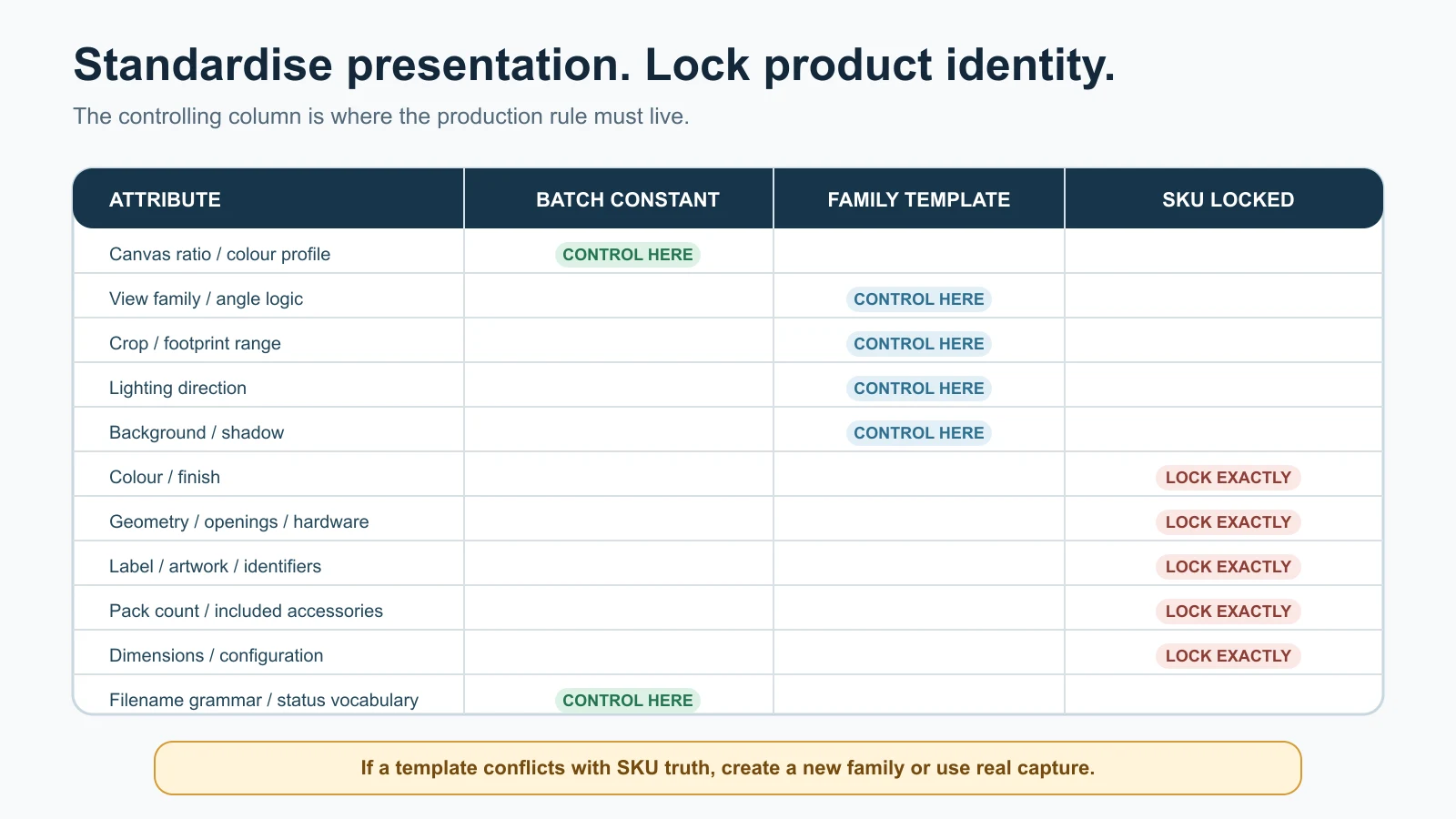
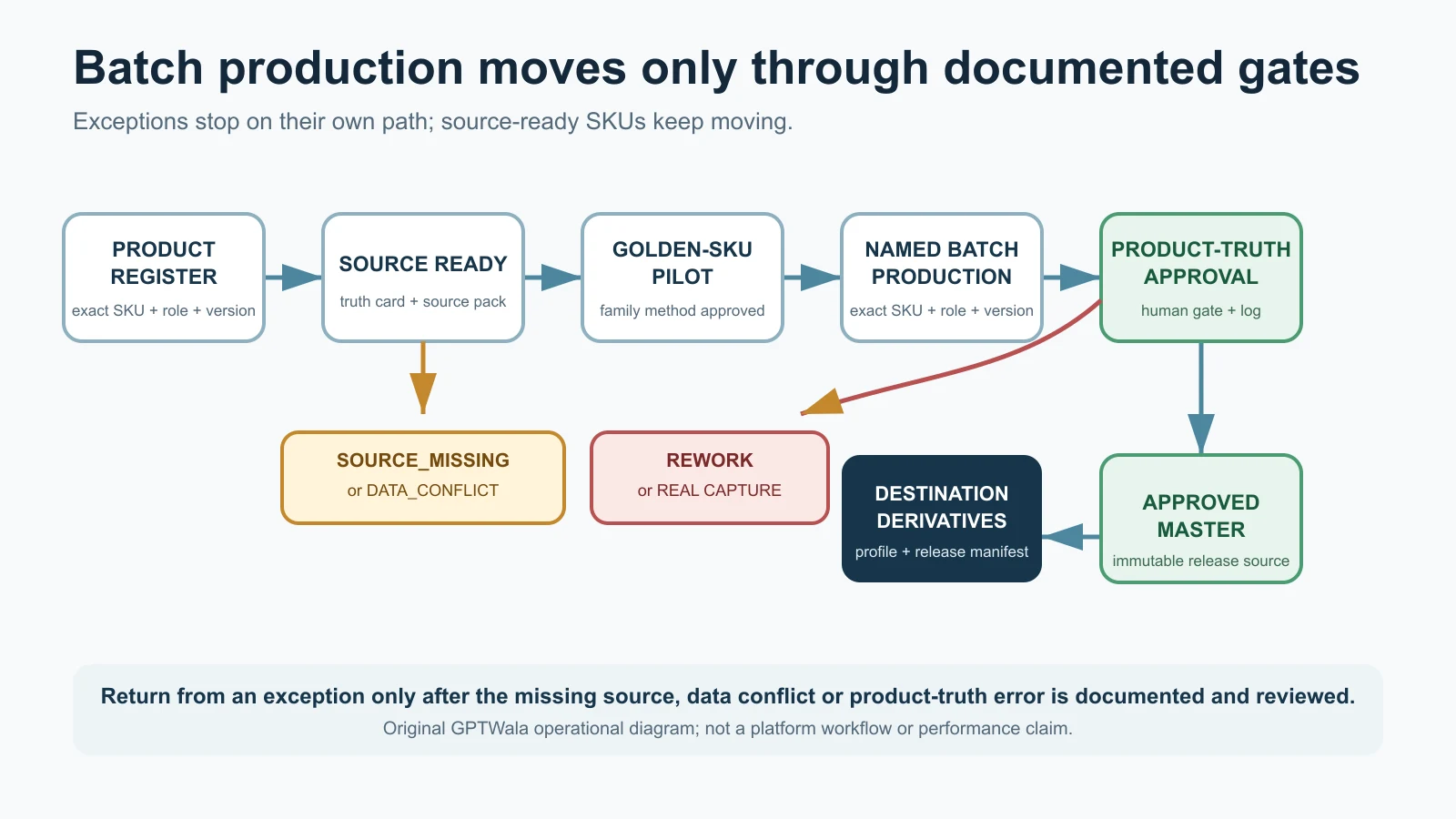
Apply a product-truth gate
Before approving an image, compare it with the physical SKU and authoritative references. Reject or correct it when any of these change:
- silhouette, proportions, openings or construction;
- colour, finish or material cue;
- print, weave, motif, label, logo or text;
- stone, clasp, fastener, handle, tier or part count;
- included quantity or accessory;
- scale, use context or compatibility implication; or
- safety, certification or performance cue.
Use the deeper product-accuracy audit for AI-assisted assets. Do not label an image “AI-generated” and assume the disclosure cures a false product representation.
Keep claims and dimensions as native text
Do not ask an image generator to draw a specification table, certification mark, price badge, warranty or pack declaration. Keep buyer-critical text in editable, accessible page/PDF content sourced from the product master. AI-rendered text can be wrong even when it looks convincing.
Name and version assets against the record
A practical pattern is:
SKU_role_view_version.ext
For example:
AJ-1000-AMBER_main-front_v03.webp
The filename supports traceability; it does not replace alt text, a database relationship or human review. GS1’s Product Image Specification Standard likewise emphasises that digital assets need associated product data and that there is no single image output suitable for every use.
Choose the right catalogue format
Do not begin with “Which catalogue app should we buy?” Begin with the buyer job, data-change rate, team capability and next action.
| Format | Strength | Main limitation | Good use |
|---|---|---|---|
| Responsive web catalogue | Searchable, linkable, updateable and measurable | Needs maintenance, hosting, permissions and technical QA | Public range, durable discovery, dealer portal |
| Controlled PDF | Easy to download, print and forward | Old copies keep circulating; weak filtering; links and text can break | Dated season/range edition, trade meeting leave-behind |
| Shared spreadsheet/table | Fast for controlled B2B comparison and updates | Easy to expose internal fields or create parallel copies | Approved buyer price/spec list with access control |
| Sales presentation | Strong narrative and guided shortlist | Not a complete searchable range | Key account meeting or launch |
| WhatsApp Business catalogue | Convenient in an active conversation | Platform fields, eligibility and controls can change; not the full data master | Small curated range and chat discovery |
| Marketplace/feed output | Reaches destination-specific discovery | Rules, fields and acceptance are destination-specific | Approved channel distribution after verification |
Use source-first publishing
The safest pattern is:
Product master → approved catalogue view → channel-specific output
Do not make a PDF the only source and then extract facts from it for a website. Do not treat the WhatsApp catalogue as the master and copy from phone screenshots into dealer sheets.
Make PDFs expire visibly
If your business uses PDFs:
- show edition/version and effective date on the cover;
- show a contact or URL for the current edition;
- state whether price and availability require confirmation;
- use selectable text, headings, bookmarks and working links;
- give each product an exact code; and
- archive replaced editions without silently deleting the history needed for disputes or review.
A date does not make a PDF current. It lets the reader and team identify whether it may be stale.
Evaluate tools with your own product records
Before adopting a catalogue platform, test:
- parent/variant structure;
- required B2B and technical fields;
- permissions and price visibility;
- update and export workflows;
- mobile navigation;
- enquiry payload with exact SKU;
- redirects if URLs change;
- ownership/export of data and images;
- privacy/security needs; and
- total operating effort, not just subscription price.
This article does not recommend or rank catalogue software. No tool was hands-on benchmarked for Article 23.
Create different views from one source of truth
A single public catalogue often fails because the business tries to show every buyer every field.
Use field permissions, not duplicate masters
| Field | Public retail view | Approved dealer view | Internal sales view |
|---|---|---|---|
| Product identity and exact variant | Show | Show | Show |
| Public description and approved claims | Show | Show | Show with source/owner |
| Retail price | As applicable | Optional/reference | Current source |
| Dealer price or discount | Hide | Show by access/terms | Show with authority |
| MOQ, case pack and assortment | When relevant | Show | Show |
| Live/estimated stock | Only if reliable | Controlled | Authoritative source/link |
| Cost, margin and internal notes | Never | Never | Restricted |
| Technical documents | Public set | Buyer-appropriate set | Full approved set |
| Discontinued/replacement mapping | Useful public note | Show | Full operational mapping |
The public and dealer catalogue can be different views without becoming different factual universes.
Create buyer-specific shortlists safely
Sales teams often need to send six relevant items rather than a 600-SKU catalogue. Generate the shortlist from approved records and include:
- buyer/project reference;
- selected exact SKUs;
- only the relevant comparison fields;
- catalogue/master version used;
- owner and date;
- commercial-basis note; and
- a clear quote or specification-review action.
Do not let the shortlist become an editable copy in which product facts drift. Buyer-specific recommendations or claims still need an approved basis.
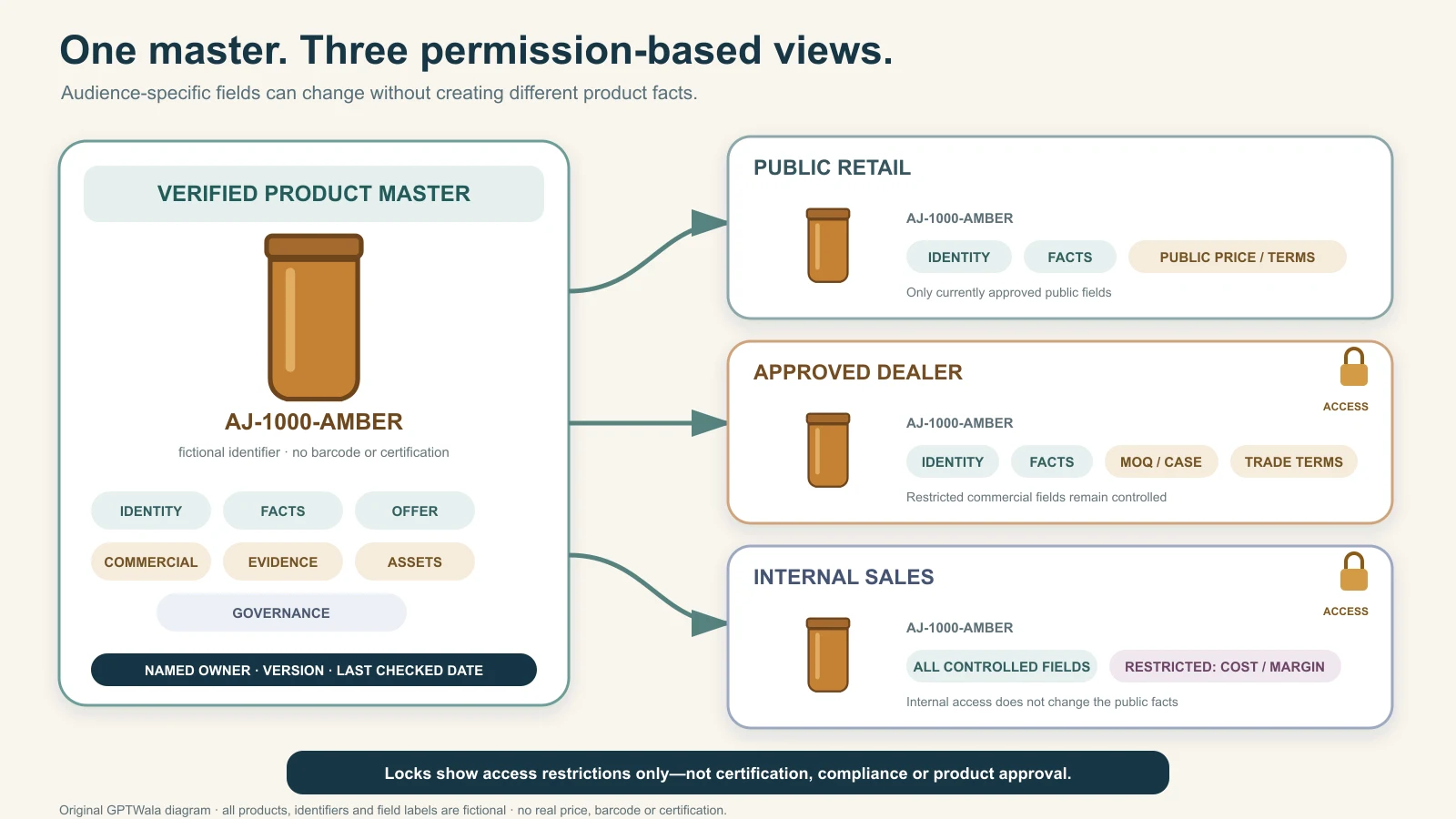
Original GPTWala permissions diagram with a fictional amber jar and identifier. Different audiences receive different fields without creating different product facts; lock symbols indicate access only, not certification or approval.
Connect every product to a controlled next action
A catalogue that ends at “contact us” makes the buyer repeat everything they just viewed.
Pass product context into the enquiry
The next action should carry, at minimum:
- SKU or product identifier;
- selected variant;
- catalogue version or page URL;
- requested quantity/pack when known;
- buyer type when relevant; and
- action type: price, sample, technical review, stock check or order enquiry.
A prefilled message might say:
I am enquiring about SKU AJ-1000-AMBER from catalogue edition 2026-08. Buyer type: retailer. Expected quantity: 120 units. Please confirm case pack, price basis and availability.
The example is fictional. The message opens a controlled conversation; it is not an accepted order or stock promise.
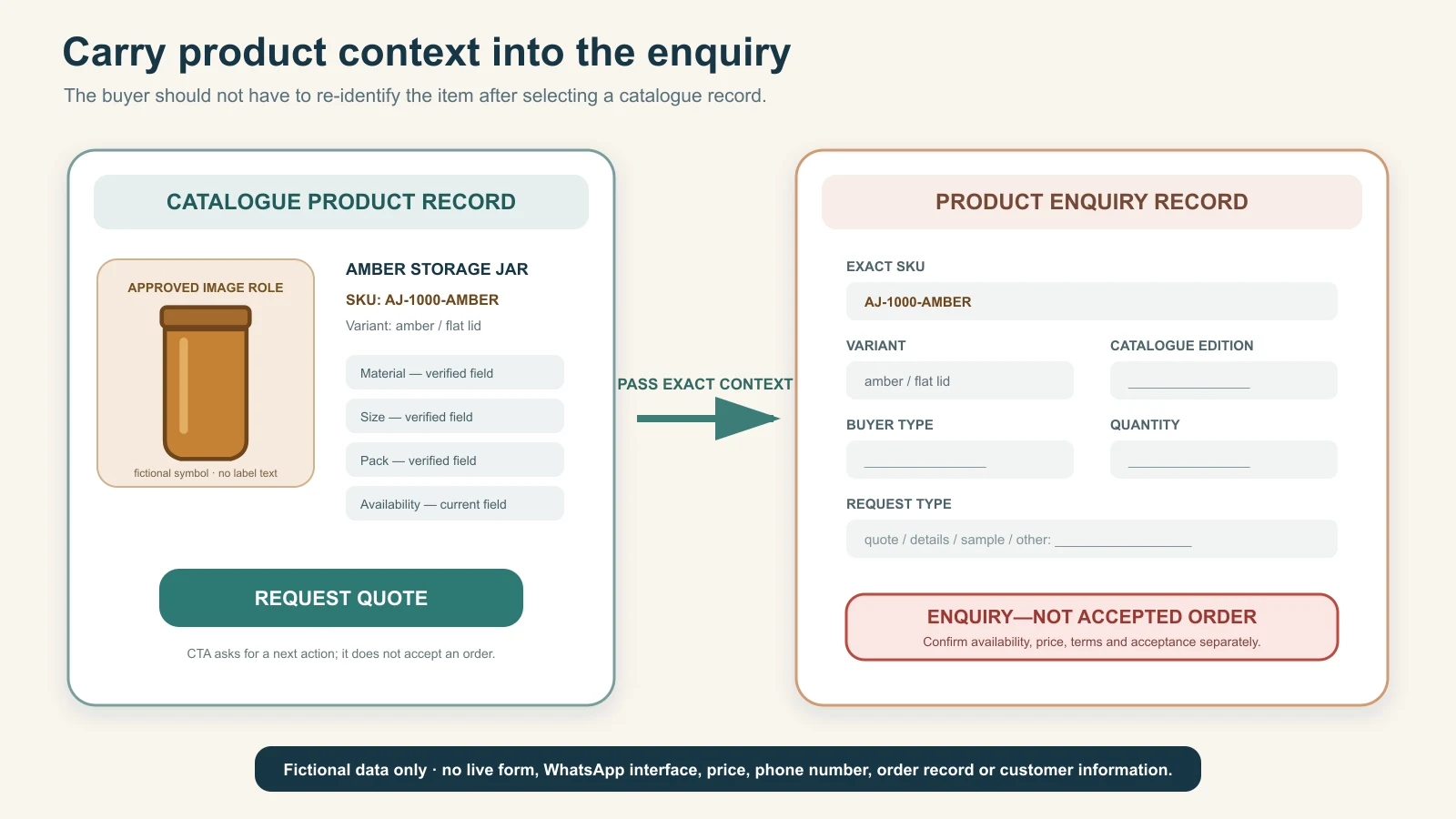
Original GPTWala workflow using fictional data. Product context passes into a blank enquiry record, but price, availability, terms and order acceptance still require separate confirmation.
Match the call to action to readiness
| Buyer state | Better next action | Avoid |
|---|---|---|
| Exploring a range | View family / compare variants | “Buy now” before the offer is defined |
| Needs compatibility check | Send requirement / ask a product specialist | Generic chat with no SKU context |
| Wholesale-ready | Request trade quote | Publishing uncontrolled dealer pricing |
| Needs sample | Request sample terms | Implying every sample is free or available |
| Exact retail offer is available | Buy/enquire for exact variant | Button that resets the selected variant |
| Custom/project product | Submit specification for review | Fixed-price promise without scope review |
Route the conversation into a record
The catalogue can begin demand capture. The WhatsApp selling system should then qualify the buyer, verify the product match, issue a controlled quote/order summary, verify payment or approved credit and hand off fulfilment. Do not count catalogue opens, downloads or WhatsApp clicks as orders.
Apply India consumer and catalogue safeguards
This section is an operating checkpoint, not legal advice. Product category, packaging, buyer type, channel and transaction model affect what applies. Use current professional/compliance review for the actual offer.
Keep digital declarations aligned with the real pack and offer
The Department of Consumer Affairs’ official Legal Metrology packaged-commodities compilation includes a rule requiring specified mandatory declarations to be displayed on the digital/electronic network used for ecommerce transactions, with stated exceptions and responsibility conditions. The Department’s packaged-commodities FAQ also summarises declarations and ecommerce treatment.
Do not turn that into a universal checklist for every product. Determine whether the rules apply to the actual packaged commodity and transaction, check amendments and sector-specific requirements, and reconcile the online record with the current physical package. A catalogue team should never infer legal declarations from an old label photograph.
Possible review fields—only where applicable and verified—include:
- manufacturer, packer or importer identity/address;
- country of origin for imported goods;
- common/generic product name;
- net quantity or number;
- retail sale price basis;
- unit sale price where applicable;
- consumer-care details; and
- best-before/use-by or other category-specific information.
That list is not a determination that every field applies to every catalogue item.
Do not hide material limitations
The Consumer Protection (E-Commerce) Rules, 2020 apply to specified goods and services sold over digital/electronic networks and include obligations across ecommerce models. If the catalogue participates in an ecommerce transaction, review the current rules and amendments for the business’s role.
Operationally, keep buyer-relevant information clear and consistent:
- exact seller/business identity;
- total-price basis and additional charges as applicable;
- delivery and fulfilment conditions;
- return, refund, warranty and grievance/support routes as applicable;
- country-of-origin or other required declarations where applicable; and
- material product restrictions or compatibility limits.
Do not bury a contradiction in a footnote or use a disclaimer to reverse the main claim.
Treat regulated and technical categories separately
Food, cosmetics, medical devices, jewellery, electrical products, toys, chemicals and other categories can have additional laws, standards, labelling, warnings or substantiation needs. Create category-specific field sets and approval gates. Do not copy a general homeware catalogue template and assume it covers them.
If a document or mark is shown, confirm:
- it belongs to the exact product/entity;
- it is current and applicable;
- the public statement does not overstate its scope; and
- the file is released for the intended audience.
Make a web catalogue searchable and accessible
Build the visible experience for people first. Technical markup should match that experience rather than decorate it with facts the buyer cannot see.
Give important variants a stable destination
If buyers search for or share an exact variant, ensure the website can reliably preserve the selected variant and show its correct image, price/terms and availability. Google’s current variant guidance says ecommerce implementations should let a variant be preselected at a distinct URL and show the corresponding information. Apply that guidance only if the site is implementing eligible Product/ProductGroup markup.
Do not create thousands of thin indexable pages that repeat one sentence with a colour name changed. A variant page or state needs distinct, useful visible information and a maintained purpose.
Keep structured data consistent with visible content
Google’s product structured-data documentation explains Product markup for product snippets and merchant listings and notes that Search appearances remain discretionary. Use accurate visible values for price, availability, images and offers. Structured data does not guarantee a rich result and must not contain a better offer than the page.
This educational article itself should use Article/BlogPosting—not Product or Offer markup. Product markup belongs on genuine product pages when its requirements are met.
Write useful alt text
The W3C Web Accessibility Initiative’s images tutorial says informative images need text alternatives that convey their essential information, decorative images should use null alt text, and functional images should describe the action.
For catalogue images:
- describe the exact visible product and differentiating view;
- include visible colour/variant when it matters;
- do not add unseen specifications or keywords;
- describe a linked image’s function when the image is the only control; and
- keep detailed specification data in page text, not only in a diagram.
Example: “Amber 1,000 ml pantry jar with matching lid, front view” is more useful than “best airtight storage jar wholesale India catalogue image”.
Support mobile comparison
On a small screen:
- keep exact SKU/variant visible near the product name;
- use readable native text rather than a full-page image;
- let buyers open images without losing their selected variant;
- make tables scroll or transform without dropping headings;
- keep the primary action labelled; and
- test forms and prefilled enquiries on actual devices.
A desktop PDF embedded inside a narrow frame is technically online but often not a usable mobile catalogue.
Set ownership, versioning and an update rhythm
Catalogue quality declines quietly. A product can remain attractive while its pack, price basis, image, document or contact route becomes wrong.
Assign field-level owners
| Change | Authoritative owner | Catalogue action |
|---|---|---|
| Product construction/specification | Product/engineering/production owner | Review affected facts, documents and claims |
| Packaging or included quantity | Packaging/operations owner | Update offer, image and pack fields together |
| Price, MOQ or terms | Finance/sales operations | Update source and all allowed views |
| Stock/lead-time basis | Inventory/operations | Refresh status language or integration |
| Product image | Catalogue/content owner plus product approver | Verify exact SKU and replace mapped asset |
| Compliance declaration/claim | Compliance/legal/category owner | Approve wording, evidence and effective date |
| URL, form or message route | Web/marketing operations | Test context passing and redirect behaviour |
“Marketing owns the catalogue” is insufficient if marketing cannot authorise the facts.
Use lifecycle states
A simple workflow is:
Draft → fact review → commercial review → content/asset review → approved → published → paused/discontinued → archived
Do not publish a half-approved record because the design deadline arrived. Do not delete a discontinued record automatically if buyers need a replacement, support document or redirect; show a controlled status and replacement path.
Record every material change
For each release, capture:
- record/SKU affected;
- old value and new value;
- source/authority;
- effective date;
- outputs that need refresh;
- approver; and
- completion status.
If a case pack changes, update the master, public catalogue, dealer view, price sheet, image if packaging is visible, enquiry template and fulfilment mapping. A changed PDF alone is not a complete release.
Use event-driven and scheduled review
Review immediately when a product, pack, price, regulation, claim, image, supplier, service area or policy changes. Also run a scheduled check based on risk and change rate. There is no universal “review every 30 days” rule; define an interval your owners can actually maintain and shorten it for volatile commercial fields.
Measure catalogue usefulness without false attribution
A catalogue supports decisions, but it does not cause every later sale by itself.
Measure findability and record quality
- searches with useful results;
- zero-result searches;
- category exits;
- product records with missing required fields;
- variant-selection errors;
- broken images/documents/links;
- stale records beyond the chosen review interval; and
- enquiry actions missing SKU context.
Measure buyer progression
- catalogue viewers who open a family or exact product;
- comparison or shortlist actions;
- specification/sample/quote requests;
- qualified enquiries linked to a catalogue SKU;
- time from enquiry to useful product match; and
- quotes/orders later connected to that enquiry in the proper business record.
Do not report a forwarded PDF as a lead, a download as a buyer, a WhatsApp click as a sale or a quote as revenue.
Measure error reduction
Track:
- wrong-variant enquiries;
- quotes issued with missing quantity/pack context;
- orders corrected after confirmation;
- disputes tied to old prices or catalogue versions;
- catalogue claims/assets rejected in review; and
- fulfilment errors linked to product-record mismatch.
The baseline matters. Without a before period and consistent definitions, “catalogue improved conversions” is an untested claim.
Launch a 20-SKU pilot
Do not wait for a perfect 2,000-SKU transformation. Choose a small range that exercises real catalogue decisions.
Step 1: choose the pilot deliberately
Select around 20 variants that include:
- one strong product family;
- common buyer enquiries;
- at least two meaningful variant attributes;
- one pack/MOQ issue;
- one product needing a technical or detail document;
- one paused or replacement case; and
- enough operational importance for the team to review carefully.
The number is a practical starting recommendation, not a benchmark.
Step 2: define the field dictionary
For each field, record:
- definition;
- example format;
- required/optional rule;
- allowed values;
- public/dealer/internal visibility;
- source and owner; and
- review trigger.
Resolve “size”, “pack”, “available”, “custom” and “price” before data entry. These words often mean different things to sales, production and buyers.
Step 3: complete and approve the records
Do not use AI to fill missing product facts. AI may help normalise supplied text, suggest category labels or draft descriptions, but a named owner must verify every output against the source. Mark unavailable information as unresolved and route it to the source owner.
Step 4: publish one buyer view
Choose one format and one audience. Test:
- finding a category;
- distinguishing two close variants;
- understanding inclusions and pack;
- opening the relevant document;
- starting the correct enquiry; and
- identifying the catalogue version.
Use representative buyers or sales operators where possible. Do not coach them through a confusing structure and call the test a pass.
Step 5: run a two-week operating check
The two-week window is a pilot recommendation, not a claim that results appear in that time. Log:
| Check | Evidence to capture | Decision |
|---|---|---|
| Findability | Search/filter path and zero-result terms | Rename, reclassify or add a controlled synonym |
| Product truth | Variant, facts, images and inclusions | Approve, correct or unpublish |
| Commercial clarity | MOQ, pack, price basis and availability questions | Rewrite field or route to quote |
| Enquiry handoff | SKU, variant and quantity passed | Repair CTA or form/message payload |
| Maintenance | Time and owner needed for changes | Simplify workflow or assign authority |
| Business flow | Qualified enquiries, quotes and errors linked in records | Continue, revise or stop expansion |
Do not claim revenue impact from a small uncontrolled pilot. Use the evidence to decide whether the structure is usable and maintainable before expanding.
See examples for Indian product businesses
These scenarios are fictional and illustrate catalogue decisions; they are not customer case studies.
Surat apparel wholesaler
Buyer: independent multi-brand retailers.
Structure: women’s apparel → kurtis → silhouette → fabric/print → exact colour-size variant.
Buying fields: fabric composition, neckline, sleeve, length, available sizes, size chart basis, colour/print variant, set quantity, case assortment, MOQ and reorder route.
Truth rule: a model image can show styling but must not silently change print placement, neckline, sleeve, border, colour, length or included pieces. Fit and drape claims need an appropriate real basis. Link buyers to the exact flat/product view and size information.
Rajkot engineering-component manufacturer
Buyer: OEM procurement and maintenance teams.
Structure: application → component family → standard/series → material/finish → exact part number.
Buying fields: part number, drawing revision, dimensions/tolerance as approved, material/grade, finish, compatibility boundary, pack, MOQ, sample/inspection route and lead-time basis.
Truth rule: a rendered component is not dimensional proof. Keep controlled drawings and datasheets separate, revisioned and approved. Route technical suitability to a competent product owner.
Morbi surface/tile manufacturer
Buyer: dealers, architects and project buyers.
Structure: application → size → surface/finish → design series → exact shade/design code.
Buying fields: nominal/actual dimensions as controlled, finish, use boundary, box quantity/coverage basis, shade/batch note, technical document and sample route.
Truth rule: styled-room images must not replace the exact tile face and detail view. Perspective and generated rooms can mislead scale, joint width, repeat, reflectivity or colour. Ask project buyers to approve current samples under relevant conditions.
Jaipur jewellery retailer
Buyer: retail customer comparing exact pieces.
Structure: category → collection → material/finish → exact item/SKU.
Buying fields: exact piece/pair, dimensions/weight basis, material description, stone/enamel details as verified, closure, included box/accessory, price basis and service/return conditions.
Truth rule: never change stone count, setting, chain, clasp, hallmark, colour or scale. A hallmark-looking mark generated in an image is not evidence of hallmarking or purity. Use controlled close-ups and exact-item review.
Local home-and-kitchen retailer
Buyer: nearby consumer browsing before a visit, delivery enquiry or WhatsApp order.
Structure: room/use → product type → size/capacity → exact colour/variant.
Buying fields: dimensions/capacity, material, included pieces, care, price, service area, delivery/pickup basis, availability confirmation and return/exchange conditions.
Truth rule: do not show food, accessories or extra containers in a way that implies inclusion. A lifestyle image should link back to the exact clean product view.
Ludhiana hosiery manufacturer
Buyer: regional distributor building a seasonal assortment.
Structure: buyer segment → garment type → season/weight range → colour-size matrix → case assortment.
Buying fields: material composition, size specification, case mix, colour availability, packaging, MOQ, production/dispatch basis and private-label enquiry route.
Truth rule: “winter”, warmth or performance language must stay within the business’s supported product information. Do not invent temperature ratings or imply certification from an editorial icon.
Avoid common digital catalogue mistakes
| Mistake | Why it fails | Safe correction |
|---|---|---|
| Designing before defining the product master | Facts are copied inconsistently into attractive pages | Approve records and field definitions first |
| Using one record for many orderable variants | Enquiries and fulfilment lose exact identity | Create one child record per sellable variant |
| Organising by internal departments | Buyers cannot predict where products live | Build a buyer-facing hierarchy and controlled filters |
| Showing price without basis or date | Forwarded copies create disputes and false expectations | State scope, conditions and confirmation route |
| Calling manual stock “live” | Availability silently becomes stale | Integrate reliably or use bounded confirmation language |
| Hiding pack quantity behind “box” | Buyer and seller interpret quantity differently | State unit, inner pack, case and order multiple |
| Treating images as proof of unseen claims | Visual polish appears to validate specifications | Keep verified data and evidence as native controlled content |
| Letting AI fill missing specifications | Plausible text becomes invented product information | Stop and ask the authoritative owner |
| Publishing the same fields to every buyer | Public pages leak internal data or overwhelm users | Create governed views from one master |
| Generic “contact us” actions | Buyer context is lost at handoff | Pass SKU, variant, catalogue version and request type |
| No version or owner | Old files circulate and errors persist | Show edition, log changes and assign field owners |
| Measuring downloads as sales | Activity is mistaken for business outcome | Connect qualified enquiry, quote and order records cautiously |
Put the catalogue inside a wider online-growth system
A truthful catalogue creates Digital Presence: buyers can find, understand and reference exact products. Approved photography, descriptions, comparison content and videos support AI Content Creation when AI is used under product-truth controls. Paid distribution can then bring relevant people to a product or enquiry route.
GPTWala’s workshop teaches the DAA sequence: Digital Presence → AI Content Creation → ₹100/day WhatsApp ads. The ₹100/day element is a taught test-budget/system concept, not a promise of reach, enquiries, orders, revenue or return on ad spend. A catalogue does not fix a weak offer, unprofitable economics, unavailable stock or poor follow-up.
See the GPTWala workshop and decide whether the DAA approach fits your product business.
Frequently asked questions
What is a digital product catalogue?
A digital product catalogue is a controlled set of product records arranged so a defined buyer can discover, compare and take the right next action. It includes the source product data, assets, approval and update process—not only the visible PDF, website or app view.
What information should every product catalogue include?
At minimum, include an exact product/variant identifier, approved name, truthful images, buying-critical attributes, included quantity/pack, relevant price/MOQ/availability language, applicable terms, next action, owner and last-checked status. Product/category-specific legal and technical fields need separate review.
Is a PDF a digital catalogue?
Yes, a PDF can be one catalogue output. It is best for a dated, controlled edition or guided sales use. It is weaker for fast-changing price/stock, filtering and version control, so show its edition and route readers to the current source.
Should manufacturers show prices in a catalogue?
Only when the price basis can be stated and maintained responsibly. If configuration, quantity, freight, raw material, tax treatment or buyer terms change the amount, show a genuine range/basis or request a quote. Do not publish a bare number that behaves like an uncontrolled promise.
How should wholesalers show MOQ and case pack?
State MOQ, order multiple, case quantity and mixed-assortment rule separately. For example: “MOQ 120 units; order in multiples of 24; 24 units per case; mixed colours subject to confirmation.” Avoid “five boxes” when a buyer cannot see what one box contains.
Do I need a separate catalogue for retail and wholesale buyers?
You often need separate views, not separate sources. Keep one approved product master and expose the right fields, prices, terms and actions to each audience. Never expose internal cost, margin or restricted dealer information in the public view.
Can AI build my full catalogue automatically?
AI can help classify supplied records, normalise wording, draft descriptions, resize approved assets and generate layouts. It must not invent specifications, price, stock, certification, legal declarations, product features or buyer terms. Human owners should verify every product record and image.
How many product images should a catalogue include?
There is no universal number. Include enough verified views to identify the exact product and resolve buying-critical questions: usually a main view plus relevant alternate, detail, scale/context or diagram roles. More images do not help if they repeat the same view or introduce product errors.
How often should a digital catalogue be updated?
Update it whenever a product, variant, pack, price basis, stock language, image, claim, document, policy or contact route changes. Add scheduled reviews based on the field’s risk and change rate. A fixed interval does not replace event-driven updates.
Is a WhatsApp Business catalogue enough for a product business?
It can be useful for a curated range inside conversations, but it should not be the only product master. Larger, technical or multi-buyer ranges usually need a controlled source and other views. Use the dedicated WhatsApp Business catalogue guide for current platform setup when it is live.
Does Product schema make a catalogue rank on Google?
No. Accurate Product and ProductGroup structured data can help Google understand eligible ecommerce product pages, but appearance remains discretionary and markup must match visible content. It does not guarantee rankings or rich results, and it does not belong on this educational article as if the article were a product offer.
Sources checked for this guide
- Department of Consumer Affairs: Legal Metrology (Packaged Commodities) Rules compilation
- Department of Consumer Affairs: packaged-commodities FAQ
- Department of Consumer Affairs: Consumer Protection (E-Commerce) Rules, 2020
- Department of Consumer Affairs: Consumer Protection rules and guidelines index
- CCPA: Guidelines for Prevention of Misleading Advertisements and Endorsements for Misleading Advertisements, 2022
- Google Search Central: Product structured data
- Google Search Central: Product variant structured data
- GS1: Global Trade Item Number
- GS1: Product Image Specification Standard
- W3C Web Accessibility Initiative: Images tutorial
- Google Search Central: Changes to HowTo and FAQ rich results