Tag: product truth

  • Best AI Product Photography Tools for Indian Sellers: Choose With a Same-SKU Test

    Same fictional product evaluated across several AI product-image workflows with a human scorecard
    Editorial illustration only. It does not show a real benchmark result, vendor interface or winning tool. The product is fictional and unbranded.

    Official product pages, pricing and terms checked: 11 August 2026

    There is no universal best AI product photography tool. For an Indian seller, the right shortlist depends on the image job, the product’s accuracy risk and the way the team reviews, exports and pays for work. Compare every candidate with the same SKU, references, brief and attempt limit. Reject product-truth errors before judging beauty, then calculate subscription, generation, operator, review and rework cost per approved asset—not per generated image.

    Benchmark disclosure: GPTWala did not run a controlled multi-tool same-SKU test for this edition. No output-performance winner or fidelity score is claimed. The named-tool comparison below is a documentation-only shortlist built from current official product, pricing, terms and privacy pages. Use the published protocol to test two candidates on your own product before buying. Features, limits, prices and terms can change.

    Table of contents

    1. Choose by approved output, not generated output
    2. Why most best-tool lists mislead
    3. Documentation-only shortlist
    4. Five tool profiles
    5. Same-SKU test protocol
    6. Product-truth scorecard
    7. Real cost per approved asset
    8. India-specific decision matrix
    9. Two-tool trial sheet
    10. When no AI tool should win
    11. FAQs

    Choose by approved output, not generated output

    A tool can generate a polished scene and still change the product being sold. It may widen a sari border, remove a saucepan handle rivet, invent a jewellery stone, alter label text or show two pieces where the offer contains one. Those are not minor creative differences. They are rejection reasons.

    Start with the business job, then decide what the test must reward.

    Business job Highest-weight criterion Immediate red flag Workflow type to trial first
    Clean a main catalogue image Exact edges, colour, label and quantity Product is redrawn while the background changes Background remover or locked-layer hybrid
    Create a secondary lifestyle image Product truth plus plausible scale and use Scene implies an absent feature, accessory or pack size Reference-based editor or product-staging tool
    Make many stable-SKU catalogue variants Repeatability, batch handling and approval trail Inconsistent crops, silent variant mixing or missing history Specialist batch workflow or controlled design suite
    Build an ad creative from an approved product master Crop control, layout speed and export workflow Decorative edit modifies the sale item Design suite with a protected product layer
    Show apparel or jewellery in context Print, drape, setting, reflection and scale accuracy “Realistic” output hides or invents buying-critical detail Real photography or tightly reviewed hybrid

    This article assumes you already understand the reference-first method in the complete AI product photography guide. Tool selection is a narrower commercial-investigation job: which two workflows deserve a controlled trial for this SKU and this image role?

    Why most “best AI product photography tool” lists mislead

    Vendor examples are not your SKU

    A home-page gallery tells you what the provider chose to show. It does not reveal how many attempts were made, what was rejected, how difficult the original was or whether the output preserved a label, seam, stone setting, texture and exact colour. The sample may be useful for discovering a feature; it cannot prove performance on your product.

    That is why this guide does not turn vendor demonstrations into a ranking. Every named capability below is attributed to an official page. Fidelity remains not tested until the same input is run through each candidate.

    Feature count is not product fidelity

    “Background generation,” “reference image,” “local edit,” “batch” and “4K” describe functions. They do not prove that the tool will retain the correct SKU. More creative freedom can even raise risk when the job requires a locked product.

    For example, Photoroom’s own Product Staging help says the feature may change lighting, position, size, zoom level and foreground, while its AI Backgrounds workflow is documented as leaving the foreground unchanged. That makes them different risk lanes inside one provider, not interchangeable checkboxes. Photoroom: Product Staging

    Cheap credits can become expensive approved assets

    One credit or generation is not one usable image. The seller pays for rejected attempts, an operator’s time, product-expert review, retouching, export, subscription allocation and sometimes tax or payment costs. A “free” tool can be costly if ten attractive outputs fail product truth; a paid tool can be economical if it produces a repeatable, reviewable asset quickly. Compare complete workflow cost, not the price printed beside a plan.

    Documentation-only shortlist: what the official pages confirm

    The table is a shortlist, not a performance leaderboard. “Confirmed” means the provider documents the capability. It does not mean GPTWala verified the result in a hands-on test.

    Candidate Workflow class What current official pages confirm Material condition to test Price/access basis checked 11 Aug 2026 Evidence status
    Google Product Studio Merchant Center-native image workflow Create/edit images, change or remove backgrounds, increase resolution and save to Merchant Center; up to three uploaded images in the current Create images flow Experimental output can be inaccurate or unexpected; reviewers may see the input, output and instruction Documented as free for Merchant Center users; India is covered by Product Studio access and India-specific terms Documentation only; account access and outputs not tested
    ChatGPT Images General reference and conversational editor Upload and edit an existing image, select an area, request transparency and choose aspect ratio; available on web, iOS and Android Selection highlights are not always precise and edits may extend outside the selected area Images 2.0 is documented across all tiers; official pricing does not publish a fixed consumer cost per approved image Documentation only; no same-SKU outputs scored
    Adobe Firefly Creative editor with selections, references and model choice Upload an image, edit objects/backgrounds, choose aspect ratio/resolution, use reference or subject images depending on model, retain generation history Model choice changes controls, credits and terms; reference guidance is not a protected product layer India page listed Standard at ₹797.68/month incl. GST and Pro at ₹1,596.54/month incl. GST; free daily generations also documented Documentation only; prices must be rechecked at checkout
    Canva Design-suite composite and background workflow Background Remover accepts common image formats, exports PNG, offers erase/restore refinement and Pro unlimited use; AI editing is governed by separate AI terms Library content changes ownership/licence position; AI limits and country/language access can vary Pro is required for unlimited background-remover use; an India checkout price was not independently captured Documentation only; not treated as a specialist staging benchmark
    Photoroom Specialist product-image and batch workflow Product Staging, AI Backgrounds, editing, batch access, shared credits, export quotas and plan-specific tooling Product Staging may change the foreground; paid account is required for commercial use; uploaded images may be used for model improvement unless opted out Public page showed Pro/Max/Ultra limits but did not expose an INR amount in this review; FAQ says GST is included and regional allowances can vary Documentation only; India account/checkout and output quality not tested
    Locked-layer hybrid Human-controlled baseline A real product cutout stays on its own layer while the background, canvas or layout changes around it Requires competent masking, colour control and a disciplined hand-off Software and labour depend on the team’s existing stack Method control, not a vendor product

    Do not read “available on all tiers” as “unlimited,” “commercial use” as an infringement guarantee, or “add to Merchant Center” as automatic marketplace approval. The destination still evaluates the finished asset and the seller remains responsible for the item shown.

    Five tool profiles and one hybrid control

    Google Product Studio: shortlist for a Merchant Center-led workflow

    Documented fit to trial: A merchant who already manages products in Google Merchant Center and wants background removal, resolution improvement, new scenes or a direct hand-off into that ecosystem.

    Google documents Product Studio as a free suite inside Merchant Center or the Google & YouTube Shopify app. Its current flow can create and edit images using text, uploaded images and Merchant Center products. The documentation also says the service may produce inaccurate or unexpected content, works best when one main product is easy to identify, and excludes certain regulated-product creation. It warns that quality reviewers may view original offer images, generated assets and instructions. Google Merchant Center: Product Studio

    What to verify in the account: Whether the required feature appears for the Indian merchant account; whether the exact category is supported; input/output dimensions and file details; how the tool behaves on labels and difficult edges; whether the 20-item recent-scene history is sufficient for the team’s audit; and what is stored locally on a shared device.

    Who should skip or pause: A seller without Merchant Center, a regulated category the tool excludes, or a team that cannot accept the documented review and data-handling conditions. Read the country-specific Product Studio additional terms before uploading confidential designs.

    ChatGPT Images: shortlist for conversational reference editing

    Documented fit to trial: A small team that wants to upload a product image, describe a controlled edit, iterate conversationally and create several aspect ratios without learning a specialist interface.

    OpenAI documents image creation and editing on web, iOS and Android, including upload-based edits, selected-area edits, transparent backgrounds and aspect-ratio control. The same help page explicitly says selections are not always precise and edits can extend outside the highlighted area. That warning matters for product labels, edges and locked geometry. OpenAI: Images in ChatGPT

    Supported OpenAI-generated images currently include C2PA metadata and SynthID provenance signals, but OpenAI warns that provenance does not prove accuracy, legal ownership or correct context and can be degraded or stripped by later handling. OpenAI: provenance signals

    For data handling, separate consumer and business plans. Consumer accounts have data controls and an opt-out; OpenAI states that ChatGPT Business, Enterprise and API inputs/outputs are not used for training by default. OpenAI: Data Controls and OpenAI: business data privacy

    What to verify in the trial: Number of reference views accepted in the chosen surface, actual output dimensions, plan limits, history and download workflow, local edit leakage, text/label stability and whether the file retains provenance after your optimisation pipeline.

    Who should skip or pause: A team that needs a provably locked foreground or deterministic pixel mask. A conversational instruction is a control attempt, not a product-truth guarantee.

    Adobe Firefly: shortlist when selection control and a creative production stack matter

    Documented fit to trial: A seller, agency or in-house designer who needs image upload, selection-based editing, reference images, model choice, resolution settings and a route into Adobe’s wider production tools.

    Adobe’s current Firefly documentation shows uploaded-image editing, model selection, aspect-ratio and resolution options, reference or subject images for supported models, downloads and generation history. Adobe: edit images using text prompts Generative Fill adds a brush selection, but the result must still be checked outside the mask because visual consistency is not the same as SKU fidelity. Adobe: Generative Fill

    On 11 August 2026, Adobe’s India pricing page listed Firefly Standard at ₹797.68/month including GST with 2,000 credits, and Firefly Pro at ₹1,596.54/month including GST with 4,000 credits; it also described free daily generations. Plan promotions, partner-model credit use and checkout prices can change. Adobe Firefly plans for India

    Adobe says outputs from features not marked beta may be used in commercial projects and says it does not train Firefly on Creative Cloud subscribers’ personal content. It automatically applies Content Credentials to Firefly-generated content in documented workflows. Those statements support a terms review; they do not remove the seller’s duty to check input rights, trademarks, product accuracy and the exact model-specific terms. Adobe Firefly FAQ and Adobe: Content Credentials

    Who should skip or pause: A non-designer who only needs quick white-background cutouts, or a buyer who has not confirmed whether the chosen Adobe or partner model is included in the quoted credit plan.

    Canva: shortlist when composition and team-ready design are the main jobs

    Documented fit to trial: A shopkeeper or marketing team already assembling posts, banners, catalogues and ads in Canva, especially when the immediate task is removing a background, refining a cutout and placing the retained product in a designed layout.

    Canva documents automatic background removal for common upload formats, high-resolution PNG download, erase/restore refinement and unlimited usage with Canva Pro. That makes it a practical design-suite candidate for a locked-product composite test. It does not prove that every generative edit will preserve the product. Canva: Background Remover

    Canva’s current AI Product Terms say users must hold rights to inputs, are responsible for outputs, own outputs subject to exceptions for licensed Canva content, and must not remove AI provenance metadata. The terms also say AI usage limits can change, some tools may not be available in all countries or languages, inputs may be shared with technology partners for the functionality, and privacy settings control some use for AI improvement. Canva AI Product Terms

    What to verify in the trial: Exact Pro checkout price and tax in the Indian account, file downscaling, transparency and export resolution, whether product pixels remain unchanged during composition, library-content licence implications and the AI privacy setting used by the team.

    Who should skip or pause: A seller seeking a tested specialist product-staging engine or large-scale catalogue automation. Canva can still be the final layout layer after another workflow creates an approved master.

    Photoroom: shortlist for specialist product workflows and batch operations

    Documented fit to trial: A reseller, retailer or catalogue team that wants specialist product-photo tools, batch access, exports and shared AI credits.

    Photoroom makes an unusually useful distinction in its own documentation: AI Backgrounds changes the background and not the foreground, while Product Staging may change the foreground, lighting, position, size and zoom and may add a human element. Product Staging requires a paid subscription and AI credits. That distinction should determine the risk lane you test. Photoroom: Product Staging

    The official pricing page checked on 11 August 2026 showed monthly pools of 4,250 AI credits/1,000 exports for Pro, 12,000/3,000 for Max and 20,000/10,000 for Ultra when billed yearly, while also warning that country or region can change allowances. The page did not expose an INR subscription amount in this research view, so record the actual Indian checkout price instead of copying a foreign amount. Product Staging consumed five credits on the contemporaneous credits page; higher-resolution exports and later edits consumed separate credits. Photoroom pricing and Photoroom AI credits

    Commercial-use terms are plan-sensitive: Photoroom says free accounts are personal-use only and paid accounts can use AI-generated content commercially, subject to IP responsibility. Its privacy page says uploaded images may be used to improve/train products and models, with an account-level opt-out; it says API model improvement does not apply. Photoroom: commercial use and Photoroom privacy policy

    Who should skip or pause: A team with unreleased product designs that has not configured the training opt-out or evaluated an API/business agreement, or a seller who assumes Product Staging will leave the product untouched.

    Locked-layer hybrid: use it as the control

    For the control workflow, photograph the real SKU, remove the background carefully, lock the product on its own layer, and change only the canvas, backdrop, props or copy around it. Record any colour correction separately. This takes more operator skill than one-click staging but creates a meaningful baseline: if an AI candidate is faster yet fails truth, the baseline wins.

    The hybrid control is especially important for jewellery, reflective metal, transparent items, intricate prints, regulated products and any image that carries a fit, material or safety implication. It also gives the test a no-AI outcome instead of forcing one vendor to win.

    The same-SKU test protocol

    Use one owned or fictional, unbranded product. If it is real, obtain permission to upload it and remove confidential data before testing—unless redaction would hide the field you need to measure.
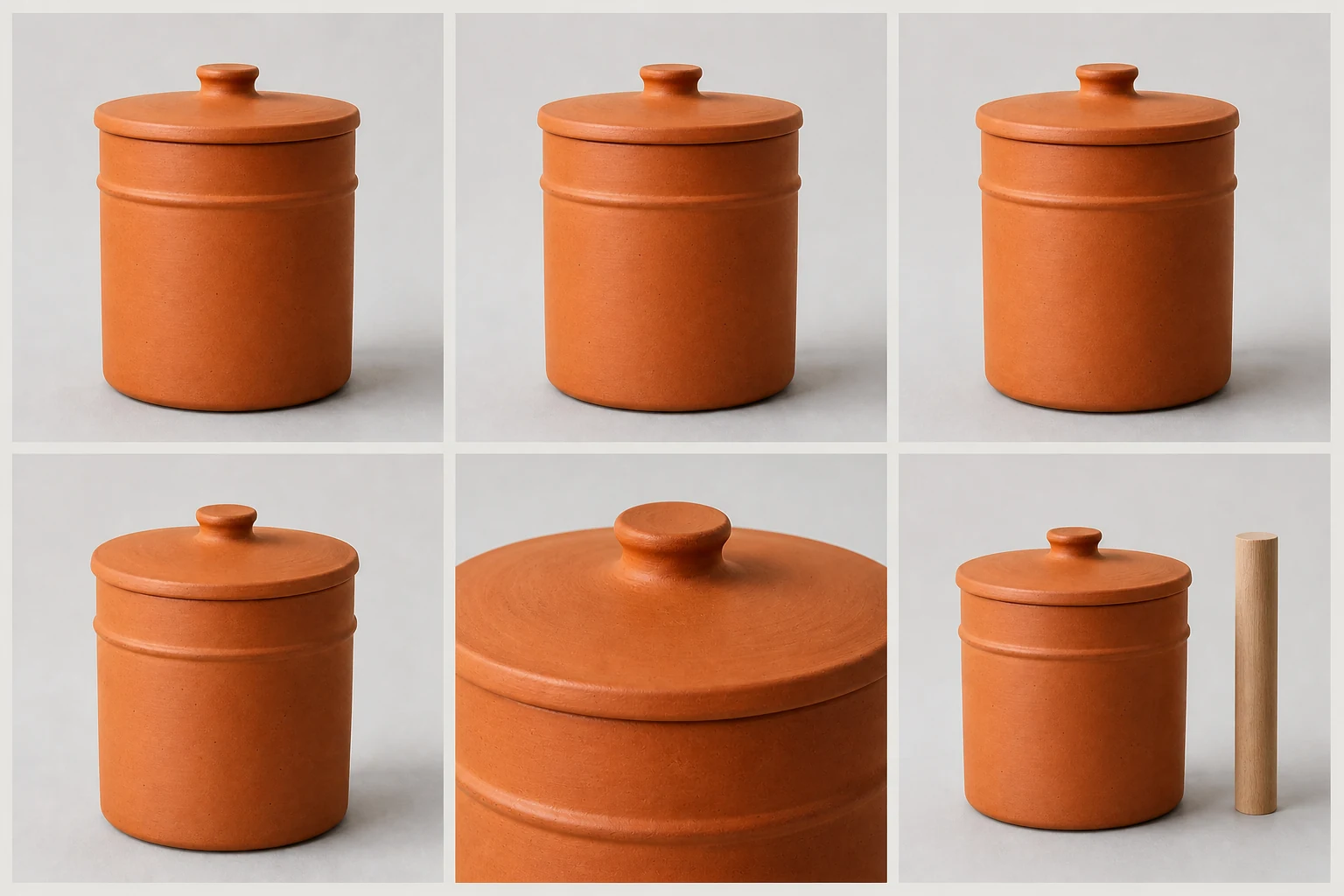
    Front, side, back, detail and scale references for one fictional product SKU

    Fictional source-pack demonstration. The panels are an editorial training aid, not a real merchant SKU or evidence that a tool preserved the product.

    1. Build one source pack and truth card

    Create five reference images under neutral, even light:

    • front;
    • side or 45-degree view;
    • back;
    • close-up of the most failure-prone detail; and
    • scale reference with measured dimensions.

    Write a truth card before opening a tool.

    Truth field Locked value to record Stop-ship example
    SKU and variant Exact internal ID, colour and finish Output shows another colourway
    Geometry Shape, proportion, handle/clasp/opening and major joins Handle, prong or seam changes
    Surface Material, texture, print, motif sequence and reflectivity Matte becomes glossy; motif is invented
    Text and marks Exact label, logo, warning, code and placement Garbled, missing or fabricated text
    Offer Quantity, included parts and accessories Extra lid, chain, piece or pack appears
    Scale Dimensions and contextual size Product becomes implausibly large or small

    2. Give every tool the same three jobs

    Use three jobs because a tool can perform differently by task:

    1. Catalogue job: retained product on a clean white or transparent background.
    2. Lifestyle job: retained product in a restrained, plausible scene with no unsupported accessory or use claim.
    3. Controlled local edit: change one background-area element without changing the product. If the tool has no local edit, record “not supported” rather than substituting another job.

    Set the same output role and aspect ratio. Do not call an output marketplace-ready merely because the tool can export it. Verify the current destination rules separately; Google’s main-image requirements, for example, require the correct product/variant and require AI-generation metadata to be preserved. Google Merchant Center: main image requirements

    3. Fix the attempt budget before starting

    Use four attempts per job per candidate for a small trial: twelve attempts per tool. Count every click that produces a new image or deducts a credit, including repairs. Do not give a preferred tool hidden extra tries.

    Save:

    • tool, model, plan, device and account region;
    • date and time;
    • all input files;
    • exact semantic instruction and any syntax adaptation;
    • every output, including failures;
    • credit/limit change;
    • operator minutes; and
    • final approval or rejection reason.

    4. Keep semantic instructions equivalent

    The common instruction can read:

    Using the supplied photo of the exact [SKU/variant], change only [background or selected area]. Preserve exact geometry, proportions, colour, pattern, material, finish, label text, quantity and included parts. Do not redraw, add, remove or reshape the product. Create [scene], [lighting], [camera/framing] and [aspect ratio]. Reject any result that changes a locked field.

    Adapt interface syntax only where necessary. Publish those adaptations so the comparison remains fair. For more examples, use the product-truth AI photography prompt pack; do not assume prompt detail can compensate for a missing mask or protected layer.

    5. Review blind where practical

    Rename outputs with random codes before visual review. Ask two people to score them independently: one operator and one product owner or person who handles the physical SKU. Review at full resolution and in the intended mobile crop. Record disagreements; do not average away a stop-ship defect.

    Score product truth before visual appeal

    Use the same 100-point scorecard for every tool and every job.

    Dimension Weight What earns points
    Product truth 35 Correct identity, geometry, colour, pattern, material, label, quantity and components
    Edit and control 15 Reference adherence, useful masks/selections, reproducibility and local revision
    Output usability 10 Suitable resolution, crop, transparency, format, grounding and low artefact rate
    Workflow and scale 10 Predictable retries, naming/download, history, batch, collaboration and hand-off
    Rights, privacy and provenance 15 Clear input duties, commercial-use wording, data controls, retention/deletion and provenance handling
    Cost per approved asset 10 Complete cost divided by outputs that pass all required checks
    Accessibility 5 Usable device/interface, verified account access and support for the operator
    Total 100 Fixed before the first generation

    Stop-ship cap: If an output has the wrong SKU or variant, quantity, essential component, label/claim, material, or materially altered geometry, mark it Rejected and cap that job at 49/100 even if it looks excellent.

    Do not award rights/privacy points because a site says “commercial use” in a headline. Read the current terms for the chosen plan and model. Confirm the team owns the input or has permission, whether uploaded images can train models, how long content is retained, what deletion/opt-out controls exist and whether conversion strips C2PA or IPTC provenance. This is operational due diligence, not legal advice.
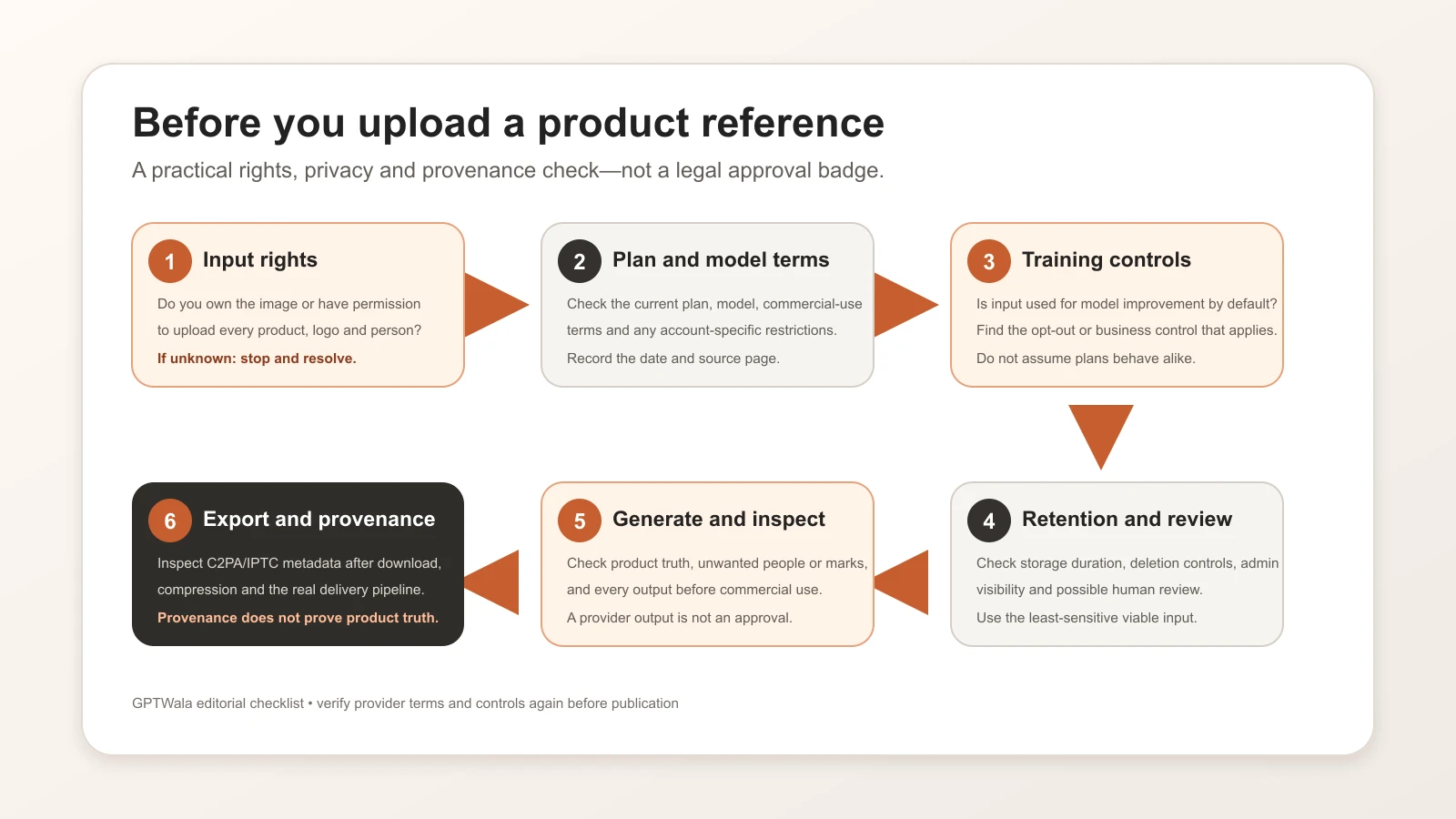
    Decision path for checking input rights, data controls, retention and provenance before uploading a product image

    Operating checklist, not legal advice or a provider approval badge. Recheck the current terms and controls for the exact plan and model you will use.

    Calculate the real cost per approved asset

    Use this formula for each candidate:

    Cost per approved asset = (allocated subscription + generation/credit cost + operator time + reviewer time + retouch/rework + export/storage/admin + taxes or payment costs) ÷ approved outputs

    An “approved output” passes product truth, intended-use review, destination rules and final file QA. A beautiful rejection is not in the denominator.

    Use a blank calculation rather than a market average:

    Cost input Your value
    Subscription allocated to this pilot ₹___
    Credits/top-ups/paid exports consumed ₹___
    Capture and upload minutes × loaded hourly rate ₹___
    Prompt/generation minutes × loaded hourly rate ₹___
    Product-owner review minutes × loaded hourly rate ₹___
    Retouch, repair or recapture ₹___
    Storage, naming, hand-off and tax/payment cost ₹___
    Total pilot cost ₹___
    Total generated outputs ___
    Outputs that pass every required gate ___
    Cost per approved asset ₹___

    Also record approval rate = approved outputs ÷ total outputs. A tool with a low apparent price but a poor approval rate may be the expensive choice. For a subscription already used for other work, calculate both the marginal cost and a fair allocated share; state which method you used.

    Which workflow should an Indian product business shortlist?

    This matrix narrows a two-tool trial. It does not predict a winner.

    Business profile Candidate 1 to consider Candidate 2/control Decision emphasis
    Merchant Center-led retailer Google Product Studio Locked-layer hybrid Direct workflow, product truth, destination rules and audit trail
    Shopkeeper already making posts in Canva Canva retained-product composite ChatGPT Images or a manual cutout Operator ease, export consistency and leakage outside the edit
    Manufacturer with many stable SKUs Photoroom batch/specialist workflow Locked-layer batch template Repeatability, naming, exports, approval ownership and per-approved cost
    Wholesaler with frequent colour/design variants Specialist workflow with strict variant folders Hybrid template No cross-variant contamination; approval rate by variant
    In-house designer or agency Adobe Firefly/Photoshop workflow Locked-layer manual edit Selection control, version history, rights and production hand-off
    Apparel seller Tool’s apparel-specific secondary-image flow Real model/product photography Print, embroidery, drape, fit implication and consent
    Jewellery or reflective-product seller Controlled local/background edit only Real macro photography Stone count, prongs, hallmarks, metal colour, reflection and scale
    Team with unreleased or confidential designs Business/API route whose terms meet policy Local/manual workflow Training default, retention, human review, deletion and contract

    For a Morbi tile manufacturer, the buying-critical fields may be surface pattern, edge profile, gloss and tile scale. For a Surat apparel wholesaler, they may be base colour, motif repeat, border width and drape. For a Jaipur jewellery seller, stone count, setting, clasp and scale can dominate the score. For a Rajkot kitchenware business, handle geometry, lid fit, finish and included pieces may be stop-ship fields. These are illustrative review patterns, not claims about every business in those places.

    Run a two-tool trial with your own SKU

    Copy this sequence into a trial sheet:

    1. Choose one ordinary but representative SKU—not the easiest and not the most confidential.
    2. Name the exact image job and destination.
    3. Create the five-view source pack and truth card.
    4. Confirm input rights, data/training setting, plan, tax, credits and export conditions.
    5. Choose two candidates from different workflow classes plus a hybrid control if risk is high.
    6. Run three equal jobs and four attempts per job.
    7. Save every output and record time/credit consumption as it happens.
    8. Randomise output names and conduct the two-person truth review.
    9. Reject stop-ship defects before scoring aesthetics.
    10. Calculate approval rate and total cost per approved asset.
    11. Choose by job. It is acceptable for one tool to win catalogue work and another to win lifestyle work.
    12. Retest on four more SKUs before rollout; include the categories most likely to fail.

    Do not upload unreleased designs, customer information, identifiable model photos or confidential labels until the team’s rights and data requirements match the provider’s current terms. Save source, instruction, output, approval and final export together so another person can audit the decision.

    Turn a tool choice into a repeatable online system

    A tool only produces an asset. It does not decide the product’s positioning, build a trustworthy digital presence, distribute the offer or follow up with enquiries. After the pilot, put the winning job-specific workflow into a phone-to-approved production SOP, then define ownership, file naming, review gates and retest dates in an AI adoption roadmap.

    If you want the broader path from offline dependence to online demand, the GPTWala DAA workshop connects Digital Presence, AI Content Creation and a ₹100/day WhatsApp ads starting system. It is education, not an earnings or lead guarantee.

    See the product-business DAA workshop

    When no AI tool should win

    Choose real or hybrid photography when:

    • no candidate passes product truth within the fixed attempt budget;
    • exact colour, finish, fit, drape, reflection, geometry or scale is the reason people buy;
    • the image carries a safety, medical, regulated or performance implication;
    • the product is high-value or difficult to replace;
    • the team cannot meet input-rights, privacy, retention or approval requirements;
    • the destination needs proof the generated result cannot provide; or
    • rework makes cost per approved asset higher than a controlled shoot.

    The correct result of a trial can be “use AI only for backgrounds and layout,” “use a photographer for main images,” or “do not upload this product.” A no-winner decision is evidence of a working safeguard, not a failed test.

    Frequently asked questions

    Which AI product photography tool is best for Indian sellers?

    There is no universal winner. As of 11 August 2026, Google Product Studio, ChatGPT Images, Adobe Firefly, Canva and Photoroom represent different workflow types worth shortlisting. Pick two based on your image job and run the same SKU, source pack, prompt intent and attempt budget through both. Product truth and cost per approved asset should decide—not a vendor gallery or feature count.

    Is there a free AI product photography tool?

    Google documents Product Studio as free for Merchant Center users. ChatGPT Images is documented on all tiers with plan-dependent limits, and Adobe documents free daily generations. Canva and Photoroom have free access or trials for some functions, but commercial-use and feature limits differ; Photoroom explicitly limits free accounts to personal use. Always check the current Indian account, plan and terms before commercial use.

    Can I use a phone photo as the input?

    Yes, several shortlisted workflows accept uploaded images, and Photoroom documents mobile capture as one Product Staging input path. A phone photo is useful only if it clearly records the exact SKU. Use neutral light, multiple angles, detail shots, measured dimensions and a colour reference; a weak source cannot reliably prove what an AI edit preserved.

    Does a tool make images Amazon-, Flipkart- or Google-ready?

    No vendor button proves destination acceptance. Export an image, then compare it with the current official rules for the exact platform, country, category and image role. Google’s current main-image guidance, for example, requires the actual correct product and variant and requires generative-AI metadata to be retained. Verify all destination rules again on publication and upload day.

    Can I use AI-generated product images commercially?

    It depends on the provider, plan, model, input rights, third-party content and intended use. OpenAI, Adobe, Canva and Photoroom publish different ownership or commercial-use terms; Photoroom’s free accounts are personal-use only, while Canva library content creates licence exceptions. Read the current terms and obtain professional advice for high-risk use. “Commercial use allowed” is not a promise that an output is accurate or free of third-party rights.

    Are confidential product images private when I upload them?

    Do not assume so. Google documents possible quality-review access in Product Studio. Consumer and business data settings differ in ChatGPT. Canva says technology partners may process inputs for AI functionality. Photoroom says uploaded images may be used for improvement/training unless the user opts out, while its API is treated differently. Match the plan and settings to your policy before uploading unreleased designs.

    Do same-SKU results generalise to my whole catalogue?

    No. One SKU measures one product, source pack, tool/model, plan, prompt, date and review team. Retest at least five representative SKUs, including difficult edges, reflective materials, fine patterns, labels and variants. State the sample limit whenever results are published.

    How often should I retest AI product photography tools?

    Recheck price, plan limits and Indian account access before purchase and at least monthly while this page is current. Recheck terms, privacy and data-use controls quarterly or after a provider notice. Rerun the same-SKU benchmark after a material model/editor change or when approval rate changes. Keep old dated results rather than silently overwriting them.

    Official sources checked

  • AI Jewellery Photography: Reflections, Stone Settings and Product-Truth Checks

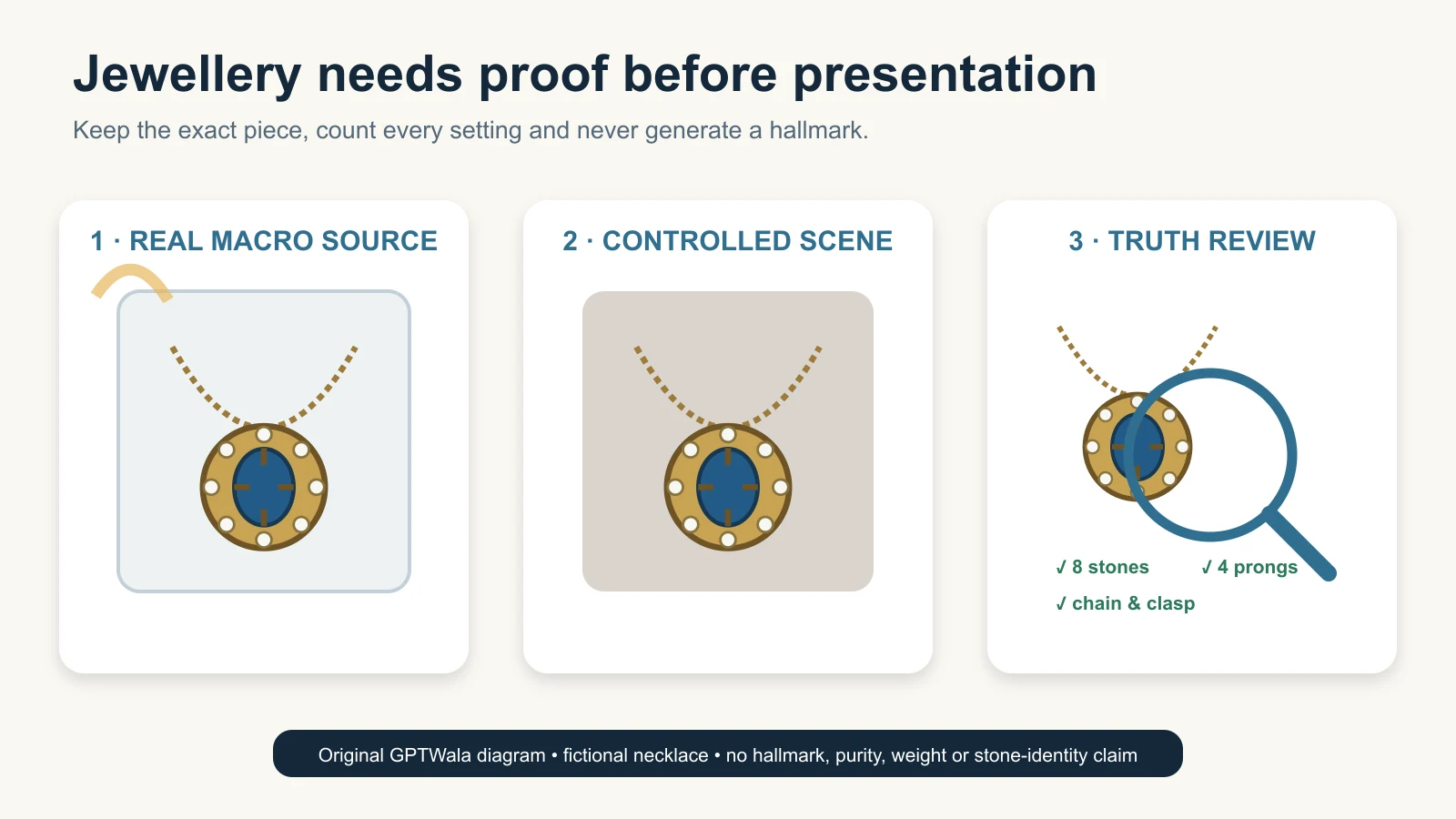
    Real macro capture, controlled AI background and product-truth inspection of the same fictional jewellery piece
    Editorial illustration of a reference-first jewellery image workflow. The necklace is fictional, unbranded and not hallmarked; it is not a merchant result, a purity claim or proof of AI fidelity.

    Reviewed and updated: 12 August 2026

    Editorial disclosure: no jewellery shoot, AI edit, marketplace submission or product result was run for this article. The workflow and checklists are GPTWala editorial guidance built from current official sources. Any generated visual on this page must use fictional jewellery and must not imply hallmark, purity, weight, stone identity or merchant performance.

    AI can help a jewellery seller remove a background, create secondary context or prepare channel crops, but the sale piece must remain the source of truth. Keep real main and macro photographs for proof. Count every stone and setting, verify clasp and chain geometry, preserve meaningful reflections, measure scale, and photograph—not generate—any hallmark. Reject an output if even one buying-relevant feature changes or cannot be verified.

    Table of contents

    1. Why jewellery needs a stricter workflow
    2. Build proof, presentation and context images
    3. Make a jewellery truth card
    4. Capture the exact piece
    5. Control reflections without erasing material
    6. Audit stones, settings and construction
    7. Handle hallmarks and HUID safely
    8. Prove scale, colour and quantity
    9. Choose the safe AI lane
    10. Run the jewellery product-truth gate
    11. Use the workflow for Indian jewellery cases
    12. Fix common failures
    13. Know when real capture is mandatory
    14. Frequently asked questions

    Why jewellery needs a stricter AI photography workflow

    Jewellery combines small geometry, reflective materials, repeated detail and high-value product claims. A tiny visual change can alter what the buyer thinks is included or what the piece is made of.

    An AI editor can make a plausible ring while changing a prong. It can make a necklace “cleaner” while removing a link. It can turn a pair of earrings into two slightly different designs, brighten stones beyond their real appearance, or rebuild a blurred mark into convincing nonsense.

    The danger is not that the result looks artificial. The danger is that it looks believable.

    Treat these as separate questions:

    • Does the image look attractive? This is a presentation decision.
    • Does it show the exact sale piece? This is a product-truth decision.
    • Does it prove purity, weight, stone identity or certification? Usually not. Those facts require verified product records and, where applicable, formal marks or reports—not a photograph alone.

    The complete AI product photography guide for Indian businesses gives the category-level strategy. This page owns the jewellery stop-ship fields: stone and prong count, setting geometry, clasp and chain construction, hallmark evidence, reflections, colour, scale, symmetry and offer quantity.

    One clean photo cannot do every job

    A ring main image should let a buyer identify the exact ring. A macro image should show setting and finish. A measured scale image should answer size questions. A model image may provide context, but it cannot replace those proof views.

    Google Merchant Center’s current additional-image guidance explicitly separates a main product image from additional views and even uses a ring example with another angle, a model view and packaging. That is useful as an image-role model. It is not a claim that Google approves any AI-generated jewellery image.

    Build three image layers: proof, presentation and context

    Create the evidence layer before asking AI for decoration.

    Layer Buyer question Appropriate source AI freedom Non-negotiable rule
    Proof What exactly will I receive? Real main, back, side, clasp, setting, hallmark and measured views of the exact piece Very low Product pixels and verified data must remain real and legible
    Presentation Can I inspect it clearly? Real product isolated and carefully retouched Low Crop, dust cleanup and background work cannot alter construction, colour or quantity
    Context How might it look when worn or displayed? Retained real product layer plus verified measurements; real model when fit/scale matters Limited and controlled Context cannot imply false size, drape, inclusion, stone behaviour or certification

    For high-value, one-off, antique, custom or regulated claims, real capture should dominate all three layers. A generated wearing image can be a concept for a shoot; it is not proof that the piece will sit at that size, angle or fall on a real person.

    Keep the sale offer separate from the styling set

    If the buyer receives a necklace and earrings, show the three pieces clearly. If the chain is a styling prop and not included, do not let it appear as part of the set. If a listing sells one earring rather than a pair, the image, title, quantity and price must all agree.

    Google’s current customized-products guidance gives a jewellery-relevant example: a seller offering either a full ring or a stone only should make the title, image, description and price reflect the actual offer. Apply the same offer-truth discipline on your website, B2B catalogue and WhatsApp catalogue even when Google is not the destination.

    Make a jewellery truth card before the shoot

    Put the exact physical piece, its SKU record and its included components together. Complete one truth card per child variant—not one card for an entire design family.

    Truth field Record from the physical piece and verified data Automatic-reject example
    Identity SKU/design code, metal/finish variant, size and current version Image shows a neighbouring size, finish or customisation
    Offer quantity Single piece, pair, set and every included component Extra chain, charm, earring, backing or box appears included
    Stone map Count, shape, position, size relationship and repeated sequence Missing, added, duplicated or relocated stone
    Setting map Setting type as recorded, prong/bead/channel pattern and visible seat Prong count, spacing or setting geometry changes
    Construction Links, joints, hinges, backs, screw/post, clasp, bail and detachable parts Link thickens, clasp changes, hinge disappears or bail is rebuilt
    Metal appearance Verified metal/finish description and reference images Yellow/rose/white tone changes or matte becomes mirror-polished
    Surface detail Engraving, texture, enamel, filigree, granulation and maker marks Pattern is simplified, mirrored or invented
    Hallmark/identifiers What is physically present, where it is and the linked record Mark is sharpened, completed, moved, copied or created
    Dimensions Measured length, width, diameter, drop and relevant thickness Model/context image makes the piece materially larger or smaller
    Weight/purity/stone claims Verified product record, invoice/report or applicable official record Image or caption infers a fact from visual appearance

    Do not ask a generative system to decide whether a stone is natural, laboratory-grown, treated or a particular variety. Do not infer gold purity, silver fineness, carat weight or total product weight from appearance. Visuals can show a piece; verified records must support the claim.

    Capture a source-of-truth pack for the exact piece

    The product should be cleaned and handled by someone who understands the material. Do not polish away intentional patina or alter an antique finish merely for the shoot.

    Capture the minimum proof views

    The exact shot list depends on the piece, but a useful jewellery source pack often includes:

    1. full front view;
    2. full back view;
    3. left and right profiles where construction differs;
    4. 45-degree view showing depth;
    5. macro of the main setting and stone map;
    6. macro of clasp, hinge, post, screw, bail or other operating part;
    7. real hallmark/identifier view where applicable;
    8. measured scale view with a ruler or controlled reference;
    9. every item in the pair or set; and
    10. packaging only if it is included in the offer.

    For a chain or anklet, add a full-length laid-straight view and close-ups of the repeating link pattern. For earrings, capture both items together and each item separately. For a ring, capture the head, shoulders, shank, gallery and inner band. For an articulated necklace, capture the back and closures so the AI cannot invent how parts connect.

    Use repeatable light, not maximum sparkle

    GIA’s official phone jewellery and gem photography guidance notes that background can influence the apparent colour of metals and gemstones, recommends using one light colour/temperature rather than mixed lighting, and discusses bounced and diffused light. Its old social-media sizing examples should not be used as current platform rules; the useful evidence here is the lighting and background principle.

    Use diffusion to make reflections controllable, not to remove every reflection. Keep the camera stable. Capture a colour/neutral reference in a separate frame when colour matters. Inspect fine settings and marks at full file resolution before putting the piece away.

    Keep a real scale reference outside the sales frame

    Photograph a ruler or measurement grid beside the piece for internal verification. The final clean product frame may omit it, but the reviewer needs a measured reference before approving an on-model or contextual image.

    Do not use a coin, fingertip or generic hand as the only scale proof. Coins differ across markets and a generated hand can make a ring or earring look materially larger or smaller.

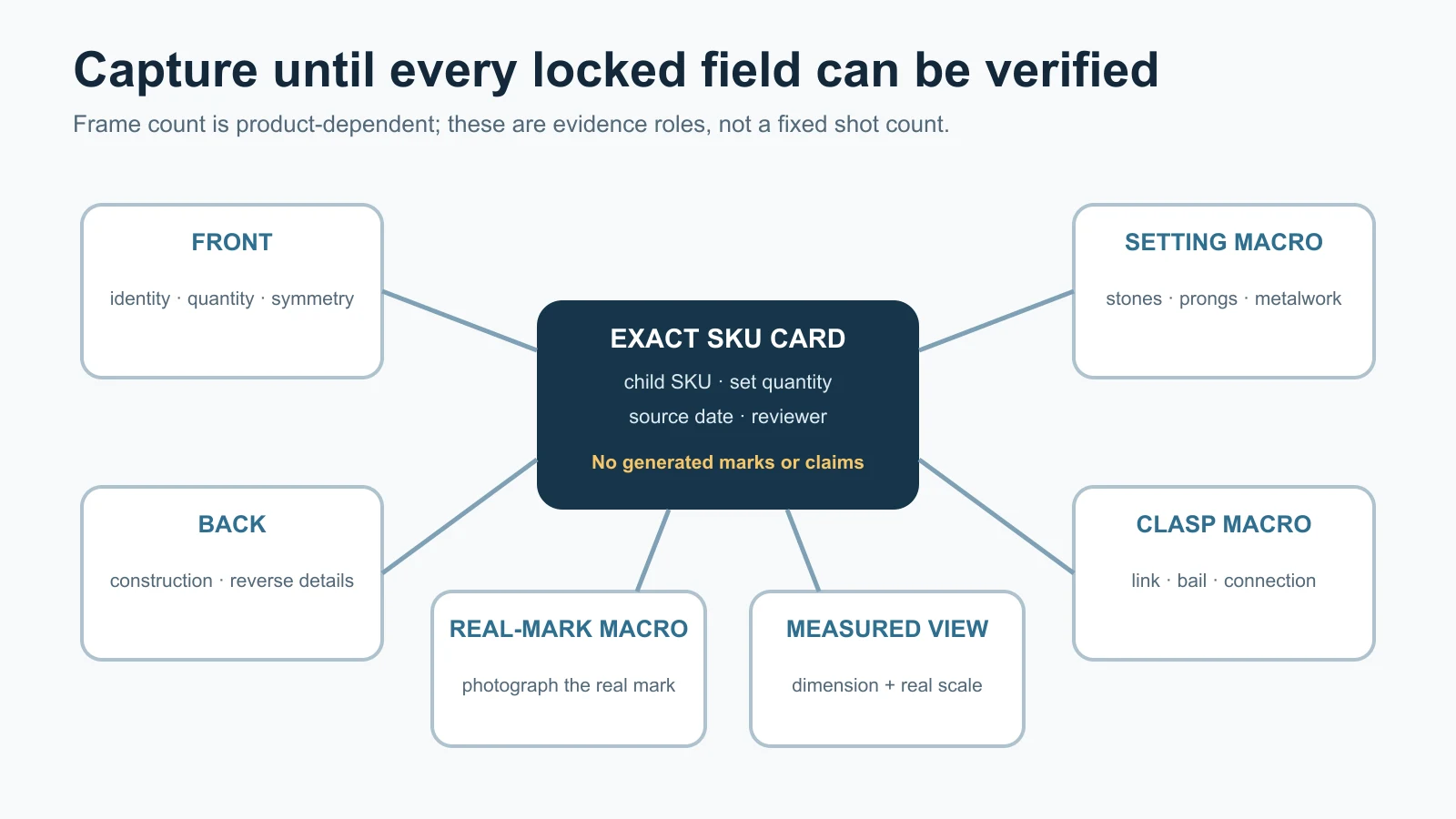
    Jewellery source-pack map showing front, back, setting, clasp, hallmark and measured views

    Original GPTWala source-pack map. Photograph the real mark; do not generate one. The number of frames is product-dependent; capture until every locked field can be checked without inference.

    Control reflections without erasing material truth

    Reflections are part of how buyers read polished metal, faceted stones and curved surfaces. A reflection can be distracting, but removing all reflections can turn gold, silver, steel or a gemstone into a flat material that the product is not.

    Classify each reflection before changing it

    Reflection type What it tells the buyer Safe treatment Stop rule
    Edge highlight Shape, thickness and curve Soften distractions while retaining continuous geometry Reject if the edge disappears or changes shape
    Metal gradient Finish and curvature Balance exposure conservatively Reject if texture/finish becomes another material
    Facet highlight Cut/facet orientation and light return Retain real pattern; use additional real angles Reject invented, cloned or symmetrical sparkle
    Dark flag/reflection Surface curvature or studio environment Reduce only if the underlying surface remains truthful Reject if removal erases engraving, setting or joint
    Coloured cast Light/background contamination Correct against the physical piece and neutral reference Stop if the variant cannot be verified
    Camera/room reflection Unwanted studio information Reshoot with flags/diffusion or carefully retouch Do not rebuild the jewellery underneath from imagination

    If an AI “clean-up” makes every stone equally bright, duplicates the same highlight across different facets or turns a brushed surface into chrome, the result has stopped being a conservative edit.

    Use real capture to solve reflection problems first

    Move and diffuse the light, change the camera angle slightly, use white/black cards to shape the metal, and capture several truthful options. When the source already contains readable material cues, background removal is easier to audit. When the source is a white glare surrounded by black void, AI must invent what the camera did not record.

    Audit stone count, settings and construction

    The jewellery audit starts with counting, not admiring.

    Build a stone-and-setting map

    For one exact piece, mark:

    • centre stone or focal element;
    • side and accent stones;
    • repeated stone sequence;
    • shape and relative size of each visible stone;
    • prongs, beads, channels, bezels or other visible setting structure;
    • intentional asymmetry;
    • empty spaces and negative shapes; and
    • connection points between the setting and metalwork.

    Use a real macro and a simple numbered overlay outside the sale image. The overlay can say “S1–S12” or use zones; do not place generated numbers over the product and trust them.

    Count both the stones and the structures holding them

    An output can keep twelve bright objects but change the setting. Check prongs or beads around each stone, channels, bezels, gallery openings and the seat. A repaired-looking prong can imply intact construction when the physical piece differs.

    For pavé, kundan-style, polki-style, meenakari, filigree or other detailed work, use the exact terminology and material claims your verified product record supports. A visual style resemblance is not evidence of technique, origin, stone identity or metal purity.

    Check pair and set symmetry without forcing false symmetry

    Two earrings in a pair should match the physical pair. Do not mirror one earring to manufacture the second unless the actual sold pair is separately verified and truly mirrored. Handmade or hand-finished pieces can contain real, acceptable differences; do not let AI “correct” them into a different product.

    Photograph hallmarks and HUID—never generate them

    A hallmark is not a decorative texture. Treat it as a separate proof asset tied to the physical article and its records.

    What current BIS guidance supports

    The Bureau of Indian Standards hallmarking overview, last updated 23 April 2026, describes hallmarking as the official recording of precious-metal content and says gold and silver are within India’s hallmarking system.

    The current BIS general hallmarking FAQ states that a gold hallmark introduced with HUID contains three elements: the BIS mark, purity in caratage/fineness and a six-digit alphanumeric HUID. It also says consumers can use Verify HUID in the BIS Care app, and that each item in a pair and detachable parts should bear their applicable separate marks/HUIDs.

    This has direct photography implications:

    • photograph the mark on the exact article or part;
    • capture enough real resolution for a reviewer to compare it;
    • keep the mark linked to the correct SKU and component;
    • verify the HUID through the current BIS route where applicable; and
    • never copy one item’s mark onto its pair, another size or another child variant.

    Do not use one generic rule for every silver piece

    BIS’s October 2025 newsletter says revised IS 2112:2025 introduced voluntary HUID-based silver hallmarking from 1 September 2025, with its own components and BIS Care details. Some BIS FAQ text still names the earlier silver standard. Because metal, marking date and applicable scheme matter, do not reconstruct a silver mark from this article or copy a gold layout. Check the physical piece and the latest BIS hallmarking sources before making a live claim.

    A hallmark photo is not the whole verification

    A sharp image can still show a copied, mismatched or irrelevant mark. Verification belongs to the physical article, BIS records where applicable, invoices/reports and the seller’s controlled product data. Photography documents what is visible; it does not assay the metal.

    Automatic reject: the edit sharpens unreadable characters, completes a partial mark, changes a digit/letter, moves the mark, invents a purity stamp, transfers a mark between items or hides a real mark that buyers need to inspect.

    Prove scale, colour and quantity

    Scale needs measurements, not mood

    Record the dimensions that define the piece:

    • ring inner diameter/size and head dimensions;
    • earring width, height and drop;
    • pendant dimensions and chain length;
    • bangle inner diameter and opening;
    • bracelet/anklet length and extension range;
    • necklace length, drop and component spacing; and
    • relevant thickness where it changes appearance or use.

    Use those measurements to review any model or contextual image. If an earring that is 18 mm tall appears 35 mm tall relative to the ear, the image is misleading even if every stone is present.

    Do not print dimensions inside an AI-generated scene. Put verified measurements in native page text or a controlled graphic outside the jewellery pixels.

    Colour needs controlled comparison

    Gem and metal appearance changes with illumination, background, viewing angle and display. GIA’s official diamond colour overview describes colour grading under controlled lighting and precise viewing conditions; this is why a dramatic image cannot establish a laboratory colour grade. Keep the physical piece available during correction, use consistent light and compare against a neutral reference.

    For colour-change, pleochroic, opalescent or otherwise lighting-dependent material, use multiple real photographs with clear lighting disclosure and specialist review. Do not ask AI to create a “more accurate” colour from memory.

    Quantity must match the actual offer

    Count sale units and detachable components separately from styling props.

    Offer Required proof Common AI/production error
    Pair of earrings Both actual earrings, both backs if included, pair-specific marks where applicable One earring mirrored into a fake pair; missing back
    Necklace set Exact necklace, earrings, pendant/tikka or other included pieces Extra matching piece invented; one component omitted
    Ring only Exact ring and child size/variant Gift box or loose stone appears included
    Stone only Stone-only image and matching title/description/price Image shows a setting or completed ring
    Chain with pendant Confirm whether detachable pendant and chain are both included AI merges chain and pendant or changes bail
    Wholesale assortment Every SKU/quantity or an explicit representative-sample label One image implies all shown designs/colours are supplied

    Choose the safe AI lane for each image

    The safest tool is not the one with the most realistic output. It is the one that can perform the narrow job without making the truth unreviewable.

    Lane Allowed task Suitable output Required review
    Preserve — preferred Crop, canvas, restrained exposure/colour correction, dust cleanup and non-generative background isolation around retained real jewellery pixels Main, macro or catalogue presentation image subject to destination rules Compare at full resolution with real source and truth map
    Contextualise — limited Create background or model/display context around a retained, verified product layer Secondary lifestyle/banner/ad concept Product truth plus measured scale, lighting, contact and offer review
    Concept only — not commerce proof Generate a jewellery design, wearing view or scene where the sale piece itself is redrawn Moodboard or shoot planning Keep internal; recreate with the real piece before selling

    OpenAI’s current Images in ChatGPT documentation says an existing image can be edited with a selection or direct instruction, but warns that selections are not always precise and edits may extend beyond the highlighted area. Google’s current Product Studio documentation describes background, removal, resolution and image-generation features while warning that experimental features may produce unexpected outputs.

    Those are the right risk assumptions for jewellery: a mask and prompt are instructions, not locks.

    A safer background-edit instruction

    Using the supplied photograph of the exact jewellery SKU, change only the area outside the jewellery to a plain neutral studio background. Preserve the original jewellery pixels and its exact stone count, stone positions, prongs/settings, metalwork, chain/link pattern, clasp, bail, engraving, hallmark area, colour, finish, scale, pair/set quantity and camera angle. Do not add sparkle, stones, symmetry, marks, text, props or accessories. Do not sharpen or reconstruct any hallmark. Keep realistic existing reflections and add only a restrained contact shadow outside the product. Output one candidate for human review.

    This is a constraint prompt, not a fidelity guarantee. Use the product-truth prompt pack for additional roles, and the background-generation guide for mask/context technique. Jewellery approval still belongs here.

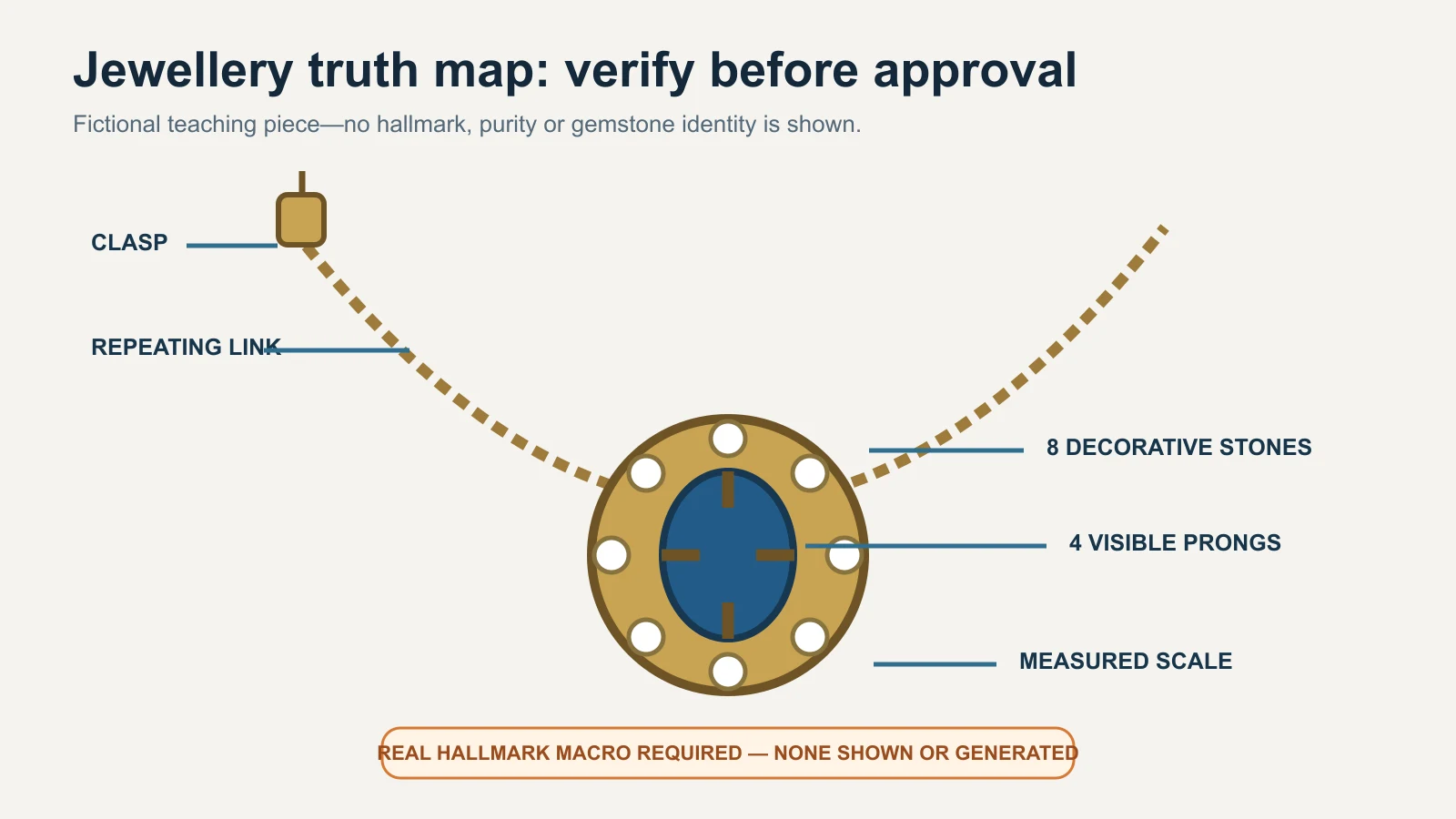
    Jewellery truth map marking clasp, repeating links, stone count, visible prongs, measured scale and the need for a real hallmark macro

    Original GPTWala truth map using a fictional piece. It shows no hallmark, purity, weight or gemstone-identity claim.

    Run the jewellery product-truth gate

    Review the candidate beside the physical piece, source views, truth card and verified product data. Use a product expert—not only the person who generated the image.

    Gate Inspect Pass condition Stop-ship error
    Identity SKU, variant, size and customisation Exact sale child SKU Similar design or wrong variant
    Offer Pair/set count, backs, chain, box and detachable parts Image and listing agree on what is included Extra/missing item or ambiguous prop
    Stone map Count, position, shape and relative size Every visible element matches the real piece One added, lost, cloned or moved stone
    Setting Prongs, beads, channel, bezel, gallery and seats Construction matches real macro Changed, repaired-looking or impossible setting
    Metalwork Links, joints, clasp, bail, hinge, post/screw and filigree All geometry and articulation match Thickened chain, changed clasp or invented joint
    Surface Finish, engraving, enamel, texture and intentional patina Buying-relevant surface remains true Gloss/material change or pattern invention
    Marks Hallmark/HUID/maker mark area and orientation Real pixels and linked verification retained Generated, sharpened, transferred or hidden mark
    Colour Metal/stone appearance under controlled references No variant or material confusion Unverifiable or materially misleading colour
    Scale Recorded measurements, model/display relation and crop Context agrees with dimensions Piece looks materially larger/smaller
    Reflections Edge, facet, metal gradient and studio artifacts Material cues remain physically plausible Repeated sparkle, flat metal or erased edge
    File/destination Crop, resolution, metadata, alt/caption and current rules Reopened final file still matches approved candidate Compression hides detail or metadata/rule fails

    If any stop-ship field fails, the result is REJECTED. Do not average a wrong stone count against a good background.

    The CCPA’s Guidelines for Prevention of Misleading Advertisements, 2022 require truthful and honest representation and prohibit misleading exaggeration of product capability or performance. This is general compliance context, not legal advice for a specific listing. The practical rule is simple: a beautiful image cannot correct a false product depiction.

    Record the approval

    Field Entry
    SKU / child variant
    Image role and destination
    Source image IDs
    Verified product-data record
    AI/retouch method and date
    Prompt/mask/version
    Stone/setting map checked
    Hallmark/HUID route checked where applicable
    Dimensions and quantity checked
    Decision and reason APPROVE / REVISE / REJECT
    Product expert / channel reviewer
    Final filename

    Keep the table blank until a real piece is reviewed. Never fill it with illustrative approval data.

    How the workflow changes across Indian jewellery cases

    These examples are fictional operating cases, not client results or claims about every seller in a city.

    Jaipur kundan-style necklace set

    Photograph the full set, back construction, focal setting, repeated motif, closures and each included piece. Map the decorative elements and intentional asymmetry. Do not label a technique, stone, metal or origin from appearance alone; use the seller’s verified product record. An AI background is secondary. Any extra motif, missing setting or invented matching accessory is a reject.

    Hyderabad pearl-strand retailer

    Count pearls, record sequence and strand length, photograph the clasp and capture colour/lustre in consistent light. AI must not make every pearl identical, rounder or brighter than the physical strand. A model image needs measured length and fall; a generated neck cannot prove fit.

    Thrissur gold-jewellery store

    Keep real main, reverse, clasp and hallmark views tied to the exact item. Verify applicable HUID details through the current BIS route and product records. Do not move a hallmark to a cleaner area or reuse one child variant’s detail view for another weight or size. A purity or weight claim lives in verified data, not in gold-looking pixels.

    Rajkot silver anklet wholesaler

    Capture both anklets, full length, repeating links/bells, closure, marks and every detachable part. Because current silver hallmarking details depend on the applicable standard and marking date, check the exact article and latest BIS source. For a wholesale assortment, state whether the image shows the supplied lot or only a representative design.

    Surat fashion-jewellery seller

    Lock plating colour, stone count, backing, pair symmetry and set quantity. Avoid words such as “gold,” “diamond,” “emerald” or “silver” when only a colour/style resemblance is known; use verified material descriptions. AI may clean a background, but it must not turn plating into a precious-metal claim or costume stones into gem-identification evidence.

    Common AI jewellery image failures and safe fixes

    Symptom Why it matters Safe fix
    Extra or missing stone Changes the sale design and possibly perceived value Reject; return to retained real product pixels
    Different prong/setting Implies another construction or condition Use the real macro; do not generate a repair
    Mirrored earring pair Can hide real pair differences and marks Photograph both actual items and review separately
    Thickened/thinned chain Changes proportions, strength impression and scale Recapture full length; composite the real chain layer
    Cleaner but unreadable hallmark becomes text Invents official-looking evidence Reject; recapture mark and verify through records
    More yellow/white/rose metal Can confuse variant or material Correct only against the physical piece under controlled light
    Identical sparkle on many stones Signals cloned highlights and hides real facet behaviour Keep real reflections; reduce generative relighting
    Flat, plastic-looking metal Material cues were erased Restore real gradients/reflections or reshoot
    Floating necklace/earring Contact, weight and scale become implausible Simplify background; use real display or restrained shadow
    On-model piece is oversized Misleads fit and perceived value Use measured overlay/composite or a real model shoot
    Extra box/chain/prop Changes what appears included Remove props or label offer clearly outside image
    Macro looks sharp but geometry is invented Upscaling/generation created plausible detail Compare with source; recapture rather than infer

    The common AI product-photography mistakes guide handles broad symptom diagnosis. This page is the final authority for jewellery-specific truth fields.

    When to stop AI and use real capture or a specialist

    Use real capture or a specialist jewellery photographer/retoucher when:

    • the piece is one-off, antique, custom, high-value or cannot be replaced;
    • stone, prong, engraving, filigree, enamel or hallmark details are below the source’s usable resolution;
    • reflections or transparency hide construction;
    • accurate metal or gemstone colour is commercially critical;
    • colour-change or optical phenomena must be shown;
    • a model image must prove scale, fit or fall;
    • purity, fineness, weight, certification or stone identity is part of the offer;
    • the jewellery has fine chains, moving parts or multiple detachable components;
    • the output will be the primary evidence for a marketplace or paid ad; or
    • repeated edits change any locked field.

    Use a hybrid when you want a new environment: photograph and retouch the real jewellery layer under controlled conditions, place it into a measured context, and review the composite against the piece. The AI versus traditional product-photoshoot guide helps choose the method; it does not relax this jewellery gate.

    Check the destination after product truth

    Product accuracy is necessary but not sufficient. Each marketplace, feed, website theme and ad surface has current format and content rules. Google Merchant Center’s main-image guidance requires the actual/correct product and variant and restricts placeholders and promotional overlays. Its AI-generated-content guidance requires applicable generative-AI product images to retain specified IPTC digital-source metadata.

    Use the product-image rules by destination before upload. Do not assume a tool’s “marketplace” preset satisfies a platform, category or seller-account rule. Inspect the final delivered file because optimisation can strip metadata or soften tiny details.

    Connect truthful jewellery images to online growth

    An approved jewellery image set can feed a digital product catalogue, a WhatsApp Business catalogue or a product landing page. The images still need accurate SKU data, offer quantity, price, follow-up and a responsible publishing process.

    The GPTWala workshop connects this AI Content Creation step to the DAA path: Digital Presence → AI Content Creation → ₹100/day WhatsApp ads. It is an educational system, not a promise of enquiries, sales, earnings or return on ad spend.

    See the GPTWala workshop
    Learn how verified product content can support a broader online-growth workflow.

    Frequently asked questions

    Can AI create jewellery product photos from one phone picture?

    It can create a plausible image, but one picture is rarely enough to verify settings, back construction, clasp, hallmark, scale and every included item. Use real front, back, profile, macro, measured and quantity views. If a buying-relevant field is not visible, recapture it rather than asking AI to infer it.

    Can I use AI to remove a jewellery background?

    Yes, as a candidate workflow when the real jewellery layer and fine edges can be retained. Review every chain link, prong, stone, clasp, reflection and mark after removal. If masking erodes detail or regenerates the product, use a controlled non-generative mask or specialist retouching.

    How do I stop AI from changing the stone count?

    Create a numbered stone map from a real macro, name stone count/position as locked fields, and compare the output at full resolution. A prompt cannot guarantee the count. If one stone changes, reject the result and return to real product pixels.

    Should I enhance a blurred hallmark or HUID with AI?

    No. A generated enhancement can create official-looking but false characters. Recapture the physical mark with appropriate magnification and light, tie it to the correct article, and use current BIS verification where applicable. A photograph alone does not assay or certify the metal.

    How can I show the true colour of gold, silver or stones?

    Use consistent controlled light, a neutral environment/reference and the physical item during correction. Provide multiple real images when appearance changes with angle or light. Do not claim exact colour across every screen, and do not use a dramatic AI relight as evidence of material or gem grade.

    Are AI model images safe for earrings and necklaces?

    Only as carefully reviewed secondary context. Use recorded dimensions, retain the real jewellery layer and compare its scale, contact and fall. A generated ear, neck or hand can make a piece look larger, smaller or differently positioned, so use a real model shoot when fit or scale is a buying decision.

    Can I mirror one earring to make a pair?

    Do not do this when selling a physical pair. Photograph and review both actual earrings, their backs and applicable marks. Mirroring can hide real construction, intentional asymmetry, condition differences or separate identifiers.

    Does an attractive jewellery photo prove purity or stone identity?

    No. Gold-looking colour does not prove gold purity; a clear stone image does not establish whether a stone is natural, laboratory-grown, treated or a specific variety. Use verified product data, applicable hallmarks/HUID checks, invoices and laboratory reports where relevant.

    Can an AI jewellery image be a marketplace main image?

    Only if it accurately shows the exact sale piece and meets the current platform, account, category and image-role rules. Keep real proof views, verify product truth first, preserve required provenance metadata and treat platform approval as a separate check.

    Sources and review method

    Reviewed 12 August 2026. Official sources were used for BIS hallmarking/HUID facts, Indian misleading-advertising context, Google product-image/AI-metadata rules and named AI-editor limitations. GIA guidance supports lighting/background cautions. No tool output, jewellery result or seller-account submission was tested. Recheck all platform-, hallmark- and account-sensitive claims within 24 hours of publication.