Reviewed and updated: 11 August 2026
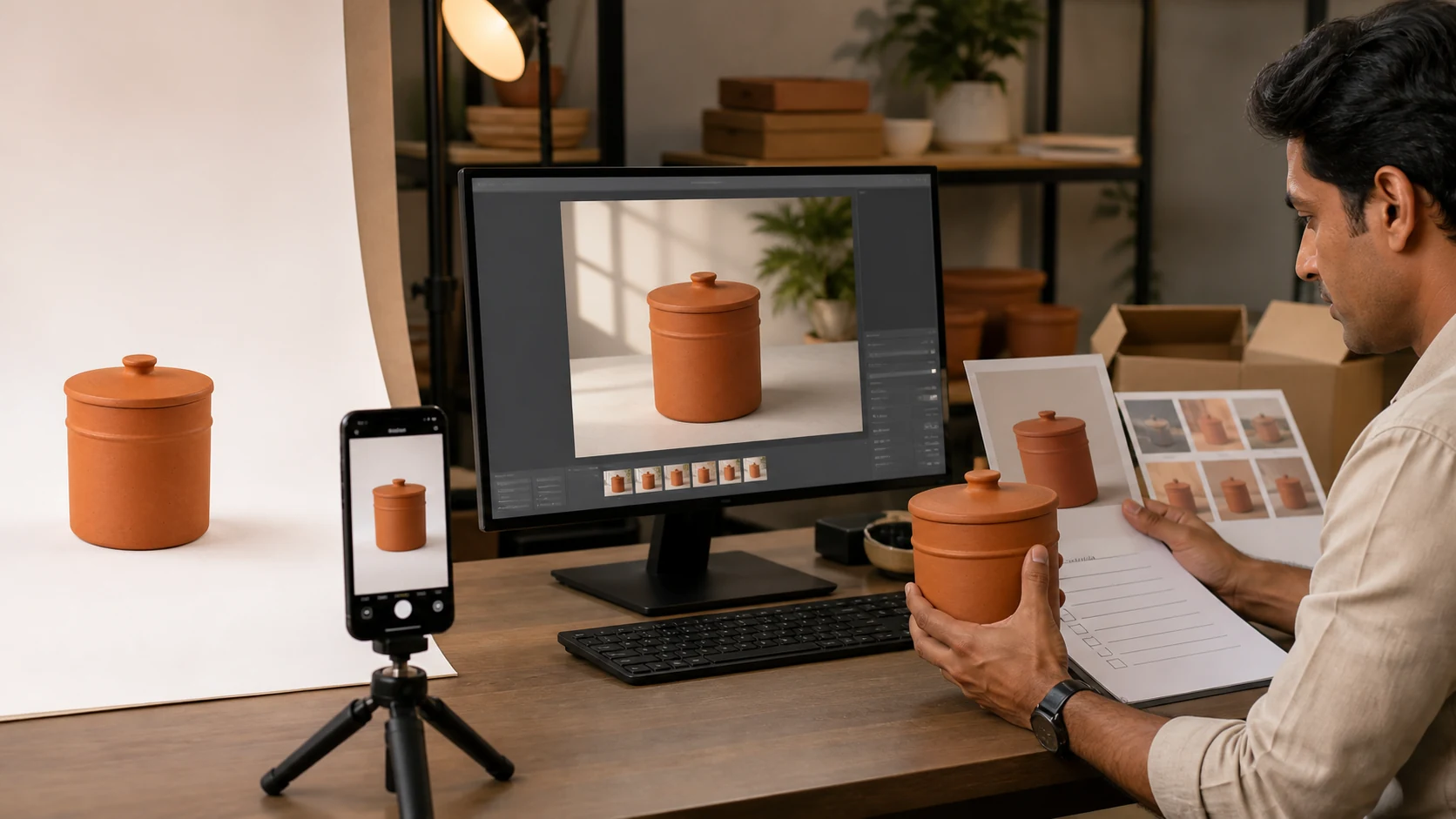
Editorial image disclosure: the featured visual was created with AI for this guide using a fictional, unbranded terracotta product. It is an editorial concept—not a merchant result, exact-SKU evidence or proof of product accuracy.
To turn phone photos into an approved product-image set, start with the exact SKU and define what each image must do. Capture a complete reference pack, protect the untouched originals, and use AI only inside a chosen risk lane. Compare every output with the product side by side, then approve and export it for one destination. One phone photo is not enough when reverse details, reflective finish, fit, shape or scale cannot be verified.
Table of contents
- The phone-to-approved workflow at a glance
- Gate 1 — Write the image job before taking a photo
- Gate 2 — Capture a truthful phone reference pack
- Gate 3 — Ingest, name and protect the originals
- Gate 4 — Prepare the product layer without inventing it
- Gate 5 — Use AI inside the chosen risk lane
- Gate 6 — Review side by side and record the decision
- Gate 7 — Export, hand off and keep a rollback path
- Four illustrative Indian operating examples
- Approval log and cost-per-approved-asset worksheet
- Common hand-off failures and safe fixes
- A one-day pilot for five SKUs
- Frequently asked questions
The phone-to-approved workflow at a glance
An AI-generated image is an intermediate file. It becomes a business asset only when it is tied to the right SKU, image role, version, reviewer and destination.
This seven-gate workflow is GPTWala editorial practice for a small product team. A single owner can fill every role, but the decisions must still be explicit.
| Gate | Input | Owner | Output | Pass condition | Stop rule |
|---|---|---|---|---|---|
| 1. Brief | Exact physical SKU and sales need | Merchandiser or owner | Image job card and truth card | Variant, role, destination and locked attributes are known | Product or intended use is ambiguous |
| 2. Capture | Clean product and job card | Photographer or trained staff member | Complete source-of-truth pack | All deciding details are visible and usable | A material detail is missing, blurred, clipped or colour-shifted |
| 3. Ingest | Phone originals | Asset operator | Named, backed-up source folder and working copies | Files map to one SKU and originals are protected | Mixed variants, duplicates or missing views remain unresolved |
| 4. Prepare | Working copies | Retoucher or operator | Clean product layer or conservative edit | Real geometry, edges, text and finish remain intact | Cleanup requires the tool to invent missing product pixels |
| 5. Edit | Protected product layer, job card and constraints | AI operator | Review candidates | Edit stays inside the approved preserve, contextualise or concept lane | Product identity or offer truth changes |
| 6. Review | Candidate, references and destination rules | Product expert and channel owner | Approve, revise or reject decision | Truth, visual quality and destination checks all pass | Any essential field is wrong or cannot be verified |
| 7. Export | Approved master and decision record | Asset owner or publisher | Channel copy, hand-off record and rollback path | Final reopened file matches approval and destination | Metadata, crop, resolution, SKU mapping or version is uncertain |
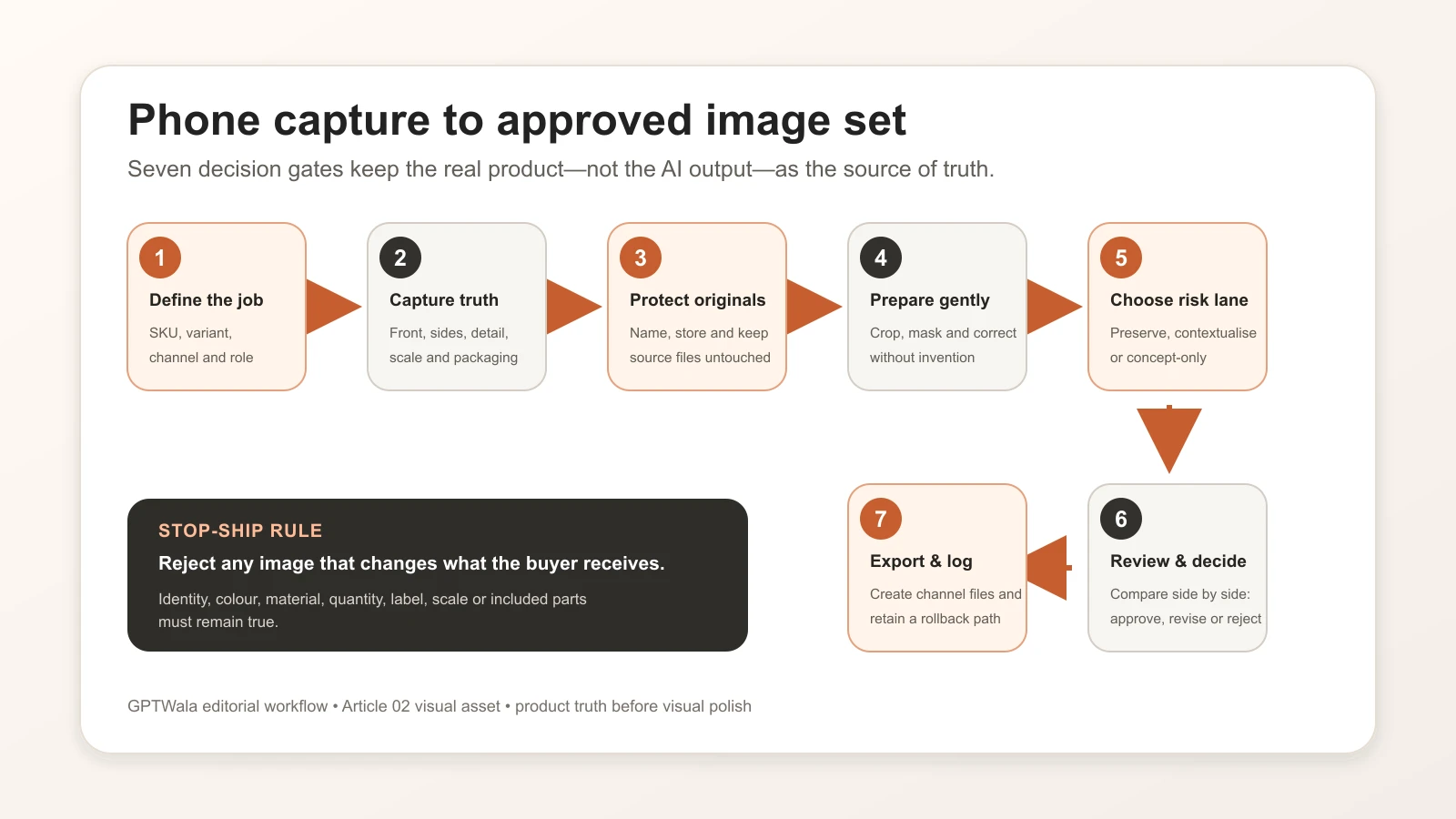
GPTWala’s seven-gate editorial workflow: define, capture, protect, prepare, choose a risk lane, review, then export with a rollback path.
The job card should name one primary image role: a clean listing image, a proof/detail image, a lifestyle image, an ad creative or a B2B catalogue image. These roles can share the same source pack, but they do not share the same acceptance test. The complete AI product photography guide for Indian businesses explains the broader strategy; this page owns the operating trail.
Gate 1 — Write the image job before taking a photo
Identify the exact SKU and variant
Put the product on the table before opening an editor. Record:
- SKU or design code;
- parent range and exact child variant;
- colour or finish name used in the catalogue;
- physical dimensions;
- quantity and included components;
- packaging or label version; and
- the date the physical item was verified.
Do not use a neighbouring colour, an old pack, a prototype or a similar design as the silent source. If the sale item changed, begin a new source pack. The same filename attached to two physical versions is a future listing error waiting to happen.
Choose one destination and image role
Write a one-sentence job:
Create a secondary website lifestyle image for SKU KSM-JAR-750-TC that shows the exact jar on a kitchen shelf without changing its lid, handle, glaze, label or apparent capacity.
That is clearer than “make this image premium.” It tells the operator what may change, what may not change and where the asset will appear.
A marketplace main image, a WhatsApp catalogue thumbnail and a wide website banner may need different crops and scene rules. One approved master can support several exports, but one production brief should not combine contradictory jobs.
For example, Google Merchant Center’s current main-image guidance requires the actual product, the correct variant and no promotional overlays; its additional-image and lifestyle attributes allow different kinds of product staging. Check the destination before production, not after a batch is finished. See Google’s official main-image, additional-image and lifestyle-image guidance.
Lock the attributes that cannot change
Create a product truth card for the exact item. Attach a real reference view beside each high-risk field.
| Truth field | What to record | Automatic-reject example |
|---|---|---|
| Identity | SKU, design code and current pack version | Output uses another variant |
| Silhouette and proportions | Overall shape and dimension relationships | Neck, handle, hem or clasp changes |
| Colour and finish | Catalogue colour name plus verified references | Matte finish becomes glossy or colour changes buying meaning |
| Pattern and construction | Print, weave, seams, joints, stone settings or mould lines | Motif, stitch, setting or part is invented |
| Label and logo | Exact spelling, position and orientation | Text is garbled or logo is moved |
| Quantity and components | What the buyer receives | Extra item appears included |
| Scale | Actual dimensions and a truthful comparison reference | Scene makes the item materially larger or smaller |
| Claims and use | Only approved, supportable claims | Visual implies unsupported heat, waterproof or safety performance |
If a locked field is not visible in the source pack, mark it “unknown—recapture.” Do not ask a prompt to recover evidence that was never captured.
Gate 2 — Capture a truthful phone reference pack
Build the minimum shot list
For many rigid products, start with front, back, left, right, a 45-degree view, top and bottom where relevant, plus close-ups of text, material and joining details. Add:
- packaging and every included component;
- a frame with a ruler or known-size object for internal scale checking;
- category-specific proof, such as a clasp, sole, border, connector, batch label or texture;
- a view that separates reflective or transparent edges from the background; and
- one frame that shows the entire product without clipping.
This is not a universal shot count. A flat notebook may need fewer views; a reflective kada, sari border, mixer attachment set or ceramic vessel may need more. Capture until a reviewer can verify the locked fields without guessing.
If the reader needs a narrower creation walkthrough rather than a team SOP, use create one product image from a phone photo when that guide is live.
Use a simple, repeatable capture setup
The goal is reliable evidence, not an equipment contest.
- Clean the product and the phone lens.
- Use a stable support and keep the camera level where geometry matters.
- Place the product against an uncluttered, contrasting background.
- Use soft, even light that reveals texture without hiding edges in glare or shadow.
- Avoid digital zoom; move or reframe while keeping the whole item sharp.
- Include a neutral or known reference where colour is commercially important.
- Keep the product, lighting and camera position consistent across variants.
These are editorial capture practices, not universal device requirements. No minimum megapixel count or phone model guarantees a truthful source. A high-resolution blurred image is still a failed reference.
Inspect before putting the product away
Review the frames at full size, not only as phone thumbnails. Zoom into labels, stitching, stone settings, edges, reflective highlights and included parts.
Retake now if any answer is “no”:
- Can I read the required text?
- Can I distinguish every thin or transparent edge?
- Is the exact variant obvious?
- Are highlights showing the material rather than erasing it?
- Is every included item documented?
- Can I verify the back, underside and closures?
- Does a trusted observer see an obvious colour cast?
Keeping the item on the table for five more minutes is safer than letting an AI system infer an unseen feature later.
Gate 3 — Ingest, name and protect the originals
A folder structure a small team can use
Use one folder tree per SKU:
/KSM-JAR-750-TC/
  /source/
  /working/
  /review/
  /approved/
    /website/
    /whatsapp/
    /marketplace/
    /ads/
  /rejected/
The source folder contains untouched phone files. Working files are duplicates. Review contains candidates, approved contains signed-off masters and channel copies, and rejected holds failures worth learning from.
Use a filename that answers five questions without opening the file:
SKU_role_view_version_status.ext
Illustrative example:
KSM-JAR-750-TC_lifestyle-front_v03_review.png
Do not put “final-final-new” in filenames. Use a version number and a controlled status such as WORKING, REVIEW, APPROVED or REJECTED.
Never overwrite the source-of-truth files
Copy phone originals into the source folder, preserve their original identifiers in the job record and make the folder read-only for routine operators where practical. Edit duplicates only.
Before processing:
- compare the physical label or design code with the folder name;
- remove accidental duplicates without deleting the only copy;
- flag files that show another variant;
- note any missing view; and
- back up the source pack in a second controlled location.
This is simple version control. It creates a rollback path when an edit, export or upload damages an asset.
Gate 4 — Prepare the product layer without inventing it
Correct capture problems conservatively
Safe preparation may include rotation, crop, modest exposure and white-balance correction, dust cleanup and careful background removal. Keep a before-and-after comparison.
Do not use generative fill to rebuild a clipped handle, hidden chain, missing label corner, unseen sole or incomplete garment border. That produces a plausible answer, not a verified one. Return to Gate 2 or use manual retouching that works from real pixels.
Inspect masks and difficult edges
Zoom in around:
- chains, prongs and fine jewellery work;
- lace, loose fibres, tassels and hair;
- glass, translucent plastic and sheer fabric;
- polished metal rims and glossy ceramics;
- thin handles, spokes and wires; and
- printed or embossed text near an edge.
A rough mask can silently remove product material; an over-wide mask can invite the model to redraw it. Give high-risk edges one of three treatments: protect the existing product layer, refine the mask manually, or return to capture with better separation. If none produces verifiable edges, use the real photo.
Gate 5 — Use AI inside the chosen risk lane
Choose a tool only after the job, locked attributes and pass condition are written. The separate same-SKU benchmark will compare AI product-photo tools on the same SKU instead of declaring a winner from vendor examples.
Preserve lane
The product pixels or protected product layer remain unchanged. AI or conventional editing changes only canvas, placement or the surrounding background. Use this lane for truth-sensitive listing support when the workflow can genuinely keep the product intact.
Pass only if an overlay comparison shows that the product boundary, text, colour and components are unchanged.
Contextualise lane
AI creates a scene around a protected product. State the intended viewpoint, scale, supporting surface, contact shadow and forbidden product changes. Treat props as context, not included items.
A concise production instruction can be:
Retain the exact supplied product layer without redrawing it. Create a warm neutral kitchen-shelf setting around it, match the existing camera angle, add a physically plausible contact shadow, and do not change the product’s shape, glaze, lid, handle, label, colour, quantity or proportions. Do not add text, badges or accessories that could appear included.
A prompt is not an accuracy guarantee. Use the product-truth AI photography prompt pack for reusable prompt structures, and generate a background without changing the product for the dedicated masking workflow once those articles are live.
Concept-only lane
Use text-to-image output to explore mood, styling or campaign direction when it does not depict a verified sale item. Label it internally as concept-only. It cannot become a product-proof image merely because it looks realistic.
Rebuild an approved concept around the real SKU, or keep it outside the catalogue. Text-to-image generation must not silently invent the product for sale.
Gate 6 — Review side by side and record the decision
Never approve from memory. Put the candidate next to the full source pack and truth card at a useful zoom level.
First pass: identity and offer truth
Check the exact SKU, variant, quantity, included components, label, logo, claims and use context. A wrong SKU, quantity, component, material, label, claim or essential geometry is an automatic reject.
This is also the customer-truth pass. India’s Consumer Protection (E-Commerce) Rules and misleading-advertisement guidance are relevant to accurate online representations, while the ASCI Code says advertisements must be truthful and not mislead through visual presentation, implication or omission. The practical rule is to avoid visually adding or implying anything the buyer will not receive. This article is operating guidance, not legal advice. Review the Consumer Protection (E-Commerce) Rules, 2020, the CCPA Guidelines for Prevention of Misleading Advertisements, 2022 and the ASCI Code for the current text.
Second pass: geometry, material and scale
Check silhouette, proportions, pattern, texture, colour, finish, reflections, contact with the surface and believable scale. Use an opacity overlay or rapid source/candidate toggle where the viewpoint matches.
Ask a category expert, not only the designer, to review high-risk fields. A jewellery owner may notice a missing prong; an apparel merchandiser may catch a changed border; a manufacturer may see a mould line or connector that an editor misses.
Third pass: destination and file integrity
Check crop, aspect ratio, resolution, text and overlay rules, embedded metadata, rights, filename, export format and the destination’s current policy. Platform acceptance, product truth and visual quality are three different approvals; passing one does not prove the others.
Use only:
- APPROVE: all required checks pass for the named destination;
- REVISE: the issue is fixable without guessing or changing a locked field; or
- REJECT: a material field is wrong, unverifiable or repeatedly reconstructed.
Record the reviewer and the reason. “Looks good” is not a production status. For a deeper severity model, use the full product-accuracy audit for AI images when live. If a known symptom keeps returning, diagnose the AI product-photo failure instead of adding random prompt adjectives.
Gate 7 — Export, hand off and keep a rollback path
Create destination presets only after current rules are checked
Build exports for a named destination: website main, website detail, WhatsApp catalogue, B2B catalogue, marketplace main, marketplace additional, lifestyle or ad. Keep the approved master separate.
Do not copy an old marketplace template into every channel. For Google Merchant Center, current main, additional and lifestyle-image requirements are separate. For Amazon.in, the signed-in Product Image Requirements and current category style guide for the seller’s account should control; public forum guidance is only a secondary pointer. For Flipkart or Meesho, check the current seller surface rather than repeating an old number from a blog. The dedicated current channel image-rules guide should own the detailed rule table when published.
Preserve the approved master and metadata
Keep:
- the approved master at its review resolution;
- the source IDs and truth card;
- the tool or method and version/date;
- the final prompt or edit instructions;
- the approval record;
- every channel copy; and
- licence, consent or release information where relevant.
Google Merchant Center currently requires generative-AI images used in the relevant product-image attributes to retain embedded IPTC digital-source metadata. Google’s AI-generated-content guidance and additional-image guidance say not to remove the relevant embedded tag.
Do not assume your export, compressor, media library or CDN preserves it. Run this test for every changed pipeline:
- Inspect the approved file with a metadata reader and save the report.
- Export the channel copy.
- Process it through the same compression and upload path used in production.
- Download the delivered file.
- Inspect the downloaded file and compare the required field.
- If the field is missing, stop that destination and repair the workflow.
A caption, filename or alt text does not replace required embedded provenance. This article does not claim that the current GPTWala WordPress pipeline preserves IPTC metadata; that must be verified after WordPress access is restored.
Publish one controlled pilot before batching
Place one approved channel copy in the real destination, then inspect:
- the live mobile and desktop crop;
- the correct SKU and variant mapping;
- labels and deciding details at the displayed size;
- compression damage and colour shift;
- surrounding copy, price and included-items information; and
- any platform diagnostic or rejection.
Keep the rollback path ready. Do not mass-update a catalogue because one generated file looked right inside the editor.
Four illustrative Indian operating examples
These are workflow examples, not client results or claims about every business in the named location.
Morbi ceramics manufacturer
The job card names the tile or vessel design, size, glaze, surface finish and batch-relevant variation. The source pack includes straight views, edge thickness, underside, a raking-light texture frame and scale. AI may build a dealer-catalogue layout around a protected product image. The reviewer rejects changed proportions, softened relief, false gloss or an installation scene that implies an unavailable size.
For many SKUs, move into a dedicated catalogue workflow for manufacturers and wholesalers rather than hiding batch logic inside one folder.
Surat apparel wholesaler
Each colourway is a child SKU, not a recolour instruction. The truth card records fabric, colour, print repeat, border, embroidery, blouse piece or included components, and verified dimensions. Flat and close-up source views remain proof. A model or lifestyle image is secondary and is rejected if fit, drape, border, motif or transparency changes.
Jaipur jewellery retailer
The source pack includes front, back, side, clasp, hallmark where appropriate, stone setting and a physical scale reference. Reflective edges and thin chains receive a high-risk flag. A contextual image can support discovery, but a real macro remains product proof. Any changed stone count, setting, metal tone, chain length or included piece is an automatic reject.
Local packaged-goods retailer
The folder is tied to the current stock version and pack size. The truth card locks brand text, flavour or variant, net quantity, cap, label panel, pack count and included offer. The reviewer rejects an old label, false quantity, extra pack, invented badge or context that implies a benefit not stated on the verified packaging.
The approval log and cost-per-approved-asset worksheet
An approval log turns judgement into a traceable decision. Use one row per candidate, not one row per SKU.
| Field | What to enter |
|---|---|
| Asset ID | Unique candidate identifier |
| SKU and variant | Exact physical product |
| Image role and destination | Main, detail, lifestyle, ad or catalogue plus named channel |
| Source IDs | Every reference file used |
| Risk lane | Preserve, contextualise or concept-only |
| Tool/method/version/date | Enough detail to repeat or audit the operation |
| Prompt or edit record | Exact instruction, mask notes and manual edits |
| Operator effort | Hands-on capture, editing and export time |
| Generation and tool cost | Actual credits or allocated subscription cost |
| Review and rework | Reviewer, elapsed effort and number of revisions |
| Decision | APPROVE, REVISE or REJECT |
| Reason code | Identity, geometry, colour, edge, context, destination, metadata or other |
| Approved master and exports | File paths and destination status |
Use actual records, not an online “average”:
Cost per approved asset = (source capture + tool or credit cost + operator time + retouching + review + rework or reshoot) ÷ approved usable assets
Also track:
- approval rate = approved candidates ÷ reviewed candidates;
- rework rate = candidates needing another edit ÷ reviewed candidates; and
- hands-on time per approved asset = total hands-on time ÷ approved assets.
If owner time has no salary line, assign and document an internal rate rather than treating it as free. Compare workflows only when the brief, destinations and quality threshold are similar.
Common hand-off failures and their safe fix
| Symptom | Risk | Return to gate | Safe fix |
|---|---|---|---|
| Two colour variants appear in one folder | Wrong image reaches the listing | 1 or 3 | Separate child-SKU folders and re-verify source IDs |
| Reverse view is missing | Hidden geometry or text is invented | 2 | Recapture; never infer a sale detail |
| Source was overwritten | No trustworthy rollback or comparison | 3 | Restore from backup and restrict source-folder edits |
| Logo or label is cropped | Buyer cannot verify identity or quantity | 2 or 4 | Use a complete source and adjust crop without rebuilding text |
| Product floats | Scene looks false and can distort scale | 5 | Rebuild contact shadow around the protected product layer |
| Colour drifts | Buyer may receive a materially different-looking variant | 2, 4 or 5 | Check capture cast, compare verified references and use a real image if unresolved |
| Required metadata disappears | Destination or provenance requirement may fail | 7 | Stop upload, identify the stripping step and retest the full pipeline |
| Wrong destination preset is used | Crop, overlay or file rule can fail | 7 | Re-export from the approved master after checking current rules |
| Staff approve from a phone thumbnail | Small text, edge and geometry errors survive | 6 | Review at useful zoom beside the source pack |
A one-day pilot for five SKUs
A “one-day pilot” means a constrained production exercise, not a promise that every team will finish five SKUs in a day. Choose four normal products and one difficult product, or use one SKU with five materially different image jobs if stock access is limited.
| Sequence | Work | Evidence to keep |
|---|---|---|
| Set the jobs | Write five job cards, truth cards and destination checks | SKU, role, locked fields, owner and stop rule |
| Capture | Create and inspect source packs | Shot list, source IDs and recapture reasons |
| Ingest | Name, back up and separate working files | Folder tree and duplicate/variant check |
| Prepare and edit | Produce a small, controlled candidate set | Method, prompt, mask, attempts, cost and operator time |
| Review | Compare every candidate side by side | APPROVE/REVISE/REJECT plus reason |
| Export | Create channel copies from approved masters | Preset, metadata before/after and reopened-file check |
| Retrospective | Count outcomes and recurring defects | Approval rate, rework rate, time and cost per approved asset |
Use blank templates if a real test cannot be completed. Any filled example must be labelled illustrative unless it records an actual, dated pilot. Do not invent an approval rate, staff time or savings claim.
The decision at the end is:
- Go: the workflow consistently produces verifiable, findable assets at an acceptable internal cost;
- Change: a specific capture, tool, mask, review or export step causes repeatable rework; or
- Stop: product truth or destination compliance cannot be controlled.
Commercial performance is a later observation. A clean pilot does not prove that an image will generate enquiries or sales.
What comes after an approved image set
An approved image set can now feed a website, dealer catalogue, WhatsApp Business catalogue or campaign brief without each team recreating the product. Next, build a digital product catalogue or set up a WhatsApp Business catalogue when those guides are live.
But approved images are only the AI Content Creation part of online growth. Product businesses also need a discoverable digital presence and a controlled way to generate and follow up enquiries.
If your business still depends mainly on walk-ins, the GPTWala workshop explains the DAA path: Digital Presence → AI Content Creation → ₹100/day WhatsApp ads. It shows how approved product assets connect to an online presence and a small-budget enquiry system without promising leads, sales or ROI.
See the GPTWala workshop
Connect your approved product assets to a broader online-growth process.
Frequently asked questions
Is one phone photo enough for an AI product image?
Only when that one view contains everything the edit must preserve and no hidden detail needs to be inferred. For most commercial workflows, capture more views. Reverse-side text, closures, reflective edges, fit, scale and included components often need their own evidence. If a locked field is not visible, recapture it rather than asking AI to guess.
Which source angles should I capture?
Start with front, back, both sides, a 45-degree view, top and bottom where relevant, then add close-ups of text, texture, joints and included parts. The product decides the final shot list. Jewellery needs setting and clasp detail; apparel needs print, border and construction proof; packaged goods need readable current labels and quantity.
How should product-image files be named?
Use a consistent pattern such as SKU_role_view_version_status.ext. Keep the exact child SKU first, then one image role, the view, a numeric version and a controlled status. Keep APPROVED files separate from REVIEW and REJECTED files. Do not overwrite phone originals or use labels such as “final-new.”
Who should approve an AI-assisted product image?
Use a product expert for identity, construction and offer truth, and a channel owner for crop, format and destination rules. In a very small business, one owner may do both jobs, but should still complete both checks. The person who created the image should not approve a high-risk field from memory.
Can an AI-assisted output be a marketplace main image?
Sometimes, but only if it accurately shows the exact product and follows the current rules for the seller’s account, category and image role. Google distinguishes main, additional and lifestyle images. Other marketplaces have their own current requirements. A tool’s “marketplace-ready” export is not proof of acceptance.
Can a phone and AI reproduce exact product colour?
Do not promise exact physical colour from an uncalibrated capture-and-screen chain. Control lighting, keep a verified reference, compare with the physical item and involve the product owner. If colour changes buying meaning and the team cannot verify it, use a real product image or a controlled professional colour workflow.
What metadata should I keep?
Keep source IDs, SKU, image role, method/tool/version, prompt or edit record, approval and rights information. Preserve any destination-required embedded provenance. Google Merchant Center currently requires applicable generative-AI product images to retain specified IPTC digital-source metadata. Test the final delivered file because export and optimisation steps can strip fields.
When should I hire a photographer or specialist retoucher?
Use a specialist when capture needs controlled colour, complex reflections, translucent or very small details, model fit, safety-critical views or reliable dimensions that the team cannot produce and verify. Hire one as soon as repeated AI or phone attempts create more uncertainty than approved assets. A hybrid workflow can keep real product proof while using AI for controlled context.
Sources and review method
Reviewed 11 August 2026. Platform rules, seller-account requirements and tool behaviour can change. Recheck destination-sensitive claims within 24 hours of publication and at least every 90 days. The folder, gate and approval templates are GPTWala editorial practice, not a claimed industry standard.
- Google Merchant Center: image link
- Google Merchant Center: additional image link
- Google Merchant Center: lifestyle image link
- Google Merchant Center: AI-generated content
- Amazon.in Seller Central: Product Image Requirements (login may be required)
- Amazon.in seller-staff public image guidance
- Consumer Protection (E-Commerce) Rules, 2020
- CCPA Guidelines for Prevention of Misleading Advertisements, 2022
- ASCI Code for Self-Regulation
- Google Search Central: changes to HowTo and FAQ rich results
- Google Search Central: structured-data guidelines
Leave a Reply