Reviewed and updated: 12 August 2026
Template status: every prompt on this page is a tool-neutral template to verify with your own SKU. GPTWala has not labelled these templates “tested” because a dated, controlled exact-SKU prompt test has not yet been completed. A prompt can direct an edit; it cannot certify the output.
A safer AI product photography prompt has four layers: source truth, permitted change, scene specification, and negative plus acceptance conditions. Attach photographs of the exact SKU and name the details that must not change. Words such as “photorealistic” or “premium” are not evidence. Negative instructions reduce ambiguity, but they cannot guarantee fidelity; compare every output with the real product and reject any material change.
Table of contents
The safest AI product photography prompt formula
Tell the tool what is true before telling it what to create. A commercial product-image prompt should answer four questions in this order:
| Layer | Question it answers | What belongs here |
|---|---|---|
| 1. Source truth | Which exact sale item is authoritative? | SKU, variant, supplied views, locked visible attributes and verified dimensions |
| 2. Permitted change | What is the tool allowed to edit? | Background, selected region, canvas, surrounding light or other narrow change |
| 3. Scene and output | What useful image should be made? | Image role, destination, setting, viewpoint, crop, contact shadow and aspect ratio |
| 4. Negative + acceptance conditions | What causes rejection? | Prohibited additions and a clear stop rule for any change to product or offer truth |
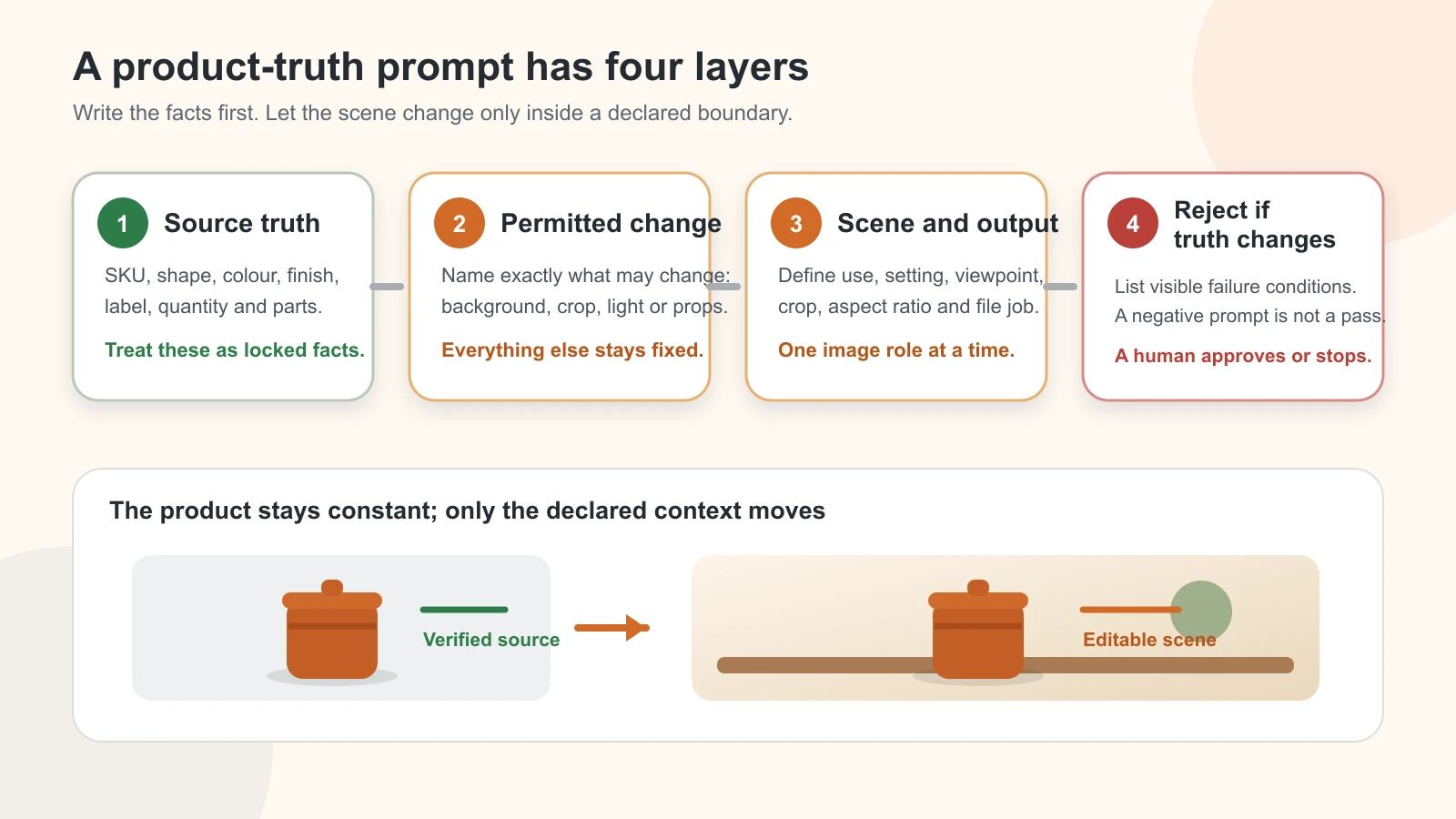
Original GPTWala prompt-anatomy diagram. A prompt narrows the edit boundary; it does not guarantee that a model will preserve the product.
Copy this modular master prompt and replace every field in square brackets:
SOURCE TRUTH
Use the attached photographs of the exact [SKU and variant] as the only source of
product identity. The [front / 45-degree / back / label / detail] references all show
the same physical item. Locked attributes: [silhouette and proportions], [colour],
[material and finish], [pattern], [label/logo/text], [quantity and included parts],
and [verified dimensions or supplied scale cue].

PERMITTED CHANGE
Change only [background / canvas outside the product / lighting around the product /
selected region]. Keep the supplied product layer intact. Do not redraw, recolour,
relabel, resize, beautify, add to, or remove any part of the product.

SCENE AND OUTPUT
Create a [main catalogue / additional / lifestyle / dealer-detail / ad] image for
[destination and audience]. Show [setting and surface] from [viewpoint], with
[lighting direction], a physically plausible [contact shadow/reflection], [crop],
and [aspect ratio]. Keep props secondary and scale believable.

NEGATIVE + ACCEPTANCE CONDITIONS
No extra product units, accessories, text, logos, badges, hands, claims or offer
elements unless they are supplied and verified. Reject the result if any locked
attribute changes, any generated text is substituted for the real label, or the
intended quantity, included parts, scale or use becomes unclear.
The non-negotiable fields are the exact SKU/variant, locked attributes, permitted edit and rejection conditions. You may omit decorative details such as a named interior style. Never ask the model to infer a missing colour, reverse view, component, quantity, dimension or claim.
A compact mobile version
If a mobile interface makes long prompts awkward, keep product identity and the stop rule:
Edit the attached photos of exact SKU [ID/variant]. Change only [area]. Preserve its
exact shape, proportions, colour, material, finish, pattern, label text, quantity,
included parts and verified scale. Create [scene/output/crop]. Add no product parts,
props that look included, text or claims. Reject any result that changes the product.
Shorter is acceptable; vague is not. “Make this premium, cinematic, ultra-realistic and 8K” says almost nothing about the sale item.
Completed editorial example
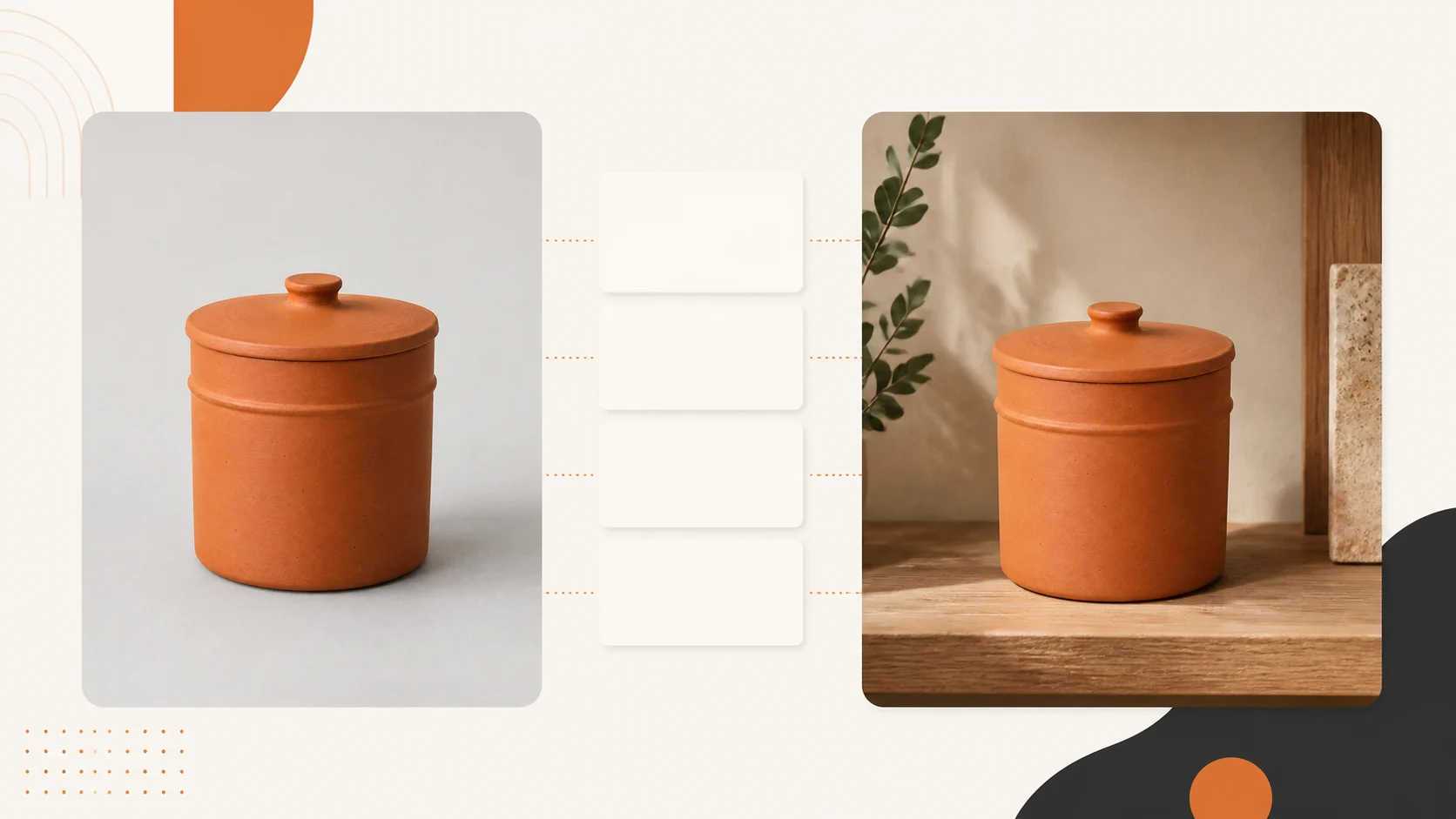
The following demonstrates the grammar with the fictional terracotta jar used in GPTWala’s parent guide. The reference exists only as an editorial image; there is no physical sale SKU, so the output must remain an illustration and cannot become product proof.
SOURCE TRUTH
Use the supplied front reference of fictional editorial jar EDU-JAR-01 as the only
source of visual identity. Lock its tall cylindrical silhouette, matching terracotta
lid and knob, matte warm-terracotta body, one raised horizontal band around the upper
body, no handles, one visible jar, and the exact front-facing proportions shown.

PERMITTED CHANGE
Change only the canvas outside the jar. Do not regenerate, reshape, recolour, relabel,
resize, sharpen or add texture to the jar.

SCENE AND OUTPUT
Create a horizontal editorial lifestyle illustration. Place the jar on a warm neutral
kitchen shelf, viewed at the same camera angle, with soft daylight from the left,
a small grounded contact shadow, restrained background objects and clear negative
space on the right. Use a 16:9 crop.

NEGATIVE + ACCEPTANCE CONDITIONS
No second jar, food claim, ingredient, logo, label, offer text, human hand or accessory
touching the jar. Reject any result that adds handles or changes the lid, knob, band,
body colour, finish, silhouette or perceived size. Keep the caption “fictional editorial example”.
That example is useful for learning the syntax—not for proving preservation. For a commercial image, replace the fictional input with a photographed exact SKU and a real product truth card.
Official controls differ by tool and version. As reviewed on 11 August 2026, OpenAI’s ChatGPT Images help says a user can upload an existing image, describe an edit and select a specific area. It also warns that highlights are not always precise and an edit may extend outside the selection. Google Product Studio’s help describes scene generation around a product image and warns that experimental features can produce unexpected output. A protected area is a useful control, not a warranty.
Before you copy a prompt, make a product truth card
The prompt should be assembled from a record, not from memory. Photograph the exact item from enough angles, then let the product owner or SKU expert complete this card.
| Product truth field | Verified value | Reference file or physical check | Stop-ship if changed? |
|---|---|---|---|
| SKU and variant | [enter] |
[filename / item in hand] |
Yes |
| Silhouette and proportions | [enter] |
[front + side] |
Yes |
| Colour and colourway | [enter] |
[controlled reference] |
Yes |
| Material and finish | [enter] |
[macro/detail] |
Yes |
| Pattern, weave or surface | [enter] |
[detail] |
Yes |
| Label, logo and readable text | [enter] |
[label close-up] |
Yes |
| Quantity sold | [enter] |
[offer record] |
Yes |
| Included parts/accessories | [enter] |
[complete pack shot] |
Yes |
| Dimensions and scale cue | [enter] |
[measured record] |
Yes |
| Permitted edit | [enter] |
[approved brief] |
— |
| Intended image role/channel | [enter] |
[approved brief] |
— |
| Named reviewer | [enter] |
[approval log] |
— |
Universal locked attributes
Lock the SKU, variant, silhouette, proportions, colour, material, finish, pattern, label/logo, quantity, components and scale whenever they affect what the buyer receives. Also lock any small feature that distinguishes one variant from another: cap type, handle shape, port location, fastening, seam, edge profile or pack size.
Generated label text is untrusted even when it looks readable. Keep the photographed label layer whenever possible; otherwise add text manually from an approved source and review it at full size.
Category-specific locked attributes
| Category | Add these locks | Do not infer |
|---|---|---|
| Jewellery | Stone count, setting, prongs, metal tone, clasp, chain length and proportions | Hallmark, purity, weight, stone identity or size |
| Apparel | Weave, print, motif/border placement, embroidery, stitching, cut, colour, drape and supplied size | Exact fit on a body, unsupplied back view or colourway |
| Packaged goods/cosmetics | Pack shape, cap/pump, closure, label, net quantity and approved claims | Ingredients, benefits, certification or revised artwork |
| Footwear | Upper, sole pattern, stitching, eyelets, fasteners and colourway | Comfort, grip, fit, material performance or unseen outsole |
| Manufactured component | Holes, ports, threads, fasteners, dimensions, finish and included pieces | Internal construction, load, capacity, compatibility or tolerance |
What a prompt cannot recover
Stop and recapture if a label is unreadable, an edge is clipped, colour is visibly wrong, a reflective surface hides its geometry, a reverse side is missing, or dimensions are unknown. A longer prompt cannot recreate evidence that was never supplied. Build the source and approval workflow before prompting, then return here.
Catalogue and main-image prompts
Catalogue images answer “What exactly will I receive?” Creative freedom should be low. A prompt does not make an image compliant with Amazon, Google, Flipkart, Meesho or any other destination. Check the current rule and category in the seller account before use.
Google’s current main product image guidance requires an actual, accurate product image, rejects generic or promotional imagery in many cases, and asks merchants to show the correct variant, colour, pattern and material. It also requires generative-AI metadata to remain embedded. Treat those as destination checks, not universal specifications for every platform.
Prompt 1 — Clean catalogue background, preserve lane
Status: Template—verify with your SKU and current destination rules. Use this only when the tool can keep the real product and change the area around it. For a main image, the channel’s current rules outrank the scene description.
SOURCE TRUTH
Use the attached front and 45-degree photos of exact SKU [ID], variant [name], as the
only product source. Lock the exact outer edge, proportions, colour [verified value],
material/finish [value], pattern [value], photographed label and text, one sale unit,
all included parts [list], and verified dimensions [value].

PERMITTED CHANGE
Replace only the pixels outside the product with [pure white / destination-approved
neutral background]. Preserve the real product layer and edge. Do not redraw,
reconstruct, recolour, retouch or upscale product details.

SCENE AND OUTPUT
Create a clean catalogue image for [channel and image role], keeping the supplied
camera view. Centre the product with [approved margin/crop], even neutral light and
only a restrained physically plausible contact shadow if the destination allows it.
Output [aspect ratio and minimum size checked on publication date].

NEGATIVE + ACCEPTANCE CONDITIONS
No props, extra units, hands, text, badges, border, watermark, invented reflection or
unlisted accessory. Reject if the edge, colour, texture, label, quantity, included
parts, scale or crop changes, or if the product is partially hidden.
Compact version: “Keep exact SKU [ID/variant] untouched. Replace only the background with [current channel-approved background]. Preserve edge, shape, colour, texture, label, one sale unit, included parts and scale. No prop, overlay, extra unit or redraw. Reject any product change.”
If the tool redraws the label or edge while replacing the background, do not keep regenerating. Restore the real layer with a controlled mask, use a manual cutout or move to a hybrid editor.
Prompt 2 — Transparent cutout with natural edge control
Status: Template—verify with your SKU and a tool that supports transparent output or controlled masking. Automatic cutouts are especially risky for glass, chrome, fine chains, fur, translucent packs, wispy fabric and soft shadows.
SOURCE TRUTH
Use the supplied high-resolution image of exact SKU [ID/variant]. Lock every visible
product pixel and boundary, including [thin edge/chain/fibre/transparent area], exact
colour, material, label, quantity, included parts and the existing product geometry.

PERMITTED CHANGE
Remove only the background outside the verified product boundary. Output transparency
outside that boundary. Preserve legitimate openings, translucent areas and fine detail;
do not invent missing edges or fill holes.

SCENE AND OUTPUT
Create a transparent PNG master for controlled downstream design, at the source
resolution and original viewpoint. Keep a separate untouched source file.

NEGATIVE + ACCEPTANCE CONDITIONS
No halo, jagged edge, clipped chain/fibre, filled opening, added reflection, softened
label, reconstructed corner or generated shadow. Reject if the mask cannot separate
the edge confidently. Route uncertain edges to manual masking or real retouching.
A transparent file is an editing asset, not proof that its edge is correct. Inspect it at 100–200% over light, mid-tone and dark temporary backgrounds before approval.
Lifestyle and additional-image prompts
Lifestyle images answer “Where might this product fit?” They can use more context than catalogue images, but the product, offer and use must remain truthful. Google’s lifestyle image guidance describes real-world context as a lifestyle role, bars promotional overlays in that feed field and requires generative-AI metadata to be preserved. Other channels may classify the same asset differently.
Prompt 3 — Neutral tabletop lifestyle scene, contextualise lane
Status: Template—verify with your SKU. Use a restrained setting before attempting a complex room or campaign.
SOURCE TRUTH
Use the attached exact SKU [ID/variant] product layer and reference views. Lock its
shape, proportions, [colour], [material/finish], [pattern], real label, [quantity],
[included parts] and verified dimensions [value].

PERMITTED CHANGE
Change only the background, supporting surface, surrounding light and contact shadow.
Keep the product layer, view and scale unchanged.

SCENE AND OUTPUT
Place the product on a [warm neutral wood / matte stone / plain counter] in a simple
[home/workshop/retail] setting. Use eye-level or slight 15-degree-down viewpoint,
soft daylight from [left/right], a short contact shadow matching that light, and a
[4:5 / 1:1 / 16:9] crop. Keep background depth subtle and props visually secondary.

NEGATIVE + ACCEPTANCE CONDITIONS
No duplicate product, hand, ingredient, accessory, logo, readable invented text,
badge or prop that looks included in the sale. No use or performance implication.
Reject product drift, floating contact, impossible reflection or misleading scale.
Choose props by exclusion as much as by style. A lid, charger, serving spoon, chain extender or refill placed too close to the product may look included even if the prompt calls it “decor”.
Prompt 4 — Scale-aware in-use context
Status: Template—verify with your SKU. Only use this prompt after measuring the product and supplying a trustworthy scale reference. Never ask the model to “make it look compact” or “show its generous size.”
SOURCE TRUTH
Use exact SKU [ID/variant] from the supplied product views. Its verified dimensions are
[H × W × D / diameter / length] and its verified quantity is [value]. Use the supplied
[ruler/fixture/known object/body-area] reference only as a scale cue. Lock the product’s
shape, colour, material, label and included parts.

PERMITTED CHANGE
Create context around the unchanged product. Do not resize, stretch, crop, rotate into
an unsupported view or modify the product to fit the scene.

SCENE AND OUTPUT
Show the product [placed/held/worn/installed] in the verified use context [description],
from [viewpoint], with the product dimensions remaining consistent with the supplied
scale cue. Use [lighting], believable contact/occlusion and [aspect ratio].

NEGATIVE + ACCEPTANCE CONDITIONS
No unsupported load, capacity, fit, safety, medical, food-contact, waterproof or
compatibility implication. Add no body part unless rights and suitability are cleared.
Reject if scale cannot be verified or the context changes what buyers may expect.
If fit or safety is a material buying claim, prefer a real demonstration and measured caption. A plausible hand, room or model can make the wrong size feel convincing.
Prompt 5 — Seasonal or regional campaign scene
Status: Template—verify with your SKU and review cultural context. Specify one occasion and a restrained visual vocabulary. “Indian festival background” is too vague and often produces clutter or mismatched symbols.
SOURCE TRUTH
Use attached exact SKU [ID/variant]. Lock its product layer, shape, colour, material,
surface, label, quantity, included parts and verified scale.

PERMITTED CHANGE
Change only the setting, ambient light and secondary decor around the product. Do not
alter the product to match the occasion.

SCENE AND OUTPUT
Create a [occasion/region]-appropriate campaign setting using only [two or three
specific, reviewed decor cues], [approved palette], [surface], [light direction] and
[crop]. Keep the product dominant with clean negative space for verified copy to be
added later in design software.

NEGATIVE + ACCEPTANCE CONDITIONS
No generated offer, price, discount, review, certification, gift claim, religious
symbol, person, extra product unit or brand mark unless separately approved and
supplied. Reject stereotyped, mixed or disrespectful cues and any product change.
Add price, discount, dates and terms later from an approved offer sheet. Do not depend on an image model to spell, calculate or substantiate them.
Prompt 6 — Consistent multi-SKU catalogue series
Status: Template—verify each SKU separately. Consistency means reusing a scene specification—not asking the tool to invent missing variants.
SOURCE TRUTH
This run is only for exact SKU [ID], variant [name]. Use its own supplied front,
45-degree, back and detail views. Lock its individual shape, proportions, colour,
material, finish, pattern, label, quantity, included parts and dimensions. Do not use
another SKU’s product pixels or infer a colourway.

PERMITTED CHANGE
Reuse only the approved series specification: [background], [surface], [camera view],
[crop], [light direction], [shadow style] and [margin]. Change no product attribute.

SCENE AND OUTPUT
Create one [catalogue/additional] asset matching series ID [SERIES-ID], at [aspect ratio
and size], while showing this exact SKU clearly. Name the candidate [SKU_ROLE_V01].

NEGATIVE + ACCEPTANCE CONDITIONS
No merged variants, borrowed labels, averaged proportions, extra units or accessories.
Reject any product drift or visual inconsistency that hides a distinguishing feature.
Approve this SKU independently before starting the next SKU.
Store source, prompt, output, rejection reason and approval per SKU. A beautiful batch is still unusable if one jar has the wrong cap or one kurta has an invented border.
Specialist product prompts
These templates narrow the job for higher-risk categories. They do not replace real proof images, category expertise or destination checks.
Prompt 7 — B2B manufacturer or dealer detail image
Status: Template—verify with engineering or product records. Use it to reveal a photographed detail, not to fabricate an internal cutaway or performance demonstration.
SOURCE TRUTH
Use exact manufactured SKU [part/model ID] and the supplied overall, side and macro
detail photos. Lock external geometry, hole/port/thread/fastener count and positions,
finish, colour, visible markings, verified dimensions, one sale quantity and included
components [list].

PERMITTED CHANGE
Change only the background, crop and non-product annotation space. Preserve the real
product and supplied macro detail. Do not invent an unseen interior or mating part.

SCENE AND OUTPUT
Create a dealer-catalogue detail image that keeps [verified feature] clearly visible
from the supplied viewpoint, on a neutral technical surface, with even light, truthful
scale and empty space for a manually added dimension callout. Output [aspect ratio].

NEGATIVE + ACCEPTANCE CONDITIONS
No cutaway, load, flow, capacity, compatibility, tolerance or durability claim. No
added bolt, port, tool or assembly part. Reject any changed geometry, count, marking,
dimension cue or implied included component.
Dimensions and arrows should be added manually from the approved technical record. Do not let the image generator create numerals or engineering labels.
Prompt 8 — Apparel secondary image with model or context
Status: Template—verify with your exact garment, model rights and tool terms. Use the result as additional or lifestyle context, not as proof of exact fit, fall or drape.
SOURCE TRUTH
Use the supplied front, back, flat-lay and macro photos of exact apparel SKU [ID],
colourway [name] and size [size]. Lock base colour, fabric appearance, weave, print,
motif sequence, border width and placement, embroidery, neckline, sleeve, hem,
stitching, closures and all included pieces.

PERMITTED CHANGE
Add only the approved model/setting around the garment using a workflow whose rights
and consent terms have been reviewed. Do not redesign, tailor, lengthen, shorten,
smooth away, recolour or invent an unsupplied garment view.

SCENE AND OUTPUT
Create a secondary lifestyle image with [approved model description and pose],
[setting], [camera view], [lighting] and [crop]. Keep the complete garment visible and
provide a separate crop for border/embroidery detail if needed.

NEGATIVE + ACCEPTANCE CONDITIONS
No invented print, border, sleeve, blouse piece, pocket, lining, accessory, body-shape
claim or extra colourway. Do not describe the result as exact fit proof. Reject if
motif, construction, colour, coverage, fall or included pieces differ from the SKU.
Keep real flat-lay, reverse and detail images beside any model image. A model scene can communicate styling; it cannot establish the exact experience of every body or size.
Prompt 9 — Jewellery contextual image
Status: Template—verify against the item in hand and real macro photographs. Fine geometry and reflections make jewellery one of the easiest categories to alter invisibly.
SOURCE TRUTH
Use the exact jewellery SKU [ID/variant] product layer plus supplied front, reverse,
clasp and macro references. Lock item count, stone count and arrangement, setting and
prongs, metal tone, surface finish, chain/bracelet length from the verified record,
clasp type, pendant/earring proportions and every visible construction detail.

PERMITTED CHANGE
Create only the background, supporting surface, restrained reflection and surrounding
context. Preserve the photographed jewellery layer. Do not redraw stones, chain links,
settings, hallmark or clasp.

SCENE AND OUTPUT
Place the product in a minimal [velvet/stone/plain skin-safe approved] context with
soft controlled light, the supplied camera view, truthful scale and [aspect ratio].
Keep the jewellery unobstructed and include a separate real macro proof image.

NEGATIVE + ACCEPTANCE CONDITIONS
No added sparkle that hides detail, extra stone, changed setting, thickened chain,
different metal colour, invented hallmark, purity/weight claim or misleading body
scale. Reject any uncertain count, geometry, reflection, mark or proportion.
Never infer purity, weight, hallmark or stone identity from appearance. Those facts belong in verified product data, not in a generated visual.
Ad-creative prompt
An ad image can use a more deliberate crop and negative space, but it still cannot invent the product, offer or evidence.
Prompt 10 — Ad-creative crop from an approved product master
Status: Template—verify with your SKU, approved master and actual ad placement. Use design software to add verified copy after the image is approved.
SOURCE TRUTH
Use approved product master [asset ID] for exact SKU [ID/variant]. Lock all product
pixels, shape, colour, material, label, quantity, included parts and scale. The master,
not a prior generated ad, is authoritative.

PERMITTED CHANGE
Extend or replace only the canvas outside the approved product. Reposition the intact
product layer within the crop if needed; do not generate a new product angle.

SCENE AND OUTPUT
Create a [Meta/website/WhatsApp] creative background for [audience/use case], with
[surface/context], [light], strong product visibility and clean negative space on
[side] for manually added approved copy. Output [placement aspect ratio and safe area].

NEGATIVE + ACCEPTANCE CONDITIONS
No generated price, discount, star rating, testimonial, badge, before/after proof,
guarantee, scarcity, certification, benefit claim or extra item. Reject any product
change, false use implication, confusing quantity or insufficient safe space.
The Indian government’s Consumer Protection Act FAQ explains that a misleading advertisement can falsely describe a product or mislead consumers about its nature, substance, quantity or quality. This is not legal advice; it is a practical reason to keep product and offer truth inside the creative workflow.
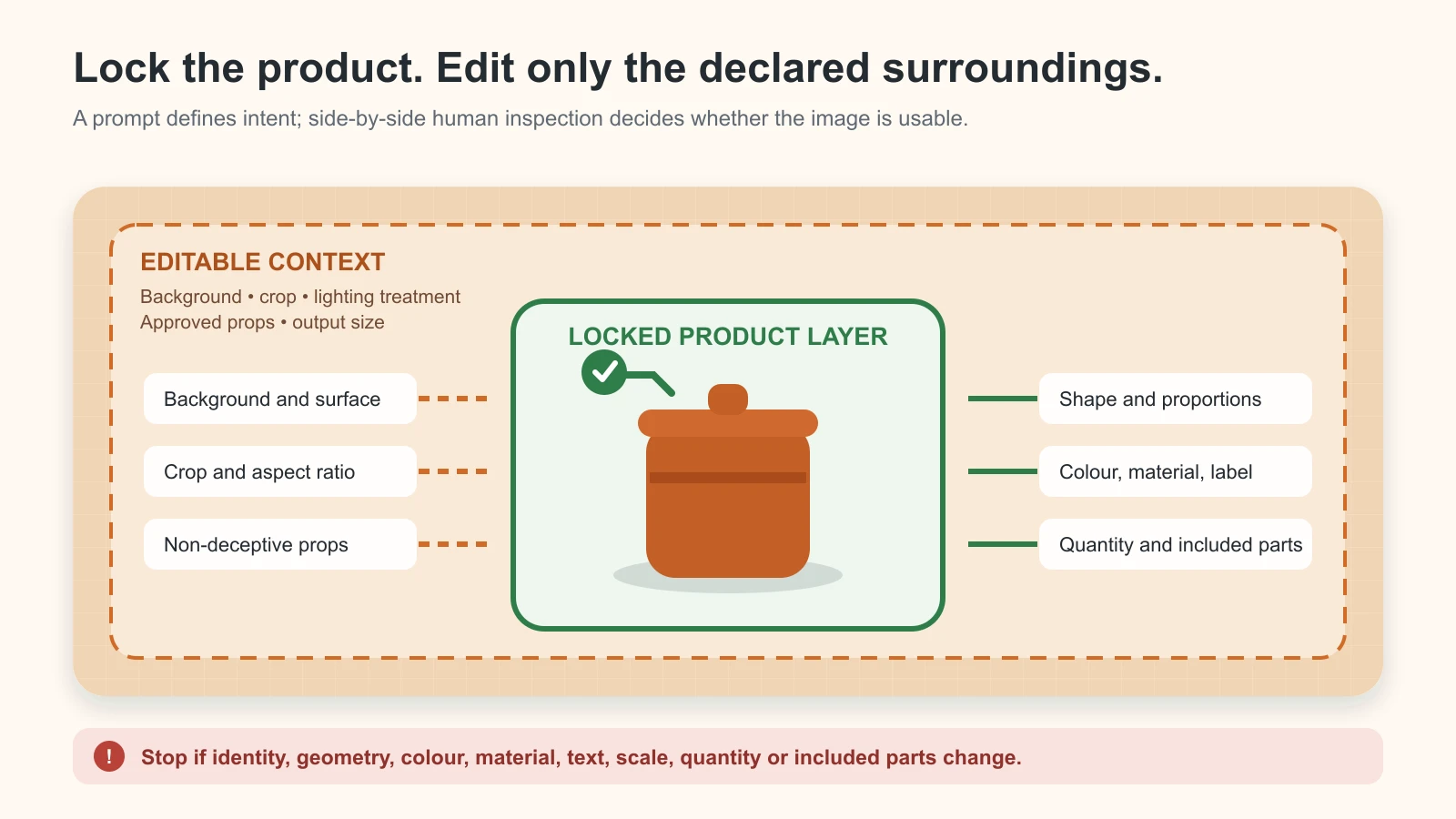
Original GPTWala edit-boundary diagram. “Locked” describes the instruction and workflow control—not a guarantee. Compare the output with the real product before approval.
A prompt repair ladder when the product changes
Do not add more adjectives to a failing prompt. Reduce uncertainty and strengthen control. Move down this ladder once per failed review.
| Step | Action | Example | Stop condition |
|---|---|---|---|
| 1 | Name the exact defect | “The output changed the six holes to five; preserve all six in their supplied positions.” | If another identity field changes |
| 2 | Reduce permitted change | Replace a complex room with a plain surface and one light direction | If the product is still redrawn |
| 3 | Protect the product layer | Select/mask only the background; composite the approved real product layer | If the control bleeds into the product |
| 4 | Supply missing evidence | Add side, back, macro, label or scale reference | If the evidence is still incomplete |
| 5 | Change workflow/tool | Move from full-frame generation to local edit, layer compositing or manual retouching | If fidelity remains inconsistent |
| 6 | Stop AI generation | Use real photography or a hybrid asset | Immediately for unresolved stop-ship truth |
Repeatedly writing “do not change the product” is not a substitute for a better source, a narrower edit or a protected layer. A product-truth audit should follow every attempt.
How to test a prompt before using it across your catalogue
Run a five-stage prompt ladder on one owned SKU before you batch anything. Keep the source, tool, model/version, date, output settings and attempt budget fixed. This article does not publish fabricated results: as of 11 August 2026, the templates above remain marked “Template—verify with your SKU.”
| Stage | Prompt/control change | What to record |
|---|---|---|
| 1 | Vague baseline: “Make this product photo premium on a lifestyle background.” | Every identity, offer, geometry, text, material and scale defect |
| 2 | Add exact SKU and locked attributes | Which defects disappear, persist or newly appear |
| 3 | Add permitted-change boundary and rejection conditions | Whether product pixels still drift |
| 4 | Add local selection/mask or protected real product layer, if supported | Selection bleed, edge defects and edit-control limits |
| 5 | Human QA and stop decision | Approved, repair, recapture, change workflow or stop |
Use the same attempt cap at each stage—such as three candidates—to avoid giving the preferred method unlimited retries. Do not select only the prettiest output. Record all candidate outcomes and calculate:
- Product-truth pass rate: outputs with zero stop-ship product/offer errors ÷ all outputs reviewed.
- First-pass approval rate: outputs approved without repair ÷ all outputs reviewed.
- Rework minutes per approved asset: total correction time ÷ approved assets.
- Cost per approved asset: tool, operator, review and rework cost ÷ approved assets.
The best prompt is the one that contributes to repeatable approved output for your SKU. It may not be the longest or most visually dramatic prompt.
Three illustrative Indian business adaptations
These are fictional training records—not merchant case studies, tool tests or outcome claims. Replace the values only after checking the real product and source pack.
Rajkot manufacturer: dealer detail image
Training truth card: EDU-COUPLING-50; stainless-steel coupling; 50 mm verified outer diameter; six equally spaced visible bolt holes; one coupling; no bolts included.
Use the supplied front, side and macro references of exact training SKU EDU-COUPLING-50. Change only the background to neutral charcoal and preserve the 50 mm scale cue, cylindrical geometry, stainless finish, six hole positions, one-unit quantity and visible marking. Create a 4:5 dealer detail image with even side light and blank space for a manually added dimension line. Add no bolt, mating part, cutaway, capacity or compatibility claim. Reject any change to hole count, geometry, marking, scale or included parts.
Surat apparel wholesaler: secondary kurta image
Training truth card: EDU-KURTA-INDIGO-M; indigo cotton kurta; white repeated motif; 35 mm verified hem border; three-quarter sleeve; one kurta; no dupatta included.
Use the supplied front, back and motif close-ups of exact training SKU EDU-KURTA-INDIGO-M. Add only a rights-cleared standing model and plain limewash-wall context. Preserve the indigo colour, white motif sequence, 35 mm hem border, neckline, three-quarter sleeves, stitching and one-piece offer. Use soft daylight and a full-garment 4:5 crop. Add no dupatta, jewellery, pocket, alternate print or fit claim. Reject changed colour, motif, border, cut, drape or implied included item. Keep real flat-lay/detail images as proof.
Local packaged-product retailer: festive additional image
Training truth card: EDU-SPICE-TIN-100; one 100 g round spice tin; matte ochre body; black lid; photographed label retained; no gift box included.
Use the approved real product layer for exact training SKU EDU-SPICE-TIN-100. Change only the setting to a restrained Diwali tabletop with one warm brass lamp in the distant background and a few marigold petals outside the product boundary. Preserve the round ochre tin, black lid, real label, 100 g net quantity, one-unit offer and scale. Leave clean space for approved copy to be added later. No generated discount, ingredient, certification, gift box, extra tin or altered label. Reject product drift, confusing quantity or decor that implies inclusion.
Notice how the adaptations change the task and risk—not just the industry noun. The manufacturer needs verified geometry; the apparel seller needs construction and offer clarity; the retailer needs pack and promotion truth.
What prompts cannot solve
A prompt cannot solve:
- poor, clipped or colour-inaccurate source photography;
- missing reverse, label, macro or scale evidence;
- a tool that redraws the product despite local instructions;
- exact colour calibration across capture, monitor and buyer screen;
- model, location, trademark or uploaded-design rights;
- privacy and retention questions for confidential catalogues;
- current marketplace, category or regulated-product restrictions;
- unsupported product performance, fit, safety or health claims;
- final approval by someone who knows the exact sale item.
If the source is weak, return to the phone-to-approved workflow. If the output looks right but you cannot verify it, run the full product-accuracy audit. If the destination rule is unclear, check the current seller documentation instead of adding “marketplace-ready” to the prompt.
Turn the prompt into a repeatable content system
A prompt pack is useful only when it sits inside a process: verified product → approved image → channel-ready content → distribution → enquiry follow-up. In GPTWala’s DAA framework, prompt-led assets support the AI Content Creation layer; they still need a Digital Presence and a practical WhatsApp advertising and follow-up system.
Join the GPTWala workshop to learn how these pieces connect, including the taught ₹100/day WhatsApp ads setup. ₹100/day is a starting-budget concept taught in the workshop—not a promise of leads, sales or profitability.
Frequently asked questions
What is the best prompt for AI product photography?
The best starting prompt identifies the exact SKU, lists locked attributes, limits the permitted edit, specifies the image job and defines rejection conditions. It is only “best” after it produces repeatable approved assets for your own SKU under a dated test. No universal wording guarantees product preservation.
Do negative prompts stop an AI tool from changing the product?
No. Negative constraints reduce ambiguity, but the tool may still alter product pixels, especially during a full-frame generation or an imprecise selection edit. Use the real reference, narrow the editable area, compare side by side and reject material drift.
Can I use the same prompt in ChatGPT, Product Studio and other image tools?
Reuse the same semantic brief—source truth, permitted change, scene and rejection conditions—but adapt it to the controls the current tool actually supports. Do not copy invented parameters between tools. Recheck official help after model or editor updates.
Does ChatGPT support editing a product reference image?
As reviewed on 11 August 2026, OpenAI’s official help says ChatGPT Images can edit an uploaded image, accept a described change, target a selected area and use a chosen aspect ratio. It also says selections may not be precise and edits can extend beyond the highlighted area. Verify the exact interface, plan and terms when you use it.
Why does AI keep changing labels and packaging text?
Image models may regenerate visual text rather than preserve the photographed label. Treat every generated character as untrusted. Retain the real label layer or add verified text manually from the approved artwork, then review at full resolution.
Can these prompts make an Amazon, Flipkart or Google main image?
They can direct a candidate edit; they cannot certify compliance. Use the real sale item, then check the current channel, country and category rules in the seller surface. Main-image, additional-image and lifestyle roles are not interchangeable.
Are AI model images safe for apparel and jewellery?
They are higher-risk secondary assets. Apparel can drift in motif, border, construction, colour, fit and drape; jewellery can drift in stone count, setting, clasp, metal tone and scale. Keep real main and detail proof, and route these categories through specialist review.
Is one product photo enough for these prompts?
Usually not for commercial approval. A single front image cannot prove the back, side, label, clasp, ports, included pieces or dimensions. Capture the views required to verify the product before generation.
When is a prompt ready for batch production?
Only after a controlled pilot records the tool/model/date, fixed attempt count, truth defects, approvals, rework time and cost per approved asset. One attractive output is not a repeatable system.
Sources and review method
This prompt pack was researched and reviewed on 11 August 2026. Tool interfaces, model behaviour, terms and marketplace image rules can change. Recheck any named tool within 24 hours of publication and after major product updates; recheck destination rules at least every 90 days and on the day of final upload.
- OpenAI Help: Images in ChatGPT
- Google Merchant Center: About Product Studio
- Google Merchant Center: Main image link
- Google Merchant Center: Additional image link
- Google Merchant Center: Lifestyle image link
- Google Merchant Center: AI-generated content metadata
- Department of Consumer Affairs: Consumer Protection Act 2019 FAQ
- Department of Consumer Affairs: Consumer Protection rules and official resources
Leave a Reply