
Reviewed and updated: 12 August 2026
Editorial test status: this page publishes a blank, repeatable same-SKU audit protocol. GPTWala has not claimed observed defects or tool accuracy rates because a controlled exact-SKU test was not completed for this article. The category examples are clearly labelled illustrative.
The safest way to preserve product accuracy in an AI image is to make the exact SKU the source of truth, protect rather than regenerate its pixels, and compare every output against several verified real views. Reject any change to identity, variant, quantity, included parts, label, material or other buyer-relevant detail. Photorealism, a strong prompt and even platform acceptance do not prove that the pictured product is correct.
Table of contents
- Why a realistic AI product image can still be wrong
- Build the source-of-truth pack
- Classify the edit before choosing the method
- Prevent errors at input, edit and export
- Use a four-level defect severity system
- Run the four-pass product-accuracy audit
- Category-specific stop-ship fields
- Decide whether to fix, recapture, change method or stop
- Use the same-SKU truth-audit protocol
- Set tolerances, ownership and records
- Separate truth, disclosure, provenance and compliance
- Estimate time, cost and resources
- Run a five-SKU pilot
- Frequently asked questions
Why a realistic AI product image can still be wrong
Photorealism is appearance, not evidence
An image can have convincing light, shadows and materials while depicting the wrong sale item. A generative system may reconstruct a clipped edge, unreadable label, reflection, weave, stone setting or hidden side with a plausible detail. Plausible is not the same as verified.
This distinction matters commercially. A Jaipur jewellery seller does not deliver “a photorealistic necklace”; the seller delivers a particular necklace with a particular chain, clasp and stone setting. A Surat wholesaler does not deliver “a realistic printed kurti”; the buyer expects the sampled print, border, cut and colourway. Product truth belongs to the SKU and offer—not to the visual style of the output.
Even a tool provider may warn that generative results can be unexpected. Google’s current Product Studio guidance describes the feature as experimental, says it may create unexpected images or videos, and notes that it works better for some product types than others. That is a reason to review outputs, not a claim that every result will be inaccurate.
Prompts describe intent; controls and comparison enforce it
“Keep the product exactly the same” is a useful instruction, but it is not an approval record. Stronger protection comes from a chain of controls:
- supply verified views of the exact variant;
- list the attributes that cannot change;
- make the editable region as narrow as the job allows;
- change one thing at a time;
- compare at product-relevant zoom; and
- record a human decision against clear stop rules.
A prompt can reduce ambiguity. A mask or protected layer can reduce the edit area. Neither guarantees that an output is faithful. The comparison against the real item closes the loop.
Platform acceptance and product truth are separate
Platform rules give sellers a destination-specific floor; they do not replace product review. Google Merchant Center’s current main-image guidance tells merchants to show the actual product accurately and to use the correct variant, colour, pattern and material. An Amazon India moderator’s product-image guidance similarly says all images must accurately represent the product for sale.
An upload can still be wrong for your SKU even if an automated check does not reject it. Conversely, an accurate image can fail a channel rule because of its crop, background or overlay. Run product-truth approval first, then the current platform and category check.
The practical reason is also straightforward: the Consumer Protection (E-Commerce) Rules, 2020 apply to goods sold over digital or electronic networks and require relevant product information that helps the buyer make an informed pre-purchase decision. The ASCI Code says advertising descriptions, claims and visual presentations should be truthful and not mislead by implication, omission, ambiguity or exaggeration. This is practical content, not legal advice; obtain professional advice for your category and claims.
Build the source-of-truth pack before editing
The input image is not automatically the whole truth. A front photo cannot prove the clasp, underside, rear label, included accessories or exact depth. Build a small evidence pack that can answer the reviewer’s questions without asking the model—or a team member—to guess.
Capture multiple verified views
For each exact SKU and variant, keep the views needed to verify its buyer-relevant details:
- front and back;
- left and right sides;
- top and bottom where construction matters;
- close-ups of label, logo, fastening, texture, seams, ports, settings or joints;
- current packaging and every included part;
- a measured scale reference when size affects the scene; and
- an untouched overview that shows quantity and the whole offer.
You do not need a ritualistic number of photos. You need enough evidence to answer what the buyer will receive. If a critical surface or component is not visible, recapture it. Do not prompt around missing proof.
Complete a locked-attribute sheet
Use four truth classes so small teams do not review only the most obvious feature, such as colour.
| Truth class | What must match the exact SKU and offer | Typical stop-ship examples |
|---|---|---|
| Identity truth | SKU, model, variant, silhouette, distinctive design, current version | Wrong colourway, altered shape, another model’s feature |
| Offer truth | Quantity, included parts, packaging, label, claims and what the buyer receives | Extra unit, missing accessory, changed net quantity, invented label claim |
| Material truth | Colour, pattern, weave, texture, finish, transparency, stone or setting, construction | Gloss becomes matte, motif shifts, metal tone changes, port or seam appears |
| Context truth | Scale, grounding, use, fit/drape, surrounding props and buyer implication | Product looks larger, prop appears included, impossible use, misleading fit |
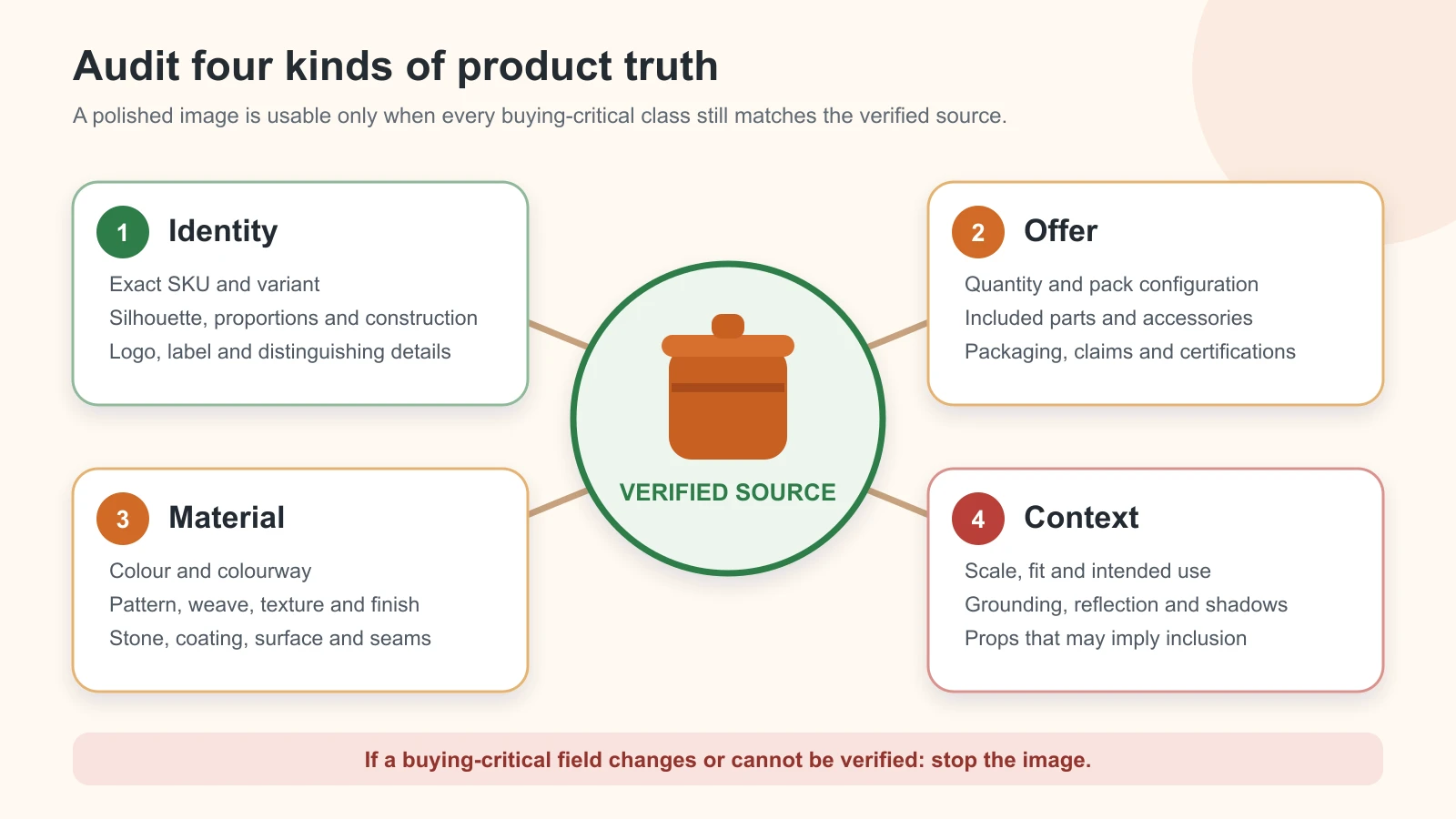
Original GPTWala product-truth diagram. A candidate must match every buying-critical class that applies to the exact SKU and offer.
Copy this record for each SKU:
| Field | Verified value | Evidence | Owner | Stop-ship if changed? |
|---|---|---|---|---|
| SKU and exact variant | [enter] |
[stock/ERP record + item] |
[name/role] |
Yes |
| Shape and proportions | [enter] |
[front/side filenames] |
[name/role] |
Yes |
| Colour and colourway | [enter] |
[physical check + controlled photo] |
[name/role] |
Yes |
| Material, texture and finish | [enter] |
[detail filename/spec] |
[name/role] |
Yes |
| Label/logo/visible text | [enter] |
[current artwork/label close-up] |
[name/role] |
Yes |
| Quantity and included parts | [enter] |
[offer record + complete pack photo] |
[name/role] |
Yes |
| Dimensions or scale cue | [enter] |
[measured record] |
[name/role] |
Yes |
| Permitted edit | [enter] |
[approved image brief] |
[name/role] |
— |
| Destination and image role | [enter] |
[approved image brief] |
[name/role] |
— |
Physically verify high-risk fields
The product owner or someone who knows the stock should inspect the real item when possible. Measure dimensions; count components or stones; operate the clasp, cap or fastener; read the actual label; and confirm the current packaging version. Do not copy a value from memory or assume the reference photo shows the latest variant.
For products whose exact colour drives purchase, compare the output with the physical sample under a consistent review setup. A photograph, phone display and buyer’s screen introduce their own capture and display variables, so avoid claims such as “perfect colour match” unless you have a defined colour-managed method. The safer approval language is specific: “no material colour drift detected under the documented review conditions.”
Classify the edit before choosing the method
Risk depends less on whether a tool is marketed as “product photography” and more on how much of the sale item it is allowed to reconstruct.
Preserve lane: lowest reconstruction risk
Use the photographed product as a protected layer and change only what sits outside it: canvas, background, supporting surface or surrounding light. This is the preferred lane for a catalogue master, proof image or high-risk SKU.
Inspect masks around fine chains, glass, chrome, fabric fibres, handles, shadows and transparent packaging. If the tool cannot separate the boundary reliably, use a manual cutout, conservative retouching or a new photograph.
Contextualise lane: controlled creative risk
Place the verified product into a new setting while keeping the product layer, view and scale stable. This can be useful for an additional or lifestyle image, but it adds questions about contact shadow, reflections, props, intended use and scale.
Context is not harmless decoration. A spoon beside a jar can look included. A model can change the perceived size of a handbag. A reflection can imply a finish that is not present. Review the whole buyer implication, not only the product outline.
Concept-only lane: not product proof
Use text-to-image or strongly generative exploration for moodboards and campaign ideas. Do not use it as evidence of an exact sale SKU unless the final commercial asset is rebuilt with verified product content and passes the truth audit.
Stay out of a generative sale-image workflow when:
- the product’s reverse side or construction is unknown;
- precise apparel fit or drape is the claim;
- a reflective, transparent or very fine object cannot be isolated reliably;
- a label carries regulated, safety, health, capacity or performance information;
- a technical cutaway would reveal unseen internal parts; or
- the generated image itself would be the buyer’s only proof of an expensive or highly variable item.
Prevent errors at input, edit and export
Input controls
- Clean the product and photograph the exact current variant.
- Keep unclipped edges and enough resolution for the reviewer to inspect critical detail.
- Separate variants into different folders and briefs; never mix “similar” colourways as references.
- Correct obvious exposure or white-balance problems conservatively without beautifying the product.
- Record real dimensions and included parts outside the image.
- Keep the untouched originals read-only or in a protected source folder.
Edit controls
- Prefer a mask or layer that excludes the product from generation.
- Make the editable region smaller than the product whenever the job permits.
- Ask for one controlled change per iteration.
- Use the same crop and product scale across candidates so comparison is easier.
- Keep scene complexity low until a simple result passes.
- Record tool, model or feature, date, prompt, reference files and important settings.
- Save every reviewed candidate, not only the final attractive one.
If a product detail changes repeatedly, do not keep adding adjectives to the prompt. Narrow the edit, restore the real layer, change the method or stop.
Export controls
- Export from the approved master, not from a messaging-app preview or screenshot.
- Do not overwrite the untouched source or the approved master.
- Check that resizing, sharpening, background removal, auto-enhancement or compression has not altered a critical edge, label or texture.
- Inspect the exact crop shown in the live destination; a safe full image can become misleading after an automated crop.
- Preserve required origin metadata and inspect the delivered file after optimisation.
- Record filename, version, destination, status and reviewer so an old variant cannot return later.
Use a four-level defect severity system
A beautiful image should not win an argument against a critical defect. Classify the most serious buyer-relevant problem first.
| Severity | Definition | Required action |
|---|---|---|
| Stop-ship | Wrong identity or variant; changed quantity, essential component, label/claim, material, safety/use implication; or materially altered geometry | Reject. Do not publish. Return to source or a product-preserving method. |
| Major | Likely to change buyer understanding of colour, scale, texture, fit, finish, context or included items | Reject or rework. Require a second review before approval. |
| Minor | Edge, shadow or crop defect that does not change product understanding under a written product-specific tolerance | Correct if practical; approve only with the recorded tolerance and reviewer. |
| Creative preference | Scene or style choice with no product-truth effect | Optional revision. Do not report it as an accuracy defect. |
“Close enough” is never acceptable for identity or offer truth. A necklace with the wrong stone count is not a minor defect because the stones are small. A carton showing an invented net quantity is not rescued by a good background. A machine part with one generated port is a different product depiction.
There is no responsible universal pixel, percentage or colour-difference tolerance for all products. A harmless one-pixel fringe on a large opaque carton is not equivalent to a clipped prong on jewellery. The owner sets tolerances for the category and exact SKU; the reviewer applies them consistently.
Run the four-pass product-accuracy audit
Review the source and candidate side by side at the same scale. Include an overall view and identical crops of critical regions. Use the real item when a photograph cannot resolve the question.
Each pass ends with one decision: APPROVE, REVISE or REJECT. Record the precise field and defect; do not write only “looks off.”
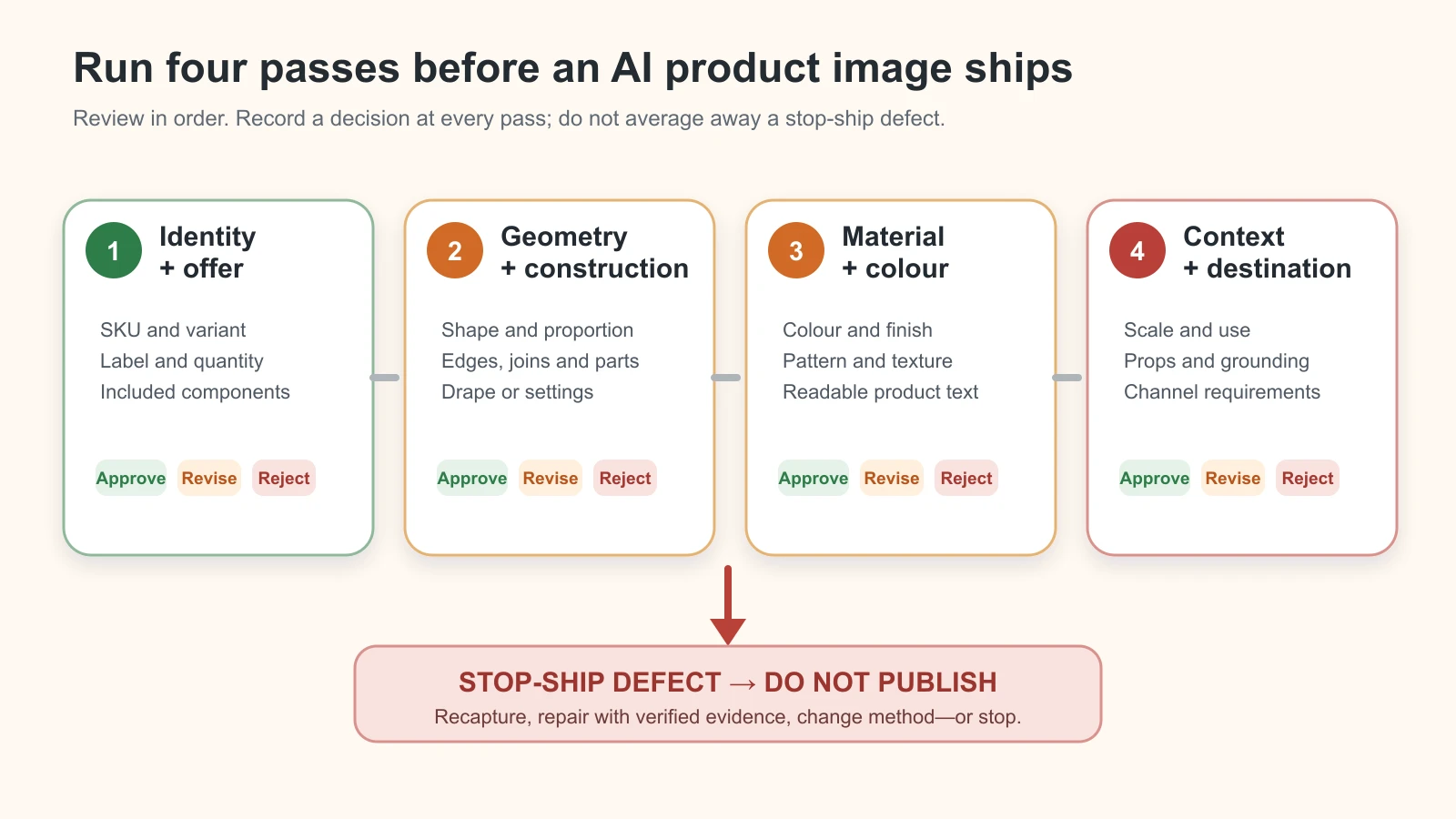
Original GPTWala audit-flow diagram. Any stop-ship defect exits to “do not publish”; there is no averaged fidelity score.
Pass 1: identity and offer
Check:
- exact SKU, model and variant;
- sale quantity and pack count;
- every included component and accessory;
- current packaging version;
- label, logo, visible text and claim;
- customisation, size or colourway shown; and
- whether any nearby prop could be mistaken as included.
Any wrong identity or offer element is stop-ship. Do not repair an invented label by trying another full-frame generation. Restore the real label or product layer from approved artwork or recapture it.
Pass 2: geometry and construction
Compare the silhouette, proportions and product-specific construction:
- edge profile and openings;
- symmetry where the real item is symmetric—and real asymmetry where it is not;
- handles, caps, pumps, clasps and fasteners;
- seams, stitching, borders and joins;
- holes, ports, threads, prongs and settings;
- outsole, underside or reverse details when visible; and
- orientation of repeated features.
Use several source views. A front-only candidate can hide an error revealed by the side reference. If the required view was never captured, the action is RECAPTURE, not INFER.
Pass 3: material and colour
Check:
- colour cast and variant colour;
- motif, print or weave placement;
- texture and surface grain;
- gloss, matte, brushed or polished finish;
- transparency and edge transmission;
- metal and stone tone;
- reflections that imply a false material; and
- artificial smoothing that erases real construction detail.
Review under documented conditions and state the limit. A normal buyer screen cannot be treated as a calibrated physical sample. For high-return-risk colours, keep a real, controlled reference image and consider a clear website note about normal screen variation without using that note to excuse a materially wrong asset.
Pass 4: context, scale and destination
Check:
- believable contact and shadow;
- consistent reflection and light direction;
- product size against a verified scale cue;
- credible installation, handling or use;
- apparel fit, drape and transparency without unsupported promises;
- props that do not imply inclusion or performance;
- crop, occlusion and overlays in the actual destination; and
- current channel-specific image and origin-metadata requirements.
Google’s current main-image rules, for example, distinguish actual product imagery from generic illustrations and require the correct variant. They also say generative-AI images must retain specified IPTC DigitalSourceType metadata. That metadata is a destination and provenance check; it is not evidence that the SKU itself passed Passes 1–3.
Category-specific stop-ship fields
Use one shared control system, then add the details that carry risk in your category.
| Category | Stop-ship fields to verify | Safer proof assets |
|---|---|---|
| Jewellery | Stone count and setting, prongs, clasp, chain proportions, metal colour; any visible hallmark, weight or purity claim; reflection and scale | Real front/back/detail images; measured scale; controlled secondary context only |
| Apparel | Exact print and border, embroidery, weave, colour, cut, length, stitching, transparency; fit or drape that implies another construction | Real flat, front/back and detail proof; model image only after garment-specific review |
| Packaging/cosmetics | Container, cap/pump, net quantity, pack count, ingredients or claim text, colour/finish, current artwork version | Preserve real pack and label layers; approved artwork comparison |
| Footwear | Last and silhouette, upper material, stitching, eyelets/laces/fasteners, outsole, pair/quantity, colour, grounding | Real pair and outsole views; contextual image as secondary proof |
| Manufactured/multi-part goods | Ports, holes, threads, fasteners, dimensions, components, capacity/performance label, included accessories | Real dimension/detail views, dealer sheet and measured record |
These are not separate thin workflows. The same source pack, severity model and audit applies. A specialist apparel or jewellery guide should add category expertise without weakening the stop rule.
Decide whether to fix, recapture, change method or stop
Use this decision path instead of generating endless variants:
- Is identity or offer wrong? Reject immediately. Return to the exact source and a protected-product method.
- Is evidence missing or unreadable? Recapture the real item. Do not ask AI to invent the reverse, label or component.
- Did the tool edit too much of the frame? Narrow the mask or restore the product as a separate real layer.
- Is the same material or geometry defect recurring? Change workflow or tool. More adjectives are not a control.
- Can a conservative manual repair restore the verified source without invention? Repair, save a new version and rerun all four passes.
- Is exact product proof essential and still uncertain? Stop using the generated candidate. Use real or hybrid photography.
The fastest safe fix is often to make the edit less generative. If only the background needs to change, there is no reason to ask a model to rebuild the cap, chain, print, pump or port.
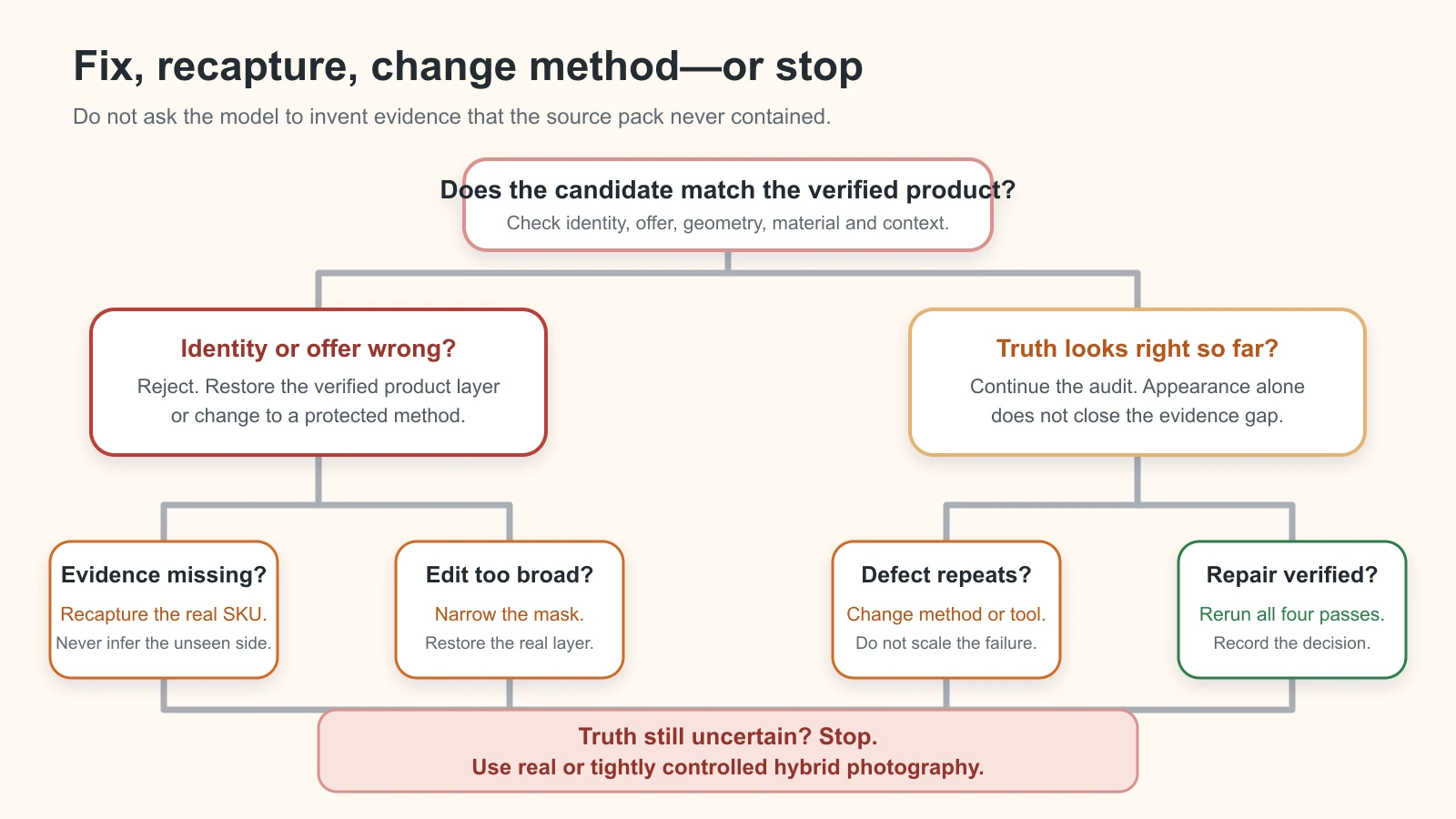
Original GPTWala decision tree. Missing evidence routes to recapture, never invention; unresolved truth routes to real or tightly controlled hybrid photography.
Use this same-SKU truth-audit protocol
No same-SKU test was run for this article, so the following is a blank protocol, not a results table. Do not replace its placeholders with imagined defect counts or an AI-created “before/after” graphic.
Choose one owned or clearly fictional reference SKU. Use the same source pack for three jobs:
- Candidate P: protected-background edit;
- Candidate C: restrained lifestyle context around the protected product; and
- Candidate G: deliberately more generative, high-risk version for internal diagnosis only—not a sale image.
Fix the attempt budget in advance and save every attempt. Compare identical crops and record only defects that are visible in the saved files or verified against the physical product.
| Field | Reference | Candidate P | Candidate C | Candidate G |
|---|---|---|---|---|
| Tool/feature, version and date | — | [enter] |
[enter] |
[enter] |
| Prompt and editable region | — | [link/file] |
[link/file] |
[link/file] |
| Identity/offer decision | Authoritative | [approve/revise/reject + evidence] |
[enter] |
[enter] |
| Geometry decision | Authoritative | [enter] |
[enter] |
[enter] |
| Material/colour decision | Authoritative | [enter] |
[enter] |
[enter] |
| Context/destination decision | N/A | [enter] |
[enter] |
[enter] |
| Highest severity | — | [enter] |
[enter] |
[enter] |
| Final action | — | [approve/repair/recapture/change method/stop] |
[enter] |
Internal test only |
| Reviewer and date | [owner] |
[enter] |
[enter] |
[enter] |
When reporting the test, separate observation (“the saved output shows six stones; the verified source has five”) from cause hypothesis (“the broader edit may have reconstructed the setting”). A one-SKU test can expose failure modes in that run; it cannot establish a universal error rate for a tool or model.
Set tolerances, approval ownership and recordkeeping
The operator should know what they may approve without escalating.
| Role | Responsibility | Must not do |
|---|---|---|
| Product/SKU owner | Defines locked fields, current offer, evidence and product-specific tolerances | Approve from memory when current stock can be checked |
| Image operator | Uses approved source and brief; logs versions and self-checks all four passes | Quietly accept or “repair” a stop-ship field |
| Reviewer | Compares against the source pack and records approve/revise/reject | Judge only the scene’s attractiveness |
| Publisher/catalogue owner | Checks final file, destination crop, metadata, current rules and approved version | Publish an unreviewed candidate or old variant |
For high-risk products, use a second reviewer when feasible. The person who generated the image may miss the same product change twice because they are focused on scene quality. The second reviewer should know the SKU or have access to the item and verified specification.
Use a simple approval log:
Asset ID | SKU/variant | image role | source version | candidate version | highest defect | decision | required action | operator | reviewer | review date | destination | published version
Keep the source pack, prompt, controls, reviewed candidates, difference crops and final file together. If packaging or the product changes, create a new source version and retire old approved assets. Do not silently overwrite the history; a rollback path prevents an old but attractive image from returning to the catalogue.
Product truth, disclosure, provenance and compliance are different checks
An asset can pass one check and fail another:
- Product truth: does it accurately depict the exact SKU and offer?
- Disclosure/provenance: does it record or communicate how the image was created or edited where required or useful?
- Rights and privacy: are the product design, logo, model, location and uploaded materials authorised for this use?
- Destination compliance: does the final file meet the current platform, country and category rules?
The current IPTC Photo Metadata User Guide defines source-type values for AI-created and AI-edited media and fields that can record the system, version and prompt information. Google Merchant Center separately requires specified AI-origin metadata in generative-AI product images. Preserve the required metadata through editing, compression and upload.
But provenance is not a product certificate. The C2PA explainer states that provenance can support understanding of an asset’s origin and history, but by itself cannot tell whether the content is true, accurate or factual. A valid creation record can describe the history of a necklace image without proving the necklace’s stone setting matches the sale item.
Do not claim that Indian law requires a visible “AI-generated” badge on every product image. Follow the specific destination and advertising rules that apply, avoid misleading visual implications, preserve required metadata, and seek category-specific legal advice where needed.
Estimate time, cost and resources per approved image
Cheap generation is not the same as cheap approval. Track the work that creates an approved asset:
Cost per approved image = (tool charges + capture labour + operator time + review time + repair/recapture time + allocated overhead) ÷ number of approved images
Also track:
- attempts generated per approved image;
- first-pass approval rate;
- stop-ship and major defects caught;
- rework and recapture time;
- approvals per operator hour;
- review disagreements;
- rejected tool credits; and
- destination failures after product approval.
Do not borrow a generic “five-minute image” claim. Make a time budget for your pilot, then replace it with observed numbers. A small team minimally needs the physical SKU, a phone or camera, simple repeatable lighting, a measurement tool, an organised source folder, the editing tool, a reviewer who knows the product and a spreadsheet or database for decisions. High-risk colour, reflective products, models or regulated claims may justify specialist photography or retouching.
The comparison that matters is not AI fee versus photographer day rate. Compare the total cost and time of an approved usable image, including failed generations, supervision and return-risk from a misleading asset.
Four illustrative Indian business scenarios
These are control examples, not reported merchant case studies.
Jaipur jewellery seller
A lifestyle candidate adds an extra prong and changes the stone arrangement. The reflection is attractive, but the construction differs. Classification: identity/material truth, stop-ship. Action: reject; keep real jewellery pixels and create only the surroundings, or use controlled real photography.
Surat apparel wholesaler
A model image moves the printed border and creates a narrower cut. Classification: material and context truth, stop-ship or major depending the exact offer implication. Action: reject the candidate; retain real flat/front/back/detail proof and move any model image through a garment-specific review.
Packaged-goods retailer
Background generation redraws the front panel and substitutes readable-looking net-quantity text. Classification: offer truth, stop-ship. Action: restore the photographed pack and label as a protected layer; never manually guess missing regulatory or quantity text.
Small industrial manufacturer
A dealer creative shows an additional connector that is absent from the physical part. Classification: identity and construction truth, stop-ship. Action: return to the real part image and measured detail views. Do not publish the candidate as a technical or compatibility illustration.
Run a five-SKU accuracy pilot before catalogue rollout
Choose five SKUs with different risks, not five easy products:
- opaque product with a simple edge;
- transparent, reflective or fine-detail product;
- product with important label text;
- product with variants or a precise pattern; and
- multi-part, wearable or scale-sensitive product.
For each one, define the image job, fix the attempt budget, run the source pack and four-pass audit, and record approval, severity, rework, operator time and reviewer time. Include failures in the review.
Pause the rollout if an identity or offer defect escapes the review stage, if reviewers cannot resolve a material question from the source, or if cost per approved asset is worse than a real or hybrid alternative. The pilot tests the control system—not sales impact. Do not promise higher conversion, fewer returns or revenue without a separate, credible measurement design.
Accurate product images are one part of taking an offline business online. They still need a useful digital presence, consistent content distribution and a clear path from interest to enquiry and follow-up. In GPTWala’s DAA framework, that connects Digital Presence, AI Content Creation and a ₹100/day WhatsApp ads system.
Join the GPTWala workshop to see how product assets fit into that wider system. The ₹100/day figure is a taught starting-budget setup, not a guarantee of reach, leads, sales or profitability.
Frequently asked questions
Why does AI change my product’s colour, label or shape?
Generative editing can reconstruct pixels instead of copying them exactly, particularly where a source is unclear, an edit selection is broad or the scene requires new reflections and geometry. Use verified multi-view references, protect the product layer, narrow the edit and reject material drift. Do not treat a more detailed prompt as a guarantee.
What is the best way to keep a product unchanged in an AI image?
Use a real photograph of the exact SKU as a protected product layer and generate only outside its boundary. Lock identity, offer, material and context fields in writing, then compare the candidate against multiple real views. For uncertain edges, text, reflections or fine detail, use manual masking or real/hybrid photography.
Is one reference photo enough?
Only when that one view contains every detail needed for the specific low-risk job—which is uncommon for commercial approval. A front image cannot verify a back label, clasp, underside, included part or depth. Capture the missing evidence instead of asking the tool to infer it.
Does masking guarantee the product will not change?
No. A mask or selected area reduces the permitted edit, but boundaries can be imperfect and downstream resizing or enhancement can still alter the result. Inspect difficult edges, compare the full candidate and audit the final exported file.
Can an AI product image be perfectly colour accurate?
Do not promise perfect physical colour from a normal phone-to-screen workflow. Capture, white balance, file profiles, display settings and ambient light can all affect appearance. Document the review conditions, compare with the physical item and reject material drift. Use a defined colour-managed workflow when exact colour is commercially critical.
Are AI images safe for jewellery and apparel?
They can be useful as controlled secondary assets, but both categories have high-risk fields. Jewellery requires checks for settings, prongs, stone count, clasp, metal tone, reflection and scale. Apparel requires checks for print, border, weave, stitching, cut, fit, drape and transparency. Keep strong real proof and use specialist review.
Does AI metadata prove that the product is accurate?
No. Metadata or Content Credentials can describe origin, edits and tools, and a platform may require particular tags. C2PA explicitly separates provenance from factual truth. Product accuracy still requires comparison with the exact SKU, verified specifications and current offer.
If Amazon or Google accepts the image, is it safe to publish elsewhere?
No. Platform acceptance is not a universal product-truth certificate, and each channel has different image roles and rules. First approve the SKU and offer; then check the current destination, country and category requirements. Recheck after any crop, compression or automated improvement.
When should I stop using AI and hire a photographer or retoucher?
Stop when critical evidence is missing, product pixels cannot be protected, the same material defect recurs, precise fit or technical proof is required, a high-value reflective/transparent item cannot be verified, or review costs exceed a real or hybrid alternative. The goal is an approved truthful asset—not maximum AI use.
Sources and review method
This article was researched and reviewed on 11 August 2026 using current official or first-party sources for platform, Indian advertising and provenance claims. Tool behaviour, marketplace rules and metadata guidance can change. Recheck named sources within 24 hours of publication, recheck destination rules on upload day and after major platform updates, and keep the non-legal-advice caveat.
- Google Merchant Center: Main product image guidance
- Google Merchant Center: AI-generated content metadata
- Google Merchant Center: About Product Studio
- Amazon India Seller Forums: Product image guidance from an Amazon moderator
- Department of Consumer Affairs: Consumer Protection (E-Commerce) Rules, 2020
- Department of Consumer Affairs: Consumer Protection rules and official resources
- Department of Consumer Affairs/CCPA: Guidelines for Prevention of Misleading Advertisements and Endorsements, 2022
- Advertising Standards Council of India: The ASCI Code
- IPTC: Photo Metadata User Guide
- C2PA: Content Credentials explainer
Leave a Reply