Reviewed and updated: 12 August 2026
An AI product video should begin with an exact product, a verified claim and one job for the viewer—not with a tool or a “viral” template. Use real footage when movement, fit, function, texture, scale, safety or performance must be proved. Use AI-assisted editing for scripts, cutdowns, captions and controlled presentation; use synthetic motion or scenes only when every visible and spoken implication can be verified. The safest result is often hybrid: real product evidence plus AI-assisted production.
For an Indian manufacturer, wholesaler, retailer, shopkeeper or product brand, the key unit is an approved video master, not a generated clip. Approval means the exact SKU, motion, offer, voice, text, claims, rights, disclosure and destination version have all passed review.
This is the root guide for deciding what kind of AI product video to make and how to govern it. The complete AI product photography guide owns approved still-image foundations. The future still-photo product demo tutorial will own the click-by-click image-to-video build. The future AI spokesperson video guide will own avatar, voice, likeness, consent and talking-head workflow in depth.
Table of contents
- What counts as an AI product video
- Choose the video job before the format
- Understand product truth and motion truth
- Choose real, hybrid or synthetic production
- Build a motion-truth card
- Prepare the evidence pack
- Write a claim-led script and storyboard
- Use the ten-gate production workflow
- Review every frame, transition and sound
- Handle Indian languages, voice and captions
- Disclose realistic synthetic content and preserve provenance
- Prepare website, social, sales and ad versions
- Apply the method to Indian product businesses
- Measure a pilot without invented results
- Know when AI should stop
- A four-cycle first pilot
- Frequently asked questions
What counts as an AI product video
“AI video” describes several different production methods. Treating them as one category creates bad decisions.
| Method | What AI does | Best first use | Main risk |
|---|---|---|---|
| AI-assisted real-footage edit | Helps script, transcribe, caption, remove pauses, organise clips, create versions or clean audio | Demo, FAQ, dealer explainer and product-page video built from real evidence | Automated edits remove context, mistranscribe facts or imply a sequence that did not occur |
| Motion-design video from approved assets | Moves text, diagrams, crops and approved still product layers on a timeline | Feature summary, catalogue reel, launch notice, dealer presentation | Camera motion or effects are mistaken for product motion; still details morph |
| Image-to-video generation | Creates apparent camera or object movement from a still image | Secondary mood shot or controlled visual transition | The unseen side, label, geometry, hand interaction or mechanism is invented |
| Text-to-video generation | Creates a scene from a written description | Concept development, non-product moodboard, abstract background | Plausible scene becomes false product evidence |
| Synthetic presenter or voice | Delivers a script through an avatar, generated person or voice | Multilingual explanation after rights and disclosure review | False endorsement, likeness/voice misuse, lip-sync or translation changes the claim |
| Hybrid product video | Combines real footage/product layers with AI-assisted edit or synthetic context | Most sale-facing physical-product videos | Viewers cannot tell which moments are proof and which are illustrative |
The production label does not determine truth. A conventional edit can mislead through cropping or timing. A synthetic background can be safe when it is clearly contextual and the product layer remains exact. Review the finished communication, not only the tool used.
Product video is broader than an advertisement
A product video may:
- identify a product or range;
- show how to assemble, open, wear, install, clean or use it;
- explain material, finish, configuration or included parts;
- give a B2B buyer a quick model comparison;
- answer a recurring sales or after-sales question;
- show a possible lifestyle or merchandising context;
- introduce an offer and invite an enquiry; or
- become a source for later ad creatives.
Each job needs different evidence. A lifestyle reel can use a clearly illustrative room; an installation video cannot invent the mounting sequence.
Choose the video job before the format
Write one sentence:
After watching, [specific viewer] should understand [one verified thing] and take [one next action].
Examples:
- “A dealer should distinguish the 500 ml and 750 ml bottle and request the current price list.”
- “A retail buyer should see the real zip, lining and pocket arrangement and open the product page.”
- “A machine-parts buyer should understand which port is inlet and which is outlet and ask for the data sheet.”
- “An existing customer should follow the verified cleaning steps and avoid a common misuse.”
Avoid “make people excited”. It gives the editor no truth boundary.
Match the video to the buyer question
| Buyer question | Useful video role | Evidence burden |
|---|---|---|
| What is it? | Product identity/reveal | Exact SKU, variant, pack and scale |
| What differs between these models? | Comparison | Same camera logic, verified differences and no hidden configuration change |
| How does it work? | Demonstration | Real or verified action sequence, actual timing and safe operating conditions |
| What will I receive? | Unboxing/offer contents | Exact current pack, quantity, accessories, labels and exclusions |
| How might it look in context? | Lifestyle/context | Exact product plus plausible, non-deceptive scene; no implied included props |
| Can this solve my use case? | Explainer/case application | Substantiated suitability, constraints and no unverified performance promise |
| What should I do next? | Enquiry/offer video | Current availability, price/terms where stated and a working action path |
One master can contain several roles, but every shot still needs one job. Do not hide a proof claim inside decorative B-roll.
Understand product truth and motion truth
An approved still image is not automatically safe to animate. Motion adds information the source never contained.
Product truth
Product truth asks whether the product looks like the exact sellable SKU:
- identity and variant;
- shape, proportions and dimensions;
- colour, material, texture and finish;
- print, label, logo and required marks;
- parts, openings, seams, stones, ports and fasteners;
- pack quantity and included accessories; and
- current packaging generation.
Use the AI product image accuracy checklist before a still becomes a video source.
Motion truth
Motion truth asks whether the video accurately represents what happens over time:
- Can that lid, clasp, hinge, wheel, fabric or mechanism move that way?
- Does the hand hold the product at a truthful scale?
- Does a component appear, disappear or pass through another object?
- Is the quantity of liquid, food, product or pack content stable?
- Is the action sequence complete and in the correct order?
- Does speed-ramping make a slow result seem instant?
- Does reverse playback make disassembly look like automatic assembly or repair?
- Does a loop conceal an ending, spill, fit problem or manual reset?
- Do particles, shine, vapour or sound imply power, freshness, cooling, weight or quality?
- Does the scene show an accessory or environment as if it is included, compatible or approved?
Motion can create a claim without words
| Edit or visual | Possible viewer inference | Required control |
|---|---|---|
| Water rolls off a surface | Waterproof or water-resistant | Use verified test/evidence and accurate wording, or remove the action |
| Heavy impact sound | Solid, metal, premium or durable construction | Use truthful recorded sound or neutral audio; do not let effects substitute for material proof |
| Food sizzles immediately | Heating performance or speed | Demonstrate under recorded conditions or label illustrative sequence clearly |
| Fabric flows in slow motion | Weight, softness, transparency or drape | Use real garment movement when those properties matter |
| Jewellery emits added sparkle | Stone quality, count or brilliance | Keep decorative effect clearly separate from proof; retain real macro footage |
| A room assembles around a product | Installation ease or compatibility | Do not present synthetic assembly as instruction |
| A model praises the item | Testimonial or endorsement | Use a genuine authorised statement or identify scripted presentation; never fabricate customer experience |
The rule is simple: if the buyer could reasonably use the motion to judge the product, the motion needs evidence.
Choose real, hybrid or synthetic production
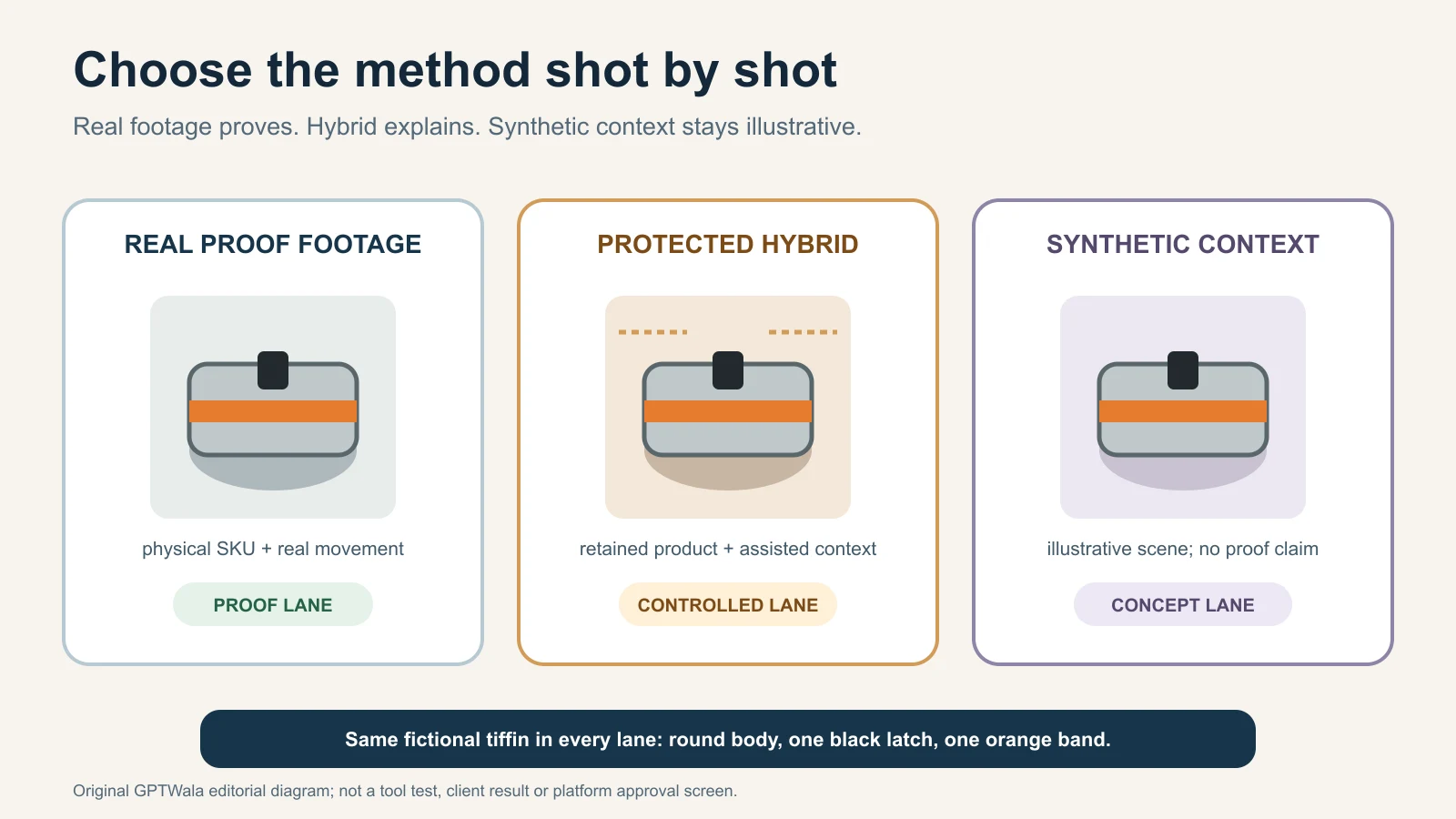
Choose at the shot level. A 25-second video can contain a real demonstration, an approved animated diagram, a synthetic contextual background and a conventional CTA card.
Lane 1: real evidence
Use real capture when the shot must prove:
- movement, fit, drape, opening, assembly or use;
- colour, gloss, texture, transparency or reflection in motion;
- exact dimensions, quantity or relative scale;
- actual sound, timing, output or physical result;
- a safety-critical or regulated instruction; or
- a real person’s experience or endorsement.
AI can still assist with captions, transcript cleanup, shot logging, noise repair and derivative versions after the evidence is recorded.
Lane 2: protected hybrid
Use a hybrid shot when the exact product evidence can remain real while AI changes non-product context. Examples:
- animate a camera crop around an approved still without inventing the unseen side;
- place a protected real product cut-out over an illustrative background;
- combine a real hand demonstration with labels and verified callouts;
- use a real rotation with an AI-assisted clean backdrop; or
- turn a real longer demo into short language or destination versions.
The AI-versus-traditional photography decision guide applies the same evidence-first thinking to source assets.
Lane 3: synthetic illustration
Use fully generated scenes for:
- concept boards;
- abstract mood or category context;
- non-literal transitions;
- a clearly illustrative problem/solution setup; or
- pre-production planning.
Do not let a synthetic illustration become the only evidence beside a purchase or enquiry action. Pair it with exact product views and mark the internal role clearly.
Decision matrix
| Shot job | Default method | AI may help with | Stop condition |
|---|---|---|---|
| Exact product reveal | Real or protected product layer | Background, crop, light cleanup, titles | SKU/label/shape changes |
| Physical demo | Real capture | Script, shot list, captions, edit, callouts | Action, timing or result cannot be verified |
| Feature list | Approved stills/footage plus motion design | Layout and versions | Visual callout points to the wrong feature |
| Lifestyle context | Hybrid or synthetic secondary shot | Scene, props, atmosphere | Scene implies false scale, included item, compatibility or performance |
| Technical explanation | Real detail plus verified diagram | Diagram animation, narration, captions | AI invents cutaway, dimensions or internal components |
| Model/apparel movement | Real capture for fit/drape proof | Secondary styling/context | Garment construction, drape or body interaction changes |
| Spokesperson | Real authorised person or governed synthetic presenter | Language versions and layout | Likeness/voice/endorsement rights or disclosure unclear |
Build a motion-truth card
Create one card before scripting. It should fit on one page and travel with the project.
Identity and offer
- exact SKU, variant and product family;
- current pack, quantity and included pieces;
- product name and approved pronunciation;
- destination and intended viewer;
- video job and next action; and
- source/product owner.
Locked visual facts
- shape, proportions, construction and dimensions;
- colour, finish, print and label;
- parts, settings, seams, ports and accessories;
- product-facing surfaces that must remain visible; and
- old packaging or similar variants that must not appear.
Allowed and prohibited motion
- motion directly observed in real footage;
- permitted camera movement around a still or cut-out;
- operations that require real capture;
- actions, results, durations or environments not verified;
- props that are contextual but not included; and
- unsafe or off-label uses that must not appear.
Claim and audio controls
- approved feature and benefit wording;
- source for objective claims;
- words such as “fast”, “strong”, “natural”, “premium”, “waterproof” or “safe” that require evidence or removal;
- verified units, measurements and model numbers;
- voice, music and sound-effect rights; and
- pronunciation/translation owner.
People, disclosure and release
- model, actor, employee, customer, likeness and voice permissions;
- whether a person is real, synthetic or an authorised digital double;
- platform upload disclosure decision and owner;
- C2PA or other provenance route, if supported;
- product, legal-risk and channel reviewers; and
- real-capture stop rules.
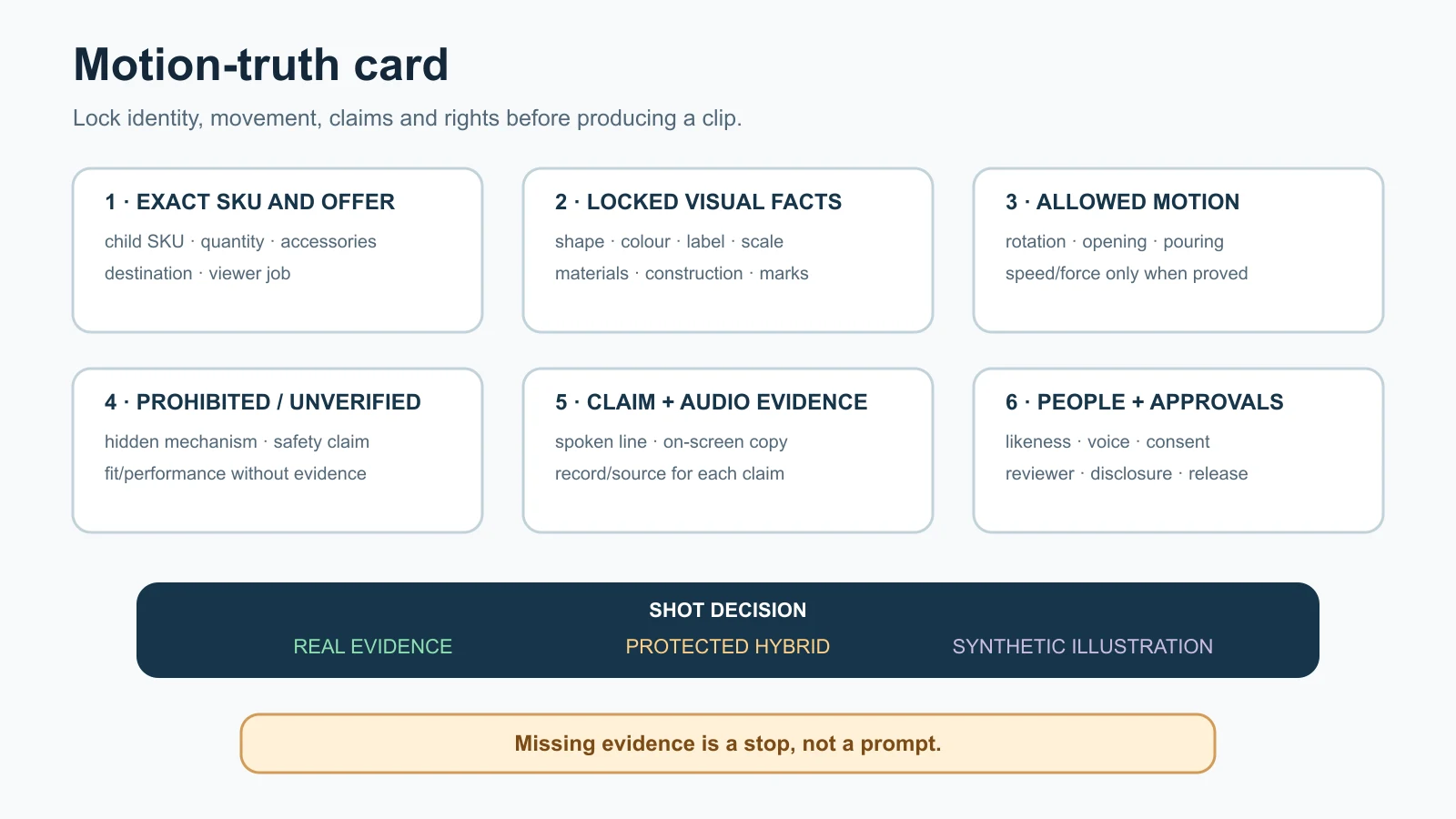
Lock the product, permitted motion and claim evidence before any clip is generated. Missing evidence is a stop, not a prompt.
Prepare the evidence pack
AI cannot recover facts that were never supplied. Build the pack according to the video job.
Product sources
- approved front, back, side, top and detail images;
- real footage of any action being claimed;
- scale reference and verified dimensions;
- current label, packaging and artwork files;
- bill of materials or included-parts list where relevant;
- data sheet, usage instruction and safety information; and
- exact colour/finish reference where buying-critical.
For a high-SKU range, use the AI catalogue photography system to prevent adjacent variants from contaminating a video job.
Communication sources
- approved product description and offer;
- substantiation for objective claims;
- known buyer question and objection;
- glossary of product terms and forbidden substitutions;
- brand voice and visual guide;
- approved CTA and destination; and
- language master plus authorised translations.
Rights and provenance sources
- who owns each image, clip, design, voice, music and font;
- release/permission for identifiable people, locations and property where required;
- tool, plan/model, project date and settings;
- source files and generation/edit history; and
- export and disclosure record.
Do not upload unreleased products, customer information, confidential drawings, faces or voices until the chosen provider’s current terms and the business’s data policy permit it.
Write a claim-led script and storyboard
Start with evidence, then write. An AI-written script can sound fluent while changing a model number, adding a benefit or turning “may help” into “will”.
Use a claim ledger
| Script line or on-screen statement | Claim type | Evidence | Allowed wording | Reviewer |
|---|---|---|---|---|
| Product name/model | Identity | Product master | Exact approved name | Product owner |
| “Includes lid and two inserts” | Offer composition | Pack list and physical sample | Exact count only | Product owner |
| “Matte surface” | Attribute | Approved specification/sample | Do not upgrade to “scratch-proof” | Category reviewer |
| “Ask for dealer pricing” | CTA | Current sales process | No unavailable price/stock promise | Sales owner |
| Warranty or performance statement | Objective claim | Current written policy/test | Match scope, conditions and date | Authorised business/legal reviewer |
Keep a line that has no evidence out of the script. A disclaimer is not a storage place for unsupported claims.
Use a shot ledger
| Shot | Viewer job | Visible product/action | Method | Truth risk | Approval evidence |
|---|---|---|---|---|---|
| 01 | Identify exact item | Static front/three-quarter product | Real/protected | Wrong variant or pack | Approved master and SKU |
| 02 | Prove feature | Real opening/connection/detail | Real footage | Impossible motion or hidden reset | Raw clip and instruction |
| 03 | Explain benefit | Callout over verified detail | Motion design | Callout exaggerates attribute | Claim ledger |
| 04 | Add context | Product in illustrative setting | Hybrid/synthetic | False scale or included props | Context reviewer/disclosure decision |
| 05 | Invite action | End card | Conventional | Old offer, phone or URL | Sales owner |
This ledger is the project’s most useful hand-off. The generator, editor and reviewer can see why every shot exists and what would make it fail.
Storyboard for silent understanding
View the storyboard without narration. Can a buyer still identify the exact product and avoid a false inference? Then read the script without visuals. Does the audio make a promise the product footage never proves? Review both layers separately before combining them.
Use the ten-gate production workflow
Gate 1: define viewer, job and action
Choose one primary viewer and one next step. A dealer video and a consumer reel can share footage but should not share an unfocused script.
Gate 2: approve the method lane
Assign real, hybrid or synthetic method per shot. Escalate proof, safety, fit, performance and endorsement scenes to real evidence.
Gate 3: approve the motion-truth card
The product owner signs off the exact SKU, locked facts, allowed motion and stop rules before generation.
Gate 4: complete the evidence pack
Mark missing sources. Do not let an editor fill a blank with a plausible clip.
Gate 5: approve script, claim ledger and storyboard
Check identity, units, offer, language and implied claims. Separate product facts from creative direction.
Gate 6: capture and generate shot by shot
Record proof footage first. Generate small, replaceable components rather than asking for an entire finished commercial in one step. Keep source, prompt/instruction, output and version together.
Gate 7: assemble picture and sound
Add titles, callouts, narration, music and sound effects only from approved sources. Keep product labels and mandatory information readable for long enough to review.
Gate 8: run independent truth review
The operator checks technical quality. A product/category owner checks the exact SKU, motion, claim and offer. A language reviewer checks voice, on-screen copy and captions where needed.
Gate 9: make destination versions
Create versions from the approved master according to current platform, website, sales and ad requirements. Recheck crops because a vertical cut can hide a disclaimer, product part or quantity.
Gate 10: release, log and measure
Release only named, approved versions. Record the publication URL, upload disclosure choice, source master, date and owner. Keep rejected versions out of shared sales folders.
Review every frame, transition and sound
Do not review an AI product video only at normal speed on a phone. Review the full-resolution master, then inspect keyframes and transitions.
Five review passes
- Identity pass: exact SKU, colour, label, pack and included parts.
- Geometry pass: shape, proportions, openings, seams, stones, handles and product boundaries across frames.
- Motion pass: physical action, contact, sequence, timing, continuity and cause/effect.
- Claim pass: narration, text, symbols, props, sound and implied benefit.
- Release pass: rights, captions, disclosure, crop, CTA, destination profile and final filename.
Common motion failures
| Symptom | Likely risk | Decision |
|---|---|---|
| Label letters swim or change | Wrong brand, model, quantity or legal text | Replace with protected real label/footage; do not patch frame by frame blindly |
| Handle, clasp, port or stone count changes | Product identity/geometry drift | Reject shot; use real capture or protected layer |
| Hand merges with product | False use, scale or safety | Reject; recapture real interaction |
| Product rotates to reveal invented back | Unseen detail fabricated | Limit camera motion or supply/record the real back |
| Liquid or pack contents change between frames | Quantity/offer misrepresentation | Reject or use real footage |
| Shadow/reflection moves independently | Floating or physically impossible presentation | Repair only if product truth remains exact; otherwise recapture |
| Cut hides a manual step | Ease-of-use or performance implication | Restore the step or label the edit/summary accurately |
| Speed change makes outcome look immediate | Timing/performance claim | Show actual time/conditions or remove implication |
| Voice says a stronger claim than text | Unsupported audio claim | Return to approved script and rerecord/regenerate |
| Caption changes a unit/model number | Offer or safety error | Correct caption and review all language tracks |
When one critical product feature changes, reject the shot rather than averaging the rest of the video into a passing score.
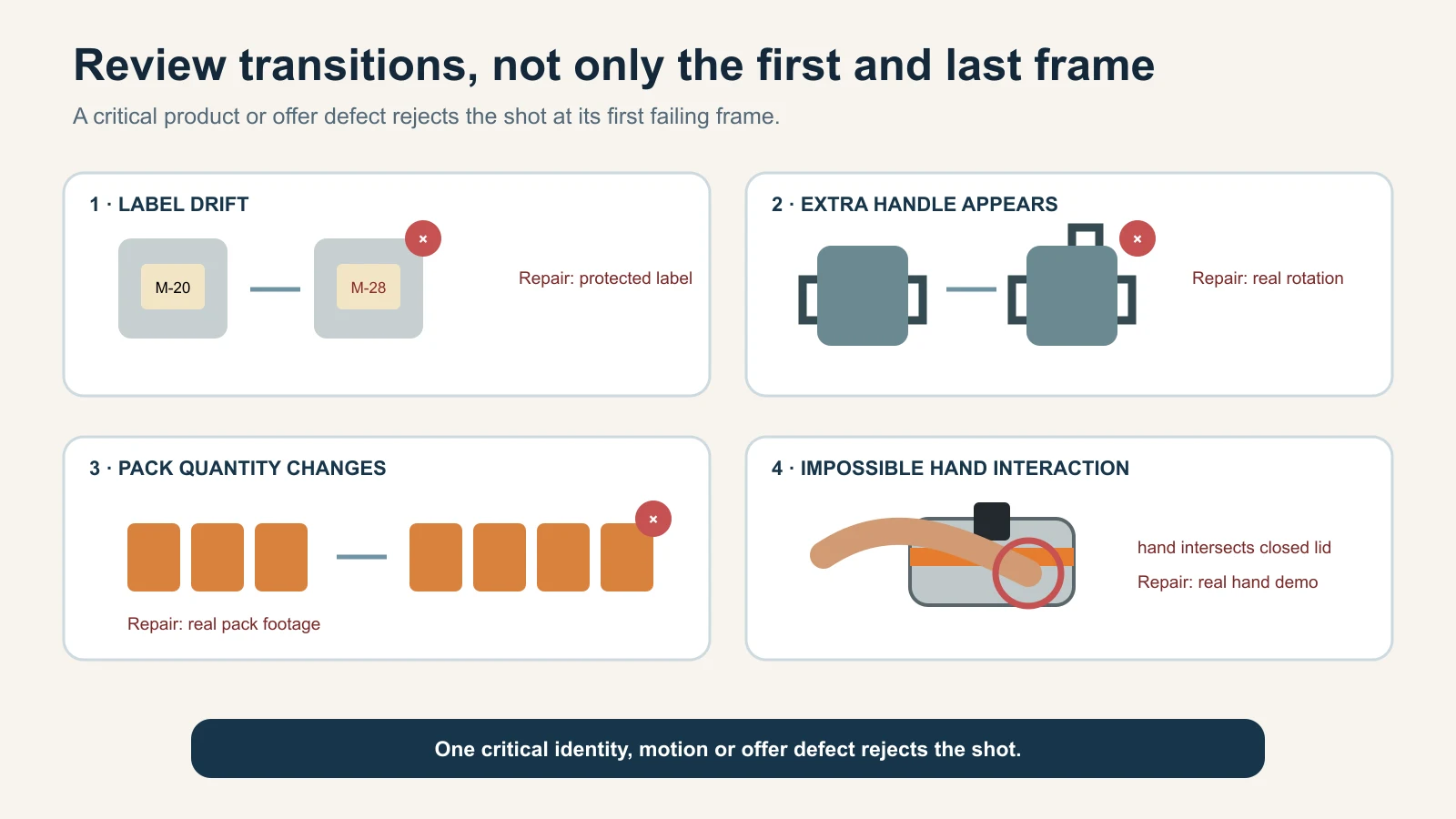
Inspect transitions and keyframes; critical product details often fail between attractive start and end frames. The defects are deliberate teaching illustrations, not observed model outputs.
Handle Indian languages, voice and captions
India-facing product videos often mix English product terms with Hindi, Gujarati, Marathi, Tamil, Telugu, Bengali or other languages. Translation must preserve the product, not merely sound fluent.
Create one approved fact master
Lock:
- product and model names;
- technical terms that remain untranslated;
- units, quantities, prices and dates;
- safety, warranty and limitation wording;
- CTA destination; and
- terms that must not be upgraded into stronger claims.
Use a competent reviewer for every published language. Back-translation can expose drift, but it does not replace a reviewer who understands the product and intended audience.
Treat captions as content
W3C’s WCAG 2.2 guidance for prerecorded synchronized media says captions should provide synchronized text for audio content, including meaningful non-speech information. See Understanding WCAG 2.2 captions for prerecorded media.
YouTube also warns that automatic captions may misrepresent speech because of pronunciation, accents, dialects or background noise and tells creators to review and correct them. See YouTube’s automatic captioning guidance.
For product videos, always check:
- brand and model pronunciation;
- Indian names and regional terms;
- decimal points, units and pack counts;
- phone numbers, URLs and prices;
- speaker labels and meaningful sound cues; and
- caption placement over product details and disclosures.
Do not rely only on burned-in subtitles if the publishing surface supports a proper caption track. Supply both where the audience and platform need them.
Disclose realistic synthetic content and preserve provenance
Disclosure rules differ by platform and can change. Make the decision for each destination on the upload date.
YouTube’s current rule
YouTube currently requires creators to disclose content that is meaningfully altered or synthetically generated when it seems realistic. Its examples include making a real person appear to do or say something they did not, altering a real event/place, or generating a realistic scene that did not occur. It says minor production assistance such as script help, caption creation, sharpening or audio repair generally does not require that disclosure, while the list is not exhaustive. See YouTube’s GenAI disclosure guidance.
Use the upload setting YouTube provides when the finished product video meets that test. Do not assume a caption saying “AI video” replaces the platform setting.
YouTube’s current impersonation policy also says disclosure is not a free pass to use someone’s AI likeness or voice to falsely imply authorisation or endorsement. See YouTube’s impersonation policy.
The AI spokesperson product video guide will cover that risk in depth. Until then, do not create a customer, expert, celebrity, employee or founder endorsement without documented permission and truthful wording.
Keep a provenance record
The C2PA 2.3 explainer describes Content Credentials as a cryptographically bound structure that can record an image, video, audio file or document’s origin, modifications and AI use. It also says credentials do not judge whether the underlying content is true and can be incomplete or removed. See the C2PA Content Credentials explainer.
Therefore:
- preserve supported Content Credentials through editing/export where practical;
- keep a separate internal record of source, tool/model, edits, claims and approvals;
- test whether the editor, compressor, host and platform preserve credentials; and
- never treat provenance metadata as proof that the product or claim is accurate.
India product-truth safeguard
The Central Consumer Protection Authority’s 2022 misleading-advertisement guidelines apply to commercial communication, and the ASCI Code says advertising should not mislead through statements or visual presentation by implication, omission, ambiguity or exaggeration. See the Department of Consumer Affairs’ official guidelines page and the ASCI Code.
For an AI product video:
- show the SKU, offer and current packaging that can actually be supplied;
- substantiate objective claims and visual demonstrations;
- do not fabricate a testimonial, test or product result;
- disclose material synthetic presentation where the destination or context requires it; and
- seek category-specific legal review for regulated, safety-critical or high-consequence claims.
This is operational guidance, not legal advice. There is no blanket claim here that every AI-assisted edit requires the same public label in India.
Prepare website, social, sales and ad versions
An approved master is not automatically ready for every destination. Maintain a version register with:
- source master ID;
- destination and account;
- frame/aspect and safe-area profile;
- maximum duration/file requirements from the current guide;
- caption/subtitle track;
- AI disclosure decision;
- thumbnail/poster frame;
- CTA, link and offer date;
- reviewer and approval date; and
- published URL.
Do not publish universal aspect ratios, file sizes or duration limits from memory. Verify the current platform/account instructions at export time.
Website and video search
Google Search Central says video discovery depends on crawlable embeds, an indexable page and a valid thumbnail at a stable URL. For eligibility in video features, it recommends a dedicated watch page where watching the single video is the main purpose; it specifically notes that a product page with a complementary 360-degree video is not a watch page. A non-watch product page can still appear as a normal text result. See Google’s video SEO best practices.
If one product video deserves search visibility:
- create a useful page where that video is the main content;
- give it a unique title and description;
- place a truthful transcript or supporting copy nearby;
- provide a stable, accessible thumbnail;
- add accurate
VideoObjectstructured data if implemented correctly; and - monitor indexing rather than promising a video rich result.
Google says structured data information should match the actual video and does not guarantee a specific search feature. See Google’s VideoObject documentation.
Sales and WhatsApp use
Create a lightweight approved derivative only after the master passes. Keep the exact product name, sales contact and current offer in the message or adjacent copy. Do not compress until label text or product detail becomes misleadingly unreadable.
Paid ad use
An organic or sales video is not automatically ad-safe. Advertising destinations impose additional content, offer, rights and account rules. Google Ads, for example, prohibits ads or destinations that deceive by omitting relevant product information or providing misleading information, and YouTube/Discover feed ads receive a separate review. See Google Ads’ misrepresentation policy.
The future AI ad creatives guide should own the creative/ad system. Recheck the actual ad platform policy and account before submission; never say a video is “platform approved” merely because a tool exported the right dimensions.
Apply the method to Indian product businesses
The following are fictional operating examples, not client results or claims about every business in those regions.
Rajkot cookware manufacturer: prove the mechanism, generate the kitchen
A pressure cooker or pan video may need to show the exact handle, lid fit, valve, finish and included pieces. Capture the opening/closing and safety-relevant actions for real, following the authorised instructions. AI can help storyboard, clean the background, add verified feature callouts and create a non-proof kitchen context.
Stop if the video changes the valve, implies instant heating, shows unsafe steam handling or adds a lid/accessory not in the pack.
Morbi tile manufacturer: separate finish evidence from room context
Use real footage to show surface texture, gloss, edge, face variation and scale. A generated room can help a dealer imagine a style, but it should not become evidence of shade, slip resistance, installation ease or an exact layout. Do not animate grout or tiles assembling themselves as an installation tutorial.
For a B2B range, link every video master to the same SKU/finish records used in the catalogue system.
Surat apparel wholesaler: movement is a product claim
When fabric moves on a body, the viewer may judge drape, weight, transparency, flare, fit and included pieces. Use real garment movement when those properties affect the sale. A synthetic model or generated walk can distort construction and body interaction even if one frame looks convincing.
Keep product-only and real-detail evidence available and use the AI model photos for apparel guide for fit, drape, consent and cultural-styling safeguards.
Jaipur jewellery retailer: real macro motion before sparkle effects
A real turntable or hand-held macro clip can prove stone arrangement, prongs, clasp, back and scale. AI sparkle, lens flare or floating motion may be decorative, but it must not change stone count, metal colour or brilliance in a way that becomes product proof.
Use the AI jewellery photography checklist to approve the still/detail sources before motion work.
Multi-brand wholesaler: permission and version control
Confirm that the supplier’s clips, pack shots, trademarks, music and product claims can be reused and edited. Record the packaging generation and source date. Do not modernise a label, remove the manufacturer’s identity or make a synthetic representative “recommend” the product without authorisation.
Measure a pilot without invented results
Do not claim AI made video “10x faster”, cut costs by a fixed percentage or increased sales unless a defined test supports it.
Operational measures
| Metric | Formula | Why it matters |
|---|---|---|
| Source-ready rate | projects with complete evidence packs ÷ projects started | Separates source problems from tool problems |
| First-pass shot approval | shots approved without rework ÷ shots submitted | Measures method/brief reliability |
| Critical motion-defect rate | shots rejected for identity, geometry, motion, claim or offer defects ÷ shots reviewed | Shows product/motion-truth risk |
| Rework time per approved master | total rework minutes ÷ approved masters | Makes hidden labour visible |
| Cost per approved master | all attributable production and review cost ÷ approved masters | Compares methods after rejection, not before |
| Caption/translation defect rate | caption or language lines corrected ÷ lines reviewed | Finds multilingual risk |
| Disclosure completeness | released versions with documented disclosure decision ÷ released versions | Checks platform/process control |
| Destination completion | approved destination versions ÷ required versions | Measures release readiness |
| Post-release correction rate | released videos needing a truth/offer correction ÷ released videos | Tracks escaped errors |
Include real capture, subscriptions/credits, operator time, product review, language review, music/voice/licensing, rework, storage and export in cost. A generated clip that fails product truth is not an approved master.
Audience and business measures
Choose only metrics tied to the video’s job:
- viewers reaching the first meaningful product proof;
- completion of a short instruction or comparison;
- clicks to the exact product or data sheet;
- qualified WhatsApp enquiries tagged to that video;
- dealer requests for a catalogue or sample;
- reduction in a specific repeated support question; or
- attributed orders where the measurement setup is credible.
Do not assume views equal demand or attribute a sales change to video when price, stock, distribution, seasonality, ads or follow-up also changed. The future unit economics guide should decide whether scaled distribution makes commercial sense.
Pilot design
Test a small but representative set:
- one simple product identity video;
- one feature or comparison video;
- one product with motion/interaction risk; and
- one destination/language version that challenges the workflow.
Keep the job, evidence standard and review method fixed when comparing a real, hybrid or synthetic approach. Publish no “winner” unless the test is actually run and documented.
Know when AI should stop
Use real capture, a verified technical animation or no video when:
- the exact SKU, variant or pack is not available as adequate evidence;
- movement, fit, drape, texture, reflection, timing or scale is the reason people buy;
- AI changes product geometry, labels, counts, components or interaction;
- a demonstration implies safety, efficacy, compatibility, durability or measured performance;
- a generated hand/body interaction cannot be verified;
- the script contains a testimonial, certification, comparison or guarantee without substantiation;
- model, voice, music, location, trademark or source rights are unclear;
- a required disclosure cannot be made accurately;
- translation or captions change a model, unit, warning, price or offer; or
- rework makes the hybrid/AI route less controllable than a simple phone or studio capture.
“Use AI only for planning, captions and versions” is a successful decision when product evidence needs to stay real.
A four-cycle first pilot
Cycle 1: one product, one viewer, one job
Choose a representative SKU, define the next action and build the motion-truth card.
Cycle 2: evidence, claims and storyboard
Complete the source pack, approve every script claim and assign real/hybrid/synthetic method shot by shot.
Cycle 3: small-component production and review
Capture proof first, generate replaceable elements, assemble one master and run the five review passes.
Cycle 4: one destination, measure and revise
Verify the current destination settings, publish one approved version, record operational metrics and fix the system before scaling across SKUs or languages.
The production system should grow only after one honest master survives the complete hand-off.
Turn product video into an online growth system
A product video is an asset, not a complete growth plan. It still needs a digital place to be found, a useful message, distribution to the right people and an enquiry/follow-up path.
If your business still relies mainly on walk-ins, dealer calls, exhibitions or forwarded catalogues, GPTWala’s workshop explains the DAA path: Digital Presence → AI Content Creation → ₹100/day WhatsApp ads. It connects approved content to a broader online enquiry system without promising leads, sales or return on ad spend.
See the GPTWala workshop and decide whether it fits your product business.
Frequently asked questions
What is an AI product video?
It is a product video in which AI helps with one or more production tasks, such as scripting, editing, captions, motion design, image-to-video generation, synthetic scenes, voices or presenters. The label says nothing about accuracy; the final product, motion, claims, rights and disclosures still need approval.
Can I make a product video from one photo?
You can create limited camera or design motion, but one photo does not prove the unseen sides, mechanism, hand interaction, scale or movement. Keep the product static/protected or use the future still-photo tutorial for a controlled secondary video. Record real footage when the video must demonstrate function or physical behaviour.
Should I use real footage or AI-generated video?
Use real footage for proof and AI for tasks that do not weaken the evidence. A hybrid video is often appropriate: real product reveal and demonstration, AI-assisted captions/editing, and a clearly contextual synthetic scene. Choose per shot, not for the whole project.
Can an AI product video show how my product works?
Only if the working action is based on real or otherwise verified evidence. Do not let image-to-video invent opening, assembly, flow, timing, output or safety steps. Use real capture for buying-critical or high-consequence demonstrations.
How do I stop the product changing between frames?
Use complete exact-SKU references, protect real product layers where possible, restrict camera/object movement, generate short components and inspect keyframes. Reject the shot if labels, geometry, parts, colour, quantity or contact points drift; do not rely on a prompt alone.
Do AI product videos need a disclosure?
It depends on the destination and the finished content. YouTube currently requires its disclosure when content is meaningfully altered or synthetically generated and seems realistic under its guidance. Other platforms and contexts have their own rules. Check on upload day and keep an internal disclosure decision for every released version.
Can I use an AI avatar or cloned voice to sell a product?
Only after confirming likeness/voice rights, script truth, disclosure, data handling and the destination’s current rules. Never create a false customer, expert, celebrity or founder endorsement. Use the dedicated AI spokesperson guide when it is live.
How long should an AI product video be?
There is no universal best duration. Make it long enough to complete one viewer job without hiding required steps or conditions. Test destination-specific versions using your own retention and action data; do not cut proof merely to reach an arbitrary number.
Can I use the same video on my website, YouTube, Instagram and WhatsApp?
Use the same approved master as a source, but make reviewed destination versions. Crops, caption support, duration, safe areas, disclosure settings, link behaviour and compression differ. Recheck every version because a crop can hide a product part, condition or disclosure.
How should I compare AI video production with a real shoot?
Compare cost per approved master for the same video job and evidence standard. Include capture, tools, operator time, product/language review, rights, rework, captions and exports. Also compare critical defect rate and whether the method can prove what the buyer needs.
Sources checked for this guide
- YouTube Help: Disclosing use of GenAI content
- YouTube Help: Impersonation policy
- YouTube Help: Use automatic captioning
- Google Search Central: Video SEO best practices
- Google Search Central: VideoObject structured data
- Google Ads: Misrepresentation
- W3C WAI: Understanding captions for prerecorded media
- C2PA: Content Credentials explainer, specification 2.3
- Department of Consumer Affairs: Guidelines for Prevention of Misleading Advertisements and Endorsements for Misleading Advertisements, 2022
- Advertising Standards Council of India: The ASCI Code
Leave a Reply