GPTWala Business Hub · Practical ecommerce systems
A practical SKU-by-SKU system for deciding which views to capture, why each image exists and what must be checked before upload.
Updated 23 August 2026 · Reading guide for Indian product businesses
A product photography shot list is not a list of attractive angles. It is a written answer to a more useful question: what must a buyer see before they can judge this exact SKU with confidence? When the list is organised around buyer uncertainty, the shoot becomes easier to approve, variants stay consistent and the final gallery does a clearer selling job.
What an ecommerce product photography shot list must decide
A useful shot list connects five things: the SKU, the buyer question, the required view, the intended channel and the approval rule. If any one is missing, the team may produce a beautiful image that cannot be used.
The one-line rule: every planned image should either identify the item, prove a detail, explain scale or use, differentiate a variant, or remove a purchase objection.
Decision
Question to answer before shooting
Output
SKU coverage
Which exact product, size, colour and pack is being captured?
One row per sellable variant or approved shared asset
Buyer need
What can the buyer not verify from copy alone?
A named image purpose
View
Which angle, crop or context proves that point?
A capture instruction
Channel
Will this be a main image, gallery image, ad or catalogue asset?
Background and composition rule
Approval
What must remain accurate?
A measurable QA note
Turn buyer questions into images
Begin with the questions your sales team repeatedly answers on WhatsApp, at the counter or during returns. These questions are often better inputs than a competitor gallery because they reflect your product, your customers and your fulfilment reality.
Use four sources of uncertainty
Identification: Is this the right model, colour, size, finish or pack?
Inspection: What are the texture, stitching, ports, closure, ingredients, markings or included parts?
Scale and fit: How large is it, how does it sit, and what can it hold?
Use and outcome: How is it assembled, worn, applied, stored or used safely?
Write each uncertainty as a buyer question. Then decide whether photography can answer it truthfully. If the answer depends on a measurement, specification or policy, keep that information in the copy or a labelled diagram rather than implying it through perspective.
The core ecommerce image sequence
There is no universal magic number of photographs. The right count is the smallest complete set that lets a buyer identify and evaluate the product. Google Merchant Center supports one main image and additional images, and notes that different angles can help purchase decisions. Its current product-image guidance also requires the image to represent the actual product and the correct variant. See the official Merchant Center image-link guidance.
Sequence
Image purpose
Typical capture
Do not hide
1
Immediate identification
Clean three-quarter or front hero
Overall shape, colour and sellable unit
2
Complete inspection
Front, back and important sides
Closures, controls, labels or rear construction
3
Material/detail proof
Macro or close crop
Texture, weave, edge, finish or connector
4
Scale
In-hand, on-body, beside a neutral reference, or dimension graphic
True proportion
5
Use
Product in one realistic context
How it is held, worn, opened or positioned
6
What is included
Lay-flat of box contents or bundle
Every included and excluded component
7
Variant distinction
Separate approved image per colour or configuration
SKU-specific colour, pattern and attachment
For marketplace main images, use the relevant channel rules as the final authority. GPTWala’s Google, Amazon, Flipkart and website image-rules guide explains the difference between a clean main image and supporting gallery assets.
Add category-specific modules
The core sequence is a base. Add modules only where the product creates a specific buying risk.
Category
Extra views worth planning
Accuracy risk
Apparel
Front, back, side, fabric close-up, closure, on-body fit and movement
Do not reshape fit, length, drape or print placement
Jewellery
Face, side profile, clasp, setting, scale on body and hallmark where relevant
Do not enlarge stones or remove construction details
Food and packaged goods
Front pack, back label, ingredients/nutrition, seal, pack contents and serving context
Keep label copy and pack quantity legible and current
Tools or appliances
Controls, ports, accessories, operating position, size reference and safety labels
Do not show accessories that are not included
Furniture or decor
Front, side, back, material detail, dimensions, room context and assembly points
Perspective must not exaggerate size
B2B components
Multiple faces, connector/thread detail, dimensional drawing, finish and packaging
Revision, tolerance and material claims must match the data sheet
Reusable ecommerce shot-list template
Create one row for every required output. Do not write “take all angles”. A photographer, editor and approver should interpret the instruction in the same way.
Field
Example
SKU / variant
JAR-750-AMBER / 750 ml / amber
Buyer question
What does the lid and sealing ring look like?
Shot ID and purpose
JAR-750-AMBER-04 / closure proof
Capture instruction
Top-down close-up with lid removed and ring visible
Ring colour, lid thread and finish must match approved sample
Crop / delivery
Square master plus 4:5 derivative; keep full product inside safe area
Approval owner
Product manager
If several variants share construction, record exactly which asset may be shared. Never use a convenient image of one colour for another colour variant.
Plan the production day from the shot list
Group by setup, not only by SKU
Capture all products that need the same light, lens, background and camera position before rebuilding the set. However, keep a physical “to shoot / captured / approved” lane so grouped production does not cause variant mix-ups.
Lock the reference before volume capture
Photograph one representative SKU, edit it to the proposed standard and obtain approval. That reference should define crop, background tone, shadow, colour handling and naming. The approach mirrors the sample-first control in GPTWala’s product-accuracy checklist.
Reserve time for proof shots
Details, contents and labels often take longer than hero images because the product must be cleaned, opened or repositioned. Put them on the plan; do not leave them as optional shots at the end of the day.
Adapt the shot list by channel
Capture a truthful master set first, then derive channel crops. A marketplace main image, a website gallery, a WhatsApp catalogue tile and a Meta ad do different jobs.
Marketplace main: clear product identification under the platform’s current rules.
Website gallery: full evaluation sequence, including detail, scale, contents and context.
WhatsApp catalogue: instant identification on a small screen, with simple composition.
Advertising: attention and context, while preserving the actual SKU and claims.
Avoid composing every shot too tightly. Leave safe space in selected masters so your team can create square, portrait and landscape crops without cutting the product.
Approval checklist before files leave production
Match the physical sample to the SKU and variant row.
Confirm every required shot ID exists and no duplicate file is pretending to be another view.
Check colour, material, shape, label, included parts and scale.
Inspect edges, dust, reflections, stitching, clasps, ports and text at 100%.
Confirm the main image and supporting images follow the target channel’s current rules.
Verify crop derivatives against their safe areas.
Rename, export and place files in the approved SKU folder.
Common shot-list mistakes
Copying a competitor’s gallery: it may not answer your buyers’ questions or fit your product.
Planning by angle only: “front, side, back” says nothing about the purpose of each image.
Using one list for every category: a jar, kurta and machine component have different proof needs.
Ignoring variants: colour and configuration errors create a product-truth problem.
Shooting for one crop: tight framing can make a useful master impossible to adapt.
Leaving approval until the end: one early reference approval is cheaper than reworking a full catalogue.
Frequently asked questions
What should be included in a product photography shot list?
Include the exact SKU or variant, buyer question, image purpose, capture instruction, background, channel, crop, product-truth check and approval owner for every required output.
How many product photos should an ecommerce listing have?
Use the smallest complete set that lets a buyer identify the product, inspect important details, understand scale or fit, see what is included and distinguish the correct variant. The number varies by product risk and channel.
Which product angles reduce buyer uncertainty?
A clear hero plus the hidden or decision-critical sides usually matter most. Add detail, scale, use, contents and variant views where they answer a real purchase question.
Should every colour variant have separate photos?
Yes when colour, pattern, finish or another visible attribute changes. A shared construction detail can be reused only when it is genuinely identical and the listing does not imply it represents another variant.
Can AI generate missing shots?
AI can help with approved backgrounds or derivatives, but it should not invent an unseen side, accessory, label, material or construction detail. Capture missing product evidence from the real item.
Who should approve the shot list?
The product owner should approve factual coverage, while the channel or marketing owner checks placement and format. Assign one final decision owner to avoid conflicting feedback.
Illustration of a reference-first AI product photography workflow.
Reviewed and updated: 11 August 2026
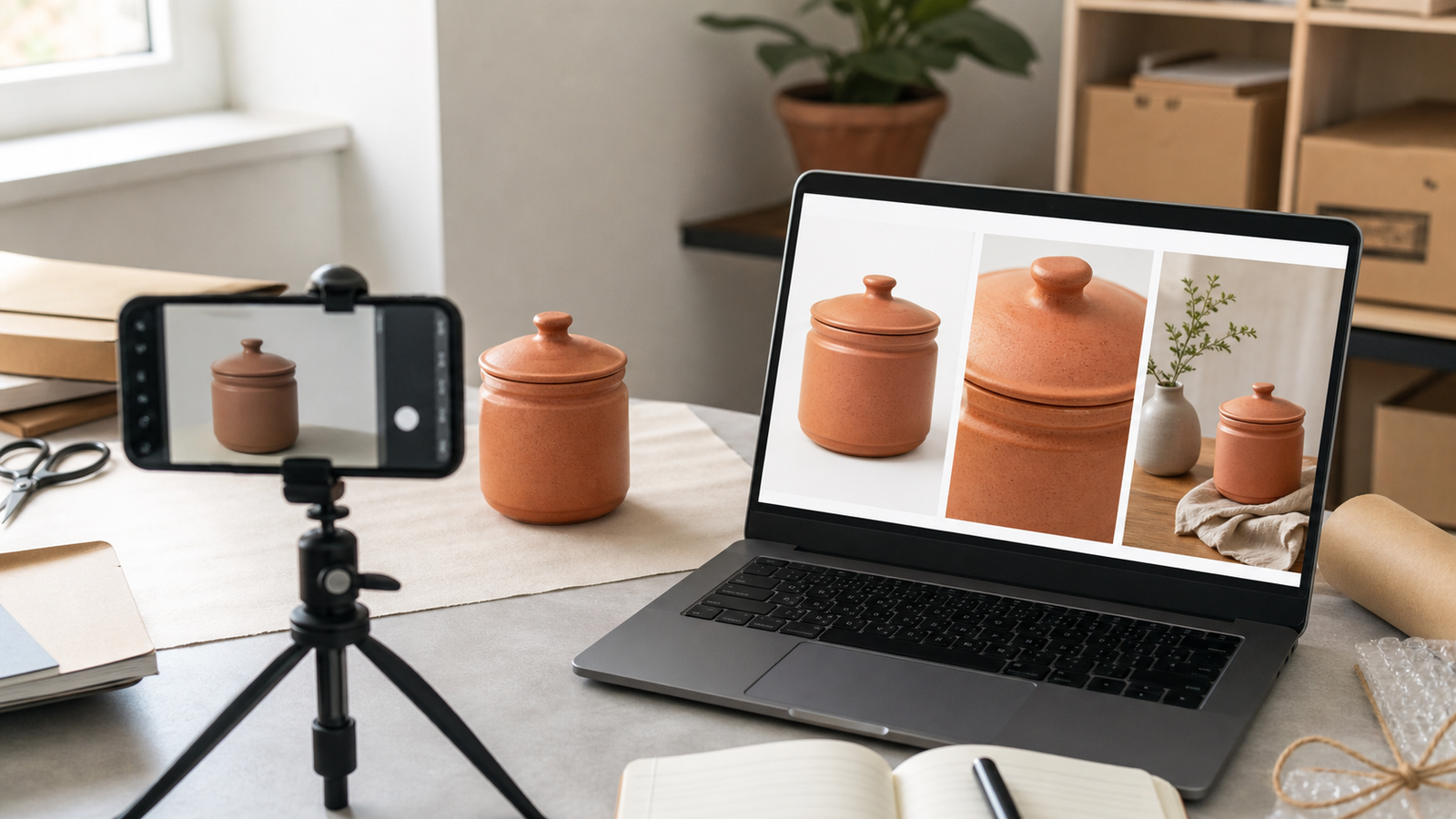
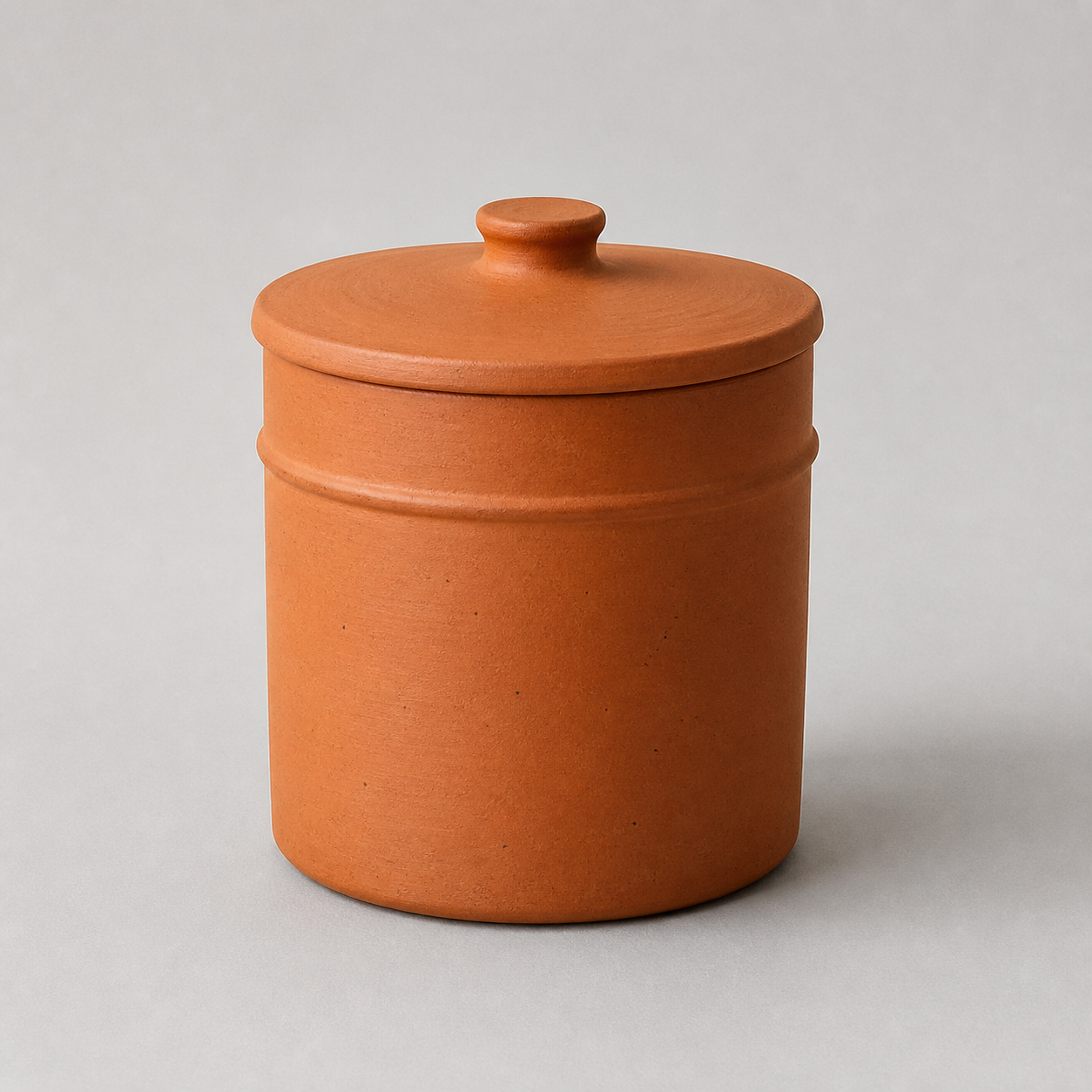
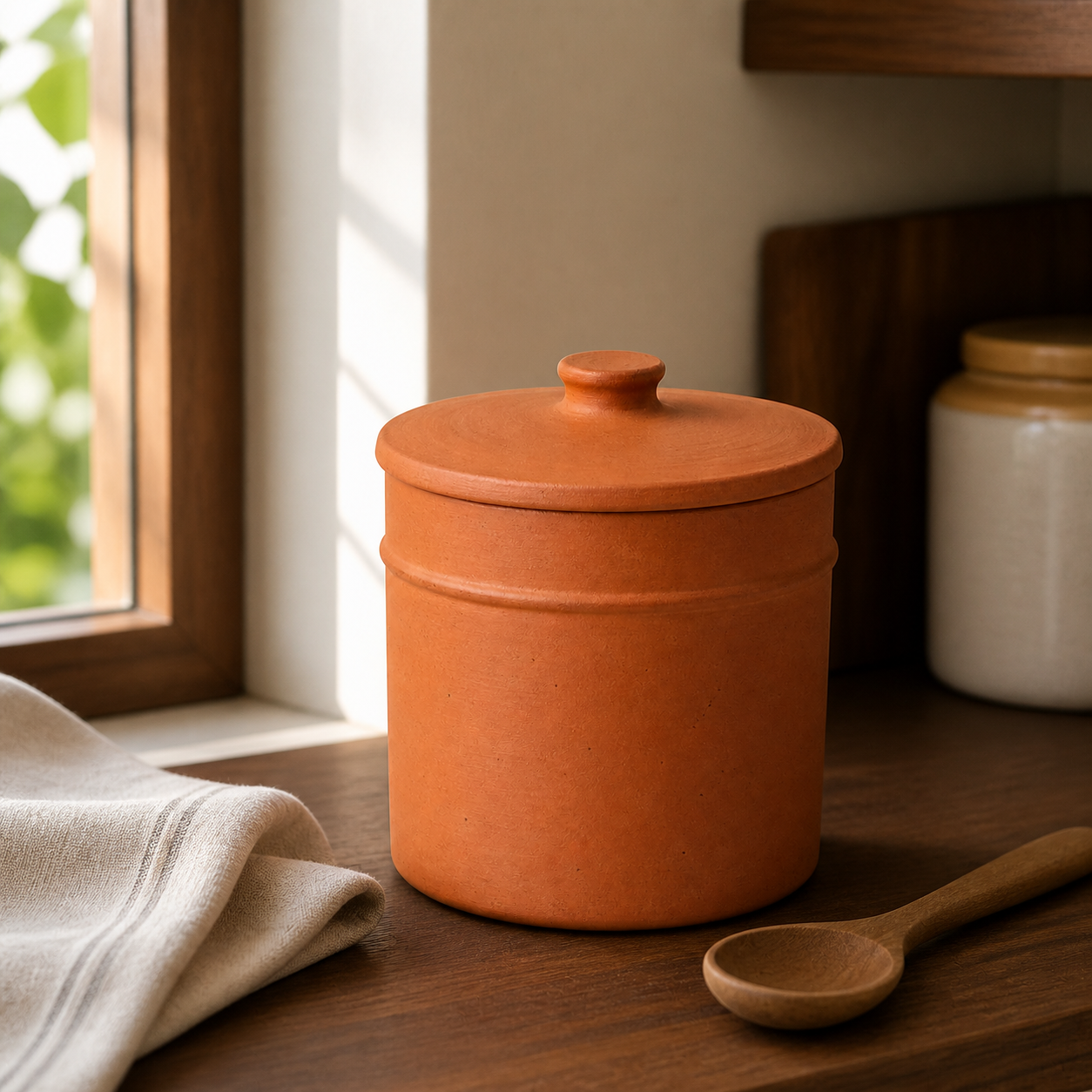
Editorial image disclosure: the three jar visuals on this page were created with OpenAI image generation for this guide. They show a fictional, unbranded product, not a merchant result or a claim of product accuracy.
AI product photography uses AI to edit a real product photo or create extra scenes around it. For an Indian manufacturer, wholesaler, retailer, shopkeeper or product brand, the safest method is reference-first and hybrid: photograph the exact SKU, make controlled changes and compare every output with the product before publishing. AI can change a background quickly, but it can also alter colour, shape, labels, patterns, components or scale.
AI product photography is a workflow that uses AI to clean, edit or create context around product images. It is useful when the exact product remains the source of truth. It is not permission to invent a sale item from a text prompt. “Photorealistic” only describes how convincing an image looks; it does not prove that the SKU, colour, label, finish or dimensions are correct.
Method
What it changes
Suitable role
Main risk
AI editing
Background, crop, canvas, exposure, resolution or a selected area
Clean catalogue assets and format changes
The editor may still redraw edges, text or texture
AI generation
A new scene or new parts of an image
Lifestyle images, banners and concepts
The product itself may be regenerated or altered
Virtual model imagery
A model, pose or wearing context
Secondary apparel or accessory images
It is not proof of exact fit, fall, drape or scale
Google’s current Product Studio documentation describes background removal, resolution improvement and scene-generation features, while warning that experimental features may produce unexpected output. That is the right mental model for any tool: useful assistance, followed by verification, not automatic approval.
Should your business use AI, a photographer, or both?
Use AI for controlled, repeatable edits; use real photography for product proof; and use a hybrid workflow when context is valuable but truth cannot move. The decision belongs to the asset, not to the business as a whole.
Asset or job
AI-assisted
Traditional
Hybrid
Why
Background removal, crop or channel resize
Strong fit
Optional
Useful for difficult edges
The product layer can often be preserved
Main image of an ordinary, non-reflective item
Limited
Strong fit
Strong fit
The exact item and current channel rules control
Lifestyle scene for an approved SKU
Useful
Useful
Strongest fit
AI can build context while a real product layer carries truth
Jewellery, glass, chrome or transparent product
Risky
Strong fit
Strong fit
Reflections, edges, stones and material cues are easy to distort
Apparel fit, drape or size claim
Risky as proof
Strong fit
Useful as a secondary asset
A plausible model image can still show the garment inaccurately
Regulated, safety-critical or high-value product
Not for unverified proof
Strong fit
Only with careful review
A visual implication can become a material product claim
Prefer a real shoot when exact colour or material is the buying reason, the geometry is complex, a safety or fit claim is involved, or the item cannot be replaced. A clean AI output that changes a feature is not a bargain; it is the wrong asset.
Build the right image set before choosing a tool
Start by deciding the image’s job. One “beautiful product photo” cannot safely serve every channel and buyer question.
Exact SKU → Main image identifies it → Proof images explain it → Lifestyle/ad images contextualise it
Image role
Buyer job
What it should show
Creative freedom
Main listing image
Identify the exact product and variant
The sale item, clearly and without confusing extras
Low; current channel and category rules apply
Proof/detail images
Remove practical doubt
True angles, texture, dimensions, package, components and scale
Low to medium; facts must remain visible and correct
Lifestyle/ad images
Help the buyer imagine context
The same product in a plausible setting or use
Medium; never imply an absent feature, quantity or unsupported use
Google separates its main image, additional image and lifestyle image guidance. Amazon also distinguishes its main and additional-image jobs. This separation matters even on your own website or WhatsApp catalogue: proof images answer “What will I receive?” while a lifestyle image answers “Where might it fit?”
The seven-step phone-photo-to-approved-image workflow
Generation is not the finish line; approval is. Each step below has a clear condition before the image can move forward.
1. Define the exact output
Record the SKU and variant, destination, image role, aspect ratio and due date. Decide whether you need a main, proof or lifestyle asset. Accept when: one written brief names the exact sale item and one intended use.
2. Capture a source-of-truth pack
Use neutral, even light and a clean background. Photograph front, back, sides and a 45-degree view; add label, material and joining-detail close-ups. Record physical dimensions, colour reference and every included part. Do not crop edges or hide a handle, clasp or lid. Accept when: a person who knows the SKU could verify its visible geometry, colour, text and contents from the pack.
3. Choose the risk lane
Route the job to preserve, contextualise or concept only before opening a tool. Accept when: the team knows what may change and what is locked.
4. Choose the tool category and constraints
Check whether the tool can use a real reference, mask only the background, export the needed size and preserve version history. Review commercial-use, privacy, data-retention and model-consent terms. Accept when: the tool can perform the narrow job without requiring the sale product to be invented.
5. Prompt and generate variations
State the locked product fields first, then the scene, composition, light, camera view and exclusions. Generate a small batch so review does not become uncontrolled. Accept when: every candidate is traceable to its source, prompt, tool and date.
6. Run the product-truth gate
Compare the output with the exact SKU, not with your memory. Inspect it at full size and at the intended mobile crop. Accept when: it has no stop-ship error and the owner or product expert signs off.
7. Export, label and archive
Export in the destination’s current format and dimensions. Use a descriptive filename and literal alt text, preserve required provenance metadata, and store the source, instruction, result and approval record together. Accept when: another team member can identify who approved the file, for which SKU, role and channel.
The three risk lanes: preserve, contextualise, concept only
The safest lane is the narrowest one that can do the job. The following is GPTWala’s recommended operating model, not an industry certification.
Lane
Allowed change
Typical use
Approval rule
Preserve : green
Crop, canvas, background removal and restrained light correction
Main catalogue or listing image
Compare edges, colour, label and components; check destination rules
Contextualise : amber
Background, surface, props, atmosphere or model context around the retained product
Additional image, website banner or ad creative
Pass product truth plus scale, context and use review
Concept only : red for commerce
Product, angle or feature is generated and cannot be verified
Moodboard or pre-production idea
Keep internal; recreate and verify before any commercial use
If the tool redraws the product while “changing only the background”, move the output out of the preserve lane. A prompt cannot overrule what the pixels show.
How to choose an AI product-photo tool without chasing a “best” list
There is no best tool for every Indian seller; the right tool is the one that produces approved assets for your job with controllable risk. Test the same SKU and brief instead of comparing home-page demos.
High-risk image with a retained real product layer
Layer-level edit, colour control and audit trail
Skilled operator and reviewer time
Before subscribing, score fidelity, masking, batch consistency, export resolution and formats, commercial rights, privacy, metadata handling, operator effort and reproducibility. Verify features and pricing on the publication or purchase date; credits are not comparable until you know what counts as a generation, edit and export.
A safer prompt formula for product images
A good prompt limits the edit, but it never proves product accuracy. Put the locked product fields before decorative detail.
Using the supplied photo of the exact [SKU/variant], change only [background/context area]. Preserve the product’s exact geometry, proportions, colour, pattern, material, finish, label/logo text, number of parts and included accessories. Do not add, remove, redraw or reshape the product. Place it [scene and position] with [lighting], [camera/framing] and a physically plausible contact shadow or reflection. Output [aspect ratio/use].
Examples of useful locks:
Surat sari: retain the border width, motif sequence, pallu and base colour; do not infer a blouse-piece design.
Jaipur jewellery: retain the stone count, prongs, chain length and metal colour; never invent or sharpen a hallmark.
Rajkot kitchenware: retain handle and lid geometry, finish and number of pieces; do not add an accessory or unsupported cooking use.
Even a precise prompt can produce a convincing error. The real product and source pack remain the test.
Fictional AI-generated reference image; no physical sale SKU exists.AI-assisted editorial illustration; not a client result or approved commerce asset.
The product-truth gate: what to check before publishing
If a material detail is wrong or cannot be verified, do not publish the image as a listing, product or ad asset. One red failure is enough to reject it.
Check
Verification
Stop-ship when…
Exact SKU and variant
Match the design code and colourway
The output belongs to another parent or child SKU
Shape and proportion
Compare every edge, opening, handle, clasp and neckline
Geometry or visible proportions changed
Dimensions and scale
Compare known measurements and contextual scale
Props or a model imply a false size
Colour and pattern
Compare with the product/reference under controlled viewing
Colour, motif, border or orientation changes buying meaning
Material and texture
Inspect weave, grain, gloss, transparency and reflection
A finish or material appears different
Label, logo and text
Read against the real pack; do not trust generated text
Words, quantity, barcode or regulatory information changed
Quantity and components
Count sale pieces and distinguish props
Anything appears included when it is not
Use and safety context
Check every visual implication
The scene suggests an unsupported load, heat, water, food or medical use
Shadow, reflection and contact
Check physical grounding
The effect changes perceived shape or material
Crop and mobile view
Inspect full size and intended thumbnail
A mandatory or deciding detail disappears
Channel, rights and consent
Check current rules, licences and model permission
Any requirement or right is unresolved
Provenance and approval
Preserve required metadata and record a named reviewer
Required metadata is missing or no product expert approves
Editorial illustration test: why “concept only” is the honest result
The two images below were made during production of this article on 11 August 2026 with OpenAI image generation. First, a fictional unbranded terracotta jar was generated on a neutral background. A second image used that file as a reference for a kitchen context. This was an editorial illustration, not a physical-SKU or merchant test.
Fictional AI-generated reference image. There is no physical sale SKU behind it.
AI-assisted lifestyle illustration made from the fictional reference. It is not a client result or an approved commerce asset.
A human visual comparison found the broad jar silhouette, lid, terracotta colour and raised band to be similar. But physical dimensions, true colour, material, capacity and function cannot be checked because the “reference” is also synthetic. Total attempts, operator minutes and credit cost were not recorded, so this test supports no speed, cost or tool-performance claim. Its correct lane is concept only. A real seller would replace the first image with an owned, measured SKU pack before running the same review.
Truth checkpoint
What the two files show
Commerce decision
Silhouette and lid
Broad cylindrical shape and lid profile look similar
Observation only; no physical dimensions to verify
Raised band and surface
Both images show a band and terracotta-like texture
Similar appearance is not proof of the same material or finish
Colour
Both look orange-brown under very different light
No calibrated real-product colour reference exists
Scale and function
Kitchen props suggest size and use
Capacity, food suitability and actual scale are unverified
Final lane
The result works as an article illustration
Concept only; not approved for a product listing or ad
Four India-specific workflows: and their safe boundaries
The workflow changes with the product’s truth risk, not with a decorative city label. These are illustrative operating examples, not client case studies or reported results.
Morbi tile manufacturer
The manufacturer records a straight-on tile image, edge view, macro texture, dimensions, finish code and a colour reference for each SKU. Those real images remain the swatch and technical proof. AI may place the exact tile pattern in a room as an additional visual. The reviewer checks tile scale, grout width, pattern repeat, surface finish and whether the render suggests an unavailable size. A room scene never replaces the real swatch or specification image.
Surat sari wholesaler
The wholesaler photographs each exact design and colour variant, including the border, motif repeat, pallu, weave and embroidery detail. An AI on-model image may help show a wearing context, but it stays secondary. The team rejects changed border width, invented blouse details, smoothed embroidery or a colour borrowed from another child SKU. One attractive output is never reused across several colour variants unless every product field has been separately verified.
Jaipur jewellery retailer
Real main and macro images carry the proof layer. A contextual wearing image may be created only with a verified size reference. Reviewers count stones and prongs, then check the setting, chain length, clasp, metal tone and hallmark. If the system makes stones brighter, thickens a chain or “cleans” hallmark text, the output is rejected. For a high-value or one-off piece, a controlled real shoot is usually the safer default.
Rajkot kitchenware manufacturer
The manufacturer retains the real utensil layer and creates a clean kitchen context around it. The source pack records handle shape, lid fit, surface finish, piece count and included accessories. Reviewers reject an extra spoon that looks included, a lid from another model, a false capacity impression or a scene implying unsupported flame, oven or safety compatibility. The lifestyle image can suggest context; it cannot create a technical claim.
What does AI product photography really cost?
Measure the cost of an approved, usable asset, not the advertised price of one generation. A cheap output that needs repeated repair may be the expensive option.
Cost per approved asset = (tool or credit cost + source capture + operator time + retouching + review + rework or reshoot) ÷ approved usable assets
Also track:
Approval rate = approved outputs ÷ total generated outputs
Rework rate = outputs needing another edit or generation ÷ reviewed outputs
Time per approved asset = total hands-on time ÷ approved outputs
Cost input
Record for AI/hybrid work
Compare with a real shoot
Source creation
Phone setup, product preparation and reference views
Photographer, studio, transport and product handling
Production
Credits/subscription and operator hours
Shoot, model/props and retouching
Quality control
Product expert review and colour/label checks
Selection and retouch approval
Failure cost
Discarded outputs, rework, reformatting and reshoot
Missed shots, extra edits and reshoot
Rights and delivery
Licence review, consent, storage and exports
Usage licence, model release and final files
Use your actual invoices, wage or owner-time assumptions and approved-asset count. Do not insert a market-average rupee figure without dated, comparable quotes.
Are AI product photos allowed on Google, Amazon, Flipkart and your website?
Sometimes:if the image is accurate, has the right role and follows the current destination rules. A tool’s “marketplace-ready” label is not platform approval.
Channel
Main image
Additional or lifestyle
AI/provenance note
Verify before use
Google Merchant Center
Must show the actual product and correct variant under its current main-image rules
Separate additional and lifestyle guidance applies
AI-generated images in specified attributes must retain required IPTC DigitalSourceType metadata
Official Merchant Center help and account diagnostics
Amazon.in
Public Amazon staff guidance says pure white background, only the product for sale and at least 85% frame fill
Additional images can show angles, details and use
No blanket AI approval should be inferred
Logged-in Seller Central help and current category style guide
Flipkart
Do not rely on an old blog or vendor’s template
Role and category requirements can change
No exact unverified spec is stated here
Current seller dashboard/help centre
Meesho
Do not rely on search snippets or another platform’s rules
Check the current listing workflow
No exact unverified spec is stated here
Current supplier panel/help centre
Your website
You control presentation and technical format
More room for context and comparison
Product truth, rights, privacy and ad-destination rules still apply
Your policy, legal review where needed, and final page preview
Google’s AI-generated-content guidance specifies embedded IPTC provenance metadata for applicable Merchant Center images; a visible watermark or alt text is not a substitute. Its 2026 product-data update says warnings for images below 500 × 500 began on 14 April 2026 and enforcement of that new minimum begins on 31 January 2027. That future enforcement date should not be described as a universal rejection already in force.
Amazon’s publicly accessible seller-staff image guidance gives the main-image points above and tells sellers to check category guidance. The logged-in Product image requirements and the rules shown for the seller’s account remain controlling.
Common AI product-photo failures and the fastest safe fix
Reduce the edit area or return to the real product layer before adding more prompt words. Stop when a material field cannot be verified.
Symptom
Likely cause
Safe fix
When to stop
Label, logo or text changes
Product area was regenerated
Restore the real label layer; mask only around it
Any required text remains wrong
Wrong colour or variant
Weak reference or mixed-SKU input
Use one SKU pack and controlled colour reference
Colour changes buying meaning
Texture looks plastic or smooth
Generative cleanup replaced detail
Retain the real product pixels; use real macro proof
Material cannot be restored
Shape, dimensions or piece count changes
Tool inferred hidden geometry
Add views; reduce edit; use real image
Geometry or contents stay uncertain
Invented prop appears included
Scene brief did not separate props
Remove it or label context clearly
Buyer could expect it in the box
Product floats or reflection is wrong
Scene physics and surface mismatch
Rebuild contact shadow around retained product
Effect changes perceived shape/material
Model fit or sari drape shifts
Virtual model regenerated garment areas
Keep as secondary; verify against flat/mannequin views
Fit, print or border is unreliable
Mobile crop hides a deciding feature
Wrong aspect ratio or focal point
Reframe for the exact placement
Mandatory detail cannot remain visible
Low credit cost, high rejection
Wrong tool/job fit
Calculate cost per approved asset; switch workflow
Rework repeats across the pilot
Tool accepts it, marketplace rejects it
Tool template is not platform approval
Read the current account error and channel guide
Rule or category status is unresolved
Run a five-SKU pilot before changing the whole catalogue
A seven-day, five-SKU pilot reveals operating problems without risking the complete catalogue. Include four normal products and one difficult item.
Day
Work
Evidence to keep
1
Select five SKUs and define one preserve plus one contextual job for each
SKU, role, channel and risk lane
2
Build source-of-truth packs and list missing proof images
Views, measurements, details and gaps
3
Produce a small, traceable set of variations
Tool, source, prompt, output count and date
4
Run the truth gate; log every rejection
Error field, severity and reviewer
5
Retouch or regenerate only fixable outputs
Hands-on time, credits and rework reason
6
Export approved assets to one controlled destination after checking its rules
Final file, metadata action and approval
7
Review approval rate, time/cost per approved asset and recurring defects
Pilot scorecard and go/change/stop decision
Do not promise a sales result from this pilot. Operational success means the team can create, verify, find and reuse accurate assets at an acceptable internal cost. If you also observe enquiries or orders, keep the offer, traffic and other major changes stable where possible and treat a small sample as directional, not proof that the images caused the result.
Where product photos fit in an online growth system
Product photos are assets, not the whole growth system. A business also needs an online presence, content that carries the offer, a way to reach the right people and a clear enquiry follow-up process.
If your business still depends mainly on walk-ins, see how to take an offline product business online. The GPTWala webinar explains the DAA path: Digital Presence → AI Content Creation → ₹100/day WhatsApp ads. It shows how these pieces connect for a product business without making product images carry the entire burden.
See the GPTWala webinar Learn how to connect your product assets, online reach and enquiry follow-up instead of relying only on walk-ins.
Frequently asked questions
What is AI product photography?
It is the use of AI to edit a product photo or create additional visual context around it. For truth-sensitive commercial work, start with a real image of the exact SKU. AI editing can change a background or canvas; AI generation can add a scene. Neither approach proves accuracy by itself, and a photorealistic output can still show the wrong colour, label, geometry or scale.
Can I create professional product photos from a phone photo?
Often, yes, for a controlled background, crop or simple contextual image: if the source is sharp, evenly lit and complete. One phone photo is not enough when the tool must infer hidden geometry, text or high-risk details. Capture front, back, side, 45-degree and close-up views, plus dimensions and included parts, before asking AI to edit the exact product.
Can AI replace traditional product photography?
It can replace some repeatable editing and help create secondary assets. It should not replace truthful proof when exact colour, material, reflections, fit, safety or dimensions matter. A hybrid workflow is often safer: real main and detail images establish the product, while AI helps with approved backgrounds, layouts and additional context.
Which AI product photography tool is best for Indian sellers?
There is no universal best tool. Match the tool to the image role, then test the same SKU and brief. Compare product fidelity, mask and reference controls, export quality, batch consistency, commercial rights, privacy, metadata handling, operator effort and cost per approved asset. A vendor demo or “marketplace-ready” badge is not evidence that your SKU will remain accurate.
How much does AI product photography cost in India?
Use your own cost per approved asset. Add tool or credit cost, source capture, operator time, retouching, review, rework and any reshoot; divide by the number of approved, usable files. A price per generation omits rejected outputs and staff time. Compare this total with current photographer or studio quotes for the same brief and usage rights.
Can I use AI product images on Amazon, Flipkart, Meesho or Google Shopping?
Sometimes, but the exact product, image role, category and current platform rules decide. Google publishes separate main, additional and lifestyle guidance and requires specified provenance metadata for applicable AI-generated images. Check logged-in Amazon, Flipkart and Meesho seller guidance for the current account and category. Do not treat another platform’s template or an AI tool’s export as automatic approval.
Can AI change my product’s colour, label or shape?
Yes. It may alter colour, text, motifs, reflections, texture, proportions, parts or scale even when the instruction says not to. Reduce the edit area, provide more reference views and preserve the real product layer wherever possible. If a material field is wrong or cannot be checked against the exact SKU, reject the output.
Do AI-generated product images need a label or metadata?
Requirements vary by destination and type of edit. Google Merchant Center requires AI-generated images in specified attributes to retain defined IPTC digital-source metadata. Other platforms, ad systems, laws and tool terms may apply different rules. Keep an internal creation record, preserve required embedded metadata and check whether your image optimiser strips it; alt text is for accessibility and context, not a replacement for provenance.
Is AI product photography safe for jewellery and apparel?
It can help create additional context, but these categories carry high truth risk. Jewellery reviewers must verify stone count, settings, metal tone, clasp, length, scale and hallmark. Apparel reviewers must verify colour, print, embroidery, border, fit and drape. Keep real main and detail images as proof, and reject any model or lifestyle output that changes the sale item.
Sources and review method
This guide was researched and reviewed on 11 August 2026. Platform rules, tool capabilities and pricing can change. Recheck official seller surfaces within 24 hours of publication and at least every 90 days for marketplace-sensitive sections.