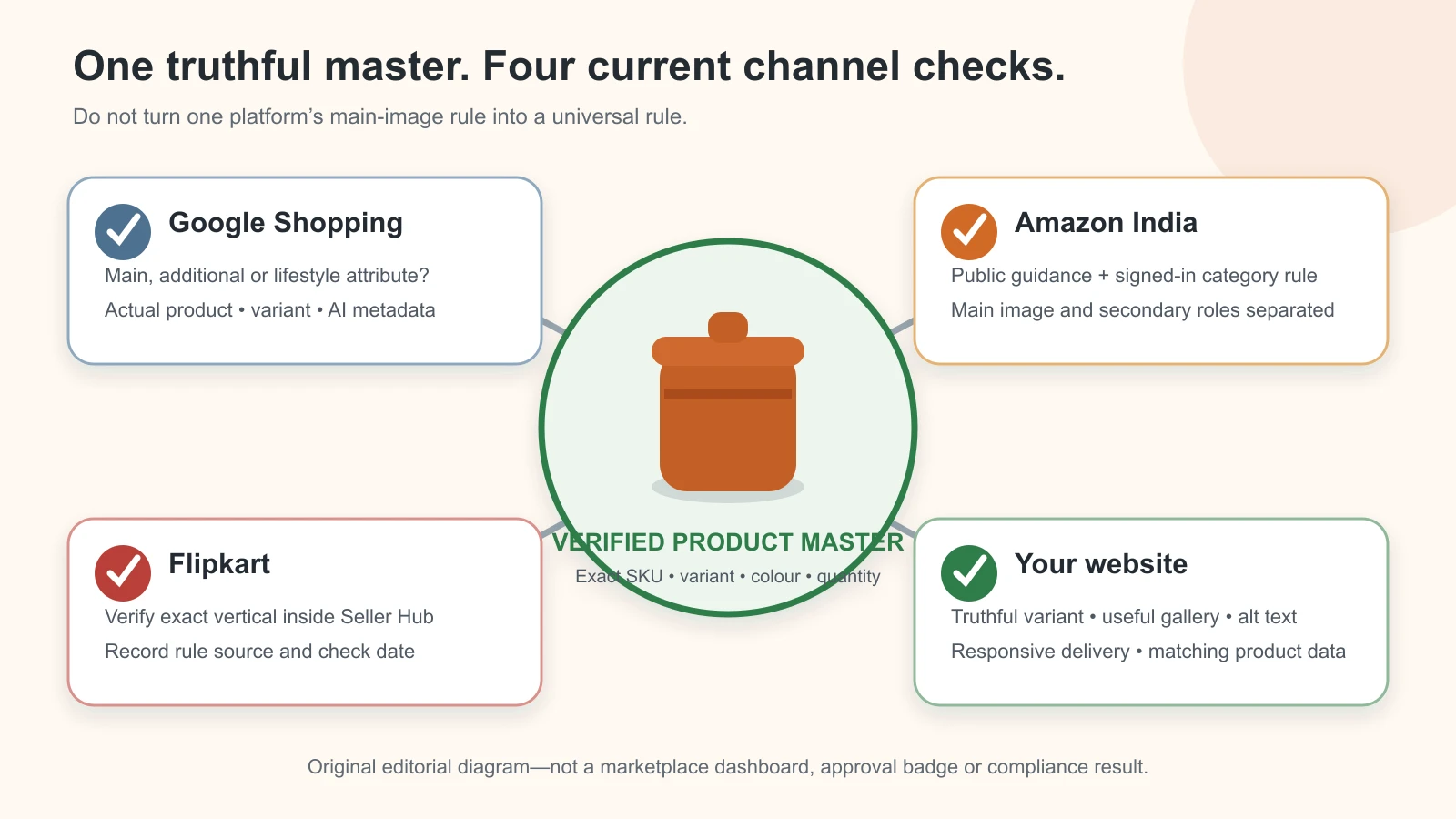
Reviewed and updated: 12 August 2026
The safest way to prepare product images for Google Shopping, Amazon India, Flipkart and your own website is to keep one verified source set for each exact SKU, then create and check a separate export for each channel. Do not rely on one “marketplace size” copied from a blog. Google publishes feed-specific main, additional and lifestyle-image rules; Amazon combines public technical guidance with signed-in category style guides; Flipkart’s image checks depend on its current Seller Hub workflow, category and vertical; and your website needs truthful images that also load quickly and remain understandable to search engines and people.
This guide was checked against official public sources on 11 August 2026. Marketplace policies and account-level validations can change. The current rule shown in the relevant seller account, category guide, upload template or diagnostics screen wins over any static checklist, including this article.
Table of contents
- The four-channel answer at a glance
- Main, additional and lifestyle images are different jobs
- Google Shopping product image rules
- Amazon India product image rules
- Flipkart product image rules
- Product image rules for your own website
- Build channel exports from one truthful master
- Use a pre-upload verification log
- Apply the product-truth gate before every upload
- What to do when an image is rejected or does not update
- Frequently asked questions
The four-channel answer at a glance
The most important distinction is not Amazon versus Flipkart. It is published universal rule versus live category or account rule. Google exposes unusually detailed public specifications. Amazon publishes a useful India-facing summary, but points sellers to signed-in style guides for category details. Flipkart exposes its image-guidelines route and quality-check workflow, while many exact production limits are presented dynamically inside the seller flow. Your own website has no marketplace upload gate, but it still has product-truth, accessibility, search and performance requirements.
| Destination | What the public official source establishes | What still needs a live check | Safe production decision |
|---|---|---|---|
| Google Shopping | Separate image_link, additional_image_link and lifestyle_image_link roles; correct product and variant; no promotional overlays on the main image; generative-AI source metadata; technical and URL requirements |
Merchant Center Diagnostics, feed format, account warnings and the image-size transition described below | Export a clean, exact-SKU main image plus separately classified additional and lifestyle images; preserve final-file AI metadata |
| Amazon India | Public Amazon staff guidance lists technical ranges and a clean main-image pattern; additional images may explain features or use | Signed-in Product Image Requirements, Product Page Style Guide, category exceptions, Submission Status and the current ASIN state | Treat the public post as orientation, then approve against the India account and exact category on upload day |
| Flipkart | Seller terms require listing pictures to describe the actual item and prohibit misleading descriptions; an official image-guidelines and image-uploading route exists | Seller Hub category/vertical guide, listing template, live QC and rejection reason | Do not publish a universal pixel, fill or image-count claim; record the live requirement for the exact category before export |
| Your website | You control the gallery, but Google Search documents discoverability, alt text, responsive delivery and structured-data practices | Theme/CDN behaviour, real mobile rendering, product schema, caching and page-speed results | Use truthful exact-variant images, responsive files, descriptive alt text and a tested product page |
This page owns dated channel-rule verification. For capture, editing, approval roles and version control, use the phone-to-approved AI product photography workflow. For the wider strategy, begin with the AI product photography guide for Indian product businesses.
Main, additional and lifestyle images are different jobs
Calling every file a “product photo” creates avoidable rejections. Give each image one job before editing it.
| Image role | Buyer question it should answer | Typical content | Risk to control |
|---|---|---|---|
| Main or primary image | “What exactly am I buying?” | The correct product or sale bundle, clearly visible, with minimal distraction | Wrong variant, extra props, promotional text, clipped product, misleading quantity |
| Additional proof image | “What does the back, detail, texture, size or included set look like?” | Other angles, close-ups, packaging, included components, a measured detail or permitted information graphic | An annotation that becomes an unsupported claim; showing an item that is not included |
| Lifestyle or use image | “How does this product look or work in context?” | Product worn, held, installed or staged in a plausible setting | Altered fit, scale, colour, finish, construction or implied performance |
| Website campaign image | “Why should I keep exploring this range?” | A wider composition with brand context and room for page copy | Treating a campaign illustration as product evidence; poor mobile crop; text embedded in the file |
Google has explicit feed attributes for all three Shopping roles. Amazon calls the first detail-page image the main image and distinguishes it from additional images. Flipkart’s current slot names and validations must be taken from the listing flow. Your website can use its own naming, but the gallery should still start with product proof rather than atmosphere.
Do not force one file into four roles. A wide website banner may fail as a marketplace main image. A square white-background main image may be truthful but weak as a lifestyle visual. The efficient method is one verified source pack, not one universal export.
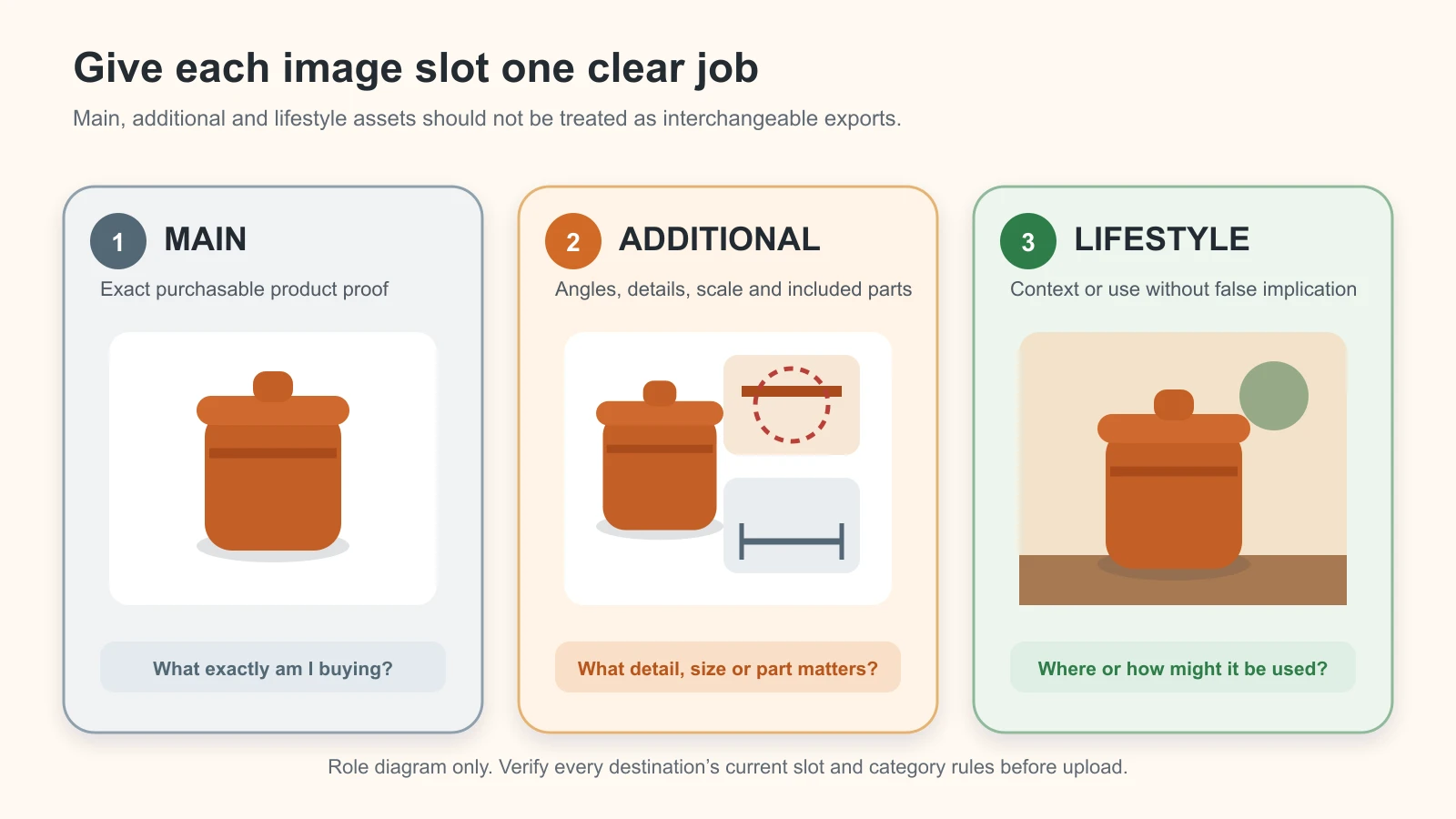
Original GPTWala role diagram. Verify every destination’s current slot and category rules before upload.
Google Shopping product image rules
Google’s product-data documentation is the clearest public rule set in this comparison. It also contains an active size transition, so dates matter.
What the Google main image must do
The main image is submitted through image_link and is required for each product. Google’s current documentation says the URL must point to a supported image, be crawlable, use http or https, and remain stable unless the image genuinely changes. The file must accurately show the product and correct variant. Placeholders, a merchant logo instead of the product, borders and promotional overlays can cause disapproval, subject to the narrow category exceptions listed in Google’s own guide.
Google differentiates requirements from best practices. That distinction should stay visible in a production checklist.
| Google main-image check | Status in Google’s guide | Production interpretation |
|---|---|---|
| Required image for every product | Requirement | No placeholder or missing main image |
| Actual product and correct variant | Requirement or direct accuracy guidance | Match colour, pattern, material and customization to the submitted item |
| Entire product visible with minimal or no staging | Requirement | Do not crop away a deciding feature or hide it with props |
| No price, “buy now”, free-shipping badge, watermark, retailer logo, border or other promotional overlay | Requirement | Keep promotion outside the image file and in the appropriate feed/page fields |
| Bundle represented accurately | Requirement | If the feed marks a bundle, show what the bundle contains as directed by Google |
| Product occupies about 75% to 90% of the frame | Best practice | Use it as a composition target, not as a false universal rejection threshold |
| Solid white or transparent background | Best practice, with cautions | Prefer a clean background; check how light products render on transparency |
| High-quality source, up to 64 megapixels and 16 MB | Requirement/best-practice limits shown in the current page | Export from a real high-resolution master; do not enlarge a thumbnail |
Source: Google Merchant Center’s official image link specification, verified 11 August 2026.
Handle Google’s 2027 image-size transition conservatively
At the time of this review, Google’s main-image page contains two statements that a seller should not silently flatten into one rule:
- an important notice says a minimum of 500 × 500 pixels for all products begins 31 January 2027; and
- the same page’s minimum-requirements section currently displays at least 500 × 500 pixels, while recommending images around 1500 × 1500 pixels or above.
That page is evidently in a transition state. The practical response is not to debate which smaller legacy file might pass today. Prepare a sharp source large enough for a 1500 × 1500-pixel or larger square export when the product permits it, stay below Google’s current file and megapixel limits, and treat Merchant Center Diagnostics as the live decision for the account. Record the effective date beside the export so an old checklist cannot override the upcoming rule.
Do not upscale a small WhatsApp image to reach the number. Google explicitly warns against scaled-up images and thumbnails. Recapture or return to the high-resolution original.
Use additional images for proof, angles and permitted staging
The optional additional_image_link attribute can carry up to 10 additional images under Google’s current specification. Those images can show another view, highlight part of the product, include product staging, show use, or clarify a bundle or multipack in ways the main slot cannot.
Additional does not mean unregulated. Google says additional images must meet the main image requirements, with the documented allowances for staging, partial views, bundles and multipacks. They must still be clear, relevant and truthful. A lifestyle scene that changes a kurta print, gemstone setting, appliance control panel or pack quantity is not rescued by being in a secondary slot.
See Google’s official additional image link specification.
Use the lifestyle attribute when the feed needs a distinct context image
The optional lifestyle_image_link is designed to show the product in a real-world context, such as apparel worn by a model or furniture in a room. Google’s current page states a minimum resolution of 600 × 600 pixels and adds its own aspect-ratio, overlay, border and quality rules. Because exact ratio text and feed validations can change, check the live lifestyle image link specification while preparing the feed rather than copying an old ratio table.
A lifestyle file should answer a context question without becoming a false demonstration. If AI generates the room, model or hand, reviewers still need to compare the sale product with the exact SKU references for silhouette, colour, construction, markings, quantity and plausible scale.
Preserve Google’s AI-image provenance metadata in the final file
Google says all images created with generative AI must contain metadata identifying that origin. Its current guidance points to the IPTC DigitalSourceType property and names TrainedAlgorithmicMedia, CompositeSynthetic and AlgorithmicMedia source types. The rule applies to images used in the main, additional and lifestyle attributes.
The important production detail is final file. Adding IPTC metadata to a working PNG is not enough if a later background remover, optimiser, CDN transform or format conversion strips it. Before upload:
- Export the exact channel file.
- Inspect the metadata in that exported file.
- Upload or pass that file through the actual delivery path.
- If the CDN or commerce platform creates another derivative, inspect the served derivative where practical.
- Keep the original generation and edit record with the SKU approval log.
Use Google’s official AI-generated content guidance as the source of record. This Google requirement should not be presented as an identical Amazon or Flipkart rule without an official source for those channels. Regardless of channel policy, keep internal provenance so the team knows what was generated, composited, retouched and approved.
Amazon India product image rules
Amazon India provides public staff guidance, but the public page is not the final category-by-category authority. A safe article must state both parts.
What Amazon’s public India guidance currently says
An Amazon-moderated India Seller Forums guide, last shown as moderator-updated about 12 months before this review, states that product images should be 500 to 10,000 pixels on the longest side and use JPEG, TIFF, PNG or non-animated GIF. It recommends at least 1,000 pixels for zoom. The same Amazon staff post says the main image should use a pure white background, the product should fill at least 85% of the frame, and extra text or logos should not be added to that main image. It describes additional images as the place for feature, use, lifestyle and permitted infographic content.
Use the official Amazon India post, Sell More! Your Guide to Perfect Amazon.in Product Photos, as a public orientation source. A second official Amazon staff summary says every product needs at least one image, prefers images above 1,000 pixels on the longest side and JPEG, lists the same 500-to-10,000-pixel technical range, and warns that non-compliant images may be rejected, removed, altered or associated with listing suppression. It also notes that Amazon may select images supplied by other selling partners for a shared detail page. See Listings Lounge: Product Image Requirements.
What must be checked inside Seller Central
Amazon’s own public posts direct sellers to the Product Image Requirements page, the Product Page Style Guide for the category, Image Manager, Submission Status and listing-fix tools. Some of those resources require sign-in, and category rules can differ. Therefore:
- do not treat the public 500-to-10,000-pixel range as the only rule;
- do not assume an apparel, jewellery, grocery, home, electronics or bundle listing has identical main-image exceptions;
- do not infer that text permitted in one category’s additional image is allowed in every category;
- do not copy an Amazon.com or another-country rule into Amazon.in without checking the India account; and
- do not assume an uploaded image will necessarily be the displayed image on a shared ASIN.
On upload day, open the India marketplace, confirm the exact product type and category style guide, then save the rule version or screenshot reference in the pre-upload log. If Seller Central rejects the asset or shows a different requirement, the account message supersedes the public summary.
Keep the ASIN and image tied to the same product
Amazon’s public guidance says one ASIN represents one product and should not be repurposed for a new version. The image workflow must follow the same discipline. A package redesign, component change, new jewellery setting, altered garment pattern or revised appliance panel may need a new source pack and a listing decision, not a quiet image replacement.
For shared catalogue pages, check the live detail page after approval. Your submitted file may pass but not become the displayed image. Record what was submitted, what Amazon displayed and when the page was checked.
Flipkart product image rules
Flipkart is the section where many online articles become overconfident. Public search results often repeat exact dimensions, frame-fill percentages and image counts without an accessible current Flipkart source for every category. This guide does not convert those repetitions into “official” rules.
What can be verified publicly
Flipkart maintains an official Image Guidelines and Image Uploading route in its Seller Learning content, but the detailed page is dynamically presented and may not expose a stable universal specification to a signed-out reader. Flipkart’s public seller terms say listing graphics, pictures and videos must describe the item for sale; the listing description must not be misleading and must describe the actual condition of the product. The terms also say listed products and their features should be consistent with what is shown on the platform.
Those are strong product-truth rules. They do not prove one universal 2026 pixel dimension, image count, aspect ratio, file-size ceiling or frame-fill percentage for every Flipkart category.
Verify the exact category and vertical inside Seller Hub
Before producing a Flipkart export, the seller or authorised operator should:
- Sign in to the correct Flipkart Seller Hub account.
- Choose the exact marketplace, category, sub-category and vertical used for the SKU.
- Open the current image guidelines or download the current single/bulk listing template.
- Record the accepted file formats, dimensions, aspect ratio, file-size limit, required views, image count, background rule and any category-specific model or packaging rule.
- Upload one representative SKU before processing the whole range.
- Read the real-time QC or catalogue QC result and save the stated failure reason.
- Update the channel profile only after the test passes.
If an agency says “Flipkart always requires 2000 × 2000” or “every primary image must fill exactly 85%,” ask for the current official Seller Hub rule for your category and date. Use the official rule if it exists; otherwise label the number as an agency production target, not platform policy.
Keep Flipkart truth and QC as separate gates
A technically accepted image can still be misleading, and a truthful image can still fail a technical upload check. Review both:
- Truth gate: exact SKU, colour, pattern, components, quantity, packaging, scale and supported claims match the item.
- Channel gate: the file meets the live Flipkart category and QC requirements.
The official Flipkart seller terms support the truth gate. The Seller Hub image guide, listing template and QC result provide the channel gate.
Product image rules for your own website
Your website gives you more creative freedom, not permission to weaken product evidence. It also adds technical responsibilities that a marketplace normally handles.
Start the gallery with the exact purchasable variant
The first product image should make the selected variant understandable. When a buyer changes from blue to maroon, from 500 ml to 1 litre, or from a single unit to a pack of four, the visible image should change where that difference matters. Do not show a premium set while the selected offer is one piece.
A useful product-page sequence is:
- clean main view of the selected SKU;
- opposite side or back;
- deciding detail or texture;
- included components and packaging;
- scale or measured view;
- truthful use or lifestyle context; and
- category-specific proof such as clasp, sole, label, controls, care information or garment construction.
This is an editorial sequence, not a universal image count. Add only the views needed to remove buying uncertainty.
Make images discoverable and understandable
Google Search’s official image guidance recommends standard HTML image elements, a usable src fallback for responsive images, descriptive filenames and useful alt text. It also says images should appear near relevant page content. Google does not index CSS background images in the same way it finds images in the src attribute of an <img> element.
Use:
<img
  src="handloom-cotton-kurta-maroon-front-800.webp"
  srcset="handloom-cotton-kurta-maroon-front-480.webp 480w,
          handloom-cotton-kurta-maroon-front-800.webp 800w,
          handloom-cotton-kurta-maroon-front-1500.webp 1500w"
  sizes="(max-width: 600px) 92vw, 50vw"
  width="1500"
  height="1500"
  alt="Maroon handloom cotton kurta, front view, with round neck and three-quarter sleeves">
The alt text describes the image in context; it is not a list of keywords. For a decorative texture that communicates no product information, empty alt text may be appropriate. For a product-proof image, describe what a buyer who cannot see it needs to know. Follow Google’s image SEO best practices and your accessibility review.
Serve responsive files without shifting the page
Do not force every phone to download the largest studio master. Create responsive sizes with the same truthful product content and let the browser choose through srcset and sizes. Keep a valid fallback src. Set width and height, or reserve the correct aspect ratio, so the page does not jump when an image loads. Google’s web.dev guidance explains that responsive images reduce unnecessary mobile transfer and can improve image load time, while explicit dimensions help prevent layout shift.
Use a modern delivery format such as WebP or AVIF when it produces an acceptable visual result, with a compatible fallback where the site needs one. Inspect fine jewellery edges, fabric texture, small label text and gradients after compression. A smaller file that destroys a product-defining detail fails the truth gate.
References: serve responsive images, serve images with correct dimensions and choose the right image format.
Connect the visible image to product data
Use Product structured data appropriate to the page and ensure the image URL, name, SKU, price, availability and selected variant agree with the visible page. Google says product structured data can support richer Search, Google Images and Google Lens presentations, and that combining on-page structured data with a Merchant Center feed can help Google understand and verify product information.
Validate the page with Google’s Rich Results Test and inspect the rendered mobile page. Structured data does not make an inaccurate image accurate, and it does not guarantee a rich result. Use the official Product structured data documentation for the current required and recommended properties.
Build channel exports from one truthful master
The efficient workflow separates evidence, master and channel derivative.
Keep three asset layers
- Reference evidence: untouched phone or camera captures of the exact SKU, all deciding views, packaging and included items.
- Approved master: a high-resolution, colour-checked product image or protected product layer that has passed the product-accuracy review.
- Channel derivative: a file cropped, compressed, tagged and named for one destination and slot.
Never overwrite reference evidence. A channel file can be remade when a platform changes a limit; the physical truth should not need to be rediscovered.
Use a channel profile, not tribal memory
Create one versioned profile for each destination and category. A profile is not “Amazon rules.” It is more specific:
Channel: Amazon.in
Product type/category: [exact current value]
Image slot: MAIN
Source checked: signed-in Product Page Style Guide
Checked on: 11 August 2026
Dimensions and file limits: [copied from current guide]
Background/framing: [copied from current guide]
Text/prop/model/packaging rules: [copied from current guide]
Test ASIN/SKU and result: [record]
Owner and next review date: [record]
Make a separate profile for Google Merchant Center, Flipkart and the website theme/CDN. When the rule changes, update the profile version; do not edit history out of an old approval record.
Export in this order
- Choose the exact approved master and variant.
- Choose one channel, category and image slot.
- Apply the current crop, canvas, colour space, format and compression target.
- Preserve or add required provenance metadata to the final derivative.
- Reopen the exported file and compare it with the master.
- Run truth, technical and file-integrity checks.
- Upload one pilot SKU.
- Record the channel response before batch export.
This sequence prevents a common small-business loss: editing 200 SKUs to a remembered specification and discovering at upload that the current category template differs.
Use a pre-upload verification log
The log is the evidence that a real rule was checked for a real SKU. It also makes rejections easier to diagnose.
| Field | What to record |
|---|---|
| SKU and exact variant | Internal SKU, marketplace ID/ASIN/FSN where available, colour, size, pack and current packaging version |
| Destination | Google Merchant Center, Amazon.in, Flipkart or website URL |
| Category/vertical | Exact live category, product type or vertical, not a broad label such as “fashion” |
| Image role | Main, additional, lifestyle, gallery, variant or banner |
| Official rule source | Direct URL plus signed-in page/template name where applicable |
| Rule checked on | Date and time, account/marketplace, operator |
| Technical limits | Pixel dimensions, ratio, file size, formats, colour/background and image-count rules shown live |
| Content limits | Cropping, fill, text, border, watermark, prop, model, packaging, bundle and category exceptions |
| AI provenance | None, retouched, composite or generated; IPTC value required/present; final-file inspection result |
| Product-truth result | Pass/reject for identity, colour, construction, markings, quantity, scale and claims |
| Upload result | Accepted, warning, rejected or displayed differently; exact diagnostic text |
| Reviewer and decision | Name, approval date, next action and rollback file |
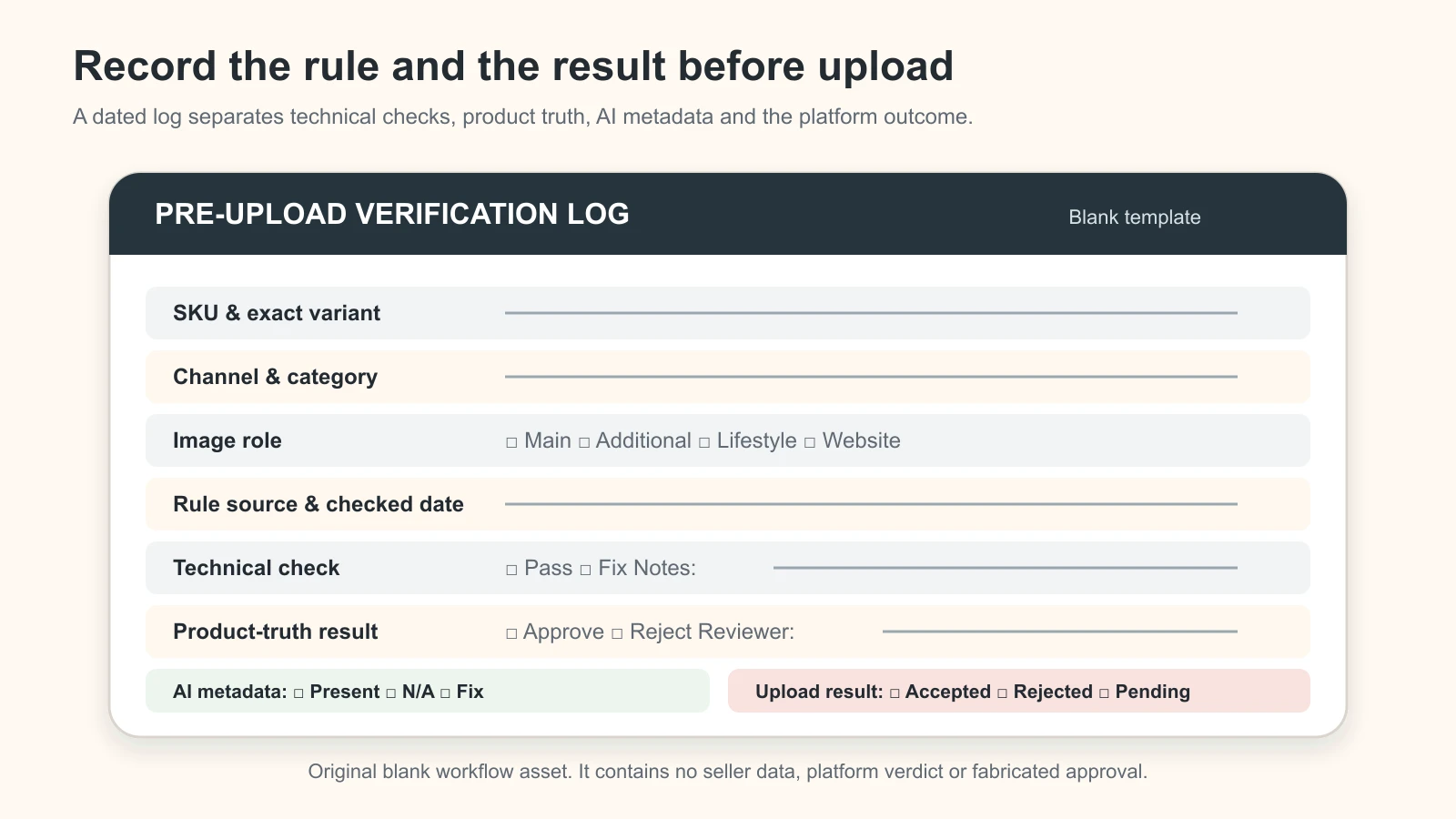
Original blank workflow asset. It contains no seller data, platform verdict or fabricated approval.
Do not write “meets all platform rules” in the result. Write what was actually tested: “Amazon.in, Home Storage product type, MAIN, accepted 11 August 2026” or “Google Merchant Center Diagnostics: no image issue after recrawl.” Approval for one category and slot is not proof for every channel.
Apply the product-truth gate before every upload
Platform acceptance is not the same as a truthful offer. India’s Consumer Protection framework is relevant to online representations and misleading advertisements. Flipkart’s own seller terms also require listing media to describe the actual item. The operational rule is simple: an image must not falsely change or imply what the buyer receives.
| Product-truth field | Reject the image when… | Indian product-business example |
|---|---|---|
| Identity and variant | It shows another design, colour, size, batch, pack or version | A maroon kurta listing uses the wine variant because it photographed better |
| Shape and construction | AI or retouching changes a silhouette, seam, clasp, stone setting, handle, control or component | A jewellery image adds prongs or a garment image changes the neckline |
| Quantity and inclusion | Props or duplicates look included when they are not | A single jar appears as a set of three; a necklace is shown with earrings not in the offer |
| Colour, material and finish | The edit changes buying meaning | Oxidised silver looks mirror-polished; matte laminate appears glossy |
| Label and packaging | Text, marks, statutory label details or pack version are wrong | A generated food pack invents or blurs the printed information |
| Scale and fit | Perspective, model or context makes size or fit materially misleading | A small pendant appears oversized; an apparel model changes actual drape |
| Performance or use | The scene implies an unsupported capability | An image shows water exposure without a verified waterproof claim |
If a feature cannot be verified from the source pack, recapture it or use the real photograph. Do not prompt an AI model to reconstruct a missing clasp, reverse label, garment border or component. The common AI product photography mistakes guide provides a separate troubleshooting checklist; the apparel model-photo checklist and AI jewellery photography guide cover category-specific risks.
The official sources are the Department of Consumer Affairs’ Consumer Protection rules collection, including the Consumer Protection (E-Commerce) Rules, 2020 and amendment, and the CCPA’s Guidelines for Prevention of Misleading Advertisements and Endorsements, 2022. This section is practical editorial guidance, not legal advice. Regulated categories and specific claims may require professional compliance review.
What to do when an image is rejected or does not update
Do not immediately resize or regenerate the whole catalogue. First identify which gate failed.
If the platform reports a technical failure
- copy the exact error, field, SKU and time into the log;
- confirm file extension matches the actual format;
- check pixel dimensions, file size, colour profile and corrupt exports;
- verify the image URL is publicly crawlable for Google;
- compare against the current category guide, not a saved agency checklist; and
- retry one corrected pilot before changing the batch.
If the platform reports a content or policy failure
- inspect borders, promotional text, watermarks, incorrect variant and product crop;
- check bundle, multipack, packaging, model and category-specific exceptions;
- compare the final upload file, not only the master;
- use the account’s diagnostic, Submission Status or QC reason; and
- escalate through the platform’s support path with the file and rule evidence if the result appears wrong.
If the new image is accepted but the old one remains visible
Google recommends a new, unique URL when the image genuinely changes; its current main-image page says a new URL typically prompts a faster recrawl, while replacing the content at the same URL can take much longer. On Amazon, another selling partner’s image may be selected for a shared detail page. On Flipkart, record the listing/QC status and live page separately. On your website, purge the relevant cache or CDN derivative and verify the selected variant on mobile and desktop.
Never disguise a changed file behind an old approval record. Record the new hash or filename, URL, upload time and displayed result.
Frequently asked questions
Can I use the same product image on Google Shopping, Amazon, Flipkart and my website?
You can use the same approved source master, but do not assume the same exported file is suitable for every slot. Make a channel derivative and verify the current destination, category, image role, format, dimensions, background, overlays, metadata and upload result.
What size should I make one master file?
There is no single official cross-platform size. Capture and retain a high-resolution master that preserves real detail, then export per channel. For Google Shopping, the current public page recommends around 1500 × 1500 pixels or above and announces a 500 × 500 minimum for all products beginning 31 January 2027. Amazon and Flipkart category/account checks still apply.
Does Google Shopping allow lifestyle product images?
Yes. Google has a dedicated optional lifestyle_image_link attribute and also allows documented staging in additional images. The main image still needs to identify the actual product accurately and follow its own rules. Use the correct feed attribute rather than treating every scene as a main image.
Do AI-generated Google Shopping images need a label?
Google says generative-AI images must retain IPTC DigitalSourceType metadata indicating their source. Check the final exported and delivered file, because optimisation or format conversion may strip metadata. This does not replace exact-SKU review.
Is an Amazon India main image always white with 85% product fill?
Amazon’s current public India staff guidance describes a pure-white main background and at least 85% frame fill. Amazon also tells sellers to check the signed-in Product Image Requirements and category Product Page Style Guide. Use the live India category rule and any displayed exception as the final authority.
What is the official Flipkart product image size in 2026?
This review did not find one stable public exact specification that can safely be applied to every Flipkart category and vertical. Flipkart exposes an official image-guidelines route, while the operative details and QC are dynamic. Check the current Seller Hub category/vertical guide or listing template and record the result. Do not present an agency target as a universal Flipkart rule.
Can I put text and dimensions on additional images?
It depends on the channel, category and slot. Google permits certain additional-image uses but still restricts irrelevant or promotional text. Amazon’s public guidance describes infographics in additional images, while category guides control the exact use. Flipkart requires a live check. Dimensions must be accurate and supported by the physical product record.
Should alt text include my target keyword on every website image?
No. Write useful alt text that describes that specific image in context. Google warns against keyword stuffing. A front view, material close-up and size diagram should not all have identical alt text.
How often should marketplace image rules be rechecked?
Check before a new category, new marketplace, new listing template or major batch; after a rejection; and on the review date in your channel profile. Google’s dated 2027 transition is a clear reason to recheck before and after 31 January 2027. Always let the live account message override a static checklist.
Turn compliant images into a working online sales system
Correct image exports prevent avoidable rejections, but images alone do not build demand or close enquiries. GPTWala’s DAA workshop connects digital presence, AI-assisted content creation and a practical WhatsApp advertising path for product businesses that want to grow beyond walk-ins.
See the GPTWala workshop and decide whether it fits your product business.
Official sources checked for this guide
- Google Merchant Center: Image link (
image_link) - Google Merchant Center: Additional image link (
additional_image_link) - Google Merchant Center: Lifestyle image link (
lifestyle_image_link) - Google Merchant Center: AI-generated content
- Amazon India Seller Forums, Amazon staff: Sell More! Your Guide to Perfect Amazon.in Product Photos
- Amazon India Seller Forums, Amazon staff: Listings Lounge: Product Image Requirements
- Flipkart Seller: Image Guidelines and Image Uploading
- Flipkart Seller: Terms of Use
- Google Search Central: Image SEO best practices
- Google Search Central: Product structured data
- web.dev: Serve responsive images
- web.dev: Serve images with correct dimensions
- Department of Consumer Affairs: Consumer Protection rules collection
- Central Consumer Protection Authority: Guidelines for Prevention of Misleading Advertisements and Endorsements, 2022
Leave a Reply