Automate repetitive coordination while keeping product truth, exceptions, negotiation, complaints and high-consequence decisions under human control.
Updated 23 August 2026 · Guide for Indian product businesses
WhatsApp product-enquiry automation should help a buyer reach the right answer or human faster. It should not imitate confidence when product facts are missing. Small businesses get value by automating acknowledgement, structured questions, approved FAQs, routing and status updates while reserving exceptions and judgement for staff.
If enquiries start through paid campaigns, align the opening questions and source labels with the click-to-WhatsApp acquisition workflow. Automation should preserve the ad promise and campaign source rather than dropping every paid lead into the same untracked greeting.
Automation principle: repeatable, reversible and observable
Test
Question
If no
Repeatable
Does the same verified input lead to the same safe action?
Keep a human decision
Reversible
Can a person correct the answer or reach staff?
Add correction/handoff
Observable
Can the business see inputs, output, failure and owner?
Add logs and queue
Truthful
Does the answer come from an approved current source?
Block the answer
Permitted
Do consent, policy and law support the message?
Do not send
Map the enquiry journey before choosing a tool
Stage
Buyer question
System job
Human job
Entry
Am I speaking to the right business?
Identify business and scope
Review unusual source/identity issue
Intent
Can you help with this product/use?
Offer clear categories
Interpret ambiguous needs
Qualification
Which option fits?
Collect minimal structured facts
Assess complex fit or trade-off
Proof
What does the product include/do?
Retrieve approved specifications and media
Explain limits and exceptions
Commercial
What price, stock and delivery apply?
Show current approved data
Quote, negotiate or approve exceptions
Decision
How do I order?
Provide verified next step
Resolve payment or trust concern
After-sale
Where is my order or what went wrong?
Give factual status
Handle complaint, refund or safety issue
Good candidates for automation
Business identification, hours and expected response time.
Menu of product categories or enquiry types.
Collection of SKU, quantity, pincode, use case and preferred timing.
Retrieval of approved catalogue pages, dimensions and care instructions.
Order/reference capture before routing support.
Queue assignment and acknowledgement.
Status updates based on a trusted source system.
Simple preference and opt-out handling.
Each answer needs an owner and source. A catalogue link can be automated when the product ID and version are current. A promise about custom fit cannot.
Keep these decisions human
Situation
Why a human is needed
Automation role
Product fit with safety or technical consequence
Requires contextual judgement and responsibility
Collect facts and route
Custom quotation or negotiation
Margin, stock and relationship context change
Prepare structured brief
Complaint, damage or refund dispute
Emotion, evidence and policy exceptions matter
Acknowledge and prioritise
Unclear or conflicting product data
Confident answer could mislead
Say verification is needed
Threat, abuse, fraud or security concern
Needs escalation and controlled handling
Detect/reroute without confrontation
Sensitive personal information
Privacy and access risk
Move to an approved secure process
Build an approved product knowledge source
Do not train an automation on old chats alone. Chats contain informal promises, obsolete prices and personal data. Create a structured source with product ID, name, variants, dimensions, material, included items, exclusions, compatible uses, price logic, stock source, delivery rules, warranty/care, owner and last approval.
Field
Automation permission
Fallback
Verified static specification
Answer with source/version
Human if missing
Live stock
Answer only from reliable inventory
“We will confirm availability”
Price
Use current authorised rules
Route custom quote
Compatibility
Use explicit approved matrix
Collect model/use and route
Performance claim
Only documented qualified wording
Remove or ask product owner
Policy
Quote current published policy
Escalate exception
Design a short qualification flow
Ask only what changes the next action. A wholesale packaging enquiry might need product type, dimensions, weight, quantity, print requirement, pincode and timeline. A retail size question may need only the SKU and use. Progressive questions reduce abandonment and unnecessary data.
Identify the business and state automation is assisting if relevant.
Ask the person to choose the enquiry job.
Collect two or three high-value fields.
Show an approved answer or ask the next necessary question.
Summarise the captured information.
Offer correction and human handoff.
Create the record and notify the owner.
Connect the flow to the CRM pipeline and keep the human-readable summary. Do not bury the buyer in an endless menu.
Set an abandonment rule for partial flows. If a buyer answers one question and stops, do not restart the full menu repeatedly. Preserve the minimal state for an appropriate period, give one clear way to resume, and suppress follow-up when consent or relevance is missing. A human should be able to see where the flow stopped without exposing unnecessary personal data.
Design a human handoff that actually works
Handoff field
Minimum content
Reason
Quote, fit, complaint, payment, unavailable data or requested person
Buyer summary
Need, SKU/category, quantity, location and timing
Conversation summary
What was asked, answered and left unresolved
Risk flag
Complaint, safety, privacy, fraud or urgent delivery
Owner/SLA
Named queue and honest expected response
Return path
How staff respond without restarting the flow
Let the buyer type “human” or an equivalent phrase at sensible points. When staff take over, pause automation that could contradict them. Meta’s 2026 India announcement about Business AI on WhatsApp explicitly describes owner takeover for complex needs; availability and eligibility should be checked in the current app.
Use AI for retrieval and summarisation with guardrails
AI can classify intent, retrieve approved product facts, draft a response or summarise a chat. It must not invent specifications, stock, discounts, testimonials or policy exceptions. Use retrieval from a controlled knowledge source, confidence thresholds and blocked-answer categories.
Safe fallback: “I do not have an approved answer for that yet. I have shared your question and the details above with [team]. Expected response: [honest window].”
Disclose automation where appropriate, preserve an easy human path and review applicable WhatsApp policy, privacy notice and law. Do not feed sensitive chats into unapproved tools.
Plan for outages and degraded mode
Define what happens when the catalogue, CRM, inventory service, model or provider is unavailable. A safe degraded mode can identify the business, acknowledge the message, collect only an order or enquiry reference, state an honest response window and route the case. It should not reuse stale stock, price or delivery data. Monitor queue age and give supervisors a clear switch to manual-only handling.
Test before and after launch
Run valid, invalid, blank and contradictory inputs.
Test every product variant and out-of-stock state.
Test price changes, old catalogue links and expired promotions.
Test opt-out, deletion and consent-state changes.
Test human takeover, queue outage and staff delay.
Test abusive, sensitive and safety-related messages.
Review logs for hallucinated claims and repeated loops.
Maintain a rollback and manual-only mode.
Measure quality, not deflection alone
Metric
Question
Correct-answer rate
Did approved facts answer the question?
Unsafe/wrong-answer rate
Did the system invent or misapply information?
Handoff completion time
Did staff resolve routed cases?
Repeat-contact rate
Was the first answer actually sufficient?
Qualified-enquiry rate
Did automation capture decision-useful facts?
Opt-out/block/complaint rate
Were messages unexpected or frustrating?
Order contribution and return quality
Did the system support viable sales?
Frequently asked questions
What can I automate in WhatsApp product enquiries?
Automate identification, menus, minimal qualification, approved FAQs, catalogue retrieval, routing, acknowledgements and verified status updates.
What WhatsApp enquiries should stay human?
Keep complex fit, safety, custom quotation, negotiation, complaints, refunds, fraud, sensitive data and unclear product information under human control.
Can AI answer product questions on WhatsApp?
Yes when it retrieves approved current facts, uses confidence and blocked-answer rules, and hands off missing or high-consequence questions instead of inventing answers.
How do I hand off a WhatsApp bot conversation to a person?
Send the owner a reason, buyer summary, captured fields, unresolved question, risk flag and expected response time, then pause conflicting automation.
Do I need consent for WhatsApp automation?
Automation does not remove consent, policy or legal duties. Review the message purpose, initiation rules, user expectation, opt-out and applicable Indian requirements.
How should WhatsApp automation quality be measured?
Track correct and unsafe answers, handoff completion, repeat contacts, qualified enquiries, customer feedback, opt-outs and confirmed business outcomes.
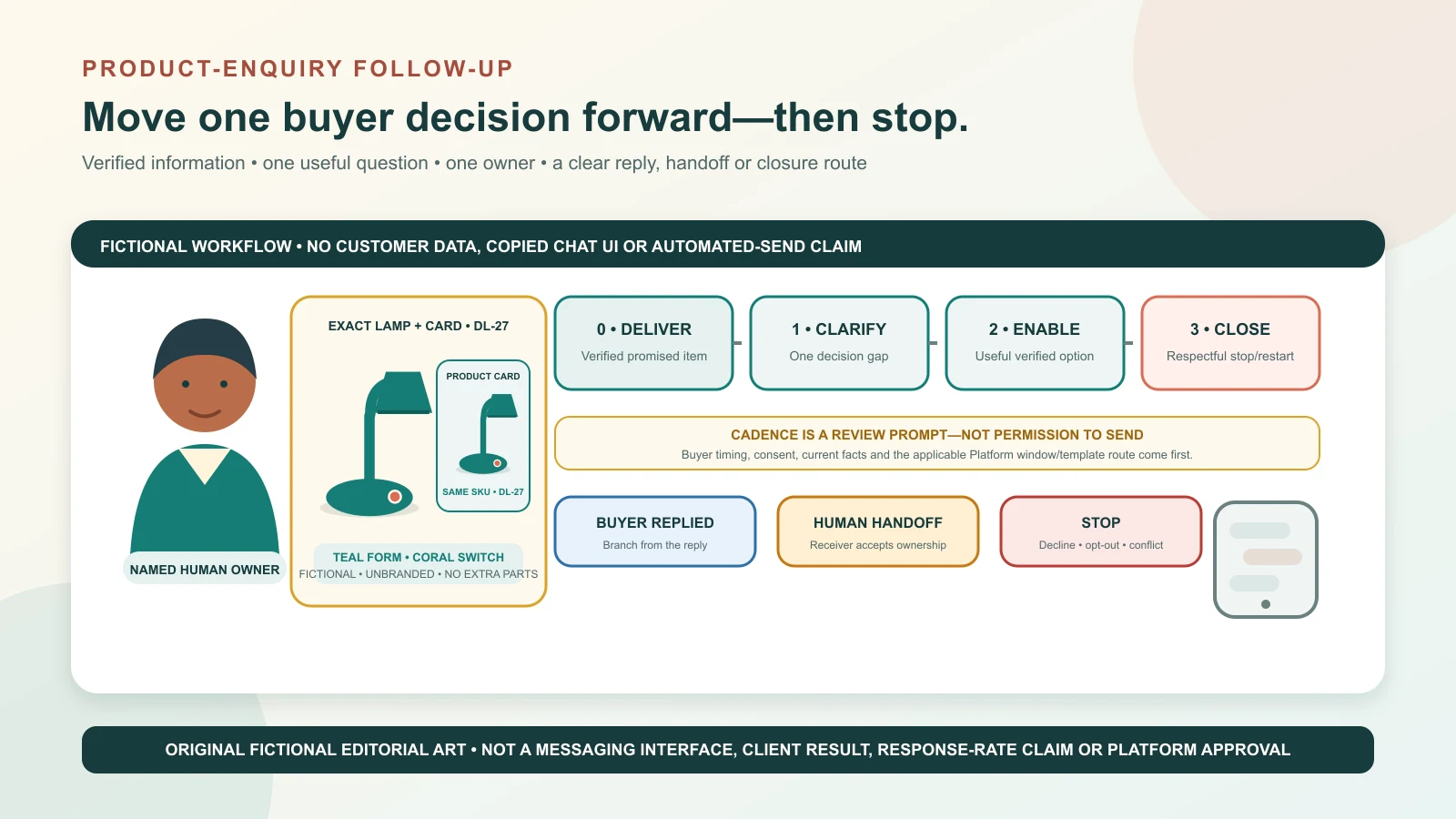
A useful follow-up advances one real buyer decision; it does not repeat “just checking” until the person replies. Original GPTWala editorial illustration using a fictional unbranded lamp and abstract message cards; it is not a messaging-platform interface, client result, response-rate claim or platform approval.
Reviewed and updated: 12 August 2026
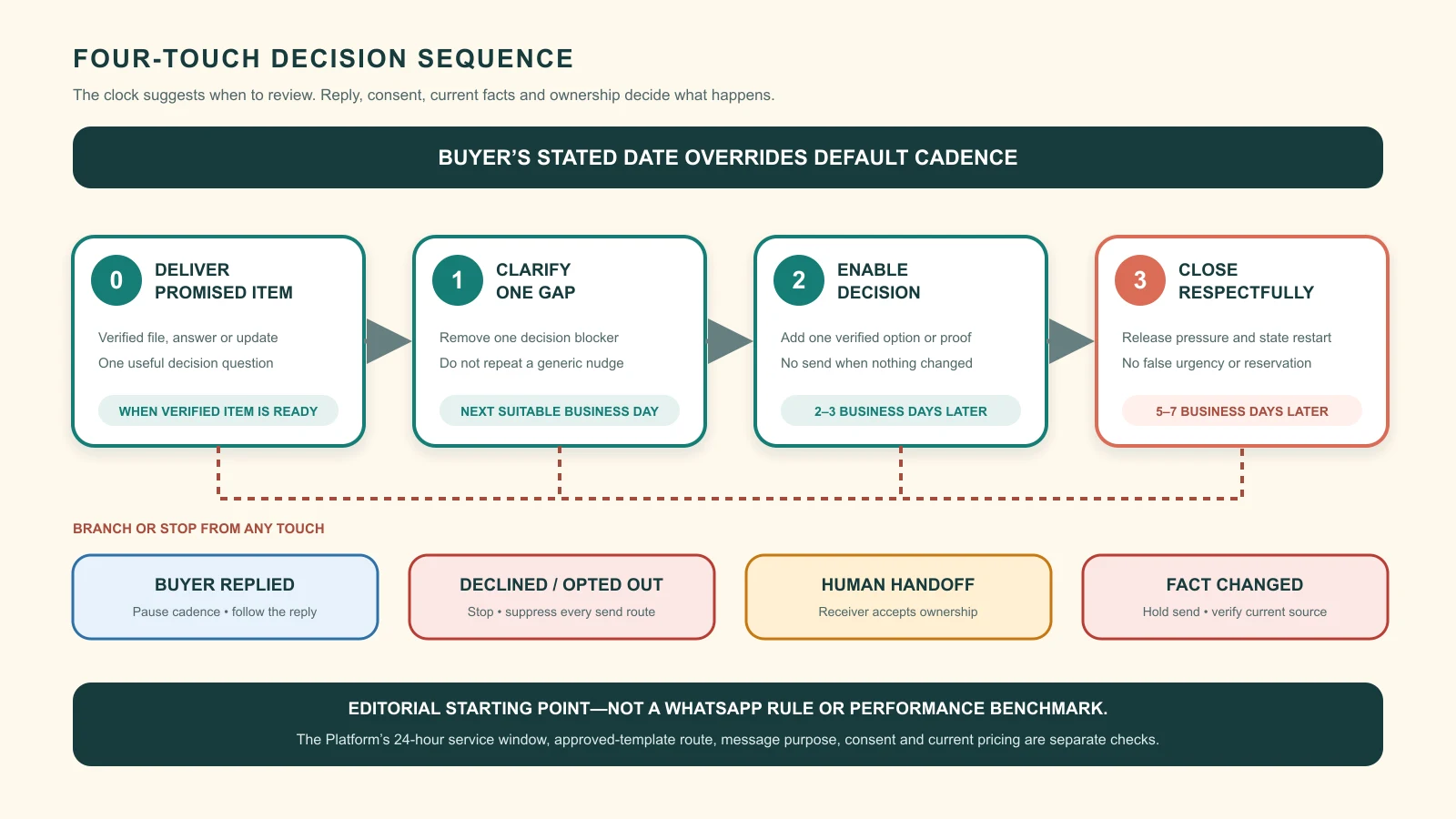
The best WhatsApp follow-up for a product enquiry gives the buyer one verified piece of decision information, asks one easy question and records one next action. It should not simply repeat “Any update?” A practical starting sequence is: send promised information as soon as it is verified, make one relevant nudge on the next suitable business day, send one decision-enabling follow-up two to three business days later, then close the enquiry politely after another five to seven business days if there is still no response. Change that timing when the buyer gave a date, the requirement is urgent, the quote has a genuine expiry or the category needs a different service rhythm.
Those intervals are GPTWala operating recommendations to test, not WhatsApp rules, legal advice or universal conversion benchmarks. On the WhatsApp Business Platform, the current policy has a separate 24-hour customer-service window and approved Message Template requirements. Permission, message purpose, current template/category rules and an opt-out must govern what can actually be sent.
This guide owns the timed product-enquiry sequence, copy templates, branch rules and human handoffs. The complete WhatsApp selling guide owns the wider enquiry-to-order pipeline. The digital product catalogue guide owns catalogue structure, and the WhatsApp Business catalogue guide owns in-app catalogue setup.
A sequence is a controlled set of decisions. Every touch should answer five questions:
Why is this person receiving a message?
What exact product or requirement is in context?
What new verified value does this message add?
What single action can the buyer take next?
When should the business stop, wait or hand off?
If the operator cannot answer those questions, the next message is probably noise.
Follow up on the open decision
Product buyers usually go silent around a specific uncertainty:
the exact variant is not clear;
the price does not include tax, freight or installation;
the buyer needs a smaller quantity or different pack;
a shopkeeper needs margin, case-mix or delivery information;
a manufacturer needs a drawing, sample, specification or compatibility answer;
the buyer is waiting for another decision-maker;
the desired item is out of stock; or
the seller has not made the next action obvious.
Follow up on that uncertainty. “Would a front-and-back view of SKU J42 help you confirm the clasp?” is more useful than “Did you see my message?”
A message is not a stage change
Do not mark an enquiry “qualified”, “quoted”, “confirmed” or “won” merely because a template was sent. Change the stage only when the required evidence exists. A buyer opening a message is not a product decision; a payment screenshot is not bank settlement; and “looks good” is not a complete order confirmation.
Stop sequences when reality changes
Pause automation and route to a person when:
the customer replies, even if the reply does not match an expected keyword;
the product, price, stock, quote or delivery fact has changed;
the buyer asks a technical, safety, legal, warranty or regulated-category question;
the chat becomes a complaint, refund, payment or fraud issue;
the buyer asks to stop, says they are not interested or chooses another supplier;
two team members appear to be handling the same enquiry; or
the business cannot verify the next message from its source records.
Separate service follow-up from marketing
“Follow-up” is an operating label, not a WhatsApp message category. The purpose and content matter.
Service or task-continuation follow-up
This continues something the buyer requested or a transaction already in progress, for example:
sending the specification the buyer asked for;
asking for one missing field needed to prepare a quote;
confirming an agreed sample, pickup or dispatch update;
answering an open product question; or
routing the buyer to a product specialist.
Keep it limited to the stated task. Do not attach an unrelated festival offer to an order update.
Promotional or re-engagement follow-up
An offer, product recommendation, cross-sell, abandoned-cart reminder or attempt to revive a dormant prospect can be marketing. WhatsApp’s official marketing-message page includes offers, product suggestions, cart reminders and re-engagement among marketing uses. The current WhatsApp Business Messaging Policy requires a business to have the person’s number and opt-in permission for subsequent messages or calls, and to honour opt-outs. Its best-practice section recommends setting expectations by message category.
Therefore, do not treat an old enquiry, an invoice, an exhibition visitor list, a business card, a group membership or a saved phone number as permanent permission to promote.
The Platform’s 24-hour control is different from this cadence
For the WhatsApp Business Platform, current policy says a business may reply without a Message Template within 24 hours of the user’s last message. Outside that customer-service window, only approved Message Templates may be sent. Business-initiated conversations must use approved templates, and automation during the service window must offer a clear path to human escalation.
The 24-hour window does not mean “send a reminder every 24 hours”. Nor does this article’s next-business-day suggestion override Platform policy. Before implementation, verify:
whether the business uses the Business app or Business Platform;
whether the service window is open;
the purpose and current category of the proposed message;
whether an approved template is required and available;
whether consent covers the message; and
current pricing and account/country eligibility.
The official Platform pricing page currently describes marketing, utility, authentication and service categories, with charges and conditions that vary by market and category. Do not hard-code an old price or assume a message will be free.
Build a verified follow-up card
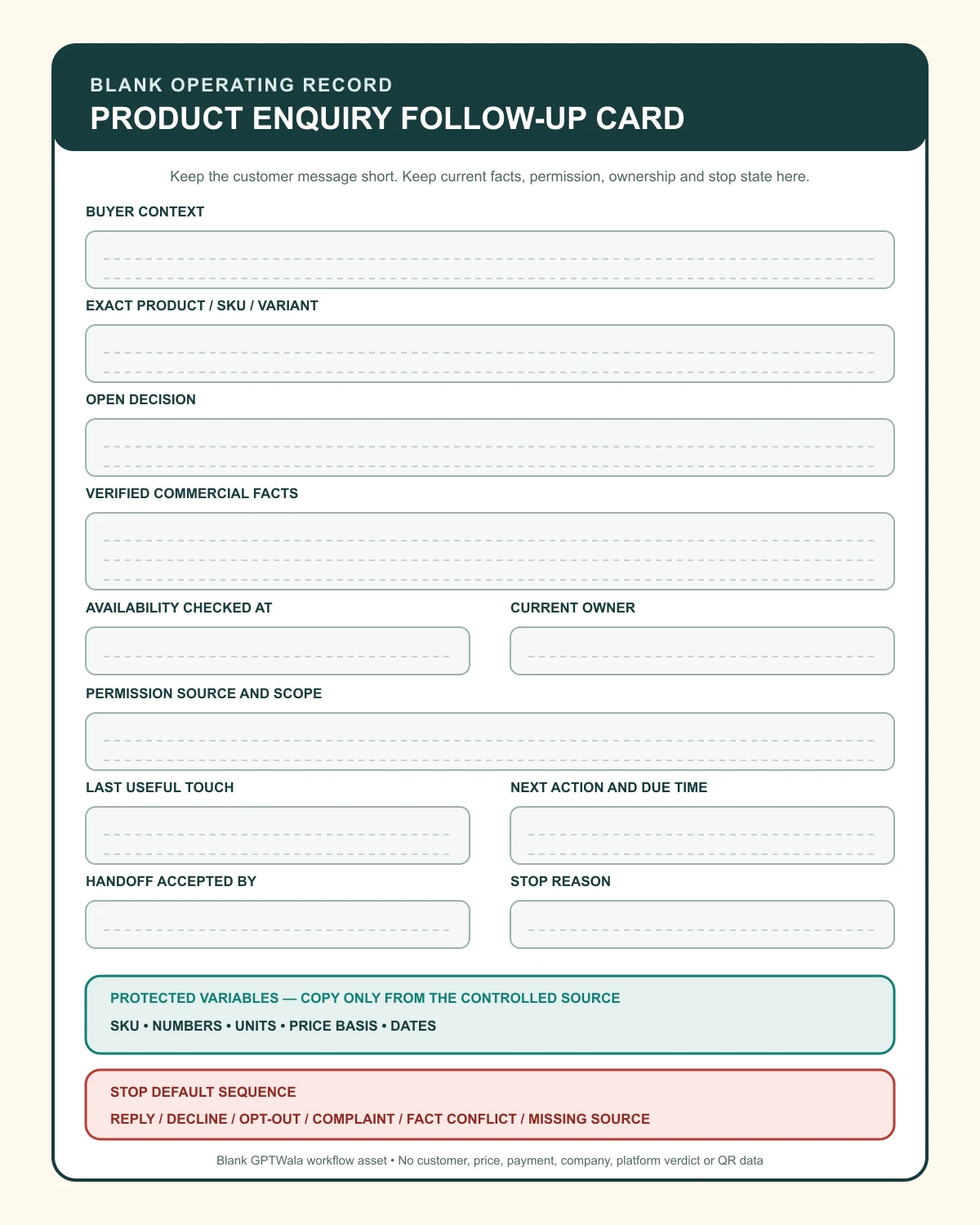
Templates are safe only when their variables are safe. Create one follow-up card for every active enquiry.
Field
What to record
Truth source
Buyer context
buyer type, stated use and location if relevant
Buyer’s own message
Exact product
approved name, SKU, variant, size, finish, pack
Product master/catalogue
Open decision
the one answer or action still needed
Conversation plus stage record
Commercial facts
price, tax, freight, MOQ, quote validity
Current price/quote master
Availability
stock or production status and when checked
Inventory/production owner
Promised item
image, drawing, quote, sample update or call
Named internal owner
Permission
source, scope and opt-out state
Consent/customer record
Sequence state
last useful touch, next action and due time
Inbox/CRM/controlled log
Owner
one named person or queue
Team roster
Stop reason
replied, declined, opted out, duplicate, invalid or closed
Recorded event
Lock the buying-critical variables
Use placeholders such as:
[BUYER_NAME]
[BUSINESS_NAME]
[PRODUCT_NAME]
[SKU]
[VARIANT_SIZE_FINISH]
[PACK_OR_MOQ]
[PRICE_AND_TAX_BASIS]
[FREIGHT_OR_DELIVERY_BASIS]
[STOCK_STATUS_AS_OF_TIME]
[QUOTE_ID_AND_VERSION]
[VALID_UNTIL]
[ONE_NEXT_ACTION]
[HUMAN_CONTACT_OR_ROUTE]
Do not allow AI or a bulk tool to fill these from a similar product. Pull them from the approved record, or leave the message unsent.
Use a five-part message anatomy
A useful product follow-up can usually be built from:
Identity: who is writing.
Context: the exact enquiry, SKU or quote.
Verified value: one new fact, view, option or resolved question.
One question: the smallest decision the buyer can make now.
Exit or handoff: how to pause, decline or reach a person.
Example anatomy:
Hello [BUYER_NAME], this is [OWNER] from [BUSINESS_NAME]. You asked about [SKU / EXACT PRODUCT]. I have now verified [ONE FACT] as of [TIME]. Would you like [OPTION A] or [OPTION B]? If this requirement is on hold, tell me and I will close the enquiry for now.
This is a structure, not a claim that a certain wording increases replies.
Use the four-touch baseline
Start with this sequence, then adjust it using your own response, qualification and closure data.
Touch
Suggested trigger and timing
Job
Do not send when
0. Deliver
As soon as the promised verified item is ready, within stated business hours
Fulfil the promise and ask one decision question
The item is unverified or another owner is already replying
1. Clarify
Next suitable business day after no response
Remove one likely decision gap
Buyer gave a later decision date or asked not to be contacted
2. Enable
Two to three business days later
Add a real comparison, term, proof view or alternate route
Nothing new can be added
3. Close
Five to seven business days later
Release pressure, keep the record clean and state how to restart
There is an active order, service issue or promised internal action
These are not mandatory gaps. Use the buyer’s stated date instead of your default. A dealer who says “call Friday after my partner returns” should not receive Tuesday and Wednesday nudges. A buyer asking for same-day stock should receive a verified answer as soon as it exists, not wait for a cadence.
Event-driven messages outrank timed nudges
Send a verified event update when:
the requested quote is ready;
the correct product image or drawing is approved;
production confirms feasibility;
stock changes materially;
a sample is dispatched; or
the buyer’s requested follow-up date arrives.
Do not send both the event update and the scheduled nudge. Cancel or reset the scheduled step.
Set a response promise you can keep
If the answer needs work, acknowledge the enquiry and state a realistic next update:
Thanks for the enquiry about [SKU]. [OWNER] from [BUSINESS_NAME] is checking [STOCK / SPECIFICATION / FREIGHT]. We will update you by [DATE AND TIME]. If your requirement is urgent, reply with the needed quantity and delivery location.
Do not promise “in 10 minutes” merely to sound responsive. The response promise should match staff coverage and source availability.
The clock suggests when to review an enquiry; the buyer’s reply, consent state and verified facts decide what happens next. The intervals are editorial starting points, not messaging-platform rules, approved templates or performance benchmarks.
Copy the enquiry and qualification templates
Replace every bracket with verified information. Remove unused clauses. Never send visible placeholder text.
Template 1: acknowledgement when the answer needs checking
Hello [BUYER_NAME], this is [OWNER] from [BUSINESS_NAME]. I received your enquiry for [PRODUCT / SKU]. I’m verifying [SPECIFIC FACT] and will update you by [DATE / TIME]. To check the right option, is this for [PERSONAL USE / RETAIL RESALE / WHOLESALE / MANUFACTURING APPLICATION]?
Use when a useful answer cannot be given immediately. The deadline must be owned.
Template 2: one missing qualification field
I can prepare the right option for [PRODUCT]. Please confirm one detail: do you need [QUANTITY / SIZE / MODEL / DELIVERY PINCODE / APPLICATION]? I will use that only to check the suitable product and terms.
Ask one question, not a form disguised as a message.
Template 3: vague “price?” enquiry
The price depends on [VERIFIED VARIABLE, such as pack size or finish]. For the exact quote, should I check [OPTION A] or [OPTION B]? I will include [TAX / FREIGHT BASIS] clearly.
Do not send a misleading “starting from” figure if the buyer’s likely configuration cannot receive it.
Template 4: first no-response clarification
Hello [BUYER_NAME], following up on [PRODUCT / SKU]. To avoid sending an irrelevant list, I only need [ONE FIELD]. You can reply with [SHORT RESPONSE OPTIONS], or say “not now” and I will pause the enquiry.
Template 5: move from voice note to exact requirement
I noted [QUANTITY] and [PRODUCT FAMILY] from your voice message. Before I quote, please confirm: does [QUANTITY] mean [PIECES / SETS / CASES], and is the required variant [VARIANT]? I will send the written summary for your check.
Never infer units, colours or models from unclear audio.
Follow up after a recommendation or catalogue share
A catalogue link is not the follow-up. Help the buyer compare a small, relevant set.
Template 6: exact recommendation plus trade-off
Based on [BUYER’S STATED NEED], the current match is [PRODUCT / SKU / VARIANT]. Compared with [ALTERNATIVE], the main trade-off is [VERIFIED DIFFERENCE]. Would you like the [DETAIL VIEW / SPECIFICATION / PACK AND PRICE] for this exact SKU?
Template 7: after sharing product images
The images I sent are for [EXACT SKU / VARIANT]. The [PROP / MODEL / ROOM SETTING] is context and is not included. Would a close-up of [BUYING-CRITICAL DETAIL] help you decide?
If an image is AI-assisted, it must still preserve the exact item. Use the product-accuracy checklist before a visual supports a purchase decision.
Template 8: two-option comparison
You shortlisted [SKU A] and [SKU B]. The verified differences are: [DIMENSION 1] and [DIMENSION 2]. [SKU A] suits [SUPPORTED USE]; [SKU B] suits [SUPPORTED USE]. Which difference matters more for your order?
Do not claim one is “best” unless the recommendation follows the buyer’s criteria and approved evidence.
Template 9: catalogue-share follow-up
I shared the [COLLECTION / CATEGORY] catalogue for your [USE / STORE TYPE]. To narrow it down, send me up to three product codes and your approximate quantity. I will check the current variant, pack, stock and quote basis for those exact items.
The digital product catalogue guide explains what buyer information belongs in the catalogue; this message only moves the conversation forward.
Follow up after a quote
Do not ask “Did you check the quotation?” without making the decision easier.
Template 10: quote receipt and one decision
Hello [BUYER_NAME], I sent quote [QUOTE ID / VERSION] for [EXACT PRODUCT AND QUANTITY] on [DATE]. It includes [TAX / FREIGHT / DELIVERY BASIS]. Is the open question the product, quantity, timing or commercial terms? Reply with one and I will route it correctly.
Template 11: buyer is comparing suppliers
Understood. When comparing, please check that both quotes cover the same [SKU / MATERIAL / SIZE / PACK / TAX / FREIGHT / WARRANTY SCOPE]. If you want, send the comparison fields without the other supplier’s confidential document and I will clarify our quote.
Do not invent a competitor weakness or pressure the buyer to disclose confidential pricing.
Template 12: genuine quote validity
Quote [ID / VERSION] is valid until [DATE] because [VERIFIED REASON, if useful]. Current availability is [STATUS AS OF TIME], not a reservation. Would you like us to recheck availability, revise the quantity or close this version?
Never add a fake midnight deadline, “last piece” line or countdown. The ASCI Code requires factual claims to be substantiated and says advertising should not mislead through implication, omission, ambiguity or exaggeration. A promotional WhatsApp message should follow the same truth discipline.
Template 13: revised quote
I have prepared quote [NEW ID / VERSION] with the agreed change from [OLD FACT] to [NEW FACT]. Please ignore version [OLD VERSION]. Before we proceed, confirm [SKU / VARIANT / QUANTITY / TOTAL / DELIVERY BASIS] in the new written summary.
Never allow two live versions to compete inside a long chat.
Template 14: decision delayed to a stated date
Thanks, I have noted that you will review this on [BUYER’S DATE]. I will pause messages until then. If price, stock or lead time changes before that date, should I update you only if it affects quote [ID]?
Record the answer; do not assume permission.
Handle stock, MOQ, sample and custom requirements
Template 15: stock is unverified
I do not want to confirm availability from an old message. I am checking [SKU / VARIANT / QUANTITY] with [INVENTORY OWNER] and will update you by [TIME]. Please do not treat it as reserved until we confirm in writing.
Template 16: product is out of stock
[SKU / VARIANT] is currently [OUT OF STOCK / UNAVAILABLE] as verified at [TIME]. I can check [EXACT ALTERNATIVE] or notify you if you have opted in for a restock update. The alternative differs in [VERIFIED DIFFERENCE]. Which route do you prefer?
Do not silently substitute a similar colour, size, material or model.
Template 17: wholesale MOQ or case multiple
For [SKU], the current wholesale term is [MOQ / CASE MULTIPLE], with [PACK MIX RULE] and [PRICE BASIS]. You asked for [BUYER QUANTITY]. Would you like the nearest valid pack, a different SKU with a lower minimum, or no further follow-up?
Template 18: sample request
For the [SKU / MATERIAL] sample, the verified process is [CHARGE / CREDIT / COURIER / LEAD TIME]. A sample confirms only [DEFINED PURPOSE]; final production follows [APPROVED SPECIFICATION / TOLERANCE]. Shall I prepare the sample request with your company and delivery details?
Do not claim that one sample guarantees the appearance or performance of every production unit.
Template 19: custom or technical requirement
Your requirement for [CUSTOM DIMENSION / APPLICATION] needs review by [PRODUCT / ENGINEERING OWNER]. I have recorded [KNOWN FACTS]. The open point is [ONE TECHNICAL QUESTION]. May I hand this to [ROLE], who will respond by [TIME]?
Do not let a salesperson or AI infer compatibility, load, safety, certification or manufacturing feasibility.
Template 20: location or freight is missing
The product price is verified, but the delivered total is not complete without [PINCODE / DESTINATION / UNLOADING CONDITION]. Please share [MINIMUM NECESSARY LOCATION FIELD], or I can quote ex-[WORKS / STORE] without claiming a delivered total.
Collect only what is needed at the current stage. The WhatsApp Business policy says businesses are responsible for necessary notices, permissions and lawful data handling, and prohibits requesting full payment-card, financial-account and other sensitive identifiers.
Branch when the buyer replies
The first reply should cancel every pending automated follow-up. Then route by intent.
Buyer response
Next action
Safe reply structure
“Yes / proceed”
Build and verify an order summary
Confirm exact SKU, variant, quantity, total, delivery and terms; ask for explicit confirmation
“Send details”
Identify which detail changes the decision
Offer specification, exact view, terms or human call—not a 20-file dump
“Too expensive”
Diagnose comparison basis
Ask whether the gap is budget, quantity, pack, delivered total or specification
“Need later”
Ask for a buyer-chosen date and permission
Pause until that date; do not continue the default cadence
“No”
Record reason if volunteered and close
Thank the buyer; do not argue or trigger a discount automatically
“Stop / remove me”
Suppress further sends
Confirm the opt-out action without adding a promotion
Complaint or payment issue
Exit sales sequence
Route to support/finance with one owner and verified record
Unclear reply or language issue
Ask one clarification or use a human
Do not force it through keyword automation
Price objection template
Thanks for saying that. To compare fairly, is the issue the total budget, minimum quantity, delivered cost or required specification? I can check one approved alternative; I will not change the specification or terms without showing the difference.
“Not now” template
Understood. I will pause this enquiry. If you want a follow-up, choose a date or month; otherwise you can message us again with [SKU / QUOTE ID]. This does not add you to promotional updates.
Opt-out confirmation
Understood. We have recorded your request not to receive further [CATEGORY] messages from [BUSINESS_NAME]. You may contact us if you need service for an existing order.
The exact suppression action must occur in every sending list or system, not only as a label in the chat.
Use customer-facing and internal handoffs
A handoff is complete only when the receiver accepts ownership and the customer knows what will happen next.
Customer-facing product-specialist handoff
Your question about [TECHNICAL POINT] needs [ROLE]. I have shared only the relevant enquiry details with [NAME / TEAM]. [THEY / WE] will respond by [TIME] in this chat / through [APPROVED ROUTE]. I remain the owner until they accept the handoff.
Customer-facing shift handoff
I am handing your enquiry for [SKU / QUOTE ID] to [NEW OWNER] because [REASON]. They have the confirmed details: [ONE-LINE SUMMARY]. The next update is due by [TIME]; you do not need to repeat the full enquiry.
Internal five-line handoff
Buyer and requested outcome
Exact product, SKU, quantity and quote/order version
Verified facts and their sources
Open question, risk or consent limitation
New owner, required action and due time
Finance handoff
Internal: Buyer says payment was made for order [ID]. Do not mark paid from the chat or screenshot. Finance owner [NAME / QUEUE] must verify [AMOUNT / REFERENCE] in the authorised bank, gateway or merchant record and return status [VERIFIED / PENDING / MISMATCH] by [TIME].
Never ask a buyer for a UPI PIN, OTP, full card number, password or account credential. Payment and refund status must come from the authorised financial record.
Fulfilment handoff
Internal: Confirmed order [ID / VERSION] for [SKU / VARIANT / QUANTITY]. Buyer-confirmed delivery/pickup basis: [TERM]. Payment/credit status from finance: [VERIFIED STATUS]. Operations owner: [NAME]. Next verified update due: [TIME]. Exceptions: [NONE / LIST].
The message stays short because the operational record carries the facts, owner, permission state and next action. This blank asset contains no customer, company, price, payment, result or platform-verdict data.
Close silent enquiries respectfully
Closure is part of good follow-up. It prevents an inbox full of false “active leads” and stops repeated unwanted contact.
Template 21: final close-the-loop message
Hello [BUYER_NAME], I have not heard back about [PRODUCT / QUOTE ID], so I will close this enquiry for now and stop the follow-up sequence. If you want to restart, reply with [SKU / QUOTE ID]; we will recheck price, stock and terms then. No product or quantity has been reserved.
Template 22: close when the promised information is no longer current
The [PRICE / STOCK / LEAD TIME] shared on [DATE] is no longer safe to rely on without a fresh check. I am closing this version rather than leaving an old offer open. Message us with [SKU] if you want a current quote.
Do not manufacture urgency before closure
Avoid:
“Final chance” when the offer remains available;
“You will lose this price tonight” without an approved, genuine expiry;
“Only one left” without current inventory evidence;
“Your competitors are buying” without authorised evidence and relevance;
repeated punctuation, guilt or fear; and
a surprise discount immediately after every silence.
WhatsApp’s Messaging Guidelines prohibit spam and repeated unwanted contact. Its business policy also tells businesses not to confuse, deceive, mislead, spam or surprise people. A short, truthful closure is safer than an endless sequence.
Record a useful close reason
no response after the allowed sequence;
no product match;
price, MOQ, pack or freight mismatch;
timing or service-area mismatch;
buyer chose another option;
duplicate or invalid enquiry;
buyer deferred to a known date;
opt-out; or
complaint/support route opened.
Do not invent a reason when the buyer did not provide one. Use “no response after sequence”, not “price too high”.
Adapt templates for Indian product businesses
The following are fictional workflow examples, not client results or claims about an industry’s typical conversion rate.
Surat apparel wholesaler
A retailer asks for “24 blue sets”. The follow-up must resolve whether 24 means pieces or sets, the size ratio, fabric/collection code, case multiple, tax/freight basis and delivery city. It should not send a model image from a similar garment as proof of fit or colour. If AI-assisted apparel imagery is used, apply the garment-truth checklist and keep the exact SKU beside the order decision.
Useful next question:
For collection [CODE], should the 24-unit requirement use [APPROVED SIZE RATIO A] or [RATIO B]? I will then verify the blue variant, case and delivered quote basis.
Jaipur jewellery retailer
The buyer wants the piece shown in a styled image. The operator should send exact front, back, clasp, setting and scale views for the actual SKU, then clarify material, finish, size, inclusions and documented hallmark/certification facts where applicable. Do not imply stone identity, purity, weight or certification from appearance.
Rajkot component manufacturer
A purchasing team asks whether a component fits an application. The sales sequence pauses for engineering or product-owner review. The handoff carries drawing/version, material, dimension, quantity, application and open technical question. A catalogue similarity is not a compatibility approval.
Morbi tile manufacturer
The buyer has a room render and wants an export quote. The follow-up should identify exact tile code, nominal size, finish, batch/variation disclosure, pack, quantity, destination, incoterm/freight assumption and required documents. A room visual is context, not proof of shade, slip performance, installation result or batch uniformity.
Local appliance retailer
The buyer asks whether a model can be delivered and installed. Verify the exact model, stock, pincode/service area, included accessories, installation responsibility, warranty terms and delivery basis. Do not turn “delivery available” into a same-day promise without operations acceptance.
Use regional languages without changing commercial facts
Translate the conversational layer, but lock:
SKU and model code;
numbers, units and pack multiples;
material and specification terms;
price, tax and freight basis;
date and time;
warranty/return language; and
the opt-out meaning.
Ask a fluent reviewer to check high-stakes or ambiguous translations. Do not transliterate a technical term if it changes what the buyer may understand.
Use AI without inventing commercial facts
AI can help draft and organise; it cannot become the source of truth.
Safe assistance
suggest a shorter version of an approved message;
identify the one unanswered buyer question;
classify a proposed follow-up for human review;
translate approved copy while locking protected variables;
summarise a chat into the five-line handoff;
flag missing fields, repeated messages or an approaching due time; and
propose two question phrasings for the human owner.
Human approval required
stock, price, discount, quote validity and delivery commitment;
product fit, performance, compatibility, certification or safety;
custom feasibility, technical tolerances and regulated claims;
payment, refund, dispatch and return status;
consent scope, opt-out exceptions and message-category decisions;
complaint, warranty, legal or vulnerable-customer messages; and
any text built without an approved product/policy source.
Prompt pattern for an internal draft
Draft one concise follow-up using only the approved fields below. Preserve SKU, numbers, units, price basis, dates and policy wording exactly. Add no scarcity, guarantee, compatibility, stock, delivery, payment or performance claim. Ask one question. If any required fact is missing or contradictory, output HUMAN CHECK — [missing field] instead of a customer message. Approved fields: [CONTROLLED DATA].
Never paste customer addresses, IDs, private dealer pricing, invoices, payment details or confidential drawings into an external AI service unless the provider terms, business policy, permissions and applicable law allow that use.
Set up the workflow in the Business app or Platform
Small team using the Business app
WhatsApp’s current Business app feature page lists greeting and away messages, quick replies and labels among its tools. It also notes that some newer broadcast capabilities are limited to eligible users in selected countries. Check the actual account rather than assuming a feature is available.
A simple operating setup is:
Create labels for new, qualification, match pending, quote sent, buyer decision, handoff, closed and opted out.
Save message structures, not stale prices or stock statements, as quick replies.
Keep the follow-up card in a controlled sheet/CRM/order system appropriate to the business.
Assign one owner and next-action time to every active enquiry.
Review due follow-ups at opening and before closing each business day.
Cancel pending steps immediately on reply, handoff, decline or opt-out.
Audit a small sample weekly for product truth, duplicate sends and closure quality.
Team using the Business Platform
Add Platform-specific controls:
store the last user-message time;
distinguish the open service window from business-initiated sending;
map each proposed template to its current approved purpose/category;
maintain consent evidence and suppression centrally;
expose a clear human escalation route;
prevent overlapping campaigns and service sequences;
record template version and variables actually sent;
monitor delivery and quality signals without treating delivery as a sale; and
recheck official policies, pricing and templates before rollout.
Do not use unofficial automation, scraping or harmful bulk messaging. The current WhatsApp Messaging Guidelines explicitly prohibit scraping and bulk/auto-messaging or automation used to harm WhatsApp or users.
Pre-send checklist
Is the buyer and enquiry correctly identified?
Is the message expected and permitted for this purpose?
Is the Platform service window open, or is the correct approved template route being used?
Is every product, price, stock, quote and date field current?
Does the message add one useful fact or action?
Is there only one question?
Is another owner or automation already contacting the buyer?
Is the stop/opt-out state clear?
Is there a human route for exceptions?
If any answer is no or unknown, hold the send.
Measure the sequence without fake benchmarks
Do not claim a universal WhatsApp open rate, reply rate, conversion rate or ideal number of touches. Define and compare your own stages.
Metric
Definition
What it diagnoses
Due follow-up completion
due follow-ups completed or correctly paused ÷ due follow-ups
quotes needing correction/clarification ÷ quotes followed up
Quote clarity and product-data gaps
Handoff acceptance on time
accepted handoffs by due time ÷ handoffs due
Team continuity
Opt-out suppression completeness
opt-outs suppressed across all send systems ÷ opt-out requests
Consent control
Truth-defect rate
reviewed sends with wrong SKU/price/stock/term/claim ÷ sends reviewed
Commercial risk
Closed-with-reason rate
closed enquiries with evidenced or honest reason ÷ closed enquiries
Pipeline hygiene
Segment results by source, product group, buyer type, owner and sequence version. A click-to-WhatsApp ad, a store visit, an exhibition relationship and an existing dealer enquiry are not equivalent. The ₹100/day click-to-WhatsApp guide owns the small-budget acquisition workflow; this page starts after the enquiry exists.
Run a controlled improvement loop
Choose one enquiry type, such as retail product-price enquiries.
Use one approved sequence version for a defined period or sufficient operational sample.
Record stage outcomes and truth defects—not just replies.
Review silent conversations to identify missing decision information.
Change one element: timing, question, proof item or handoff rule.
Keep consent, product truth and closure controls unchanged.
Document the new version and compare like with like.
Do not declare a winning script from a few conversations or a seasonally distorted week.
Turn follow-up into a wider online growth system
Better follow-up prevents avoidable leakage after an enquiry, but it does not create a complete online growth system. The business still needs a trustworthy digital presence, accurate product content and a controlled way to create demand.
If your manufacturer, wholesale, retail or product brand still depends mainly on walk-ins, dealer calls, exhibitions or forwarded catalogues, GPTWala’s DAA workshop explains the path: Digital Presence → AI Content Creation → ₹100/day WhatsApp ads. It connects discovery, content and conversation into a practical operating model. It does not guarantee leads, sales, reply rates or return on ad spend.
Frequently asked questions
How many times should I follow up on a WhatsApp product enquiry?
There is no universal number. A useful starting point is the promised-information touch, one clarification, one decision-enabling follow-up and one respectful closure. Stop sooner when the person declines, opts out, gives a later date or the enquiry moves to support/order handling. Test your own sequence by buyer type and stage.
How long should I wait before the first WhatsApp follow-up?
Send promised information as soon as it is verified. If the buyer does not respond, the next suitable business day is a reasonable operating baseline for many ordinary enquiries. Use the buyer’s stated timing, urgency and business hours instead of following the clock blindly. This suggestion is not a WhatsApp rule.
What should I write instead of “just checking”?
Reference the exact product or quote, add one verified fact or useful option, and ask one small question. For example: “For quote Q14, would clarifying the case quantity or delivered total help you decide?”
Can I follow up after 24 hours on WhatsApp?
It depends on the product route and permission. On the Business Platform, current policy says free-form replies are allowed within 24 hours of the user’s last message; outside that window, approved Message Templates are required. Business-initiated messages also use approved templates. Verify current category, consent, template and pricing rules before sending. Do not interpret this as permission to send an unwanted message.
Is a product-enquiry follow-up a service or marketing message?
The label “follow-up” does not decide the category. A response that fulfils the buyer’s open request differs from an offer, recommendation or attempt to re-engage a dormant prospect. Review the message’s actual purpose against current WhatsApp guidance; do not automatically label every quote reminder as utility or service.
Can I copy these messages directly into WhatsApp?
Use them as editable structures. Replace every bracket with verified facts, remove irrelevant text, check permission and current Platform rules, and have a human approve high-risk messages. Never send an unresolved placeholder.
Should I offer a discount when a buyer does not reply?
Not automatically. Silence may mean missing information, internal approval, wrong timing or no interest. Diagnose the open decision. Use only an authorised, truthful discount with clear terms; do not manufacture scarcity or train every buyer to wait for a lower price.
How do I follow up with a wholesale or manufacturing buyer?
Reference the exact requirement, quote/drawing version, quantity, MOQ/pack, commercial basis and one open decision. Give the buyer’s internal review time. Route technical fit, custom feasibility, credit, export and production commitments to the authorised owner.
What should happen when a customer says “not now”?
Pause the default sequence. Ask whether they want a follow-up on a date they choose; if not, close the enquiry and let them restart. “Not now” is not permission for indefinite promotional messages.
Can AI automate the entire follow-up sequence?
AI can draft, classify, summarise and flag missing fields, but a controlled source must provide product, price, stock, quote, consent, payment and fulfilment facts. Human review is required for exceptions and high-risk claims. Automation must stop on reply, decline, opt-out, complaint, conflict or missing source.
How do I know whether the sequence is working?
Measure stage progress, useful information, truth defects, duplicate sends, accepted handoffs, opt-out action and qualified commercial outcomes by source and product. A delivered message or reply alone does not prove a sale or profitable acquisition.
WhatsApp selling works when every conversation has an owner, an exact product and one verified next step.
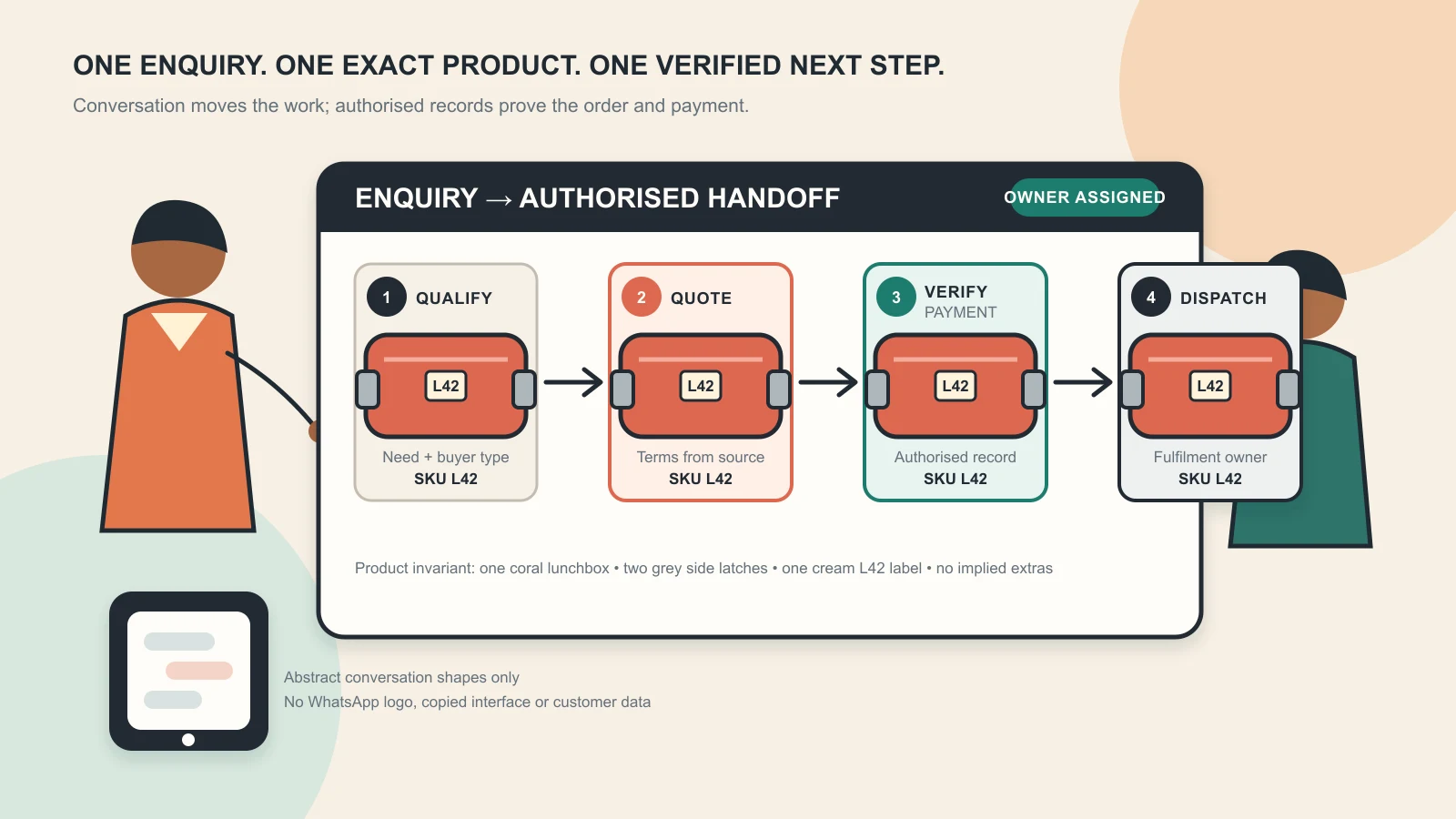
Visual disclosure: Original GPTWala editorial illustration created with AI using one fictional, unbranded coral lunchbox (SKU L42) and abstract conversation shapes. It is not a WhatsApp interface, client result or sales claim; the lunchbox geometry, two grey side latches, cream label, colour and included pieces remain identical at every stage.
Reviewed and updated: 12 August 2026
WhatsApp selling is a controlled enquiry-to-sale process, not simply replying fast or sending a catalogue. A product business should identify the buyer’s need, match an exact SKU, confirm stock and terms, send a written quote/order summary, receive explicit confirmation, verify payment or approved credit in its own system, hand the order to fulfilment and keep one owner until delivery or closure. Automation can assist; it must not invent a product, price, promise or payment status.
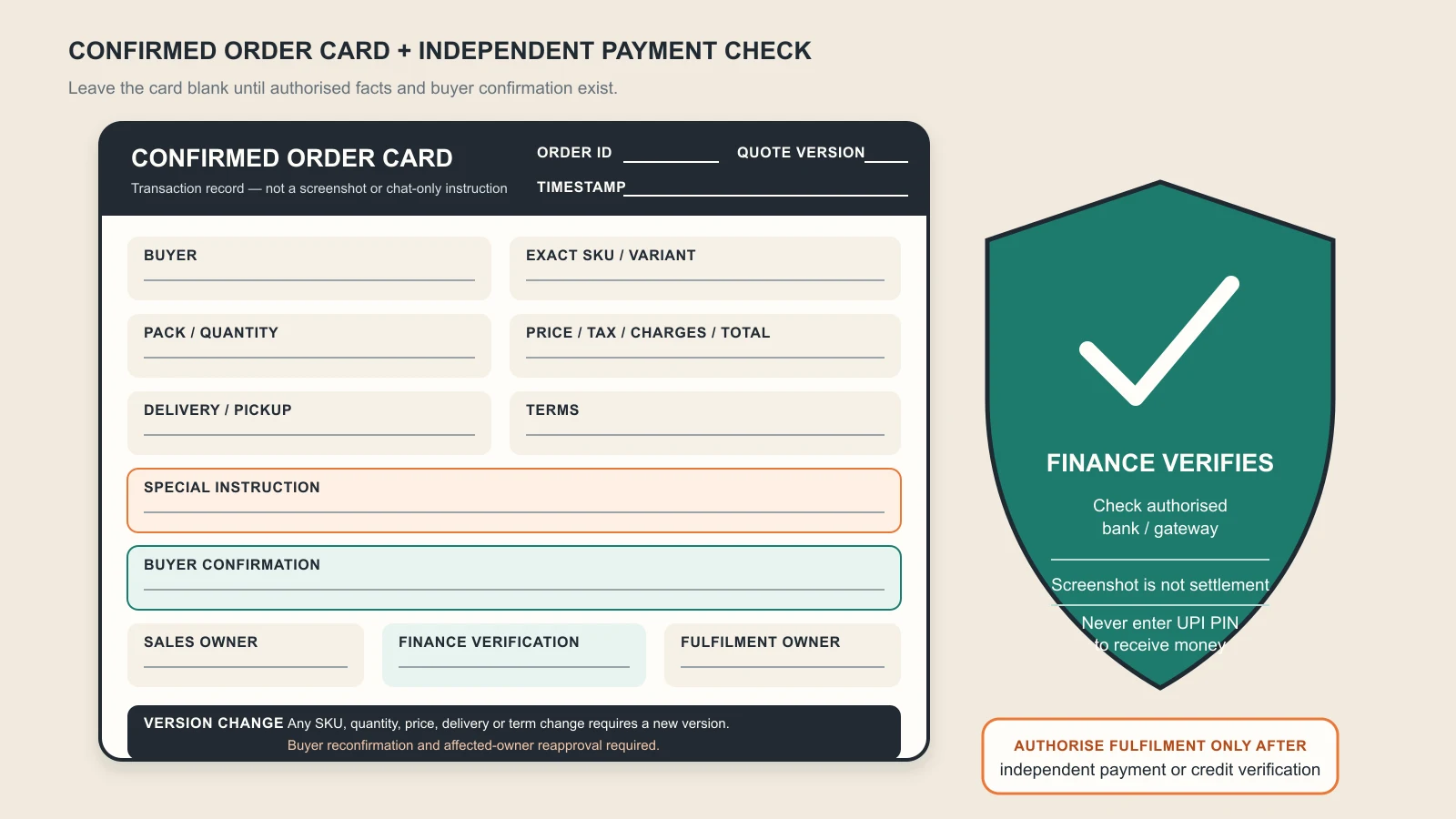
For an Indian manufacturer, wholesaler, retailer, shopkeeper or product brand, the key record is the confirmed order card, not the chat thread. The card connects what the buyer requested to what the business can actually supply.
This root guide owns the complete enquiry-to-sale operating system. The future WhatsApp follow-up template guide will own timed scripts and handoff messages. The digital product catalogue guide will own catalogue information architecture, while the WhatsApp Business catalogue guide will own the current app setup. The ₹100/day click-to-WhatsApp system owns that particular ad workflow.
WhatsApp can be the conversational layer of a sale. The customer can ask, compare, clarify, confirm and receive updates in one familiar thread. But the business still needs accurate product data, inventory, quotation, payment, fulfilment, service and consent controls outside the conversation.
A conversation is not automatically a lead
An inbound message can be:
a genuine product enquiry;
an existing customer seeking support;
a dealer asking for a range or price list;
a duplicate from another source;
an enquiry outside the service area or minimum order;
a supplier, job seeker or collaboration request;
spam or fraud; or
a person who has not yet said what they need.
Classify first. Do not report every “Hi” as a lead.
A “yes” is not automatically an order
“Send this”, “book it”, a screenshot or a voice note can omit the exact variant, quantity, delivery conditions or total. An actionable order needs a written summary that the buyer confirms and the business can fulfil.
A catalogue is not inventory or a quotation
A catalogue helps discovery. It may not reflect real-time stock, buyer-specific pricing, freight, tax, minimum quantity or a custom configuration. Confirm those separately. The platform itself says businesses are responsible for transactions, sales terms, taxes and fulfilment; WhatsApp is not the seller or fulfiller. See the WhatsApp Business Messaging Policy.
A sent message is not a sale
Track the pipeline through qualified enquiry, product match, quote, confirmation, verified payment/credit, dispatch and delivery. Revenue should come from the accounting/order record—not a salesperson’s count of chats.
Choose the Business app or Platform
WhatsApp currently positions the Business app for small businesses that personally manage conversations and the Business Platform for medium-to-large businesses using programmatic access at scale. See the official WhatsApp Business product overview and Business Platform overview.
Choose based on operating complexity, not status.
Need
Business app is usually the simpler start
Platform/API route deserves evaluation
Conversation ownership
One owner or a small manageable team
Multiple agents, queues, routing or specialist handoffs
Volume
Human review of every active conversation remains reliable
Inbox volume causes missed, duplicate or unowned work
Product data
Small range, controlled catalogue and manual stock check
Large/dynamic range connected to catalogue, CRM, ERP or order system
Messaging
Inbound, personal replies and simple business tools
Approved templates, programmatic notifications or governed automation
Reporting
A label/list plus a small order log is enough
Auditable events, integrations and role-based reporting are needed
Exceptions
Owner can handle custom terms
Rules need escalation across sales, finance, fulfilment and support
The Business app’s current official feature page lists business profiles, greetings, away messages, quick replies, labels, catalogues, carts, catalogue links and entry points such as QR codes and short links. Some features, broadcasts, payments and commerce options vary by country, eligibility or account. Check the actual app before designing a process around them. See WhatsApp Business app features.
The Business Platform has different messaging, template, pricing and automation rules. Its current pricing page uses message categories and market/category-dependent pricing; do not copy an old rate into a business plan. Verify the live WhatsApp Business Platform pricing.
Use one official business identity
Whichever route you choose:
use an accurate business name, category and contact information;
state service hours and expected response time;
separate business and personal conversations;
identify the human/business when an automated message opens the chat;
control who can access the number, linked devices and customer data; and
document an exit/backup plan if the primary phone, person or provider is unavailable.
WhatsApp’s policy requires a Business profile with customer-support contact information and accurate, up-to-date details, and prohibits impersonation or misleading people about the nature of the business.
Build a product and policy source of truth
Do this before driving more enquiries.
Product master
For every sellable item or configuration, store:
SKU/product code and approved name;
current variant, size, colour, finish and packaging;
exact product images and buying-critical detail views;
shipping, delivery zone, freight and pickup terms;
offer dates, coupon/discount conditions and stock limits;
payment methods and official payee identity;
credit approval authority for B2B orders;
cancellation, return, exchange and refund process;
warranty/after-sales scope; and
quote validity.
Communication master
Approve:
product names and words that must not be translated;
English and regional-language terminology;
greeting/away message and response-time promise;
qualification questions by buyer type;
quote and order-confirmation structure;
payment-safety note;
escalation messages; and
opt-in/opt-out wording by message category.
Saved replies should pull from these masters. They are controlled shortcuts, not permanent truths; review them whenever price, stock, policy or product changes.
System-of-record map
Name the authoritative record for each fact:
Fact
Authoritative source
WhatsApp’s role
Product/specification
Approved product/PIM/catalogue record
Explain and link/share the exact item
Stock
Inventory/owner-confirmed stock record
Communicate last verified availability
Price/offer
Current price/offer master
Send a dated quote
Customer and consent
Approved CRM/consent log where required
Capture the conversation and preference
Order
Order/accounting/ERP record or controlled order sheet
Obtain confirmation and send updates
Payment
Bank, payment gateway or authorised merchant record
Share official method; never self-certify from a screenshot
Dispatch
Fulfilment/courier record
Communicate verified status/tracking
Return/refund
Service/accounting record
Collect issue, confirm decision and update customer
When these sources disagree, pause the sale and resolve the fact. Do not choose whichever answer closes fastest.
Control entry points and permission
Make it easy for a buyer to start the right conversation and hard for the business to send an unexpected one.
Useful customer-initiated entry points
a short link beside the exact product/page;
a QR code in the store, on an authorised catalogue, invoice, booth or package insert;
a “message us” action on a controlled social profile;
a product landing page with a prefilled product code;
an existing customer’s support/order-update link; or
an approved click-to-WhatsApp ad.
Use a source code or prefilled line such as SAREE-S214 / dealer catalogue so the operator knows what caused the conversation. Do not make the buyer re-explain the product shown beside the link.
The future product landing-page guide will own that page workflow. A20 owns paid click-to-WhatsApp acquisition.
Permission is not a purchased contact list
WhatsApp’s current Business Messaging Policy says a business may contact people only when it has their mobile number and opt-in permission confirming they want subsequent messages or calls. It also requires businesses to respect requests to stop or opt out and says communications must not confuse, deceive, spam or surprise people. See the current policy.
Therefore:
record where, when and for what category a person opted in;
do not scrape numbers or message an exhibition list simply because the number is visible;
do not treat group membership, an old invoice or a one-time support chat as blanket permission for promotions;
make the sending business and purpose clear;
give a simple opt-out route and action it across the operating list; and
keep order/service updates separate from promotional permission.
A customer who starts a product enquiry has asked for a response to that enquiry. Do not silently turn it into indefinite marketing permission.
Platform-specific 24-hour rule
For the WhatsApp Business Platform, the policy says a business may respond without a Message Template within 24 hours of the user’s last message; outside that customer-service window it may send only approved Message Templates. It also requires a clear human escalation route when automation is used. These are Platform-specific controls, not a generic instruction for every Business-app reply.
Check current templates, message categories, pricing and account eligibility before implementation. A22 will own the detailed follow-up sequence.
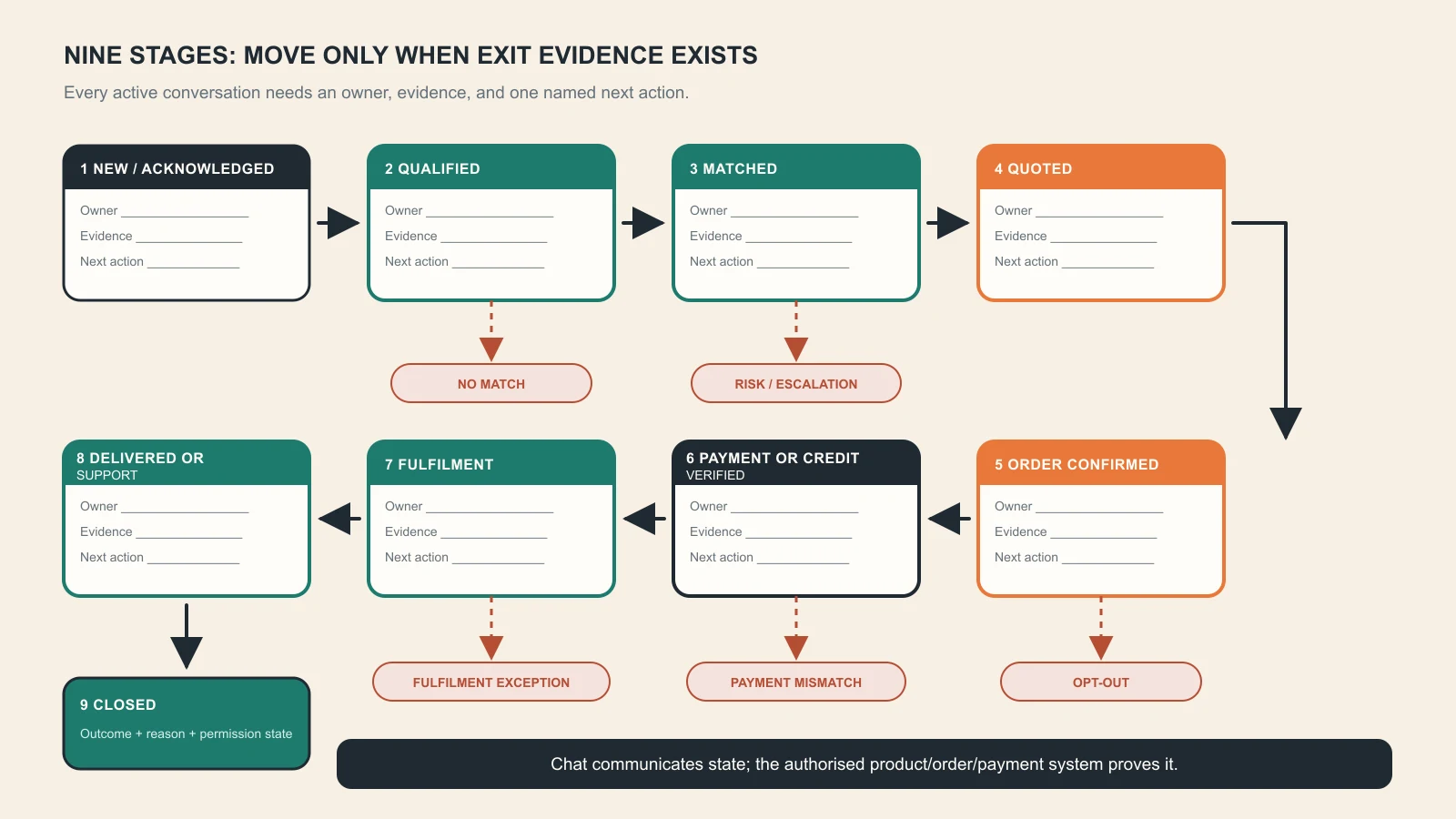
Use the nine-stage enquiry-to-sale pipeline
Every active chat needs a stage, an owner and a next action time.
Stage
Required output
Exit condition
Stop/escalate when
1. New/acknowledged
Source, time, owner and response expectation
Buyer/product context identified
Spam, abuse or wrong business
2. Qualified
Buyer type, need, quantity/application, location and timing
Enough information to recommend
Regulated/high-risk need or unclear authority
3. Matched
Exact SKU(s) or an honest “no match”
Buyer sees verified option/evidence
Product cannot meet stated need
4. Quoted
Dated price/terms/validity from approved master
Buyer asks to proceed or declines
Stock, freight, tax, credit or claim unresolved
5. Order summary sent
Complete written order card
Buyer explicitly confirms or corrects
Variant/quantity/address/terms ambiguous
6. Payment/credit verified
Bank/gateway confirmation or approved B2B credit/PO status
Order authorised for fulfilment
Screenshot only, mismatch or suspicious request
7. Fulfilment
Order ID, picking/production/dispatch owner and due date
Dispatched/ready for pickup
Stock variance, damage or delay
8. Delivered/support
Verified delivery/pickup and issue route
Customer accepts or issue is opened
Wrong/damaged/missing item or safety concern
9. Closed
Won/lost reason, final record and permission state
Record complete
Open refund, complaint, warranty or payment issue
Do not move a chat because time passed. Move it only when the exit condition is evidenced.
Stage 1: acknowledge and set the next expectation
An acknowledgement should do four things:
name the business/operator;
recognise the item or request if known;
state when a useful answer will arrive; and
ask one easy next question.
Example structure:
“Hello, this is Meera from [Business]. I can help with product code S214. I’m checking today’s colour and case availability now. Are you buying for a retail shop or for personal use?”
This is an anatomy example, not a claim that instant replies guarantee sales.
Stage 2: qualify only what changes the recommendation
Ask the fewest questions needed to avoid a wrong match. Do not collect identity or sensitive information because it might be useful later.
Stage 3: match or say no honestly
Recommend only products supported by the product master. If there is no safe/exact match, state that and route to a product specialist. “No match” protects trust and prevents returns.
Stages 4 and 5: separate quotation from order confirmation
A quote is an offer under stated conditions. An order summary is the exact configuration the buyer asks you to fulfil. Keep separate IDs/versions if terms change.
Stages 6–9: finance and operations take ownership
Sales should not mark “paid”, “dispatched”, “delivered” or “refunded” from an assumption. The authoritative team/system supplies those states and the chat communicates them.
Move a conversation only when the stage’s exit evidence exists—not because time passed. Original GPTWala deterministic pipeline; it contains blank owner/evidence/next-action fields and exception exits, not customer data, platform UI or claimed results.
Qualify without interrogating the buyer
B2C qualification card
Ask only what affects serviceability and product fit:
exact item/use case;
size, colour, variant or compatibility need;
serviceable city/pincode or pickup preference;
timing/occasion if stock or customisation depends on it; and
one decision question or constraint.
Do not ask for a complete address, ID document or payment information before it is needed.
B2B qualification card
For a dealer, retailer, wholesaler, institutional or industrial buyer, record:
business/buyer type and city;
product family, application or exact code;
quantity, case/pack requirement or expected repeat pattern;
specification/quality/packaging requirement;
delivery location and requested timeline;
catalogue, sample, data sheet or quotation next step; and
purchase order, tax invoice or approved-credit process where applicable.
Do not treat every “price?” as an opportunity that sales must chase forever. If minimum order or service area does not match, answer respectfully and close with a coded reason.
Qualification should work in Indian languages
Ask the buyer’s preferred language. Preserve:
SKU/model names;
units, decimals and pack counts;
technical terms that should remain in English;
price, tax, shipping and payment meaning;
warranty/return limitations; and
delivery dates and addresses.
If a buyer sends a voice note, summarise the order-critical facts in writing and ask them to confirm. Voice recognition or AI translation is not the order record.
Match and present the exact product
Use a three-part recommendation
Exact match: SKU, variant and one line explaining why it fits the stated need.
Evidence: approved product view, data sheet, dimensions, pack contents or real demonstration.
Boundary: what is not included, not verified or not suitable.
Example:
“Based on 24 pieces for resale, the current match is SKU J42-G, gold-tone, 12-pair dealer case. The attached real front/back/clasp views are for J42-G. Display tray and model styling are not included.”
Send fewer, better options
Do not flood a buyer with 40 unrelated images. Share one recommended option and, if useful, two meaningfully different alternatives. Explain the trade-off: material, size, pack, finish, price band, lead time or use case.
Product-image truth rules
label every image with SKU/variant internally;
do not mix old and current packaging;
show required sides/details before payment;
do not let an AI background change size, colour, texture, label, components or quantity;
state when a lifestyle scene is illustrative and props are not included;
use real capture for fit, drape, reflection, mechanism, scale, texture, safety and performance proof; and
withdraw an image when the sellable product changes.
An attractive but inaccurate image is not a conversion asset. It is an order-error risk.
Quote and confirm the order in writing
The quote card
Include:
quote ID, date and validity;
buyer/business name where appropriate;
exact SKU/variant and description;
quantity, unit/pack/case logic and included pieces;
unit price, applicable taxes/charges and discount conditions;
shipping/freight/pickup and destination assumptions;
dispatch or production estimate stated accurately;
payment/credit terms;
return, exchange, cancellation and warranty reference;
total payable or clearly marked items still to be calculated; and
salesperson/approver.
Do not hide a mandatory charge until the final message. If freight is unknown, say “freight pending for pincode confirmation”, not “free delivery”.
The confirmed order card
After the buyer agrees, send a new summary:
Field
Required entry
Order/quote reference
Unique ID and version
Buyer
Name/business and contact
Item
Exact SKU, variant, pack and quantity
Price
Unit/line total, tax/charges, discount and final total
Delivery
Full address/pincode or pickup point; promised estimate
Terms
Payment/credit, cancellation, return/exchange and warranty reference
Special instruction
Only approved, operationally feasible instruction
Confirmation
Buyer’s explicit confirmation and timestamp
Internal owner
Sales plus fulfilment/finance owner
Ask the buyer to correct any line and explicitly confirm. Do not interpret an emoji or payment screenshot as confirmation of all terms.
Changes create a new version
If SKU, quantity, price, address or terms change, issue an updated summary and ask for confirmation again. Do not edit the old message silently and hope operations notices.
Convert chat into a versioned order card, then verify payment independently before fulfilment. Original GPTWala blank template: it contains no personal data, QR code, bank or WhatsApp logo, transaction status, filled amount or fabricated order result.
Verify payment and hand off fulfilment
Share only approved payment routes
Use the business’s authorised merchant/acquirer, payment link, bank account, UPI ID or other approved method. The payee name the customer sees should be expected and explainable. Never request a full card number, bank account credentials, UPI PIN, OTP or sensitive identity number in chat; WhatsApp’s Business policy also prohibits asking people to share full card/account numbers or other sensitive identifiers.
A screenshot is not settlement evidence
Verify payment in the business’s own bank, gateway or authorised merchant record and reconcile amount, payer/reference, order ID and status. If status is pending or mismatched, mark it pending—not paid.
NPCI’s UPI FAQ says a merchant receives money after the customer confirms payment into the merchant’s bank/pool account under the merchant arrangement. NPCI’s fraud-awareness page also warns that scanning a QR code and entering a UPI PIN is for making a payment, not receiving one. See NPCI’s UPI FAQ and NPCI Fraud Awareness.
For a seller:
never enter a UPI PIN to “receive” a customer payment;
never approve a collect request just because the sender says it is a refund or verification;
train staff to verify the credit in the authorised record;
use the official bank/acquirer complaint route for a disputed status; and
separate payment access from casual shared-phone access.
B2B credit and purchase orders
If the buyer uses an approved credit line or purchase order, finance—not chat—authorises fulfilment. Record PO/reference, credit approval, due terms and responsible owner. “Old customer” is not a credit decision.
Fulfilment handoff
Finance/operations receives the confirmed order card, not a forwarded conversation dump. The handoff must identify:
order ID and confirmed version;
exact picking/production instruction;
verified payment/credit state;
dispatch/pickup commitment and owner;
packing/label/customisation instruction;
buyer delivery/contact information restricted to those who need it; and
exception/escalation route.
Send verified updates for acceptance, dispatch, tracking, pickup readiness, delay and delivery. Do not fabricate a tracking number or promise a date operations has not accepted.
Organise the inbox and team handoffs
The Business app currently provides tools such as labels/lists, quick replies, greeting and away messages. Use the actual labels available in the current app, but keep the stage logic stable.
Minimum stage labels
New/unowned
Needs qualification
Product match pending
Quote pending
Buyer decision
Confirmation/payment pending
Fulfilment
Support/exception
Won/closed
Lost/closed
Opted out/do not market
A label is not the result. A conversation can be labelled “Payment pending” only when the order summary is confirmed and finance knows what to verify.
Ownership rule
At any moment, one named person or queue owns the next action. The record should show:
current stage;
owner;
next action;
due time/date;
blocker;
last verified product/offer/order version; and
escalation owner.
Avoid the shared-inbox phrase “someone please reply”. Assign the conversation.
Daily operating rhythm
At opening:
triage new/unowned messages;
check time-sensitive quotes, payments and fulfilment exceptions;
verify availability changes; and
confirm who covers the inbox.
During the day:
update the stage when exit evidence appears;
create order/quote records immediately;
escalate product, finance or complaint exceptions; and
keep replies tied to the correct source master.
At close:
no active conversation remains unowned;
every next action has a due time;
payment/dispatch exceptions are handed over; and
lost/no-decision reasons are recorded.
Team handoff note
Use five lines:
Buyer and requested outcome
Exact product/order version
Facts already confirmed
Open question/risk
Named next action and deadline
Do not ask the customer to repeat the full conversation because internal ownership changed.
Use AI and automation with a human stop rule
AI can help a team handle repetition, but the business owns every answer and commitment.
Safe assistance tasks
classify a conversation into a proposed stage;
draft a reply from approved product and policy sources;
summarise long chats or voice-note facts for human verification;
translate an approved message while locking SKU, units and commercial terms;
identify missing fields in the quote/order card;
suggest a relevant catalogue item from a controlled set;
flag an angry customer, payment-risk phrase or safety question; and
prepare internal daily summaries with access controls.
Human approval or direct handling required
product fit, compatibility, safety or regulated-category advice;
non-standard discount, credit, refund or compensation;
warranty, legal or liability language;
stock, dispatch and custom-production commitments;
payment/refund verification;
complaint, threat, vulnerable customer or serious incident;
high-value/custom B2B negotiation; and
any answer without an approved source.
The no-source rule
If the assistant cannot retrieve the exact product/policy/transaction source, it should say what is missing and route to a person. It must never invent:
a SKU or compatible model;
stock, price, discount or delivery date;
product performance or certification;
order, payment, refund or tracking status;
return/warranty permission; or
a customer’s consent.
Protect customer and business data
Do not copy customer chats, invoices, addresses, IDs, unpublished pricing, dealer lists or confidential drawings into an external AI tool until the provider’s current terms, the business’s policy and applicable law permit the intended use. Limit access, retain only what is needed and keep customer data out of public prompt libraries.
For Platform automation, WhatsApp’s policy says businesses using automation within the customer-service window must provide prompt, clear and direct escalation paths, such as a human-agent transfer, phone, email, web support, store/branch or support form.
Handle follow-up, marketing and opt-out correctly
This root page defines the controls; A22 will provide the timed message sequence and reusable templates.
Service follow-up
Service messages should continue the buyer’s stated task:
answer an open product question;
confirm a promised quote/sample/data sheet;
request one missing order field;
give an authorised payment or fulfilment update; or
resolve support/return/warranty.
Do not disguise a promotion as an order update.
Marketing follow-up
Before sending offers, launches, restock notices or recommendations:
confirm opt-in covers that message category;
identify the business and why the message is relevant;
use current product/offer facts;
choose a frequency consistent with the expectation set;
include and honour a clear opt-out; and
apply Platform template/category rules where applicable.
WhatsApp’s Messaging Guidelines prohibit fraud/spam and repeated unwanted contact, and prohibit unauthorised bulk messaging, auto-messaging or automation that harms WhatsApp or users. See the WhatsApp Messaging Guidelines.
Closed-lost is not “message forever”
Record why the enquiry closed:
no product match;
MOQ/price/timing/service area mismatch;
no response after an allowed, expected follow-up sequence;
buyer chose another option;
duplicate/spam; or
opt-out.
That reason guides product and process decisions. It does not create permission for repeated promotions.
Apply India product, ad and payment safeguards
Product and advertising truth
The Central Consumer Protection Authority’s 2022 guidelines address misleading advertisements and endorsements. The ASCI Code says advertisements should not mislead through statements or visual presentation by implication, omission, ambiguity or exaggeration. See the Department of Consumer Affairs’ official guidelines page and the ASCI Code.
The same truth discipline should govern an ad, catalogue card, status update, saved reply, product photo, quote and chat:
exact item and pack;
substantiated feature/performance claims;
genuine current price/offer;
visible material conditions;
no fake testimonial, urgency, certification or demonstration; and
no disclaimer that contradicts the main message.
This is operational guidance, not legal advice.
Consumer/e-commerce obligations do not disappear in chat
The Department of Consumer Affairs maintains the Consumer Protection (E-Commerce) Rules, 2020 and amendments in its official consumer-protection rules index. Applicability and exact disclosures depend on the seller’s role and model. Obtain appropriate advice and ensure the buyer receives the business/product/price/terms, grievance and transaction information required for the sale.
WhatsApp also says businesses using commerce features must comply with the Meta Commerce Policy, applicable terms/laws, and remain responsible for sales terms, privacy terms, taxes, payment and fulfilment.
Restricted and regulated products
WhatsApp’s current Business policy restricts or prohibits messaging/commerce for various illegal, regulated or restricted goods and services and contains product-, country- and surface-specific exceptions. Do not assume a licence automatically makes the Business app, Platform messaging, catalogue or payment feature permissible.
Before using WhatsApp for a regulated product:
check the current Business Messaging and Commerce policies;
check the specific country and Business app/Platform surface;
confirm age, licence and geographic controls;
obtain category-specific legal/compliance approval; and
build enforcement and audit evidence before outreach.
Do not publish a static “allowed products” list from memory; the policy can change.
Use the system in different product businesses
The scenarios below are fictional operating examples. They are not client results, regional-market claims or promises that WhatsApp is the best channel for every business.
Surat apparel wholesaler: convert the voice note into an exact case order
A retailer sends a voice note asking for “the blue set, 24 pieces”. The seller should not forward it to packing. The operator identifies the collection/SKU, verifies whether “24” means pieces or sets, confirms size/colour assortment, case multiple, wholesale price, tax/freight, destination and buyer timeline, then sends the written order card.
Real garment images must preserve colour, construction, included pieces and pack logic. Use the AI model-photo garment-truth guide when styled visuals are shared, but keep product-only/detail evidence available.
Rajkot component manufacturer: route technical fit to a product owner
A buyer names an application but not the exact part. The operator records operating condition, required specification, existing model/connection and quantity, then routes the match to an authorised technical person. The quote links the verified data sheet and identifies assumptions.
The chatbot must not infer compatibility from a similar product name. If the application carries safety or performance consequences, WhatsApp is the handoff layer—not the engineering approval record.
Jaipur jewellery retailer: keep the exact item beside the payment decision
The customer enters from a festive lifestyle image. The operator confirms the exact SKU, real front/back/clasp views, dimensions/weight information as approved, metal/stone description, included box, price conditions, availability and return/warranty terms before sending a payment route.
AI sparkle, altered stone count or a synthetic model must not replace real product evidence. The AI jewellery photography checklist owns the detailed visual review.
Local appliance retailer: verify model and service area
A customer sends a screenshot without the model number. The operator requests the exact code, explains what is included, checks current stock and serviceable delivery/installation area, and issues a dated quote. The confirmed order card names the exact model; finance independently verifies payment.
If installation is performed by another party, state who is responsible and what is/is not included. Do not imply installation, warranty or same-day delivery from an attractive creative.
Morbi tile exporter: WhatsApp is the conversation, not the complete contract
The buyer asks for an export quotation. WhatsApp can capture size, finish, quantity, destination, sample/data requirement and timeline, but the formal quote/order system should hold packing, quality/specification, commercial terms, freight assumptions, documents and approvals. A showroom/rendered room is context, not shade, finish, slip, variation or installation evidence.
When terms are complex or high-value, move the validated requirements into the authorised commercial documents and use the chat to coordinate—not to replace them.
Measure the pipeline without invented benchmarks
Do not claim WhatsApp “converts at” a fixed rate or that messages have a universal open rate. Measure your own process with defined denominators.
Volume and ownership
Metric
Formula
Decision use
New enquiries
eligible first-time enquiry records in period
Workload by source/product
Unowned-active rate
active conversations without an owner ÷ active conversations
active conversations with owner + next action + due time ÷ active conversations
Whether follow-up can be managed
Qualification and commercial flow
Metric
Formula
Decision use
Qualification rate
qualified enquiries ÷ eligible enquiries
Source/message fit; do not assume higher is always better
Product-match rate
enquiries with a verified match ÷ qualified enquiries
Range/knowledge gap
Quote-ready rate
quotes issued from approved facts ÷ qualified enquiries
Sales operations readiness
Quote-to-confirmed-order rate
confirmed order cards ÷ valid quotes
Commercial fit; analyse by product/source
Confirmation-to-authorised-fulfilment rate
payment-verified or credit-approved orders ÷ confirmed orders
Payment/credit friction or risk
Truth and operations
Metric
Formula
Decision use
Wrong-SKU/order correction rate
confirmed orders corrected for product/variant/quantity error ÷ confirmed orders
Product/confirmation failure
Price/stock exception rate
quotes changed for unverified price/stock ÷ quotes
Source-master freshness
Payment verification exception rate
attempted handoffs with screenshot-only/mismatch/pending status ÷ payment-stage orders
Finance/safety control
On-time fulfilment handoff
authorised orders handed to operations by agreed internal time ÷ authorised orders
Sales-to-operations control
Post-order issue rate
delivered orders with wrong/missing/damaged/term-related issue ÷ delivered orders
Product/fulfilment quality; classify cause
Opt-out action completeness
opt-outs removed/suppressed across sending records ÷ opt-out requests
Messaging-policy control
Business outcome
Track:
qualified enquiries and orders by source, product, region and buyer type;
contribution-aware order or customer-acquisition cost where attribution is credible;
cancellation, return and refund impact;
repeat orders from appropriately permissioned customers; and
lost reasons that product, price, service area or process can actually address.
Do not credit WhatsApp alone when an ad, store visit, distributor relationship, price change or salesperson created the demand. The small-budget AI ad-testing guide uses qualified WhatsApp outcomes instead of chat starts; the unit-economics guide should govern profitability decisions.
Know when chat should not be the system of record
WhatsApp may remain the buyer-facing conversation while another system controls the transaction.
Escalate beyond a chat-led record when:
SKU count, stock or buyer-specific price changes faster than humans can verify;
multiple agents create duplicate, missed or conflicting replies;
the order needs formal quotation, PO, credit, export, tax or compliance documents;
customer/payment data needs role-based access and retention controls;
delivery, returns or warranty need case management;
messages must connect to inventory, CRM, accounting or ERP;
regulated products require age, country, licence or audit controls;
one phone/person is a business-continuity risk; or
management cannot reconcile chats with orders and money.
Do not buy automation merely because it exists. First define the pipeline, sources, roles, consent and exception logic. Automation will scale a contradiction as efficiently as it scales a good process.
A practical first rollout
Choose one representative product family and one enquiry source.
Build its product, commercial and communication masters.
Define stages, exit evidence, owners and escalation paths.
Create the quote and confirmed-order cards.
Test ten fictional scenarios: exact request, vague request, wrong product, out of stock, wholesale, custom, payment mismatch, change after confirmation, complaint and opt-out.
Train the operator and finance/fulfilment owners on the handoff.
Start with one controlled entry point and inspect every conversation.
Measure errors and stage leakage before adding ads, broadcasts or automation.
Add a Platform/CRM/integration only when a named operating limitation justifies it.
The goal is not “zero manual work”. It is zero unowned commitments and fewer preventable order errors.
Turn conversations into a wider online growth system
WhatsApp can convert and serve demand, but it does not create a complete digital presence by itself. Buyers may still need a trusted website/page, accurate product content, discovery, advertising and consistent follow-up.
If your product business still depends mainly on walk-ins, exhibitions, dealer calls or forwarded catalogues, GPTWala’s workshop explains the DAA path: Digital Presence → AI Content Creation → ₹100/day WhatsApp ads. The workshop connects these pieces into an online enquiry system without guaranteeing leads, sales or return on ad spend.
WhatsApp can support discovery, conversation, order capture and updates, and some commerce/payment features may be available by country/account. The business remains responsible for product truth, terms, payment, taxes, fulfilment, returns and applicable law. Use a confirmed order record outside or alongside the chat.
Should I use WhatsApp Business app or the Business Platform?
Start with the Business app when a small team can personally own every conversation and maintain the order record. Evaluate the Platform when you need multiple agents, routing, programmatic messages, governed automation or CRM/ERP integration. Do not choose by a fixed message number; choose by control failure and process needs.
Do customers need to opt in before I message them?
WhatsApp’s current Business Messaging Policy requires the number plus opt-in permission for subsequent business messages/calls and requires opt-out requests to be honoured. A customer-initiated enquiry permits a relevant response to that task; it should not be treated as unlimited promotional consent.
What is the 24-hour WhatsApp customer-service window?
It is a Business Platform rule: after a user’s message, a business can respond without a Message Template within the 24-hour service window. Outside it, business-initiated messages require approved templates under current policy. Recheck the live policy, category and pricing before implementing follow-up.
How should I organise WhatsApp sales leads?
Give every active chat a stage, owner, next action and due time. A practical flow is new, qualified, matched, quoted, order confirmed, payment/credit verified, fulfilment, delivered/support and closed. Labels help navigation; a controlled order/CRM/accounting record holds the transaction.
What information should I collect before confirming an order?
Collect only what the sale needs: exact SKU/variant, quantity/pack, price and charges, delivery/pickup details, applicable terms, special instruction and buyer confirmation. For B2B, add business/buyer type, PO/credit and invoice requirements as applicable. Delay sensitive data until genuinely required.
Is a UPI payment screenshot enough to dispatch an order?
No. Verify the credit and status in the business’s authorised bank, gateway or merchant record, then reconcile it to the order. Never enter a UPI PIN to receive money or approve an unexpected collect request as “verification”.
Can AI answer customers and close orders automatically?
AI may classify, draft, translate, summarise and retrieve approved facts. A human or authoritative system must control product suitability, stock, price, discounts, credit, payment/refund, delivery, warranty, safety and exceptions. If the exact source is unavailable, AI should stop and escalate.
Can I send promotions to everyone in my contacts?
No. A saved number is not automatically current, category-specific marketing permission. Record opt-in, set a clear expectation, send relevant truthful messages, provide opt-out and honour it. Do not use scraped lists or repeated unwanted contact.
What should I measure in WhatsApp selling?
Measure qualified enquiries, ownership, product match, quotes, confirmed orders, verified payment/credit, fulfilment, errors, issues, opt-outs and business outcomes by source/product. Avoid counting “Hi”, sent messages or catalogue shares as sales.