Reviewed and updated: 12 August 2026
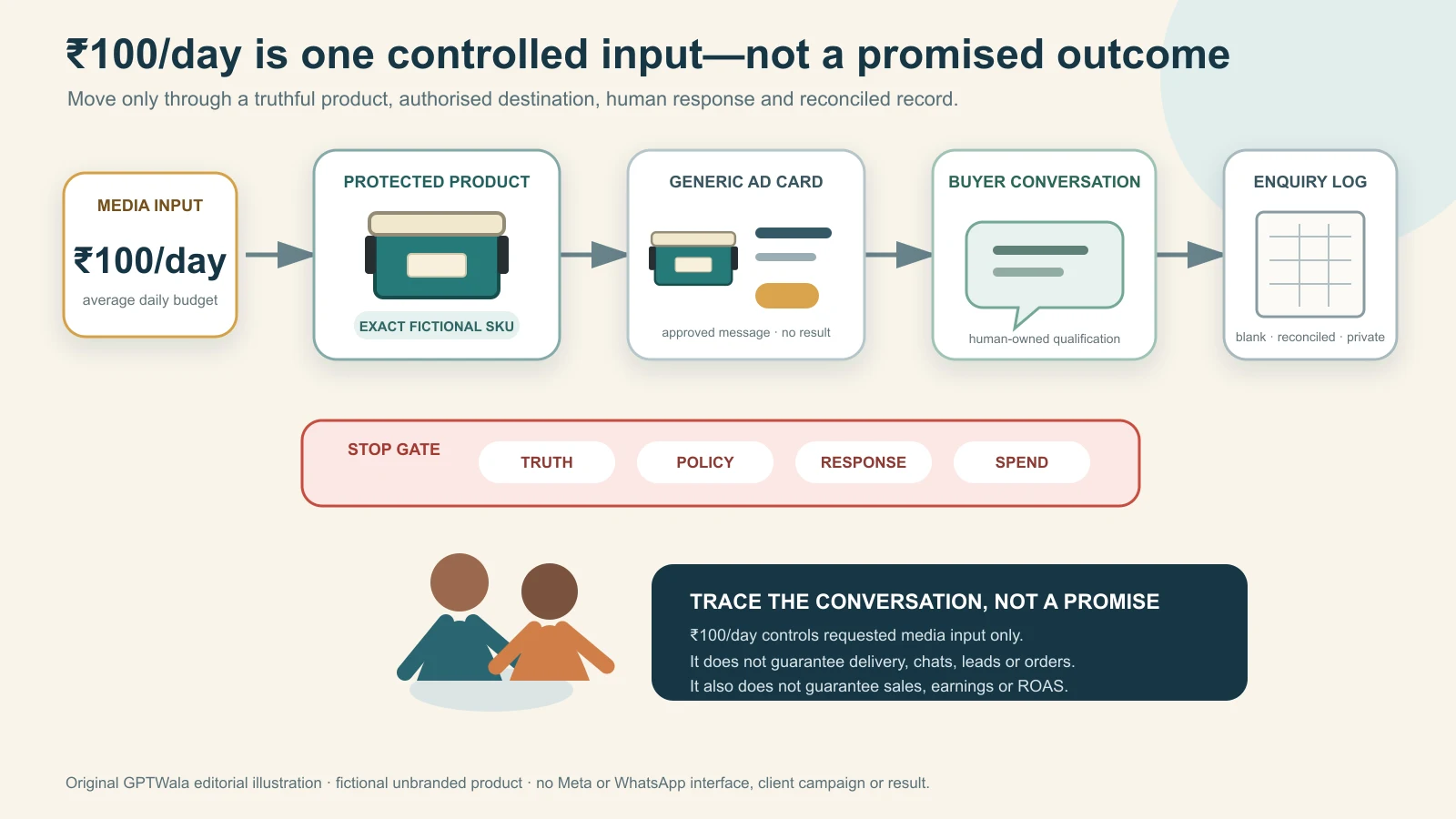
To run a ₹100/day click-to-WhatsApp ad responsibly, use one accurate product offer, one serviceable audience, one approved creative, one authorised WhatsApp destination and one written qualification rule. Set ₹100 as an average daily media budget, not a lead or sales promise. Check the live budget control, preview the complete ad-to-chat journey, have a human ready to respond, log every attributable conversation and stop when product truth, policy, response capacity or spend control fails.
The system can buy a small amount of distribution and evidence. It cannot guarantee delivery, clicks, chats, qualified enquiries, orders, revenue, profit or return on ad spend. At low volume, the correct conclusion may simply be not enough evidence.
This article owns the specific click-to-WhatsApp setup, tracking loop and limits. The AI ad creative guide owns creative strategy; the small-budget creative testing guide owns control-versus-challenger testing; the Meta-readiness article owns the account, offer and destination gate; and the WhatsApp selling system owns the full enquiry-to-order conversation. Do those jobs separately rather than forcing one ₹100 campaign to solve all of them.
Table of contents
- Understand what ₹100/day actually controls
- Choose one narrow job for the campaign
- Pass the zero-spend launch gate
- Write the campaign decision card
- Set up the click-to-WhatsApp ad
- Make the ad and first chat agree
- Build a tracking system that survives low volume
- Run the daily operating loop
- Use stop, review and continue rules
- Apply the system to Indian product businesses
- Protect product truth, customer data and messaging permission
- Know the limits before you spend
- Use the one-page launch record
- Frequently asked questions
Understand what ₹100/day actually controls
₹100/day controls only the average daily media-budget input you request from the platform. It does not set a price for a lead, reserve a number of impressions or buy a particular business outcome.
Meta’s current public budget guidance defines a daily budget as the average amount an advertiser is willing to spend per day. It says Meta may spend up to 75% over that daily promotional budget on a particular day, while weekly spend should not exceed seven times the daily budget. A lifetime budget works differently: it limits total spend over the selected run while daily spend may fluctuate. Check the current explanation on Meta’s budgets, costs and schedules page and the exact control shown in your live account before approval.
For a continuously scheduled ₹100 average daily budget, the current public definition implies:
- one day is not guaranteed to stop at exactly ₹100;
- a day could reach ₹175 under the stated 75%-over allowance;
- the corresponding seven-day media envelope is up to ₹700; and
- actual delivery can be below the available budget.
Those figures are arithmetic illustrations of the current budget definition, not predicted results. Billing currency, taxes, account time zone, changes, pauses and other charges need their own live-account check. If Ads Manager displays a different minimum, limit or control, do not force the article’s number into the account. Re-authorise the amount actually shown or do not launch.
Use ₹100/day as a controlled pilot input
A responsible owner can authorise four things:
- Media control: the live daily or lifetime budget and maximum authorised exposure.
- Time control: start, end and response hours.
- truth control: the exact product, offer, claims and visual evidence allowed.
- decision control: what would make the business continue unchanged, review or stop.
The owner cannot authorise the market to respond. That is why “₹100/day ads” must never be presented as “₹100 for guaranteed customers.”
Do not turn a budget label into a benchmark
No universal cost per WhatsApp chat exists for every manufacturer, wholesaler, retailer, apparel seller, jewellery business or product brand. Auction conditions, geography, audience, product, season, offer, creative, destination, response quality and measurement all change the result. Even two campaigns for the same SKU can behave differently at different times.
Use your own attributable records to learn what happened in a defined operating window. Do not borrow a screenshot, agency average or competitor’s claimed cost and treat it as your forecast.
Choose one narrow job for the campaign
Ads that click to WhatsApp can appear on Facebook or Instagram and open a chat with the business, according to the current WhatsApp product overview. That path is useful only when the chat has a clear first job.
Choose one, such as:
- ask whether a local retail SKU is available for pickup;
- request a wholesale catalogue for one category;
- share quantity, city and delivery requirement for a quote;
- ask for a technical data sheet for one component family;
- request size guidance for one apparel line; or
- book a product-viewing conversation for a specific jewellery collection.
Avoid “message us for everything.” A vague ad invites vague chats and makes qualification inconsistent.
Write the campaign’s single sentence
Use this template:
This campaign will show [exact product and truthful offer] to [one serviceable buyer group in one geography] and invite them to [one WhatsApp action], which counts as qualified only when [written conditions] are met.
Example:
This campaign will show the current 25 kg wholesale pack of an unbranded food-safe storage product to verified retailers in serviceable Maharashtra districts and invite them to request a dealer catalogue; a qualified enquiry must include business type, city/PIN and expected order quantity.
This is a planning example, not a real campaign or outcome. Replace every term with facts your business can document.
Keep low-budget structure narrow
Start this operating guide only after one creative—or a deliberately small approved creative set—has passed product, claim and rights review. A ₹100/day campaign fragmented across many audiences, products, offers, placements and generated ads may give each branch too little exposure to interpret.
This article does not decide how many creative variants to test. Use the small-budget AI ad testing matrix for that decision. For the present system, reduce variables so that a chat can be traced back to one clear promise and product.
Pass the zero-spend launch gate
Do not pay the platform to reveal an error that a phone preview, stock check or human reviewer could have caught.
The future Meta-readiness guide should carry the full account audit. This is the minimum campaign gate:
| Gate | Evidence required before launch | Stop condition |
|---|---|---|
| Business identity | Accurate business name, contact details, authorised ad account and authorised WhatsApp business destination | Wrong owner, impersonation, unclear access or compromised account |
| Product | Exact current SKU/variant, accurate image, current packaging, stock or fulfilment route | Changed label, false colour, missing part, unavailable offer or uncertain variant |
| Offer | Price/MOQ/discount/dates/tax-shipping conditions documented where mentioned | Business cannot honour the words or material conditions are hidden |
| Claim | Source for every objective or implied material claim | Unsupported performance, safety, ranking, scarcity, comparison or certification claim |
| Audience | Geography and buyer type the business can legally and operationally serve | Outside service area, prohibited targeting logic or no fulfilment route |
| Destination | Correct WhatsApp number selected; test chat opens on a phone | Wrong number, dead destination, personal number used without authorisation |
| Response | Named human owner and published response hours | Nobody available to answer, qualify or escalate |
| Measurement | Campaign code, qualification rule and lead log ready | No way to distinguish an ad chat, duplicate or qualified enquiry |
| Policy | Current Meta advertising and WhatsApp category/messaging rules checked | Product/category is prohibited, restricted without eligibility or messaging plan is non-compliant |
| Spend | Owner has seen the live budget type, currency, schedule and maximum authorised exposure | Unclear billing, unapproved card/account or no stop authority |
Passing this gate means eligible to try, not approved by buyers and not guaranteed to pass platform review. Meta says its ad review can consider the creative, text, targeting and destination, and that click-to-message ads have an additional thread-level checkpoint. Review can recur after an ad is live. See Meta’s current ad review, policy and support guide.
Test the complete phone journey
Use a phone that is not already inside the business workflow where practical. Preview the ad and check:
- The crop does not remove a pack size, disclaimer or essential product detail.
- The CTA opens the intended WhatsApp business identity.
- The first visible message names the same product and offer as the ad.
- A buyer can state the minimum qualification facts without sharing sensitive data.
- The business reply is available in the stated hours.
- The source code or campaign identifier reaches the log.
- A human escalation path works.
Screenshots from this preview are evidence of setup, not evidence of delivery or demand. Redact numbers, profiles, payment data and customer content before storing or sharing them.
Write the campaign decision card
One page should tell the owner, responder and reviewer what is running. Complete it before opening Ads Manager.
| Field | What to write |
|---|---|
| Campaign ID | A durable code, for example CTWA-2026-08-BOX-Retail-MH-v1 |
| Business job | One action: availability, catalogue, quote input, data sheet, size help or appointment |
| Product | Exact SKU/family and version date |
| Offer | Approved copy plus dates and material conditions |
| Audience | Buyer type, geography and any lawful eligibility condition |
| Destination | Authorised WhatsApp business number/account owner |
| Response window | Days, hours, primary responder and backup |
| Qualification rule | Exact facts required to count a qualified enquiry |
| Creative | Asset ID, source-photo ID, reviewer and approval date |
| Budget | Daily/lifetime type, live amount, schedule, currency and maximum authorised exposure |
| Tracking | Platform fields, source code, lead-log owner and reconciliation time |
| Immediate stops | Truth, policy, destination, response, security and spend failures |
| Review point | Predeclared time, spend cap or evidence condition—not “when we feel like it” |
Name assets so humans can reconcile them
Use a readable naming system. For example:
CTWA | BOX-T2 | RETAILER-MH | CATALOGUE | AUG26 | C1
The name records channel, product, audience, offer/action, period and creative ID. It does not include a customer’s phone number or personal data. Use the same campaign and creative codes in the response log.
Do not rename the campaign repeatedly to describe performance. Record decisions in the operating log and preserve the original identity.
Set up the click-to-WhatsApp ad
The current official WhatsApp guide describes this broad Ads Manager path: create a campaign, choose an available objective, name it, select Messaging Apps as the conversion location, choose WhatsApp, set schedule and budget, define the audience, add the ad format and content, customize responses and publish. See How to create ads that click to WhatsApp.
Interfaces, eligibility and labels vary by account, region, objective and product update. Treat the sequence below as a control checklist; follow the live guided flow rather than forcing an outdated screenshot.
Step 1: open the authorised business and verify state
Confirm the selected ad account, Page/business identity, currency, time zone, payment method, permissions and WhatsApp destination. If the intended number does not appear, use the live connection flow and recheck ownership. Do not improvise with an employee’s personal number just to get the campaign live.
Stop if any business asset looks unfamiliar, restricted or compromised.
Step 2: create and name the campaign
Select Create in Ads Manager. Choose the objective currently available and appropriate for a messaging destination. Do not choose an objective because an old tutorial shows it; product labels and eligibility change.
Enter the campaign decision-card ID. Disable or decline optional changes you do not understand until the owner knows what they change, what they may cost and how they will be measured.
Step 3: select messaging and WhatsApp
At the relevant conversion-location or destination step, select Messaging Apps, then the authorised WhatsApp account/number. If the interface offers multiple messaging destinations, keep WhatsApp only for a system intended to measure WhatsApp conversations. Mixing destinations changes the operating and reconciliation job.
Send a preview or test through the live tools where available. Verify the business name and number on the receiving phone.
Step 4: enter the authorised budget and schedule
Choose daily or lifetime budget deliberately:
- Daily budget: an average per day under Meta’s current definition; daily spend may vary.
- Lifetime budget: total available media spend for the selected run; daily allocation can vary.
If using the article’s ₹100/day system, enter ₹100 only when the live account accepts it and the owner accepts the current daily-budget behaviour. Write the start, intended review point and end/stop authority. Do not leave an open-ended campaign merely because the daily number appears small.
Meta’s page currently recommends enough budget over at least seven days for its system to learn. WhatsApp’s setup page similarly presents at least seven days as a best-practice recommendation. That is platform guidance, not proof that seven days at ₹100 will deliver enough buyer actions for a decision. Use a pre-authorised window and accept “not enough evidence” when volume is weak.
Step 5: define the serviceable audience
Start with real fulfilment and buyer logic:
- where the product can be delivered, installed, collected or supported;
- whether the buyer is a consumer, retailer, dealer, distributor, procurement team or other business;
- language needed for the ad and response;
- whether order quantity, category or location changes eligibility; and
- whether current policy restricts the product or targeting.
The official WhatsApp setup page currently gives a broad audience-size recommendation. Do not apply that generic number blindly to a local shop, narrow industrial component or high-consideration jewellery product. A wide audience that cannot buy is not useful reach.
Avoid unlawful or discriminatory targeting. If the product or offer belongs to a regulated category, obtain category-specific policy and legal review before any setup.
Step 6: choose placements without creating accidental versions
Review the live placement options and previews. The official ads-that-click-to-WhatsApp overview says the format can appear across Facebook and Instagram, including named feed, Stories and Marketplace surfaces, subject to current availability.
At a ₹100/day input, do not create many manual placement branches without a reason. Whichever placement logic you choose, preview the real crop, text, CTA and material conditions in each eligible format. Reject a placement that hides the product truth or makes the offer misleading.
Step 7: add one approved product message
Upload the approved asset and enter the exact copy from the decision card. The product in the image, headline, main text, CTA and WhatsApp opening must agree.
Check especially:
- SKU, model, colour, finish and pack quantity;
- price, MOQ, sale period and delivery conditions where stated;
- included versus illustrative accessories;
- claim qualifiers and readable disclosures;
- language and punctuation; and
- whether an AI-generated context implies a feature, scale, customer, endorsement or result that is not real.
Never use a fabricated testimonial, star rating, certification, “sold out soon” cue, before/after result or showroom crowd.
Step 8: configure the first-message experience
Use the live response-customisation controls to make the first action easy and attributable. Keep it short.
For example:
I saw BOX-T2 / Catalogue-AUG26. I am a [retailer / consumer / other] in [city or PIN] and need approximately [quantity].
The code is fictional. Do not prefill facts the user did not choose. Do not ask for a full card number, financial-account number, government ID or other sensitive identifier. WhatsApp’s current Business Messaging Policy expressly warns businesses not to request full-length payment-card, financial-account, personal-ID or other sensitive identifiers.
Provide a clear way to reach a human. A bot or quick reply can collect basic routing facts; it should not pretend to be a person or trap the buyer without escalation.
Step 9: preview, record and publish for review
Before selecting Publish:
- Compare every surface to the signed decision card.
- Capture the final campaign, ad-set and ad IDs/names.
- Record the live budget type, amount, schedule and account time zone.
- Save the approved creative and copy version.
- Run the ad-to-chat phone test.
- Confirm the responder is on duty.
- Confirm the stop owner knows how to pause delivery.
Publish submits the ad into the platform process; it does not certify the product, claim, economics or likely outcome. Record review/delivery state in the log and do not call an ad “running” until the live status and spend confirm delivery.
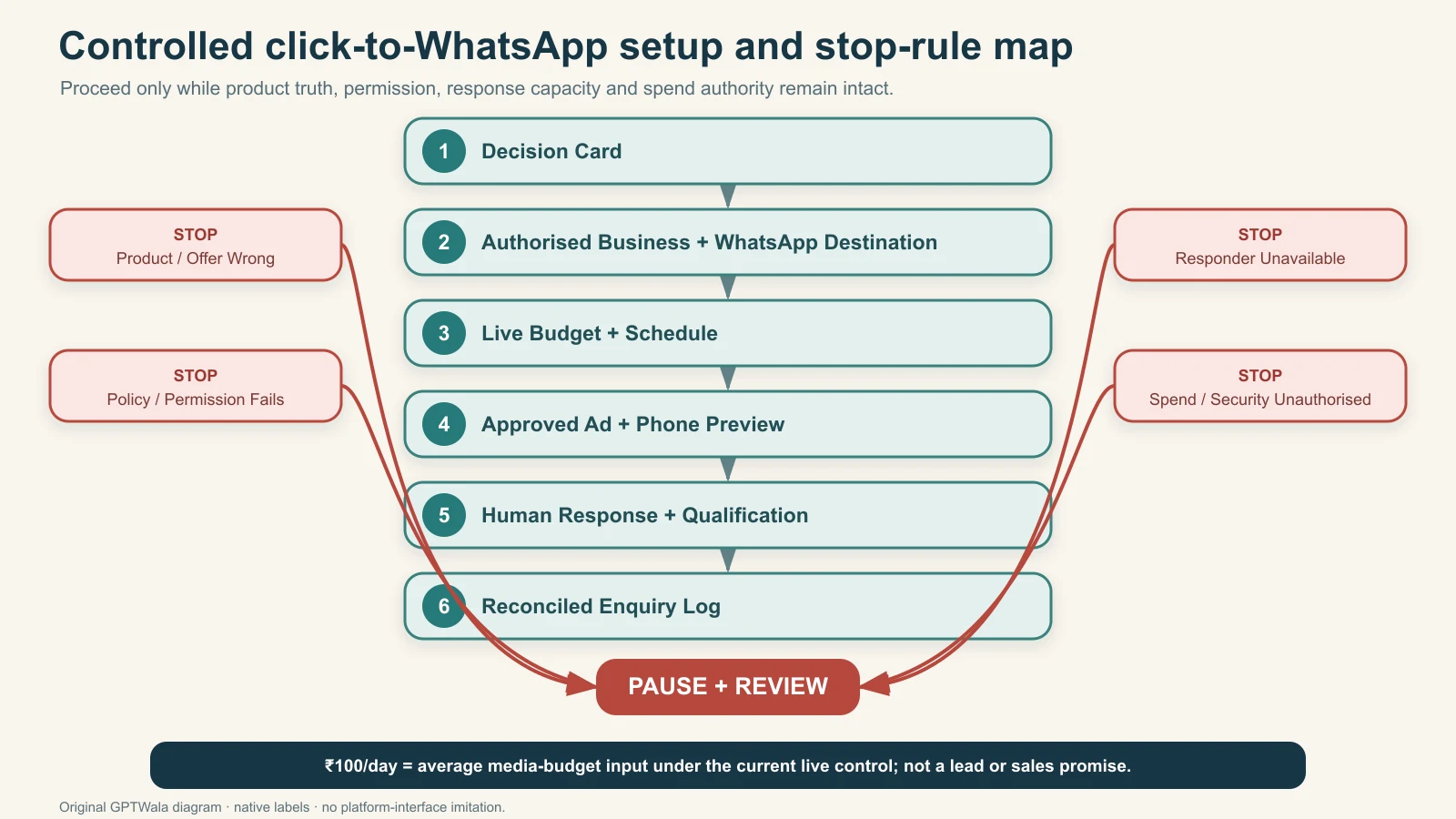
Original GPTWala control flow. Proceed only while product truth, permission, response capacity and spend authority remain intact; the ₹100/day setting is not a lead or sales promise.
Make the ad and first chat agree
The first WhatsApp exchange is where a persuasive ad either becomes a useful enquiry or reveals a mismatch.
Use message continuity
| Ad promises | First chat should confirm | Do not do |
|---|---|---|
| “Ask if this SKU is available in Lucknow” | SKU, branch/PIN and current availability route | Switch to another model without saying so |
| “Request the wholesale catalogue” | Business type, city, category and catalogue version | Send an unrelated catalogue or hide MOQ |
| “Share quantity for a quote” | Exact item, quantity, delivery location and quote conditions | Claim a final price without required inputs |
| “Get the technical data sheet” | Component family, application and document version | Treat a brochure as proof of suitability |
| “Ask for size help” | Exact garment, size chart version and buyer’s chosen inputs | Promise fit from a synthetic model image |
| “Book a jewellery viewing” | Exact collection/item, appointment route and current product details | Imply the AI lifestyle render is the exact stone/finish |
Do not bait with one product and open with another. Do not make a low headline price do work that a material MOQ, tax, delivery or variant condition should have done in the ad.
Define qualification before the first chat arrives
A “message” is not automatically a lead. A lead is not automatically qualified. A qualified enquiry is not a sale.
For this campaign, write the minimum observable facts. A B2B wholesale enquiry might require:
- relevant business/buyer type;
- serviceable city or PIN;
- requested product/category;
- quantity or credible buying range; and
- a next action the business can fulfil.
A retail enquiry may need only product, location and purchase window. A technical manufacturer may need application and specification inputs—but should collect sensitive or safety-critical information through an appropriate secure process, not an improvised chat.
The WhatsApp selling guide for product businesses should own the complete qualification and sales conversation. This campaign needs only a consistent first handoff.
Build a tracking system that survives low volume
Use two records:
- Platform delivery record: what the current interface reports about status, spend, delivery and messaging actions.
- Business outcome record: what an authorised person verifies in the WhatsApp and order workflow.
Metric names and attribution definitions can change. Export or note the exact label and definition shown in the account; do not silently translate every click or platform event into a buyer conversation.
Use a five-stage measurement ladder
| Stage | Operational definition | Source of truth | Typical error |
|---|---|---|---|
| 1. Delivered | Ad entered delivery and incurred recorded media spend | Ads Manager/billing record | Assuming approval means delivery |
| 2. Ad-attributed new chat | First observed chat meets the prewritten source-code/time rule | WhatsApp plus lead log | Counting clicks, previews or returning chats as new chats |
| 3. Valid buyer chat | Not a test, duplicate, spam, job seeker, supplier pitch or unrelated request | Human classification | Treating every message as demand |
| 4. Qualified enquiry | Meets the campaign’s written buyer, product, geography and need conditions | Human/CRM record | Changing the definition after seeing results |
| 5. Verified business outcome | Quote, appointment, sample, order or other defined action is reconciled to the enquiry | Order/CRM record | Assuming a chat became revenue |
Name the deepest outcome the business can verify. Do not invent an order field if the order system cannot be reconciled.
Create a privacy-minimised enquiry log
Recommended fields:
| Field | Purpose |
|---|---|
| First-contact date/time | Reconcile with the campaign window and account time zone |
| Campaign and creative ID | Trace the source without relying on memory |
| Contact key | Masked phone or internal lead ID; avoid copying full numbers into shared files |
| New/returning/duplicate | Prevent inflated new-chat counts |
| Product and request | Confirm message continuity |
| Buyer type | Retail consumer, retailer, dealer, procurement, other |
| City/PIN or service zone | Check fulfilment, using only the detail necessary |
| Quantity/need | Apply the written qualification rule |
| Classification | Test, spam, unrelated, valid, qualified |
| Next action and owner | Prevent an enquiry from disappearing |
| Outcome status | Quote/catalogue/appointment/order/closed-no-fit, only when verified |
| Exclusion reason | Explain why a chat was not counted |
Restrict access, set a retention rule and avoid pasting raw customer chats into public AI tools. The WhatsApp Business Messaging Policy places responsibility on the business for necessary notices, permissions, consents, data protection and a published privacy policy. Obtain India-specific legal guidance for your actual collection and processing; this article is an operating framework, not legal advice.
Write the attribution rule before launch
Example:
Count a new ad-attributed chat when the first incoming message carries campaign code
CTWA-BOX-AUG26or can be matched to the current ad entry within the predeclared window, the contact is not a team test or known duplicate, and a human verifies the product request. Record returning contacts separately.
Choose the window and matching method that your actual tools can support. Campaign codes reduce ambiguity but do not prove causation: a buyer can edit the prefilled message, forward details or contact through another route.
Calculate only what the data supports
Use reconciled media spend, not the budget setting, as the numerator.
Cost per ad-attributed new chat
reconciled media spend ÷ ad-attributed new chats
Valid-chat rate
valid buyer chats ÷ ad-attributed new chats × 100
Qualification rate
qualified enquiries ÷ valid buyer chats × 100
Cost per qualified enquiry
reconciled media spend ÷ qualified enquiries
Cost per verified attributable order
reconciled media spend ÷ verified attributable orders
If the denominator is zero, report not calculable—not ₹0 and not infinity as if it were a useful business result. If attribution is uncertain, report the count and uncertainty rather than forcing precision.
These calculations describe acquisition events, not profitability. They exclude or may exclude creative production, product review, staff time, messaging/technology charges, discounts, returns, fulfilment, tax and contribution margin. Use the product-business unit economics guide before deciding that an observed cost is affordable.
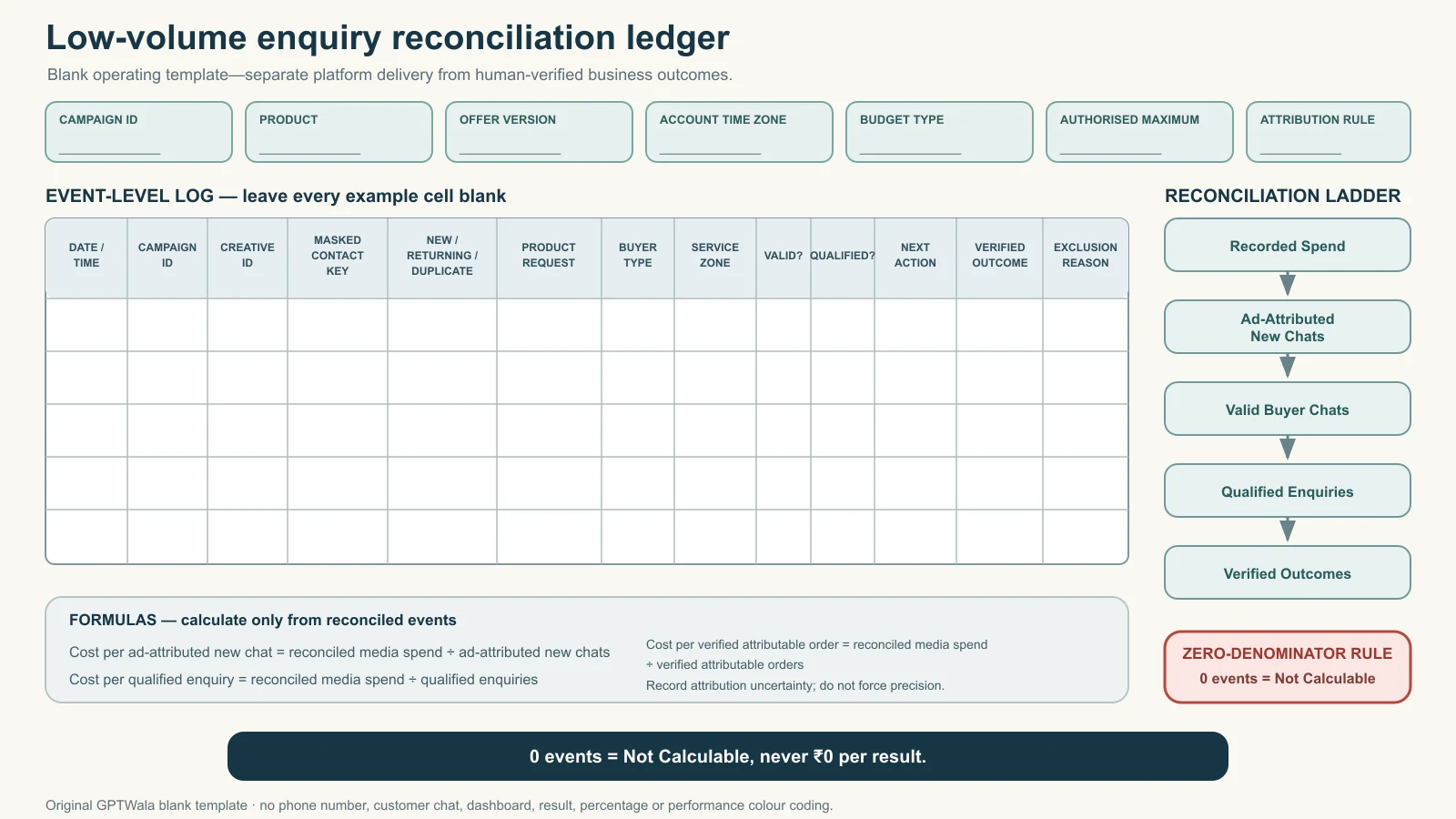
Original GPTWala blank reconciliation template. Keep platform delivery and human-verified outcomes separate, apply a written attribution rule, minimise contact data, and report a zero denominator as “Not Calculable”—never ₹0 per result.
Run the daily operating loop
A low daily media input still needs daily ownership.
Before response hours
- confirm the advertised product, offer, stock/fulfilment route and response promise are still true;
- check account, campaign, ad-set and ad status;
- check spend against the current authorisation and account time zone;
- open the destination from a current preview when anything changed;
- confirm the primary responder and backup are available; and
- check for policy, security, billing or account-quality alerts.
During response hours
- answer through the declared business identity;
- verify the buyer’s request before sending product facts;
- apply the same qualification rule to every chat;
- add the campaign/creative ID and classification to the log;
- provide a clear human route when automation is used;
- honour any stop/opt-out request; and
- escalate safety, technical, payment or sensitive-data issues instead of improvising.
Speed helps only when the reply is accurate. A fast wrong specification, price or promise is not good service.
At the end of the operating day
Reconcile:
- live status and recorded media spend;
- new source-coded chats;
- team tests, duplicates, spam and returning contacts;
- valid and qualified enquiries;
- missing responses or handoffs;
- offer/product changes; and
- any reason to pause before the next response window.
Do not change audience, offer, creative, destination and qualification together because one day felt quiet. Low-volume noise can look dramatic. Preserve the setup unless a safety/truth/policy/spend stop is triggered or a predeclared review authorises a documented change.
At the predeclared review point
Choose one state:
| State | Meaning | Next action |
|---|---|---|
| Continue unchanged | Setup is truthful, controllable and producing enough useful operating evidence | Continue only within the next authorised budget/time window |
| Review one bottleneck | Delivery exists, but a documented mismatch appears in audience, ad-to-chat continuity, qualification or response | Diagnose, change one material component and version the campaign |
| Stop | Truth, policy, destination, response, security, billing or affordability fails | Pause delivery; fix and re-review before any restart |
| Not enough evidence | Safe operation, but too few events to infer a result | Report uncertainty; do not name a winner or promise a result |
The testing guide owns formal creative comparisons. The unit-economics guide owns the profitability decision. Article 20 owns whether this operating system is controlled and traceable.
Use stop, review and continue rules
Write business-specific thresholds before launch. The table below supplies conditions, not invented universal performance numbers.
| Symptom | Likely issue | Diagnostic check | Safe action |
|---|---|---|---|
| Product in ad differs from supplied SKU | Creative/version failure | Compare final ad to the current approved product record | Stop immediately; replace only after fresh product QA |
| Offer, price, MOQ or availability is no longer true | Offer-control failure | Ask product/operations owner; check dated approval | Stop or update through formal review; do not explain away the mismatch in chat |
| WhatsApp opens the wrong number or identity | Destination failure | Test from ad preview on a separate phone | Stop immediately and correct ownership/connection |
| Nobody can reply in promised hours | Capacity failure | Check roster, queue and escalation path | Pause until a trained responder is available |
| Spend exceeds owner’s understood control | Budget/billing failure | Compare live setting, spend, schedule, currency and current Meta definition | Pause and resolve before reauthorising |
| Ad is approved but does not deliver | Delivery/eligibility/auction issue | Read live status and diagnostics; inspect schedule and account | Do not diagnose from the title; follow live guidance or support |
| Many chats are tests, spam or unrelated | Attribution/message mismatch | Reclassify logs; inspect ad wording, audience and source-code flow | Review one cause; never report the raw count as leads |
| Valid chats are outside service area | Audience/serviceability mismatch | Compare cities/PINs to the fulfilment map | Correct audience/message at a versioned review |
| Buyers ask for a product/condition not shown | Message-continuity failure | Compare repeated questions with ad and first message | Clarify the truthful offer; do not bait-switch |
| Chats are valid but rarely qualified | Qualification/offer/audience issue | Apply the unchanged qualification rule and exclusion reasons | Review one bottleneck; do not lower the rule to improve the report |
| Qualified enquiries receive no next action | Sales-handoff failure | Audit owner, timestamp and open tasks | Pause acquisition if capacity cannot protect buyer experience |
| No orders appear in a tiny sample | Insufficient or downstream evidence | Check qualified count, follow-up status and order reconciliation | Do not declare failure or success from zero/very low volume |
| Buyer asks to stop messages | Permission/experience issue | Verify the request and contact record | Stop messaging and honour opt-out promptly |
| Suspicious login, asset or payment activity appears | Security risk | Check authorised admins and official security/account tools | Pause and secure the account; do not continue spending |
An accepted ad and an open chat do not override these stops.
Apply the system to Indian product businesses
The structure stays the same; the qualification facts change by business model.
Rajkot industrial-component manufacturer
Campaign job: request the current data sheet for one pump-component family.
Truth controls: exact drawing revision, material/compatibility wording, no synthetic cutaway that invents an internal feature, and no suitability claim without engineering approval.
First-message fields: component code, application category, city/country and requested quantity range. Route detailed specifications to a trained technical person. The chat does not replace an engineering review.
Qualified enquiry: serviceable geography, relevant application, identifiable component need and plausible next action. A student asking for a project PDF is recorded separately, not mocked and not counted as a buyer.
Surat apparel wholesaler
Campaign job: request the current wholesale catalogue for one garment line.
Truth controls: real colour/print/size chart, current MOQ, dispatch conditions and catalogue version. An AI model must not make the garment look longer, slimmer, differently draped or differently embellished than the supplied item.
First-message fields: retailer/reseller status, city, product line and quantity band. If the seller cannot confirm fit from the information available, say so; link to verified measurements or use real try-on evidence.
Qualified enquiry: appropriate buyer type, serviceable location, catalogue-relevant category and MOQ-compatible need.
Morbi tile or home-surface distributor
Campaign job: request an availability call for one series and delivery region.
Truth controls: exact pattern, finish, tile size, batch/variation explanation and current sample policy. An AI room scene cannot be used as exact proof of colour, scale, reflectivity, joint width or installed result.
First-message fields: series/code, project location, area/quantity estimate and buyer type. Direct the buyer to a real sample or approved physical inspection when finish and batch matter.
Lucknow kitchenware retailer
Campaign job: ask whether one exact SKU is available for branch pickup or serviceable delivery.
Truth controls: current pack quantity, included parts, capacity/model and price conditions. Decorative props must not look included.
First-message fields: SKU, branch/PIN and intended quantity. A qualified retail enquiry can be simpler than a wholesale one, but the store must still separate current buyers from team tests and generic support chats.
Tiruppur apparel brand
Campaign job: get verified size guidance for one product page or collection.
Truth controls: real garment measurements and colour references; no promised fit from a generated body; no fabricated review or “best seller” badge.
First-message fields: exact garment/variant, buyer-selected size inputs and delivery PIN. Collect only what is needed and avoid sensitive body/health data. Escalate ambiguity to a trained human.
Jaipur jewellery business
Campaign job: arrange a product-detail or viewing conversation for a named collection.
Truth controls: real current piece, metal purity/stone/treatment/weight wording as applicable and approved; accurate hallmark/certification statements; no AI enlargement of stones, prongs, finish or included quantity.
First-message fields: item/collection code, city, preferred viewing route and purchase timing if the buyer volunteers it. High-value payment and identity checks belong in a secure, approved process—not the first ad chat.
Bengaluru home-storage product brand
Campaign job: ask for the correct variant for one documented storage need.
Truth controls: exact dimensions, closure, material and included quantity. Do not generate a capacity demonstration or stacking configuration that has not been physically verified.
First-message fields: selected SKU, intended use, variant and serviceable PIN. When load, fit or safety matters, use a real measurement or demonstration.
These examples illustrate routing logic, not campaign forecasts. Each business must replace them with its own records, policy checks and service constraints.
Protect product truth, customer data and messaging permission
Paid distribution increases the cost of a mistake. Use the same product-truth discipline for an ad as for a catalogue or marketplace listing.
Lock a product fact sheet to the creative
Before launch, record:
- exact product/SKU and packaging generation;
- approved source-photo IDs;
- dimensions, material, capacity, quantity and included parts only where verified;
- current colour/finish reference and acceptable display caveat;
- approved offer, claim and disclaimer copy;
- rights/consent for people, locations, voices, testimonials, logos and supplier assets;
- whether AI created or materially altered any part; and
- product-owner, claim-reviewer and approval date.
Use the AI product-image accuracy checklist when AI assisted the visual. If a buyer-critical feature cannot be locked—such as a jewellery setting, textile print, connector geometry, label, shade, fit, finish, scale, included quantity, safety action or tested performance—use real capture or a deterministic composite. Do not ask a prompt to guess.
Treat generated context as advertising, not decoration
An AI background can imply indoor/outdoor suitability, heat resistance, waterproofing, load capacity, premium material, celebrity use, customer satisfaction or a result. Remove the implication or substantiate it. A tiny disclaimer should not be used to repair a misleading main visual.
India’s Department of Consumer Affairs publishes the Guidelines for Prevention of Misleading Advertisements and Endorsements for Misleading Advertisements, 2022. The ASCI Code similarly requires objective claims to be substantiable and visual presentation not to mislead by implication, omission, ambiguity or exaggeration. Obtain qualified legal/category review where needed; ASCI is an industry self-regulatory body, not a government authority.
Meta’s June 2026 update says its “About this ad” area will carry AI information for ads created or significantly edited with Meta’s generative tools and describes plans/detection for some third-party AI signals. See Meta’s GenAI ad-transparency update. Platform labelling does not prove product accuracy and does not replace advertiser review.
Separate the buyer’s first contact from permission for later marketing
A buyer clicking an ad and starting a chat has asked about that interaction. Do not interpret one enquiry as unlimited permission to broadcast unrelated promotions.
WhatsApp’s current Business Messaging Policy says businesses must maintain accurate profile/contact information, respect block/discontinue/opt-out requests, avoid surprise or spam, and obtain the permissions/notices required for their communications. Its 24-hour customer-service window and approved-template rules are specifically stated for the WhatsApp Business Platform. Do not casually copy those Platform rules onto a Business App workflow, and do not assume the App has no obligations: identify which product you actually use and check its current terms.
If using the Business Platform, the policy says business-initiated conversations use approved message templates; a business may reply without a template within 24 hours of the last user message; and outside that window only approved templates may be used. Pricing applies and can change. The WhatsApp follow-up article should own timed sequences and template use once live.
For either product:
- state who the business is;
- reply to the request the buyer made;
- record any separate permission needed for later categories of messages;
- provide a clear opt-out route;
- stop when asked; and
- provide human escalation when automation is used.
Know the limits before you spend
₹100/day may be too little for the intended job
The campaign may deliver slowly, unevenly or not at all. A narrow industrial audience, expensive auction, weak account eligibility, restrictive placement, low-quality ad, scheduling choice or other conditions may make the budget insufficient. The system cannot infer which cause applies without live diagnostics.
A seven-day window is not a proof threshold
Seven days at a ₹100 average daily budget is an authorised-media example, not a scientific sample size. If only a few valid chats occur, differences between days, creatives or audiences may be noise. Report what happened and the uncertainty.
Platform numbers and WhatsApp records can disagree
Attribution windows, returning contacts, cross-device behaviour, forwarded messages, edited prefills, privacy controls, delayed reporting and team tests can create differences. Preserve both records and the reconciliation method.
Chat quality depends on the whole chain
A truthful ad can still fail operationally because the offer is weak, the audience cannot be served, the first response is late, the catalogue is outdated, the quote is confusing, stock is missing or follow-up is absent. Do not blame the creative alone.
A qualified enquiry is not an order
Orders can cancel, return or produce too little contribution margin. This article stops at traceable acquisition events. A financial decision needs landed margin, fulfilment, staff, returns, production and technology costs—not media spend alone.
Platform approval is not business approval
An approved ad may still be inaccurate, rights-infringing or unaffordable. A rejected ad may need correction or a formal review. Never evade enforcement by disguising the same prohibited or misleading content.
Policies and interfaces change
This guide was reviewed on 12 August 2026. Recheck live objectives, destinations, placements, budget definitions, review status, messaging rules, category eligibility, pricing and AI labels before publication and every launch.
Use the one-page launch record
Copy this into the campaign folder.
Identity and authorisation
- Campaign ID:
- Business/ad-account owner:
- WhatsApp product: Business App / Business Platform / other confirmed setup:
- Authorised WhatsApp destination:
- Currency and account time zone:
- Primary responder / backup / escalation:
Product and offer
- Exact SKU/family and version:
- Source-photo/product-record IDs:
- Approved offer and validity:
- Claim sources:
- AI use and disclosure decision:
- Product/claim/rights approvers and date:
Audience and chat job
- Buyer type and service geography:
- One campaign action:
- Prefilled message/source code:
- Qualification rule:
- Response hours:
- Opt-out and human-escalation path:
Budget and review
- Live budget type and amount:
- Start/end or review condition:
- Maximum authorised media exposure:
- Tax/billing check owner:
- Immediate stop owner:
Tracking
- Platform fields captured:
- Attribution rule/window:
- Masked lead-log location/owner:
- Reconciliation time:
- Valid/qualified/outcome definitions:
Final zero-spend sign-off
- Product truth passed:
- Offer/claim passed:
- Rights/consent passed:
- Category/policy passed:
- Phone preview passed:
- Destination and responder passed:
- Measurement passed:
- Budget authorisation passed:
Do not launch with blank owners or implied approvals.
Connect the campaign to a wider growth system
A click-to-WhatsApp ad cannot compensate for an invisible or untrustworthy business, weak product content, an inaccurate offer or a broken conversation. It works as one distribution layer inside a larger system.
If your manufacturing, wholesale, retail, shop, apparel, jewellery or product-brand business still depends heavily on walk-ins, dealer calls, exhibitions or forwarded catalogues, GPTWala’s workshop explains the DAA path: Digital Presence → AI Content Creation → ₹100/day WhatsApp ads. The ₹100/day phrase is a controlled setup and learning concept. It is not a guarantee of reach, chats, leads, enquiries, orders, sales, earnings, profit or ROAS.
See the GPTWala workshop and decide whether the DAA approach fits your product business.
Frequently asked questions
Can ₹100/day guarantee WhatsApp leads or sales?
No. ₹100/day is a media-budget input. Auction conditions and the entire ad-to-order chain determine what happens. Delivery itself can be limited, and a low-volume campaign may produce no defensible conclusion. Never sell the number as a guaranteed customer-acquisition package.
Will Meta spend exactly ₹100 every day?
Not under Meta’s current public daily-budget definition. It describes daily budget as an average and says a day may spend up to 75% over while weekly spend does not exceed seven times the daily budget. Recheck the live account and current official page; choose lifetime budget if its total-run control better matches the owner’s authorisation.
Which Meta campaign objective should I choose for click-to-WhatsApp ads?
Choose the currently available objective that supports your intended messaging destination and business job. The current official setup flow says to choose an objective and then select Messaging Apps and WhatsApp in the relevant conversion/destination controls. Labels and eligibility can vary, so do not rely on an old screenshot or a universal objective name.
How many ads should run on ₹100/day?
There is no universal count. Do not fragment the budget across more products, offers, audiences and creative variants than the campaign can meaningfully serve. Begin this setup with one approved creative or the deliberately small set defined by your testing plan. A18 owns formal control-versus-challenger design.
How long should a ₹100/day campaign run?
Authorise a time and maximum exposure that the business can afford, and define stop/review rules first. Meta/WhatsApp currently present at least seven days as a best-practice learning recommendation, but seven days does not guarantee enough delivery, qualified enquiries or statistical evidence. “Not enough evidence” is valid.
Is a click the same as a WhatsApp conversation?
No. A click, a platform messaging event, a new attributable chat, a valid buyer chat, a qualified enquiry and an order are different stages. Keep platform delivery and business outcome records, then reconcile them using a written attribution rule.
What should count as a qualified WhatsApp enquiry?
Define it for the campaign before launch. It normally needs the right buyer type or real consumer need, a serviceable location, the relevant product/request and the minimum quantity/specification/timing facts needed for a next action. Do not lower the rule after seeing weak results.
Can I send promotional follow-ups to everyone who clicks the ad?
No. A click alone is not unlimited marketing permission. Respond to the user’s actual request, identify the WhatsApp product you use, obtain required permissions, honour opt-outs and follow current policy. Business Platform conversations have specific template and 24-hour service-window rules; use the dedicated WhatsApp follow-up system for later sequences.
Can I use AI-generated product images in the ad?
Only after exact product, claim, rights and context review. Lock shape, labels, colour, finish, size, quantity and included parts. Use real capture when a buyer-critical feature, fit, material, scale, safety action or performance cannot be faithfully protected. An AI or platform label does not make an inaccurate ad acceptable.
What should make me stop the campaign immediately?
Stop for a wrong product/offer, misleading claim, broken or wrong destination, unavailable responder, prohibited or ineligible category, unauthorised spend/billing, account compromise, permission/opt-out failure or material customer-data risk. Performance disappointment alone should follow the prewritten review rule, not an impulsive multi-variable edit.
What is the most useful number to track?
Track the deepest event you can verify consistently—often a qualified enquiry rather than a click. Pair its cost with the valid-chat and qualification rates so you can locate the bottleneck. A verified order and contribution margin are deeper still, but only when your records support attribution and the full economics.
Sources checked for this guide
- WhatsApp for Business: How to create ads that click to WhatsApp
- WhatsApp for Business: Ads that click to WhatsApp overview
- Meta for Business: Facebook and Instagram ad budgets, costs and schedules
- Meta for Business: Ad review, policy and support
- WhatsApp Business Messaging Policy
- WhatsApp Messaging Guidelines
- Department of Consumer Affairs: Guidelines for Prevention of Misleading Advertisements and Endorsements for Misleading Advertisements, 2022
- Advertising Standards Council of India: The ASCI Code
- Meta: Expanding GenAI Transparency for Meta’s Ads Products, updated 1 June 2026
Leave a Reply