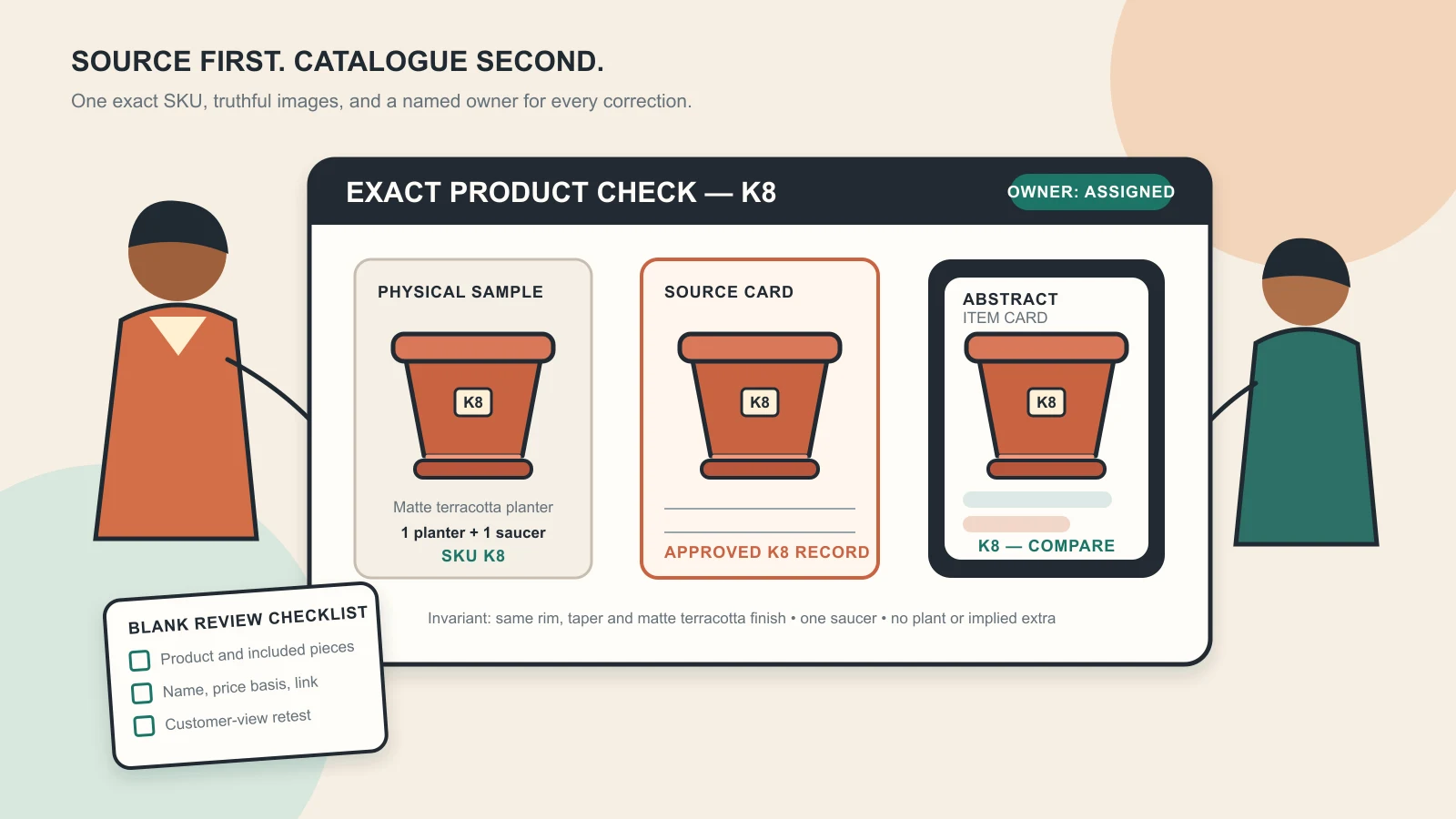
Visual disclosure: Original GPTWala editorial illustration using one fictional, unbranded matte terracotta K8 planter with one matching saucer and abstract catalogue shapes. It is not a WhatsApp interface, platform approval, client result or sales claim; the planter’s rim, taper, colour, finish, K8 label and saucer count remain identical in every representation.
Reviewed and updated: 12 August 2026
To build a useful WhatsApp Business catalogue, start with a small approved set of products, prepare one accurate record for each SKU, add truthful images and buyer-relevant details in the WhatsApp Business app, group related items into collections where the feature is available, and inspect the public result from a customer’s phone. Then use the catalogue as a discovery and conversation tool—not as proof of stock, a final quotation, a payment record or a guarantee of sales.
For each enquiry, share the most relevant item or collection, confirm the exact variant, quantity, current price, availability, delivery conditions and included parts, and move the confirmed order into the business’s authorised order system. Assign one person to correct outdated catalogue entries and keep a dated update log.
This guide owns the current WhatsApp Business app catalogue setup and practical usage workflow. The WhatsApp selling guide owns the full enquiry-to-order process; the WhatsApp follow-up template guide owns timed message sequences and permission; and the digital product catalogue guide owns range architecture, dealer information and larger B2B catalogues.
Table of contents
- Understand what a WhatsApp Business catalogue does
- Choose the correct WhatsApp product
- Prepare the catalogue source of truth
- Build the first launch set
- Add products in the WhatsApp Business app
- Organise items into useful collections
- Verify the customer view before sharing
- Use the catalogue in real buyer conversations
- Handle prices, stock, variants and B2B terms
- Protect product truth in images and descriptions
- Follow commerce, messaging and privacy rules
- Maintain the catalogue with a weekly control loop
- Measure usefulness without inventing sales attribution
- Troubleshoot common catalogue problems
- Apply the workflow to Indian product businesses
- Use the launch checklist
- Frequently asked questions
Understand what a WhatsApp Business catalogue does
WhatsApp describes the Business app catalogue as a mobile storefront for products and services. Its current Business app feature page says businesses can group similar items into collections, share the complete catalogue or specific item links, and let customers select catalogue items into a cart that is sent as one message. See the official WhatsApp Business app features.
That makes the catalogue useful for three jobs:
- discovery: a buyer can see what the business offers without requesting photos one by one;
- identification: a shared item can give both sides a clearer product reference; and
- conversation: a buyer can select an item and ask a specific question or send a cart message.
The catalogue does not automatically become the business’s inventory, accounting, quotation, tax, payment, shipping or warranty system. WhatsApp’s current policy says the business remains responsible for its transactions, sales terms, privacy terms, taxes, fees and fulfilment. A customer selecting an item or sending a cart is therefore an enquiry or order request until the business verifies and confirms it.
Catalogue, product database and quote are different records
| Record | Primary job | What it should control | What it must not pretend to prove |
|---|---|---|---|
| Product source of truth | Authoritative product facts | SKU, variant, specifications, approved images, current pack and claims | Buyer intent or confirmed stock allocation |
| WhatsApp catalogue | Mobile discovery and product reference | Approved public item cards and collections | Real-time inventory, final freight, credit or tax treatment |
| Quote or order summary | Commercial commitment for one buyer | Exact item, quantity, price, charges, delivery and terms | Payment settlement or dispatch |
| Accounting/order system | Transaction and fulfilment control | Payment/credit status, invoice, allocation, dispatch and reconciliation | A substitute for clear customer communication |
The safest design is a chain: source of truth → catalogue item → buyer conversation → confirmed order record. When one link changes, update the downstream records or temporarily hide the affected item.
Choose the correct WhatsApp product
This article is for a small business or a manageable team using the WhatsApp Business app. WhatsApp currently positions that app as the small-business product and the Business Platform as the programmatic route for larger-scale messaging. The two products have different setup, management, pricing and messaging controls.
Use the Business app workflow when:
- one owner or a small team can review every catalogue change;
- the launch range is manageable manually;
- current stock and price can be verified before confirmation;
- individual customer conversations are handled by people; and
- no ERP, CRM or automated catalogue integration is required.
Evaluate the Business Platform or a qualified implementation partner when:
- several agents need controlled access and routing;
- the product range or availability changes too quickly for manual maintenance;
- catalogue data must come from an ERP, ecommerce platform or inventory service;
- the business needs programmatic single- or multi-product messages; or
- governance, reporting and integrations exceed what the app can reliably handle.
Do not follow Business Platform instructions inside the Business app or copy the Platform’s 24-hour/template rules into an app setup without checking which product you use. This page does not teach Commerce Manager, API integration or provider selection.
Complete the business profile first
Before adding catalogue items, make the business identity clear. WhatsApp’s current policy requires an accurate Business profile with customer-support contact information and at least one of an email address, website address or telephone number. The current Business app page also describes profile fields such as business description, hours and website.
Check:
- legal or trading name used with customers;
- recognisable logo that the business owns or may use;
- plain-language description of what the business sells;
- current address or service area where appropriate;
- customer-support contact route;
- correct working hours; and
- website or verified landing page if one exists.
A complete profile cannot prove trustworthiness, but an inaccurate one creates avoidable doubt and can breach policy. Do not use another brand’s name, logo or dealer status without authority.
Prepare the catalogue source of truth
Do not type the catalogue from memory while holding the phone. Prepare an approved product sheet first. One row should represent one saleable SKU or clearly defined product configuration.
Use a catalogue source row
| Field | What to record | Reject or pause when… |
|---|---|---|
| Internal SKU | Stable code used by staff | The code maps to more than one item or variant |
| Public item name | Product type plus the buyer’s key differentiator | The name depends on vague words such as “premium” or “best” |
| Variant | Colour, size, material, pack or model | The images show a different variant |
| Current image set | Approved filenames and review date | A label, pattern, stone, part or pack version is uncertain |
| Short description | Material, dimensions, use and included quantity that can be substantiated | A benefit, certification or compatibility claim lacks evidence |
| Display price decision | Exact public price, “contact for current quote,” or another live-app-supported choice | Tax, MOQ, unit basis or variant price would make the displayed figure misleading |
| Product code | Customer-safe code if useful | It exposes confidential data or differs from the sales system |
| Product/website link | Canonical landing page for the exact item, if available in the current app | The page is broken, mismatched or outdated |
| Stock/availability note | Internal status and last check time | Staff cannot verify it before confirming an order |
| Owner | Person responsible for catalogue accuracy | Nobody has authority to edit or hide the item |
Meta’s original catalogue announcement documented price, description and product code as item information. The current app may show additional, fewer or differently labelled fields by operating system, version, account and market. Use the controls actually visible in the current app and do not invent a value merely to fill a field.
Write names that survive chat
The item name should help a customer and salesperson identify the same product after the image is separated from its collection. A useful pattern is:
Product type + model/range + key variant
Examples:
- Stainless Steel Tiffin R3 — 3 Tier, 900 ml Total
- Cotton Kurti S17 — Indigo, Size M
- Gold-Plated Brass Earrings J42 — Green Stone Pair
- Ceramic Planter K8 — Matte Terracotta, 18 cm
- Tile Sample Box M12 — Stone Finish, 300 × 600 mm Range
These are fictional examples, not claims about real products. Match the unit, material and variant to the business’s evidence. Do not cram offers, emojis, urgency or unverifiable superlatives into the name.
Treat price as a controlled field
Display a price only when a buyer can understand what that figure covers. Record:
- unit basis: piece, pair, set, metre, kilogram, carton or another exact unit;
- whether the figure includes applicable taxes;
- minimum order quantity where relevant;
- pack size and included parts;
- variant dependency;
- whether freight, installation or customisation is separate; and
- the date or event that should trigger revalidation.
If a wholesale, made-to-order or commodity-linked price cannot remain accurate, use the current app’s supported presentation carefully and direct the buyer to request a current written quote. Never place a placeholder number such as ₹1 merely to make the card look complete.
Build the first launch set
Start with a small set that the team can keep accurate. “Small” is an operating recommendation, not a claimed WhatsApp limit. Ten well-maintained items are more useful than a large catalogue containing wrong variants, discontinued stock and mixed price bases.
Choose launch items that are:
- frequently requested;
- currently saleable;
- easy to identify from approved images;
- supported by complete product facts;
- permitted by current WhatsApp and Meta commerce policy; and
- manageable by the person responsible for updates.
Exclude an item for now if:
- the product or pack is changing;
- a buying-critical detail is not photographed clearly;
- price, tax, MOQ or delivery wording is unresolved;
- a certification, composition or performance claim is unverified;
- the item falls into a prohibited or restricted category; or
- the business cannot fulfil enquiries for it reliably.
Select the image set by job
Use the first image to identify the exact sale item. Additional images should answer buyer questions rather than repeat the same angle.
| Image role | Useful content | Product-truth guardrail |
|---|---|---|
| Main item image | Complete product, simple background, recognisable variant | No extra accessory, offer badge or different pack |
| Alternate angle | Back, side, opening, closure or construction | Same exact SKU and current version |
| Detail | Texture, label, clasp, seam, fitting or surface | Never “enhance” unreadable detail into invented evidence |
| Scale/dimension | Verified measurement diagram or honest reference | Do not distort the product or imply an unverified capacity |
| In-use/context | Realistic use without hiding the item | Props must not look included; performance must not be staged as proof |
| Pack/set | Every included piece and quantity | Do not show optional items as part of the offer |
For a deeper image workflow, use the AI product photography guide for Indian businesses and the product-accuracy audit. A catalogue card inherits every error in its source image.
Add products in the WhatsApp Business app
Interface labels change. On many current app versions, the catalogue is reached through Settings or the main menu → Business tools → Catalogue. Treat that path as orientation, not a permanent promise. Update the app from an official store, open the Business tools visible in the account and follow the current on-screen route.
Step 1: Open the catalogue manager
Confirm that you are in the correct business account and phone number before editing. If the catalogue control is absent, do not install unofficial WhatsApp builds or give a third party remote access to the phone. Work through the troubleshooting gate later in this guide.
Step 2: Add one pilot item
Do not upload the whole range first. Add one low-risk, fully documented item. Use the source row—not memory—to enter the visible fields.
In the current item form:
- add the approved images in the intended order;
- enter the exact public item name;
- enter a price only if its unit and conditions remain truthful;
- add a concise description with material, size, pack and relevant buying detail;
- add the customer-safe product code if the field exists and helps identification;
- add the exact product link if offered and verified; and
- save the item as the app permits.
Field availability and labels can vary. If the app marks an item as pending, hidden, rejected or under review, record the displayed state and follow the current in-app guidance. Do not promise an approval time and do not repeatedly recreate the item to bypass a policy decision.
Step 3: Compare the saved card with the source row
Check the saved item line by line:
- correct SKU and variant;
- image order and crop;
- complete product and included parts;
- name, spelling and units;
- price basis and currency;
- description and product code;
- link destination; and
- visible availability or review state.
Correct the source or the catalogue; do not tolerate a mismatch because “customers will ask anyway.”
Step 4: Add the remaining approved launch items
Use a second person for a spot check when the catalogue contains high-value, regulated, technical or variant-heavy goods. Add in short batches so a repeated mistake can be caught before it affects the full range.
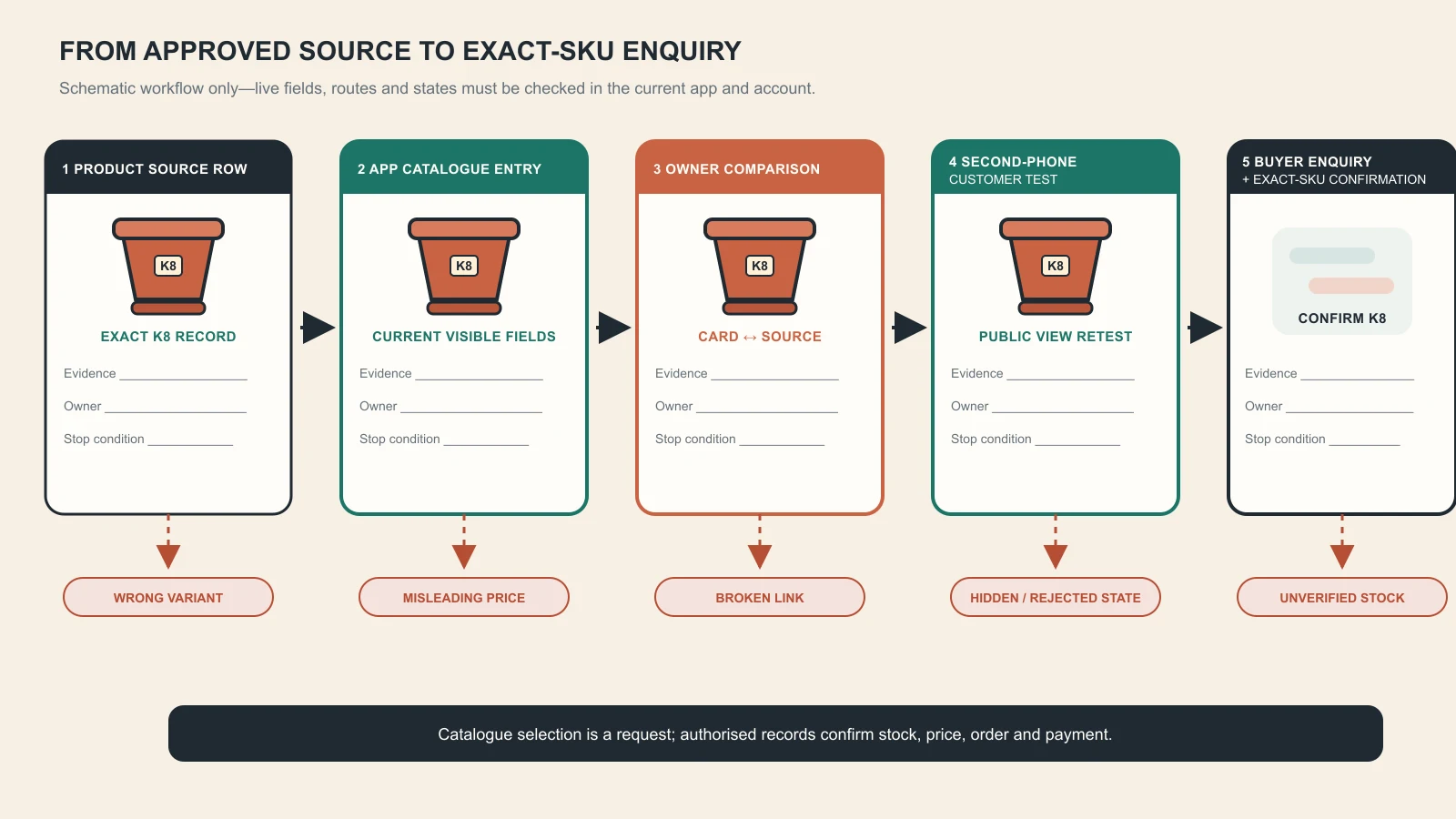
The catalogue is a controlled publishing layer between the product source of truth and the buyer conversation. Original GPTWala deterministic workflow: it is not a WhatsApp interface, and every field, route, state and customer view still requires a live-app/account check before publication or use.
Organise items into useful collections
WhatsApp’s current Business app feature page says catalogue items can be grouped into collections. Use collections to reduce buyer effort, not to reproduce every internal department or supplier folder.
Good collection logic reflects how a customer begins a decision:
- product type: planters, earrings, kurtis, storage boxes;
- buyer type: retail packs, wholesale-ready range, dealer samples;
- use: gifting, kitchen storage, festive wear, office accessories;
- material: cotton, brass, ceramic, stainless steel; or
- confirmed availability: ready to dispatch, made to order—only if the status is actively maintained.
Avoid overlapping names such as “New,” “Latest,” “Trending” and “Featured” unless the team has a written rule for membership and expiry. A product can appear exciting and still be impossible to locate.
Give each collection one clear job
| Buyer question | Better collection | Weak alternative |
|---|---|---|
| “Which planters can ship this week?” | Ready-to-dispatch planters, with an update owner | Best planters |
| “What do you supply to boutiques?” | Boutique wholesale starter range | Business products |
| “Show me your cotton kurtis” | Cotton kurtis | Fashion collection |
| “Which earrings are under my current budget?” | Use a current, maintained price band only | Cheap jewellery |
| “Do you have sample packs for dealers?” | Dealer sample packs | Special |
Do not create a “ready stock” or price-band collection unless its owner can remove items when the status changes. If the app/account does not offer collections, keep item names consistent and share specific item links rather than inventing a workaround that misleads buyers.
Verify the customer view before sharing
The editor’s view is not the customer’s proof. Test from a separate, ordinary customer account that is not an administrator of the business.
Run the second-phone test
Ask a colleague to open the business profile and catalogue as a customer would. Test both Wi-Fi and mobile data if access problems are reported. Check:
- Can the customer find the catalogue from the business profile?
- Are the intended items and collections visible?
- Does the main crop show the complete product?
- Are name, variant, units, price conditions and code readable?
- Does each link open the exact working page?
- Can a specific item or full catalogue be shared through the controls currently shown?
- If cart is available, does the selected item arrive in the business chat clearly?
- Does the salesperson know that this message is not yet a confirmed order?
Capture the date, device type, app version if accessible, tester and result in the launch log. Do not publish a filled fictional log as though it were a real test.
Use a blank catalogue verification record
| Check | Result | Evidence or issue | Owner | Retest date |
|---|---|---|---|---|
| Business profile accurate | ||||
| Catalogue visible to second account | ||||
| Collections understandable | ||||
| Exact item image and crop correct | ||||
| Name, variant and unit correct | ||||
| Displayed price not misleading | ||||
| Product link resolves correctly | ||||
| Cart/item message identifies SKU | ||||
| Policy-sensitive items checked | ||||
| Final decision: launch, revise or pause |
Use the catalogue in real buyer conversations
WhatsApp’s feature page says a business can share the whole catalogue or specific item links on WhatsApp, Facebook and Instagram from within the app. It also describes carts as a way for customers to choose catalogue items and send them as one message.
Use the smallest relevant share:
- one item link when the buyer asks about a specific product;
- one collection when the buyer has named a category or use;
- the full catalogue when the range is genuinely small or the buyer asks to browse; and
- a separate B2B catalogue or landing page when specifications, tiers and many variants cannot fit clearly in the app.
Sending the full catalogue to every “Hi” makes the buyer do the qualification work. First ask one useful question such as product category, use, size, quantity, budget range or delivery city—whichever materially changes the answer.
Use a catalogue-to-confirmation micro-flow
- Clarify the need. “Is this for retail use or a wholesale requirement?”
- Share the narrowest relevant item or collection. Include the public item name or code in native text.
- Invite a specific response. “Please send the item code, colour and quantity you want checked.”
- Verify current facts. Check stock, current price, MOQ, tax, freight and dispatch promise in the authorised records.
- Summarise the order or quote. Write the exact SKU, variant, quantity, price and conditions.
- Get explicit confirmation. Correct changes before taking payment or allocating stock.
- Verify payment or approved credit separately. A screenshot or cart message is not settlement.
The message examples are operating templates, not platform requirements or tested conversion claims. Adapt them to the business’s voice and current terms. The WhatsApp selling system owns the complete process after the catalogue share.
Do not count a cart as a paid order
A cart message can be a useful structured request, but the business must still confirm:
- exact variant and quantity;
- availability or production lead time;
- current price, tax, discount and freight;
- delivery or pickup details;
- return, cancellation and warranty terms where applicable;
- buyer confirmation; and
- authorised payment/credit status.
Only then should fulfilment receive an order record.
Handle prices, stock, variants and B2B terms
Most catalogue failures are data-governance failures, not design failures.
Keep one variant per unambiguous card
If colour, size, material, pack or model changes the item, the card must not make the buyer guess which variant the image and price represent. Use separate items when that is the clearest supported setup, or state the available choice without implying that every photographed variant has the displayed price or stock.
For apparel, a card named “Cotton Kurti — all sizes” is risky if the image shows one print, the price applies only to one size, or some sizes are unavailable. For jewellery, one pair cannot silently represent different stone counts or metal finishes. For industrial components, a family image cannot prove the dimensions of every part number.
Never use catalogue availability as the final stock promise
Before committing, check the live source controlled by the business. If stock is manual, state the last checked time internally and assign a person to reconcile reservations, store sales and damaged units.
Use honest phrases such as “Please confirm current availability” only where they do not contradict a stronger displayed claim. Do not label a collection “Ready stock” while keeping sold-out items visible for convenience.
Separate B2B discovery from quotation
A manufacturer or wholesaler can use WhatsApp catalogue cards for representative products, ranges or sample packs. The final quote may still depend on:
- grade, specification or tolerance;
- minimum order and pack multiple;
- quantity tier;
- tax registration and invoice needs;
- branding or customisation;
- production lead time;
- freight, insurance and destination; and
- approved credit terms.
Put stable discovery information in the catalogue. Put buyer-specific commercial terms in a versioned quote. Use the digital product catalogue guide for richer B2B range structure.
Protect product truth in images and descriptions
A catalogue image is a product representation. The CCPA’s Guidelines for Prevention of Misleading Advertisements and Endorsements for Misleading Advertisements, 2022 apply across forms and media and require truthful, honest representation without misleading exaggeration. A disclosure that an image was AI-assisted does not make an invented feature acceptable.
Use the exact-SKU image gate
Before approving any real or AI-assisted image, compare it with the physical item and controlled source photos.
Reject when the output changes or invents:
- silhouette, proportions, openings, handles, lids or parts;
- colour, finish, material or transparency;
- printed text, logo, label, hallmark or certification mark;
- pattern, weave, seam, stone count, setting or construction;
- included quantity or accessory;
- scale or dimension; or
- a use, result or performance that has not been substantiated.
Use AI for a background or controlled context only when the product layer remains verifiably true. If the source does not show a detail, recapture it instead of prompting the tool to guess.
Keep claims tied to evidence
| Claim type | Evidence needed before publishing | Unsafe shortcut |
|---|---|---|
| Material | Supplier/specification record and exact SKU mapping | Inferring from appearance |
| Dimensions/capacity | Current technical or measurement record | Estimating from a photo |
| Certification/compliance | Valid document covering the exact product and claim | Using a badge from another SKU |
| Performance | Applicable test or defensible substantiation | Treating a styled scene as proof |
| “Handmade,” “organic,” “waterproof” or similar | Defined, documented basis appropriate to the claim | Repeating supplier marketing without review |
| Included quantity | Current pack/BOM and complete image | Showing props that look included |
When a claim is not ready, remove it from the catalogue; do not soften it with an asterisk that leads nowhere.
Follow commerce, messaging and privacy rules
Catalogue setup does not create permission to market to everyone whose number the business has.
WhatsApp’s current Business Messaging Policy requires businesses to maintain accurate profile information, contact only people who have provided their number and opt-in permission for subsequent messages or calls, respect block/discontinue/opt-out requests, and avoid spam, deception or surprise. It also makes the business responsible for required privacy notices, permissions and legal compliance. See the WhatsApp Business Messaging Policy.
Check product eligibility before listing
The same policy says businesses using catalogue or other commerce experiences must comply with Meta Commerce Policy and applicable terms, laws and regulations. It also lists prohibited or restricted activities and products, with surface- and country-specific exceptions in limited cases.
Do not rely on a short blog checklist for a policy-sensitive business. Before listing, open the current policy and determine:
- whether the product, service or business model is allowed;
- whether the rule differs between the Business app and Business Platform;
- whether India is an allowed market for any stated exception;
- what age, geography, licence or other conditions apply; and
- whether separate Indian product, advertising or sector rules apply.
If uncertain, pause the item and obtain appropriate compliance advice. “Another seller has it in their catalogue” is not evidence of permission.
Minimise personal data in catalogue conversations
Do not ask for full payment-card numbers, financial-account numbers, government ID numbers or unrelated sensitive data in chat. Collect only what the specific transaction needs, at the stage it is needed, and control who can access it. Use authorised payment routes and verify settlement in the bank, gateway or accounting record—not from a screenshot.
Respect the boundary between service and promotion
Sharing the exact item a customer requested is different from repeatedly sending unrelated offers. Record how the person opted in, what category of messages they expect and how they can stop them. Honour an opt-out across the team.
The WhatsApp follow-up templates should own timed follow-up and permission language when live. Do not turn this setup article into a broadcast playbook.
Maintain the catalogue with a weekly control loop
Assign a catalogue owner and a backup. The owner does not need to create every image, but must have authority to correct, hide or escalate an inaccurate item.
Run this loop at a frequency matched to the business. Weekly is a practical starting recommendation, not a platform rule.
- Review changes: new SKU, new pack, discontinued item, price change, stock risk, policy change or broken link.
- Compare: catalogue card against the current product source row.
- Correct or hide: do not leave a known error live while waiting for a redesign.
- Retest: inspect the changed item from a customer account.
- Record: date, item, change, reason, editor, reviewer and final state.
- Notify sales: tell staff when an item code, price basis or availability message changed.
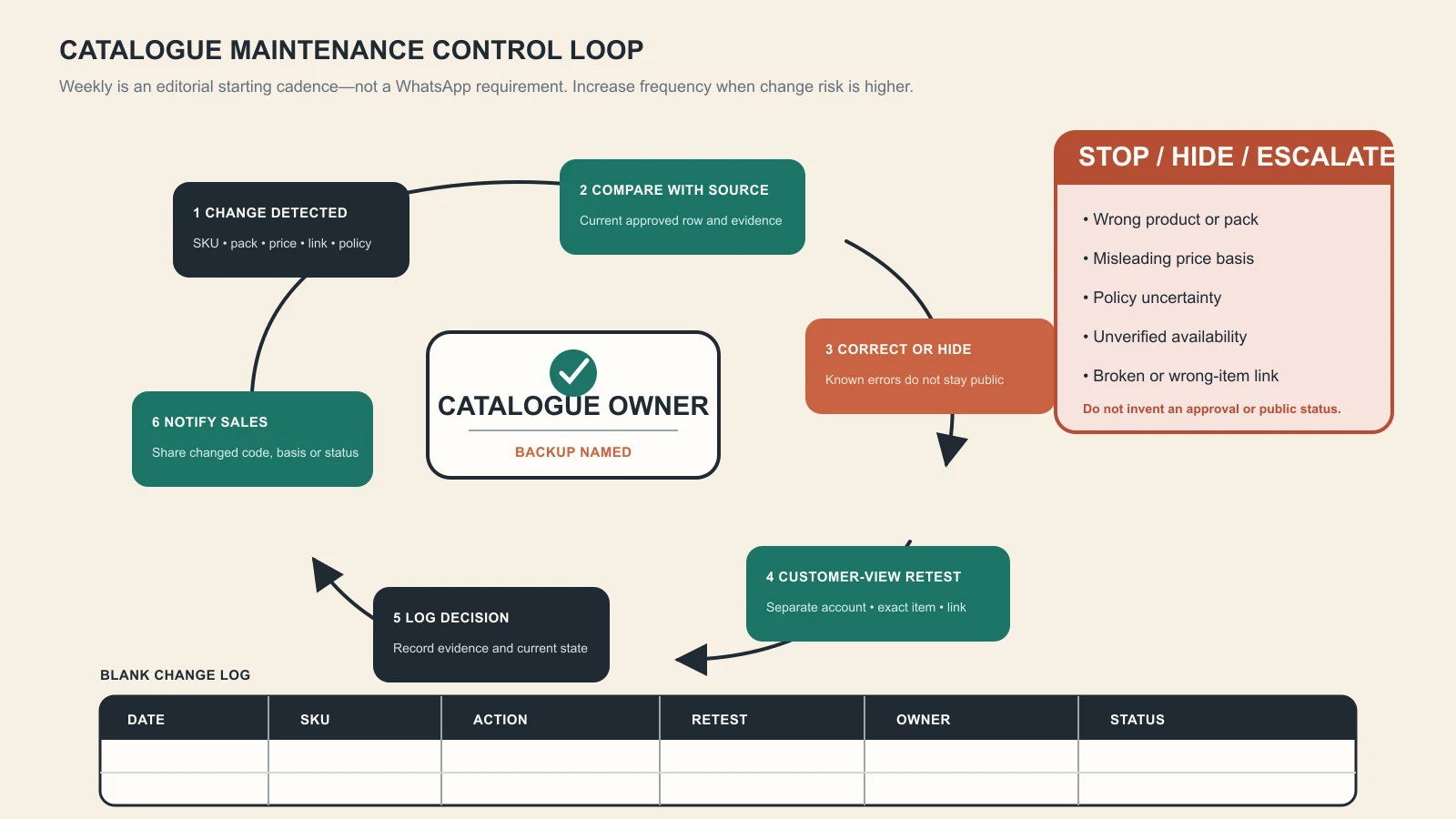
A catalogue remains useful only when source changes trigger correction, retesting and team notification. Original GPTWala deterministic operating diagram; the blank log contains no client data or fabricated status, and the weekly cadence is an editorial starting recommendation—not a WhatsApp requirement.
Keep a blank change log
| Date | SKU/item | Change trigger | Catalogue action | Customer-view retest | Owner/reviewer | Status |
|---|---|---|---|---|---|---|
Useful statuses are draft, pending/current app state, visible, hidden, revise, retired. Use the exact platform status in a separate field if it differs. Never fill the public template with fictional approvals.
Use stop rules
Hide or pause an item when:
- the current product or pack no longer matches the image;
- the displayed price or unit basis can mislead;
- stock or fulfilment cannot be verified;
- a key link is broken or opens the wrong item;
- an item is rejected or restricted and the reason is unresolved;
- a material, certification or performance claim is challenged;
- the catalogue owner cannot maintain it; or
- customers repeatedly confuse variants or included parts.
The correct response to a known catalogue error is not “explain it later in chat.” Fix or remove the public card.
Measure usefulness without inventing sales attribution
Do not assume every catalogue view caused a sale or every order came from the most recently shared link. Use measurements the business can actually observe and define.
Record a catalogue-assisted enquiry
Add these fields to the enquiry or order log where useful:
- enquiry source;
- catalogue, collection or item shared;
- item code named by the buyer;
- qualified or not, under a written rule;
- current availability confirmed;
- quote sent;
- order confirmed;
- payment/credit verified;
- fulfilment status;
- mismatch or correction needed; and
- opt-out or complaint.
Then ask operational questions:
- Which items attract qualified questions rather than repeated confusion?
- Which cards create variant, unit or price misunderstandings?
- How often is an item shared while unavailable?
- Which broken links or wrong images recur?
- How long do known errors remain visible?
- Which catalogue-assisted enquiries become confirmed orders in the authorised records?
Do not publish a conversion benchmark until the business has a defined denominator, attribution rule, time window and enough reliable data. A small sample may support no conclusion.
Use an issue rate as a guardrail
One simple internal guardrail is:
catalogue mismatch rate = catalogue-assisted enquiries with a material item error ÷ catalogue-assisted enquiries reviewed
Define “material item error” before counting—for example wrong variant, misleading price basis, unavailable promised stock, broken product link or incorrect included quantity. This is an editorial measurement recommendation, not an industry standard. The goal is to find preventable harm, not manufacture an impressive dashboard.
Troubleshoot common catalogue problems
| Symptom | Likely checks | Safe next action |
|---|---|---|
| Catalogue control is missing | Correct app, current official version, business account, device/account availability | Update through the official store, restart, check current Help Center/in-app support; do not sideload unofficial builds |
| Item is pending, hidden or rejected | In-app status, product category, image/text, current commerce policy | Record the exact state, correct substantiated errors, use official appeal/support route where offered; do not promise review time |
| Customer cannot see an item | Customer-view test, app version, item state, collection membership, connection | Retest from a second account and network; share only after visibility is confirmed |
| Main image crops badly | Image aspect, subject margins, current preview | Re-export around the complete product; do not stretch or regenerate the SKU |
| Wrong product opens from a link | Copied item, link destination, duplicate or retired SKU | Stop sharing, correct the mapping and retest the exact link |
| Price in chat differs from catalogue | Source date, unit, tax, MOQ, variant or old item | Pause the item, correct the public card and issue a clear current quote |
| Customers confuse variants | Card naming, image-to-variant match, collection overlap | Separate ambiguous cards and use exact product codes in chat |
| Buyer sends a cart but staff cannot fulfil | Stock/lead-time check missing | Treat cart as a request, confirm availability and terms, then create an order record |
| Catalogue gets views but few useful enquiries | Unclear range, weak names, wrong share, insufficient buyer detail | Share a narrower item/collection and improve information; do not claim the platform “doesn’t work” from an undefined sample |
| Team keeps reintroducing old errors | No source row, owner or change log | Lock the source, assign an owner and require a customer-view retest |
Escalate to a Platform/integration evaluation when manual synchronisation repeatedly creates customer harm or the team cannot keep the app catalogue aligned with its authorised product and inventory records.
Apply the workflow to Indian product businesses
These examples are illustrative operating scenarios, not GPTWala client results.
Surat apparel seller
Build collections by stable buyer logic such as cotton kurtis, co-ord sets and wholesale starter packs. Give each print/colour/size combination an unambiguous mapping. Do not use an AI model image to prove fit or drape unless the exact garment has passed the apparel product-truth checklist. Confirm current size stock and pack quantity before quoting.
Jaipur jewellery business
Use exact pair/set images and a customer-safe design code. Check stone count, setting, metal colour, clasp, pair symmetry, dimensions and included quantity. Do not infer purity, hallmarking or gemstone identity from an image. High-value or fine-detail products need the jewellery photography truth checks before catalogue approval.
Rajkot kitchenware manufacturer
One tiffin family may contain different tier counts, capacities, latch designs and steel grades. A family card is useful for discovery only if it does not imply that the pictured configuration and displayed price cover every model. Send the relevant technical sheet and a current quantity-based quote after qualification.
Morbi tile wholesaler
Use collections for finish or application where that matches buyer search. Treat catalogue images as colour/texture guidance, not a guarantee that every screen shows exact colour. Map sample codes to current batches and send specification, packing, quantity and freight terms in the quote. Do not compress a whole tile series into one card when variations materially affect the purchase.
Local gift or homeware retailer
Create a manageable ready-to-check range rather than photographing every shop shelf. The catalogue can help a buyer shortlist, but a “ready today” label needs same-day maintenance. Remove sold one-off pieces or clearly reverify availability before accepting payment.
B2B wholesaler with many SKUs
Use WhatsApp for a curated entry range and conversation, not as the only database. Ask buyer type, category, quantity and location, then send the relevant digital product catalogue or landing page. Maintain one shared product master so the WhatsApp card, PDF and quote do not contradict one another.
Use the launch checklist
Before setup
- [ ] The account is the official WhatsApp Business app account intended for customers.
- [ ] Business identity and support details are accurate.
- [ ] Each launch item has one approved source row and owner.
- [ ] Product eligibility has been checked against current policy.
- [ ] Images show the exact SKU, variant and included quantity.
- [ ] Price, unit, tax/MOQ/freight wording cannot mislead.
During setup
- [ ] One pilot item is entered from the source row.
- [ ] Saved fields, image order and links match the approved record.
- [ ] Collections follow buyer logic and have an update rule.
- [ ] Any pending/rejected state is recorded without invented approval timing.
- [ ] Remaining items are added in reviewable batches.
Before sharing
- [ ] A second customer account can find the intended catalogue and items.
- [ ] Main crops show the complete product.
- [ ] Item and catalogue links open the correct destination.
- [ ] Cart/item messages identify the product clearly where available.
- [ ] Sales staff know that a selection is not a confirmed or paid order.
- [ ] Stock, price, MOQ, freight and delivery are rechecked before commitment.
After launch
- [ ] A catalogue owner and backup are named.
- [ ] Source changes trigger a public-card review.
- [ ] Errors are corrected or hidden promptly.
- [ ] Customer-view retests and changes are logged.
- [ ] Catalogue-assisted enquiries are measured with defined fields.
- [ ] Opt-in, privacy and opt-out controls apply to later messaging.
Turn the catalogue into one part of an online-growth system
A truthful WhatsApp Business catalogue gives an offline product business a useful Digital Presence inside a familiar conversation channel. Accurate product images and descriptions are the AI Content Creation layer. Once the catalogue, enquiry handling and tracking are ready, a controlled ₹100/day click-to-WhatsApp test can be evaluated without treating spend as a sales promise.
That is the GPTWala DAA sequence: Digital Presence → AI Content Creation → ₹100/day WhatsApp ads. The workshop is educational and does not guarantee enquiries, orders, revenue, profit or return on ad spend.
See the GPTWala workshop
Learn how a verified catalogue fits into the wider DAA path for taking an offline product business online.
Frequently asked questions
Is WhatsApp Business catalogue free?
WhatsApp currently describes the Business app as free to download and includes catalogue capabilities among its business tools, while also noting that the app has a mix of free and paid features. Costs can still arise from data, devices, staff, ads, third-party tools or other services. Check the current official Business app resource and the controls visible in the account; do not assume every business feature or connected service is free.
How many products can I add to a WhatsApp Business catalogue?
This guide does not publish a product limit because no current first-party limit was verified for this manuscript and limits can change by product or implementation. Check the live Business app and current WhatsApp Help Center before planning capacity. Operationally, launch only the number the team can keep accurate.
What information should a catalogue item include?
Use the exact product name, variant, truthful images, buyer-relevant description and customer-safe product code. Display price only when unit, pack, tax, MOQ and variant conditions cannot mislead. Add an exact landing-page link if the current app offers the field and the destination is maintained.
Can I use one card for all sizes or colours?
Only when the card makes the available variants and the pictured/priced choice unambiguous. If size, colour, material, pack or model changes the product, price or stock, separate cards or a controlled follow-up may be safer. Never let one image silently stand for a different variant.
Does a WhatsApp cart message confirm an order?
No. Treat it as a structured request. Confirm the exact item, variant, quantity, availability, price, charges, delivery and terms; obtain buyer confirmation; then verify payment or approved credit in the authorised system before fulfilment.
Can manufacturers and wholesalers use a WhatsApp catalogue?
Yes, as a curated discovery and conversation layer. It should not replace specifications, quantity tiers, MOQ, tax, freight, lead time, credit terms or a versioned quote. Large or dynamic ranges need a controlled product master and may require a richer digital catalogue or Platform/integration route.
Can AI-generated product images go into the catalogue?
Only after a human verifies that the image truthfully represents the exact SKU. Reject changed shape, colour, material, text, pattern, part count, included accessories, scale or performance. If the AI cannot preserve a buying-critical detail, use the real photograph or a specialist workflow.
Why is my catalogue item not visible?
Check the exact status shown in the app, current product/commerce policy, correct business account, item fields, customer-view test, app version and connection. Follow official in-app or Help Center guidance. Do not promise a review time, repeatedly recreate a rejected item or install unofficial software.
Can I send my catalogue to every phone number I have?
No. A catalogue link does not remove messaging-permission requirements. WhatsApp’s policy requires the appropriate opt-in and says businesses must respect opt-outs and avoid spam or surprise. Respond to the buyer’s request and keep later promotional messaging within the permission they gave.
Sources checked for this guide
- WhatsApp Business app features
- WhatsApp Business app resource: create a digital storefront
- WhatsApp resource: why small businesses should use the Business app
- WhatsApp Business Messaging Policy and commerce-feature policy
- WhatsApp Help Center: About catalogue
- WhatsApp Help Center: About cart
- Meta newsroom: Introducing Catalogues for Small Businesses
- Department of Consumer Affairs: Consumer Protection rules index
- CCPA Guidelines for Prevention of Misleading Advertisements and Endorsements for Misleading Advertisements, 2022
- Google Search: General structured data guidelines
- Google Search: Changes to HowTo and FAQ rich results
Leave a Reply