Reviewed and updated: 12 August 2026
Editorial disclosure: no video tool, product or publishing account was tested for this article. Named capabilities come from current official documentation. The workflow, storyboard and checks are GPTWala editorial guidance; all examples and planned visuals are fictional.
To make a product demo video from still photos, start with verified images of the exact SKU, write one truthful message, and place the photos on a simple timeline. Use cuts, native text and slow camera movement over the stills before trying generated product motion. A single photo cannot prove an unseen side, opening action, fit or performance. If the video must show the product doing something, record that action with the real product.
Table of contents
- What this workflow makes
- Choose a safe motion level
- Build the still-photo pack
- Write the one-message brief
- Create the storyboard
- Assemble the video
- Use image-to-video carefully
- Add text, voice and music
- Run motion-truth review
- Adapt for the destination
- Indian product examples
- Failures and fixes
- When real video is required
- Frequently asked questions
What this workflow makes—and what it cannot prove
This page creates a short product-explainer video from real, approved photographs. It is useful when the buyer needs a quick overview of the product, its visible details, included parts and next action.
It does not create evidence of real movement from a still image. It also does not create an AI presenter. The complete AI product-video guide for Indian product businesses owns video strategy, formats, channel roles and measurement. The AI spokesperson product-video guide owns synthetic presenters, consent, voice and disclosure. This article owns the smaller production task: verified product stills → honest timeline → reviewed demo file.
What a still-based demo can show safely
- the exact product from photographed angles;
- visible material, finish, pattern, label and construction captured in those images;
- the quantity and included components shown in a real set photo;
- verified dimensions presented as native text;
- a sequence such as front → detail → back → contents → offer;
- a controlled zoom, pan or crop inside a real photograph; and
- a background or graphic transition that does not change the product.
What it cannot establish on its own
- how a hinge, lid, pump, zip, wheel, mechanism or machine moves;
- how fabric falls, stretches or fits on a person;
- how a liquid pours, foam forms or a product performs under use;
- the unseen back, inside or underside of a product not photographed;
- a genuine 360-degree rotation from one view;
- real speed, strength, capacity, waterproofing, heat resistance or other performance;
- human handling, scale or ergonomics from a generated hand; or
- real results, customer response or return on ad spend.
If your intended “demo” depends on one of those facts, the correct input is real video footage—not a longer prompt.
Choose the safest motion level that can do the job
Motion can come from the camera, the edit or the product. Those are not equivalent.
| Level | What moves | Suitable use | Truth risk | Approval rule |
|---|---|---|---|---|
| 1. Static timeline — safest | Nothing inside the photo; the edit cuts between real images | Catalogue overview, product features, set contents | Low | Every still already approved; transitions add no product pixels |
| 2. Camera move over a still | Crop window slowly pans or zooms across a real photo | Reveal detail, create pace, fit a vertical frame | Low to moderate | Product remains within source pixels; no edge is invented |
| 3. Layered/parallax scene | Verified product layer and background move at different speeds | Controlled depth, banner-style motion | Moderate | Masks must not expose hidden product areas or bend geometry |
| 4. Generated background motion | Scene changes around a retained product | Secondary lifestyle or ad context | Moderate to high | Product, scale, shadow and reflections remain true in every frame |
| 5. Generated product motion — highest | Tool invents in-between product states | Internal concept or shoot planning | High | Not commerce proof; record the real action before publishing a claim |
Start at Level 1 or 2. Move higher only when the buyer benefit is clear and a reviewer can still verify the exact product frame by frame.
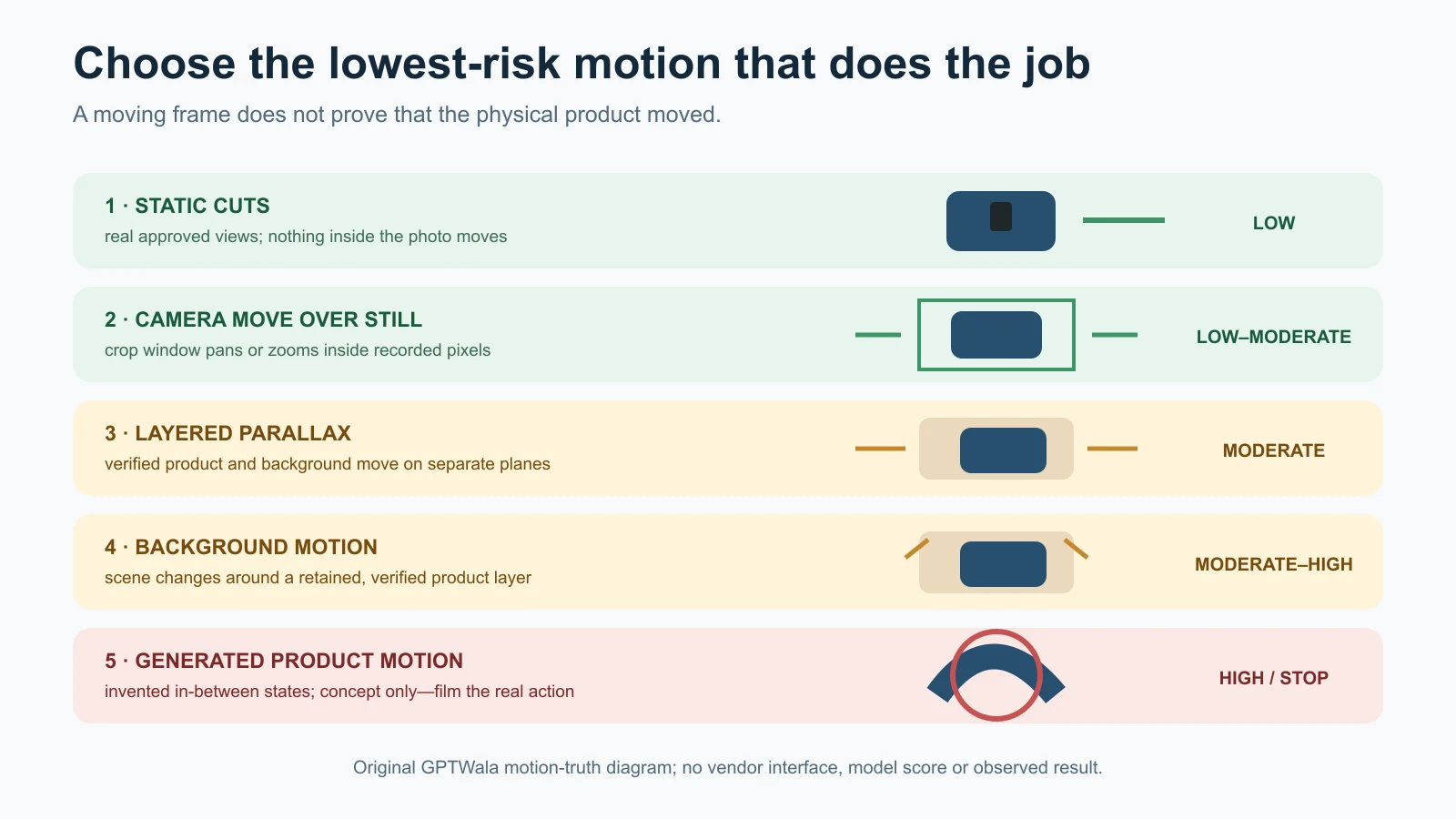
GPTWala motion-truth lanes. Moving the frame is not the same as proving that the physical product moved.
Build a truthful still-photo pack
The video is only as trustworthy as its source images. Keep the physical product, exact child SKU and approved product data together until review is complete.
Start with one exact SKU and offer
Record:
- SKU/design code and child variant;
- colour, finish, size and current pack version;
- quantity and every included component;
- dimensions and weight only from controlled product data;
- visible label/logo text;
- material and performance claims supported by current records;
- intended video destination; and
- one buyer question the video must answer.
Do not mix a blue product front, a black product back and an old package detail into one smooth-looking video. Do not show a single unit while the caption claims a set unless the offer and visuals explain the quantity clearly.
Capture the views the video will actually use
For a simple rigid product, a useful source pack may include:
- clean front or 45-degree hero view;
- back and side views;
- top, inside or underside only when actually photographed;
- detail images of texture, label, joint, closure or control;
- all included parts in one truthful set image;
- measured scale reference for internal review; and
- packaging only if it is part of the offer.
The list is not universal. A flat notebook may need fewer views. A jewellery set, reflective vessel, printed garment, machine component or transparent bottle may need more. The phone-to-approved product-image workflow covers the full capture and approval SOP.
Protect the untouched files
Keep source images separate from crops, background edits and video exports. Use filenames that preserve SKU, view, version and status:
SKU_view_source.ext
SKU_view_approved-v01.ext
SKU_demo-timeline_review-v02.ext
If an input image has already changed the label, colour, geometry or included parts, animation will multiply the error across many frames.
Write a one-message demo brief
A product demo from stills needs one clear job. “Make a viral video” is not a brief.
Use this format:
Create a short vertical product overview for exact SKU RJK-LBX-900-MB. Show the real exterior, latch, interior divider and included spoon using approved stills. Use slow camera moves and native captions only. Do not animate the lid, hand, food, insulation effect or leakproof performance. End with “Ask for current price and stock on WhatsApp.”
The product code is fictional. The important parts are the locked SKU, visible proof, prohibited motion and honest next action.
Choose one buyer question
| Buyer question | Still-photo answer | Do not imply |
|---|---|---|
| What does it look like? | Real front, back, side and detail cuts | A hidden angle that was not captured |
| What is included? | Real set layout plus native item list | An extra prop or alternative colour is included |
| How big is it? | Verified dimensions in text and measured reference graphic | Scale from a generated hand or room |
| What detail makes it useful? | Close-up of a real latch, texture, pocket or connector | That it operates successfully if no real action is shown |
| How do variants differ? | Separate approved stills and labels for each child SKU | Morphing one colour/design into another as if it is the sale item |
| How do I enquire? | Native CTA to current WhatsApp/landing page | Scarcity, discount or delivery claim not verified |
Keep benefit wording tied to visible fact. “Two removable dividers included” can be shown with a real components photo. “Keeps food hot for 8 hours” requires evidence beyond a still photo and should not appear because the video looks warm.
Build a short scene-by-scene storyboard
Plan before opening an animation tool. Each scene should have one approved visual, one factual caption and one transition.
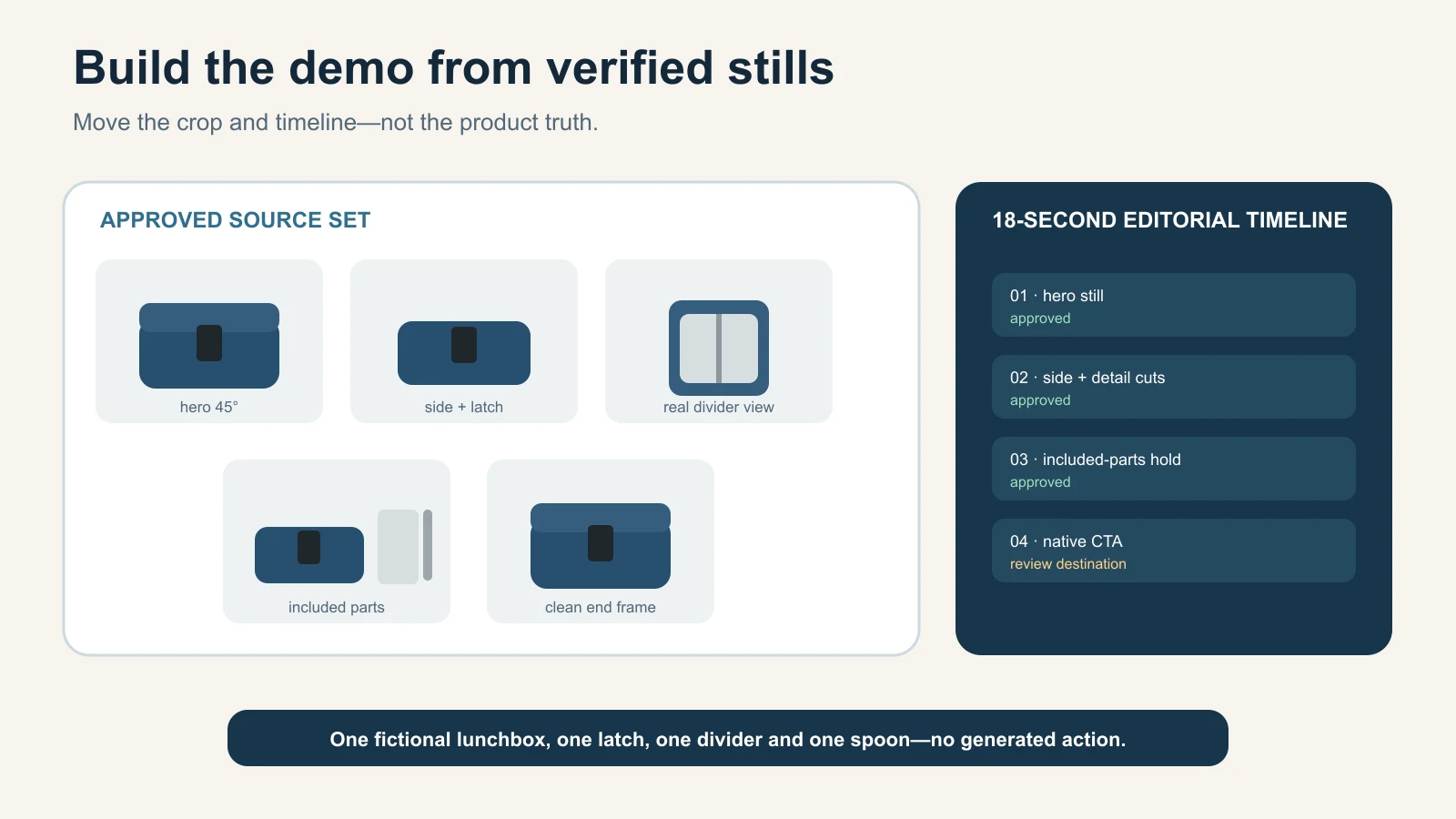
Illustrative 18-second storyboard
This timing is a copyable example, not a universal platform rule or tested “best length.” Adjust it after checking the real destination and viewer job.
| Time | Visual | Native caption | Motion | Truth check |
|---|---|---|---|---|
| 0–2 s | Approved hero still | Exact product name/variant | Gentle scale-in within source frame | Whole product remains visible |
| 2–5 s | Front and side stills | One verified visible feature | Straight cut or dissolve | No morph between angles |
| 5–8 s | Detail macro | Verified material/construction label | Slow pan across real detail | Crop never leaves recorded pixels |
| 8–11 s | Included-parts still | Exact quantity and contents | Static hold with native pointers | Every listed part is visible and sold |
| 11–14 s | Measured/product-data card | Verified dimensions or variant | Native graphic transition | Numbers match current SKU data |
| 14–18 s | Approved hero or pack shot | Honest WhatsApp/website CTA | Simple fade | No fake urgency or outcome claim |
Use captions outside the product pixels
Build titles, measurements, arrows and CTA as native video text or graphics. Do not ask a video generator to draw package labels, dimensions or price inside the product image. Generated lettering may look convincing while being wrong.
Keep text readable against a high-contrast background, leave safe margins for the actual destination and provide captions when narration carries meaning.
Use cuts when interpolation would invent
A cut from a real front image to a real back image is truthful. A morph that “rotates” the product between them can invent the sides, thickness, handle and label transition. If the in-between states were not recorded, use the cut.
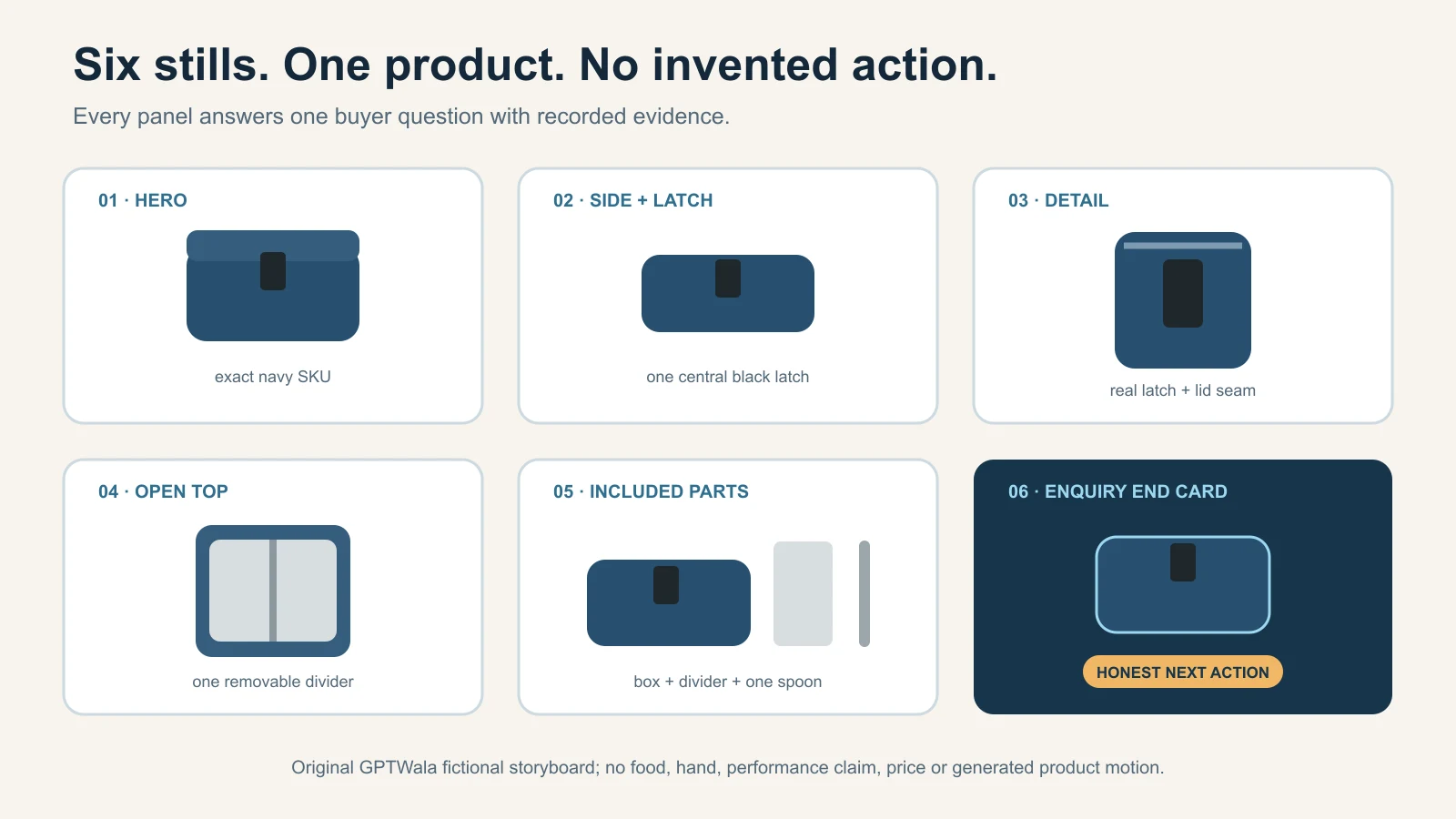
Original GPTWala fictional storyboard. It shows one lunchbox, one latch, one divider and one spoon; it is not a tool result or proof of product motion or performance.
Assemble the first version without generating product motion
A conventional timeline editor is the safest first tool because it can move the crop window without rebuilding the product.
1. Set the destination canvas
Choose the aspect ratio and resolution from the current destination requirements, not from a universal template. A vertical social video, landscape website embed and square catalogue preview have different crops. Keep one high-quality edit master and make reviewed channel copies rather than stretching one export everywhere.
2. Place only approved stills
Put the images in storyboard order. Match each file to the exact SKU record. Do not use an attractive draft, neighbouring variant or an AI scene that has not passed product truth.
3. Add controlled camera movement
For each still, set a start crop and end crop that remain inside the recorded image. Use a slow push toward a label or detail, a side-to-side pan across a wide set, or a small pull-back to reveal included parts.
Avoid aggressive zoom that exposes blur, turns a thumbnail into a macro or crops away a component. Do not pan beyond the original edge and fill the gap with generated pixels unless that new area is background-only and reviewed.
4. Use simple transitions
Straight cuts, short fades and restrained slides are easier to understand and audit than liquid morphs or object transformations. A transition should connect scenes, not turn one product state into another.
5. Add native information
Insert product name, variant, dimensions, components and CTA from the current SKU record. Keep a source for every claim. Spell-check Hindi, English and regional-language copy with a human reviewer; do not trust text rendered inside generated frames.
6. Export a review file
Name it REVIEW, not FINAL. Reopen the exported file and watch it once at normal speed, once frame by frame around every transition, and once in the destination crop.
Use generative image-to-video only inside a motion-truth lane
Generative image-to-video creates new frames. That is exactly what makes it useful and risky.
What current official tools document
Google’s current Product Studio documentation describes an Animate images route from an uploaded image or Merchant Center product, with an editable generated prompt and multiple output candidates. It also states that the broader Generate Video feature is currently available to merchants in India and selected other countries, and warns that experimental features may produce unexpected results.
Google’s separate Product Studio video guide documents choosing products and arranging product images, optional text and AI-asset labelling guidance. Availability, account access and label controls can change; verify them in the real account.
Adobe’s current Firefly image-to-video documentation describes a first image, optional last image, text-guided transition and camera-motion choices. It also warns that availability can vary by geography, user type and regulatory requirements.
This article did not test either tool. Documentation proves that the controls exist on the checked date; it does not prove product fidelity, cost, speed or suitability for a SKU.
Old tutorials are especially risky. OpenAI currently says the Sora web and app experiences were discontinued on 26 April 2026, with the API scheduled for discontinuation on 24 September 2026. Do not build a production SOP around an old interface video without checking the current provider page.
Safer generated motion
Use generative video only for a narrow instruction such as:
Use the supplied approved photo as the exact first frame. Keep the product completely static and unchanged. Apply only a slow virtual camera push toward the product while the plain background light shifts subtly. Preserve exact geometry, colour, finish, label text, logo, component count, included parts, scale, crop and contact shadow. Do not rotate, open, bend, deform, relight, touch or animate the product. Do not add hands, props, text, particles, liquid, food, steam or extra products. Return one candidate for frame-by-frame human review.
A prompt is not a lock. If the tool cannot keep the product still, return to Level 1 or 2.
Unsafe generated motion from stills
Do not publish these as product demonstrations without real footage:
- rotating the item to reveal an unseen side;
- opening a lid, hinge, clasp, zip or package;
- pouring from a bottle or operating a pump;
- flexing fabric, footwear, cable or material;
- spinning a wheel, fan, mixer, tool or machine part;
- putting apparel or jewellery on a generated person;
- showing food, cosmetics or a chemical taking effect;
- adding steam, water, fire, impact or load to imply performance; or
- generating a customer, worker or expert using the product.
These actions can be useful as a storyboard for a real shoot. Label them concept-only and keep them out of commerce until recreated and verified.
Add text, voice and music without adding false claims
Keep copy tied to evidence
Create a claim ledger before recording voiceover:
| Script line | Evidence | Safe status |
|---|---|---|
| “Includes two dividers and one spoon” | Real contents photo and current SKU record | Use if the exact offer matches |
| “Matte blue exterior” | Approved colour/finish source plus physical review | Use with normal colour-display caveat |
| “Leakproof” | A still of a closed lid | Do not use; a still does not prove performance |
| “Fits every lunch bag” | No dimensional comparison | Do not use; universal claim unsupported |
| “Made in India” | Current product/supplier records | Use only when verified for this SKU |
| “Best-selling” | No current sales evidence and scope | Do not use |
The CCPA’s Guidelines for Prevention of Misleading Advertisements, 2022 require truthful and honest representation and prohibit misleading exaggeration of product capability or performance. This is general compliance context, not legal advice for one video.
Use a real or authorised voice
A simple owner/staff narration can work if the speaker approves the recording and the script. If you use a synthetic or cloned voice, verify the speaker’s rights/consent, destination rules and disclosure requirements. A voice sounding confident does not make a product claim true.
AI presenter and cloned-voice decisions belong in the AI spokesperson product-video guide. This still-photo workflow can work without any presenter: captions plus product images are enough.
Treat music as licensed material
Use music you created, licensed or are otherwise authorised to use for the destination. Record the source and licence. Do not assume a tool’s library, “royalty-free” label or subscription automatically permits every organic, paid, client or cross-platform use; check the current terms.
Run the frame-by-frame motion-truth review
Video review must inspect time, not only a thumbnail. Compare the source stills and exact SKU against the start, middle, end and every transition of each shot.
| Gate | Inspect across frames | Automatic reject |
|---|---|---|
| Identity | SKU, child variant, current package/design | Product becomes a similar or generic item |
| Geometry | Shape, proportions, handles, lids, openings, edges | Product bends, rotates into invented geometry or changes silhouette |
| Colour/finish | Buying-relevant colour, pattern, material cues | Variant drifts or material changes with generated light |
| Text/marks | Label, logo, quantity, model code and orientation | Text swims, sharpens falsely, changes or disappears |
| Quantity | Units, components, accessories and props | Extra/missing item or prop appears included |
| Scale | Dimensions, hand/model/room relationship and crop | Product grows, shrinks or floats |
| Physical behaviour | Hinges, liquid, fabric, mechanism, shadow and gravity | Unrecorded function or impossible movement is shown |
| Background/contact | Surface, reflection, shadow, occlusion and edge | Product detaches, intersects a prop or reveals a missing side |
| Captions/voice | Spelling, timing, language and evidence | Unsupported claim, wrong variant or misleading urgency |
| Disclosure/rights | AI label, people/voice consent, music and source records | Required disclosure/permission is missing |
| Destination file | Aspect, crop, resolution, captions, metadata and CTA | Final export differs from approved review file |
Watch at normal speed after the frame review. A transition may pass frame-by-frame but still create a misleading impression when seen quickly.
Use an approval record
| Field | Entry |
|---|---|
| SKU / child variant | |
| Video purpose and destination | |
| Source still IDs | |
| Storyboard/script version | |
| Tool/editor and model/version if relevant | |
| Generated segments and prompts | |
| Claims and evidence record | |
| Music/voice/people rights | |
| Disclosure decision | |
| Product reviewer | |
| Channel reviewer | |
| Decision | APPROVE / REVISE / REJECT |
| Final filename/checksum or version |
Keep the form blank until a real video is reviewed. Do not turn the illustrative storyboard into a fake approval record.
Export and disclose for the real destination
Verify format and crop at publication time
Aspect ratios, duration limits, file-size limits, safe areas, caption behaviour and ad rules change. Check the actual destination account before export. Use the product-image and creative rules guide for the broader verification habit, then confirm the current video-specific page for the channel.
Create a master with sufficient quality for planned versions, but review every crop. A vertical crop can remove a handle, included part or measurement card even when the landscape version passed.
Disclose realistic synthetic content where required
YouTube’s current altered or synthetic content guidance requires disclosure when content is meaningfully altered or synthetically generated and appears realistic; the upload flow includes an Altered content setting. Minor aesthetic edits may not require the same disclosure, but the examples and rules must be checked for the actual video.
Do not use disclosure as permission to misrepresent the product. “AI-generated” does not cure a false lid movement or invented feature.
Add video structured data only for a real embedded video
If the finished demo is watchable on a product or article page, Google’s current VideoObject documentation describes properties such as name, description, thumbnail URL, upload date, duration and content/embed URL. Use markup that matches the visible, accessible video. Do not add VideoObject to this article until an actual video exists, and do not expect markup to guarantee a rich result.
How Indian product businesses can use the workflow
These are fictional operating examples, not client results or promises.
Morbi tile manufacturer
Use real stills of the tile face, edge/thickness, finish, back and verified dimensions. Cut between them with native specification text. Do not animate the tile bending, resisting water, preventing slips or supporting a load unless those claims and actions are captured and supported.
Rajkot kitchenware seller
Show the real vessel, lid, handle/joint, included parts and measured capacity from verified data. A slow pan across a real finish is safer than generated rotation. Film the actual opening, pouring, steam, heat or induction use if those behaviours matter.
Surat apparel wholesaler
Sequence real front, back, fabric, print/border, stitching and size-chart stills. Do not make a flat garment appear to drape, stretch or fit a generated model. Use real model footage when fall, fit and movement drive the purchase decision.
Jaipur jewellery retailer
Cut between real main, back, setting, clasp, measured-scale and applicable hallmark views. Do not generate sparkle, rotation or a wearing view from one photo. One changed stone, prong, chain link, hallmark or scale rejects the segment. The AI jewellery photography checklist is the category authority.
B2B machine-part manufacturer
Use verified front/side/back/port and dimension drawings as native graphics. Do not animate a shaft, valve, switch, load path or safety function from stills. Record the real mechanism under appropriate safety conditions and technical review.
Local packaged-goods retailer
Show the current pack front, back/label, seal, size and real included quantity. Keep ingredients, declarations, net quantity and expiry/batch information readable only from current real sources. Do not make particles, ingredients or outcomes swirl out of the pack as if they prove contents or performance.
Common still-to-video failures and safe fixes
| Failure | Why it happens | Safe fix |
|---|---|---|
| Product “breathes” or changes shape | Generative interpolation redraws each frame | Use a static still with camera crop movement |
| Label letters swim | Tool rebuilds fine text over time | Keep label static; add verified native text outside product |
| Fake 360 rotation | One/two views cannot define hidden geometry | Use cuts between real views or record a real turntable |
| Extra part appears mid-shot | Model invents context/occlusion | Remove generated segment; simplify background |
| Colour pulses | Generated lighting changes material/variant | Use approved stills and restrained global transitions |
| Product floats | Shadow/contact changes across frames | Keep real contact; use static background or controlled composite |
| Hand changes size or grip | Generated human/product interaction is unstable | Film a real authorised hand with measured product |
| Transition morphs variants | Tool blends child SKUs | Separate variants with a cut and native label |
| Zoom reveals blur | Source lacks detail | Recapture macro; do not upscale into false detail |
| Caption claims more than still shows | Script written for persuasion, not evidence | Use claim ledger; delete or verify the line |
| CTA covers product/quantity | Destination crop/safe area ignored | Reposition native CTA and preview in actual surface |
| Export loses captions/audio/metadata | Preset or platform processing changes file | Reopen final upload/derivative and compare with approved master |
The common AI product-photography mistakes guide covers source-image defects. Fix those before video assembly; animation does not repair product truth.
When to stop and record real video
Record real footage when the buyer must see:
- opening, closing, locking, folding or assembly;
- pouring, dispensing, mixing, spraying or flow;
- fit, drape, stretch, movement or worn scale;
- texture changing under touch or pressure;
- reflective/transparent material changing with angle;
- machine, tool, wheel, valve, switch or safety operation;
- setup time, speed, load, temperature, sound or performance;
- a person using the product;
- an unboxing, seal, pack contents or condition sequence; or
- a one-off, high-value or regulated item where invented motion is unacceptable.
Still-photo video is a presentation method. Real video is evidence of real motion. A hybrid can use real action clips plus still macros and native data cards, with every part tied to the exact SKU.
Turn the demo into an online-growth asset
An approved video can support a product landing page, digital product catalogue, WhatsApp follow-up or an AI ad-creative testing plan after the relevant channel review. Do not call it successful until you measure the real business outcome separately.
The GPTWala workshop connects this AI Content Creation step to the DAA path: Digital Presence → AI Content Creation → ₹100/day WhatsApp ads. It teaches a practical system, not guaranteed views, enquiries, sales or return on ad spend.
See the GPTWala workshop
Learn how truthful product content can connect to a wider online-growth process.
Frequently asked questions
Can I make a product video using only photos?
Yes. Use a timeline of real approved stills with cuts, native captions and slow pan/zoom movement. This can explain appearance, details, dimensions and included parts. It cannot prove an unrecorded action, hidden side, fit or performance.
How many product photos do I need?
There is no universal number. Capture enough approved views to support every scene without invention: hero, side/back, details, included parts and measured evidence as the product requires. If the storyboard asks for a view you do not have, recapture it or delete that scene.
Can AI turn one product photo into a 360-degree video?
It can generate a plausible rotation, but the unseen geometry is inferred. Do not present that as an exact-product demo. Use a real turntable video, a verified 3D model created from sufficient product data, or cuts between real views.
What motion is safest for a still-photo product demo?
A slow crop-window pan or zoom within a real photograph, plus simple cuts and fades. The product pixels do not need to be regenerated. Check that the crop stays inside the source and that no important component or text is lost.
Can I animate a lid, pump, zip or machine part from a still?
Not as evidence of real function. A generated action may invent hinges, seals, hands, intermediate positions or performance. Film the actual movement with the exact product and appropriate safety review.
How do I stop text and logos changing in AI video?
Keep the product/label static where possible and place captions as native video text. Frame-by-frame review is still required. If a generated segment makes label text swim, sharpen, vanish or change, reject it.
Do I need to disclose that a product video used AI?
It depends on the destination and the nature of the edit. YouTube currently requires disclosure for meaningfully altered or synthetic content that appears realistic. Other platforms and advertising systems have their own rules. Check the actual destination and local obligations; disclosure does not permit product misrepresentation.
Should I use an AI spokesperson in a photo-based demo?
It is optional and adds consent, voice, likeness, script and disclosure risks. A clear product-only video with native captions can be enough. Use the separate AI spokesperson guide before adding a synthetic presenter.
What should make me reject a generated product-video segment?
Reject it if identity, geometry, colour, label, quantity, scale, shadow, included parts or physical behaviour changes; if it shows an unverified claim; or if rights/disclosure evidence is missing. One serious error outweighs attractive motion.
Sources and review method
Reviewed 12 August 2026. Named tool capabilities, platform disclosure and schema facts were checked against current official documentation. The storyboards, motion levels, checks and examples are editorial recommendations. No tool output, merchant account, Indian checkout, upload, VideoObject implementation or performance result was tested.
- Google Merchant Center: About Product Studio
- Google Merchant Center: Generate videos in Product Studio
- Adobe Firefly: Generate videos using images
- OpenAI Help Center: What to know about the Sora discontinuation
- YouTube Help: Disclosing altered or synthetic content
- YouTube Help: How this content was made disclosures
- Google Search Central: VideoObject structured data
- Google Search Central: Video SEO best practices
- CCPA Guidelines for Prevention of Misleading Advertisements, 2022
- Google Search Central: General structured-data guidelines
Leave a Reply