Create one evidence-backed message system that sales, packaging, ecommerce and content teams can adapt without changing the product truth.
Updated 24 August 2026 · Guide for Indian product businesses
Brand messaging is the reusable language system that explains what a business offers, who it is for, why it matters and why a buyer should believe it. It is not one slogan. A useful system gives different teams the same strategic truth while allowing the wording to fit a pack, product page, sales call or short video.
List the buying stage, audience and next action. Awareness messaging helps a person recognise a problem or category. Consideration messaging explains fit and difference. Conversion messaging removes a specific uncertainty. Retention messaging reinforces use, care and repeat value. One sentence cannot optimise all four stages.
Stage
Buyer question
Message job
Useful proof
Awareness
Is this relevant to me?
Name the problem, category or outcome
Recognisable situation
Consideration
Why this option?
Explain meaningful difference
Specification, process or comparison
Conversion
Can I trust this purchase?
Resolve risk and next step
Policy, demonstration, availability
Use
How do I get the promised value?
Guide correct setup or care
Instructions and support
Retention
Should I buy or recommend again?
Reinforce fit and continuity
Service record and next-use relevance
Collect message inputs from evidence
Do not begin in a headline workshop. Assemble the approved product facts, buyer research, objections, alternative choices, price logic, service boundaries, policies and proof. Use the B2B buyer persona guide when buying roles differ from end users.
Input
What to capture
Source
Buyer language
Words used to describe the need and risk
Interviews, calls and search enquiries
Product truth
Materials, dimensions, performance and limits
Approved product data
Alternative
What the buyer would otherwise choose or do
Sales and market review
Difference
A meaningful reason to prefer this offer
Positioning evidence
Proof
What makes the claim credible
Tests, process, records or policy
Objections
What stops the next action
Sales, returns and support logs
Mark each input as verified, conditional or unknown. Unknown is not permission to make the sentence sound certain.
Build a brand messaging hierarchy
The hierarchy prevents every channel from inventing its own promise. Start broad and move toward evidence and action. Each lower layer should explain or prove the layer above it.
Layer
Purpose
Template
Category frame
Help buyers place the offer
We provide [category] for [audience/use].
Core promise
State the primary buyer value
So you can [credible outcome] without [important friction].
Differentiator
Explain the meaningful choice
Unlike [alternative], we [specific difference].
Reasons to believe
Support the difference
This is backed by [fact, process, policy or demonstration].
Product pillar
Organise repeatable themes
[Pillar name]: [buyer value] because [proof].
Action
Tell the buyer what happens next
[Specific next step] and what to expect.
Write one approved version and a plain-language paraphrase. If the paraphrase changes the truth, the message is too fragile.
Complete the practical messaging template
Audience: the priority person, context and buying role.
Problem: the observable situation, not an exaggerated fear.
Category: what the product actually is.
Promise: the most important credible value.
Difference: why this choice is meaningfully different.
Proof: product fact, process, demonstration, policy or evidence.
Boundary: conditions, exclusions or proper-use limits.
Objection answer: a concise response to a real concern.
Next step: an action with clear expectations.
Working formula: For [audience] who need [job], [brand/product] is a [category] that provides [value] because [difference and proof]. It is best suited when [fit] and not intended for [boundary].
Create a message-to-proof bank
Every important claim needs an owner and evidence. A proof bank lets writers work quickly without upgrading a possibility into a promise. Link the record to the exact product or range.
Claim type
Good evidence
Control question
Material or specification
Approved technical data or supplier record
Does it apply to every named variant?
Performance
Valid test or measured operating record
Are method and conditions stated?
Process
Documented workflow and quality control
Is it current and consistently followed?
Customer experience
Authentic attributed feedback with permission
Is it representative and unedited in meaning?
Delivery or service
Current service policy and operating capacity
Does geography or cut-off change it?
Price or saving
Current comparable calculation
Are taxes, fees and conditions clear?
For ecommerce copy, map this bank into the product-page copy template. Product-specific evidence belongs near the decision it supports.
Control claims and disclosures
Messaging must remain truthful and supportable. The ASCI code and guidance are useful review points for advertising in India, while regulated categories can carry additional obligations. Do not publish superlatives, health, safety, environmental, origin or certification claims simply because competitors use them.
Draft wording
Review question
Safer action
Best or number one
What independent, current comparison proves it?
Use a specific verified difference
Eco-friendly
Which environmental attribute, lifecycle and standard?
Name the narrow substantiated fact
Guaranteed result
Can every compliant user receive it?
State conditions or avoid the guarantee
Made in India
What legally and operationally supports the origin claim?
Confirm applicable requirements
Loved by thousands
Are count, source and period auditable?
Use an accurate attributed figure or remove
Free
What must the buyer pay or do?
State all material conditions beside the claim
Keep an approval owner for sensitive claims and a review date for evidence. This article provides a marketing workflow, not category-specific legal advice.
Adapt the message without changing the truth
Channel adaptation changes length, order and next step. It must not change specifications, create a stronger result or omit a material condition.
Channel
Lead with
Include
Avoid
Packaging front
Category, variant and key value
Required identifiers and concise proof
Unreadable claim pile-up
Product page
Product identity and decision help
Specifications, proof, policies and FAQ
Generic brand story before product facts
Marketplace
Compliant searchable product data
Required attributes and accurate media
Keyword stuffing and unsupported claims
Sales deck
Buyer problem and business fit
Process, evidence, scope and next step
One deck for every role
WhatsApp
Context and one answer/action
Product link, qualifier and response expectation
Long unsolicited message sequences
Short video
One demonstrable idea
Disclosure, product truth and next step
Claims the footage cannot prove
The content marketing system can distribute different questions while preserving this message hierarchy.
Test comprehension before persuasion
Show a message in its real format for a few seconds, then ask the viewer what is sold, who it suits, what value was promised, why it might be credible and what action comes next. Do not explain the answer first.
Test
Pass condition
Diagnostic use
Five-second recall
Correct category and audience
Tests orientation
Paraphrase
Meaning remains accurate
Tests clarity
Proof match
Viewer identifies the supporting fact
Tests credibility
Difference test
Viewer can name the alternative and distinction
Tests positioning
Boundary test
Viewer notices important limitation
Tests fairness
Action test
Viewer predicts the next step
Tests CTA clarity
Compare versions on qualified progression and confirmed outcomes, not only clicks. A vague promise can attract many low-fit visits.
Govern message rollout
Approve the message hierarchy, proof bank and claim boundaries.
Store exact product facts in one source of truth.
Create channel examples, not rigid copy for every situation.
Assign owners for product, legal/compliance, brand and sales review.
Update packaging, web, marketplace, CRM and sales assets in sequence.
Archive replaced wording so old files can be identified.
Review objections, returns and support questions monthly.
Change the core message only when evidence or strategy changes.
The goal is disciplined flexibility. Teams should be able to write naturally while staying inside the same product truth.
Frequently asked questions
What is a brand messaging template?
It is a structured worksheet that connects audience, problem, category, promise, difference, proof, boundaries, objection answers and next action.
What should a brand messaging framework include?
Include a category frame, core promise, differentiator, reasons to believe, product pillars, claim controls and channel adaptation rules.
What is the difference between brand strategy and brand messaging?
Brand strategy defines choices such as audience, position and identity. Brand messaging translates those choices into repeatable buyer-facing language.
How do I write a strong brand message?
Start from buyer context and verified product facts, state one credible value, explain a meaningful difference and place proof near the claim.
Should the same message be used on every channel?
Use the same strategic truth, but adapt length, order, proof and next step to the channel and buying stage.
How often should brand messaging be updated?
Review it when products, evidence, audience, regulations, objections or strategy change, and keep dated approval records for sensitive claims.
A vendor-neutral evaluation method that tests real product work, rights, accuracy, editability and total effort before a team commits.
Updated 23 August 2026 · Guide for Indian product businesses
The “best AI video generator” is not a stable category. Tools change quickly, and the strongest text-to-video demo may be the wrong choice for a team that needs exact product labels, controllable edits, multilingual voice, predictable rights or repeatable catalogue production. Choose with a same-brief test, not a feature list.
This framework extends GPTWala’s AI product video guide and avoids ranking vendors that have not been tested on your actual products.
Avoid the best-tool trap
Marketing claim
Operational question
Evidence to collect
“One-click videos”
How much correction is needed before approval?
Hands-on edit time and rejected outputs
“Brand consistent”
Can the team lock logo, colours, fonts and product assets?
Exported variants against brand QA
“Commercial use”
Which plan, inputs, outputs and regions are covered?
Current terms and written clarification
“Product accurate”
Does the exact SKU survive motion and relighting?
Frame-by-frame comparison with approved master
“Fast”
Fast to first output or fast to approved deliverable?
Total elapsed and labour time
Define the use case before opening tools
Write the asset, input and approval need. “Make AI videos” is not a use case. Examples:
Animate approved still photos into a 15-second product demo without changing the item.
Create presenter-led FAQ versions in Hindi and English using an authorised avatar.
Generate non-product background clips for a campaign while compositing a locked real product layer.
Resize and caption approved footage into vertical, square and horizontal edits.
Separate generation, editing, avatar/voice, translation and versioning. One tool does not have to perform every stage.
Build a same-brief evaluation test
Give each shortlisted tool the same source assets, script, duration, crops, brand rules and prohibited changes. Include one easy scene and one high-risk detail scene. Record settings and attempts.
Test input
Requirement
Why
Approved product master
Exact label, shape, colour and components
Tests preservation, not imagination
Script and shot list
Same words and scene jobs
Keeps the comparison fair
Brand kit
Orange/black/white, logo and type rules
Tests repeatable brand control
Delivery matrix
9:16, 1:1 and 16:9 versions where needed
Tests reframing and safe areas
Prohibited changes
No invented label, accessory, claim or testimonial
Creates an objective rejection gate
Rights scenario
Real input types and intended commercial destination
Tests plan/terms fit
Score output quality and workflow quality separately
Criterion
Weight example
Measure
Product truth
Gate, not average
Any material SKU, label, colour, size or function error fails
Scene and motion quality
15%
Usable continuity, perspective, hands and contact
Editability
15%
Can correct timing, text, layers, captions and crop?
Brand control
10%
Repeatable logo, colour, type and template behaviour
Audio/language
10%
Pronunciation, timing, consent and replaceability
Workflow fit
15%
Review, versions, collaboration, export and archive
Rights/privacy/security
Gate
Terms, retention, training use, access and deletion fit
Total cost/time
15%
Approved deliverable, not generation credit alone
Adjust weights before seeing outputs. Otherwise a visually impressive result can make the team quietly change the criteria.
Make product truth a non-negotiable gate
Inspect the video frame by frame where the product moves, rotates, becomes occluded or interacts with a hand. Reject if the tool changes:
logo, label, spelling or regulatory text;
colour, pattern, material or finish;
shape, dimensions or proportions;
ports, clasps, controls, stones, stitching or included parts;
Review rights, privacy and governance before uploading real assets
Terms and settings change. Read the current vendor documentation for the exact plan and intended use. Record, at minimum, input ownership, output usage rights, training use, retention/deletion, human/face/voice consent, sub-processors, confidentiality options, watermark/disclosure and account export/deletion.
Do not upload confidential product launches, customer data, identifiable people or licensed assets until the responsible owner has approved the handling. The NIST AI Risk Management Framework provides a vendor-neutral way to think about governance, mapping, measurement and management.
Not legal advice: commercial-use labels do not replace reviewing the exact terms, source-asset rights and consent obligations for your business and region.
Measure total cost to an approved deliverable
Track subscription/credits, failed generations, waiting time, operator time, manual retouching, caption/voice fixes, exports and review cycles. A cheaper tool can cost more if every output requires reconstruction.
Cost line
Record
Decision metric
Generation
Credits/attempts per approved scene
Cost per usable scene
Labour
Prompting, editing and QA minutes
Hours per approved deliverable
Rework
Reasons and number of revisions
First-pass approval rate
Tool chain
Extra editor, caption, voice or storage costs
End-to-end cost
Risk
Blocked use cases or required manual controls
Fit/non-fit by workflow
Run a controlled pilot
Choose two representative SKUs and one difficult variant.
Test no more tools than the team can evaluate consistently.
Blind-review outputs against the pre-set scorecard where practical.
Complete rights/privacy review before expanding inputs.
Run one real delivery through review, export and archive.
Decide approved use cases, prohibited use cases and fallback workflow.
Keep a decision record, not a permanent winner
Record date, plan, tested version, sources, prompts/settings, results, costs, risks, owner and review date. Approve tools for specific use cases, such as “caption and resize approved footage”, rather than “all product video”. Re-evaluate when pricing, models, terms or business inputs change.
Testing different briefs: one tool receives a polished prompt while another gets a vague sentence, so the comparison measures operator effort rather than tool fit.
Scoring only the first frame: product errors often appear during rotation, hand contact, occlusion or transitions.
Ignoring rejected attempts: only counting the final output hides cost and unpredictability.
Assuming a paid plan solves rights: plan names are not a substitute for current terms and source-asset permissions.
Choosing for one expert operator: test whether the actual team can repeat, review and hand off the workflow.
No exit path: keep originals, scripts, captions and editable assets so a vendor change does not erase the production system.
Interpret the scorecard with gates
Do not average a serious product-truth or rights failure into an otherwise attractive score. Mark those as gates. Among tools that pass, compare the weighted operational criteria and note uncertainty. If two tools are close, choose the simpler controlled pilot rather than forcing a winner from small samples.
A tool may be approved for background ideation but blocked for product animation, or approved for captions but blocked for customer voice cloning. Use-case-specific approval reduces risk and prevents a broad purchase decision from overruling evidence.
Document human review time as part of the control, not as an invisible cost. If the workflow requires a specialist to catch subtle label or motion errors, assign that reviewer and include the time in the pilot decision. Repeat the hardest test before final approval.
Frequently asked questions
How do I choose the best AI video generator for product marketing?
Define the exact use case, test shortlisted tools with the same approved brief and assets, gate on product truth and rights, then compare editability, workflow fit and total cost.
Should I choose an AI video tool from online rankings?
Use rankings only for discovery. Tool capabilities, plans and terms change, and a reviewer may not test your SKU accuracy, rights or approval workflow.
What should I test in an AI product video?
Test labels, shape, colour, components, motion, hands/contact, editability, aspect ratios, captions, brand controls, rights, privacy and cost to approval.
Can I use a free AI video generator commercially?
Do not assume so. Review the exact plan’s current terms, watermarks, source-asset rights, output rights, retention and usage restrictions before commercial use.
How many AI video tools should a small team test?
Test only a manageable shortlist against the same brief. A deep comparison of a few realistic candidates is more useful than shallow trials of many tools.
How often should we re-evaluate an AI video tool?
Set a review date and reassess when the model, plan, price, terms, data handling or required business use changes.
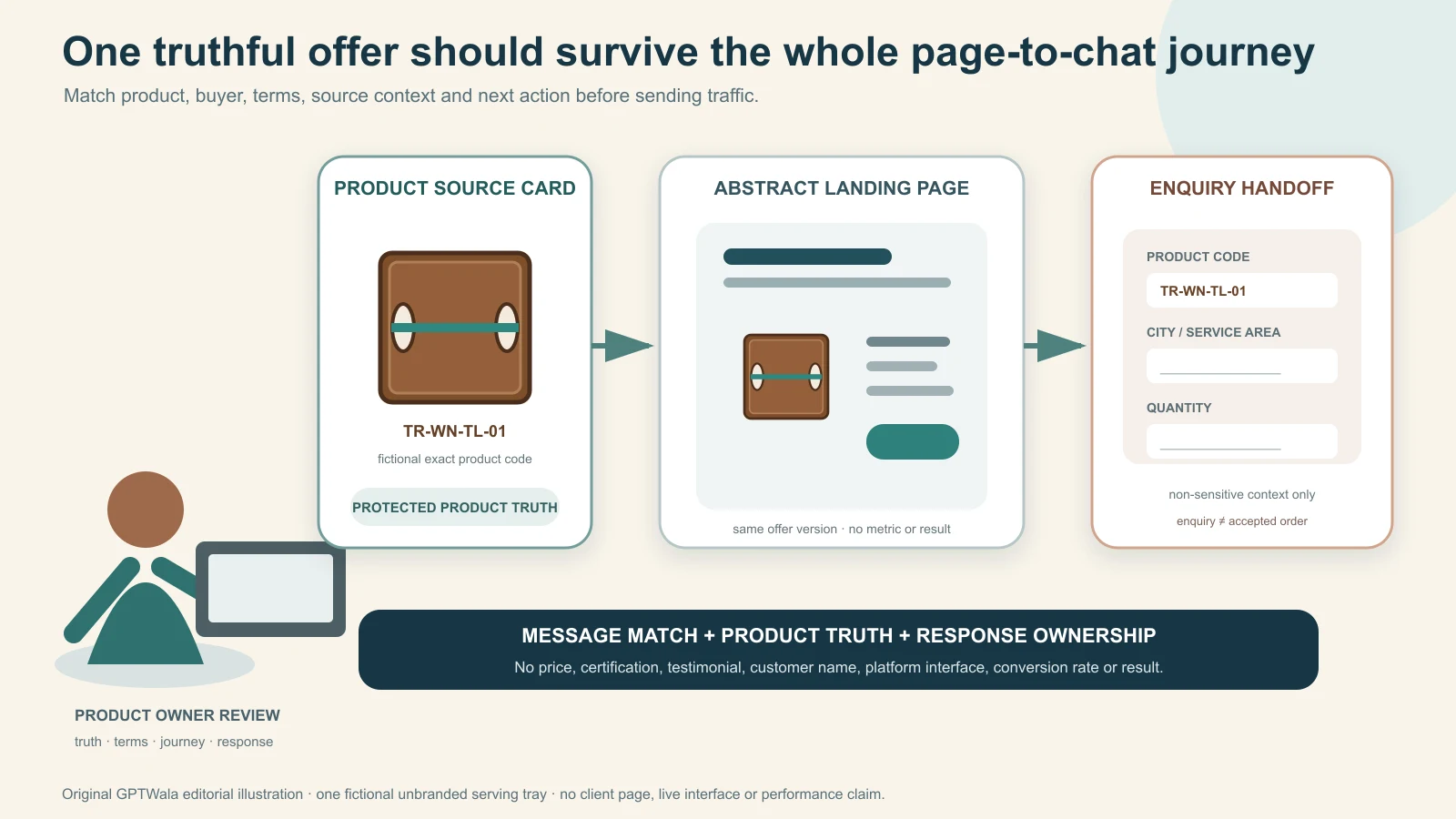
Original GPTWala editorial illustration using one fictional, unbranded walnut-finish serving tray. The same offer context passes from source to abstract page to enquiry; no price, customer, platform interface, conversion result or certification appears.
Reviewed and updated: 12 August 2026
To build a product landing page for WhatsApp enquiries, choose one buyer, one exact product or bounded offer and one next action. Match the page to the message that brought the visitor, show the real product and buying-critical facts, state price/MOQ/availability and service conditions honestly, answer the decision-stopping objections, and make the primary button open the correct business conversation with a non-sensitive product and source reference. Test the entire phone journey before sending traffic.
The page should help a suitable buyer decide, “This may fit; I know what to ask next.” It should not disguise a catalogue, quote, checkout, technical approval or confirmed order as a green chat button.
All examples are fictional operating models, not GPTWala client results. This is conversion and workflow guidance, not legal advice or a promise of enquiries, sales or return on ad spend.
A product landing page is a focused destination for one campaign, offer, product family or exact item. It gives the visitor enough verified information to take one intended next action. In this guide, that action is an appropriate WhatsApp enquiry.
A landing page is not a smaller homepage
A homepage usually serves several audiences and paths. A landing page should remove unrelated navigation and answer the promise that led the visitor there.
It can still contain business identity, policies and supporting links. “Focused” does not mean anonymous, context-free or stripped of trust information.
A WhatsApp button is not the page’s strategy
A page with a product photo, “Best quality”, a phone number and a floating green icon gives the buyer very little help. The page must answer:
What exactly is being offered?
Is it for someone like me?
Which variant, pack or configuration is shown?
What will I receive—and what is not included?
What are the important terms or limits?
Why should I trust the product representation?
What information should I send for a useful reply?
What happens after I tap the button?
The button starts the handoff; it does not replace those answers.
A chat start is not a qualified enquiry
A visitor may tap accidentally, open WhatsApp and leave, send “Hi”, ask for an unavailable variant, fall outside the service area, be seeking a job or be a supplier. Define the business action separately from the interface event.
A useful page goal might be:
A retailer in our serviceable region sends the exact starter-assortment code, expected quantity and city, and agrees to a product-and-terms conversation.
That is not yet a quote, order, payment or sale.
Choose one buyer, product and action
The narrowest truthful offer usually creates the clearest page.
Write a one-sentence page brief
Use this pattern:
Help [specific buyer] understand whether [exact product/bounded offer] fits [job or need], then [one WhatsApp action] with [minimum useful context].
Fictional examples:
Help independent apparel retailers assess a 24-piece cotton-kurti starter assortment, then request current trade terms with city and expected quantity.
Help maintenance teams assess whether bearing series BR-6204 may fit their documented requirement, then send application and part/drawing reference for human review.
Help nearby homeware shoppers understand the exact four-container set, then ask about the shown colour and delivery pincode.
Do not write “anyone interested in our products” as the buyer or “contact us” as the action.
Choose the right page scope
Page scope
Use when
Main risk
Better control
Exact SKU
One item/variant is the message and offer
Stock or price can change quickly
Product/offer version and bounded availability language
Product group
Buyer must choose among a few real variants
CTA loses selected variant
Preserve variant in the button/message context
Curated bundle
Included items and pack are controlled
Lifestyle image implies extra inclusions
List every included item and bundle code
Wholesale range entry
Buyer needs a category-level decision before a catalogue
Page becomes a second full catalogue
Show range logic, qualification and link to controlled catalogue
Custom/technical solution
Price depends on requirements
Page implies fixed suitability or performance
State inputs needed and route to competent review
If the page needs dozens of product cards and filters, it is becoming a catalogue. If it needs several unrelated offers, create separate pages or choose a higher-level decision.
Define who should not enquire
A clear boundary improves both honesty and response quality. State relevant exclusions such as:
wholesale only or retail only;
serviceable locations;
minimum order or order multiple;
buyer/project type;
compatible/incompatible use;
custom lead-time requirement;
sample terms; or
products/categories the business cannot supply.
Do not hide a material exclusion until after the visitor sends personal information.
Write an approved offer-and-evidence card
Do this before designing the page. The card becomes the source for the headline, product block, CTA, saved reply and any ad creative.
Offer-and-evidence card
Field
Approved entry
Stop if…
Page/offer ID
Stable internal code and version
No owner can identify the live version
Buyer
Defined B2C, B2B, dealer, procurement or project audience
The same copy tries to serve incompatible buyers
Product identity
Exact SKU/group/bundle and variant
The image and record cannot be matched
Page promise
One supported decision/outcome
Wording implies an unproved performance result
Included offer
Unit, pack, accessories and exclusions
Quantity or inclusions are ambiguous
Price basis
Fixed/range/starting/quote, conditions and validity
Lowest slab is shown as universal price
Availability basis
Live source, made-to-order or confirmation route
Manual stock is labelled live
MOQ/order multiple
Exact unit and pack logic
“Box” or “set” has no defined quantity
Delivery/service
Geography, timing basis and charges as applicable
Page promises unverified nationwide service
Claims
Exact wording, evidence, owner and review date
“Best”, certification or performance is unsupported
Assets
Approved exact-product images/video and rights
Product or person consent/rights are unclear
CTA
Exact WhatsApp number/route, prefilled context and owner
Nobody is staffed to answer
Policies
Applicable privacy, delivery, return, warranty and support paths
Material terms are missing or contradictory
Measurement
Qualified-enquiry definition, exclusions and record source
CTA clicks are being called leads
One person can fill the card for a small business, but the product, commercial, claim and fulfilment sources must remain identifiable.
Separate four kinds of truth
Product truth: identity, variant, shape, material, specifications and inclusions.
Offer truth: price basis, MOQ, availability, delivery, warranty and time conditions.
Claim truth: evidence for performance, comparison, certification, sustainability, testimonial or scarcity language.
Journey truth: the CTA destination, responder, qualification rule, next step and measurement definition.
The page fails if any one layer is false. A correct product image does not cure a misleading discount. A real price does not cure an unavailable WhatsApp number.
Use the no-source rule
If an exact fact is missing, do not let an AI writer, designer or salesperson fill the gap from plausibility. Mark it unresolved and ask the authoritative owner. That applies especially to:
dimensions, capacity or material grade;
compatibility and safety;
colour/variant identity;
included quantity;
stock and lead time;
certification or test result;
environmental or “natural” claims;
price, discount and scarcity; and
delivery, return or warranty terms.
Match the page to the traffic message
The visitor should recognise the same product, buyer promise and conditions after the click.
Build a message-match table
Entry message
Landing-page confirmation
CTA context
“Wholesale cotton kurtis; MOQ 24 pieces”
Same product family, trade audience and MOQ basis
Range/assortment code, city, quantity
“Exact blue 1.5 L lunch carrier”
Same colour, capacity, included parts and price basis
Exact SKU and delivery pincode
“Request a sample of matte wall tile series”
Same series, finish, sample terms and service region
Design code, project city and sample request
“Component for 6204 bearing requirement”
Same part family with suitability caveat
Part/drawing/application reference
If the traffic message shows one variant and the page defaults to another, repair the route. If the ad says retail and the page says “dealer MOQ 100,” the traffic promise is wrong—not merely the button colour.
Keep one offer version across the journey
Use the same approved offer ID in:
ad or post brief;
landing-page record;
product asset folder;
WhatsApp prefilled reference;
response card or saved reply;
quote source; and
measurement log.
When price, stock, product, claim or geography changes, create or approve the new version and update every live surface. Do not edit only the headline while the saved reply continues to quote old terms.
Treat destination review as a separate gate
Meta’s current ad review guidance says review can consider an ad’s creative, text, targeting and destination. That does not mean platform approval verifies the product claim, legal compliance, conversion quality or fulfilment. Test the page yourself even when no paid ad is planned.
Use a practical landing-page structure
The page should follow the buyer’s decision sequence, not a generic template’s section names.
Recommended section order
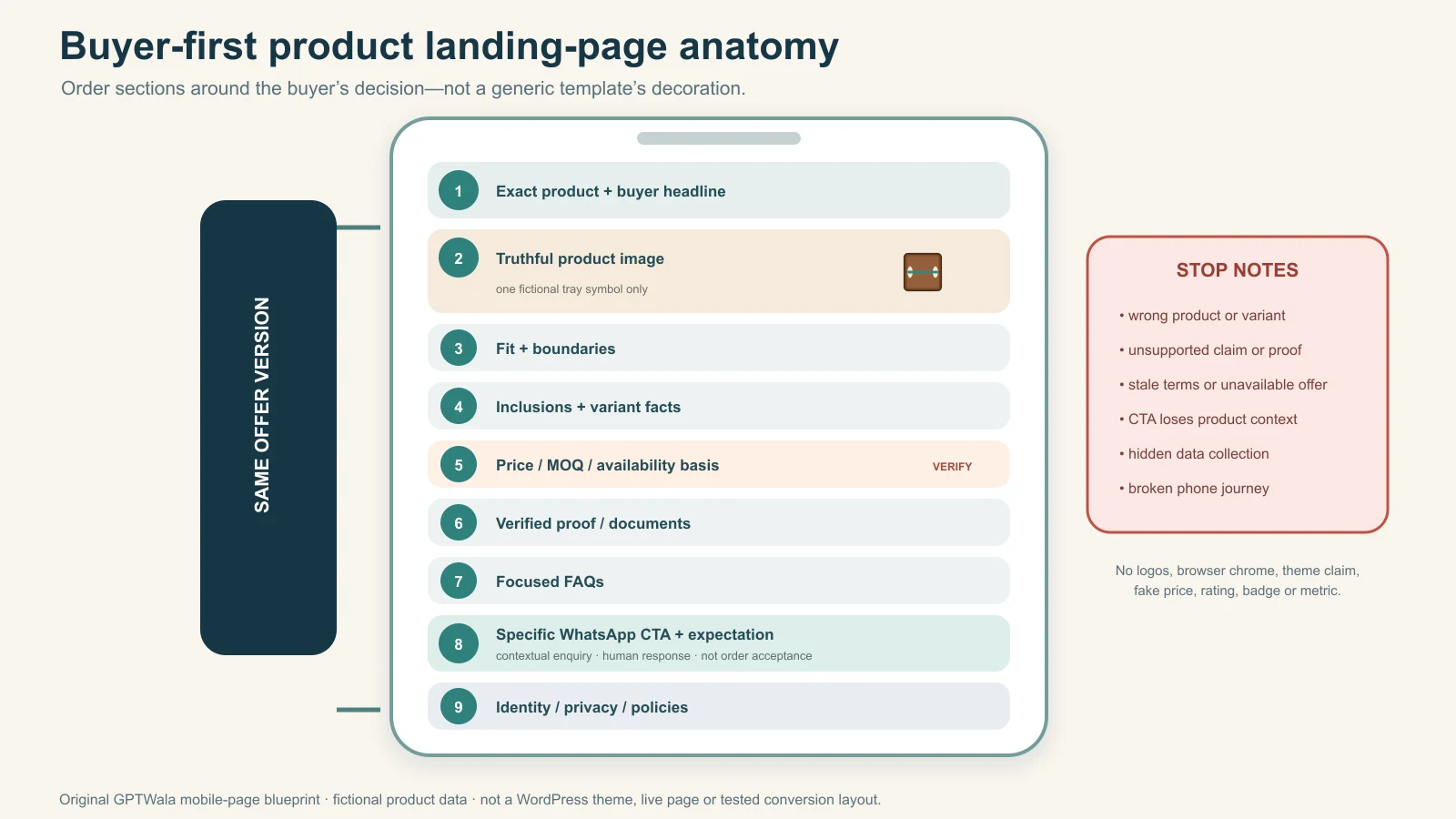
Identity and promise: exact product/offer, intended buyer and supported benefit.
Primary product proof: truthful main image/video and key decision facts.
Fit and boundaries: use, buyer, geography, MOQ, compatibility or service limit.
What is included: unit, pack, accessories and exclusions.
Comparison/specification: attributes needed to choose the right variant.
Commercial basis: price/quote, availability, delivery and applicable terms.
Trust evidence: business identity, verified documents, process or genuine proof.
Objection answers: focused FAQs or short decision blocks.
WhatsApp action: exact context and response expectation.
Policies and identity: support, privacy and applicable delivery/return/warranty links.
Not every page needs ten visibly separate bands. Combine adjacent material without removing a buying-critical answer.
Keep one primary action
The main action should be consistent: “Ask about SKU…”, “Request current wholesale terms”, “Check fit with a product specialist” or “Request sample terms”. Secondary actions can support people who are not ready:
view the full catalogue;
download an approved datasheet;
check delivery or return terms; or
call during stated hours.
Avoid five equal buttons for WhatsApp, phone, email, Instagram, directions and download above the fold. Focus does not require hiding alternative access; it requires a clear priority.
Repeat the CTA at decision points
A WhatsApp action can appear:
after the first complete product-and-offer summary;
after the detailed fit/specification block; and
after the FAQs or final decision summary.
Use the same offer and context. Do not introduce a different discount or route in the footer.
Original GPTWala buyer-first page blueprint using fictional product data. It keeps one offer version through nine decision sections and is not a WordPress theme, live page or tested conversion layout.
Build the first screen around a truthful decision
The first screen should orient the visitor, not compress the entire page into a poster.
Use a specific headline
Weak:
Transform Your Lifestyle With Premium Quality
Stronger:
24-Piece Cotton Kurti Starter Assortment for Independent Retailers
The stronger version identifies the offer and buyer. It still needs factual support for cotton composition, piece count and assortment.
Add a bounded supporting line
Explain the main difference plus a material condition:
Choose from the current straight-cut assortment with recorded size and print variants. MOQ 24 pieces; city and quantity are required for current trade terms and availability.
Do not use “direct factory price”, “lowest price”, “guaranteed margin”, “zero risk” or “pan-India delivery” unless each claim has a current, defined and supportable basis.
Show the exact product or offer
The hero asset should make the product identifiable. For a bundle, show every included item or state that the image is illustrative and give the exact list immediately. For a variant, do not use a generic family image that displays other colours as if they are included.
Add a short product-truth caption when needed:
Shown: fictional bundle KSA-24-A. Props and display rack are not included. Current assortment and availability confirmed before quotation.
Place the first CTA after enough context
The first CTA can be visible immediately, but the label should describe the real next action:
“Ask about this 24-piece assortment”;
“Send my requirement for fit review”;
“Check delivery for this exact set”; or
“Request current sample terms”.
“Buy now” is wrong if the business still needs to confirm the product, quantity, price, delivery or credit.
Show product fit, specifications and terms clearly
The middle of the page should remove uncertainty without becoming an unfiltered internal datasheet.
Explain who it is for—and not for
Use a short fit block:
Good fit when:
the buyer type and use match;
quantity meets the stated minimum;
location is serviceable; and
the product’s verified constraints suit the requirement.
Ask a specialist first when:
technical compatibility affects safety or performance;
custom size/material is required;
colour or batch matching is critical;
certification or documentation must meet a project requirement; or
the intended use falls outside the recorded specification.
This is more useful than a generic “perfect for everyone”.
Show comparison fields in native text
For multiple variants, use a compact comparison table.
Field
Variant A
Variant B
Buyer decision
Product code
Exact child SKU
Exact child SKU
Pass the selected code into WhatsApp
Size/capacity
Verified value
Verified value
Choose by actual need, not image scale
Material/finish
Approved description
Approved description
Do not infer unseen grade
Pack/inclusions
Exact list
Exact list
Prevent quantity confusion
MOQ/price basis
Current controlled basis
Current controlled basis
Confirm final quote/availability
Do not rasterise this table into an image. Native text is easier to update, search, select and read with assistive technology.
Explain the complete offer
Use explicit wording:
exact unit or bundle;
included pieces;
optional accessories;
excluded props;
MOQ and order multiple;
public/dealer price basis;
tax/freight/delivery basis as applicable;
quote/offer validity where used;
stock or made-to-order status; and
return, exchange, warranty or service conditions as applicable.
If the page is not integrated with authoritative inventory, say “availability confirmed before quotation/order” rather than “in stock”.
Keep technical proof separate from marketing shorthand
A product landing page can summarise. Link to a current approved datasheet, drawing, certificate scope or test information when the buyer needs it. Do not convert a technical document into a broad headline it does not support.
For example, a result under defined laboratory conditions does not automatically support “works in every environment”. A material declaration does not prove performance. A certificate logo without exact applicability can mislead.
Use images, video and proof without inventing trust
Visual quality matters, but product fidelity and claim integrity come first.
Use images by decision job
Hero image: identify the exact product/offer.
Alternate view: show shape, back, side or construction.
Detail view: show a buying-critical feature or label accurately.
Scale/context view: explain use or size without changing the offer.
Included-pieces view: show every item that comes with the purchase.
Diagram: explain verified dimensions or part relationships with native text.
Reject an image or video when it changes or implies:
the SKU, variant or package version;
shape, proportions, construction or part count;
colour, print, texture, finish or material;
label, logo, hallmark or text;
included accessories or quantity;
fit, drape, scale or compatibility;
operation, safety or performance; or
certification, scarcity, rating or customer outcome.
An AI disclosure does not make a false product representation acceptable. The CCPA’s Guidelines for Prevention of Misleading Advertisements and Endorsements, 2022 state that valid, non-misleading advertising should contain truthful and honest representation and should not exaggerate capability or performance.
Use proof that proves the stated thing
Claim type
Useful evidence route
Not sufficient by itself
Product identity
Exact SKU, current product and approved image references
Do not display five-star graphics, customer counts, logos, awards or “trusted by” statements without a verifiable and authorised source.
Keep people and testimonials controlled
If the page shows a customer, model, employee, installer or expert:
document rights/consent for the intended use;
do not imply endorsement or experience they did not provide;
do not give a synthetic person a real testimonial;
verify every quote and material relationship; and
remove or update content when permission or relevance ends.
For fit, demonstration, safety or expert claims, use an appropriate real evidence route rather than a decorative synthetic person.
Design the WhatsApp call to action
The CTA should open the correct business destination, preserve useful context and set an honest expectation.
Choose the exact business route
Use the approved business number or governed Platform route that the team currently owns. Confirm:
visible business identity;
current number and account access;
supported language;
service hours and response owner;
backup/escalation route; and
correct handoff into the team’s enquiry record.
Do not build the page around an employee’s personal number unless the business has explicitly approved ownership, access, privacy, recovery and continuity.
Prefill context, not sensitive data
Use the current official link/short-link method available for the chosen WhatsApp product and test the final URL. A useful prefilled message is:
I am enquiring about offer KSA-24-A from page version 2026-08. Buyer type: retailer. City: [add city]. Expected quantity: [add quantity]. Please confirm current assortment, trade terms and availability.
Keep it short enough to edit on a phone. Do not put passwords, payment details, identity documents, health data, exact home addresses or other sensitive information in the URL or prefilled text. Links and browser records can be copied, logged or forwarded.
Make the button label specific
Good labels tell the visitor what happens:
“Ask about this exact set on WhatsApp”;
“Request current wholesale terms”;
“Send my application for product-fit review”;
“Check sample terms for design MT-3060-C”; or
“Check delivery for my pincode”.
Avoid “Get quote” if the next step only asks a qualification question and cannot produce a quote yet.
Set the response expectation beside the CTA
Use a truthful statement such as:
Messages are reviewed Monday–Saturday, 10:00–18:00 IST. We first confirm the exact variant, quantity, location and current availability before quoting.
Publish only hours and response behaviour the business can maintain. Do not promise “instant reply” because an automated greeting exists.
Explain what the tap means
Add a compact note:
Tapping opens a WhatsApp conversation with the product reference. It does not reserve stock, confirm price or place an order.
This prevents the UI from implying a transaction state the business has not reached.
Qualify the enquiry without building a long form
The landing page should do enough qualification to create a useful first message, but it should not ask every sales question before the buyer understands the offer.
Ask only decision-changing fields
For many product businesses, the minimum is:
exact product/variant reference;
buyer type;
city/service area;
quantity or pack expectation; and
one application/use field when fit matters.
Examples:
Business
Minimum useful context
Later human questions
Apparel wholesaler
Retailer type, city, assortment code, expected pieces
Tolerance, environment, technical approval and terms
Jewellery retailer
Exact SKU, city, appointment/delivery preference
Availability, size/customisation and terms
Tile manufacturer
Design/finish code, project city, approximate requirement
Batch/sample, application, timeline and freight
Local homeware shop
Exact set, pincode and quantity
Stock, delivery slot and payment/order confirmation
Do not request GSTIN, full address, identity document or payment detail merely to answer an initial product question unless a valid, explained process genuinely needs it at that stage.
Preserve selected choices
If the page lets a visitor select colour, size, pack or buyer type, the CTA must carry or display that selection accurately. Test every branch. A button that always sends the default SKU can create wrong quotes and fulfilment errors.
Route unsuitable enquiries respectfully
If the buyer is outside the fit boundary, offer the appropriate alternative:
view a retail product instead of a wholesale-only offer;
request a distributor contact for a serviceable region;
send a technical requirement for manual assessment; or
state that the product is unavailable or unsuitable.
Do not force every visitor into WhatsApp simply to increase message counts.
Add privacy, consent and policy controls
This is operational guidance, not legal advice. The applicable privacy, consumer, ecommerce and sector position depends on the actual data, product, business role and transaction.
Map what the page and tools collect
Create a small data map:
Data/event
Where it is collected
Why
Who can access
Retention/deletion route
Basic server logs
Website/host
Security and operation
Named technical owner/provider
Defined operational policy
Analytics event
Browser/tool, if enabled
Page/CTA diagnostics
Named marketing/data roles
Tool and business settings
Prefilled product/source code
Link/message
Route the enquiry
Sales/enquiry owner
Enquiry-record policy
Buyer-provided message
WhatsApp
Respond to the stated task
Authorised business users/provider
Messaging/business policy
Later order data
CRM/order/accounting system
Quote/order/fulfilment
Restricted operational roles
Applicable business/legal policy
Do not install a tag or collect a form field merely because a plugin makes it easy.
Give an accessible privacy notice
Before or near the action, make it possible to understand:
the business identity;
what the page or form collects;
why it is collected;
relevant sharing/providers;
how to contact the business or exercise applicable choices; and
where fuller privacy information lives.
Do not hide the only notice behind an unreadable footer or pre-tick a broad marketing permission merely to open WhatsApp.
Treat enquiry response and later marketing separately
A buyer who starts a relevant product conversation expects a response to that task. Do not treat one enquiry as indefinite permission for unrelated promotions. WhatsApp’s current Business Messaging Policy requires businesses to have the person’s number and opt-in permission for subsequent messages/calls and to honour opt-out requests, while also placing responsibility for notices, permissions and legal compliance on the business.
India’s data-protection framework has phased commencement. The official DPDP Act commencement record on India Code records phased commencement from 13 November 2025, with many core provisions scheduled later. Do not copy an old checkbox or generic “GDPR compliant” badge. Verify the law, rules and actual data flow on the implementation date.
Add applicable consumer and transaction terms
If the page participates in ecommerce, review the current Consumer Protection (E-Commerce) Rules, 2020, amendments and applicable product/packaging requirements for the business’s real role. Make relevant seller identity, total-price basis, delivery, return/refund, warranty, grievance/support and product information clear where applicable.
Do not use a disclaimer to reverse the main offer or hide a material condition.
Make the page mobile, accessible and resilient
Most WhatsApp journeys will be tested on a phone even if some traffic arrives elsewhere. Build for the real device and connection, not only the desktop editor.
Use semantic page structure
one descriptive H1;
H2/H3 headings in logical order;
native paragraphs and lists;
real buttons/links with descriptive labels;
labelled form controls;
table headers that remain associated with values;
sufficient colour contrast;
visible keyboard focus; and
captions/transcripts or text equivalents for important media.
The W3C Web Accessibility Initiative’s forms guidance explains that controls need labels and that instructions, validation and notifications should help people complete a form. Apply the same principle to variant selectors and WhatsApp enquiry fields.
Write alt text for the image’s purpose
The W3C images tutorial distinguishes informative, decorative and functional images. For a product page:
describe the exact visible product/variant in informative-image alt text;
use empty alt text for genuinely decorative flourishes;
describe the action when an image is the only link/button content; and
keep complex specifications available in nearby native text.
Do not write claims, keywords or unseen features into alt text.
Optimise the useful asset, not the product’s identity
Compress and resize copies for the required display while keeping an approved master. Confirm after processing that:
the product remains sharp at decision-relevant detail;
colour and finish have not shifted materially;
text/marks have not become unreadable or distorted;
the crop does not remove included pieces;
the mobile crop still shows the right variant; and
filenames/URLs map to the correct record.
Test failure states
The page needs a safe response when:
WhatsApp is not installed;
the device cannot open the intended app route;
JavaScript fails;
an image/video does not load;
a selected variant is unavailable;
a user has low bandwidth;
the business is outside staffed hours; or
the route changes or number is retired.
Provide an understandable fallback contact path and business identity. Never leave a dead button with no explanation.
Measure the journey without calling clicks leads
Measurement should help diagnose the path without collecting unnecessary customer data or inventing attribution.
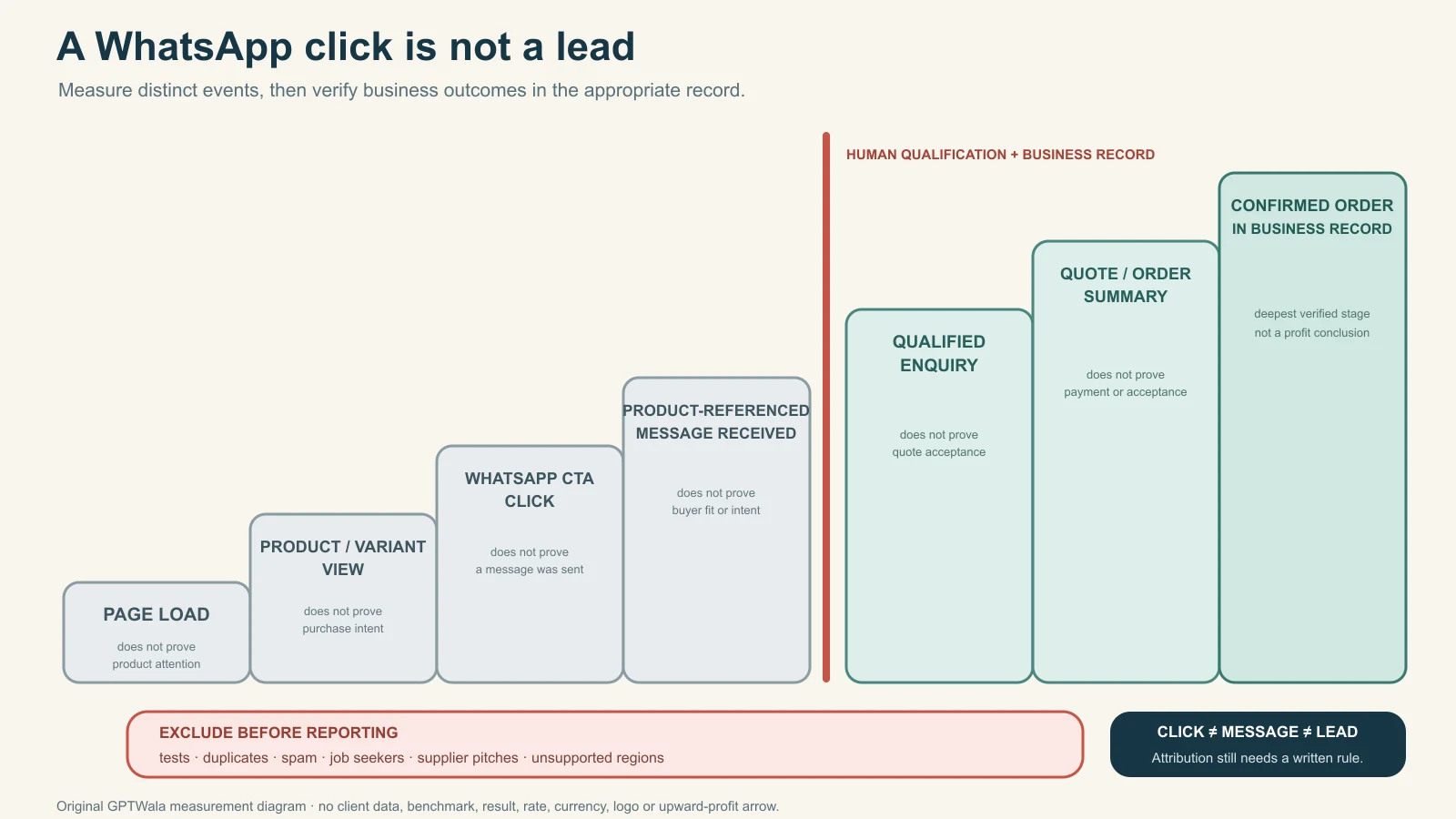
Use an event ladder
Stage
Example event/record
What it proves
What it does not prove
Exposure
Page loaded
Browser requested the page
A person read or understood it
Interest
Product detail/variant viewed
Interface interaction occurred
Buyer suitability
Intent signal
WhatsApp CTA clicked
Visitor attempted to continue
Conversation opened or message sent
Conversation
Product-referenced message received
Business received a message
Qualified enquiry
Qualification
Written criteria passed
Buyer/product/location/quantity fit current rule
Quote acceptance or sale
Commercial
Dated quote/order summary issued
Business advanced the opportunity
Payment or revenue
Outcome
Confirmed order and verified accounting record
A business transaction was recorded
Landing page alone caused it
Choose names that preserve these distinctions. Do not call the CTA event lead if qualification happens later.
Original GPTWala measurement ladder. Interface events, messages, qualified enquiries, commercial records and confirmed orders are distinct; the diagram contains no client data, rate, benchmark, currency, attribution result or profit claim.
Define a qualified WhatsApp enquiry
Example for a wholesale landing page:
A non-test, non-duplicate message from a retailer or distributor in a serviceable region that names the page’s product/assortment, meets or can meet the disclosed MOQ, provides city and expected quantity, and reaches a real next step.
Exclude spam, tests, jobs, suppliers, accidental clicks, unsupported geographies and unrelated service requests. Adapt the definition to the business; it is not a universal benchmark.
Use non-sensitive source references
Pass a short page/offer/campaign code such as KSA24A-AUG26, not a customer name, phone number, email or detailed personal profile. Reconcile the code in the enquiry record. Do not hide sensitive or manipulative targeting information in the prefilled message.
Choose the least complicated valid measurement route
A small business may begin with:
page/CTA diagnostics;
a manual or CRM enquiry source field;
test-message exclusions; and
quote/order reconciliation.
Adding a Meta pixel, Conversions API, call-tracking system or customer-data upload introduces technical, access and privacy work. Meta’s Business Tools Terms place requirements around rights, permissions, lawful basis, notice and restricted/sensitive data. Recheck current terms and obtain appropriate advice before implementation. Technical availability is not permission.
Report cautiously
Useful page reports can show:
working/broken CTA rate from tests;
CTA clicks by page/offer version;
product-referenced conversations received;
qualified enquiry rate using the written rule;
response ownership/time as an operational measure;
wrong-product or missing-context rate;
quotes/orders linked in business records; and
data/consent or product-truth incidents.
Do not claim that a new headline “increased sales” without a controlled comparison and reliable outcome linkage.
Assemble the page in WordPress or another CMS
The controls below are platform-neutral. Menu names, theme behaviour and plugins change; inspect the actual authorised site before implementation.
Create the page shell
Use the approved slug and canonical intent.
Set the page to draft.
Add one H1 and the buyer-first section order.
Use native text, headings, lists, tables and buttons rather than one long image.
Insert only approved, compressed derivative assets with alt text/captions.
Add policy and business-identity links.
Configure the correct WhatsApp action and fallback.
Add only privacy-reviewed measurement.
Preview on real phone widths before any traffic.
This article does not claim that a particular WordPress block, theme or plugin was tested.
Keep reusable blocks source-controlled
Reusable elements can include:
business identity and contact block;
delivery/returns/warranty link block;
WhatsApp expectation note;
product-truth disclosure;
qualified-enquiry fields; and
final QA footer.
But reuse must not freeze stale facts. A global “ships across India” block can make every page wrong at once. Assign an owner and update trigger to every reusable commercial statement.
Handle variant pages and URLs deliberately
If the page covers several variants:
preserve the selected variant in the URL or page state when feasible;
update visible product name, image, facts and CTA context together;
keep one clear canonical approach;
avoid indexable thin combinations with no distinct buyer value; and
test shared links in messaging/social previews.
Google’s current Product variant structured-data guidance says eligible ecommerce implementations should give variants unique identifiers and support direct preselection with the correct image, price and availability information. Treat this as web implementation guidance—not a ranking promise or a reason to generate thin pages.
Use schema only when the visible page qualifies
Google’s Product structured-data documentation distinguishes product snippets from merchant listings and says Search appearances remain discretionary. If the landing page is a genuine product page, an implementer can evaluate current eligible markup and required visible fields.
Do not add a fabricated Offer, review, rating, price, availability or return policy merely for schema. This educational blog article should use Article/BlogPosting plus BreadcrumbList, not Product markup.
Run the pre-launch phone journey
The page is not ready because the builder preview looks correct. Test the public draft or protected staging route as a buyer.
Twelve-step dry run
Open the source message/ad/post and record its product, offer and audience.
Tap through on a normal phone and relevant connection.
Confirm the exact page, HTTPS route and business identity.
Compare headline, image, variant, offer and material conditions with the approved card.
Read every specification, inclusion, price/MOQ, availability and policy statement.
Try every variant, accordion, table, download and secondary link.
Use keyboard/screen-reader/accessibility checks appropriate to the implementation.
Tap every WhatsApp CTA and confirm the correct business account/number.
Verify prefilled product, variant, page version and non-sensitive source code.
Send a labelled test message during the staffed test window.
Confirm the right owner receives, logs and excludes the test from leads/sales.
Retrieve the correct product source and follow the real qualification/handoff path.
Testing must not create a live order, take payment, reserve stock or expose real customer data.
Pre-launch decision table
Gate
Pass evidence
Hard stop
Product
Exact SKU/variant, inclusions and assets verified
Similar/unverified item or AI product drift
Offer
Price/MOQ/availability/delivery basis current
Contradiction or unsupported urgency
Claims
Evidence and owner recorded
Unsupported performance/certification/comparison
Page
Mobile route, content and links work
Broken, wrong or inaccessible critical path
WhatsApp
Correct business identity, context and owner
Personal/retired number or lost variant context
Privacy
Data map, notice, permissions/access reviewed
Unapproved tags, sensitive URL data or missing notice
Operations
Stock/quote/fulfilment source and stop owner ready
Nobody can answer or fulfil the advertised route
Measurement
Events and exclusions match written definitions
Clicks/tests reported as qualified leads/orders
Any hard stop keeps the page in draft or traffic paused until the defect is corrected and retested.
Set event-driven rechecks
Reopen the affected gates when:
product, variant, packaging or included pieces change;
price, MOQ, stock, delivery or policy changes;
an image, video, claim or proof asset changes;
the WhatsApp number, team, hours or access changes;
a page, plugin, theme, domain or redirect changes;
a tracking/data tool or privacy position changes;
the traffic message or target buyer changes; or
a complaint reveals confusion or misrepresentation.
No fixed review interval replaces those triggers.
Use the workflow for Indian product businesses
These are fictional examples, not case studies or performance claims.
Surat apparel wholesaler: starter assortment page
Page job: help independent retailers decide whether a 24-piece cotton-kurti assortment fits their store.
Show: exact assortment code, fabric composition source, silhouettes, size/colour mix rules, piece count, MOQ, replacement policy as applicable, current trade-terms route and serviceable region.
WhatsApp context: retailer type, city, expected quantity and assortment code.
Truth stop: model imagery must not change print, neckline, sleeve, border, colour, length, size or included mix. Do not promise margin or sell-through.
Rajkot component manufacturer: technical fit page
Page job: help a procurement/maintenance buyer identify whether a component family deserves technical review.
WhatsApp context: part/drawing reference, application, quantity, city/country and timeline.
Truth stop: a render is not dimensional or performance proof. Do not say “prevents breakdowns” or “fits all models”. Route suitability to a competent human using current documents.
Morbi tile manufacturer: sample-request page
Page job: let dealers or project buyers inspect one design/finish family before requesting sample terms.
WhatsApp context: design code, finish, project city, approximate area/quantity and sample request.
Truth stop: generated room scenes must not alter tile face, repeat, reflectivity, grout/joint impression, colour or scale. Current physical sample approval may be necessary for colour-critical decisions.
Page job: help a local buyer ask about one exact necklace or pair before a store/video appointment.
Show: exact SKU, item count, dimensions/weight basis, verified material/stone/enamel description, close-ups, current price/availability basis and appointment/service terms.
WhatsApp context: SKU, city, preferred appointment type and question.
Truth stop: do not change stone count, setting, chain, clasp, hallmark, colour or apparent scale. A generated hallmark-looking mark is not purity evidence.
Local appliance retailer: delivery-area page
Page job: help nearby buyers check one model and delivery/service area before enquiry.
Show: exact model, included accessories, key verified specifications, price basis, pincode/service boundary, installation/warranty route and stock-confirmation language.
WhatsApp context: model, pincode, quantity and installation question.
Truth stop: do not say “free installation” or “same-day delivery” without current conditions and operational capacity. Avoid a family image that shows accessories not included with the model.
Global product exporter: bounded trade-enquiry page
Page job: help a business buyer request a current export quotation for one controlled range.
Show: product/pack specification, MOQ/order multiple, applicable documents, incoterm/freight/price confirmation route, lead-time basis and target-market limits as reviewed.
Truth stop: do not imply customs, certification, sanctions, tax, currency, delivery or market eligibility without current specialist review for the actual destination.
Fix common product landing-page mistakes
Mistake
Why it fails
Safe fix
One page serves retail, wholesale and procurement
Product, price and qualification messages conflict
Choose one primary buyer or governed views/pages
Headline repeats vague “premium quality”
Buyer cannot identify offer or fit
Name exact product/offer, buyer and supported difference
Ad/post shows one variant; page shows another
Message match and product truth break
Route to exact variant and preserve selection
Hero image includes unlisted props
Buyer may infer extra inclusions
Use exact offer image and list inclusions/exclusions
AI fills missing specifications
Plausible facts become misinformation
Apply the no-source stop rule
“Starting at” has no real configuration
Price attracts under false conditions
Name purchasable basis and material conditions
Wholesale price ignores MOQ/case
Enquiries start with wrong expectation
State unit, MOQ, multiple, case and quote basis
Floating WhatsApp icon says only “Chat”
Product and action context are lost
Use specific labels and prefilled product reference
CTA opens personal/retired number
Ownership, privacy and continuity fail
Use governed business route and test regularly
Prefilled URL contains personal data
Data can leak through logs/shares
Use non-sensitive offer/source codes only
Instant-reply promise relies on automation
Human response/stock check cannot meet it
Publish real hours and next-step expectation
Page asks 12 fields before giving value
Buyer leaves or gives unreliable data
Ask only decision-changing fields
Pixel/tag added by default
Data collection lacks purpose/review
Map event, owner, notice, access and retention first
CTA click counted as lead or sale
Reporting inflates business outcomes
Use the event ladder and qualification record
Page stays live after offer changes
Old price/stock/claim keeps circulating
Assign owner, version and event-driven pause/update
Connect the page to the DAA growth system
A truthful landing page is part of Digital Presence. Verified product images, explanations, comparisons and videos support AI Content Creation when AI is constrained by the product/offer source. Paid distribution can then bring suitable people to the page and WhatsApp journey.
GPTWala’s workshop teaches the DAA sequence: Digital Presence → AI Content Creation → ₹100/day WhatsApp ads. The ₹100/day element is a taught test-budget/system concept, not a guarantee of reach, approval, enquiries, sales, earnings, profit or return on ad spend. A landing page cannot fix an unprofitable offer, unavailable product, misleading creative or unstaffed WhatsApp route.
What is a product landing page for WhatsApp enquiries?
It is a focused page for one product, product group or bounded offer that gives a specific buyer the information needed to start a useful WhatsApp conversation. It should pass exact product and source context into the chat without implying that a click is an order.
Do I need a website before using WhatsApp for product enquiries?
Not for every organic conversation, but a maintained landing page gives ads, posts, QR codes and sales links a controlled place to explain the product, offer, proof, terms and privacy before chat. Choose the destination that the business can truthfully operate.
What should be above the fold on a product landing page?
Show the exact product/offer, intended buyer, supported value, material condition such as MOQ or service area, truthful hero asset and a specific WhatsApp action. Do not hide the only important limitation far below the button.
How long should a WhatsApp landing page be?
Long enough to resolve the buying decision and no longer. A simple local retail item may need a short page; a wholesale assortment or technical product may need comparison, documents and terms. Remove repetition, not buying-critical information.
What should the WhatsApp button say?
Describe the next action: “Ask about this exact set”, “Request current wholesale terms”, “Send my requirement for fit review” or “Check delivery for my pincode”. Avoid “Buy now” when stock, price, fit or terms still require confirmation.
What should the prefilled WhatsApp message contain?
Include a non-sensitive product/offer code, selected variant, page version, buyer type, city/service area and quantity/application prompt where useful. Do not put identity documents, payment data, health information, exact home addresses or other sensitive details in a URL or prefilled message.
Is a WhatsApp button click a lead?
No. It proves only that the visitor attempted the action. A message received proves a conversation; a qualified enquiry must pass the business’s written buyer, product, location, quantity and next-step rule. Keep tests, duplicates and spam separate.
Should I show price on the landing page?
Show it only when the unit, variant, tax/freight/delivery basis and conditions are clear and maintainable. Otherwise state a genuine range, starting configuration or quotation route. Never show the lowest volume slab as though every buyer receives it.
Can I use AI-generated product images on the page?
Only after exact-product review. Reject any output that changes shape, colour, material, pattern, text, quantity, included parts, scale, fit or performance. Use real proof for buying-critical details, operation, safety, certification and performance.
Do I need a form before the WhatsApp button?
Usually not. Ask only the few fields that materially improve the first message. A long form can duplicate the chat and collect unnecessary data. If a form is used, label fields, explain purpose, validate accessibly and review privacy/data handling.
Should I add the Meta pixel or Conversions API?
Not automatically. Start with the business decision and event definition. Add a tool only when a named measurement need, authorised access, privacy review, notices/permissions, technical QA and maintenance route exist. A CTA click should not be labelled a qualified lead.
What schema should a product landing page use?
Evaluate current Product markup only when the page is a genuine eligible product page and visible content meets the requirements. Do not fabricate price, availability, reviews or offers for schema. This educational guide itself should use Article/BlogPosting plus BreadcrumbList.