Tag: AI product photography

  • AI Product Photography vs Traditional Photoshoots: When to Use AI, a Studio or a Hybrid

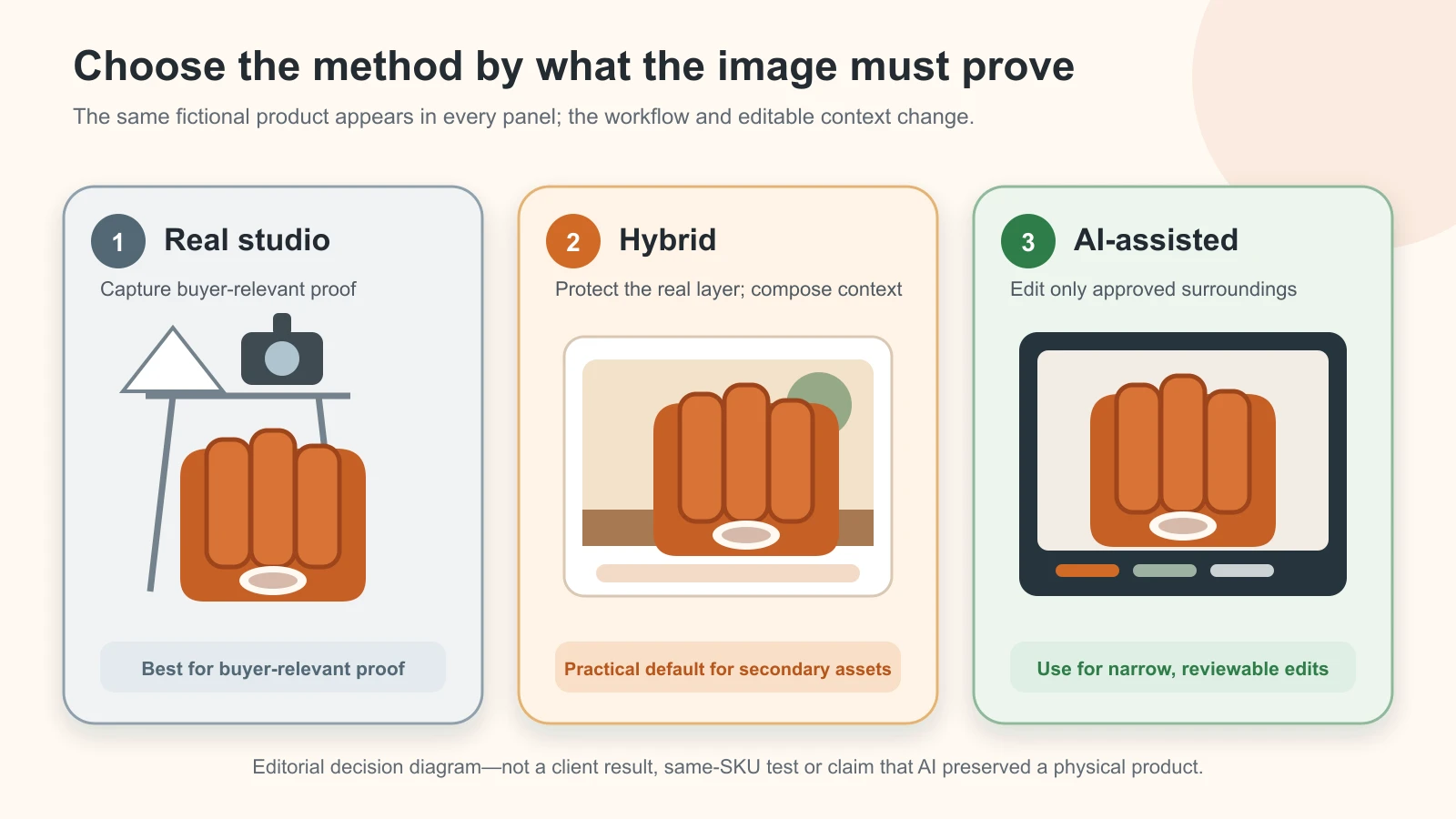
    The same fictional terracotta desk organiser shown across real studio, hybrid and AI-assisted workflow panels
    Original editorial decision diagram using one deterministic fictional product symbol. It is not a client result, same-SKU test or claim that AI preserved a physical product.

    Reviewed and updated: 12 August 2026

    Editorial method note: this guide provides a decision model and blank cost worksheet. It does not claim a measured price, time saving, conversion lift or approval rate. The business scenarios are illustrative, not client case studies.

    Choose the method asset by asset. Use real photography when the image must prove the exact product, fit, finish, construction, scale or included parts. Use AI for controlled cleanup, crops and secondary context when the product layer can remain truthful. Use a hybrid workflow when you need both: real product evidence plus adaptable backgrounds or campaign scenes. Compare methods by cost per approved asset, not by the price of a shoot or subscription alone.

    Table of contents

    1. The decision in one table
    2. What AI, a traditional shoot and a hybrid actually mean
    3. Ask five questions before choosing a method
    4. Risk-and-fit matrix by image job
    5. When real capture is mandatory
    6. When AI is a sensible fit
    7. Why hybrid is often the practical default
    8. Compare total cost per approved asset
    9. Six illustrative product-business decisions
    10. Check platform rules, rights and advertising truth
    11. Use this nine-step hybrid SOP
    12. Run a small decision pilot
    13. Put the approved method into an online growth system
    14. Frequently asked questions

    The decision in one table

    “AI versus photography” is the wrong business-level question. A manufacturer may need a controlled studio capture for a technical component, a hybrid installation scene for a brochure and AI-assisted crops for dealer messages. Those are three asset decisions for one SKU.

    Use this first-pass rule:

    If the image must… Start with Why Do not approve until…
    Prove the exact item, variant, finish, construction or pack Real capture The product itself supplies the evidence It matches the physical SKU and current offer
    Show exact fit, drape, scale or use that affects a buying decision Real capture, usually with a specialist A plausible reconstruction can still imply the wrong product behaviour The product expert verifies the visible result
    Put an already approved product into a new secondary context Hybrid A real product layer carries identity while AI changes the scene Edges, reflections, contact, scale and context remain truthful
    Remove a background, clean dust, resize or make channel crops AI-assisted or conventional editing The task can often preserve the product pixels The before/after comparison shows no product change
    Explore a campaign direction before production AI concept Fast visual exploration can help a brief It is labelled concept-only and never presented as product proof
    Produce a main listing image for an unfamiliar platform or category Real or hybrid after checking the current rule The destination controls what may appear and how The current seller-account/category rule and exact SKU both pass

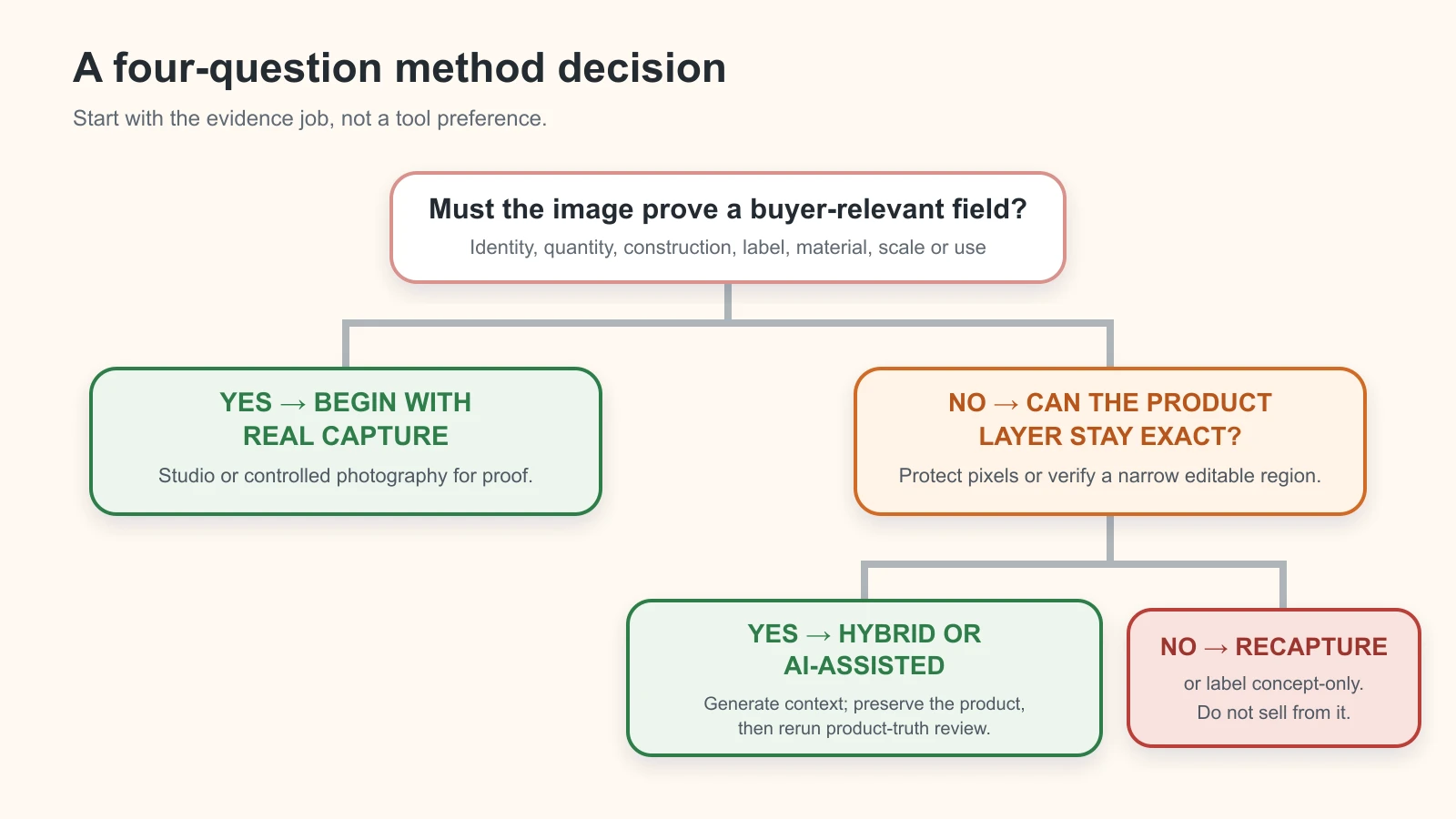
    Decision path choosing real capture, hybrid or AI assistance according to whether the image must prove a buyer-relevant field and whether the product layer can remain exact

    Original GPTWala method-decision diagram. Start with real capture when an image must prove the product; use AI assistance only when the editable scope is narrow and reviewable.

    This is a routing table, not a verdict on a profession or tool. A strong photographer can solve lighting, composition and material problems that automation cannot. A disciplined AI-assisted workflow can remove repetitive production work. A hybrid team can use each method where it is strongest.

    For the broader terminology and three product-truth risk lanes, read the complete AI product photography guide. This page owns the method-selection and cost decision.

    What AI, a traditional shoot and a hybrid actually mean

    Fair comparison begins with fair definitions.

    AI-assisted product imagery

    This can range from low-risk editing to high-risk reconstruction:

    • background removal or replacement;
    • expansion for a different aspect ratio;
    • cleanup, relighting or shadow generation;
    • placement of a real cut-out into a generated scene;
    • generation of model or lifestyle context around a reference; or
    • complete text-to-image generation.

    These are not equivalent. Removing dust from a real pack is different from asking a model to reconstruct a necklace. The first may preserve the product; the second can invent it. Judge the actual operation, not the “AI” label.

    A traditional or studio photoshoot

    This means the sale item, or a verified representative item where that is legitimate, is physically captured. It may involve a product photographer, stylist, model, studio lighting, colour control, focus stacking, specialist rigging and conventional retouching.

    “Traditional” does not mean unedited. Real photography still needs a product-truth boundary. Retouching that removes a permanent seam, changes a gemstone setting or alters the pack quantity can mislead just as an AI reconstruction can.

    A hybrid workflow

    A hybrid starts with verified real captures and uses AI or conventional compositing for a controlled part of the final asset. Common examples include:

    • a real product cut-out on an AI-generated room background;
    • real apparel and fit reference with a carefully reviewed context extension;
    • a studio hero image plus AI-assisted crops for WhatsApp and ads; and
    • a real machine-part photograph combined with a clearly illustrative installation setting.

    Hybrid does not automatically mean safe. It is safe only when the protected product layer remains exact, the new context does not create false scale or performance implications, and the final file passes human review.

    Ask five questions before choosing a method

    1. What must this image prove?

    Write one sentence:

    This image must help the buyer verify the exact blue 750 ml bottle, its current label, cap, quantity and included pourer.

    If the sentence contains verify, exact, fits, includes, measured, current pack, finish, setting, connector or safety, begin with real evidence. AI can assist later, but it should not invent the field that the image is supposed to prove.

    If the job is “show how this approved bottle could look on a breakfast table,” a hybrid secondary image may be appropriate. The bottle still needs a real source; the table can be contextual.

    2. Can the exact product layer remain untouched?

    Ask whether the process can preserve the product silhouette, label, colour relationships, construction and reflections while changing only the permitted area.

    If the editor must regenerate through the product because the source angle is missing, the mask is poor or the scene demands a new view, risk increases sharply. Return to capture rather than treating the prompt as evidence.

    The product-accuracy control guide owns the detailed audit. For this decision, one rule is enough: if you cannot isolate what may change from what must not change, choose real capture or recapture.

    3. Is repeatability more important than novelty?

    A wholesaler may need the same crop and background treatment across 400 already photographed SKUs. A rule-based AI-assisted edit may be useful if the same acceptance test works across the batch.

    A new premium range may instead need one art-directed shoot that establishes lighting, angles and material language. Novelty is not automatically better, and volume does not automatically make full generation sensible. Count repeatable operations, not just SKU volume.

    4. Can a qualified reviewer detect a wrong result?

    An owner who handles the ceramic every day can often identify a false glaze or rim. A marketplace operator who has never seen the physical product may not. A jewellery image needs someone who can check the stone setting and clasp; an industrial part needs someone who knows the ports and dimensions.

    If nobody available can verify the high-risk fields, do not use a method that can reconstruct them. A realistic output is not self-verifying.

    5. What happens after approval?

    Name the destination before production: website, marketplace main image, additional image, WhatsApp catalogue, dealer PDF, ad or internal concept board.

    The same scene can be acceptable as a clearly contextual website image and unsuitable as a marketplace main image. Google Merchant Center, for example, distinguishes the main product image from additional images and currently requires the main image to accurately display the product and correct variant. Its rules also require specified AI-source metadata to remain in generative-AI product images. Check the current destination rather than assuming one “ecommerce-ready” file works everywhere. See Google’s main-image, additional-image and AI-generated content guidance.

    Risk-and-fit matrix by image job

    “Strong fit” means a sensible starting method, not automatic approval.

    Image job AI-assisted Real studio/on-location Hybrid Primary failure to control
    Clean background, dust cleanup or channel crop from a good source Strong fit Optional Useful for difficult edges Product pixels, thin edges or label are altered
    Marketplace main image Conditional Strong fit Strong fit when exact product remains real Wrong variant, crop, staging, overlay or current platform rule
    Secondary lifestyle image Useful Useful Strong fit False scale, extra components or invented use
    Apparel fit and drape proof Weak as reconstruction Strong fit Conditional secondary use Cut, length, transparency, print or drape changes
    Jewellery macro/detail proof Weak as reconstruction Strong fit Conditional context use Stone count, prong, clasp, metal colour or reflection changes
    Reflective, transparent or translucent product Risky Strong fit with specialist control Useful after a real hero exists Edges, transparency, highlights or material identity fail
    Technical part, dimensions or connector proof Weak as reconstruction Strong fit Useful for labelled context diagrams Hole, thread, port, scale or included part is invented
    B2B catalogue range with approved SKU cut-outs Useful for standardisation Useful for source capture Strong fit Variant mapping and batch QA break
    Seasonal ad background around an approved pack Useful Useful Strong fit Offer, pack, quantity or context becomes misleading
    New campaign mood-board Strong fit as concept Useful later Useful Concept is mistaken for an available product or result

    The matrix deliberately avoids a single winner. It also avoids a separate page for every industry. The product’s buyer-relevant fields and asset role determine the route.

    When real capture is mandatory

    For this editorial system, real capture is mandatory for the product layer whenever the final image must prove a field that the team cannot otherwise verify. That is an operating stop rule, not a claim that a particular law bans AI.

    Start or return to a real shoot when:

    • the exact SKU or current variant has not been photographed;
    • a reverse side, closure, underside, port or included component is missing;
    • fit, drape, transparency or size relationship affects the buying decision;
    • colour or surface finish is commercially decisive and the current capture chain cannot be checked;
    • stones, prongs, engraving, hallmarks, fine textures or reflective edges must be visible;
    • the image communicates dimensions, compatibility, safety, performance or a regulated claim;
    • a high-value or one-off item cannot tolerate invented detail;
    • a marketplace or category rule requires a presentation the team cannot create and verify from the existing source;
    • the AI-assisted result repeatedly changes the same essential field; or
    • no competent reviewer can compare the output with the physical item.

    “Real capture” can mean an owner’s controlled phone reference for a simple low-risk secondary asset, or a specialist studio for colour, reflections, macro detail, liquids, glass, jewellery, machinery or models. Choose the capture competence that the product demands.

    Do not confuse real capture with automatic accuracy. Use the correct sample, clean it, record the variant and approve the retouch. A studio image of the wrong packaging version is still wrong.

    When AI is a sensible fit

    AI is most useful when it removes repeatable work or creates non-evidentiary context around evidence that already exists.

    Good candidates include:

    • background removal from a clean source;
    • canvas expansion for a banner or vertical ad;
    • consistent shadows after the product layer is protected;
    • removal of temporary dust, support wires or capture artefacts that are not product features;
    • standard crops and exports across approved images;
    • multiple secondary room or seasonal contexts around one approved cut-out;
    • early campaign concepts that are clearly labelled and not offered for sale; and
    • internal visual briefs before a photographer, stylist or designer produces the final asset.

    Use a narrower guide for AI background generation or creating a product image from a phone photo when those pages are live. This article does not own their tool steps.

    AI is a poor fit when the operation must imagine unseen product surfaces, create another view from inadequate references, reconstruct exact lettering or demonstrate performance. More prompting does not turn missing evidence into evidence.

    Why hybrid is often the practical default

    A hybrid library separates proof assets from persuasion assets.

    Proof assets show what the buyer receives: clean front and back, important details, scale, current packaging, components, fit and construction. Capture these from the real item and preserve them.

    Persuasion assets help a buyer imagine context: a sari at an occasion, a planter in a balcony, a fitting in a production line, a gift box in a festive setting. These can use controlled AI assistance when the product remains accurate and the scene does not imply a false inclusion, dimension, use or result.

    That separation gives a small business reusable material without asking every image to do every job. It also gives reviewers a fallback: when a contextual image is uncertain, the real proof set remains available.

    A practical sequence is:

    1. capture and approve the exact product once;
    2. create a protected master cut-out where appropriate;
    3. build a small number of controlled contexts;
    4. compare every context with the real proof set;
    5. export by destination; and
    6. recapture whenever the requested angle or product state is absent.

    For the full phone-to-approved operating trail, use the seven-gate AI product photography workflow. The decision here is simpler: hybrid is valuable only when it keeps the proof layer real.
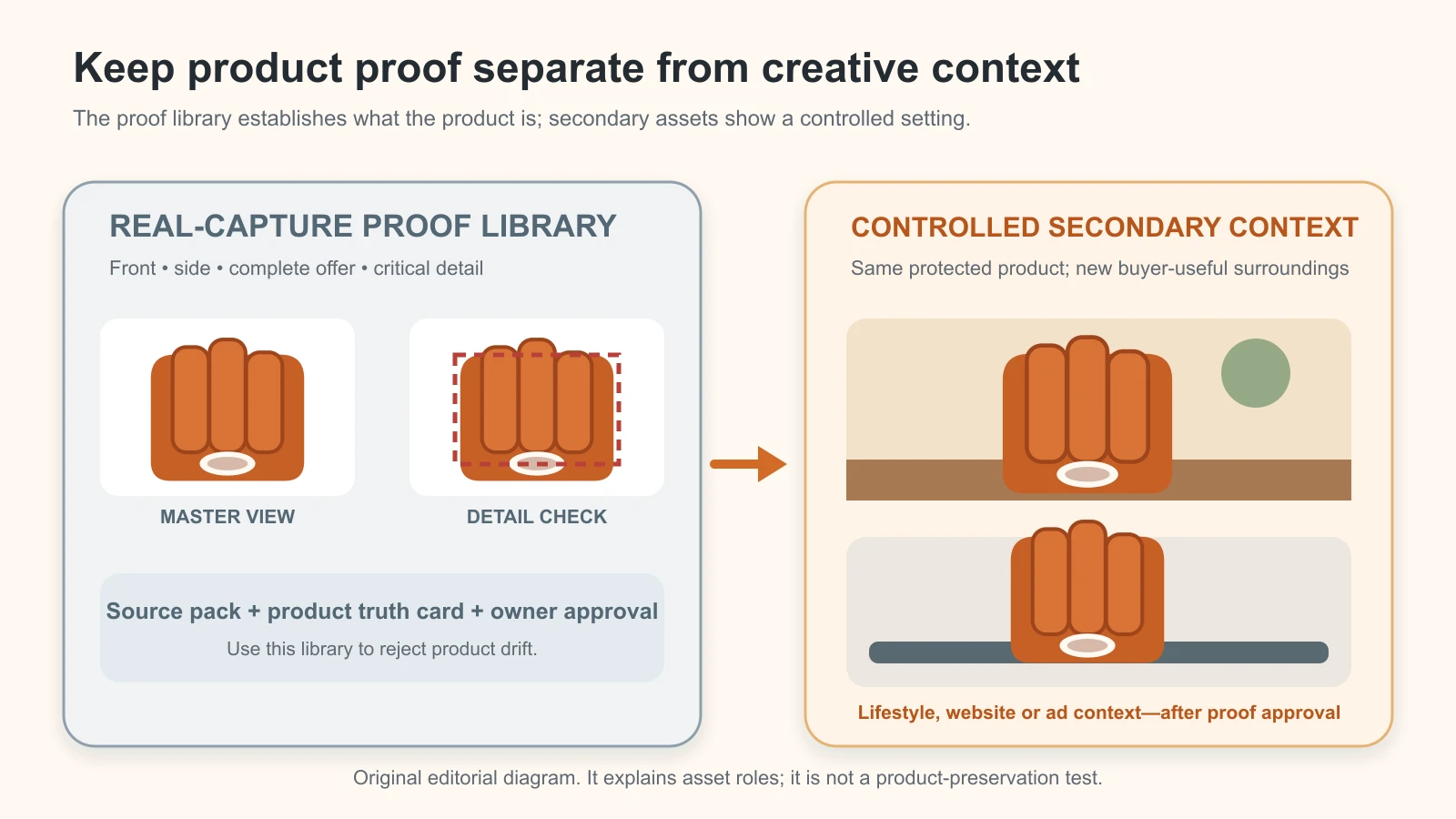
    Real-capture product proof library beside controlled secondary context assets built around the same protected fictional product

    Original GPTWala asset-role diagram. It explains why proof and contextual imagery need different approval jobs; it is not a product-preservation test.

    Compare total cost per approved asset

    The cheapest generation, subscription or shoot quote can become the most expensive route if it creates unusable files, repeated review or a reshoot. Compare the same job, quantity, destination and quality threshold.

    Use the same cost boundary for every method

    For each method, record:

    • planning and shot-list time;
    • sample sourcing, cleaning, transport and returns;
    • photographer, studio, model, stylist, operator or agency fees;
    • equipment or rental allocated to the job;
    • software, credits and storage allocated to the job;
    • capture, generation, retouching and compositing time;
    • product-expert and channel-review time;
    • rejected attempts and revision time;
    • export, naming, metadata and hand-off time;
    • licensing, releases or rights administration where applicable; and
    • reshoot or recapture cost caused by a failed method.

    Use the business’s actual loaded hourly cost or an agreed internal rate. Do not copy a universal Indian market rate into the worksheet.

    Calculate approved output, not generated output

    Use:

    Total cost per approved asset = all attributable production and review cost ÷ number of assets that passed product truth and destination review

    If an AI tool generates 80 files and only eight pass, the denominator is eight. If a shoot produces 30 captures but the brief required and approved 12 final assets, the denominator is 12. Drafts and rejected variations are work, not inventory.

    Add two separate measures:

    Lead time per approved set = elapsed time from approved brief to usable hand-off

    First-pass approval rate = assets approved without revision ÷ assets submitted for review

    These measures reveal different problems. A method can be inexpensive but slow because approval waits for a product owner. Another can have a high shoot fee but deliver a durable proof library for several campaigns.

    Use this blank comparison worksheet

    Cost or outcome AI-assisted route Real shoot route Hybrid route
    Planning and sample preparation ₹___ ₹___ ₹___
    Capture/studio/model/operator ₹___ ₹___ ₹___
    Software, equipment and allocated overhead ₹___ ₹___ ₹___
    Retouching/compositing ₹___ ₹___ ₹___
    Review and revisions ₹___ ₹___ ₹___
    Rights, releases and hand-off ₹___ ₹___ ₹___
    Recapture/reshoot caused by failure ₹___ ₹___ ₹___
    Total attributable cost ₹___ ₹___ ₹___
    Assets submitted for review ___ ___ ___
    Assets approved ___ ___ ___
    Cost per approved asset ₹___ ₹___ ₹___
    First-pass approval rate ___% ___% ___%
    Lead time for approved set ___ ___ ___

    Do not force depreciation, reusable set design or a source library into one job if they will serve future work. Allocate them consistently and state the rule. Also record the life of the asset: a verified studio master reused for two years is not fairly compared with a one-week campaign background without noting reuse.

    The worksheet supports a decision; it does not prove that one method always wins. Keep filled results private until they come from a dated, reviewable production run.

    Six illustrative product-business decisions

    These scenarios show how the matrix works. They are not claims about real GPTWala clients, costs or outcomes.

    Rajkot component manufacturer: real proof, hybrid application context

    The manufacturer sells a machined connector to distributors. Hole placement, threading, dimensions and finish affect compatibility.

    Decision: commission controlled real front, back, side, macro and measured views for the technical proof set. Use a hybrid image only for a clearly contextual “typical installation” scene, with the real component layer protected and any non-included machinery clearly contextual.

    Why not full generation: the image must prove geometry that a model could plausibly but incorrectly reconstruct. A dealer should receive dimensioned technical material, not an attractive approximation.

    Surat apparel wholesaler: real garment truth, selective secondary context

    The wholesaler needs line-sheet images for many sari designs plus a few campaign scenes. Border, print, weave, transparency and drape distinguish the SKUs.

    Decision: capture each exact design and its border/details. Use real model photography when fit or drape is evidence. Consider hybrid or AI-assisted secondary scenes only after the exact garment is preserved and checked.

    Stop rule: if the generated view invents pleats, changes the border width, repeats a motif or shows a different transparency, reject it. The dedicated AI model photos for apparel guide should control garment-specific review when live.

    Jaipur jewellery retailer: specialist real macro first

    The retailer sells a high-value necklace whose stone arrangement, prongs, clasp and scale drive trust.

    Decision: use specialist real macro and worn-scale photography for proof. AI may help create a non-product background for a secondary campaign image only if the necklace layer is unchanged and the contact, reflection and scale remain believable.

    Stop rule: one changed setting, missing prong, invented hallmark or misleading chain scale stops the asset. Use the AI jewellery photography checklist for category detail when live.

    Indore packaged-goods retailer: current pack capture plus seasonal variants

    The retailer has a modest catalogue and changes festive messaging through the year. Current label, net quantity, flavour and included count matter.

    Decision: photograph the current pack and included units. Keep a clean real main image. Build hybrid secondary festival contexts around the approved pack, but do not add gifts, ingredients, quantities or performance claims that are not part of the offer.

    Stop rule: an old pack, unreadable statutory information or an extra product that appears included returns the job to capture or brief.

    Morbi ceramics brand: controlled master library, then contextual scale

    The brand exports tiles or tableware and needs consistent dealer imagery plus room scenes.

    Decision: create real colour/finish and detail masters for every commercially distinct variant. Use hybrid room scenes for inspiration only after checking pattern repeat, scale, edge, grout or set quantity implications. Label a concept if it is not a literal installed result.

    Why hybrid: one controlled proof library can support several layouts, while the real master remains the buyer’s reference. Do not let a generated room become the only evidence of finish or size.

    Multi-brand wholesaler: rights check before any method

    The wholesaler receives mixed supplier images and wants a consistent catalogue quickly.

    Decision: first confirm which source files may be edited, uploaded to an AI service and reused in ads. Request missing high-resolution or current-variant files. Then standardise approved sources with controlled backgrounds and crops.

    Stop rule: no permission, unclear variant or unknown source means no AI upload and no public reuse until resolved. Speed does not cure an asset-rights gap. The AI catalogue photography guide for manufacturers and wholesalers should own the batch-governance layer when live.

    Check platform rules, rights and advertising truth

    Method choice is only one gate. A truthful product can still use the wrong crop for a platform; a technically accepted image can still depict the wrong SKU.

    Platform rules control the destination

    Google Merchant Center’s current main-image page says the image should accurately display the entire product, should not use a generic illustration instead of the actual product except in stated categories, and should show the correct variant, colour, pattern and material. It also requires AI-source metadata to remain in generative-AI images. Google permits AI-generated images in specified image attributes, but that permission is not a promise that any particular output is accurate or will be accepted.

    Amazon India’s controlling product-image requirements can require sign-in and category context. Its public seller-staff guidance also tells sellers to check the category Product Page Style Guide. Reopen the current seller account on production day. Do not turn a public forum post, an AI tool’s export label or this article into blanket platform approval.

    Use the forthcoming product image rules for Google Shopping, Amazon, Flipkart and websites for the channel-by-channel check. Until then, verify each live seller surface directly.

    Put rights and permissions in the brief

    In India, the Copyright Act identifies photographs as artistic works and contains specific rules on first ownership of commissioned photographs, subject to its provisions and any agreement to the contrary. It also sets requirements for written assignments, including the work and rights assigned. Those rules can be fact-specific; this article is not legal advice. See the official Copyright Act, 1957, especially Sections 2, 17 and 19, and obtain professional advice where needed.

    Operationally, record:

    • who created or commissioned each source photograph;
    • the agreed media, territory, duration, editing and sublicensing scope;
    • whether supplier files may be modified and used in advertising;
    • whether the selected AI service may receive the product, logo, model or location files under its current terms;
    • model, talent and location permissions where applicable;
    • restrictions on confidential prototypes or unreleased designs; and
    • who may deliver masters and working files after the job.

    Do not assume a subscription gives rights to source material you did not own, or that paying a photographer resolves every model, location, trademark or cross-border use. Put the required commercial uses in writing before production.

    Product truth applies to every method

    The ASCI Code says advertising claims should be truthful and that visual presentation should not mislead by implication, omission, ambiguity or exaggeration. The Government of India’s Consumer Protection rules and guidelines hub lists the E-Commerce Rules and the 2022 misleading-advertising guidelines.

    That is why an AI scene must not imply a component, scale, capability or result that the buyer does not receive—and why a heavily retouched studio image does not get a free pass. Keep claim evidence and product approval separate from aesthetics. Obtain category-specific legal or regulatory advice for medical, food, cosmetic, electrical, safety-related or other controlled claims.

    Use this nine-step hybrid SOP

    This is a narrow hand-off between real capture and controlled context. It is not a replacement for the complete production workflow.

    1. Assign one image role

    Name the exact SKU, destination and role: proof, detail, lifestyle, ad or concept. Do not combine “marketplace main image” and “festive ad” in one brief.

    2. Lock the product truth fields

    List the silhouette, variant, colour relationship, finish, pattern, label, construction, quantity, components, dimensions and approved claims that cannot change.

    3. Capture the real proof set

    Photograph enough views to verify the locked fields. Keep the untouched originals and the physical product available until the first contextual output passes.

    4. Confirm rights and destination

    Record source permissions, model/location permissions where applicable, tool upload permission and the current channel/category rule.

    5. Build a protected product master

    Create a clean cut-out or approved real base without reconstructing missing edges. Thin chains, glass, fibres, shadows and reflective edges may need specialist masking. If the extraction cannot preserve the item, change the source or method.

    6. Generate or compose only the permitted context

    Mask or otherwise protect the product layer. Specify what may change—background, surface, lighting environment or crop—and what must remain untouched. Avoid prompts that ask for another product angle unless that view has real evidence.

    7. Review proof and context separately

    First compare product identity, offer, material and geometry against the real item. Then check contact, shadow, reflections, scale, surrounding objects and implied use. Reject a context that makes an unsafe, unsupported or non-included claim.

    8. Export for one destination

    Apply the current size, crop, format, overlay and provenance rules. Preserve required metadata through compression, content management and delivery. Reopen the delivered file—not only the editor preview.

    9. Record the decision and true cost

    Mark APPROVED, REVISE or REJECTED with a reason. Record attempts, operator time, reviewer time, external fees and approved output. Feed the result into the cost-per-approved-asset worksheet.

    If product truth repeatedly fails at Steps 5–7, do not keep regenerating. Return to the real shoot, change the asset role or use the real image without generated context.

    Run a small decision pilot

    Before committing a range, choose one representative SKU and three materially different asset jobs:

    1. a proof or main-listing image;
    2. a secondary contextual image; and
    3. a channel crop or campaign variation.

    Produce each job with only the methods that are genuinely plausible. Do not force full AI generation into a proof job just to complete a comparison.

    Keep the same brief, product, destination check and approval owner. Record:

    • source quality and missing views;
    • first-pass product-truth result;
    • destination result;
    • attempts and rejection reasons;
    • hands-on and elapsed time;
    • all attributable cost;
    • approved asset count; and
    • whether the method creates a reusable master.

    At the end, make a per-job decision:

    • Real: proof risk or specialist capture need dominates;
    • AI-assisted: the task is repeatable and product preservation is demonstrable;
    • Hybrid: real evidence plus adaptable context gives the cleanest control; or
    • Stop/change brief: no method can support the requested implication truthfully.

    This pilot is a template, not a result. Do not publish a savings percentage or “faster than a studio” claim until a dated comparison with the same acceptance standard exists.

    Put the approved method into an online growth system

    Choosing the right image method does not create demand by itself. The asset still needs a useful destination, an offer, a way for buyers to ask questions and a follow-up process.

    If your product business still depends mostly on walk-ins, referrals or dealer visits, the GPTWala workshop explains the DAA path: Digital Presence → AI Content Creation → ₹100/day WhatsApp ads. Product photos belong in the AI Content Creation layer; the workshop shows how that layer connects to a visible presence and a controlled enquiry process. It does not promise leads, sales or ROI.

    See the GPTWala workshop
    Choose an image method that supports the business system—not a pile of unused files.

    Frequently asked questions

    Is AI product photography always cheaper than a traditional photoshoot?

    No. Compare total cost per approved asset for the same brief and acceptance standard. Include source capture, subscriptions or credits, operator time, retouching, product-expert review, rejected attempts, exports, rights administration and recapture. AI can be efficient for repeatable context or crops; repeated product errors can erase that advantage. A shoot can cost more upfront while creating a reusable proof library.

    Can AI replace a product photographer?

    Not as a universal rule. AI can reduce repetitive editing and create controlled secondary context. A photographer remains the stronger starting point when lighting, material, reflections, macro detail, colour, fit, scale or physical product proof must be captured. Many businesses will use both, with the method chosen per asset.

    Is a studio photo automatically more accurate than an AI image?

    No. A studio can capture the real item, but the wrong sample, poor colour control or excessive retouching can still create a false image. Real capture provides evidence that generation cannot invent; it still needs exact-SKU identification, an approved brief and product-truth review.

    What is hybrid product photography?

    Hybrid product photography combines verified real product captures with controlled editing, compositing or AI-generated context. A common example is an approved real cut-out placed into a generated lifestyle scene. The product layer, offer and scale still need side-by-side approval, and the final destination rules still apply.

    Which method is safest for jewellery?

    Begin with specialist real capture for stone settings, prongs, clasps, metal colour, engraving, scale and reflections. Use AI cautiously for secondary backgrounds or campaign context only when the real jewellery layer remains intact. Reject any changed construction or implied hallmark, weight, purity or inclusion.

    Which method is best for apparel model images?

    Use real garment and fit evidence when cut, length, drape, print, transparency or size presentation matters. AI-assisted model or context images can be secondary assets only after garment-specific review. A plausible garment on a model can still show a different construction.

    Can I use an AI image as a marketplace main image?

    Only if the current platform, account and category rules allow the final presentation and the image accurately represents the exact product. Google Merchant Center currently allows generative-AI images in specified attributes but also requires the actual product/correct variant standards and AI-source metadata. Other marketplaces control their own current rules. Check on upload day; “marketplace-ready” from a tool is not approval.

    How do I calculate cost per approved product image?

    Add every attributable production and review cost, then divide by the number of assets that pass both product-truth and destination review. Use approved assets—not generated variations—as the denominator. Record lead time and first-pass approval separately so a low price does not hide long waits or repeated rework.

    Who owns commissioned or AI-assisted product images?

    Ownership and permitted use depend on the source, contract, applicable law, tool terms and any third-party rights. Indian copyright law has specific rules for commissioned photographs and written assignments, but the facts and agreement matter. Record rights, media, territory, duration, editing, AI upload and model/location permissions in writing, and seek legal advice for uncertain or high-value use.

    Sources and review method

    Reviewed 11 August 2026. The method matrix, cost worksheet, hybrid SOP and illustrative scenarios are GPTWala editorial tools, not externally validated standards. No real comparative cost pilot was available for this draft. Platform rules and service terms can change; recheck them within 24 hours of publication and on each destination’s upload day.

  • Common AI Product Photography Mistakes: Troubleshooting and Rejection Checklist

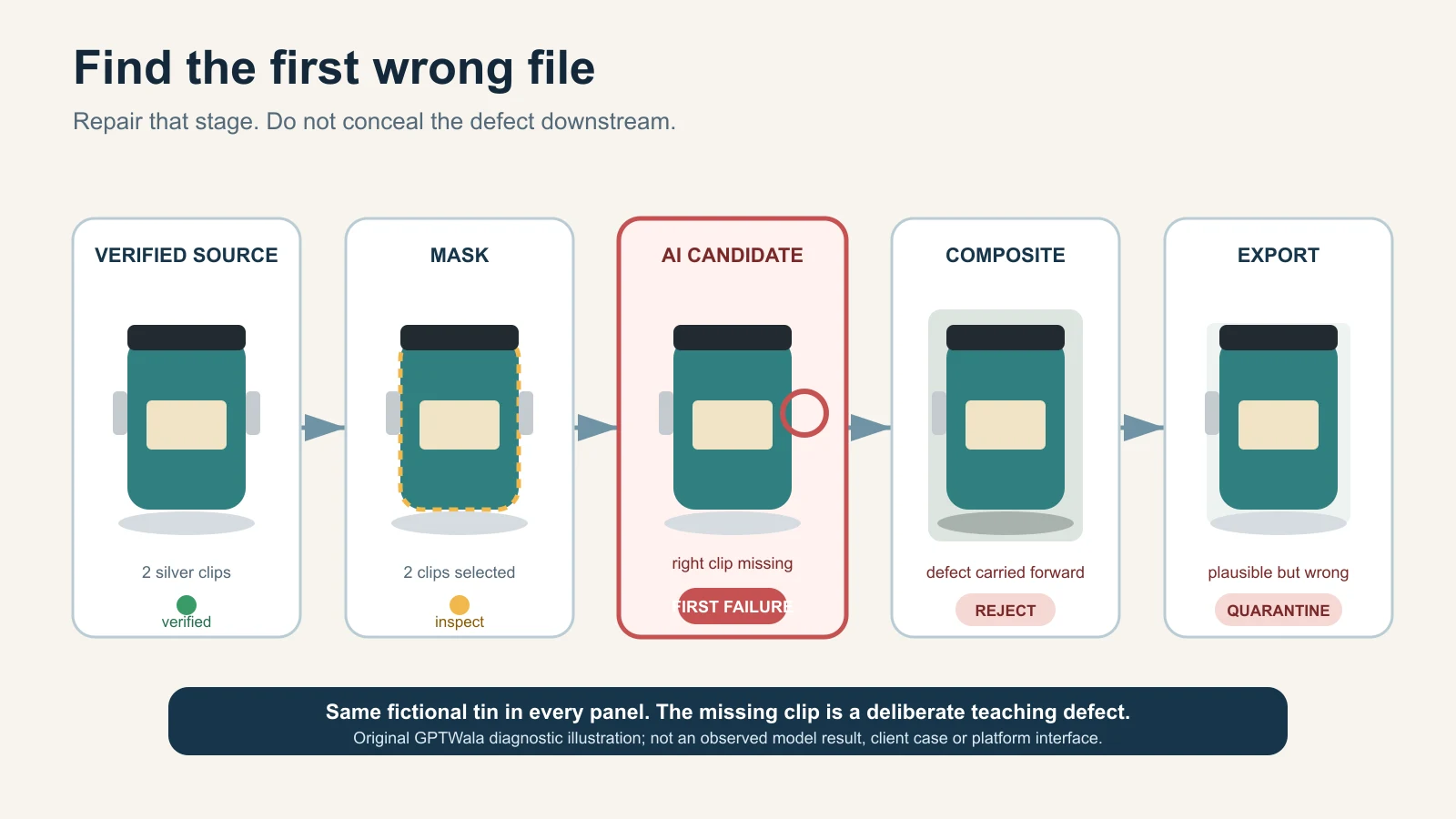
    Reviewer tracing an AI product-image defect from the source photo to the final export
    Find the first file where product truth fails; repair that stage or recapture the missing evidence. Original GPTWala diagnostic illustration using one fictional, unbranded product; not a client result, tool test or platform interface.

    Reviewed and updated: 12 August 2026

    Editorial disclosure: GPTWala did not run a product shoot, AI editor, marketplace submission or controlled accuracy test for this article. The diagnostic system is editorial guidance based on current official sources and production reasoning. Product owners must compare every candidate with the exact physical SKU and verified product records.

    The safest way to fix an AI product-photo mistake is to find the first file where the product becomes wrong. Compare the source, mask, generated candidate, composite and export in order. Repair only that failing stage. Reject and recapture when identity, quantity, label, geometry, material, scale or another buying-relevant fact cannot be verified. Do not keep regenerating until a plausible image hides the defect.

    Table of contents

    1. What counts as an AI product-photo mistake?
    2. Quarantine the image before troubleshooting
    3. Find the first wrong file
    4. Use the complete troubleshooting table
    5. Diagnose identity, text and quantity failures
    6. Diagnose shape, colour and material drift
    7. Diagnose edges, shadows and scale
    8. Diagnose file, channel and hand-off failures
    9. Choose a safe repair level
    10. Know when to stop and recapture
    11. Apply the method to Indian product businesses
    12. Prevent repeat failures without building more bureaucracy
    13. Run the rejection checklist
    14. Frequently asked questions

    What counts as an AI product-photo mistake?

    An AI product image has failed when it is unusable for its intended job, even if it looks polished. There are four different failure types:

    Failure type The image may look like The real problem Appropriate response
    Product-truth failure Attractive and believable A buyer-relevant product or offer fact changed Reject; restore verified evidence or recapture
    Presentation failure Rough, cut out or poorly grounded Product may still be correct, but the image distracts or confuses Repair the background, edge, shadow or crop without touching the SKU
    Destination failure Correct on the editing screen The crop, overlay, file, metadata or current channel rule fails after export Re-export from the approved master and verify the destination
    Process failure Each file looks acceptable alone Wrong SKU mapping, inconsistent batch style or unclear approval lets the wrong asset travel Quarantine the batch; correct mapping, ownership or hand-off

    The most dangerous mistake is not always the most obvious. A rough shadow is visible and usually repairable. A subtly changed valve port, sari border, stone setting or pack quantity can look professional while describing the wrong product.

    This guide owns symptom-led diagnosis and the fix-or-reject decision. It does not repeat the full phone-to-approved image workflow, the one-phone-photo tutorial, the background-generation workflow or the broader AI image accuracy governance system. Use those pages for their respective jobs.

    A mask is not a product lock

    Selecting only the background does not prove that the product will remain untouched. OpenAI’s current image-editing guidance says selections are not always precise and an edit may extend beyond the targeted area. Google’s current Product Studio guidance calls its generative features experimental and warns that unexpected outputs may occur. Those are useful operating cautions, not evidence that every edit will fail.

    Assume every generated candidate is unapproved until it has passed a comparison with the exact source and the physical or recorded product truth. A prompt can state a constraint; it cannot sign off the output.

    Quarantine the image before troubleshooting

    When someone notices a defect, stop the candidate from moving into a catalogue, ad folder or seller upload. Do not overwrite the approved source or rename the faulty export as final.

    Record these eight facts before editing again:

    1. exact SKU, child variant and offer quantity;
    2. intended image role: proof, main, detail, context, ad or internal concept;
    3. destination and current specification owner;
    4. source file used, including date or version;
    5. first visible symptom;
    6. first file in which the symptom appears;
    7. product record, physical sample or source view used to verify it; and
    8. decision: narrow repair, recapture, change method, specialist review or reject.

    Call this a defect card. It need not be a new software system. One row in the existing production register is enough.

    Describe the symptom without guessing the cause

    Write “the right handle disappears at the rear edge” before writing “bad prompt.” Write “the blue child SKU is attached to the green-variant file” before writing “AI colour problem.” The first statement can be checked. The second can send the team to the wrong repair.

    Avoid vague diagnoses such as:

    • “looks fake”;
    • “AI issue”;
    • “make premium”;
    • “colour is off” without naming the reference and viewing condition; or
    • “marketplace rejected” without recording the actual account message and submitted file.

    A precise symptom narrows the investigation. It also prevents a team from regenerating the product when the real fault is a crop preset, a mislabelled source or a compressed export.

    Find the first wrong file

    Follow the files in production order:

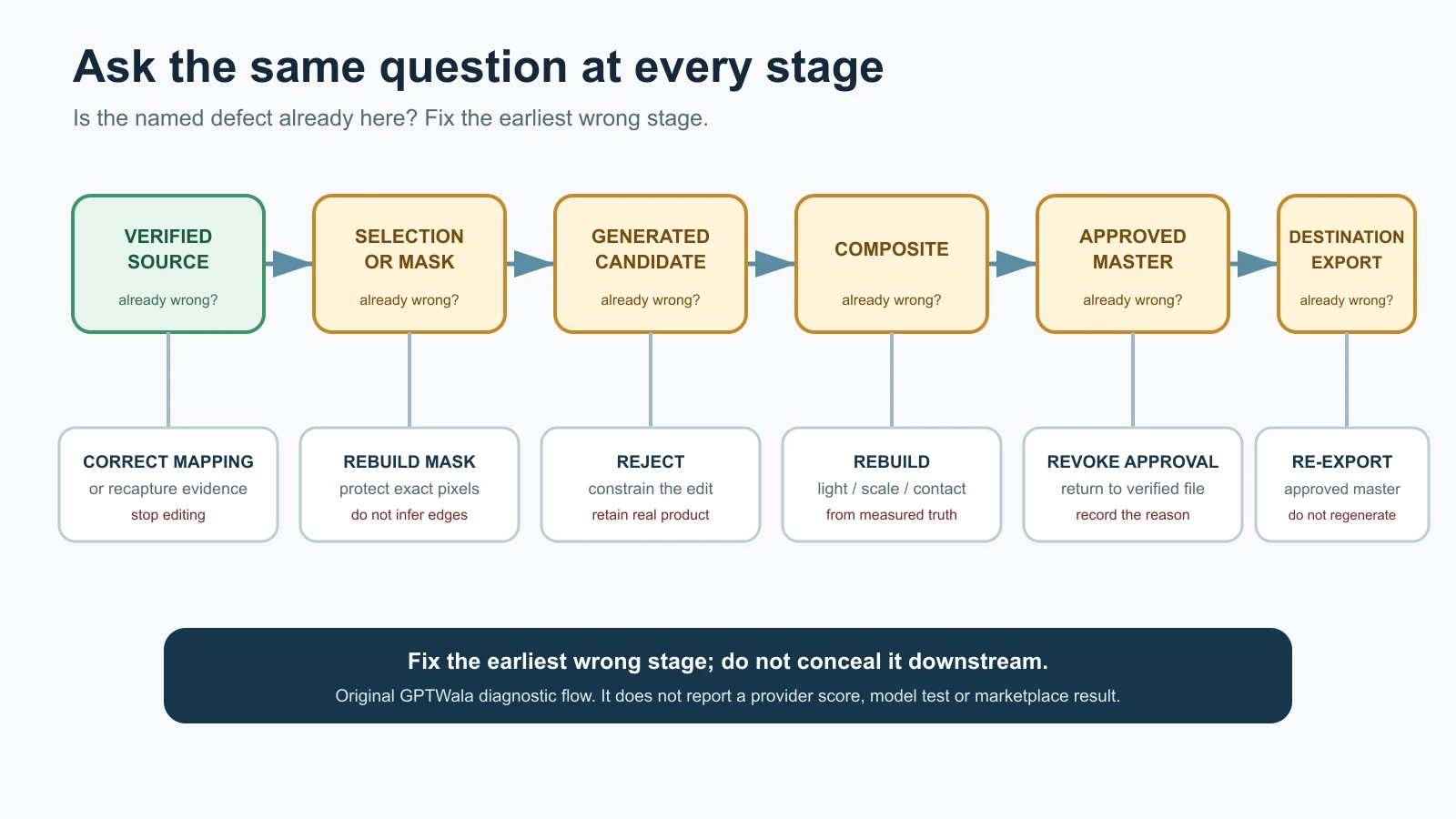
    Verified source → selection or mask → generated candidate → composite → approved master → destination export

    Open them side by side at useful magnification. Ask one question at every step: Is the named defect already present here?

    First wrong stage What it usually means First safe action
    Verified source The camera did not capture the field, the wrong SKU was photographed, or the record is incomplete Stop editing; correct the SKU mapping or recapture
    Selection or mask Fine edges, holes, transparent areas or gaps were included/excluded incorrectly Rebuild a smaller, cleaner non-destructive selection
    Generated candidate The editor altered protected pixels, inferred an unseen detail or introduced an object Reject candidate; constrain the edit or retain the real product layer
    Composite Light, perspective, contact, scale or occlusion no longer agrees Rebuild the composite with measured geometry and a real retained product layer
    Approved master Approval was attached to the wrong version or an unverified repair was flattened in Revoke approval; return to the last verified file
    Destination export Crop, resize, colour conversion, metadata handling or overlay changed the approved asset Re-export from the approved master; do not regenerate

    This “first wrong file” method matters because late-stage repairs can conceal an early truth failure. If the source never shows the back label, sharpening the final image cannot recover it. If the approved master is correct but a square preset cuts off the handle, a new AI image is unnecessary.

    Run one diagnostic check, not five speculative edits

    Choose the smallest test that can confirm or reject the suspected cause:

    • toggle the candidate over the source at 50% opacity;
    • place matching landmarks on silhouette, holes, seams or corners;
    • compare an exact label crop with the verified artwork or source photo;
    • count components and included items;
    • view source and candidate under the same colour-managed conditions;
    • disable the generated background and inspect the product edge;
    • compare the approved master with the delivered export; or
    • open the production register and verify the SKU-to-file relationship.

    If the check does not isolate the problem, return to the symptom. Do not compensate by adding more prompt adjectives.

    Diagnostic flow from source photo through mask, AI candidate, composite and export to the safest repair

    Fix the earliest wrong stage; do not conceal it downstream. Original GPTWala diagnostic flow with native labels; it reports no provider score, model test or marketplace result.

    AI product photography mistakes: symptoms, causes, fixes and stop rules

    Use this table as triage. “Likely cause” is a hypothesis to test, not a diagnosis made from appearance alone.

    Symptom Likely cause Diagnostic check Safe fix Stop or recapture when
    Wrong product or neighbouring variant Wrong source, filename or SKU mapping Match physical item, SKU record and source identifier Correct mapping; restart from the verified source Exact variant cannot be established
    Label, logo or printed text is garbled Generative reconstruction, low-resolution source or aggressive enhancement Compare characters, line breaks, placement and legal/product fields with verified artwork and real pack Restore exact approved artwork or untouched real label layer Source/artwork is missing, outdated or unreadable
    Pack count or included accessory changes Model inferred a set or styling prop; offer record was vague Count every sale unit and component against the offer record Remove non-included props non-generatively; rebuild from the exact quantity source It is unclear what the customer receives
    Product gains or loses a part Occlusion, incomplete source pack, mask error or generative completion Compare front, back and detail views; trace the part into the mask Restore verified pixels; repair mask narrowly Part is not visible in any source or affects function/safety
    Silhouette, port, seam or construction drifts Broad edit changed protected geometry Overlay source and candidate; pin landmark coordinates Use retained real product pixels or revert the generation Geometry cannot be restored without invention
    Product looks stretched or tilted Perspective correction, resize or compositing mismatch Compare corner/axis landmarks and source aspect ratio Re-transform from the original with proportions locked Dimensions or fit would be materially misrepresented
    Colour variant shifts Mixed light, auto correction, background influence, colour conversion or generative relight Compare with physical item and neutral reference; inspect the approved master/export path Correct conservatively from a verified reference; publish multiple truthful views if appearance varies No trustworthy colour reference exists
    Matte becomes glossy, metal becomes plastic, weave disappears Smoothing, relighting, denoising or invented material Compare highlight shape and microtexture at full resolution Restore source texture; reduce the edit to the surrounding area Material/finish cannot be verified after repair
    Pattern, print or texture repeats incorrectly Generative fill tiled or reconstructed detail Align motifs, border sequence, grain and intentional irregularity Restore the real product layer or exact verified texture region Pattern is a selling feature and source evidence is incomplete
    Jewellery stone, prong, clasp or link changes Fine repeated geometry was generated or erased Count stones/settings; compare macro and construction views Reject candidate; use real macro or jewellery specialist workflow One buying-relevant element differs or a mark is unclear
    Apparel fit, drape, neckline or border changes Garment was re-generated on a model; source does not prove worn behaviour Compare flat, mannequin and measured references; inspect seam/border map Use retained garment layer or real model/mannequin capture Fit, coverage, fall or construction is a purchase decision
    Halo, missing edge or jagged cutout Mask includes background or removes fine/transparent detail View on black, white and mid-grey; toggle mask edge Rebuild mask from source; use manual or specialist cutout Edge cannot be separated without inventing fibres, chain or transparency
    Product floats or shadow points the wrong way Contact point, light direction or surface plane mismatch Draw baseline and light direction; inspect gap at contact edge Rebuild a subtle physically consistent shadow outside the product Product scale/contact cannot be verified in the scene
    Product appears too large or small in context Unmeasured scene, generated hand/model or lens/perspective mismatch Compare recorded dimensions with a known plane or reference object Rebuild at measured scale; label dimensions accurately Context determines fit, clearance or safe use and measurement is absent
    Context implies an unsupported use Prompt created installation, ingredient, compatibility or performance meaning Ask what claim a reasonable buyer could infer; compare product records Choose a neutral context or a verified real use case Use, compatibility, safety or performance is not documented
    Crop hides a handle, connector, border or pack edge Destination template or subject detection cropped the product Compare approved master and export with safe-area overlay Re-export with a product-specific crop Required identifying or functional feature will not fit the format
    Text overlay becomes part of the product offer Promotional badge, price or claim overlaps or appears printed on pack Compare clean master and destination creative; read the full message Keep clean commerce master; add only reviewed native overlay for an allowed role Destination forbids overlay or claim is unsupported
    Upscale looks sharp but creates false microdetail Generative upscale or sharpening fabricated texture/characters Compare pixels with the highest-quality real source, not only the low-res version Use a better source or conservative non-generative resize Detail is needed to verify label, finish, setting or construction
    AI/provenance metadata disappears Export, conversion, CDN or download path stripped metadata Inspect the actual delivered file with a metadata reader Re-export through a tested path; retain original and provenance record Destination requires metadata and preservation cannot be confirmed
    Correct image is attached to the wrong listing Manual copy, reused folder, ambiguous filename or variant merge Reconcile file ID, SKU, product record and destination item ID Correct the mapping and review affected neighbouring records Scope of the mapping error is unknown; quarantine the batch
    Batch style changes from one SKU to the next Prompts, templates, reviewers or source angles vary View contact sheet grouped by visual family while keeping SKU truth cards open Correct presentation controls in a small batch “Consistency” repair would change a real variant field
    Final file differs from the approved master Wrong version, compression, colour conversion or post-approval edit Hash/version check where available; visually compare exact delivered file Replace with a fresh derivative from the approved master Approval trail cannot identify the released source

    Do not turn this table into a blind automation

    The table helps a reviewer choose the next check. It cannot see the physical SKU, know the seller’s offer or decide whether a material difference matters. A reviewer with product authority must make the final call.

    Diagnose identity, text and quantity failures

    Identity, text and quantity failures are automatic commercial risks because they can change what the customer believes they will receive.

    Wrong SKU is a mapping problem until proven otherwise

    Before blaming the model, inspect the folder and register. Similar variants are easily confused: two Morbi tile finishes, adjacent bottle sizes, right- and left-hand machine components, a necklace sold with or without earrings, or a sari design in two border colours.

    Verify:

    • physical sample or authorised source ID;
    • exact child SKU and revision;
    • colour, size, finish and configuration;
    • pack quantity and included components;
    • source date; and
    • destination item ID.

    If the source belongs to another variant, no prompt can repair the mapping. Start again with the correct record.

    Restore text; do not rewrite it from memory

    Labels can contain identity, ingredients, capacity, warnings, directions, certification references, manufacturer information and other important fields. A visually plausible replacement is not acceptable.

    Use one of these routes:

    1. retain the exact real label pixels when they are clean and legible;
    2. place authorised current artwork at the verified angle and dimensions, then obtain owner approval; or
    3. recapture the pack or label.

    Do not ask a generative model to “make the text readable.” Do not reconstruct blurred characters from memory. Do not borrow artwork from a related size or market. If the current artwork is disputed, the content owner—not the image operator—must resolve it.

    Count the offer twice

    Count the physical items in the source and count the items in the final candidate. Then compare both with the actual offer record.

    A styling bowl beside a spice pack can look included. A generated necklace set can acquire a second bangle. A B2B component image can show four pieces although the quote is per piece. A “pair” can accidentally become one item through cropping.

    Where the offer is ambiguous, stop. Fix the commercial record before making the image.

    Diagnose shape, colour and material drift

    These errors often survive a quick review because the candidate looks believable. Inspect with the physical product nearby whenever possible.

    Geometry: use landmarks, not overall resemblance

    Choose points that should not move:

    • outer corners and silhouette breaks;
    • hole, port, handle and fastener centres;
    • neckline, seam, hem and border intersections;
    • clasp, prong, hinge and joint positions;
    • cap, shoulder, base and label boundaries; and
    • intentional gaps or negative spaces.

    Overlay the candidate on the source and toggle visibility. Small camera changes can prevent perfect pixel alignment, so the purpose is not to manufacture a numeric accuracy score. It is to expose a changed construction, proportion or missing part.

    Recent research still treats fine-grained product identity preservation—including branding and text—as a hard image-editing problem. The 2026 ProductConsistency paper is a preprint, not a commercial tool guarantee, but its problem framing supports the conservative rule: plausible resemblance is not proof of exact product preservation.

    Colour: trace the whole path

    Colour can change at capture, edit, compositing, export or display. Diagnose in order:

    1. Was the source captured under mixed or strongly coloured light?
    2. Is there a neutral reference or the physical product for comparison?
    3. Did the background create a visual colour contrast?
    4. Did the AI relight or “enhance” the product?
    5. Did the export change colour space or profile?
    6. Does the delivered file differ from the approved master?

    Do not promise that every viewer will see an exact screen match. Preserve the real variant, avoid dramatic colour grading and give multiple truthful views when a finish changes with angle or light.

    Material: keep the cues that make it identifiable

    Material truth often lives in small cues: weave, grain, pores, brushed lines, edge highlights, translucency, uneven handmade texture or surface reflection. Removing all “imperfections” can remove the product itself.

    Reject an edit that:

    • turns brushed metal into mirror chrome;
    • smooths handloom weave into synthetic-looking fabric;
    • makes glazed tile appear matte or vice versa;
    • converts translucent packaging into opaque plastic;
    • invents uniform sparkle across jewellery; or
    • fills wood, leather or stone with a repeated synthetic texture.

    If those cues were not captured, recapture under better light. An upscale cannot reveal real detail that the camera never recorded.

    Diagnose edges, shadows and scale

    These are presentation problems until they begin changing product meaning.

    Check edges on three backgrounds

    Place the cutout against black, white and mid-grey. This reveals white fringes, dark contamination, missing translucent detail and over-feathered edges. Inspect at normal page size and at magnification.

    Repair the selection, not the product. Fine apparel fibres, glass edges, jewellery chains, handles, holes and open metalwork may need a manual path, channel-based mask, specialist retouch or a better source. If the edge cannot be separated without reconstructing the product, stop and recapture.

    For the full process of creating a new setting while protecting product pixels, use the AI product-background generation guide. This troubleshooting page only diagnoses the fault.

    Ground the product before beautifying the scene

    A grounded product needs agreement between contact, surface plane, perspective, shadow direction and light. Use a simple diagnostic:

    • draw the contact baseline;
    • mark the dominant light direction;
    • identify the surface plane;
    • check whether the shadow begins where the product touches it; and
    • ask whether the shadow softness fits the apparent light size and distance.

    If the scene is too complex to solve without changing the product, simplify it. A neutral background with a quiet, physically plausible shadow is safer than an impressive room that makes the product float.

    Measure scale when context influences purchase

    A generated hand, shelf, room or model can change apparent size. Record product dimensions first. Then check the object’s placement on a known plane or use a real measured reference outside the clean image.

    Use real capture when context answers a fit, clearance, installation or safety question: garment fit, jewellery fall, furniture proportions, machine clearances, connector placement or an item worn near the face/body. A generated context can illustrate an idea; it should not become unverified measurement evidence.

    Diagnose file, channel and hand-off failures

    The product can survive the AI edit and still fail after approval.

    Reopen the delivered file

    Inspect the exact file that a website, feed, dealer or marketplace will receive—not only the editor canvas. Check:

    • product and offer still match;
    • crop retains the whole required view;
    • small text and detail remain legible where needed;
    • colour and transparency behave as expected;
    • filename/version maps to the correct SKU;
    • overlays are allowed and supported;
    • file format and size match the current destination; and
    • required provenance metadata remains in the delivered asset.

    Google Merchant Center’s current main-image guidance asks for the actual, correct product and variant, including colour, pattern and material, and restricts placeholders and promotional overlays. Its current AI-content guidance says applicable generative-AI product images submitted in specified image attributes should retain the named IPTC digital-source metadata. Those are Google-specific requirements; use the product-image rules by channel for a broader destination check.

    Do not assume that an editor export, WebP conversion, WordPress optimisation plugin, CDN or platform download has preserved metadata. Test the real delivery path. C2PA’s own explainer also cautions that provenance can be incomplete or removed and that provenance alone does not establish whether content is true. Keep product review and file provenance as separate checks.

    Treat “rejected by platform” as an observed event, not a diagnosis

    Record:

    • the exact submitted file;
    • seller account, category and destination;
    • submission time;
    • actual status or message;
    • any human-support response; and
    • the next controlled change.

    Do not invent a reason from a generic article. Do not claim that a file is “marketplace-approved” because it looks compliant. Rules, enforcement and account states can differ and change.

    Misleading can happen by implication

    The Advertising Standards Council of India’s current code says advertisements should be truthful and honest and that visual presentation should not mislead through implication, omission, ambiguity or exaggeration. ASCI is a self-regulatory body, and this article is not legal advice. The practical lesson is simple: a false impression can come from scale, context, included props or a perfected material—not only from written copy.

    Choose the safe repair level

    Use the lowest repair level that can restore a verified result.

    Level Action Appropriate when Never use it to
    0 — Mapping correction Attach the right approved file to the right SKU/destination Image is correct; relationship is wrong Pretend a neighbouring variant is acceptable
    1 — Re-export Create a fresh crop/format/size from the approved master Failure appears only after export Rebuild missing product detail
    2 — Narrow presentation repair Correct mask, dust, outside background or physically consistent shadow Product pixels and truth fields remain verified Alter label, construction, material or quantity
    3 — Restore verified product evidence Return the real product layer or authorised artwork Generation damaged a known field but exact evidence exists Invent unseen sides or characters
    4 — Recapture Photograph the exact item, angle, label, texture, scale or part again Source evidence is missing or technically unusable Avoid resolving an uncertain SKU/offer record
    5 — Change method or specialist Use real studio, hybrid composite, retoucher or category specialist Repeated defects affect high-risk detail Turn an unverified candidate into proof
    6 — Stop/reject Remove asset from production Truth, rights, safety or offer cannot be verified Keep a plausible image because of deadline pressure

    One controlled repair is better than a chain of untracked regenerations. If the same locked field fails again, escalate the method. Repetition is evidence that the current lane is a poor fit for that product, not an invitation to lower the approval standard.

    When to stop AI and recapture the product

    Recapture is mandatory when the source cannot prove a buying-relevant fact and no exact verified asset can restore it.

    Stop and use real capture when:

    • exact SKU or child variant is uncertain;
    • label, legal text, warning, mark or identifier is unreadable;
    • a hidden side contains ports, seams, fasteners, ingredients, settings or accessories that matter;
    • colour/finish is important and no trustworthy reference exists;
    • count, quantity or included components are disputed;
    • scale, fit, drape, clearance or installation is a buying decision;
    • jewellery settings, hallmark area or fine construction cannot be checked;
    • an AI enhancement has invented microdetail;
    • transparent, reflective or fine-edged material cannot be separated reliably;
    • rights to the source, artwork, model or reference are unclear;
    • a safety, compatibility, certification or performance impression cannot be supported; or
    • two controlled attempts repeat the same truth failure.

    The “two attempts” point is a practical escalation rule, not a universal accuracy statistic. A critical identity failure can require stopping after the first candidate. A harmless crop adjustment may take more than two non-generative exports.

    Automatic-reject fields

    Reject immediately if the final asset changes or leaves unresolved:

    • product identity or variant;
    • offer quantity or included component;
    • label, logo, mark or buying-relevant text;
    • silhouette, construction, fit or functional geometry;
    • material, finish, pattern or meaningful colour;
    • product scale where context affects the decision;
    • compatibility, safety, use or performance implication;
    • rights or consent; or
    • final SKU-to-file mapping.

    The product-accuracy audit for AI images remains the owner of the full governance and approval record. This page tells the reviewer what to do after a symptom appears.

    Troubleshooting examples for Indian product businesses

    These are fictional operating examples, not client results, city-wide claims or tested tool outcomes.

    Surat apparel seller: the sari border changes on a model

    Symptom: motifs near the pallu repeat differently and the border becomes narrower.

    First wrong file: the generated model candidate; the flat source and mask are correct.

    Diagnostic: compare the border sequence, seam intersections and pallu map with the real sari. Check whether the garment was re-generated rather than retained.

    Decision: reject. Use the real garment layer, a controlled mannequin composite or a real model shoot. Fit and drape need the specialist AI model-photo workflow for apparel; prompt repetition is not a safe repair.

    Jaipur jewellery retailer: an earring gains a stone

    Symptom: the product still looks symmetrical, but one accent stone and two prongs differ.

    First wrong file: the generated candidate.

    Diagnostic: count each stone and setting against a real macro of both actual earrings. Check backs and offer quantity separately.

    Decision: reject the candidate. Restore real pixels or recapture. Use the AI jewellery photography truth checklist for stone, setting, clasp, reflection and hallmark-specific review.

    Rajkot component manufacturer: the threaded port is softened

    Symptom: an internal thread looks smooth and the hole diameter appears larger.

    First wrong file: an aggressive cleanup/upscale.

    Diagnostic: compare the original macro and engineering/product record; inspect whether the feature is necessary for identification or fit.

    Decision: stop AI enhancement. Recapture the port or supply an approved technical/detail photograph. Do not use a generated thread as compatibility evidence.

    Morbi tile wholesaler: two finishes become one

    Symptom: matte and satin variants look nearly identical after background and colour standardisation.

    First wrong file: the batch composite; the source files preserve the difference.

    Diagnostic: compare highlight width, surface texture and child-SKU mapping under the same viewing conditions.

    Decision: restore each real surface and create separate visual-family settings if required. Consistency should standardise presentation, not erase the finish a buyer orders.

    Packaged-goods retailer: the front label is “cleaned up”

    Symptom: the brand looks correct at a glance, but one quantity line and two characters differ.

    First wrong file: the generated enhancement.

    Diagnostic: compare with current authorised artwork and the exact physical pack; verify the pack size and market version.

    Decision: reject. Use real label pixels, exact authorised artwork with owner sign-off, or a new capture. Never recreate packaging text from memory.

    Multi-SKU wholesaler: the correct image reaches the wrong row

    Symptom: the image itself passes review, but a six-hole part appears against the four-hole SKU.

    First wrong stage: catalogue mapping after approval.

    Diagnostic: reconcile asset ID, child SKU, product record and destination item ID; inspect adjacent rows for the same copy error.

    Decision: quarantine the affected batch, repair the mapping and re-review the release manifest. Use the AI catalogue photography system for manufacturers and wholesalers to prevent recurrence.

    Prevent repeat failures with a small defect log

    A defect log should accelerate production, not become a new project. Add one row only when a candidate fails or requires a consequential repair.

    Field Example value
    Asset/SKU Fictional SKU MUG-TEAL-02
    Symptom Right handle gap filled
    First wrong file Generated candidate v03
    Suspected layer Selection/reference
    Diagnostic check Source/candidate overlay; black-background edge check
    Safe action Rebuild mask; retain real handle pixels
    Result Candidate rejected; v04 sent to review
    Reviewer/date Named product owner / date

    Use short reason codes to make patterns visible:

    Code Meaning Example
    ID01 Identity or variant Wrong child SKU
    OF01 Offer, quantity or text Extra accessory; pack count changed
    GE01 Geometry or construction Missing handle; changed seam
    MA01 Material, colour or pattern Matte became glossy
    CT01 Context, scale or claim Product floats; unsupported installed use
    PL01 Platform/destination Disallowed overlay or current rule conflict
    EX01 Export/delivery Crop, compression, colour or metadata loss
    RT01 Rights/consent Source or reference permission unresolved

    Review the log after a meaningful batch, not after every pixel change. If the same code repeats for one product family, alter the source pack, template, method or review gate. Do not interpret a small internal log as a model-wide accuracy benchmark.

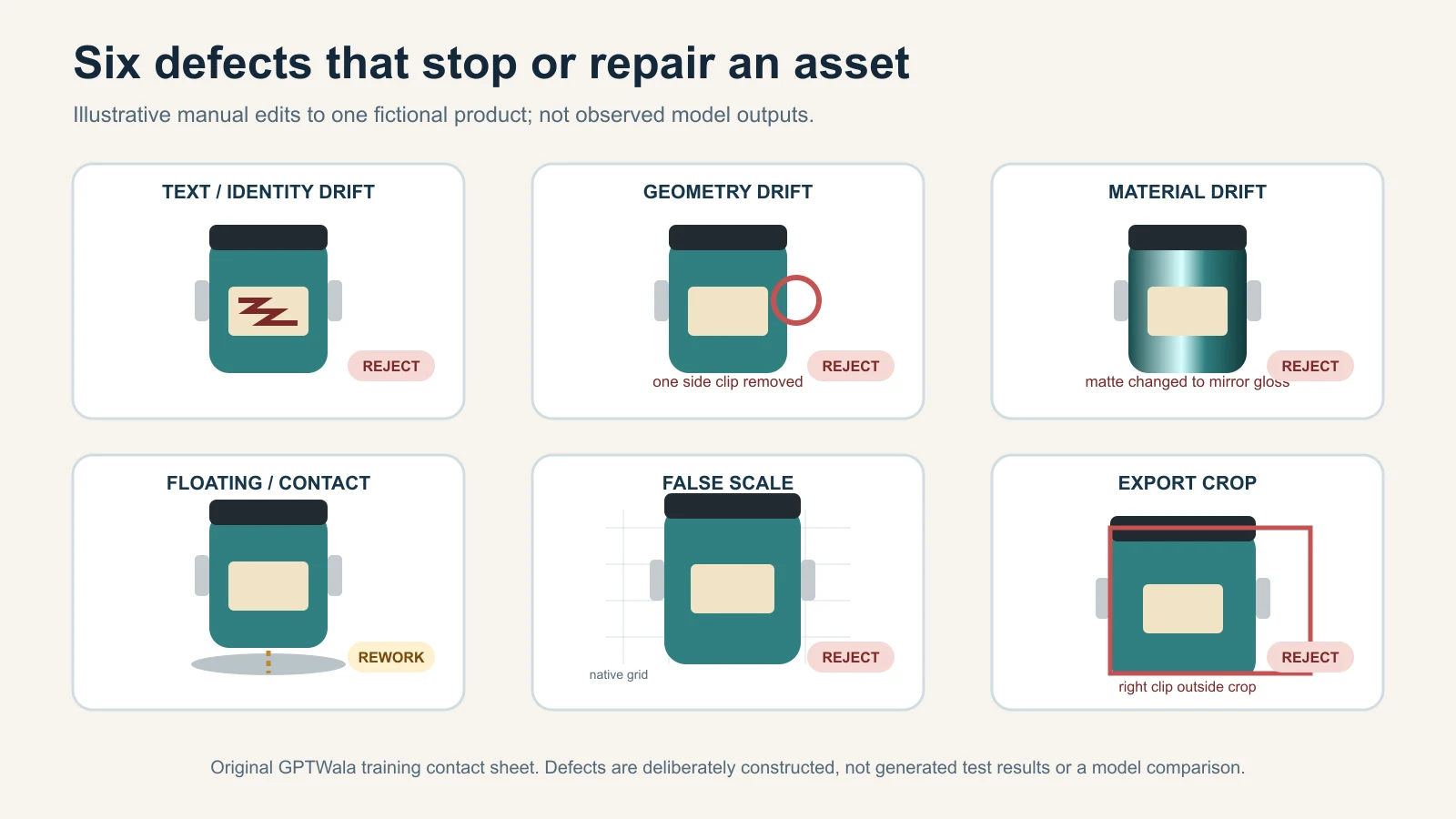
    Contact sheet illustrating wrong label, geometry, material, floating, scale and export defects

    Illustrative defects built manually from one locked fictional product for training; not observed results or a model comparison.

    Final AI product image rejection checklist

    Use this on the exact delivered file. One “no” in a critical field keeps the asset out of production.

    Identity and offer

    • [ ] Exact child SKU and revision are confirmed.
    • [ ] Colour, size, finish and configuration match.
    • [ ] Pack quantity and every included component match the offer.
    • [ ] No prop or context object appears included by mistake.
    • [ ] Label, logo, mark and product text match verified evidence.

    Product construction and appearance

    • [ ] Silhouette, dimensions and proportions are not stretched.
    • [ ] Ports, holes, handles, seams, fasteners, settings, joints and accessories are complete.
    • [ ] Pattern, border, texture, grain and intentional irregularity remain real.
    • [ ] Material, finish, colour and reflection cues remain truthful.
    • [ ] No generated detail is being used as proof.

    Presentation and context

    • [ ] Edge is clean on light, dark and mid-tone backgrounds.
    • [ ] Product contact, perspective, light and shadow agree.
    • [ ] Context does not imply unsupported size, fit, installation, safety, compatibility or performance.
    • [ ] Crop preserves all features needed for this image role.
    • [ ] Any native text overlay is accurate, approved and allowed for the destination.

    File and release

    • [ ] Final delivered file matches the approved master.
    • [ ] Filename, asset ID and destination item map to the correct SKU.
    • [ ] Current account/category/platform requirements were checked at publication time.
    • [ ] Required AI/provenance metadata is present in the actual delivered file where applicable.
    • [ ] Rights, model consent, artwork authority and reviewer sign-off are recorded.

    Record approved, rework, real capture required or rejected. “Looks fine” is not a release status.

    Turn fewer rejected images into a stronger online system

    Troubleshooting is useful when it gets verified product content moving again. It should not become endless image polishing.

    The GPTWala workshop connects this AI Content Creation work to the DAA path: Digital Presence → AI Content Creation → ₹100/day WhatsApp ads. The workshop is educational; it does not promise enquiries, sales, earnings or return on ad spend. Advertising claims, targeting, landing pages and follow-up still need their own decisions and controls.

    See the GPTWala workshop and decide whether the DAA framework fits your product business.

    Frequently asked questions

    Why does AI keep changing product labels and logos?

    Generative editors may reconstruct small or complex text instead of preserving exact pixels, especially when the source is low resolution or the edit touches the product. Compare the candidate with current authorised artwork and the physical pack. Restore the real label layer or recapture it; never rebuild buying-relevant text from memory.

    Why does my product change colour or shape after a background edit?

    The selection may include product pixels, the editor may relight or re-generate the object, or the final export may change colour or proportions. Find the first wrong file, then test the mask, source overlay and approved-master/export path. If no verified colour or geometry reference exists, recapture.

    Should I fix an AI product image or generate it again?

    Use a narrow fix when the source is verified and the defect is limited to presentation or export. Regeneration is not automatically safer. If identity, text, quantity, construction or material changed, restore real evidence, change the method or recapture. Reject repeated truth failures.

    What should I do when AI removes a handle, clasp or small part?

    Check whether the part is present in the source and mask. If verified real pixels exist, rebuild the selection and restore them. If the part is hidden, blurred or absent from every source, photograph it. Do not ask AI to guess functional construction.

    How do I fix a floating AI product photo?

    Check the contact baseline, surface plane, perspective, light direction and shadow origin. Rebuild only the scene and shadow around a retained real product layer. If product size or placement cannot be measured, simplify the background or use a real contextual capture.

    Can a better prompt guarantee product accuracy?

    No. A constraint prompt can reduce ambiguity, but it cannot verify the result or make an unseen detail true. Use exact sources, narrow edits and a human comparison. The product owner—not the prompt—approves identity and offer fields.

    Does AI metadata prove an image is accurate?

    No. Provenance metadata can help describe an asset’s history, but it may be incomplete or removed and does not prove the depicted product is true. Check both the delivered file’s required metadata and the product itself against verified evidence.

    When is one phone photo not enough?

    One view is not enough when the missing side contains a label, pattern, component, mark, clasp, seam, port, texture or dimension needed for purchase or review. Capture additional real views. The single-phone-photo tutorial is for controlled presentation candidates, not invention of unseen product truth.

    When should I use a photographer or specialist instead of AI?

    Use a photographer, retoucher or category specialist when accurate colour, fine construction, reflective/transparent material, apparel fit, jewellery detail, regulated information, installation or high-value proof cannot be captured and verified in the AI lane. The AI versus studio versus hybrid guide helps select the method.

    Sources and review method

    Reviewed 12 August 2026. Official sources were used for named editor limitations, Google product-image and AI-metadata requirements, Indian advertising context, structured-data implementation and provenance cautions. One current research preprint is used only to support the continuing difficulty of exact product-identity preservation, not as a tested tool result. Operational tables, reason codes, repair levels and Indian examples are original GPTWala editorial guidance. Recheck platform- and account-sensitive claims within 24 hours of publication.

  • AI Product Photography for Indian Businesses: Complete Guide

    Phone photo, clean catalogue image and AI lifestyle image of the same product in a product-truth workflow
    Illustration of a reference-first AI product photography workflow.

    Reviewed and updated: 11 August 2026

    Editorial image disclosure: the three jar visuals on this page were created with OpenAI image generation for this guide. They show a fictional, unbranded product, not a merchant result or a claim of product accuracy.

    AI product photography uses AI to edit a real product photo or create extra scenes around it. For an Indian manufacturer, wholesaler, retailer, shopkeeper or product brand, the safest method is reference-first and hybrid: photograph the exact SKU, make controlled changes and compare every output with the product before publishing. AI can change a background quickly, but it can also alter colour, shape, labels, patterns, components or scale.

    Table of contents

    1. What AI product photography means
    2. AI, photographer or hybrid?
    3. The three image roles
    4. Seven-step workflow
    5. Three risk lanes
    6. Choosing a tool
    7. Safer prompt formula
    8. Product-truth gate
    9. Indian business examples
    10. Real cost calculation
    11. Platform and legal checks
    12. Mistakes and fixes
    13. Five-SKU pilot
    14. FAQs

    What is AI product photography: what is it not?

    AI product photography is a workflow that uses AI to clean, edit or create context around product images. It is useful when the exact product remains the source of truth. It is not permission to invent a sale item from a text prompt. “Photorealistic” only describes how convincing an image looks; it does not prove that the SKU, colour, label, finish or dimensions are correct.

    Method What it changes Suitable role Main risk
    AI editing Background, crop, canvas, exposure, resolution or a selected area Clean catalogue assets and format changes The editor may still redraw edges, text or texture
    AI generation A new scene or new parts of an image Lifestyle images, banners and concepts The product itself may be regenerated or altered
    Virtual model imagery A model, pose or wearing context Secondary apparel or accessory images It is not proof of exact fit, fall, drape or scale

    Google’s current Product Studio documentation describes background removal, resolution improvement and scene-generation features, while warning that experimental features may produce unexpected output. That is the right mental model for any tool: useful assistance, followed by verification, not automatic approval.

    Should your business use AI, a photographer, or both?

    Use AI for controlled, repeatable edits; use real photography for product proof; and use a hybrid workflow when context is valuable but truth cannot move. The decision belongs to the asset, not to the business as a whole.

    Asset or job AI-assisted Traditional Hybrid Why
    Background removal, crop or channel resize Strong fit Optional Useful for difficult edges The product layer can often be preserved
    Main image of an ordinary, non-reflective item Limited Strong fit Strong fit The exact item and current channel rules control
    Lifestyle scene for an approved SKU Useful Useful Strongest fit AI can build context while a real product layer carries truth
    Jewellery, glass, chrome or transparent product Risky Strong fit Strong fit Reflections, edges, stones and material cues are easy to distort
    Apparel fit, drape or size claim Risky as proof Strong fit Useful as a secondary asset A plausible model image can still show the garment inaccurately
    Regulated, safety-critical or high-value product Not for unverified proof Strong fit Only with careful review A visual implication can become a material product claim

    Prefer a real shoot when exact colour or material is the buying reason, the geometry is complex, a safety or fit claim is involved, or the item cannot be replaced. A clean AI output that changes a feature is not a bargain; it is the wrong asset.

    Build the right image set before choosing a tool

    Start by deciding the image’s job. One “beautiful product photo” cannot safely serve every channel and buyer question.

    Exact SKU → Main image identifies it → Proof images explain it → Lifestyle/ad images contextualise it

    Image role Buyer job What it should show Creative freedom
    Main listing image Identify the exact product and variant The sale item, clearly and without confusing extras Low; current channel and category rules apply
    Proof/detail images Remove practical doubt True angles, texture, dimensions, package, components and scale Low to medium; facts must remain visible and correct
    Lifestyle/ad images Help the buyer imagine context The same product in a plausible setting or use Medium; never imply an absent feature, quantity or unsupported use

    Google separates its main image, additional image and lifestyle image guidance. Amazon also distinguishes its main and additional-image jobs. This separation matters even on your own website or WhatsApp catalogue: proof images answer “What will I receive?” while a lifestyle image answers “Where might it fit?”

    The seven-step phone-photo-to-approved-image workflow

    Generation is not the finish line; approval is. Each step below has a clear condition before the image can move forward.

    1. Define the exact output

    Record the SKU and variant, destination, image role, aspect ratio and due date. Decide whether you need a main, proof or lifestyle asset. Accept when: one written brief names the exact sale item and one intended use.

    2. Capture a source-of-truth pack

    Use neutral, even light and a clean background. Photograph front, back, sides and a 45-degree view; add label, material and joining-detail close-ups. Record physical dimensions, colour reference and every included part. Do not crop edges or hide a handle, clasp or lid. Accept when: a person who knows the SKU could verify its visible geometry, colour, text and contents from the pack.

    3. Choose the risk lane

    Route the job to preserve, contextualise or concept only before opening a tool. Accept when: the team knows what may change and what is locked.

    4. Choose the tool category and constraints

    Check whether the tool can use a real reference, mask only the background, export the needed size and preserve version history. Review commercial-use, privacy, data-retention and model-consent terms. Accept when: the tool can perform the narrow job without requiring the sale product to be invented.

    5. Prompt and generate variations

    State the locked product fields first, then the scene, composition, light, camera view and exclusions. Generate a small batch so review does not become uncontrolled. Accept when: every candidate is traceable to its source, prompt, tool and date.

    6. Run the product-truth gate

    Compare the output with the exact SKU, not with your memory. Inspect it at full size and at the intended mobile crop. Accept when: it has no stop-ship error and the owner or product expert signs off.

    7. Export, label and archive

    Export in the destination’s current format and dimensions. Use a descriptive filename and literal alt text, preserve required provenance metadata, and store the source, instruction, result and approval record together. Accept when: another team member can identify who approved the file, for which SKU, role and channel.

    The three risk lanes: preserve, contextualise, concept only

    The safest lane is the narrowest one that can do the job. The following is GPTWala’s recommended operating model, not an industry certification.

    Lane Allowed change Typical use Approval rule
    Preserve : green Crop, canvas, background removal and restrained light correction Main catalogue or listing image Compare edges, colour, label and components; check destination rules
    Contextualise : amber Background, surface, props, atmosphere or model context around the retained product Additional image, website banner or ad creative Pass product truth plus scale, context and use review
    Concept only : red for commerce Product, angle or feature is generated and cannot be verified Moodboard or pre-production idea Keep internal; recreate and verify before any commercial use

    If the tool redraws the product while “changing only the background”, move the output out of the preserve lane. A prompt cannot overrule what the pixels show.

    How to choose an AI product-photo tool without chasing a “best” list

    There is no best tool for every Indian seller; the right tool is the one that produces approved assets for your job with controllable risk. Test the same SKU and brief instead of comparing home-page demos.

    Tool category Best first test Controls to demand Hidden cost to record
    Background remover/editor Clean one difficult edge or reflective surface Mask refinement, undo, preserved original Edge repair and label restoration
    Reference-based generative editor Put one exact product into a simple scene Reference strength, local mask, version history Rejections caused by product drift
    Virtual-model/apparel tool One secondary image for one exact garment Garment reference, pose/fit control, consent terms Drape, print and body-product review
    Marketplace-integrated studio One additional image for its supported channel Current eligibility, export and metadata Channel-specific restrictions and reformatting
    Professional retouching workflow High-risk image with a retained real product layer Layer-level edit, colour control and audit trail Skilled operator and reviewer time

    Before subscribing, score fidelity, masking, batch consistency, export resolution and formats, commercial rights, privacy, metadata handling, operator effort and reproducibility. Verify features and pricing on the publication or purchase date; credits are not comparable until you know what counts as a generation, edit and export.

    A safer prompt formula for product images

    A good prompt limits the edit, but it never proves product accuracy. Put the locked product fields before decorative detail.

    Using the supplied photo of the exact [SKU/variant], change only [background/context area]. Preserve the product’s exact geometry, proportions, colour, pattern, material, finish, label/logo text, number of parts and included accessories. Do not add, remove, redraw or reshape the product. Place it [scene and position] with [lighting], [camera/framing] and a physically plausible contact shadow or reflection. Output [aspect ratio/use].

    Examples of useful locks:

    • Surat sari: retain the border width, motif sequence, pallu and base colour; do not infer a blouse-piece design.
    • Jaipur jewellery: retain the stone count, prongs, chain length and metal colour; never invent or sharpen a hallmark.
    • Rajkot kitchenware: retain handle and lid geometry, finish and number of pieces; do not add an accessory or unsupported cooking use.

    Even a precise prompt can produce a convincing error. The real product and source pack remain the test.

    Fictional unbranded terracotta jar generated as an editorial reference image
    Fictional AI-generated reference image; no physical sale SKU exists.
    AI-assisted lifestyle scene using the fictional terracotta jar reference
    AI-assisted editorial illustration; not a client result or approved commerce asset.

    The product-truth gate: what to check before publishing

    If a material detail is wrong or cannot be verified, do not publish the image as a listing, product or ad asset. One red failure is enough to reject it.

    Check Verification Stop-ship when…
    Exact SKU and variant Match the design code and colourway The output belongs to another parent or child SKU
    Shape and proportion Compare every edge, opening, handle, clasp and neckline Geometry or visible proportions changed
    Dimensions and scale Compare known measurements and contextual scale Props or a model imply a false size
    Colour and pattern Compare with the product/reference under controlled viewing Colour, motif, border or orientation changes buying meaning
    Material and texture Inspect weave, grain, gloss, transparency and reflection A finish or material appears different
    Label, logo and text Read against the real pack; do not trust generated text Words, quantity, barcode or regulatory information changed
    Quantity and components Count sale pieces and distinguish props Anything appears included when it is not
    Use and safety context Check every visual implication The scene suggests an unsupported load, heat, water, food or medical use
    Shadow, reflection and contact Check physical grounding The effect changes perceived shape or material
    Crop and mobile view Inspect full size and intended thumbnail A mandatory or deciding detail disappears
    Channel, rights and consent Check current rules, licences and model permission Any requirement or right is unresolved
    Provenance and approval Preserve required metadata and record a named reviewer Required metadata is missing or no product expert approves

    Editorial illustration test: why “concept only” is the honest result

    The two images below were made during production of this article on 11 August 2026 with OpenAI image generation. First, a fictional unbranded terracotta jar was generated on a neutral background. A second image used that file as a reference for a kitchen context. This was an editorial illustration, not a physical-SKU or merchant test.

    Fictional AI-generated reference image. There is no physical sale SKU behind it.

    AI-assisted lifestyle illustration made from the fictional reference. It is not a client result or an approved commerce asset.

    A human visual comparison found the broad jar silhouette, lid, terracotta colour and raised band to be similar. But physical dimensions, true colour, material, capacity and function cannot be checked because the “reference” is also synthetic. Total attempts, operator minutes and credit cost were not recorded, so this test supports no speed, cost or tool-performance claim. Its correct lane is concept only. A real seller would replace the first image with an owned, measured SKU pack before running the same review.

    Truth checkpoint What the two files show Commerce decision
    Silhouette and lid Broad cylindrical shape and lid profile look similar Observation only; no physical dimensions to verify
    Raised band and surface Both images show a band and terracotta-like texture Similar appearance is not proof of the same material or finish
    Colour Both look orange-brown under very different light No calibrated real-product colour reference exists
    Scale and function Kitchen props suggest size and use Capacity, food suitability and actual scale are unverified
    Final lane The result works as an article illustration Concept only; not approved for a product listing or ad

    Four India-specific workflows:and their safe boundaries

    The workflow changes with the product’s truth risk, not with a decorative city label. These are illustrative operating examples, not client case studies or reported results.

    Morbi tile manufacturer

    The manufacturer records a straight-on tile image, edge view, macro texture, dimensions, finish code and a colour reference for each SKU. Those real images remain the swatch and technical proof. AI may place the exact tile pattern in a room as an additional visual. The reviewer checks tile scale, grout width, pattern repeat, surface finish and whether the render suggests an unavailable size. A room scene never replaces the real swatch or specification image.

    Surat sari wholesaler

    The wholesaler photographs each exact design and colour variant, including the border, motif repeat, pallu, weave and embroidery detail. An AI on-model image may help show a wearing context, but it stays secondary. The team rejects changed border width, invented blouse details, smoothed embroidery or a colour borrowed from another child SKU. One attractive output is never reused across several colour variants unless every product field has been separately verified.

    Jaipur jewellery retailer

    Real main and macro images carry the proof layer. A contextual wearing image may be created only with a verified size reference. Reviewers count stones and prongs, then check the setting, chain length, clasp, metal tone and hallmark. If the system makes stones brighter, thickens a chain or “cleans” hallmark text, the output is rejected. For a high-value or one-off piece, a controlled real shoot is usually the safer default.

    Rajkot kitchenware manufacturer

    The manufacturer retains the real utensil layer and creates a clean kitchen context around it. The source pack records handle shape, lid fit, surface finish, piece count and included accessories. Reviewers reject an extra spoon that looks included, a lid from another model, a false capacity impression or a scene implying unsupported flame, oven or safety compatibility. The lifestyle image can suggest context; it cannot create a technical claim.

    What does AI product photography really cost?

    Measure the cost of an approved, usable asset, not the advertised price of one generation. A cheap output that needs repeated repair may be the expensive option.

    Cost per approved asset = (tool or credit cost + source capture + operator time + retouching + review + rework or reshoot) ÷ approved usable assets

    Also track:

    • Approval rate = approved outputs ÷ total generated outputs
    • Rework rate = outputs needing another edit or generation ÷ reviewed outputs
    • Time per approved asset = total hands-on time ÷ approved outputs
    Cost input Record for AI/hybrid work Compare with a real shoot
    Source creation Phone setup, product preparation and reference views Photographer, studio, transport and product handling
    Production Credits/subscription and operator hours Shoot, model/props and retouching
    Quality control Product expert review and colour/label checks Selection and retouch approval
    Failure cost Discarded outputs, rework, reformatting and reshoot Missed shots, extra edits and reshoot
    Rights and delivery Licence review, consent, storage and exports Usage licence, model release and final files

    Use your actual invoices, wage or owner-time assumptions and approved-asset count. Do not insert a market-average rupee figure without dated, comparable quotes.

    Are AI product photos allowed on Google, Amazon, Flipkart and your website?

    Sometimes:if the image is accurate, has the right role and follows the current destination rules. A tool’s “marketplace-ready” label is not platform approval.

    Channel Main image Additional or lifestyle AI/provenance note Verify before use
    Google Merchant Center Must show the actual product and correct variant under its current main-image rules Separate additional and lifestyle guidance applies AI-generated images in specified attributes must retain required IPTC DigitalSourceType metadata Official Merchant Center help and account diagnostics
    Amazon.in Public Amazon staff guidance says pure white background, only the product for sale and at least 85% frame fill Additional images can show angles, details and use No blanket AI approval should be inferred Logged-in Seller Central help and current category style guide
    Flipkart Do not rely on an old blog or vendor’s template Role and category requirements can change No exact unverified spec is stated here Current seller dashboard/help centre
    Meesho Do not rely on search snippets or another platform’s rules Check the current listing workflow No exact unverified spec is stated here Current supplier panel/help centre
    Your website You control presentation and technical format More room for context and comparison Product truth, rights, privacy and ad-destination rules still apply Your policy, legal review where needed, and final page preview

    Google’s AI-generated-content guidance specifies embedded IPTC provenance metadata for applicable Merchant Center images; a visible watermark or alt text is not a substitute. Its 2026 product-data update says warnings for images below 500 × 500 began on 14 April 2026 and enforcement of that new minimum begins on 31 January 2027. That future enforcement date should not be described as a universal rejection already in force.

    Amazon’s publicly accessible seller-staff image guidance gives the main-image points above and tells sellers to check category guidance. The logged-in Product image requirements and the rules shown for the seller’s account remain controlling.

    For India, product visuals should remain consistent with what the buyer will receive. The Consumer Protection (E-Commerce) Rules, 2020, the CCPA Guidelines for Prevention of Misleading Advertisements, 2022 and the ASCI Code are relevant checks against misleading descriptions, claims and visual implications. The practical rule is simple: do not visually add, improve or imply a feature the sale product does not have. This is practical content, not legal advice.

    Common AI product-photo failures and the fastest safe fix

    Reduce the edit area or return to the real product layer before adding more prompt words. Stop when a material field cannot be verified.

    Symptom Likely cause Safe fix When to stop
    Label, logo or text changes Product area was regenerated Restore the real label layer; mask only around it Any required text remains wrong
    Wrong colour or variant Weak reference or mixed-SKU input Use one SKU pack and controlled colour reference Colour changes buying meaning
    Texture looks plastic or smooth Generative cleanup replaced detail Retain the real product pixels; use real macro proof Material cannot be restored
    Shape, dimensions or piece count changes Tool inferred hidden geometry Add views; reduce edit; use real image Geometry or contents stay uncertain
    Invented prop appears included Scene brief did not separate props Remove it or label context clearly Buyer could expect it in the box
    Product floats or reflection is wrong Scene physics and surface mismatch Rebuild contact shadow around retained product Effect changes perceived shape/material
    Model fit or sari drape shifts Virtual model regenerated garment areas Keep as secondary; verify against flat/mannequin views Fit, print or border is unreliable
    Mobile crop hides a deciding feature Wrong aspect ratio or focal point Reframe for the exact placement Mandatory detail cannot remain visible
    Low credit cost, high rejection Wrong tool/job fit Calculate cost per approved asset; switch workflow Rework repeats across the pilot
    Tool accepts it, marketplace rejects it Tool template is not platform approval Read the current account error and channel guide Rule or category status is unresolved

    Run a five-SKU pilot before changing the whole catalogue

    A seven-day, five-SKU pilot reveals operating problems without risking the complete catalogue. Include four normal products and one difficult item.

    Day Work Evidence to keep
    1 Select five SKUs and define one preserve plus one contextual job for each SKU, role, channel and risk lane
    2 Build source-of-truth packs and list missing proof images Views, measurements, details and gaps
    3 Produce a small, traceable set of variations Tool, source, prompt, output count and date
    4 Run the truth gate; log every rejection Error field, severity and reviewer
    5 Retouch or regenerate only fixable outputs Hands-on time, credits and rework reason
    6 Export approved assets to one controlled destination after checking its rules Final file, metadata action and approval
    7 Review approval rate, time/cost per approved asset and recurring defects Pilot scorecard and go/change/stop decision

    Do not promise a sales result from this pilot. Operational success means the team can create, verify, find and reuse accurate assets at an acceptable internal cost. If you also observe enquiries or orders, keep the offer, traffic and other major changes stable where possible and treat a small sample as directional, not proof that the images caused the result.

    Where product photos fit in an online growth system

    Product photos are assets, not the whole growth system. A business also needs an online presence, content that carries the offer, a way to reach the right people and a clear enquiry follow-up process.

    If your business still depends mainly on walk-ins, see how to take an offline product business online. The GPTWala webinar explains the DAA path: Digital Presence → AI Content Creation → ₹100/day WhatsApp ads. It shows how these pieces connect for a product business without making product images carry the entire burden.

    See the GPTWala webinar Learn how to connect your product assets, online reach and enquiry follow-up instead of relying only on walk-ins.

    Frequently asked questions

    What is AI product photography?

    It is the use of AI to edit a product photo or create additional visual context around it. For truth-sensitive commercial work, start with a real image of the exact SKU. AI editing can change a background or canvas; AI generation can add a scene. Neither approach proves accuracy by itself, and a photorealistic output can still show the wrong colour, label, geometry or scale.

    Can I create professional product photos from a phone photo?

    Often, yes, for a controlled background, crop or simple contextual image:if the source is sharp, evenly lit and complete. One phone photo is not enough when the tool must infer hidden geometry, text or high-risk details. Capture front, back, side, 45-degree and close-up views, plus dimensions and included parts, before asking AI to edit the exact product.

    Can AI replace traditional product photography?

    It can replace some repeatable editing and help create secondary assets. It should not replace truthful proof when exact colour, material, reflections, fit, safety or dimensions matter. A hybrid workflow is often safer: real main and detail images establish the product, while AI helps with approved backgrounds, layouts and additional context.

    Which AI product photography tool is best for Indian sellers?

    There is no universal best tool. Match the tool to the image role, then test the same SKU and brief. Compare product fidelity, mask and reference controls, export quality, batch consistency, commercial rights, privacy, metadata handling, operator effort and cost per approved asset. A vendor demo or “marketplace-ready” badge is not evidence that your SKU will remain accurate.

    How much does AI product photography cost in India?

    Use your own cost per approved asset. Add tool or credit cost, source capture, operator time, retouching, review, rework and any reshoot; divide by the number of approved, usable files. A price per generation omits rejected outputs and staff time. Compare this total with current photographer or studio quotes for the same brief and usage rights.

    Can I use AI product images on Amazon, Flipkart, Meesho or Google Shopping?

    Sometimes, but the exact product, image role, category and current platform rules decide. Google publishes separate main, additional and lifestyle guidance and requires specified provenance metadata for applicable AI-generated images. Check logged-in Amazon, Flipkart and Meesho seller guidance for the current account and category. Do not treat another platform’s template or an AI tool’s export as automatic approval.

    Can AI change my product’s colour, label or shape?

    Yes. It may alter colour, text, motifs, reflections, texture, proportions, parts or scale even when the instruction says not to. Reduce the edit area, provide more reference views and preserve the real product layer wherever possible. If a material field is wrong or cannot be checked against the exact SKU, reject the output.

    Do AI-generated product images need a label or metadata?

    Requirements vary by destination and type of edit. Google Merchant Center requires AI-generated images in specified attributes to retain defined IPTC digital-source metadata. Other platforms, ad systems, laws and tool terms may apply different rules. Keep an internal creation record, preserve required embedded metadata and check whether your image optimiser strips it; alt text is for accessibility and context, not a replacement for provenance.

    Is AI product photography safe for jewellery and apparel?

    It can help create additional context, but these categories carry high truth risk. Jewellery reviewers must verify stone count, settings, metal tone, clasp, length, scale and hallmark. Apparel reviewers must verify colour, print, embroidery, border, fit and drape. Keep real main and detail images as proof, and reject any model or lifestyle output that changes the sale item.

    Sources and review method

    This guide was researched and reviewed on 11 August 2026. Platform rules, tool capabilities and pricing can change. Recheck official seller surfaces within 24 hours of publication and at least every 90 days for marketplace-sensitive sections.