Reviewed and updated: 12 August 2026
Editorial test status: this guide publishes a controlled background-generation method and blank approval scorecard. No named tool was hands-on tested for this article, and no speed, cost, conversion or product-preservation result is claimed. Business examples are illustrative.
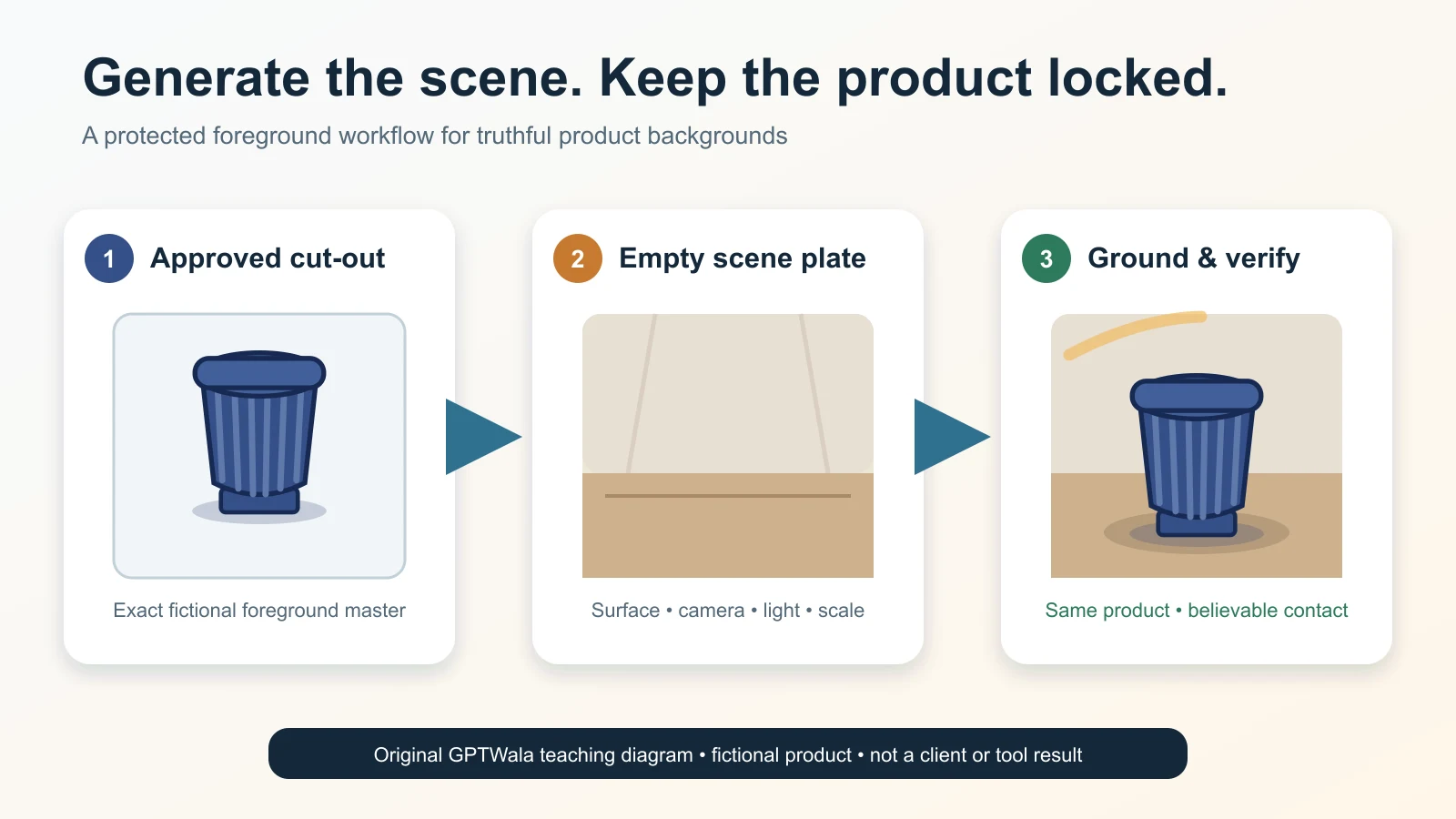
To generate an AI background safely, begin with an approved image of the exact SKU and protect the product layer. Brief the surface, setting, scale, camera, light and exclusions; then generate only the scene. Ground the product with coherent contact, perspective, shadow and reflections. Approve it twice: first for an unchanged product, then for truthful context. If the tool redraws the item or implies a false size, use or included accessory, reject the image.
Table of contents
- What AI background generation is—and is not
- Choose one of three background-edit paths
- Prepare an approved product master
- Write a six-field scene card
- Use this eight-step background-generation workflow
- Make the product belong in the scene
- Choose a background by business job
- Run the two-gate approval
- Stop when the method cannot stay truthful
- Fix common background-generation failures
- Apply the method to Indian product businesses
- Check tools, destination rules, rights and provenance
- Run a three-scene pilot before batching
- Turn approved background assets into an online growth system
- Frequently asked questions
What AI background generation is—and is not
AI background generation uses an existing product image as the foreground and creates or replaces the scene around it. The new area may be a plain studio sweep, a coloured surface, a room, a seasonal setting or an application context.
The safe objective is narrow:
Change the environment while keeping the sale item and offer unchanged.
That means a background edit is not permission to:
- reconstruct the product from text;
- invent another viewing angle;
- repair unreadable label information;
- change the colour, finish, shape, pattern or construction;
- add an accessory that appears included;
- demonstrate an unverified fit, installation or performance result; or
- turn an unavailable concept into a listing image.
Background replacement sits in the contextualise lane of the complete AI product photography guide. This article owns the scene plate, extraction, grounding and context review. The AI product photography prompt pack owns reusable prompt variations; the product-accuracy guide owns the full defect audit.
The distinction matters because an image can show the correct product on an impossible surface, at a false scale or in an unsafe use. Product truth and scene truth are two different gates.
Choose one of three background-edit paths
Use the least reconstructive method that can do the job.
| Path | What changes | Best use | Main risk | Approval label |
|---|---|---|---|---|
| A. Generate a background plate, then composite | The scene is created without the product; an approved cut-out is placed on top | High-fidelity product, readable pack, repeatable campaign scenes | Edge, shadow and perspective mismatch | Product asset after two-gate review |
| B. Select or mask the background in an image editor | The tool edits around the photographed product | Simple rigid products and limited scene changes | Selection leakage redraws edges or product details | Product asset only after pixel-level comparison |
| C. Regenerate the product and scene together | Both foreground and background can be reconstructed | Mood boards and exploratory concepts | Identity, label, geometry, colour and quantity drift | Concept-only unless rebuilt from verified product evidence |
Path A: a separate scene plate gives the strongest product lock
Generate an empty background with the required surface, camera height, perspective and light. Place the approved product cut-out into it without asking the model to redraw the item. Add contact shadow and any necessary reflection as separate editable layers.
This path demands competent extraction and compositing, but it gives the reviewer a simple product comparison: the foreground master should remain the same file. Use it for packaging, technical products, patterned goods or any label that must stay readable.
Path B: selected edits are convenient, not perfectly contained
Some editors let the operator select the background and describe the replacement. OpenAI’s current Images in ChatGPT documentation describes both selected-area editing and direct edit instructions. It also warns that highlights are not always precise and an edit can extend beyond the selected area.
Therefore, a background selection is not a product lock. Compare the output with the source around the full silhouette, then inspect internal text, colour and construction. If the product has changed, reject the output rather than trusting the selection boundary.
Path C: full generation is a concept route
Text-to-image or loose reference generation can be useful when an owner needs to choose a mood, palette or set direction. It is not evidence of the exact sale item. Label the output CONCEPT—NOT PRODUCT PROOF and hand the selected direction to a photographer, compositor or locked-product workflow.
Do not publish a concept as a listing merely because it looks plausible.
Prepare an approved product master
This guide begins after basic capture. If the only source is a difficult phone image, complete the phone-photo product-image tutorial first.
Use the exact current SKU
Record the child SKU or design code, variant, pack version, included components and verification date. The source should show the entire product at a useful resolution, with enough references to inspect its buying-relevant details.
Do not silently substitute a neighbouring shade, old label or supplier image with uncertain rights.
Start with one clear foreground
For many automated tools, a centred image with one main product and an uncomplicated background is easier to separate. Google’s current Product Studio documentation, for example, recommends one main product, centred with open canvas, and advises against input images with people, hands or props for its workflow. Those are Product Studio-specific recommendations, not universal rules.
Your master should ideally provide:
- the complete silhouette without clipping;
- crisp label, pattern, fastener and edge detail;
- a colour and finish reference the reviewer can check;
- a believable original shadow or enough form information to construct one;
- correct orientation and camera angle; and
- space or resolution for the intended final crop.
Inspect the extraction before generating a scene
Zoom into the mask edge. Look for:
- pale or dark halos from the old background;
- clipped handles, chains, fibres, lace, glass rims or translucent areas;
- holes that were filled rather than cut out;
- shadows mistaken for product—or product mistaken for shadow;
- lost reflections that define metal, glass or gloss; and
- fringe colours around packaging and labels.
If an accurate cut-out would require the operator to guess the edge, recapture against a more useful contrast or send it to a specialist retoucher. A generated background cannot repair missing product evidence.
Write a six-field scene card
A long adjective list is not a production brief. Use six fields that control how the product meets the environment.
| Field | Decision to record | Example for a fictional ceramic planter |
|---|---|---|
| 1. Asset role | Main, additional, lifestyle, ad, catalogue or concept | Secondary website lifestyle image |
| 2. Environment | Specific place and visual boundaries | Covered urban balcony with neutral plaster wall |
| 3. Support surface | Material, height, edge and cleanliness | Waist-high matte sandstone ledge, dry and uncluttered |
| 4. Product placement and scale | Position, crop and measured relationship | Planter centred left; its known 24 cm height must remain believable |
| 5. Camera and light | Viewpoint, lens feel, direction, softness and shadow | Eye-level slight three-quarter view; soft morning light from upper left |
| 6. Exclusions and truth limits | What cannot appear or be implied | No extra planter, plant, water, hanging hardware, logo, text or size claim |
Then write one compact scene instruction:
Create only an empty covered-balcony background with a matte sandstone ledge at eye level, soft morning light from upper left, restrained neutral colours and sufficient negative space on the right. Keep the scene dry and uncluttered. Do not add products, plants, people, labels, logos, text or mounting hardware.
That is a scene plate brief, not a product-generation prompt. The product is composited later. For a selected edit, add: “Replace only the selected background; preserve the foreground product exactly,” then still inspect for leakage.
Keep the full prompt library on A04. Here, the scene card exists to control geometry and implication.
Use this eight-step background-generation workflow
Step 1: assign one role and destination
Decide whether the asset is a clean catalogue image, secondary lifestyle scene, ad creative, dealer visual or concept. Check the current destination before making the background.
A plain main image and a festive ad need different rules. Do not ask one file to be both.
Step 2: lock the product and offer fields
List what cannot change: identity, silhouette, colour relationship, finish, pattern, text, quantity, included parts, scale and approved claims. Attach the real references. A wrong locked field is an automatic reject.
Step 3: choose Path A, B or C
Use a separate plate and composite when product fidelity dominates. Use a selected edit for a simple, well-separated product only if the output can be compared closely. Use full generation only as a concept until product evidence is restored.
Step 4: prepare the product layer
Work on a duplicate. Preserve the original. Extract or mask conservatively, repair only capture artefacts that are not product features, and keep an editable high-resolution master.
Do not bake an invented shadow into the product file. Keep product, shadow, reflection and background separable when the editor allows it.
Step 5: generate a small candidate set
Use one scene card and create a limited set of alternatives. Change one variable at a time: surface, distance, light direction or colour palette. Do not generate dozens of unrelated scenes and choose by beauty alone.
Record the tool, date, input, scene description and candidate number. A download is a candidate—not approval.
Step 6: ground the unchanged product
Place the product at a scale supported by its real dimensions or a verified reference. Align the camera and horizon. Add a contact shadow consistent with the scene light. Match reflections only where the real material would show them.
Do not warp the product to fit the background. Change the scene plate or use a compatible source angle instead.
Step 7: run the two-gate approval
Gate 1 asks whether the exact item and offer remain unchanged. Gate 2 asks whether the scene is physically and commercially truthful. Both gates must pass. The scorecard appears below.
Step 8: export, label and preserve provenance
Create one approved master, then destination copies. Keep the source image, mask, scene card, background plate, editable composite, generation record, reviewer and final status.
Preserve destination-required metadata through compression, WordPress and CDN delivery. Reopen the delivered file and compare it again; an export can clip edges, change colour or strip metadata.
The phone-to-approved production workflow owns the wider folder, hand-off and approval system.
Make the product belong in the scene
Grounding is not decoration. It is the set of visual cues that tells the viewer where the object sits, how large it is and how the environment affects it.
Research on product-background inpainting treats product consistency and background appropriateness as separate evaluation problems. Image-compositing research likewise identifies layout, scale, viewpoint, occlusion, lighting and shadows as foreground–background compatibility problems. See the primary papers on product-background evaluation and shadow generation for composites. The checklist below translates those concerns into an editorial review; it is not the papers’ scoring system.
Contact and gravity
The lowest visible part of a resting product should meet a plausible surface. Check for a bright gap, blurred base, contradictory feet or a shadow that starts too far away. A hanging, wall-mounted or handheld item needs real support evidence, not a floating interpretation.
Safe fix: move the product to the correct plane, use its real base geometry and add a restrained contact shadow. If the scene requires another support state, recapture that state.
Perspective and horizon
The product’s camera angle must agree with the surface and room. A top-down pack cannot sit naturally on an eye-level shelf without transforming its geometry.
Check the product’s verticals, visible top surface and base ellipse against the background’s horizon and converging lines. If they conflict, choose a new background plate generated from the source viewpoint. Do not skew a truth-critical item until it merely “looks about right.”
Light direction and shadow
Look for the brightest face and main highlight on the real product. Background objects, the generated contact shadow and visible light source should agree with that direction.
Shadow shape depends on the object, surface, light direction, distance and softness. A generic oval shadow may be acceptable for a simple opaque pack on a neutral sweep; it is not a universal solution for handles, legs, transparent items or directional sunlight.
Reflection and material
Gloss, metal and glass connect strongly to their surroundings. A studio reflection can contradict a warm room; a generated mirror reflection can invent the product’s reverse side, label or internal content.
Prefer real reflections where they define the item. If a new reflection is needed, keep it subtle, derived from the approved foreground and inspected for false detail. Jewellery, glass, chrome and liquids often deserve specialist compositing or real capture.
Scale and surrounding objects
Set scale from real dimensions, not intuition. A cup beside an enormous lemon or a floor tile beside a miniature chair can change perceived size even when the product pixels are untouched.
Use known architecture or props only when their relationship is credible. Avoid props whose standard size varies widely. If the image needs to prove dimensions, show real measured evidence elsewhere; a generated room is context, not measurement.
Depth, occlusion and focus
Foreground objects can overlap the product only when the overlap is truthful and does not hide a buying-relevant field. Depth of field should follow the intended camera plane. A razor-sharp distant wall behind a softly focused product—or a blurred label beside a sharp generated flower—can expose the composite and obstruct proof.
When a scene needs complex occlusion around chains, handles, fabric or transparent edges, use a layered composite and detailed mask rather than a one-click background change.
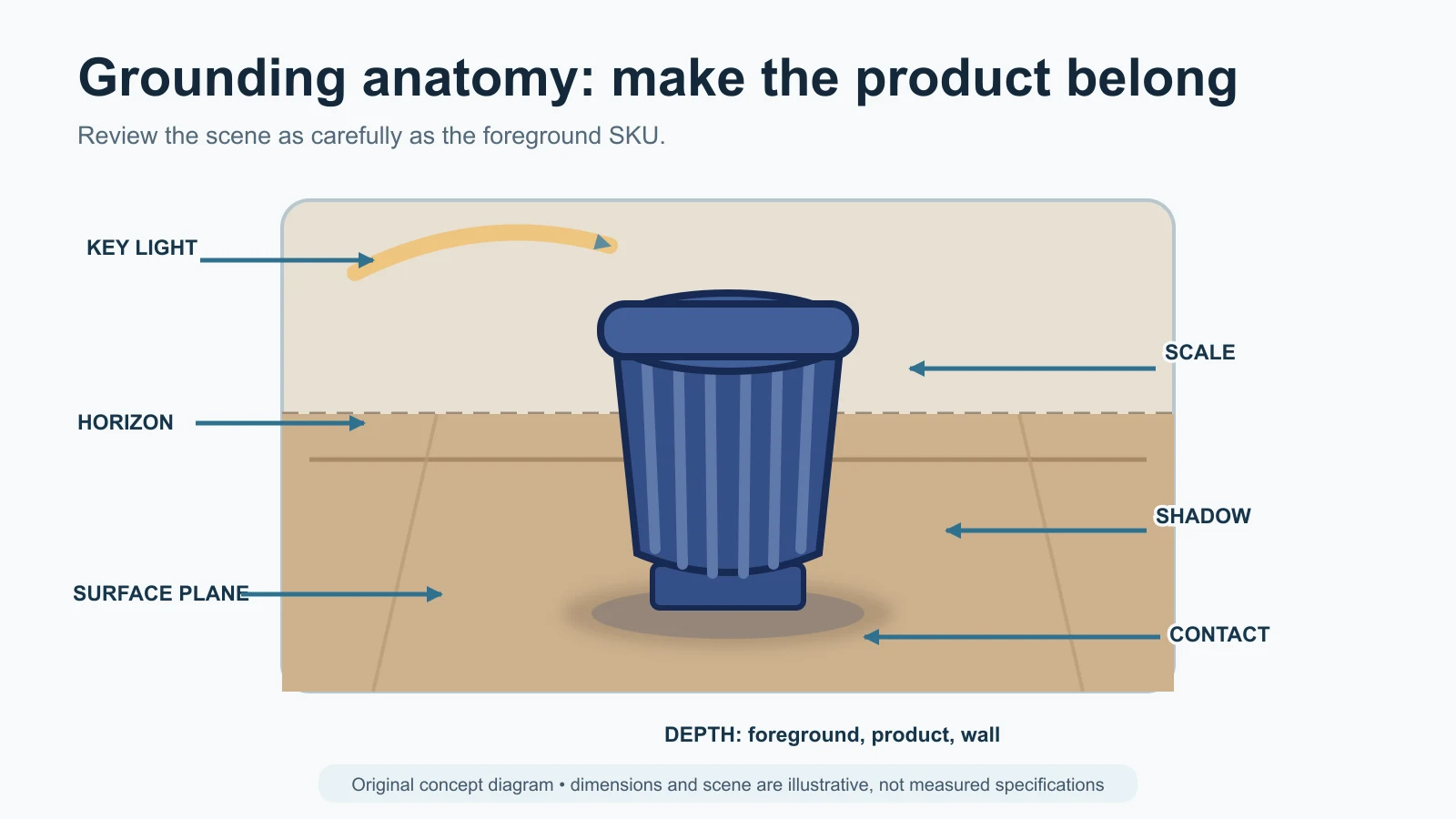
Original GPTWala grounding diagram. Dimensions and scene relationships are illustrative, not measured specifications.
Choose a background by business job
| Background role | Appropriate use | Keep real | Avoid |
|---|---|---|---|
| Plain neutral or white | Catalogue consistency, clean proof, some channel mains | Product, true edge, natural form and current label | Invented border, false pure-white rule across every platform, clipped light products |
| Simple brand-colour studio | Website tiles, dealer deck, organic social | Product and one restrained shadow | Colour cast that changes the item; promotional text inside the product image |
| Lifestyle context | Secondary website or marketplace image, catalogue inspiration | Exact product layer and scale | Extra components, unsafe use, impossible installation, context presented as product proof |
| Seasonal/festive context | Campaign or ad variation | Current pack, offer and quantity | Gifts, ingredients or decorations that look included; invented discount or claim |
| B2B application scene | Dealer education and use-case orientation | Exact part and verified interface | False connector fit, capacity, environment or certification; unlabeled concept treated as installed evidence |
| Concept/mood board | Choose art direction before production | Clear concept label | Publishing as an available SKU, completed project or customer result |
For channel-specific main/additional/lifestyle requirements, use the product-image rules guide. This page does not maintain a duplicate specification table.
Run the two-gate approval
Gate 1: product lock
Compare source and output side by side at full size.
| Product-lock question | Pass condition | Automatic reject |
|---|---|---|
| Is it the exact SKU and variant? | Identity and current version match | Another colour, pack or design appears |
| Is the silhouette unchanged? | Edge, openings, handles and proportions match | Shape, count, attachment or construction changes |
| Are colour, pattern and finish preserved? | Buying-relevant appearance matches verified references | Material, gloss, motif or shade changes meaning |
| Is all text and branding intact? | Required text is exact and in the same position | Garbled, missing, moved or invented text/logo |
| Are quantity and components truthful? | Only what the buyer receives appears as included | Extra item or missing component |
| Is scale supported? | Placement matches known dimensions/reference | Product appears materially larger or smaller |
Any automatic reject returns to the product layer, source capture or edit path. Do not repair unreadable product text by guessing.
Gate 2: scene truth and grounding
Score each item PASS, REVISE or REJECT:
- contact and support;
- camera angle and horizon;
- light direction and shadow softness;
- reflections and material response;
- scale and prop relationship;
- depth, focus and occlusion;
- safe, plausible use;
- no false inclusion, claim or installed result; and
- current destination fit.
A scene can be aesthetically weak but truthful; revise it. A scene that falsely implies size, components, compatibility, safety or outcome is a reject.
The full severity model and four-pass audit belong to the product-accuracy guide. This page uses a smaller binary product lock so operators can approve a background job without duplicating that system.
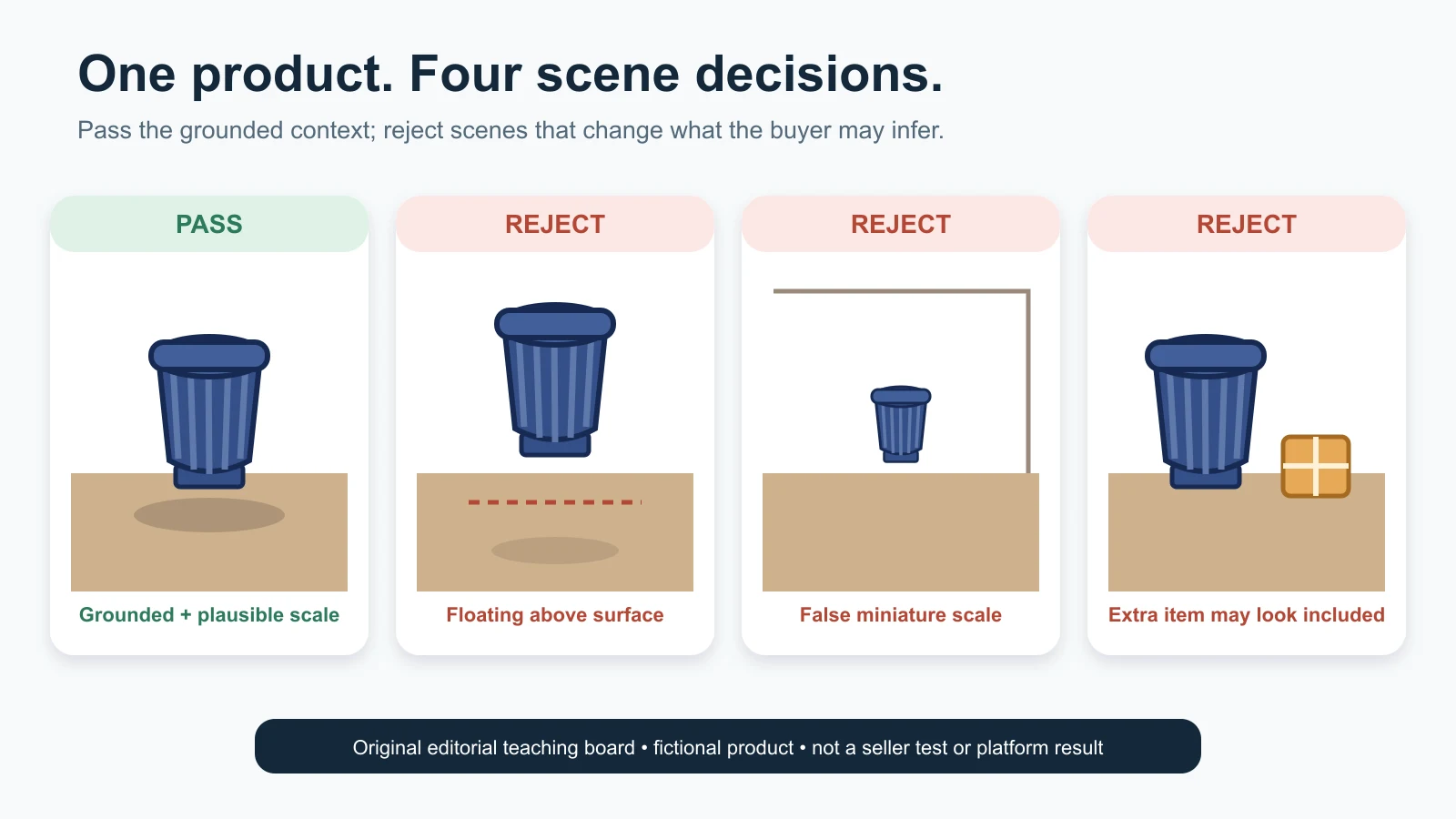
Original editorial teaching board using one fictional product. It is not a seller test, platform result or approval claim.
Stop when the method cannot stay truthful
Stop generating and change the method when:
- the editor repeatedly redraws the product or label;
- the background cannot be separated from transparent, reflective, furry, fibrous or fine-chain edges;
- the source lacks a view required by the requested scene;
- scale cannot be supported by dimensions or a trustworthy reference;
- the scene would imply a safety, fit, performance or compatibility claim the team cannot verify;
- the only available source is the wrong pack or variant;
- a supplier image has unclear editing or AI-upload rights;
- the platform/category presentation is uncertain and the asset is destined for upload;
- the product expert is unavailable for a high-risk review; or
- repeated revisions cost more than recapture or specialist compositing.
Choose one of four actions: simplify the scene, generate a background plate and composite, recapture from a compatible angle, or hire a photographer/retoucher. The AI versus studio versus hybrid guide helps make that routing decision.
Fix common background-generation failures
| Symptom | Likely cause | Safe action | Do not do |
|---|---|---|---|
| Product floats | Missing/weak contact or wrong surface plane | Reposition to the surface and build a restrained contact shadow | Add a random dark oval |
| Bright or dirty halo | Old background contamination or poor mask | Refine edge from source; use better contrast or specialist extraction | Blur the whole silhouette |
| Background and product angles disagree | Scene camera does not match source | Regenerate the plate from the product viewpoint | Warp the product into a new shape |
| Shadow points the wrong way | Light directions conflict | Match shadow to the product’s real key light or choose another plate | Relight through buyer-relevant detail without review |
| Glass/metal looks pasted on | Lost/transplanted reflections | Preserve defining real reflections; composite with material-aware review | Generate a false reverse side/reflection |
| Product appears too large or small | No dimension anchor; misleading props | Use recorded dimensions and a credible surface/environment | Use arbitrary everyday objects as proof |
| Extra object looks included | Scene props are too close or repeated | Remove it or separate clearly; clarify offer in nearby copy | Assume the buyer will understand |
| Product text or geometry changes | Selection leakage or full reconstruction | Reject; restore protected product master or use Path A | Patch label text from memory |
| Scene implies unsupported use | Brief lacks safety/application limits | Replace with a verified use or label as concept | Add a disclaimer to rescue a materially false image |
| Batch loses consistency | Too many uncontrolled variables | Lock scene card, camera, palette and review fields; pilot first | Apply one style blindly to every category |
The AI product photography mistakes guide should own deeper symptom-by-symptom troubleshooting when live.
Apply the method to Indian product businesses
The following examples demonstrate decisions, not observed client outcomes.
Morbi ceramics manufacturer: scale-checked room context
A manufacturer wants room scenes for dealer catalogues. The exact tile pattern, finish and format are buyer-relevant.
Method: photograph and approve every commercially distinct tile variant. Generate an empty room plate from a camera view compatible with the real source, then composite a verified texture or product layer using measured scale and pattern repeat. Keep real close-up proof beside the context image.
Stop rule: reject a scene with the wrong tile size, repeat, grout, finish or installed claim. Label a purely illustrative interior as concept rather than a completed customer project.
Surat apparel wholesaler: change the set, not the garment
A wholesaler wants the same flat-lay sari image on simple seasonal surfaces.
Method: protect the exact fabric, border, print, fall and colour relationship. Generate background plates without garments, jewellery or accessories; then place the approved flat-lay on a compatible plane with a restrained shadow.
Stop rule: background generation must not become model generation, drape reconstruction or pattern extension. Use the future AI model photos for apparel guide for fit/drape decisions.
Jaipur jewellery retailer: real macro proof, minimal secondary scene
A jeweller wants a gift-context image for a necklace.
Method: keep real macro, clasp, setting and worn-scale photos as proof. For a secondary campaign asset, use a protected jewellery composite on a simple fabric or box scene, with material-aware masking and no generated reflection that invents stones or hallmarks.
Stop rule: a changed stone count, prong, clasp, chain proportion, metal colour or implied box inclusion rejects the image. Follow the future AI jewellery photography guide for category detail.
Rajkot machine-part manufacturer: labelled application illustration
A component maker wants to help distributors understand where a fitting may be used.
Method: retain real technical views and a dimensioned sheet. Composite the exact part into a generic application background only when the interface and scale are verified. Mark a non-literal scene “illustrative application” near the image.
Stop rule: no invented port, thread, connector, load, certification or installed result.
Local packaged-goods retailer: festive context without false inclusion
A shop wants Diwali or wedding-season variants around a current sweet or spice pack.
Method: preserve the current label, net quantity, flavour and pack count. Generate restrained lights, colour and surface outside the pack. Keep diyas, flowers or serving elements visually separate unless included.
Stop rule: no generated ingredients, gift box, free item, quantity, discount or quality claim that changes the offer.
Home décor seller: one verified product, three channel roles
A retailer has an approved planter cut-out and needs a website tile, WhatsApp image and ad.
Method: create one plain brand-colour background, one scale-checked balcony context and one campaign crop from the same protected product master. Keep the product’s known dimensions and use the same approval card.
Stop rule: the plant, stand or mounting hardware must not appear included. Do not let the crop remove a buyer-relevant feature.
Check tools, destination rules, rights and provenance
Treat tool controls as capabilities, not guarantees
Current official documentation gives useful examples:
- OpenAI documents uploading an existing image, describing an edit and optionally selecting an area; it also warns that edits may extend outside a selection.
- Google Product Studio documents background changing from a product image and scene description, and recommends inputs with one main, centred product. Google describes the feature as experimental, notes that unexpected outputs can occur and lists unsupported product/input cases on the current page.
These facts help screen a workflow. They do not prove product preservation, commercial suitability or availability in every account. Check the live interface, terms, input handling, rights, retention and export before using real client or confidential product files. No named tool was hands-on tested for this article.
Match the current image role
Google Merchant Center’s main-image guidance currently requires the actual product and correct variant, restricts generic imagery and promotional overlays, and separates other views through additional/lifestyle attributes. A rich generated room may belong as a secondary image rather than the main image.
Amazon, Flipkart, Meesho and other platforms have their own account, country and category controls. Use the current seller surface on upload day. Do not infer acceptance from what another listing shows or from a tool’s “marketplace-ready” label.
Preserve required AI-source metadata
Google’s current AI-generated content guidance requires generative-AI images in its specified product-image attributes to contain and retain relevant IPTC DigitalSourceType metadata. Test the actual path: source export → optimiser → WordPress/CDN or feed system → downloaded delivered file.
Metadata records provenance; it does not prove that the product, scale, offer or rights are correct.
Keep visual claims truthful
The ASCI Code says advertising visual presentation should not mislead by implication, omission, ambiguity or exaggeration. A generated background can create those implications without changing a line of copy—for example, by showing an extra accessory, impossible use or unsupported installed result.
Keep the source rights, supplier permissions, model/location permissions where relevant, selected service terms and approval record. This is practical editorial guidance, not legal advice; obtain category-specific advice for regulated or high-risk claims.
Run a three-scene pilot before batching
Use one approved, representative SKU and create only:
- a plain neutral or brand-colour scene;
- a simple lifestyle scene; and
- one seasonal or B2B application scene relevant to the business.
Keep the product master, reviewer and destination fixed. For each candidate, record:
- edit path (A, B or C);
- scene-card version;
- attempts submitted;
- Gate 1 product-lock result;
- Gate 2 scene-truth result;
- rejection reason;
- operator and reviewer time;
- tool/retouching cost allocated to the job; and
- approved destination.
Use:
Background approval rate = approved scenes ÷ scenes submitted for review
Cost per approved background = all attributable generation, compositing and review cost ÷ approved backgrounds
Do not publish a result until the pilot is actually run, dated and reviewable. The purpose is to discover whether extraction, viewpoint, grounding, review or destination causes repeated failure.
Batch only the background roles and product categories that pass. A style that works for opaque cartons may fail for chains, glass or apparel edges.
Turn approved background assets into an online growth system
A new background can make an approved product asset more usable, but it does not create demand or follow up enquiries by itself.
If your business still relies mainly on walk-ins, dealers or referrals, the GPTWala workshop explains the DAA path: Digital Presence → AI Content Creation → ₹100/day WhatsApp ads. Background generation belongs inside AI Content Creation. The workshop shows how content connects to a visible digital destination and a controlled enquiry process; it does not promise leads, sales or ROI.
See the GPTWala workshop
Create backgrounds for a defined business job—not an unused folder of variations.
Frequently asked questions
What is the safest way to generate an AI background for a product photo?
Create the scene as a separate background plate, then composite an approved cut-out of the exact SKU. This gives the strongest product lock. Match surface, camera, scale, light and shadow, then pass both product and scene review. A selected background edit can also work, but selections can leak and require full comparison.
How do I stop AI from changing my product while replacing the background?
Use an exact-SKU source, protect or reuse the original product layer, and generate only the environment. Inspect the entire silhouette plus internal label, colour, pattern and construction. If the product changes, reject it and use a separate plate/composite or recapture. A preservation instruction alone is not proof.
What should I write in an AI product-background prompt?
Specify the asset role, environment, support surface, product placement and scale, camera, light, and exclusions. For maximum control, ask for an empty scene plate and composite the real product later. Use the dedicated prompt pack for variations; do not rely on adjectives such as “premium” without physical scene instructions.
Why does my product look like it is floating?
The base may not meet the surface plane, or the contact shadow may be absent, detached or inconsistent with the light. Align the product with the scene perspective and create a restrained shadow that begins at real contact points. Do not add the same oval shadow under every product.
Can I generate a lifestyle background for a marketplace main image?
Only if the current platform, country, account and category rules allow that presentation. Many platforms distinguish main images from additional or lifestyle images. Google’s current rules require the actual product/correct variant and restrict generic imagery and overlays for the main image. Check the live destination on upload day.
Are AI backgrounds safe for jewellery, glass or reflective products?
They are higher risk because the edge, transparency and reflection connect the product to its environment. Keep real macro proof and consider specialist masking/compositing. Use simple secondary backgrounds, preserve defining reflections and reject any invented stone, clasp, hallmark, reverse side or material cue.
Can I add props around the product?
Yes, in an appropriate secondary or ad asset, but props must not appear included, change scale perception or imply unsupported ingredients, uses or outcomes. Keep them visually separated and verify the offer. Remove any prop whose meaning is ambiguous.
Do AI-generated product backgrounds need metadata or a visible label?
Requirements depend on destination. Google Merchant Center currently requires specified IPTC digital-source metadata for generative-AI images in its product-image attributes. Do not claim that every context requires a visible “AI-generated” badge. Preserve required provenance and follow the current platform and advertising rules that apply.
When should I stop using an AI background generator?
Stop when it repeatedly redraws the product, cannot preserve difficult edges, lacks a compatible source angle, creates false scale or use, or cannot pass current destination review. Simplify the scene, use a separate plate and composite, recapture, or hire a photographer/retoucher.
Sources and review method
Reviewed 12 August 2026. Platform and tool interfaces can change. Recheck current documentation and the actual seller account within 24 hours of publication and on upload day. The three edit paths, scene card, eight-step workflow, grounding checklist, two-gate approval and three-scene pilot are GPTWala editorial tools, not claimed industry standards.
- OpenAI Help Center: Images in ChatGPT
- Google Merchant Center: About Product Studio
- Google Merchant Center: image link
- Google Merchant Center: additional image link
- Google Merchant Center: lifestyle image link
- Google Merchant Center: AI-generated content
- ASCI Code for Self-Regulation
- Research: evaluation of product-image background inpainting
- Research: shadow generation for composite images
- Google Search Central: general structured-data guidelines
- Google Search Central: FAQ and HowTo rich-result changes
- GPTWala workshop
Leave a Reply