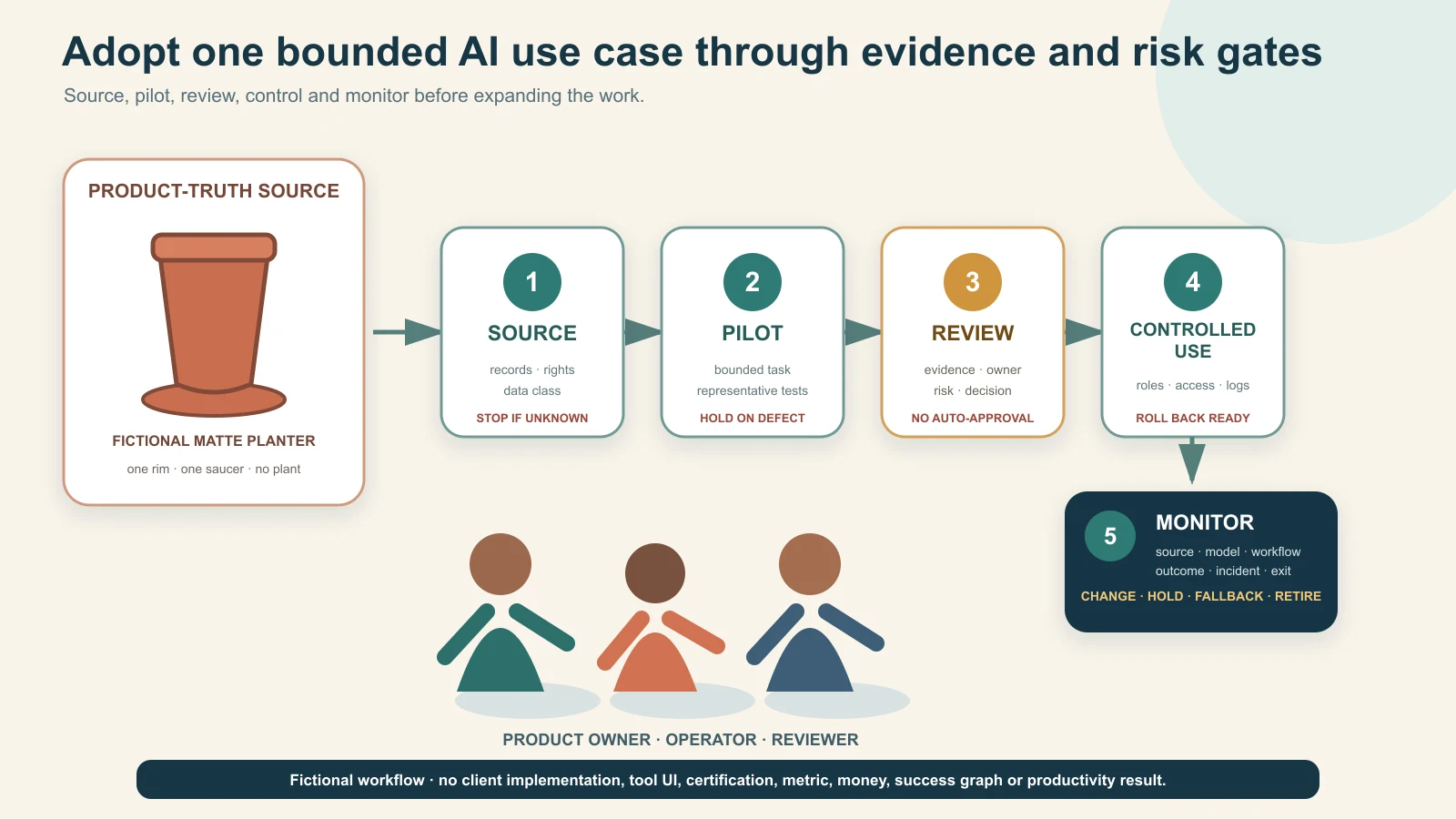
Reviewed and updated: 12 August 2026
To adopt AI responsibly, map the work before selecting tools, classify use cases by decision and data risk, choose one bounded task with a trustworthy source and human reviewer, measure it against the current process, and release it only through a written approval gate. Turn a successful pilot into a controlled workflow with named owners, access, records, monitoring, incident response and an exit plan. Scale only after the same controls work across a wider product range, team or channel.
Do not begin with “give everyone an AI account” or “automate the whole business.” A polished demo can hide wrong products, leaked data, invented claims, unsafe decisions, unclear rights, unpredictable costs and dependency on a tool the team cannot audit or leave. The useful unit is an approved AI-assisted use case: one defined job, permitted inputs, bounded outputs, responsible owners, pass/fail evidence and a decision to keep, fix, stop or scale.
This root guide owns staged AI implementation, roles and risk control across a product business. The DAA framework guide owns the customer-growth path; the AI product-photography guide and AI product-video guide own specialist asset production; the B2B lead-generation guide owns buyer acquisition; and the unit-economics guide owns profitability decisions.
Table of contents
- Define AI adoption as an operating change
- Set the non-negotiable sources of truth
- Inventory work, tools and data before adding more
- Choose the first AI use case
- Classify use cases by risk
- Stage 0: establish the mandate and guardrails
- Stage 1: run a bounded assisted pilot
- Stage 2: turn a passing pilot into a controlled workflow
- Stage 3: roll out to a trained team
- Stage 4: connect systems and bounded automation
- Stage 5: monitor, change and retire
- Assign roles and decision rights
- Select tools and vendors with an exit route
- Protect data, confidentiality, rights and access
- Protect product truth and customer claims
- Measure adoption without vanity metrics
- Apply the roadmap to manufacturers and retailers
- Use a 90-day starting roadmap
- Respond to incidents and stop unsafe use
- Frequently asked questions
Define AI adoption as an operating change
AI adoption is not a tool purchase or a training session. It changes how work is sourced, produced, reviewed, approved, released, measured and corrected. The business remains responsible for the product, customer promise, transaction, employee action and regulatory obligation even when a model assists.
The US National Institute of Standards and Technology’s AI Risk Management Framework organises voluntary risk work around Govern, Map, Measure and Manage across the AI lifecycle. This article is not a NIST implementation or certification. It adapts the lifecycle idea into a practical product-business sequence: mandate → map → pilot → control → scale → monitor/retire.
The OECD AI Principles are another high-level reference, including robustness, safety and accountability. They do not approve a particular tool, workflow or business decision.
Separate four adoption questions
| Question | What the business must decide | Weak shortcut |
|---|---|---|
| Why | Which business job or risk is worth changing? | “Competitors use AI” |
| What | Which exact task, input and output are in scope? | “Use AI for marketing/operations” |
| Who | Who owns source truth, operation, review, release and incident response? | “The AI team” |
| How controlled | What permissions, gates, records, measures and stop rules apply? | “A human will check it” |
If these questions do not have named answers, the organisation has experimentation—not adoption.
Do not confuse capability with readiness
A model may generate an image, classify a file, draft a reply or summarise a specification. That does not prove the task is suitable for release. Readiness also requires:
- permitted and current inputs;
- enough source evidence;
- defined output use and affected people;
- product/domain review;
- data, rights, security and policy review;
- versioned instructions and records;
- measurable pass/fail conditions;
- a fallback when the tool fails; and
- authority to stop or correct downstream use.
Set the non-negotiable sources of truth
AI should sit beside authoritative records, not replace them. Before selecting a use case, name what proves the product, offer, customer, employee, stock, order, payment and business rule.
Use a source-of-truth map
| Domain | Authoritative source | AI may assist with | AI must not decide or invent |
|---|---|---|---|
| Product identity | Approved product/SKU master and physical item | Classification, formatting, descriptions from supplied facts | SKU, variant, included parts or unseen feature |
| Specifications/claims | Current technical, test, compliance and claim records | Find/summarise cited fields for review | Material, performance, safety, certification or compatibility |
| Images/video | Approved exact-product captures and rights records | Background/context, layout, captions, variants within controls | Product shape, colour, pattern, text, parts, scale or proof |
| Price/terms | Authorised commercial system/version | Draft a quote explanation from current values | Price, discount, credit, tax, freight or expiry |
| Stock/capacity | Inventory, production and allocation records | Flag/reformat a current snapshot | Availability, capacity or delivery commitment |
| Customer/enquiry | Approved CRM/order/support record | Draft summary or next-question checklist | Intent, identity, consent, payment or order status |
| Payment/accounting | Authorised bank/gateway/accounting record | Reconciliation assistance under approved controls | Settlement, refund, credit or dispatch approval |
| People/roles | HR/access/permission records | Training support or authorised scheduling | Likeness/voice use, employment decision or sensitive inference |
The source can be imperfect. Adoption should expose missing ownership and version control rather than letting AI fill gaps with plausible text.
Create a claim register
For every public or buyer-facing claim, record:
- exact claim text or allowed meaning;
- product/SKU/facility/process scope;
- supporting document or authorised source;
- owner and reviewer;
- channels/use contexts;
- approval/expiry or event-triggered review; and
- words/visual implications that are not allowed.
AI can retrieve approved claims from this register. It should not draft stronger claims from a certificate name, test summary, customer conversation or competitor page.
Inventory work, tools and data before adding more
Most businesses already have unofficial AI use: personal accounts, browser extensions, phone apps, agency tools, automated features inside existing software and employee experiments. A new roadmap should first make that use visible without punishing good-faith disclosure.
Build the AI use-case inventory
| Field | What to record |
|---|---|
| Use-case ID and name | One exact job, not a department slogan |
| Business owner | Accountable person who can approve/stop |
| Operator and reviewer | Who creates and who independently checks |
| Tool/model/feature | Provider, product/plan and version or date observed |
| Input data | Source, classification, rights and permitted fields |
| Output | Asset, draft, decision support, customer reply or system action |
| Audience/impact | Internal only, public, customer, employee, supplier or automated downstream use |
| Source of truth | Record used to verify output |
| Risk tier | Low, controlled or restricted/high risk under the business rule |
| Access/integration | Named users, permissions, API/connector and destination |
| Vendor controls | Retention, model improvement, region, security and admin settings checked |
| Approval evidence | Test set, reviewer, decision and date |
| Monitoring/change trigger | Quality, cost, incident, model/policy/source change |
| Status | Discovered, proposed, pilot, controlled, scaled, held or retired |
Inventory embedded AI features too. “It came with the software” does not remove data, accuracy, rights or change risk.
Classify data before tools
Use a simple business-specific classification such as:
- public and approved: material intentionally published and current;
- internal operational: non-public but routine business data;
- confidential/restricted: designs, price lists, margins, contracts, supplier terms, unreleased products;
- personal: customer, employee, creator or contact information; and
- regulated/high-impact: information or decisions whose misuse can create legal, safety, financial or rights harm.
The classification does not itself create legal permission. It tells the operator when a tool/account/configuration is not authorised for an input.
Discover shadow use safely
Ask teams:
- which tools/features they use;
- what they upload;
- what outputs reach customers or systems;
- which logins/payment owners exist;
- what work would stop if the tool disappeared; and
- what errors they have already seen.
Do not respond to disclosure only with a blanket ban. Quarantine high-risk use immediately, then give teams a safe route for suitable work. Otherwise shadow use becomes harder to see.
Choose the first AI use case
The best first task is useful, bounded, reversible and easy to review—not necessarily the most impressive.
Pass the first-use-case gate
Start when:
- the current workflow and problem are documented;
- inputs have known sources and permissions;
- output scope is narrow;
- a knowledgeable human can detect material errors;
- harm is limited and a fallback exists;
- a representative test set can be created;
- the baseline cost/time/quality can be measured; and
- the team can stop before public or operational release.
Avoid an AI-first pilot when:
- the business expects the model to discover missing truth;
- the task makes safety, eligibility, employment, credit, payment, pricing or legal decisions;
- sensitive/confidential data cannot be protected;
- no qualified reviewer exists;
- errors are hard to detect before harm;
- the vendor/integration cannot be controlled or exited; or
- success is defined only as “people used it.”
Use value, feasibility and risk as gates
| Dimension | Evidence question | Decision |
|---|---|---|
| Value | What avoidable effort, delay, inconsistency or buyer problem exists? | No defined problem → do not pilot |
| Feasibility | Are sources, permissions, tool capability, reviewer and fallback available? | Critical missing input → hold |
| Risk | Can material error, data/rights harm and downstream impact be prevented/detected? | Uncontrolled high impact → prohibit or specialist route |
| Measurability | Is there a baseline and pass/fail test? | No comparison → documentation-only exploration |
| Ownership | Can one person approve, stop and fund the use case? | No accountable owner → do not launch |
Do not average a critical red risk into a high overall score. A useful task with no permitted data remains a no-go.
Classify use cases by risk
Risk depends on the task, data, audience, autonomy, reversibility and impact—not the brand name of the tool.
Green lane: internal, bounded and reversible
Examples:
- reformatting approved product records;
- grouping supplied SKUs for human review;
- drafting meeting notes from authorised content;
- creating internal checklists from a current SOP;
- brainstorming options that are not released; and
- translating internal draft text for fluent review.
Controls still include permitted data, source links, named accounts and human review, but AI has no release authority.
Amber lane: buyer-facing or operational assistance
Examples:
- product-description or catalogue drafts;
- background/context edits around a real product;
- buyer-facing FAQ and reply drafts;
- ad variants;
- enquiry classification;
- specification extraction into a review checklist; and
- workflow summaries that influence an operator.
Require versioned sources, product/domain review, release owner, sampling/monitoring and a fallback. One wrong material or price can be more important than fifty correct sentences.
Red lane: restricted, high-impact or specialist-controlled
Examples:
- inventing or approving technical/safety compatibility;
- autonomous price, discount, credit, refund, stock, payment or dispatch decisions;
- medical/health, regulated or safety claims;
- employment or worker-performance decisions;
- sensitive personal-data profiling;
- unauthorised likeness or voice cloning;
- realistic deceptive synthetic people/events;
- unsupervised customer outreach or contract commitment; and
- quality inspection where a missed defect can create material harm.
Red does not always mean “AI can never assist.” It means the business cannot use an ordinary content-tool workflow. It may require prohibition, validated specialist systems, professional review, stronger technical controls and clear human authority.
NIST’s Generative AI Profile is an official cross-sector risk reference for generative AI. It does not certify this three-lane model, and the three lanes are GPTWala editorial guidance.
Stage 0: establish the mandate and guardrails
Before a pilot, the owner approves a short AI mandate.
The minimum mandate
- Purpose: which business outcomes AI may support.
- Prohibited uses: data, decisions and outputs not allowed.
- Source rule: AI never overrides named authoritative records.
- Data rule: which classifications may enter which approved tools/accounts.
- Human rule: who reviews and who has release/decision authority.
- Access rule: named users, least privilege, recovery and offboarding.
- Vendor rule: minimum terms, security, retention, rights and exit checks.
- Record rule: what prompts/inputs/outputs/versions/decisions must be retained.
- Incident rule: how to stop, quarantine, escalate, correct and notify.
- Change rule: which tool/model/source/policy changes force revalidation.
Keep it readable enough for operators. A policy nobody can apply will not control a live workflow.
Establish a safe experimentation space
Provide:
- approved tools/accounts for low-risk exploration;
- synthetic or de-identified training examples where appropriate;
- prohibited-data reminders at the point of use;
- example tasks and red flags;
- a help/escalation route; and
- a fast way to report errors without hiding them.
Do not use real customer, employee, confidential design or unreleased product data for training exercises unless that exact use has been approved.
Stage 1: run a bounded assisted pilot
A pilot tests a workflow, not whether the tool can produce one attractive example.
Write the pilot card
| Field | Required decision |
|---|---|
| Job | Exact task and boundary |
| Business problem | Current delay, cost, inconsistency or capacity issue |
| Baseline | Current method, quality, time, cost and defect evidence |
| Inputs | Source IDs, data classes, rights and exclusions |
| Output/audience | Draft/recommendation/asset and where it may go |
| Tool/configuration | Approved account, feature/model/version and settings |
| Test set | Representative products/cases, including difficult and stop cases |
| Review | Operator, domain reviewer, rights/data reviewer and release owner |
| Pass conditions | Accuracy, truth, usability, cost/time and zero-tolerance defects |
| Stop conditions | Data/rights breach, product drift, unsafe claim, inaccessible reviewer, uncontrolled cost/change |
| Fallback | Existing manual or specialist route |
| Decision date | Keep, fix, stop or advance |
Use a representative test set
Include:
- normal cases;
- adjacent variants that are easy to confuse;
- poor or incomplete inputs that should trigger a stop;
- long/complex records;
- multilingual or unit-format cases where relevant;
- buyer-critical labels, patterns, dimensions or claims;
- prohibited/sensitive examples the system must reject; and
- known historical errors.
Do not train the team only on the cleanest product photograph or simplest spreadsheet.
Keep the pilot human-in-the-loop
The operator uses AI to draft or transform. The reviewer compares the output with sources. The release owner decides whether it may leave the pilot. If the same person holds multiple roles in a small team, require a second review for amber/red-adjacent work.
No pilot output should silently enter a product page, catalogue, customer reply, production instruction, order system or ad account.
Stage 2: turn a passing pilot into a controlled workflow
A passing pilot becomes an SOP only when the team can reproduce the result safely.
Build the controlled workflow pack
- purpose and scope;
- eligible/ineligible inputs;
- source and version requirements;
- approved tool/account/configuration;
- prompt/template or procedure with protected fields;
- output naming and storage;
- product/domain/rights/data review checklist;
- release authority;
- sampling and monitoring frequency;
- cost/usage boundary;
- incident and rollback route;
- model/tool/source change triggers; and
- owner, backup and review date.
Prompts are one component, not the control system. A long prompt cannot guarantee that a generative model preserves a product, follows policy or uses the right record.
Separate draft, approved and released states
Use visible states and permissions:
- draft: generated/edited; not reviewed;
- revise: material issue identified;
- approved for defined use: reviewer and scope recorded;
- released: exact channel/version/date recorded;
- withdrawn: removed from further use; and
- retired: workflow/tool no longer authorised.
An approved image for an internal mood board is not approved for a marketplace listing. Approval scope travels with the asset.
Run a shadow period
Before replacing the old workflow, run the controlled AI-assisted process beside the established method for enough representative work to detect differences. “Enough” depends on product variety and risk; no universal number applies.
If the old method provides the only reliable fallback, do not dismantle it before the new workflow proves recoverable.
Stage 3: roll out to a trained team
Rollout is a change in behaviour, access and responsibility—not a link to a recorded webinar.
Train by role
Operators need:
- eligible tasks and data;
- source requirements;
- tool procedure;
- common failure examples;
- when to stop/escalate; and
- how to preserve records.
Reviewers need:
- product/domain truth fields;
- claim and rights rules;
- sampling/inspection method;
- approval scope; and
- how to reject without “fixing from memory.”
Managers need:
- capacity and quality measures;
- cost and access ownership;
- incident/status review;
- vendor/change risks; and
- keep/fix/stop/scale authority.
Qualify people for the task and revalidate on change
Use a practical observed exercise on the current workflow and representative test cases. Record which use case/tool/version the person is internally authorised to operate or review. This is task qualification, not an external certification. A general “AI trained” badge does not prove readiness for a new model, product category or high-risk decision.
Expand one dimension at a time
Increase either:
- product range;
- output type;
- audience/channel;
- user/team;
- volume;
- language/geography; or
- autonomy/integration.
Changing all dimensions at once makes defects hard to diagnose. Recheck risk and evidence whenever the affected dimension changes.
Stage 4: connect systems and bounded automation
Automation increases the speed and reach of both correct and wrong outputs. Connect systems only after a manual controlled workflow passes.
Approve the integration map
For each connector/API/agent, record:
- system and owner;
- data read and write permissions;
- trigger and frequency;
- model/tool/service involved;
- transformations and prompts;
- human checkpoint;
- error/retry behaviour;
- logs and alerts;
- rate/cost limits;
- downstream systems/actions;
- credentials and recovery; and
- kill switch/rollback.
Grant the minimum permission needed. A catalogue-drafting assistant should not be able to modify prices, issue refunds, message every customer or approve dispatch.
Keep material decisions deterministic or human-authorised
Use validated rules or authorised people for:
- price/discount/credit limits;
- product/variant and stock commitment;
- quality acceptance;
- safety/compatibility decision;
- legal/compliance approval;
- customer opt-out/suppression;
- payment/refund status;
- hiring/discipline; and
- final public claims.
AI may prepare evidence for the decision. It should not silently become the decision owner.
Test failure modes before launch
Simulate:
- missing/late/wrong source data;
- duplicate trigger;
- tool timeout or partial result;
- hallucinated/invalid output;
- denied permission;
- rate/cost spike;
- human reviewer unavailable;
- downstream system unavailable;
- opt-out or deleted record; and
- vendor/model change.
The safe outcome may be “do nothing and alert a person.” Automatic retry is not always safe.
Stage 5: monitor, change and retire
An approved AI workflow can drift because products, sources, prices, policies, model behaviour, vendor terms, team members and attack patterns change.
Monitor four layers
| Layer | Monitor | Example trigger |
|---|---|---|
| Source | Completeness, currency, owner and version | New pack, price, claim or policy |
| Model/tool | Version, features, output behaviour, terms, cost and availability | Model update or removed control |
| Workflow | Operator/reviewer adherence, defects, overrides and incidents | Review bypass or repeated repair |
| Outcome | Accepted quality, downstream errors, buyer/staff harm and business value | Product complaint or rework spike |
Do not monitor only usage or token counts.
Revalidate on change
Reopen the use case when:
- model/tool/plan/region changes;
- source schema or product family changes;
- new personal/confidential data enters;
- output reaches a new audience/channel;
- autonomy or integration increases;
- applicable law/platform policy changes;
- a material defect or complaint occurs; or
- the reviewer/owner leaves.
Retire deliberately
When a workflow no longer passes:
- stop new use and downstream release;
- preserve required records and open issues;
- revoke tokens, connectors and user access;
- export business-owned data/templates where permitted;
- follow approved retention/deletion and contract steps;
- identify live assets/actions that depend on the workflow;
- move work to the fallback or replacement;
- notify affected teams; and
- monitor for residual automated actions.
Do not let an abandoned API key or browser extension remain a hidden production dependency.
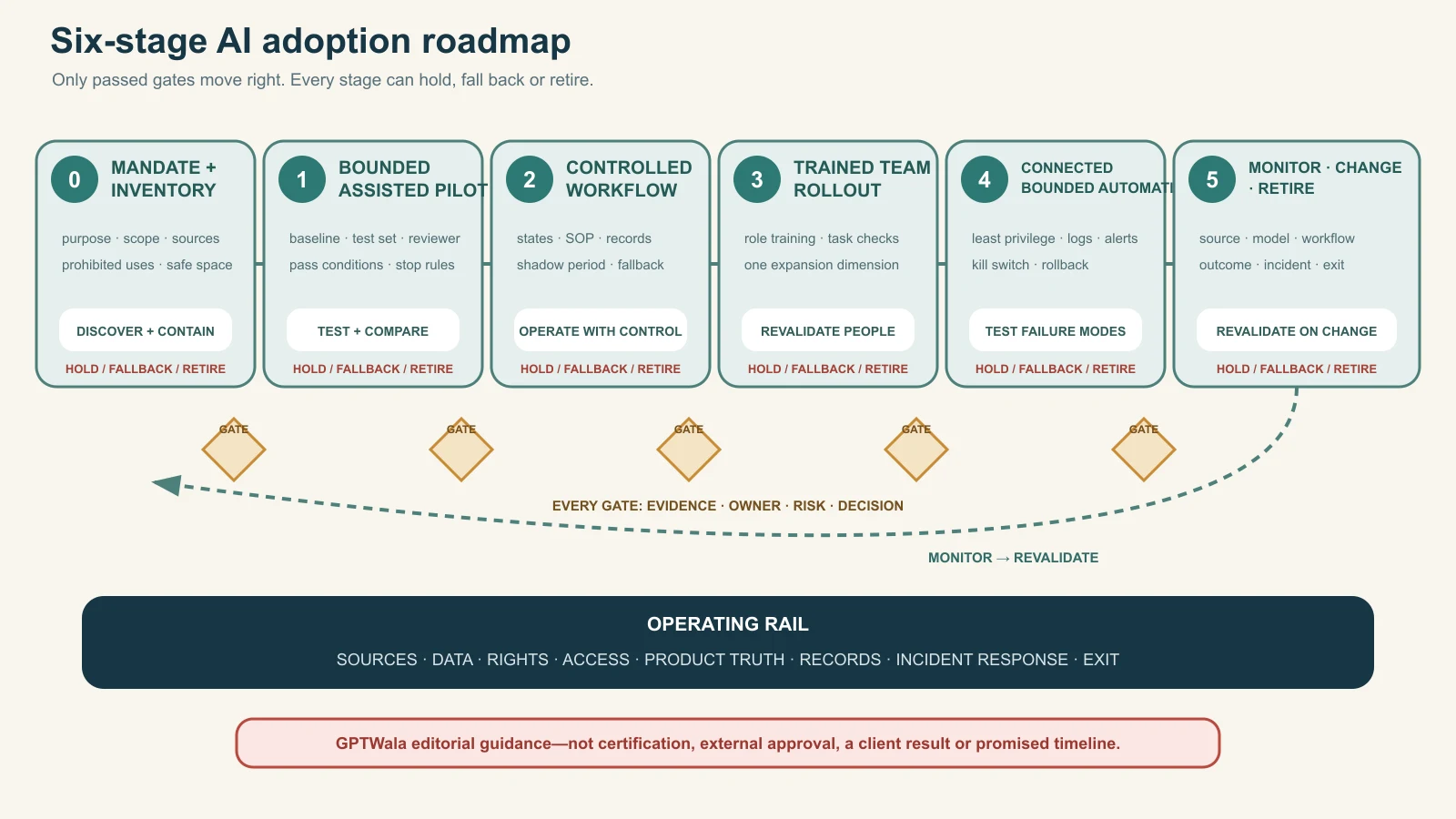
Original GPTWala deterministic roadmap. Every stage has evidence, owner, risk and decision gates plus a hold, fallback or retirement route; it is guidance, not certification or a promised implementation timeline.
Assign roles and decision rights
One person can hold several roles in a small business, but each decision still needs an explicit owner. Separate operation from approval when the output can materially affect a product, customer, employee, supplier, payment or public claim.
Minimum role map
| Role | Owns | Cannot delegate silently to AI |
|---|---|---|
| Accountable business owner | Purpose, budget, risk appetite, stage decision | Final accountability |
| Use-case owner | Workflow, baseline, value, SOP and ongoing performance | Scope/change decision |
| Product/domain owner | Product/specification/process truth | Technical/product approval |
| Data/source owner | Source quality, access, classification and retention | Permission/currency decision |
| Operator | Executes approved procedure and records exceptions | Release authority unless assigned |
| Reviewer | Compares output against product/source/rules | Evidence-based sign-off |
| Privacy/security/rights reviewer | Data flow, access, vendor, content/people rights | Specialist judgement |
| Release/decision owner | Authorises defined channel/action | Claim, price, stock, payment or safety commitment |
| Technical/integration owner | Connectors, credentials, logs, rollback and changes | Business approval |
| Incident owner | Stops, coordinates, corrects, documents and closes | Material incident decision |
Use decision rights, not “human oversight” as a slogan
For each use case, state:
- who may start a job;
- who may access which data;
- who reviews which truth fields;
- who can approve internal use;
- who can release externally;
- who can change the tool/prompt/integration;
- who can override the output;
- who can stop the workflow; and
- who owns downstream correction.
A reviewer without time, source access, expertise or authority is not a control.
Small-team pattern
An owner may be accountable and release authority; a product manager may be source owner and reviewer; an operator may create drafts. For amber work, use a second person or delayed second pass. For red/high-impact work, obtain appropriate specialist independence rather than self-approving because the team is small.
Select tools and vendors with an exit route
Choose against the use-case card, not a viral demo or a generic “best AI tools” list.
Use the vendor decision sheet
| Dimension | Evidence to inspect | Stop/hold condition |
|---|---|---|
| Job fit | Test-set performance on exact task | Works only on showcase examples |
| Control | References, masks, constraints, structured output, audit/export | Cannot protect buyer-critical fields |
| Data | Inputs, retention, model improvement, region, subprocessors/settings | Confidential/personal use is unclear or unapproved |
| Security/admin | Named users, roles, MFA/SSO where needed, logs, offboarding | Shared login or no recovery/control |
| Rights/terms | Input rights, output terms, restricted uses, indemnity/limits | Intended commercial/channel use unresolved |
| Reliability/change | Versioning, status, support, change notice, fallback | Workflow cannot detect material change |
| Cost | Unit, limits, overage, human review/rework, integration | Cost cannot be bounded or measured |
| Integration | Permissions, logs, error handling, sandbox and kill switch | Excess access or irreversible write path |
| Exit | Export, formats, deletion/retention, credential removal, replacement | Business records/workflow are locked in |
Provider terms are provider-specific. For example, OpenAI’s current ROW Terms of Use say users are responsible for input rights and output evaluation, and warn outputs may be inaccurate or non-unique. That is not a universal summary of every provider or a warranty for any use case. Read the actual current terms, privacy/data controls and enterprise agreement for the chosen account.
Include the full operating cost
Count:
- subscription/usage/API;
- setup/integration;
- source preparation;
- operator and reviewer time;
- correction and rejected output;
- storage, security and admin;
- training/change management;
- downtime/fallback; and
- incident/exit cost.
A cheaper generation is not cheaper adoption when review and rework rise.
Protect data, confidentiality, rights and access
AI adoption often moves business data to new providers, accounts, extensions and integrations. Review the data flow before the first upload.
Use an AI input gate
Before submitting data, answer:
- What exact fields/files are entering?
- Who owns or has rights to use them?
- Are personal, confidential, regulated or third-party elements present?
- Is this provider/account/feature approved for that classification and purpose?
- What retention, model-improvement and human-review settings/terms apply?
- Where does the output/log go and who can access it?
- Can the input be minimised, masked, aggregated or replaced with synthetic training data?
- What notice, contract, consent or other authority is required?
- How will correction, deletion, access revocation and incident handling work?
- Does a safer manual/local/enterprise route exist?
India’s DPDP framework has phased commencement. The current India Code commencement record is a publication-day legal-refresh route, not a checklist proving that a data use is lawful. Obtain current privacy, employment, sector, contract and cross-border advice for the real workflow.
Control likeness, voice and synthetic media
Do not upload an employee, customer, creator or owner’s face/voice merely because the business has a photograph or recording. Record purpose, source, person, consent/contract, languages, products, channels, duration, withdrawal, provider and final approval.
India’s 2026 synthetic-media framework is time-sensitive. MeitY’s official FAQ on synthetically generated information discusses realistic synthetic audio/visual media and current intermediary/platform declaration/labelling context. It does not create a universal merchant label or make impersonation acceptable. Reopen the notified rules, corrigendum, platform controls and real facts before use. The AI spokesperson video guide owns the detailed workflow.
Protect accounts and integrations
- use business-owned named accounts;
- enable appropriate authentication/recovery;
- avoid shared personal logins;
- grant least privilege;
- separate production and testing;
- store credentials in approved systems;
- review extensions/connectors;
- remove access promptly when roles change; and
- inventory renewal/payment owners.
Do not let an agency or one employee become the only person who can access, recover, export or stop a critical AI workflow.
Protect product truth and customer claims
AI can make missing truth look complete. Product businesses need a release gate that compares every material output with the exact item and authorised records.
The current ASCI Code says objectively ascertainable advertising claims should be capable of substantiation and that statements or visual presentation should not mislead through implication, omission, ambiguity or exaggeration. India’s official 2022 misleading-advertisement guidelines are another publication-day check. General guidance cannot replace category-specific legal review.
Product-truth release gate
Reject an asset or answer that changes/invents:
- SKU, model, variant or current pack;
- shape, proportions, openings, handles, closures or components;
- colour, finish, material, transparency, pattern, text or logo;
- dimensions, weight, capacity or scale;
- number of items or included accessories;
- fit, drape, setting, tolerance or compatibility;
- stock, production capability, lead time or geographic service;
- price, tax, discount, credit, freight, warranty or return terms;
- certification, hallmark, test, safety, health, environmental or performance claim; or
- customer result, testimonial, rating or endorsement.
Disclosure is separate. “AI-generated” does not repair a wrong product or unsupported claim.
Use risk-specific evidence
| Business/product | AI can assist | Human/real-source proof remains essential |
|---|---|---|
| Surat apparel | Layout, background/context draft, catalogue copy from records | Exact print/colour/size, seam, transparency, fit and drape |
| Jaipur jewellery | Classification, captions from approved fields, scene concepts | Stone count/setting, metal/purity/hallmark, weight, clasp, scale |
| Rajkot components | RFQ extraction, checklist, document search | Drawing, tolerance, material, process, compatibility and quality release |
| Morbi tiles | Taxonomy, room-context draft, sample-request routing | Shade/batch, dimensions, finish, slip/performance and installation claims |
| Packaged consumer goods | Asset resizing, approved-description variants | Current label, declarations, quantity, ingredients/claims, seals and pack version |
| Local retailer | FAQ/reply drafts from live records | Exact model, stock, price, delivery, installation, warranty and payment |
Route imagery through the product-accuracy audit and scale workflows through the AI catalogue system.
Control AI-generated web content
Google’s official guidance on generative AI content focuses on accuracy, quality, relevance and context; scaled low-value pages can conflict with spam policies. Do not use adoption targets such as “publish 1,000 pages.” Set a buyer decision, unique evidence, review owner and maintenance trigger for each public page.
Measure adoption without vanity metrics
Logins, prompts and generated files show activity. They do not prove business value, safety or adoption quality.
Establish the baseline first
For the existing workflow, record a representative period or set:
- inputs and volume;
- cycle/wait time;
- operator/reviewer hours;
- cost;
- accepted output definition;
- first-pass acceptance;
- rework and defect types;
- downstream errors/complaints;
- data/rights/security incidents; and
- capacity/quality limits.
If the baseline is not recorded, a faster-looking demo can receive credit for work it did not replace.
Use adoption-quality measures
| Measure | Definition | Guardrail |
|---|---|---|
| Accepted output | Output passing the defined source/truth/use review | Generated does not equal accepted |
| First-pass acceptance rate | Accepted without material revision ÷ outputs reviewed | Define material revision and cohort |
| Material defect rate | Outputs with defined truth/claim/data/rights defect ÷ outputs reviewed | One severe defect may stop regardless of average |
| Escaped-defect rate | Released outputs later found with material defect ÷ released outputs reviewed | Requires downstream correction log |
| Total cost per accepted output | Tool + setup allocation + operator + reviewer + rework + incident cost ÷ accepted outputs | No zero-denominator value |
| Cycle time | Start-to-approved/released time under defined boundaries | Separate active work and waiting if useful |
| Review burden | Reviewer time and queue by use case | Falling review time is unsafe if defects escape |
| Override/stop rate | Jobs stopped or routed to fallback ÷ jobs attempted | A healthy stop can be a control success |
| Adoption coverage | Trained/authorised operators actually using the controlled workflow | Do not reward shadow use |
| Outcome measure | Verified downstream business/quality measure linked under a stated method | Avoid automatic revenue attribution |
Use zero-tolerance gates
For some defects, average performance is irrelevant. Define automatic hold conditions such as:
- personal/confidential data exposure;
- wrong product/variant released;
- unsafe or regulated claim;
- unauthorised person/voice/asset use;
- price/payment/credit/stock action without authority;
- unlogged autonomous customer action; or
- inability to stop/trace the integration.
Make the scale decision
- Keep: bounded value is demonstrated and controls work.
- Fix: issue has a plausible bounded correction and retest.
- Stop: value is weak or risk/control cannot be resolved.
- Scale: expand one dimension with a new gate and monitoring plan.
“Team likes the tool” can support usability evidence. It cannot replace quality, risk, cost and outcome evidence.
Apply the roadmap to manufacturers and retailers
These scenarios are illustrative workflows, not GPTWala clients or measured results.
Manufacturer: RFQ intake assistant
Start: extract supplied RFQ fields into a review checklist and flag missing drawings, materials, quantity, tolerance and delivery information.
Keep human: engineering compatibility, manufacturability, capacity, quality plan, price, contract and commitment.
Pilot gate: representative RFQs, known missing/contradictory cases, exact source citations, no auto-reply and no ERP write. Stop if the model invents a specification or maps to the wrong part.
Manufacturer: catalogue-image workflow
Start: controlled background variants around exact approved product captures.
Keep human: SKU mapping, geometry, colour/material, text, parts, scale, claims, channel rules and release.
Pilot gate: adjacent variants, reflective/transparent items and incomplete inputs must trigger rejection. Use the phone-to-approved workflow before team rollout.
Retailer: product-enquiry reply assistant
Start: draft replies from current catalogue, service area and approved policy fields; ask a human to select/send.
Keep human/authoritative system: exact stock, price, discount, delivery, installation, warranty, payment/refund and exceptions.
Pilot gate: no autonomous outreach, no unlimited marketing inference and no request for sensitive payment credentials. Route the sales process to the WhatsApp selling system.
Apparel wholesaler: collection-content system
Start: group verified styles and draft buyer-specific collection text.
Keep human: style/size/colour mapping, assortment, case/MOQ, price basis and model-image fit/drape truth.
Pilot gate: no adjacent-print contamination, invented size availability or generated garment feature.
Jewellery retailer: content and search assistant
Start: retrieve approved design fields, draft captions and help staff locate matching items.
Keep human: exact item, stone settings, metal/purity/hallmark, weight, price, availability and customer advice.
Pilot gate: macro references and physical item required; no invented stone/material claim and no generated image used as composition proof.
Multi-store retailer: demand summary
Start: summarise authorised aggregate sales/stock reports for managers and surface questions.
Keep deterministic/human: replenishment order, promotion, price, shrinkage accusation, employee evaluation and supplier commitment.
Pilot gate: reconcile aggregates to the source, restrict store/customer/employee data, and label inference/uncertainty. Do not let a natural-language summary write inventory changes.
Use a 90-day starting roadmap
Ninety days is an editorial planning frame, not a promise that every business will reach production. High-risk, regulated, integrated or data-heavy work may need much longer; a low-risk task may stop earlier.
Days 1–15: discover and contain
- name accountable owner and working group;
- inventory current/shadow tools, use cases, data and integrations;
- stop obvious restricted/uncontrolled use;
- map product/claim/data sources;
- publish a short mandate and experiment route; and
- shortlist one low/controlled-risk use case.
Days 16–30: design the pilot
- define current workflow and baseline;
- classify data and rights;
- evaluate tool/vendor/account and exit route;
- build representative test and stop cases;
- assign operator, reviewer, release and incident owners; and
- approve pilot card, budget and fallback.
Days 31–60: run and measure
- execute in a non-production or draft-only boundary;
- record tool/model/configuration and sources;
- compare outputs with evidence;
- log reviewer effort, defects, stops, cost and cycle time;
- test failure/rollback; and
- decide keep, fix or stop.
Days 61–75: operationalise a passing use case
- write SOP/workflow pack;
- define states, permissions, storage and logs;
- train operators/reviewers on current cases;
- run shadow/parallel work;
- complete security/privacy/rights/vendor checks; and
- approve limited release.
Days 76–90: decide bounded scale
- inspect released quality and escaped defects;
- confirm value and total cost against baseline;
- recheck vendor/source/model changes;
- approve only one expansion dimension;
- schedule monitoring and revalidation; and
- document fallback/retirement route.
Do not create a second pilot merely to avoid deciding the first. Close each cycle with an evidence-backed stage decision.
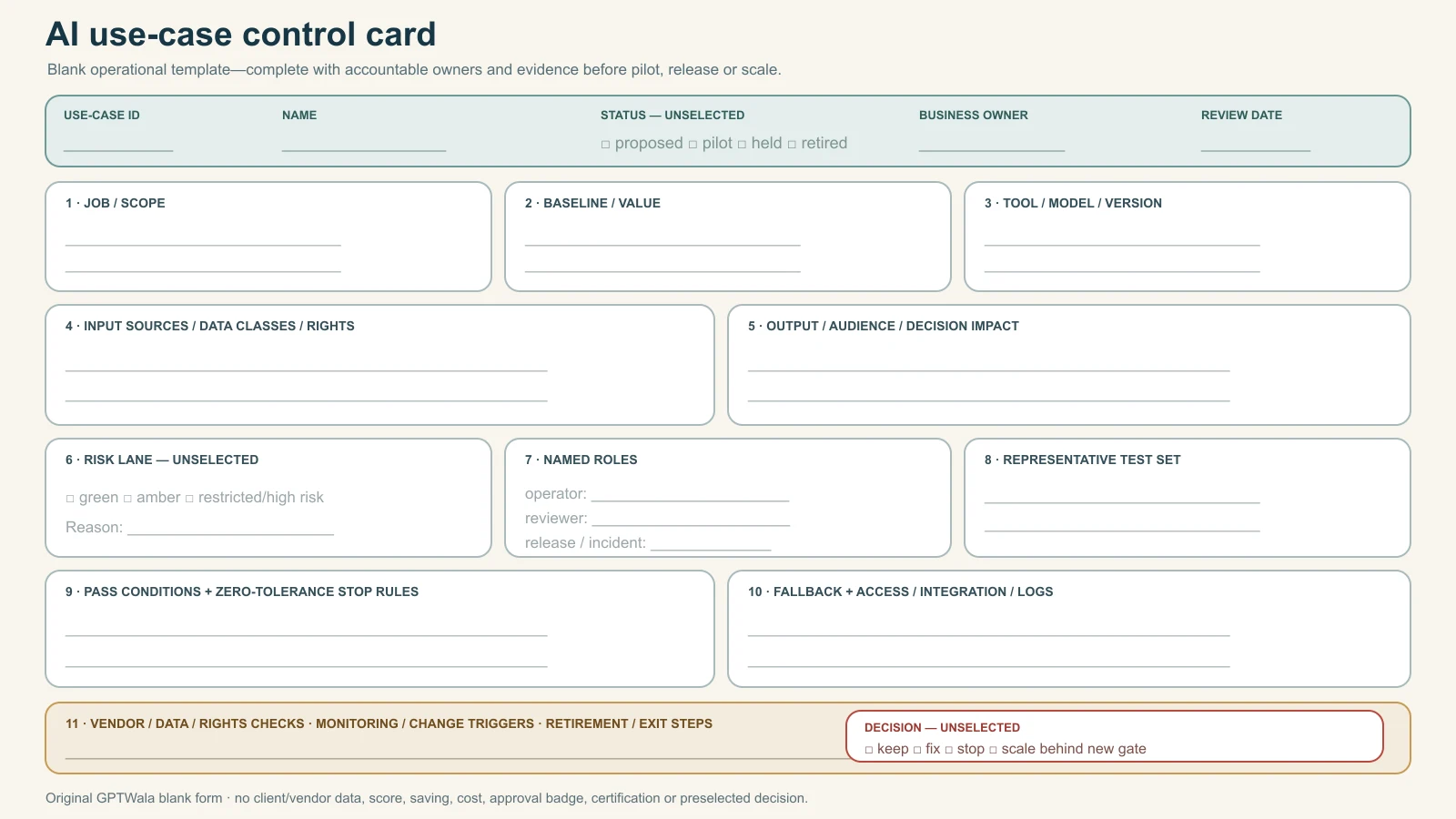
Original GPTWala blank operating template. Status and decisions remain unselected, and the card contains no client or vendor data, approval badge, certification, score, saving or productivity result.
Respond to incidents and stop unsafe use
An incident can be a data exposure, wrong product, misleading claim, unauthorised content, security event, harmful decision, uncontrolled automation, material cost spike or inability to trace/correct an output.
Use the stop-and-correct route
- Stop: pause generation, release and automated downstream action.
- Quarantine: identify affected outputs, records, accounts, connectors and live destinations.
- Preserve: retain relevant input/output/prompt/version/log/decision evidence under approved policy.
- Escalate: notify incident, business, product, data/security, rights/compliance and vendor owners as applicable.
- Protect: revoke access/keys, block the workflow and prevent further exposure or commitment.
- Correct: remove/replace public assets, correct records and contact affected people/partners where required and appropriate.
- Assess: determine scope, harm, obligations, source/model/workflow cause and control failure.
- Retest: update the system and run the representative/stop test set.
- Decide: resume within scope, reduce scope, return to manual, replace vendor or retire.
- Learn: update training, inventory, controls and monitoring without hiding the incident.
Do not let the operator silently regenerate until the error disappears. That destroys evidence and leaves the underlying control failure alive.
Define authority before the incident
Every production use case needs a named person who can:
- disable access or integration;
- stop publication/messages/actions;
- inform downstream owners;
- approve corrections;
- contact vendor/support;
- obtain specialist advice; and
- decide whether the workflow remains authorised.
If nobody can stop it quickly, it is not ready for automation.
Connect AI adoption to the DAA system
AI adoption should strengthen a product business’s source truth and operating discipline, not create content faster than the business can verify, distribute, answer or fulfil.
GPTWala’s DAA sequence is Digital Presence → AI Content Creation → ₹100/day WhatsApp ads. Article 25’s offline-to-online DAA roadmap explains the customer-growth sequence. This AI adoption roadmap supplies the wider organisational controls underneath it: approved tools, inputs, owners, product-truth gates, release records, measurement and stop rules.
The GPTWala workshop is educational. It does not guarantee productivity, savings, content volume, leads, orders, revenue, profit or return on ad spend.
Frequently asked questions
Where should a manufacturer or retailer start with AI?
Start with one useful, bounded and reversible task whose inputs are permitted and current, whose errors a knowledgeable person can detect and whose baseline can be measured. Examples include formatting approved product data or drafting from a controlled source. Do not start with autonomous pricing, credit, safety, quality release, customer outreach or product claims.
Do we need an AI policy before a pilot?
You need at least a short mandate covering purpose, prohibited uses, sources, data, human review, access, vendors, records, incidents and change. It can begin concise and grow with risk. Do not wait for a perfect policy while employees use unapproved tools invisibly; inventory and contain current use first.
How many AI tools should we test?
There is no universal number. Compare only enough options to answer the use-case requirements and exit risks. One deeply tested workflow is more informative than many shallow demos. Tool count is not an adoption metric.
How do we choose the first AI use case?
Require defined value, known/permitted inputs, bounded output, human reviewer, manageable harm, representative test set, baseline, fallback and accountable owner. Hold the task if a critical condition is missing. Do not average a data, rights or safety failure into a high score.
Can AI approve product specifications or quality?
Not through an ordinary generative-content workflow. AI may extract fields or flag questions, but technical compatibility, tolerance, material, safety and quality release need authoritative sources, validated methods and qualified human/system authority. High-impact machine-vision or engineering systems need specialist validation and governance.
Can employees upload customer or product data to AI tools?
Only when the exact data, purpose, tool/account, settings, retention, rights, security and legal/contract conditions are approved. Public availability does not remove rights or privacy questions. Minimise the input and use synthetic/de-identified training cases where appropriate.
How should we measure AI adoption?
Compare accepted output, material and escaped defects, total cost per accepted output, cycle time, review burden, stop/override rate, authorised-user coverage and a verified downstream outcome where appropriate. Pair measures with cohorts and definitions. Logins, prompts and generated files measure activity only.
When can we automate an AI workflow?
After the manual AI-assisted workflow passes, sources and decision rights are stable, permissions and data controls are approved, failure modes/rollback are tested, logs/alerts exist and a person can stop it. Increase one dimension of autonomy or scope at a time.
What if the AI model or vendor changes?
Treat a material model, feature, plan, term, data-control, region, integration or output change as a revalidation trigger. Pause affected high-risk use if the team cannot show that prior controls still work. Preserve a fallback and exit route before dependency grows.
Is AI adoption successful if it saves time?
Time can be one benefit, but only after accepted quality, product truth, data/rights safety, total cost and downstream outcomes are considered. A faster workflow that increases review, defects, customer harm or lock-in is not a demonstrated improvement.
How is this different from the DAA framework?
DAA is the customer-growth sequence linking Digital Presence, AI Content Creation and a controlled ₹100/day WhatsApp ads system. This article covers AI adoption across teams, tools, data, permissions, use cases, roles, integrations, monitoring and retirement. The two connect, but they solve different operating decisions.
Sources checked for this guide
- NIST AI Risk Management Framework
- NIST AI RMF: Generative AI Profile
- OECD AI Principles
- India Code: DPDP Act commencement record
- MeitY FAQ on 2026 synthetically generated information amendments
- CCPA: Guidelines for Prevention of Misleading Advertisements and Endorsements for Misleading Advertisements, 2022
- Advertising Standards Council of India: The ASCI Code
- Google Search: Guidance on generative AI content
- OpenAI ROW Terms of Use
- Google Search: General structured data guidelines
- Google Search documentation update: Removing FAQ rich-result support
Leave a Reply